Fayette County Full Release of Memorandum of Contract Form
Last validated October 20, 2026 by our Forms Development TeamFormatted for recording in Fayette County, for property anywhere in the county: rural and unincorporated areas as well as Arlington, Clermont, Elgin, Fayette, Hawkeye, Maynard, Oelwein, Oran and 6 more.
- 3 documents included
- Immediate PDF download
- Formatting guarantee
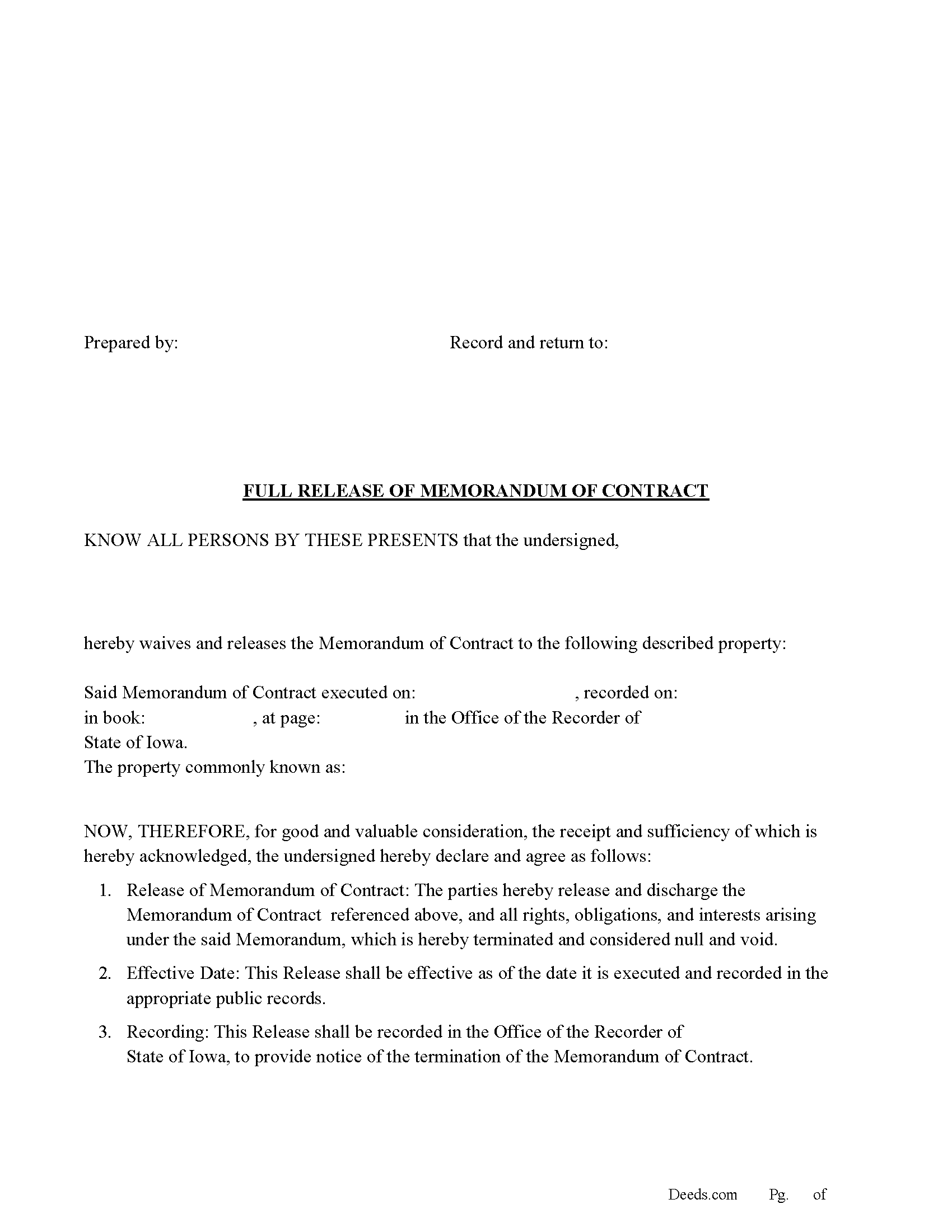
Fayette County Full Release of Memorandum of Contract Form
Fill in the blank Full Release of Memorandum of Contract form formatted to comply with all Iowa recording and content requirements.
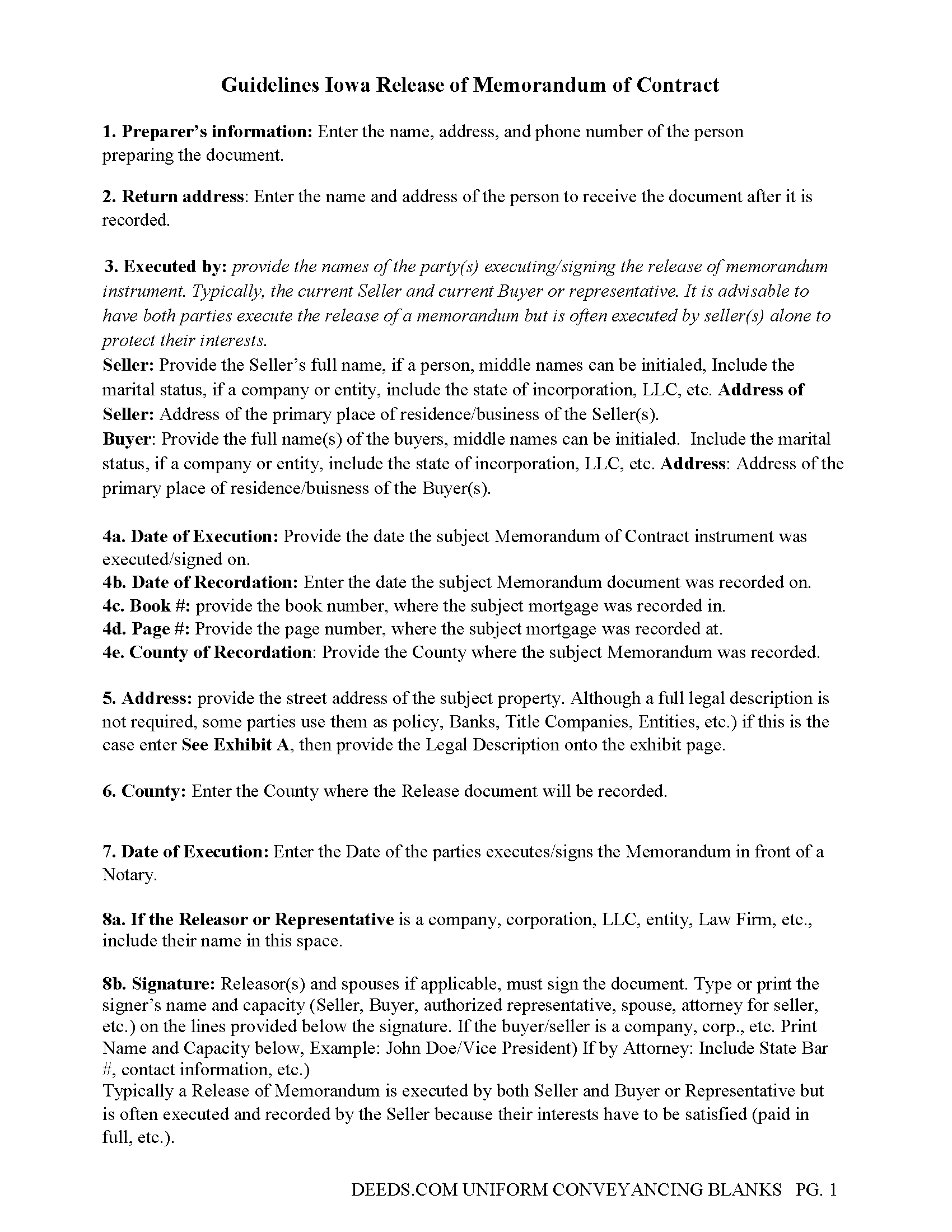
Fayette County Full Release of Memorandum of Contract Guide
Line by line guide explaining every blank on the Full Release of Memorandum of Contract form.
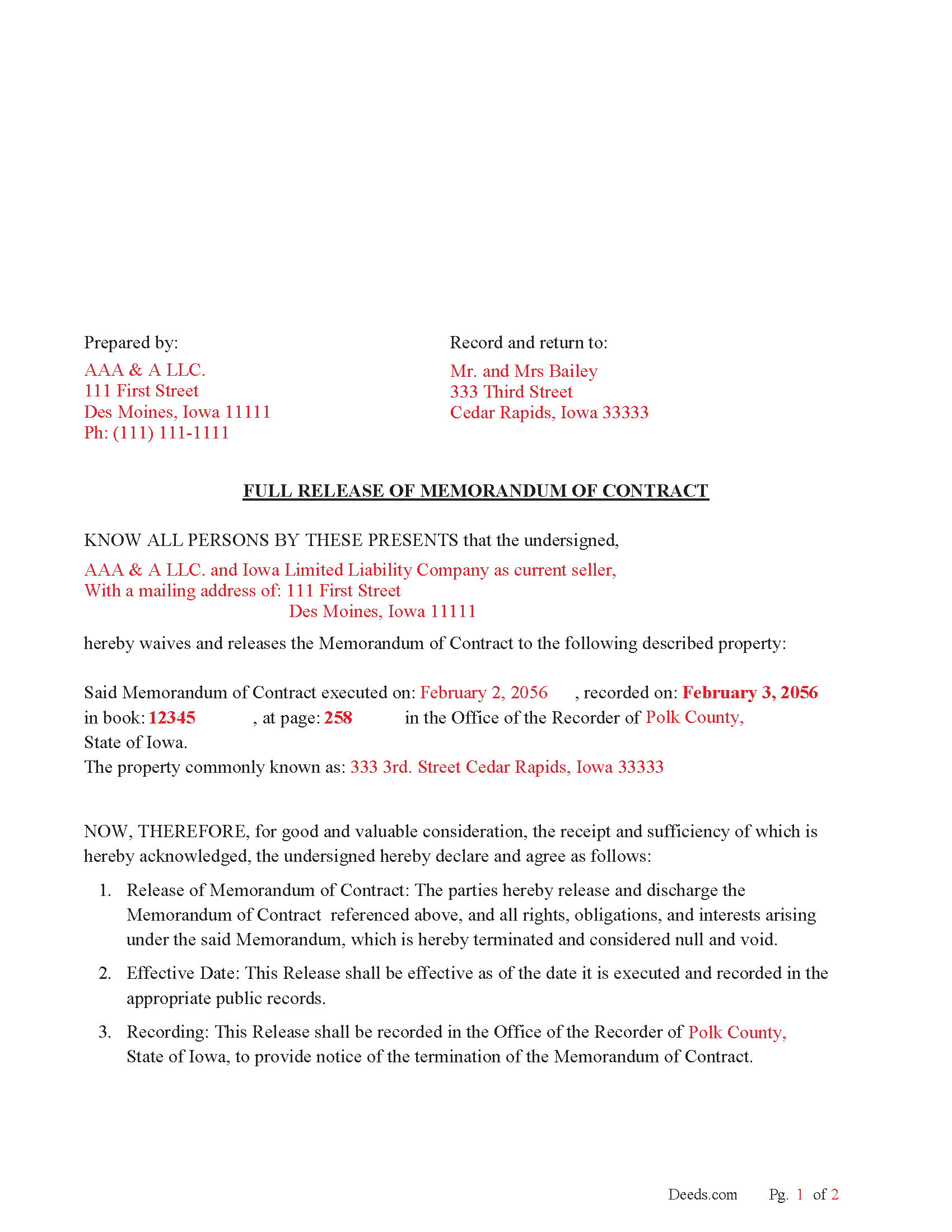
Fayette County Completed Example of the Full Release of Memorandum of Contract Document
Example of a properly completed Iowa Full Release of Memorandum of Contract document for reference.
All 3 documents above included • One-time purchase • No recurring fees
Immediate Download • Secure Checkout
Additional Iowa and Fayette County documents included at no extra charge:
Where to Record Your Documents
Fayette County Recorder
West Union, Iowa 52175
Hours: 8:00 to 4:00 Monday through Friday
Phone: (563) 422-3687
Recording Tips for Fayette County:
- Bring your driver's license or state-issued photo ID
- Ensure all signatures are in blue or black ink
- Ask about their eRecording option for future transactions
- Avoid the last business day of the month when possible
- Both spouses typically need to sign if property is jointly owned
Cities and Jurisdictions in Fayette County
Properties in any of these areas use Fayette County forms:
- Arlington
- Clermont
- Elgin
- Fayette
- Hawkeye
- Maynard
- Oelwein
- Oran
- Randalia
- Saint Lucas
- Wadena
- Waucoma
- West Union
- Westgate
Hours, fees, requirements, and more for Fayette County
How do I get my forms?
Forms are available for immediate download after payment. The Fayette County forms will be in your account ready to download to your computer. An account is created for you during checkout if you don't have one. Forms are NOT emailed.
Are these forms guaranteed to be recordable in Fayette County?
Yes. Our form blanks are guaranteed to meet or exceed the applicable formatting requirements used for recording in Fayette County, including margin requirements, font requirements, and other layout standards. This guarantee applies to formatting, not to the legal sufficiency of information entered by the user or the suitability of a form for a particular transaction.
Can I reuse these forms?
Yes. You can reuse the forms for your personal use. For example, if you have multiple properties in Fayette County you only need to order once.
What do I need to use these forms?
The forms are PDFs that you fill out on your computer. The free Adobe Acrobat Reader is recommended, and most PDF apps also work. You do NOT enter your property information online - you download the blank forms and complete them privately on your own computer.
Are there any recurring fees?
No. This is a one-time purchase. Nothing to cancel, no memberships, no recurring fees.
How much does it cost to record in Fayette County?
Recording fees in Fayette County vary. Contact the recorder's office at (563) 422-3687 for current fees.
Questions answered? Let's get started!
Iowa Code Section 558: Conveyances
Iowa Code Chapter 558, titled "Conveyances," provides the general framework for the recording of real estate documents, including contracts, memoranda, and their releases. The key provisions relevant to releasing a memorandum of contract include the following:
Iowa Code Section 558.46 - Mandatory Recording of Installment Sales Contracts:
This section governs the recording of installment sales contracts for residential real estate, as well as the option to record a memorandum of contract instead of the full contract.
Once the contract is satisfied, either the seller or the buyer may record a release of the memorandum to indicate that the installment sales contract is no longer in effect, either due to the contract being fulfilled or mutually terminated.
The release of the memorandum must be recorded with the county recorder’s office where the original memorandum was recorded. This clears the record of the buyer's interest in the property.
Purpose of the Release:
Clear Title: Recording a release of the memorandum ensures that there are no lingering claims or interests related to the installment contract. This is important if the property is to be sold or refinanced in the future.
Fulfilling Obligations: Once the installment payments are completed and the contract terms are satisfied, the seller has an obligation to release the buyer from the contract and to remove any encumbrances from the public record.
Legal Protection: Recording a release protects both parties from future disputes regarding ownership or interest in the property.
Practical Example:
Example: A buyer has completed all installment payments under a contract for deed with the seller. The original contract was recorded via a memorandum of contract. Once the final payment is made, the seller is responsible for preparing and recording a release of the memorandum to indicate that the buyer has fulfilled all obligations under the contract and now holds clear title to the property.
Important: Your property must be located in Fayette County to use these forms. Documents should be recorded at the county recording office listed above.
This Full Release of Memorandum of Contract meets all recording requirements specific to Fayette County.
Our Promise
The documents you receive here are guaranteed to meet or exceed the applicable Fayette County recording format requirements. If there is a rejection caused by our formatting, we will correct the issue or refund your payment. This guarantee applies to document formatting only and does not extend to information entered by the user, the selection of the form, or the legal effect of the completed document.
Save Time and Money
Get your Fayette County Full Release of Memorandum of Contract form done right the first time with Deeds.com Uniform Conveyancing Blanks. At Deeds.com, we understand that your time and money are valuable resources, and we don't want you to face a penalty fee or rejection imposed by a county recorder for submitting nonstandard documents. We constantly review and update our forms to meet rapidly changing state and county recording requirements for roughly 3,500 counties and local jurisdictions.
4.8 out of 5 - ( 4,836 Reviews )
Linda W. 3 out of 5 stars
The Quitclaim deed form was fine. Unfortunately, all I wanted to accomplish was to transfer property held in my name into my trust, but I could not any wording on the information you provided on how to accomplish this. It was not a sale, just a transfer from me to me as trustee.
Thank you for your feedback. We really appreciate it. Have a great day!
Jeanette S. 5 out of 5 stars
Easy to use and instructions were very clear. If possible, it would be nice to be able to download the entire package at one time - it was a little cumbersome to download each item separately. (Of course, I didn't know which of the items I needed, so downloaded them all)
Thank you for your feedback. We really appreciate it. Have a great day!
richard E. 5 out of 5 stars
First time I used service. It was simple to use. The response time was excellent. I look forward to using them in the future.
That's awesome Richard, glad we could help!
Willard V. 3 out of 5 stars
While it's nice to get all the forms and info in one package for a reasonable cost, the fixed format of the form does not allow for a lengthy meet and bounds property description for real property. Also, the Cover Sheet has big fillable sections with no instructions about what's supposed to go there. I tried the "Contact Us" link, but all it does is spin saying it's trying verify the security of my connection. Looks like I;m going to have to create my own deed in MS Word instead of just filling in the blacks of the PDF file that I downloaded. Bummer!
Your feedback is a crucial part of our dedication to ongoing improvement. Thank you for your insightful comments.
RICHARD M. 5 out of 5 stars
EASY TO USE AND GREAT I COULD DOWNLOAD MULTIPLE DOCUMENTS
Thank you!
Duane R. 5 out of 5 stars
Your site was very easy to use and provided all the information needed.
Thank you for your feedback. We really appreciate it. Have a great day!
Larry A. 5 out of 5 stars
Provided exactly the form I was looking for at a reasonable price. Easy to do as well.
Thank you!
Gerald G. 5 out of 5 stars
I am researching forms required to change deed from joint owners to individual. Subsequently, forms required when/after a trust is established for real property.
Thank you!
Anne B. 5 out of 5 stars
Great experience! It was so easy and quick. We will definitely use the service again.
We appreciate your business and value your feedback. Thank you. Have a wonderful day!
Victoria T. 5 out of 5 stars
This is a great website!!! Easy to use and inexpensive. Thank you deeds.com!
We appreciate your business and value your feedback. Thank you. Have a wonderful day!
Linda s. 5 out of 5 stars
This was such an easy process and even tho you had to pay a $15 - to me it was well worth not having to drive downtown etc or take the risk of mailing the documents (fearing that they would get lost). I'll be using this from now on...
We appreciate your business and value your feedback. Thank you. Have a wonderful day!
Margo M. 4 out of 5 stars
So far help has been good given some of the information you don't have as far as making corrections. This is my first time using your service so maybe I will be better at utilizing it if I have to again.
Thank you for your feedback. We really appreciate it. Have a great day!
Larry B. 5 out of 5 stars
Clear Directions; worked well.
We appreciate your business and value your feedback. Thank you. Have a wonderful day!
Thomas D. 2 out of 5 stars
The documents themselves are fine and the information provided with them is helpful. I find the actual processing of the documents, however, to be difficult particularly once the document has been saved. First, I note that the box for the date only allows entry of the last 2 digits of the year. Unfortunately, my download only allows me to enter one of the 2 digits required. When I delete it repeatedly, it eventually allows both digits to be entered but puts them in extremely small text and in superscrypt. I have not found a solution to this problem and am not sure the deed can even be recorded with this problem. Another problem is that if you try to revise the document after you have saved it the curser goes to the end of the line after each key entry. This means that there basically is no way to efficiently save the document for reworking later since you will have to delete everything you have entered in the text box unless you only need to make a single keystroke change or are willing to replace the curser after each entry. Try that with a long property description! Please note that I am using a Mac to prepare my documents and perhaps this is part of an "incompatibility problem". However, I didn't see a disclaimer regarding Mac use and so would expect the documents to perform correctly. Overall, I give the program a "2 star" rating because I am experiencing significant difficulties in entering dates in the documents even before saving them and because saving your work for later revision appears to be basically unworkable.
Thank you for your feedback Thomas, we appreciate you being specific about the issues you encountered. Adobe and Mac have a fairly long history of issues working together.
Martha V. 5 out of 5 stars
Great service!
We appreciate your business and value your feedback. Thank you. Have a wonderful day!