Rutland County Correction Deed Form
Last validated November 18, 2026 by our Forms Development TeamFormatted for recording in Rutland County, for property anywhere in the county: rural and unincorporated areas as well as Belmont, Benson, Bomoseen, Brandon, Castleton, Center Rutland, Chittenden, Cuttingsville and 21 more.
- 3 documents included
- Immediate PDF download
- Formatting guarantee

Rutland County Correction Deed Form
Fill in the blank form formatted to comply with all recording and content requirements.
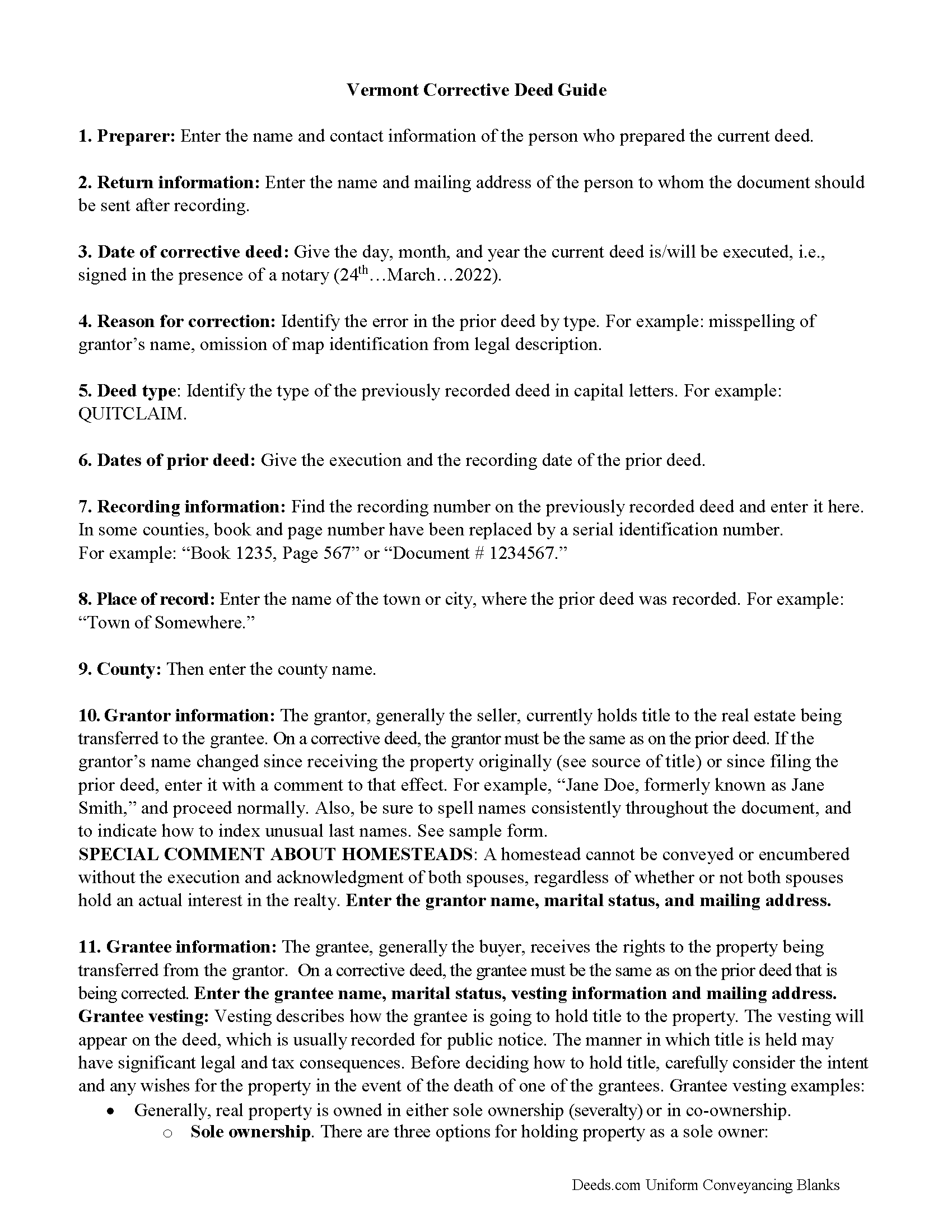
Rutland County Correction Deed Guide
Line by line guide explaining every blank on the form.
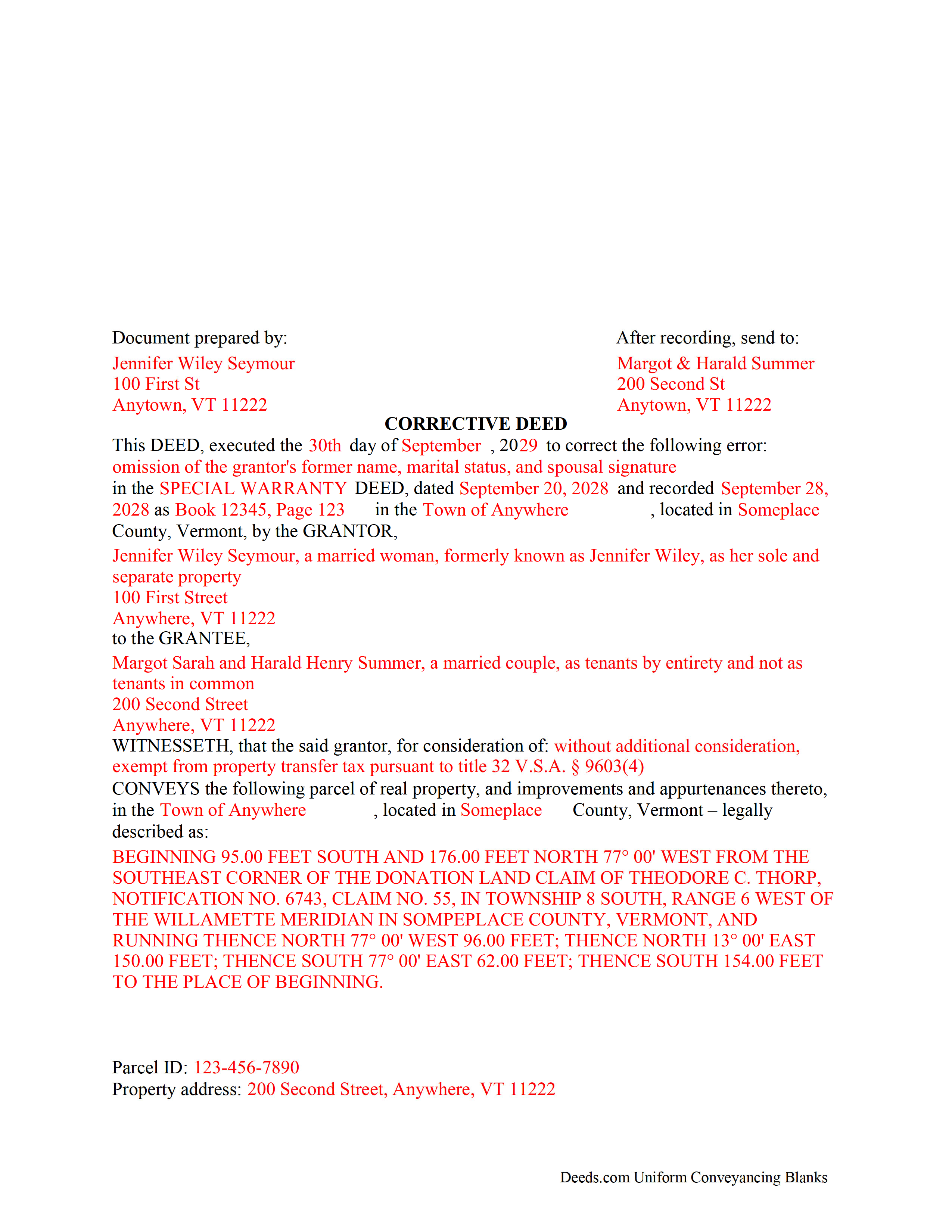
Rutland County Completed Example of the Correction Deed Document
Example of a properly completed form for reference.
All 3 documents above included • One-time purchase • No recurring fees
Immediate Download • Secure Checkout
Additional Vermont and Rutland County documents included at no extra charge:
Where to Record Your Documents
Town Clerk of Benson
Benson, Vermont 05731
Hours: Mo, Tu, Th, Fr 9:00 to 3:00 & We 3:00 to 7:00
Phone: (802) 537-2611
Town Clerk of Brandon
Brandon, Vermont 05733
Hours: Mo-Fr 8:00 to 4:00
Phone: (802) 247-3635
Town Clerk of Castleton
Castleton, Vermont 05735
Hours: Mo-We 9:00 to 4:30; Th 10:00 to 5:30 (closed 12:30-1:00); Fr 9:00 to 1:00
Phone: (802) 468-2212
Town Clerk of Chittenden
Rutland, Vermont 05737
Hours: Mo-Th 9:00 to 4:00
Phone: (802) 483-6647 x1
Town Clerk of Clarendon
Clarendon, Vermont 05759
Hours: Mo-Th 10am to 4pm
Phone: (802) 775-4274
Town Clerk of Danby
Danby, Vermont 05739
Hours: Mo-Th 9am to 12pm & 1pm to 4pm
Phone: (802) 293-5136
Town Clerk of Fair Haven
Fair Haven, Vermont 05743
Hours: Mo-Th 8:00 to 4:00; We until 7:00; Fr 8:00 to 12:00
Phone: (802) 265-3610 x4
Town Clerk of Hubbardton
Castleton, Vermont 05735
Hours: Mo, We, Fr 9am to 2pm; call on other days
Phone: (802) 273-2951
Town Clerk of Ira
Ira, Vermont 05777
Hours: Tu 3:00 to 7:00 & Fr 8:30 to 2:30; or by appt
Phone: (802) 235-2745
Town Clerk of Killington
Killington, Vermont 05751
Hours: Mo-Fr 9:00 to 3:00
Phone: (802) 422-3243
Town Clerk of Mendon
Mendon, Vermont 05701
Hours: Mo, Tu, Th 8:00 to 5:00
Phone: (802) 775-1662 x1
Town Clerk of Middletown Springs
Middletown Springs, Vermont 05757-1232
Hours: Mo, Tu 9:00 to 12:00 & 1:00 to 4:00, Fr 1:00 to 4:00, Sa 9:00 to 12:00
Phone: (802) 235-2220
Town Clerk of Mount Holly
Mount Holly, Vermont 05758
Hours: Mo-Th 8:30 to 4:00
Phone: (802) 259-2391
Town Clerk of Mount Tabor
Mt. Tabor, Vermont 05739
Hours: Tu & We 9am to noon or by appt
Phone: (802) 293-5282 or 293-5020 (home)
Town Clerk of Pawlet
Pawlet, Vermont 05761-0128
Hours: Mo, We 8:30 to 3:30; Tu 11:00 to 6:00; Th 9:00 to noon
Phone: (802) 325-3309 x1
Town Clerk of Pittsfield
Pittsfield, Vermont 05762
Hours: Tu 12pm to 6pm; We, Th 9am to 3pm
Phone: (802) 746-8170
Town Clerk of Pittsford
Pittsford, Vermont 05763-0010
Hours: Mo-We 8:00 to 4:30; Th 8:00 to 6:00; Fr 8:00 to 3:00
Phone: (802) 483-6500 x11, 12 & 13
Town Clerk of Poultney
Poultney, Vermont 05764
Hours: Mo-Fr 8:30 to 12:30 & 1:30 to 4:00
Phone: (802) 287-5761
Town Clerk of Proctor
Proctor, Vermont 05765
Hours: Mo-Fr 8:00 to 4:00
Phone: (802) 459-3333
City of Rutland: Clerk
Rutland, Vermont 05702
Hours: Mo-Fr 8:30 to 5:00 (phone); 9:00 to 4:45 (vault)
Phone: (802) 773-1800 x5
Town of Rutland: Clerk
Ctr Rutland, Vermont 05736
Hours: Mo-Fr 8:00 to 4:30
Phone: (802) 773-2528
Town Clerk of Shrewsbury
Shrewsbury, Vermont 05738
Hours: Mo-Th 9:00 to 3:00
Phone: (802) 492-3511
Town Clerk of Sudbury
Sudbury, Vermont 05733
Hours: Mo 9:00 to 4:00; We 7:00 to 9:00; Fr 9:00 to 3:00
Phone: (802) 623-7296
Town Clerk of Tinmouth
Tinmouth, Vermont 05773
Hours: Mo & Th 8:00 to 12:00 & 1:00 to 5:00; most Sats 9:00 to noon; and by appt
Phone: (802) 446-2498
Town Clerk of Wallingford
Wallingford, Vermont 05773
Hours: Mo-Th 8:00 to 4:30; Fr 8:00 to 12:00
Phone: (802) 446-2336
Town Clerk of Wells
Wells, Vermont 05774
Hours: Mo-Th 7:30 to 3:30
Phone: (802) 645-0486 x10
Town Clerk of West Haven
West Haven, Vermont 05743
Hours: Mo & We 1:00 to 3:30
Phone: (802) 265-4880
Town Clerk of West Rutland
West Rutland, Vermont 05777
Hours: Mo-Th 9:00 to 3:00; Friday by appointment
Phone: (802) 438-2204
Recording Tips for Rutland County:
- Bring your driver's license or state-issued photo ID
- Ensure all signatures are in blue or black ink
- Leave recording info boxes blank - the office fills these
- Make copies of your documents before recording - keep originals safe
- Recorded documents become public record - avoid including SSNs
Cities and Jurisdictions in Rutland County
Properties in any of these areas use Rutland County forms:
- Belmont
- Benson
- Bomoseen
- Brandon
- Castleton
- Center Rutland
- Chittenden
- Cuttingsville
- Danby
- East Poultney
- East Wallingford
- Fair Haven
- Florence
- Forest Dale
- Hydeville
- Killington
- Middletown Springs
- Mount Holly
- North Clarendon
- Pawlet
- Pittsfield
- Pittsford
- Poultney
- Proctor
- Rutland
- Wallingford
- Wells
- West Pawlet
- West Rutland
Hours, fees, requirements, and more for Rutland County
How do I get my forms?
Forms are available for immediate download after payment. The Rutland County forms will be in your account ready to download to your computer. An account is created for you during checkout if you don't have one. Forms are NOT emailed.
Are these forms guaranteed to be recordable in Rutland County?
Yes. Our form blanks are guaranteed to meet or exceed the applicable formatting requirements used for recording in Rutland County, including margin requirements, font requirements, and other layout standards. This guarantee applies to formatting, not to the legal sufficiency of information entered by the user or the suitability of a form for a particular transaction.
Can I reuse these forms?
Yes. You can reuse the forms for your personal use. For example, if you have multiple properties in Rutland County you only need to order once.
What do I need to use these forms?
The forms are PDFs that you fill out on your computer. The free Adobe Acrobat Reader is recommended, and most PDF apps also work. You do NOT enter your property information online - you download the blank forms and complete them privately on your own computer.
Are there any recurring fees?
No. This is a one-time purchase. Nothing to cancel, no memberships, no recurring fees.
How much does it cost to record in Rutland County?
Recording fees in Rutland County vary. Contact the recorder's office at (802) 537-2611 for current fees.
Questions answered? Let's get started!
Use the corrective deed to correct an error in a previously recorded deed of conveyance, such as a warranty or quitclaim deed, in Vermont.
Correcting an error in a recorded deed helps prevent problems that might arise when the current owner tries to sell the property. The best method for correction is to prepare and record a new document, often called a corrective or correction deed. This document does not convey title; instead, it confirms the prior conveyance of the property.
Apart from supplying the correct information, the new deed must give the reason for the correction by identifying the error. It also must reference the prior deed by title, date, and recording number. The original grantor has to sign again, which confirms the property transfer to the grantee. Generally, corrective deeds are used to address minor errors in a deed, such as typos, accidentally omitted suffixes or middle initials of names, and other minor omissions. When correcting the legal description, both grantor and grantee should sign the corrective instrument to avoid doubt regarding any portions of the conveyed property.
For certain changes, however, a correction deed cannot be used. According to Vermont Title Standard 4.1, a grantor, "who has conveyed by an effective and unambiguous deed," cannot use a corrective deed in order to "make a substantial change in the name of the grantee, decrease the size of the premises or the extent of the estate granted, impose a condition or limitation on the interest granted, or otherwise diminish the grant of the prior deed." Material changes of that nature require that the grantee convey back to the grantor before a correction can be applied. When in doubt about the gravity of an error and whether a corrective deed is the appropriate vehicle to address it, consult with a lawyer.
(Vermont CD Package includes form, guidelines, and completed example)
Important: Your property must be located in Rutland County to use these forms. Documents should be recorded at the county recording office listed above.
This Correction Deed meets all recording requirements specific to Rutland County.
Our Promise
The documents you receive here are guaranteed to meet or exceed the applicable Rutland County recording format requirements. If there is a rejection caused by our formatting, we will correct the issue or refund your payment. This guarantee applies to document formatting only and does not extend to information entered by the user, the selection of the form, or the legal effect of the completed document.
Save Time and Money
Get your Rutland County Correction Deed form done right the first time with Deeds.com Uniform Conveyancing Blanks. At Deeds.com, we understand that your time and money are valuable resources, and we don't want you to face a penalty fee or rejection imposed by a county recorder for submitting nonstandard documents. We constantly review and update our forms to meet rapidly changing state and county recording requirements for roughly 3,500 counties and local jurisdictions.
4.8 out of 5 - ( 4,860 Reviews )
Scotty A. 5 out of 5 stars
A great time and money saver that also has a money back guarantee. I received all the pertinent forms and instructions for less than a family eating a fast food dinner.
Thank you!
Brian T. 5 out of 5 stars
Great to find this makes for easy work when you need to secure your ownership of a property!!Thanks guys Brian the Mann
We appreciate your business and value your feedback. Thank you. Have a wonderful day!
David K. 5 out of 5 stars
Worked Great! First time go at the courthouse
Thank you!
Bakul W. 5 out of 5 stars
You guys did a great job for us yday. With the strim coming and the registry being closed to visitors I didn't know how I was going to get my work done and I found your website and in less than a day everything was done. Thank you.
Thank you!
Guido d. 5 out of 5 stars
Excellent service. Easy to use, easy to upload, and very cost effective!
Thank you for your feedback. We really appreciate it. Have a great day!
Rajashree S. 5 out of 5 stars
Deed was easy to download and complete. Will use again if needed.
We appreciate your business and value your feedback. Thank you. Have a wonderful day!
Robert E B. 5 out of 5 stars
Easy to use!
Thank you!
Melinda P. 5 out of 5 stars
I received my documents immediately! Thats was a huge relief!
We appreciate your business and value your feedback. Thank you. Have a wonderful day!
Diane W. 5 out of 5 stars
Easy to download and print. Came with good instructions. Would use deeds.com again.
We appreciate your business and value your feedback. Thank you. Have a wonderful day!
Nancy J M. 5 out of 5 stars
Site is easy to navigate and forms are as described. Too bad there is no secure payment link service (PayPal, Apple Pay, etc. So after I verify charge has hit my credit card I will delete my Deeds.com account.
Thank you!
Claudia S. 5 out of 5 stars
The site is very user friendly. Where can I get a copy of all the invoices that were paid? Thank you. Claudia
Thank you for your feedback. We really appreciate it. Have a great day!
Michael M. 5 out of 5 stars
Received the documents as ordered in a timely fashion. Can't ask for much better than that!
Thank you!
Rachel Y. 5 out of 5 stars
I liked the ease of use, however I would love to be able to add multiple APN’s and delete lines that are not applicable
Thank you, Rachel. We’re glad you found the form easy to use, and we appreciate your suggestions about adding multiple APNs and removing inapplicable lines. Feedback like this helps us improve our forms.
charles g. 5 out of 5 stars
very good forms. they covered everything i needed.
Thanks Charles, we really appreciate your feedback. Have a great day!
Larry M. 5 out of 5 stars
Everything went well except that any information that I typed in on the computer download moves upward so that the letters or numbers are somewhat elevated above the line that should be even with the words on the form. I think it will be acceptable to the county recorder, but I don't especially like to submit things that appear uneven. I asked for help but just received a robotic reply that said to take steps that I already had done. So unless you know a way to correct this I likely won't use your forms again.
Thank you!