Jefferson County Termination of Decedent Property Interest Form
Last validated October 23, 2026 by our Forms Development TeamFormatted for recording in Jefferson County, for property anywhere in the county: rural and unincorporated areas as well as Fort Atkinson, Helenville, Ixonia, Jefferson, Johnson Creek, Lake Mills, Palmyra, Sullivan and 2 more.
- 3 documents included
- Immediate PDF download
- Formatting guarantee
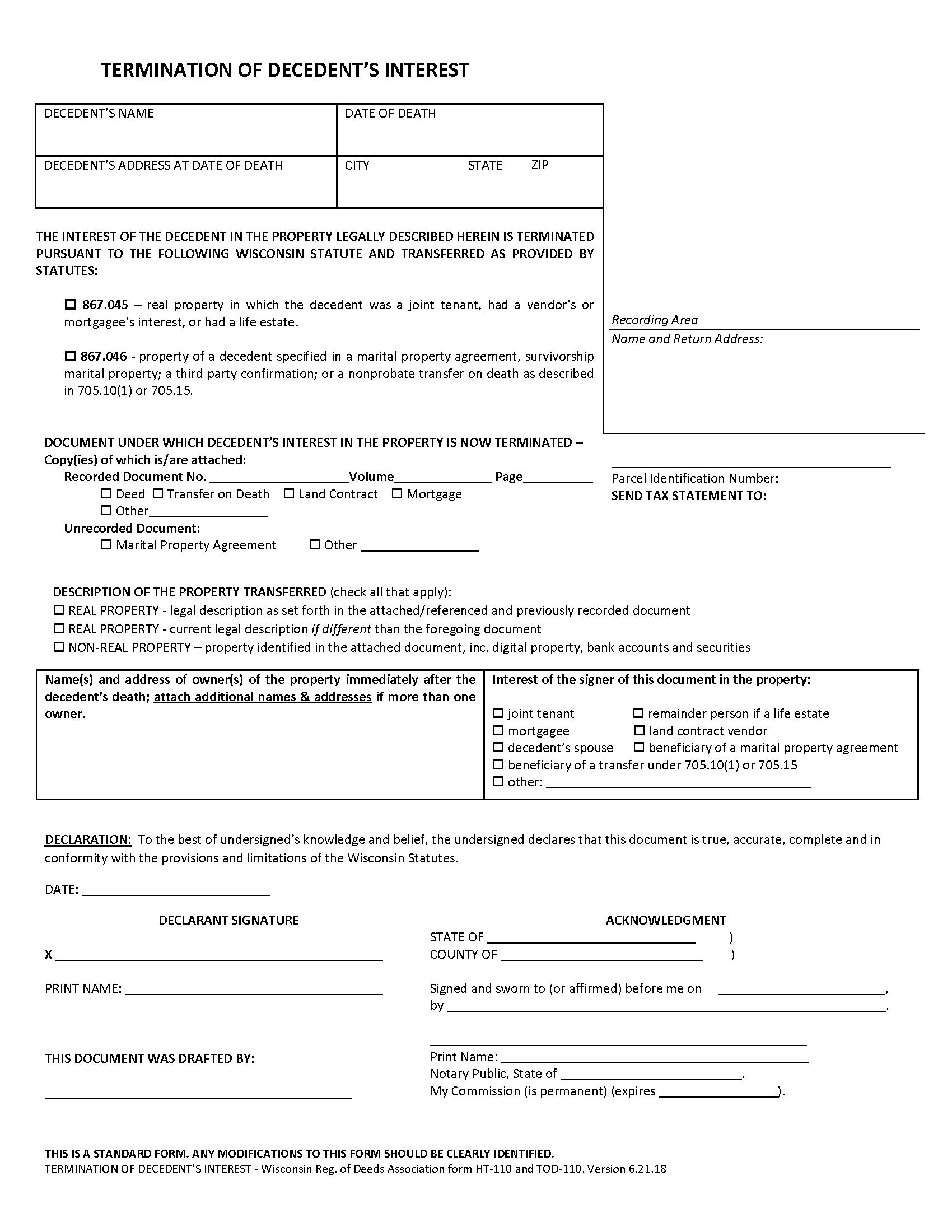
Jefferson County Termination of Decedents Interest Form
Fill in the blank form formatted to comply with all recording and content requirements.
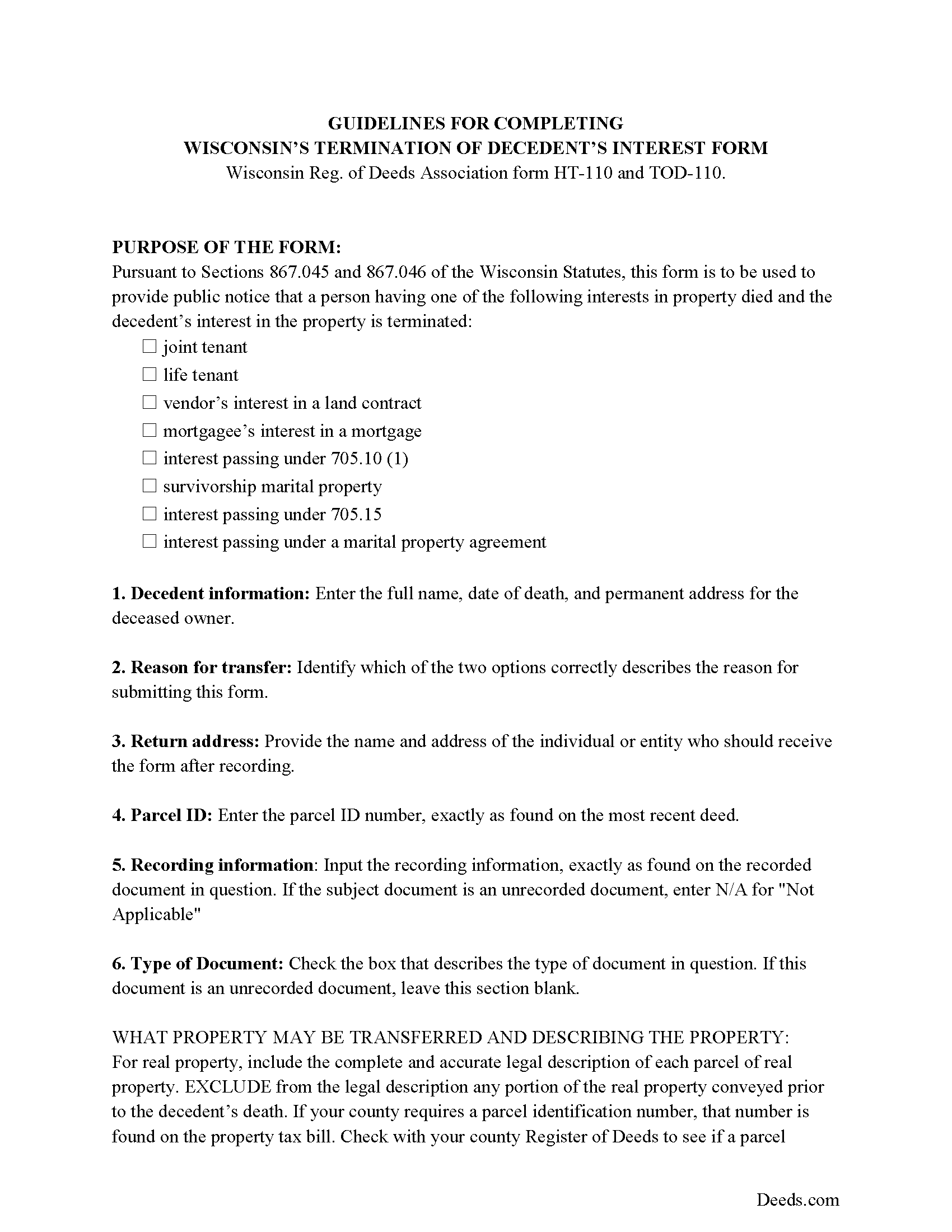
Jefferson County Termination of Decedents Interest Guide
Line by line guide explaining every blank on the form.
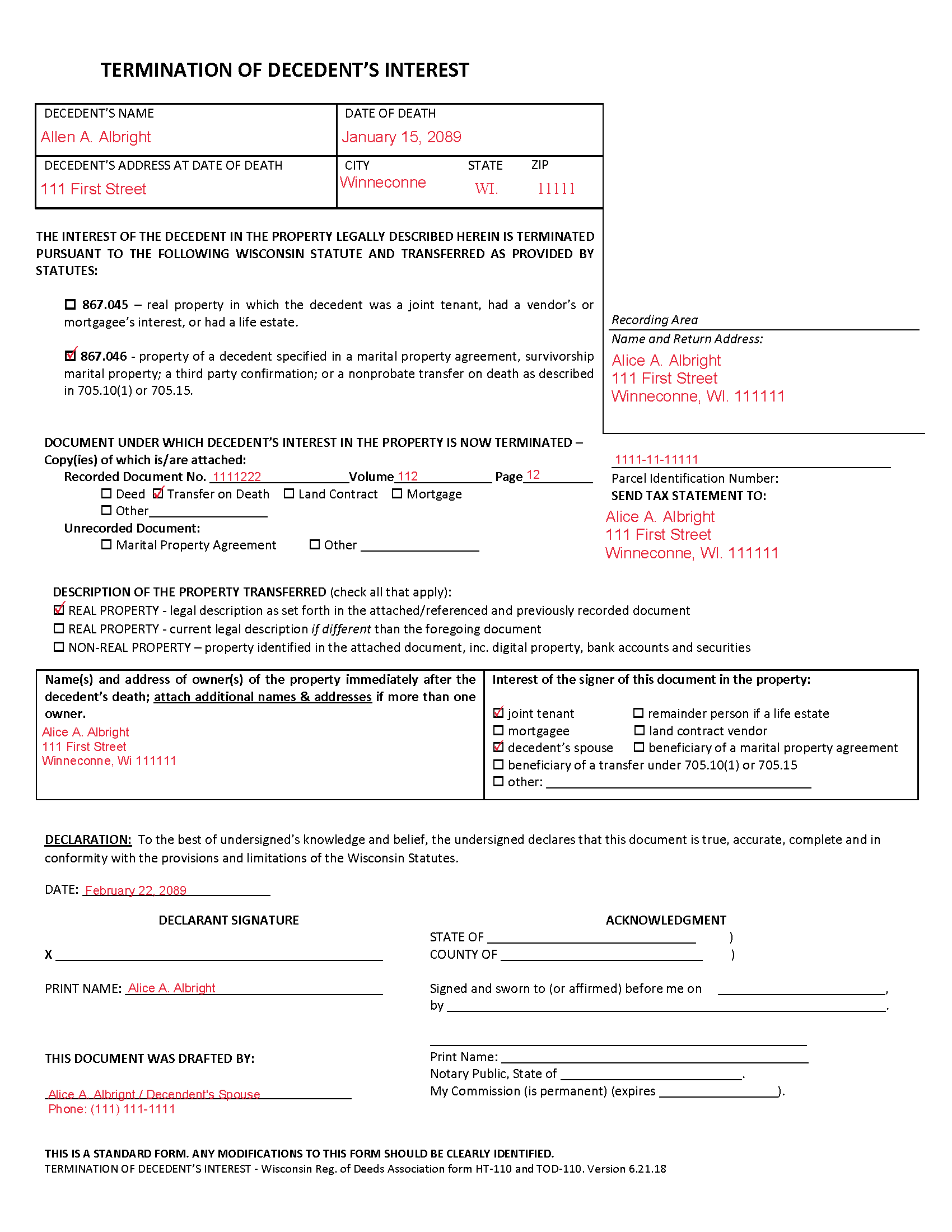
Jefferson County Completed Example of the Termination of Decedents Interest Document
Example of a properly completed form for reference.
All 3 documents above included • One-time purchase • No recurring fees
Immediate Download • Secure Checkout
Additional Wisconsin and Jefferson County documents included at no extra charge:
Where to Record Your Documents
Register of Deeds
Jefferson, Wisconsin 53549
Hours: Monday - Friday 8:00am to 4:30pm
Phone: 920-674-7235
Recording Tips for Jefferson County:
- Bring your driver's license or state-issued photo ID
- Ensure all signatures are in blue or black ink
- Ask about their eRecording option for future transactions
- Avoid the last business day of the month when possible
- Both spouses typically need to sign if property is jointly owned
Cities and Jurisdictions in Jefferson County
Properties in any of these areas use Jefferson County forms:
- Fort Atkinson
- Helenville
- Ixonia
- Jefferson
- Johnson Creek
- Lake Mills
- Palmyra
- Sullivan
- Waterloo
- Watertown
Hours, fees, requirements, and more for Jefferson County
How do I get my forms?
Forms are available for immediate download after payment. The Jefferson County forms will be in your account ready to download to your computer. An account is created for you during checkout if you don't have one. Forms are NOT emailed.
Are these forms guaranteed to be recordable in Jefferson County?
Yes. Our form blanks are guaranteed to meet or exceed the applicable formatting requirements used for recording in Jefferson County, including margin requirements, font requirements, and other layout standards. This guarantee applies to formatting, not to the legal sufficiency of information entered by the user or the suitability of a form for a particular transaction.
Can I reuse these forms?
Yes. You can reuse the forms for your personal use. For example, if you have multiple properties in Jefferson County you only need to order once.
What do I need to use these forms?
The forms are PDFs that you fill out on your computer. The free Adobe Acrobat Reader is recommended, and most PDF apps also work. You do NOT enter your property information online - you download the blank forms and complete them privately on your own computer.
Are there any recurring fees?
No. This is a one-time purchase. Nothing to cancel, no memberships, no recurring fees.
How much does it cost to record in Jefferson County?
Recording fees in Jefferson County vary. Contact the recorder's office at 920-674-7235 for current fees.
Questions answered? Let's get started!
Removing a Deceased Joint Tenant from a Wisconsin Real Estate Deed
Wisconsin laws provide that two or more people may hold real estate as joint tenants with right of survivorship. If one joint tenant dies, his/her share of the property is distributed evenly amongst the remaining co-owners without the need to pass through probate.
To terminate the decedent's interest in the property and to complete the distribution, file a form HT-110 under Wis. Stat. 867.045, with the register of deeds for the county where the property is located.
Recording the form formalizes the transfer of property rights, but the deceased joint tenant's name will still appear on the deed. Complete and record an updated deed from all joint tenants, but identify the deceased co-owner, and convey the property to the survivors only. It might be necessary to provide copies of the original deed, the death certificate, and the recorded HT-110 when submitted the revised deed.
(Wisconsin TODPI Package includes form, guidelines, and completed example)
Important: Your property must be located in Jefferson County to use these forms. Documents should be recorded at the county recording office listed above.
This Termination of Decedent Property Interest meets all recording requirements specific to Jefferson County.
Our Promise
The documents you receive here are guaranteed to meet or exceed the applicable Jefferson County recording format requirements. If there is a rejection caused by our formatting, we will correct the issue or refund your payment. This guarantee applies to document formatting only and does not extend to information entered by the user, the selection of the form, or the legal effect of the completed document.
Save Time and Money
Get your Jefferson County Termination of Decedent Property Interest form done right the first time with Deeds.com Uniform Conveyancing Blanks. At Deeds.com, we understand that your time and money are valuable resources, and we don't want you to face a penalty fee or rejection imposed by a county recorder for submitting nonstandard documents. We constantly review and update our forms to meet rapidly changing state and county recording requirements for roughly 3,500 counties and local jurisdictions.
4.8 out of 5 - ( 4,831 Reviews )
Donald W. 5 out of 5 stars
Could not have been any easier to download the quit claim forms. The provided instructions and samples look to be helpful. Only have to set aside the time to fill out. Thanks
Thank you!
Elizabeth W. 5 out of 5 stars
would have been smart to give each pdf a name instead of unintelligible numbers...
Thank you for your feedback. We really appreciate it. Have a great day!
Kelin F. 5 out of 5 stars
Prompt, accurate and professional response. Thank you. Kelin F.
Thank you, Kelin! We appreciate your kind words and are glad we could help. Let us know if you ever need anything else!
James B. 5 out of 5 stars
Your website is very easy to use. No problem downloading the forms.
Thank you!
Kimberly C. 5 out of 5 stars
Very straight forward easy to use. No need to hunt for the information or forms you ate looking for, every thing is right there just click on the link and voila!
Thank you for your feedback. We really appreciate it. Have a great day!
Trina P. 5 out of 5 stars
Deeds.com is a quick and effective way at finding property deeds. I had the results I needed in a couple hours without having to miss work to get to the clerks office, which is well worth the price of the service.
Thank you for your feedback. We really appreciate it. Have a great day!
Stephen M. 5 out of 5 stars
The process to record took five minutes of my time, and within 45 minutes, my document was recorded! Simple, efficient and affordable! Thanks!
Thank you for your feedback. We really appreciate it. Have a great day!
Omid B. 5 out of 5 stars
Super efficient, extremely responsive , and above all quick turnaround. Thank you! Will definitely use your services again!
Thank you!
LINDA C. 5 out of 5 stars
EASY, FAST, AND CONVENIENT.
Thank you!
Brian S. 3 out of 5 stars
PDF fields change font sizes leading to an unprofessional-appearing printed page. The examples for "Convey to" section don't include how to specify just one person instead of a married couple. Maybe that is simple but it would help to spell it out in an example. Haven't submitted to County Recorder yet, so will find out if it is acceptable.
Thank you for the feedback Brian.
The font issue is caused by using a PDF viewer other than Adobe Acrobat Reader. Our form fields are set to a uniform 12-point font, but non-Adobe viewers often render form fields inconsistently. Opening and printing the form with the free Adobe Acrobat Reader will resolve that.
Regarding the examples, that's a fair point, we'll look at expanding them.
Melody P. 5 out of 5 stars
Thanks for such great service!
Thank you for your feedback. We really appreciate it. Have a great day!
Evelyn T. 5 out of 5 stars
Easy to follow; user friendly.
We appreciate your business and value your feedback. Thank you. Have a wonderful day!
Frank R. 5 out of 5 stars
Our notary. Marie was prompt, courteous and professional. Would definitely use again and reccomend
Thank you for your feedback. We really appreciate it. Have a great day!
Laurie F. 5 out of 5 stars
I am so glad I found Deeds.com. You had exactly what I needed and made it easy to download. I have bookmarked you in the event of further inquiry. Thank you.
We appreciate your business and value your feedback. Thank you. Have a wonderful day!
Bobby T. 5 out of 5 stars
Great!! Helps me out
Thank you!