La Paz County Revocation of Beneficiary Deed Form
Last validated July 28, 2026 by our Forms Development Team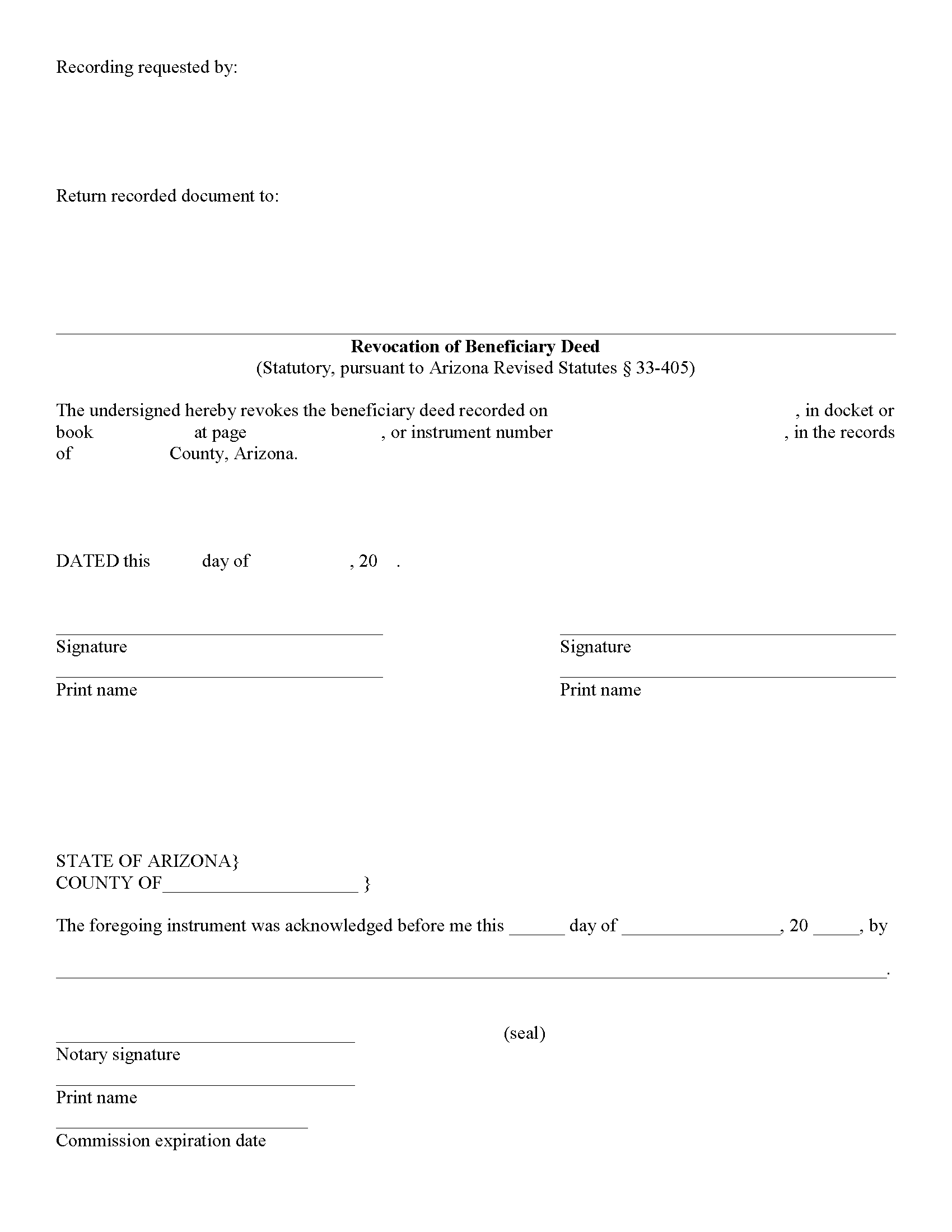
La Paz County Revocation of Beneficiary Deed Form
Fill in the blank form formatted to comply with all recording and content requirements.
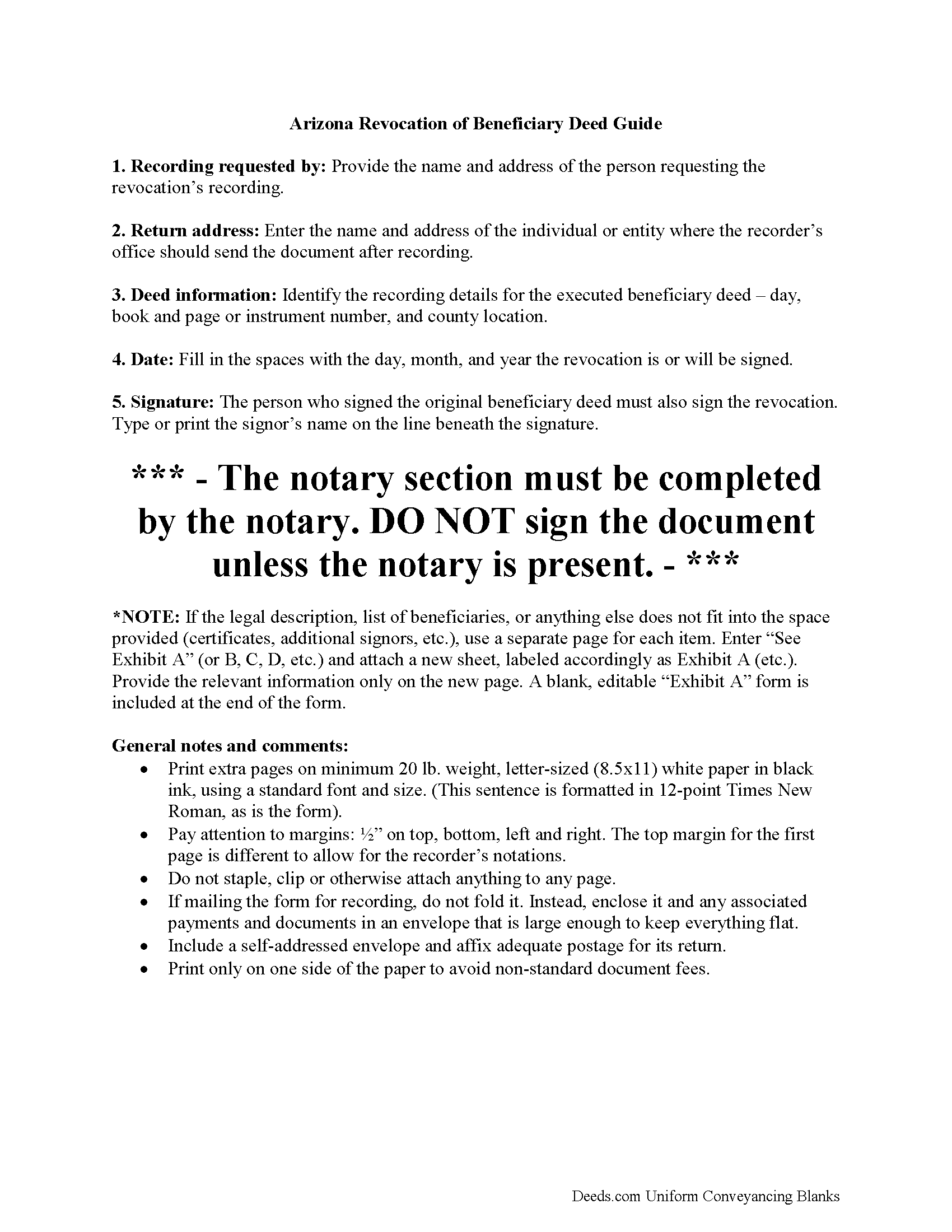
La Paz County Revocation of Beneficiary Deed Guide
Line by line guide explaining every blank on the form.
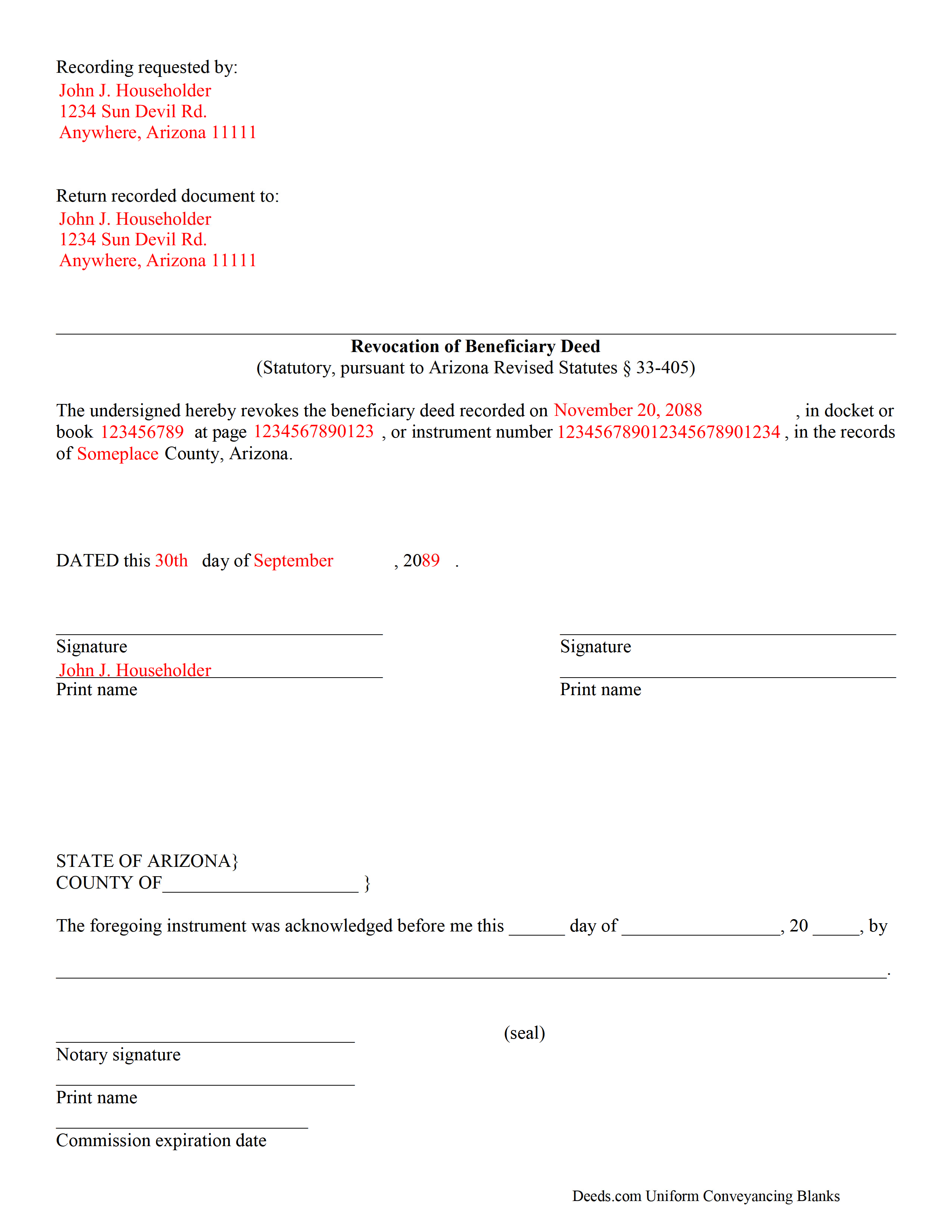
La Paz County Completed Example of the Revocation of Beneficiary Deed Document
Example of a properly completed form for reference.
All 3 documents above included • One-time purchase • No recurring fees
Immediate Download • Secure Checkout
Additional Arizona and La Paz County documents included at no extra charge:
Where to Record Your Documents
County Recorder's Office
Parker, Arizona 85344
Hours: 7:00 AM until 6:00 PM Monday through Thursday, except legal holidays
Phone: 928-669-6136 or 888-526-8685
Recording Tips for La Paz County:
- White-out or correction fluid may cause rejection
- Leave recording info boxes blank - the office fills these
- Avoid the last business day of the month when possible
Cities and Jurisdictions in La Paz County
Properties in any of these areas use La Paz County forms:
- Bouse
- Cibola
- Ehrenberg
- Parker
- Poston
- Quartzsite
- Salome
- Wenden
Hours, fees, requirements, and more for La Paz County
How do I get my forms?
Forms are available for immediate download after payment. The La Paz County forms will be in your account ready to download to your computer. An account is created for you during checkout if you don't have one. Forms are NOT emailed.
Are these forms guaranteed to be recordable in La Paz County?
Yes. Our form blanks are guaranteed to meet or exceed the applicable formatting requirements used for recording in La Paz County, including margin requirements, font requirements, and other layout standards. This guarantee applies to formatting, not to the legal sufficiency of information entered by the user or the suitability of a form for a particular transaction.
Can I reuse these forms?
Yes. You can reuse the forms for your personal use. For example, if you have multiple properties in La Paz County you only need to order once.
What do I need to use these forms?
The forms are PDFs that you fill out on your computer. You'll need Adobe Reader (free software that most computers already have). You do NOT enter your property information online - you download the blank forms and complete them privately on your own computer.
Are there any recurring fees?
No. This is a one-time purchase. Nothing to cancel, no memberships, no recurring fees.
How much does it cost to record in La Paz County?
Recording fees in La Paz County vary. Contact the recorder's office at 928-669-6136 or 888-526-8685 for current fees.
Questions answered? Let's get started!
The Arizona Revocation of Beneficiary Deed is the instrument used to undo a previously recorded beneficiary deed under ARS 33-405 before the owner's death. Two rules drive why a dedicated revocation form exists in Arizona. First, a beneficiary deed — like the revocation itself — is effective only if it is recorded in the county where the property is located during the owner's lifetime, so the revocation has to clear the record before death the same way the original deed did. Second, and distinctive to Arizona's statute, a beneficiary deed cannot be revoked by will: a testamentary attempt to cancel the designation has no legal effect, because the deed lives in the real property records, not in the probate estate. The only reliable way to undo a beneficiary deed during life is to record an instrument that satisfies ARS 33-405.
When the Arizona Revocation of Beneficiary Deed Is Used
Revocation is appropriate any time the owner's circumstances or wishes have changed since the beneficiary deed was recorded. Common triggers include a falling-out with the named beneficiary, the beneficiary's death before the owner, a decision to handle the property through a revocable living trust instead, sale or refinance planning that is cleaner without an outstanding beneficiary deed on the record, divorce (discussed below), and second-marriage planning where competing family interests need to be re-balanced. Revocation does not require the beneficiary's consent, signature, or even knowledge; the beneficiary has only an expectancy during the owner's life, and the owner is free to eliminate it at any time.
The Three Methods of Revocation
ARS 33-405 recognizes three effective methods of revoking a beneficiary deed during the owner's lifetime. The first is recording a formal revocation instrument — this form — that identifies and cancels the earlier deed. The second is recording a new beneficiary deed that supersedes the earlier one; the most recently recorded beneficiary deed controls, and an owner who wants to replace the named beneficiary can do so by recording a fresh deed rather than a separate revocation. The third is conveying the property during life to someone else by ordinary deed, which leaves the beneficiary deed with no property to operate on when the owner dies.
Each method has its place. A formal revocation is the cleanest choice when the owner wants the beneficiary designation removed but is not ready to name a replacement. A superseding beneficiary deed is more efficient when the owner is simply swapping one beneficiary for another. A lifetime conveyance is typically driven by other planning reasons — funding a trust, selling the property, transferring to a successor owner — with the effect on the beneficiary deed being a consequence rather than the goal.
Revocation by Will Has No Effect
This point is sharp enough in Arizona to deserve its own heading. ARS 33-405 specifically provides that a beneficiary deed cannot be revoked by a will or other testamentary instrument. An owner who signs a will saying "I hereby revoke the beneficiary deed I recorded in 2019" has accomplished nothing: the deed continues to stand, and at the owner's death the property passes to the named beneficiary regardless of what the will says. This rule exists because the deed is a non-probate transfer recorded in the real property records; a document that never reaches those records cannot cancel an entry in them. Owners who want to change a beneficiary designation through their estate plan should coordinate with their estate planner to record a revocation or a superseding beneficiary deed — updating the will alone is not enough.
The Lifetime Recording Requirement
ARS 33-405 requires that a revocation be executed and recorded in the office of the county recorder of the county where the property is located before the owner's death. The rule mirrors the requirement for the original beneficiary deed and is just as strict. A signed and acknowledged revocation that sits unrecorded when the owner dies does not cancel the beneficiary deed — the earlier deed remains on the record, and the named beneficiary takes the property. This is the single most consequential drafting and handling rule for the revocation. Signing and recording should happen in the same sitting, and the recording should be confirmed against the county's index rather than assumed from a mailing receipt.
Reference to the Original Beneficiary Deed
The revocation must tie itself to the specific beneficiary deed it is canceling. The instrument should identify the original deed by recording date, recording reference (docket and page or instrument number), county of recording, and the names of the owner-grantor and beneficiary. The legal description of the property should be recited, matching the description used in the original deed. Without an explicit tie, the county recorder's index will not link the revocation to the original, and a title examiner running the chain may miss the revocation and assume the beneficiary deed is still operative. This is not a formality — it is how the revocation actually does its job on the record.
Co-Owners, Spouses, and Who Must Sign
Who must sign the revocation depends on who signed the original beneficiary deed. When both spouses signed the original deed conveying community property, both spouses generally need to sign the revocation; a revocation by one spouse alone revokes only that spouse's designation, which can produce unintended results depending on how the couple's ownership is structured and who dies first. When multiple owners of property held in tenancy in common or joint tenancy signed the original deed, each owner has the independent ability to revoke their own portion of the designation by recording a revocation as to their interest, but coordinated revocation by all signers is the cleaner approach when the intent is to wipe the entire designation.
When the original deed was executed by a single owner — either because the property is sole and separate property or because only one owner held title — that owner can revoke alone. The marital status of the owner-revoker belongs in the revocation instrument's recitals just as it did in the original deed.
Divorce and Automatic Statutory Revocation
Arizona's revocation-on-divorce statute at ARS 14-2804 automatically revokes a revocable beneficiary designation in favor of a former spouse upon the entry of a final decree of divorce or annulment, and that rule applies to beneficiary deeds as well as to wills, trusts, and other non-probate transfer instruments. An owner whose beneficiary deed named a spouse, and who has since divorced, does not need to record a revocation to cut off the former spouse's designation — the statute does it automatically. That said, the original deed still sits in the county recorder's office naming the former spouse, which can create title questions when the property is later sold or when the owner dies. Recording a formal revocation (or a superseding beneficiary deed naming a new beneficiary) after the divorce is cleaner than relying on the statutory revocation alone, because it puts the cancellation plainly on the record where a title examiner will find it.
Execution and Acknowledgment
Under ARS 33-401 and 33-405, the revocation must be in writing, subscribed by the owner who is revoking, and acknowledged before a notary public or other officer authorized to take acknowledgments. Arizona does not require subscribing witnesses. Acknowledgments taken outside Arizona must comply with ARS 33-501. The beneficiary does not sign — as with the original beneficiary deed, the revocation is a one-way instrument that requires no cooperation or acknowledgment from the person whose designation is being canceled.
Affidavit of Property Value Exemption
Arizona normally requires an Affidavit of Property Value to accompany instruments affecting interests in real property (ARS 11-1133), but a revocation of beneficiary deed qualifies for an exemption under ARS 11-1134 because no property is being transferred — the instrument is canceling a designation that would have transferred property at a future date. The exemption must be claimed on the face of the instrument: a statement that the transfer is exempt, together with a citation to the specific exemption subsection, belongs below the legal description. A revocation that omits the exemption recital is frequently rejected at the recorder's window even though the transaction is plainly exempt.
Formatting and Recording
ARS 11-480 sets the formatting requirements for every recordable instrument: legible type of at least ten points, white paper no larger than 8.5 by 14 inches, a caption identifying the document (for example, "Revocation of Beneficiary Deed"), a top margin of at least two inches on the first page reserved for the recorder's stamp, and half-inch minimums elsewhere. Record the revocation in the same county where the original beneficiary deed was recorded, and confirm fees and accepted forms of payment with the recorder's office in advance. Because the lifetime recording rule is absolute, confirm that the revocation has actually been indexed rather than relying on a drop-off or mailing receipt.
What's Included in the Download Package
The Arizona Revocation of Beneficiary Deed package includes the revocation form drafted to satisfy ARS 33-405's requirements and to reference the original beneficiary deed's recording information, detailed guidelines covering the Arizona-specific drafting and lifetime recording requirements, and a completed example showing how the form should look for a typical revocation. All files are available for instant download after purchase.
Important: Your property must be located in La Paz County to use these forms. Documents should be recorded at the office below.
This Revocation of Beneficiary Deed meets all recording requirements specific to La Paz County.
Our Promise
The documents you receive here are guaranteed to meet or exceed the applicable La Paz County recording format requirements. If there is a rejection caused by our formatting, we will correct the issue or refund your payment. This guarantee applies to document formatting only and does not extend to information entered by the user, the selection of the form, or the legal effect of the completed document.
Save Time and Money
Get your La Paz County Revocation of Beneficiary Deed form done right the first time with Deeds.com Uniform Conveyancing Blanks. At Deeds.com, we understand that your time and money are valuable resources, and we don't want you to face a penalty fee or rejection imposed by a county recorder for submitting nonstandard documents. We constantly review and update our forms to meet rapidly changing state and county recording requirements for roughly 3,500 counties and local jurisdictions.
4.8 out of 5 - ( 4774 Reviews )
Linda L.
July 7th, 2021
The service was excellent. The fee to use Deeds was more than I expected however, but the service was excellent!
We appreciate your business and value your feedback. Thank you. Have a wonderful day!
Janet C.
April 11th, 2022
Easy to use website and extremely helpful. great service!
Thank you!
Joshua M.
March 15th, 2023
Fast service, very responsive. Thank you!
We appreciate your business and value your feedback. Thank you. Have a wonderful day!
Margaret M.
October 28th, 2019
Great job with these forms. Super easy and up to date, a rare find online these days. Thank you.
Thank you!
Dawn M.
October 26th, 2020
So helpful and quick! The response time and kindness was amazing! The steps were easy to follow as well. We will definitely be using Deeds.com in the future!
Thank you for your feedback. We really appreciate it. Have a great day!
Margo M.
February 11th, 2021
So far help has been good given some of the information you don't have as far as making corrections. This is my first time using your service so maybe I will be better at utilizing it if I have to again.
Thank you for your feedback. We really appreciate it. Have a great day!
Sarah H.
December 11th, 2020
Very helpful and great price
Thank you!
Diane C.
December 5th, 2019
Hey, great job! Love these forms. They make the process really easy.
Great to hear Diane, have a fantastic day!
Lenore H.
March 13th, 2019
I was very pleased with the service I received yesterday at the recorders office. no complaints at all. Served promptly and efficiently.
Thank you!
Gretchen B.
June 22nd, 2021
I wanna give more stars because the required information is there, but the character spacing is disjointed on the first page, rendering a gap-filled, awkward-looking document. Also, the opening parenthesis for the first field on the first page is on the wrong line and is backwards, which sets the wrong tone especially since it's the first thing you have to fill out.
Thank you for your feedback. We really appreciate it. Have a great day!
Robert S.
January 18th, 2023
Very easy to use
Thank you!
Misty M.
April 14th, 2021
I appreciate the Guide and the Sample pages.
Thank you!
Jean B.
February 28th, 2023
Thank you for this service. Saved a lot of my time and money. The guide and sample was very helpful. Jean
We appreciate your business and value your feedback. Thank you. Have a wonderful day!
Robert P.
June 10th, 2019
excellent reference
Thank you for your feedback. We really appreciate it. Have a great day!
Kimberly G.
April 5th, 2021
It would be helpful if there were a specific example of putting a deed into a trust. Also, the limitation of characters on the description of the property was not enough.
Thank you for your feedback. We really appreciate it. Have a great day!