Brevard County Notice of Commencement Form
Last validated September 22, 2026 by our Forms Development TeamFormatted for recording in Brevard County, for property anywhere in the county: rural and unincorporated areas as well as Cape Canaveral, Cocoa, Cocoa Beach, Grant, Indialantic, Malabar, Melbourne, Melbourne Beach and 11 more.
- 3 documents included
- Immediate PDF download
- Formatting guarantee
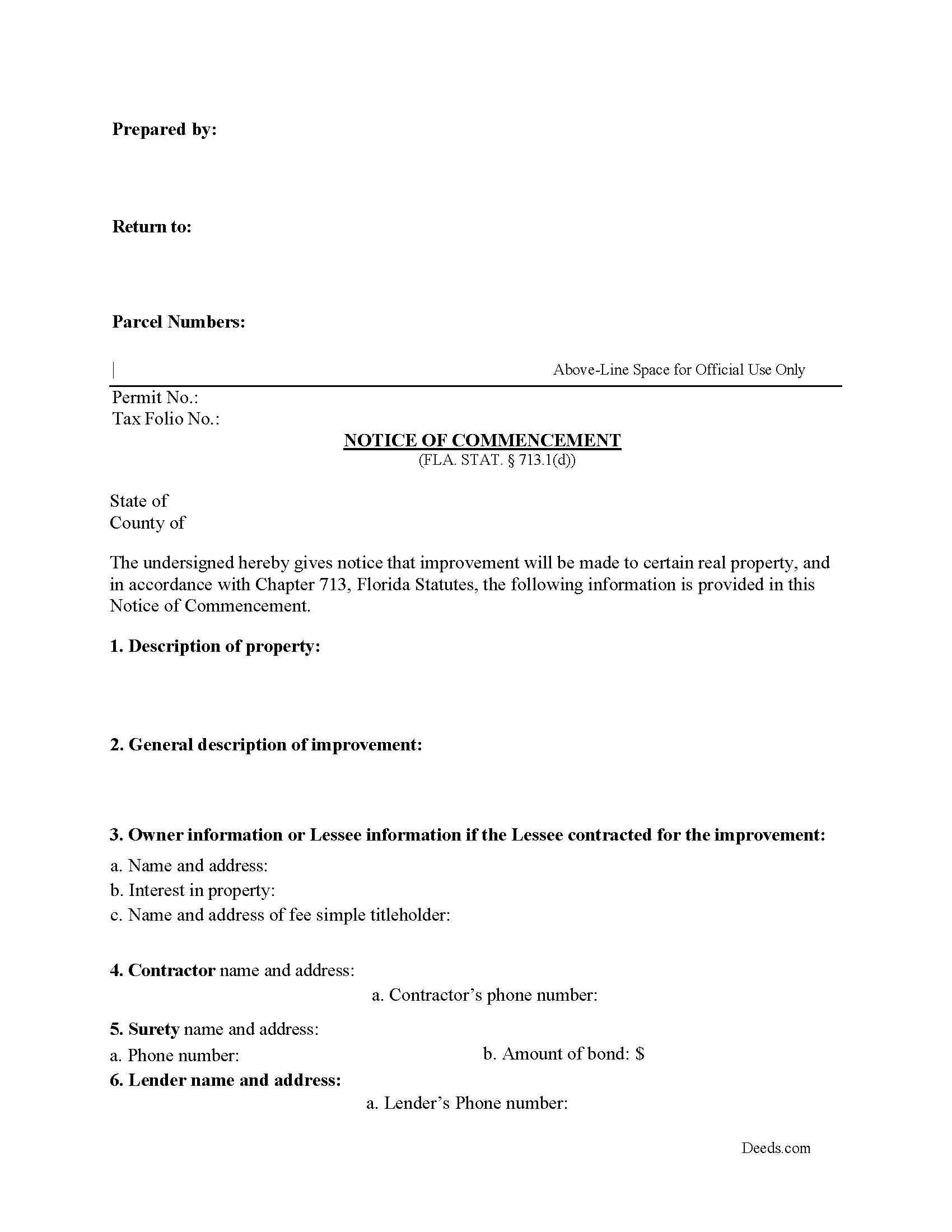
Brevard County Notice of Commencement Form
Fill in the blank Notice of Commencement form formatted to comply with all Florida recording and content requirements.
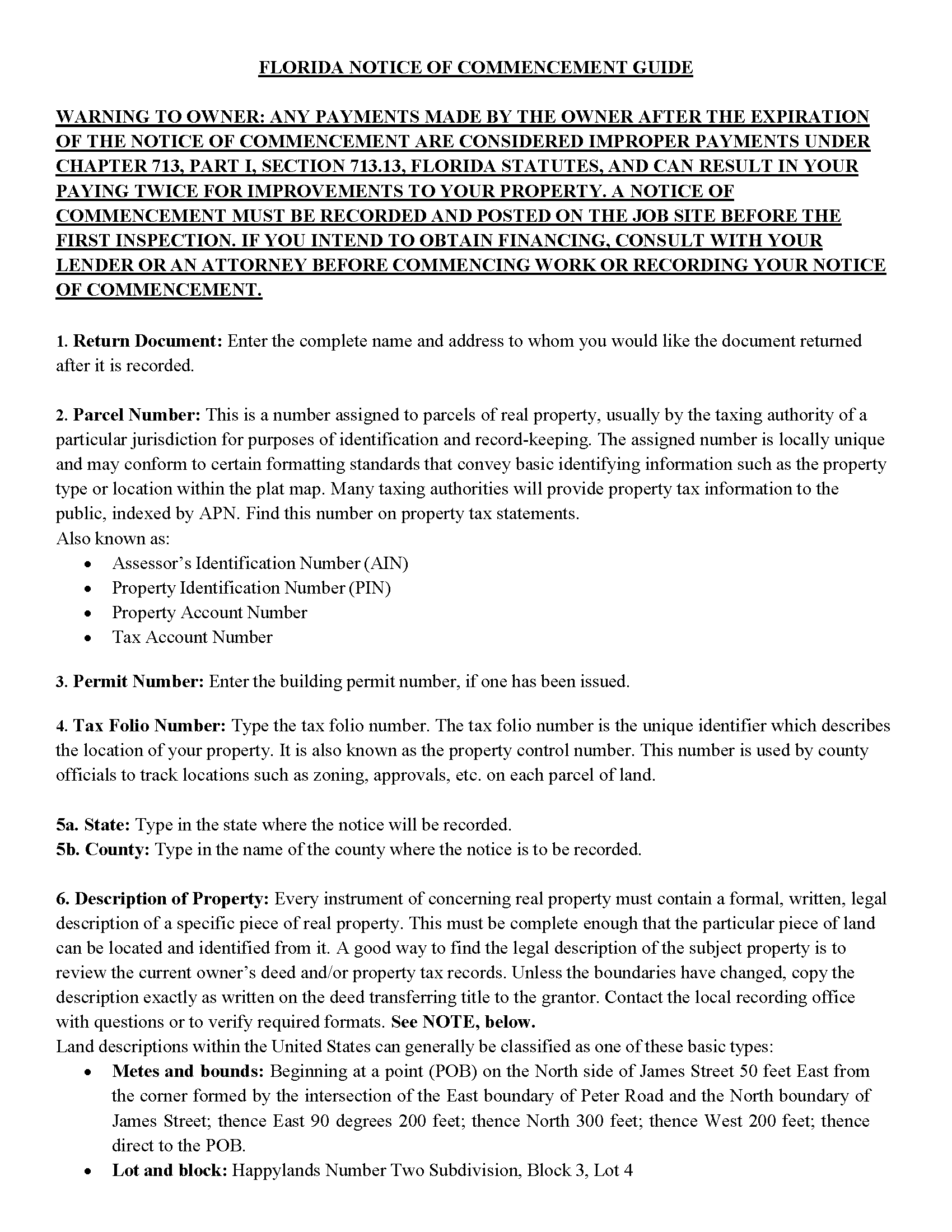
Brevard County Notice of Commencement Guide
Line by line guide explaining every blank on the Notice of Commencement form.
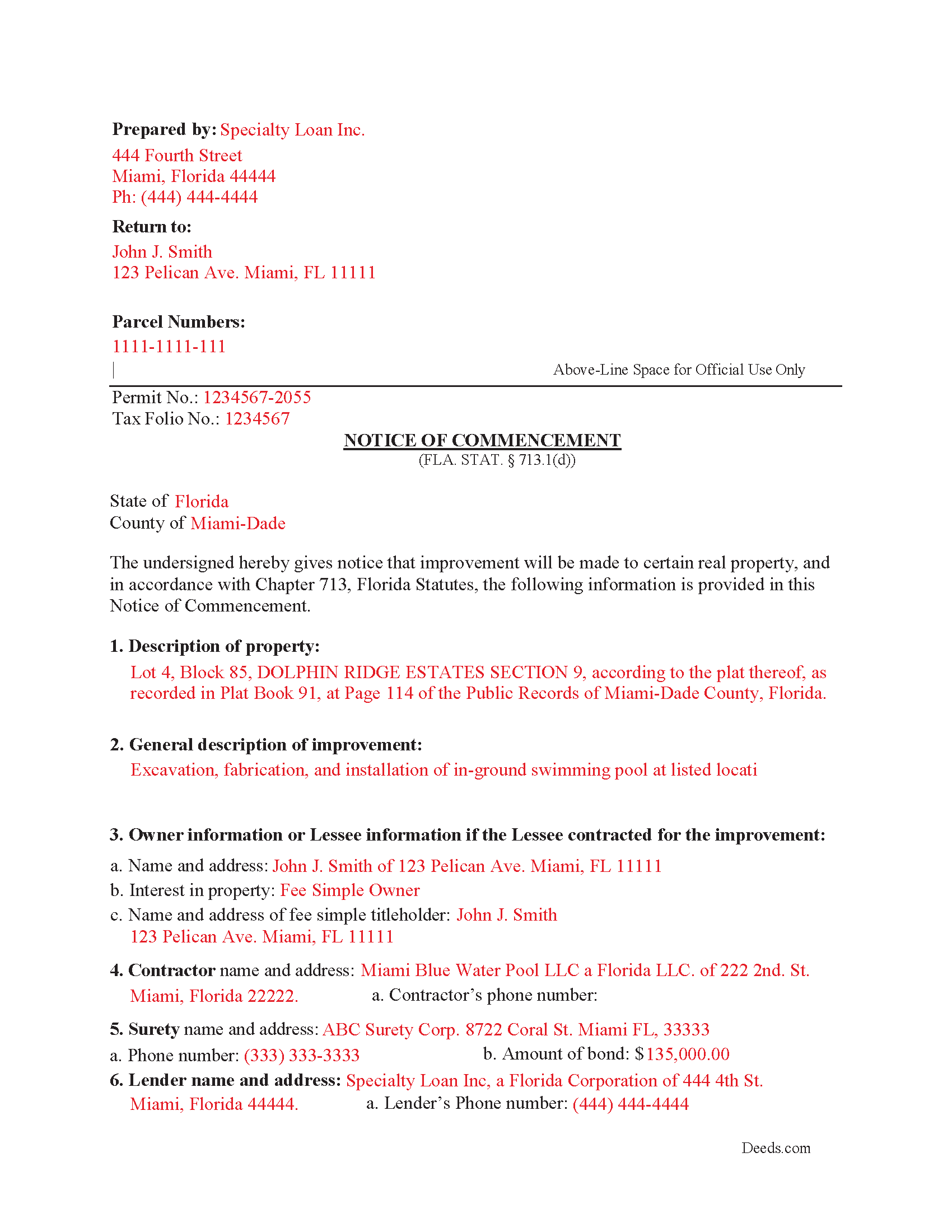
Brevard County Completed Example of the Notice of Commencement Document
Example of a properly completed Florida Notice of Commencement document for reference.
All 3 documents above included • One-time purchase • No recurring fees
Immediate Download • Secure Checkout
Additional Florida and Brevard County documents included at no extra charge:
Where to Record Your Documents
Clerk of Court
Titusville, Florida 32780
Hours: Monday through Friday 8:00 a.m. to 5:00 p.m.
Phone: (321) 637-2006
Parkway Complex
Titusville, Florida 32780
Hours: 8:00 a.m. to 5:00 p.m. M-F
Phone: Phone (321) 637-2006
Moore Justice Center
Viera, Florida 32940
Hours: 8:00 - 5:00 M-F
Phone: (321) 637-2006
Melbourne Branch Courthouse
Melbourne, Florida 32901
Hours: 8:00 - 5:00 M-F
Phone: (321) 637-2006
Merritt Island Office
Merritt Island, Florida 32953
Hours: 8:00 - 5:00 M-F
Phone: (321) 637-2006
Palm Bay Office
Palm Bay, Florida 32909
Hours: 8:00 - 5:00 M-F
Phone: (321) 637-2006
For Mail: Recording Department
Titusville, Florida 32781-2767
Hours:
Phone: N/A
For Overnight Delivery: Clerk of Court
Titusville, Florida 32780-4015
Hours:
Phone: N/A
Recording Tips for Brevard County:
- Bring your driver's license or state-issued photo ID
- Ensure all signatures are in blue or black ink
- Ask if they accept credit cards - many offices are cash/check only
- Check that your notary's commission hasn't expired
- Documents must be on 8.5 x 11 inch white paper
Cities and Jurisdictions in Brevard County
Properties in any of these areas use Brevard County forms:
- Cape Canaveral
- Cocoa
- Cocoa Beach
- Grant
- Indialantic
- Malabar
- Melbourne
- Melbourne Beach
- Merritt Island
- Mims
- Orlando
- Palm Bay
- Patrick Afb
- Rockledge
- Satellite Beach
- Scottsmoor
- Sebastian
- Sharpes
- Titusville
Hours, fees, requirements, and more for Brevard County
How do I get my forms?
Forms are available for immediate download after payment. The Brevard County forms will be in your account ready to download to your computer. An account is created for you during checkout if you don't have one. Forms are NOT emailed.
Are these forms guaranteed to be recordable in Brevard County?
Yes. Our form blanks are guaranteed to meet or exceed the applicable formatting requirements used for recording in Brevard County, including margin requirements, font requirements, and other layout standards. This guarantee applies to formatting, not to the legal sufficiency of information entered by the user or the suitability of a form for a particular transaction.
Can I reuse these forms?
Yes. You can reuse the forms for your personal use. For example, if you have multiple properties in Brevard County you only need to order once.
What do I need to use these forms?
The forms are PDFs that you fill out on your computer. The free Adobe Acrobat Reader is recommended, and most PDF apps also work. You do NOT enter your property information online - you download the blank forms and complete them privately on your own computer.
Are there any recurring fees?
No. This is a one-time purchase. Nothing to cancel, no memberships, no recurring fees.
How much does it cost to record in Brevard County?
Recording fees in Brevard County vary. Contact the recorder's office at (321) 637-2006 for current fees.
Questions answered? Let's get started!
Choose a Florida Notice of Commencement when a Florida construction project needs the Chapter 713 notice that ties lien rights to the county recording record. Florida’s version is unusually specific: it uses a statutory form, requires recording in the clerk’s office and job-site posting before the first inspection, separates the $2,500 construction-lien threshold from the $5,000 inspection-copy rule, and voids the notice if the improvement does not start within 90 days after recording.
What a Florida Notice of Commencement Does and When It Is Used
A Notice of Commencement identifies the property, the improvement, the owner or contracting lessee, the contractor, and any lender or payment bond so contractors, subcontractors, suppliers, and laborers know where lien-related notices should be sent. In Florida, it is commonly used for private construction, remodeling, additions, repairs, and other improvements to real property when the project is not exempt under the construction lien law. It does not transfer title, change ownership, create survivorship rights, or operate like a deed; it is a recorded construction-lien notice governed by Chapter 713.
Florida Statutory Requirements for the Notice
Except for an improvement exempt under the small-project rule, an owner or the owner’s authorized agent must record a notice of commencement in the clerk’s office before actually commencing an improvement to real property, or before recommencing completion after default or abandonment, even when the project has a payment bond (Fla. Stat. § 713.13(1)(a)). An improvement for which the direct contract price is $2,500 or less is exempt from most provisions of Part I of Chapter 713 except the contractor’s lien provision (Fla. Stat. § 713.02(5)).
The Florida notice must be in substantially the statutory form and must include:
- A legal description sufficient to identify the property, plus the street address and tax folio number if available, or other information describing the physical location when no street address is available (Fla. Stat. § 713.13(1)(a)1.).
- A general description of the improvement (Fla. Stat. § 713.13(1)(a)2.).
- The owner’s name and address, the owner’s interest in the site, and the fee simple titleholder’s name and address if different from the owner. A lessee who contracts for the improvement must be listed as the owner with a statement that the interest is a leasehold interest (Fla. Stat. § 713.13(1)(a)3.).
- The contractor’s name and address (Fla. Stat. § 713.13(1)(a)4.).
- The surety’s name and address, if a payment bond exists, and the bond amount (Fla. Stat. § 713.13(1)(a)5.).
- The name and address of any lender making a construction loan for the improvements (Fla. Stat. § 713.13(1)(a)6.).
- The name and Florida address of any person designated by the owner to receive notices or other documents, if the owner designates someone for that purpose (Fla. Stat. § 713.13(1)(a)7.).
- The name and address of any additional person designated to receive a copy of a lienor’s notice, if the owner makes that optional designation (Fla. Stat. § 713.13(1)(b)).
- An expiration date. If no different date is stated, the notice expires one year after recording (Fla. Stat. § 713.13(1)(d)).
If the contract with the contractor named in the notice states a completion period longer than one year, the notice must state that it is effective for one year plus the additional time, and payments made after expiration are treated as improper payments under Chapter 713 (Fla. Stat. § 713.13(1)(c)).
Signing, Notarization, and Job-Site Posting in Florida
The statutory form is signed by the owner or lessee, or by the owner’s or lessee’s authorized officer, director, partner, or manager when an entity is involved, and the form includes a notary acknowledgment for physical presence or online notarization (Fla. Stat. § 713.13(1)(d)). Florida’s notice of commencement is not executed like a deed: the statutory form does not include two witness lines, but the owner-signature rule is strict because the statute states that the owner must sign the notice and no one else may be permitted to sign in the owner’s stead (Fla. Stat. § 713.13(1)(g)).
After recording, the owner must post either a certified copy of the recorded notice or a notarized statement that the notice has been filed for recording, together with a copy of the notice, at the improvement site (Fla. Stat. § 713.13(1)(a)). When the direct contract is greater than $5,000, the building permit applicant must file a copy of the notice with the issuing authority before the first inspection; the copy may be a certified copy of the recorded notice, a notarized filing statement with a copy, or the clerk’s official records information such as the instrument number or book and page (Fla. Stat. § 713.135(1)(e)).
Recording, Priority, and County Filing
The notice is recorded in the clerk’s office for the county where the Florida property is located. For Chapter 713, the clerk’s office means the clerk of the circuit court or other county recorder serving the county where the real property is located (Fla. Stat. § 713.01(4)). The notice is effective upon filing in the clerk’s office (Fla. Stat. § 713.13(1)(f)).
Prompt recording matters because Florida lien priority is tied to the notice. Liens under the contractor and subcontractor lien statutes attach and take priority as of the time the notice of commencement is recorded; if no notice is filed, those liens attach and take priority as of the time the claim of lien is recorded (Fla. Stat. § 713.07(2)). Recording the notice does not itself create a lien, cloud, or encumbrance on the real property, but it gives constructive notice that Chapter 713 claims of lien may be recorded and may take priority under Florida’s priority statute (Fla. Stat. § 713.13(3)).
Florida-Specific Issues That Commonly Cause Problems
- Recording too early: If the improvement described in the notice is not actually commenced within 90 days after the notice is recorded, the notice is void and has no further effect (Fla. Stat. § 713.13(2)).
- Confusing the two dollar thresholds: The $2,500 rule relates to the small-improvement exemption in Chapter 713, while the $5,000 rule relates to filing a copy of the notice with the permitting authority before the first inspection (Fla. Stat. §§ 713.02(5), 713.135(1)(e)).
- Weak legal description: Florida requires a legal description, and a street address alone is not a substitute when a legal description is available. An incorrect property description in the notice can make payments on the direct contract improper as to a lienor adversely affected by the error (Fla. Stat. § 713.06(3)(a)).
- Payment bond not attached: If a payment bond exists, a copy must be attached when the notice is recorded. Failure to attach it negates the exemption that would otherwise apply to the bonded direct contract (Fla. Stat. § 713.13(1)(e)).
- Leasehold improvements: When a lessee contracts for the work, the lessee is treated as the owner for notice purposes and must be listed with a leasehold-interest statement, while the fee simple titleholder must also be identified if different (Fla. Stat. § 713.13(1)(a)3.).
- Spousal lien exposure: Florida’s construction lien law contains a spouse-agency rule. When a husband or wife contracts for an improvement on property owned by the other spouse or by both spouses, and the spouses are not separated and living apart, the contracting spouse is deemed the other spouse’s agent for lien purposes unless the other spouse gives the contractor and records a notice of objection within 10 days after learning of the contract (Fla. Stat. § 713.12).
- Deed-style information: A Notice of Commencement is not a deed, so it does not use vesting language, survivorship wording, marital status recitals, or deed documentary stamp tax calculations. The required information is the construction-lien information listed in Chapter 713.
- Recording-format details: Florida recording offices may screen instruments for printed names and addresses of signers, a preparer’s name and address, the notary’s printed or stamped name, and the required recording space at the top right of the page (Fla. Stat. § 695.26).
Amending or Terminating a Florida Notice of Commencement
A notice recorded within its effective period may be amended to extend the effective period, correct erroneous information, or add omitted information. The amended notice must identify the official records book and page of the original notice, and the owner must serve a copy on the contractor and each lienor who serves notice before or within 30 days after the amendment is recorded. Changing contractors requires a new notice of commencement or a notice of recommencement rather than an amendment (Fla. Stat. § 713.13(5)).
An owner may terminate the effective period by recording a Notice of Termination that includes the same information as the notice of commencement, the recording reference and recording date of the original notice, a termination date that is not earlier than 30 days after recording, a statement describing whether the termination applies to all or part of the property, a statement that all lienors have been paid, and the required service statements. When properly served before recording, the termination is generally effective 30 days after recording or on a later date stated in the notice (Fla. Stat. § 713.132).
What You Receive With This Florida Notice of Commencement
- A county-specific Florida Notice of Commencement form developed by Deeds.com’s forms development team for the selected Florida county.
- Step-by-step completion instructions explaining the property description, owner or lessee information, contractor information, lender and surety fields, notice-recipient fields, expiration date, signature, notarization, recording, and posting steps.
- A completed example showing how the Florida Notice of Commencement can be filled out for a typical county recording.
- County recording information to help prepare the notice for filing with the correct Florida clerk or county recorder.
- Downloadable materials available immediately after purchase for use with the selected Florida county.
Important: Your property must be located in Brevard County to use these forms. Documents should be recorded at the county recording office listed above.
This Notice of Commencement meets all recording requirements specific to Brevard County.
Our Promise
The documents you receive here are guaranteed to meet or exceed the applicable Brevard County recording format requirements. If there is a rejection caused by our formatting, we will correct the issue or refund your payment. This guarantee applies to document formatting only and does not extend to information entered by the user, the selection of the form, or the legal effect of the completed document.
Save Time and Money
Get your Brevard County Notice of Commencement form done right the first time with Deeds.com Uniform Conveyancing Blanks. At Deeds.com, we understand that your time and money are valuable resources, and we don't want you to face a penalty fee or rejection imposed by a county recorder for submitting nonstandard documents. We constantly review and update our forms to meet rapidly changing state and county recording requirements for roughly 3,500 counties and local jurisdictions.
4.8 out of 5 - ( 4,819 Reviews )
Gerald B. 5 out of 5 stars
Thank you so much for the helpful service and quick action! If needed, I will definitely choose Deeds.com again.
We appreciate your business and value your feedback. Thank you. Have a wonderful day!
Chastity S. 1 out of 5 stars
Very confusing and a waste of money, Now I will have to pay for another service from another site. Very disappointed.
Thank you for your feedback. Sorry to hear about your disappointment. It is certainly a good idea to seek a more full service route if you are not completely sure of what you are doing. We have canceled your order and payment.
Joseph D. 5 out of 5 stars
Easy to use and a quick turnaround Deed was recorded and retuned within 24 hours
We are grateful for your engagement and feedback, which help us to serve you better. Thank you for being an integral part of our community.
Barbara S. 5 out of 5 stars
Thanks for this service. I believe it will be all I need. Will know for sure within a week
We appreciate your business and value your feedback. Thank you. Have a wonderful day!
Jeanette S. 5 out of 5 stars
Your site was easy to figure out after a few mistakes on my part. Messages were returned quickly. Very convenient for our recording of documents. I will recommend using this method for recording in future. Thank you for working fast in our recording.
Thank you for your feedback. We really appreciate it. Have a great day!
James B. 5 out of 5 stars
Was a lot easier than driving to the County Building and faster than expected. Thank you!
We appreciate your business and value your feedback. Thank you. Have a wonderful day!
David O. 5 out of 5 stars
Service was top-notch....fast, accurate, cost-effective.
Thank you!
Veronica S. 5 out of 5 stars
Very convenient and quick. I will definitely use it again.
Thank you!
Karen M. 5 out of 5 stars
This was a very easy and organized system to use.
Thank you for your feedback. We really appreciate it. Have a great day!
Susan Z. 4 out of 5 stars
Helpful website. Couldn't use the forms for my situation and area
Thank you for your feedback Susan. We don't want you to have to pay for something you didn't use, we've gone ahead and canceled your order and payment. Have a great day!
John M. 5 out of 5 stars
Very satisfied with your service. Considering how complicated real estate titles are, this could not have been simpler. Your website worked perfectly.
Thank you!
Angela A. 5 out of 5 stars
The forms, instructions and example of the completed Interspousal Transfer Deed was very helpful. I was able to complete all necessary forms quickly and bring them to the County Recorder's Office for filing with no problems. It was a great relief, and I didn't even need to hire an attorney. Thank you!
We appreciate your business and value your feedback. Thank you. Have a wonderful day!
roger m. 5 out of 5 stars
super clean interface i thank you very much
Thank you!
Kenneth K. 5 out of 5 stars
It was fast and easy to use.
Thank you!
Patricia W. 5 out of 5 stars
Easy to use with the itemized instruction.
Thank you for your feedback. We really appreciate it. Have a great day!