Sumter County Special Warranty Deed (Attorney-in-Fact Grantor) Form
Last validated October 11, 2026 by our Forms Development TeamFormatted for recording in Sumter County, for property anywhere in the county: rural and unincorporated areas as well as Bushnell, Center Hill, Coleman, Lake Panasoffkee, Oxford, Sumterville, The Villages, Webster and 1 more.
- 3 documents included
- Immediate PDF download
- Formatting guarantee
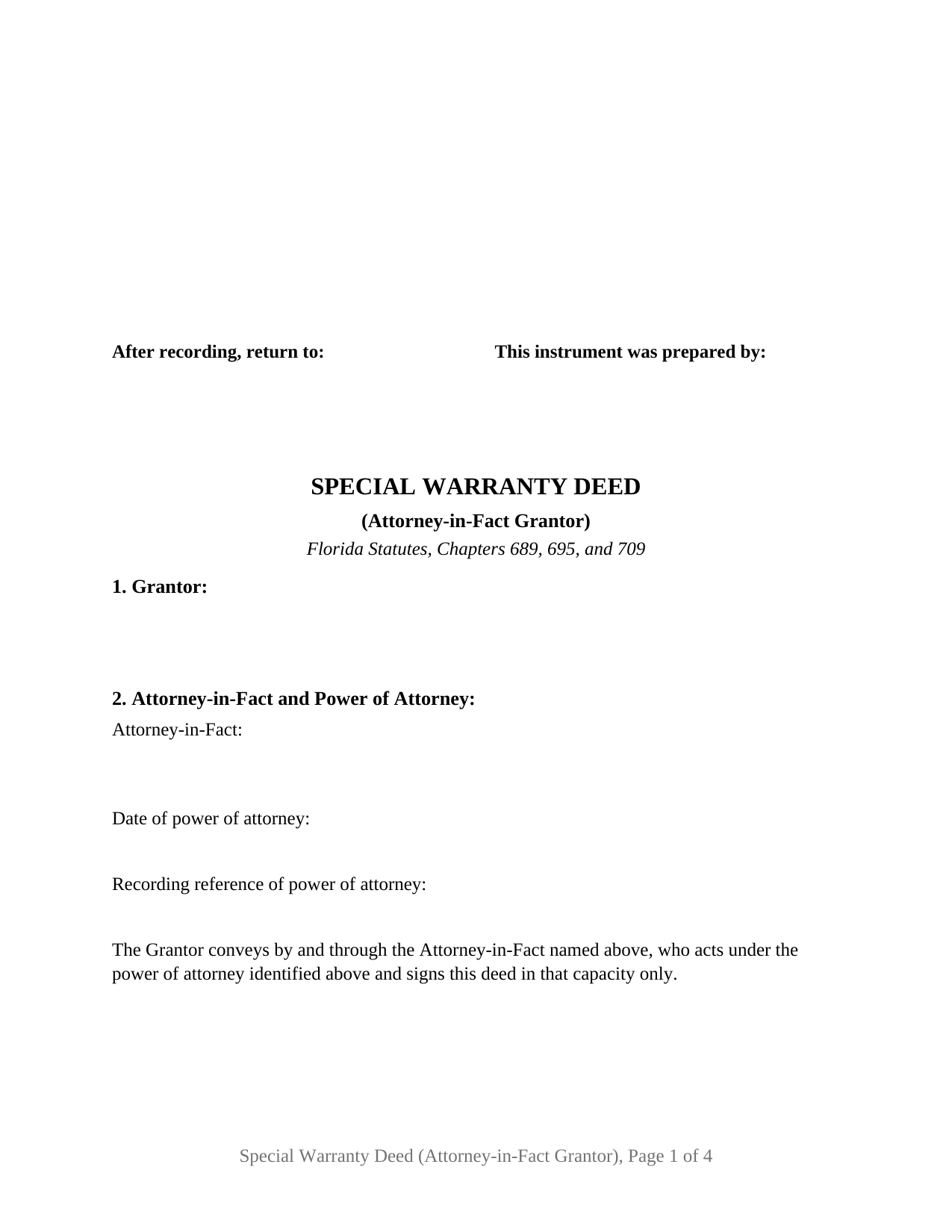
Sumter County Special Warranty Deed (Attorney-in-Fact Grantor) Form
Fill in the blank Special Warranty Deed (Attorney-in-Fact Grantor) form formatted to comply with all Florida recording and content requirements.
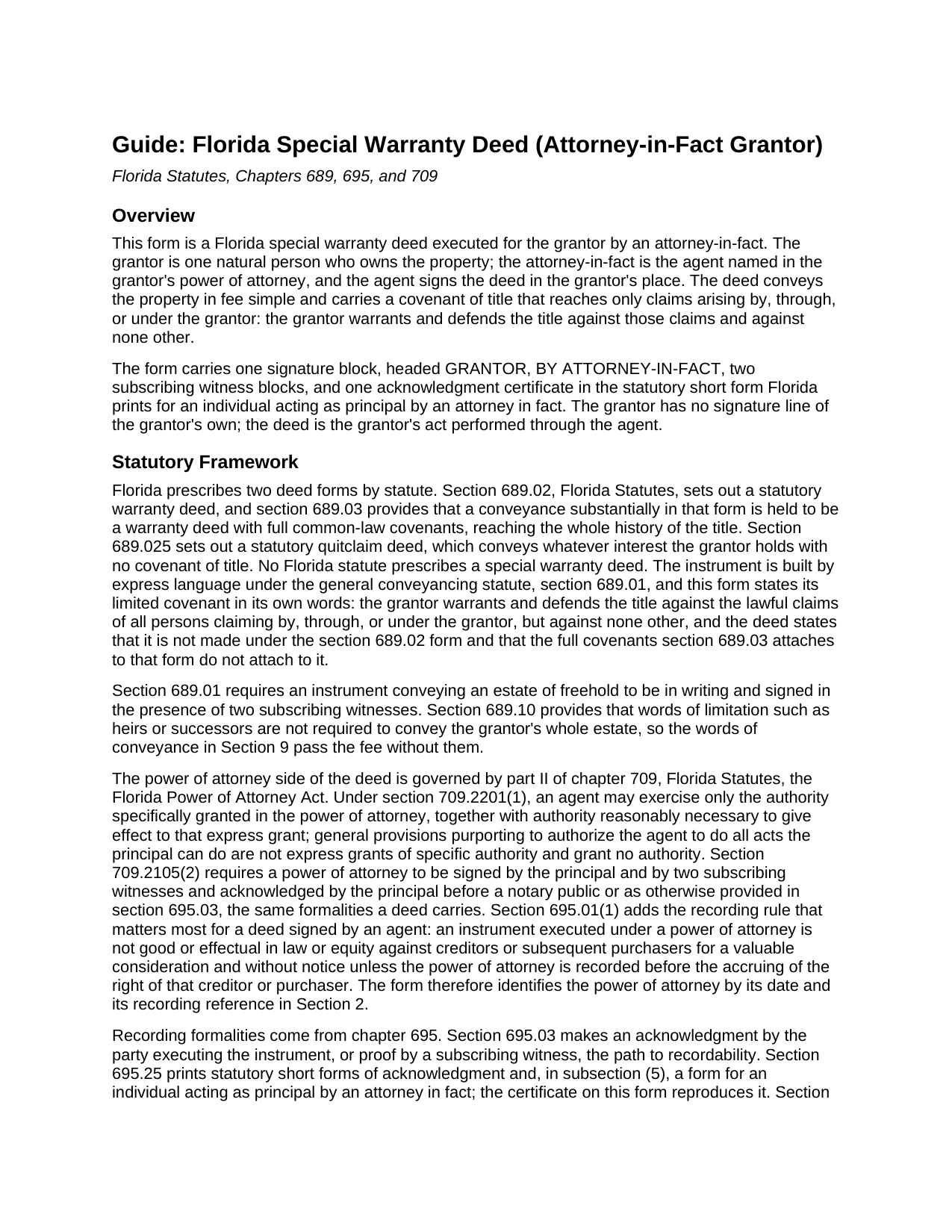
Sumter County Special Warranty Deed (Attorney-in-Fact Grantor) Guide
Line by line guide explaining every blank on the Special Warranty Deed (Attorney-in-Fact Grantor) form.
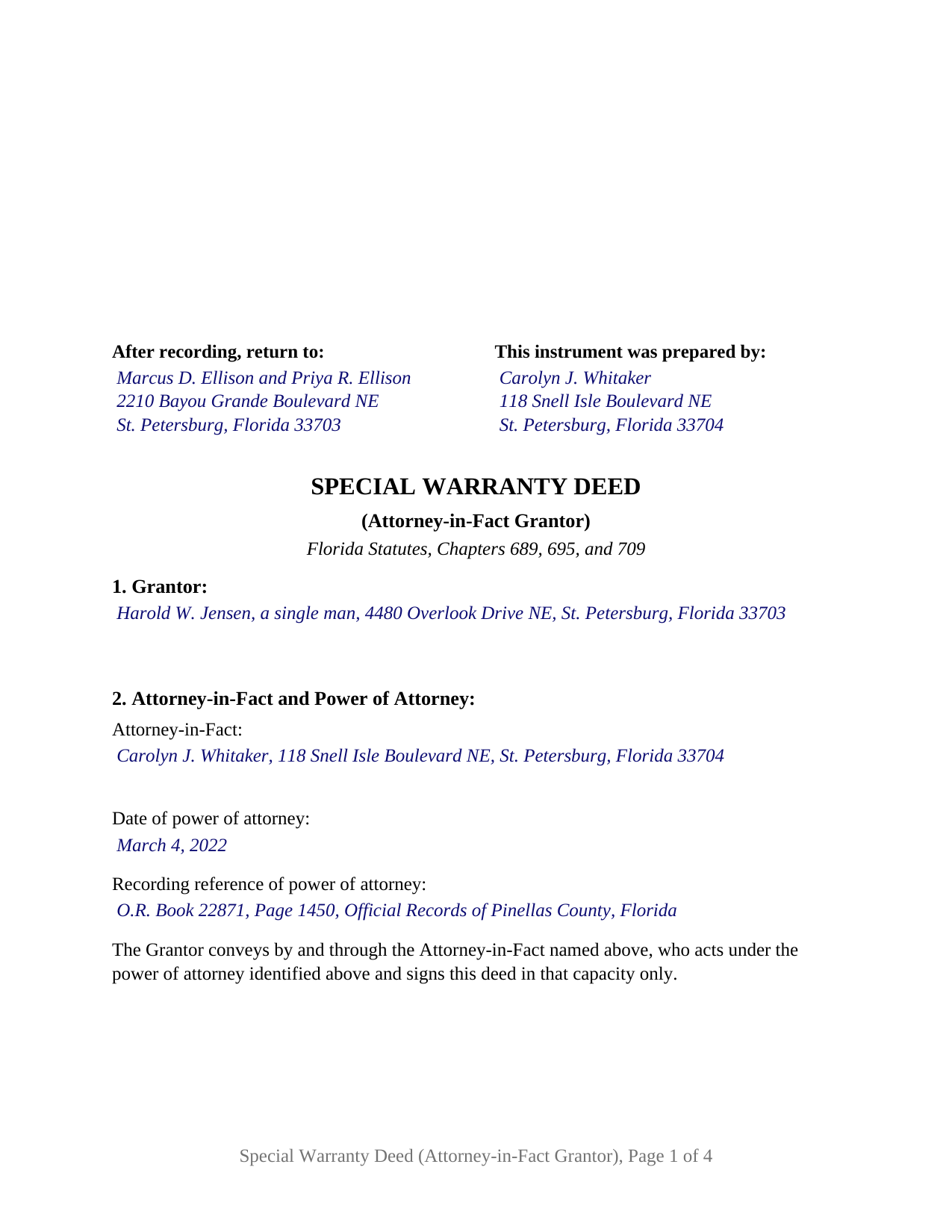
Sumter County Completed Example of the Special Warranty Deed (Attorney-in-Fact Grantor) Document
Example of a properly completed Florida Special Warranty Deed (Attorney-in-Fact Grantor) document for reference.
All 3 documents above included • One-time purchase • No recurring fees
Immediate Download • Secure Checkout
Additional Florida and Sumter County documents included at no extra charge:
Where to Record Your Documents
Clerk of Court: Official Records
Bushnell, Florida 33513
Hours: 8:30 to 5:00 M-F
Phone: (352) 569-6600
North Sumter Annex
The Villages, Florida 32162
Hours: 8:30am - 5:00pm M-F / Document drop-off only
Phone: 352-689-4625
Recording Tips for Sumter County:
- Bring your driver's license or state-issued photo ID
- Ensure all signatures are in blue or black ink
- Bring extra funds - fees can vary by document type and page count
- Check margin requirements - usually 1-2 inches at top
- Leave recording info boxes blank - the office fills these
Cities and Jurisdictions in Sumter County
Properties in any of these areas use Sumter County forms:
- Bushnell
- Center Hill
- Coleman
- Lake Panasoffkee
- Oxford
- Sumterville
- The Villages
- Webster
- Wildwood
Hours, fees, requirements, and more for Sumter County
How do I get my forms?
Forms are available for immediate download after payment. The Sumter County forms will be in your account ready to download to your computer. An account is created for you during checkout if you don't have one. Forms are NOT emailed.
Are these forms guaranteed to be recordable in Sumter County?
Yes. Our form blanks are guaranteed to meet or exceed the applicable formatting requirements used for recording in Sumter County, including margin requirements, font requirements, and other layout standards. This guarantee applies to formatting, not to the legal sufficiency of information entered by the user or the suitability of a form for a particular transaction.
Can I reuse these forms?
Yes. You can reuse the forms for your personal use. For example, if you have multiple properties in Sumter County you only need to order once.
What do I need to use these forms?
The forms are PDFs that you fill out on your computer. The free Adobe Acrobat Reader is recommended, and most PDF apps also work. You do NOT enter your property information online - you download the blank forms and complete them privately on your own computer.
Are there any recurring fees?
No. This is a one-time purchase. Nothing to cancel, no memberships, no recurring fees.
How much does it cost to record in Sumter County?
Recording fees in Sumter County vary. Contact the recorder's office at (352) 569-6600 for current fees.
Questions answered? Let's get started!
On this Florida special warranty deed the owner's name appears as grantor, and the signature beneath it belongs to someone else: the attorney-in-fact named in the owner's power of attorney. One grantor, a natural person, conveys real property in fee simple through one agent under a recorded power of attorney, warranting the title only against claims arising by, through, or under the grantor.
A signature that stands in for the owner's
Under section 709.2201(1) of the Florida Power of Attorney Act, an agent may exercise only the authority the power of attorney specifically grants; a clause letting the agent do all acts the principal could do grants nothing. The deed therefore identifies its authority on its face: Section 2 names the attorney-in-fact with the date and recording reference of the power of attorney, and the operative paragraph conveys by and through that agent. The attorney-in-fact signs under a block headed GRANTOR, BY ATTORNEY-IN-FACT, with the agent's own printed name and post office address beneath, the data section 695.26 asks of the person who executes the instrument. The grantor has no signature line.
Why the power of attorney is recorded first
Section 695.01(1) contains a rule written for this deed: an instrument executed under a power of attorney is not effectual against creditors or later purchasers for value without notice unless the power of attorney is recorded before their rights accrue. A power never yet recorded is recorded in the county where the land lies, before or with the deed, so the Section 2 reference points to an instrument in the same official records.
The certificate that names two people
Section 695.25(5) prints a statutory short form of acknowledgment for an individual acting as principal by an attorney in fact: the officer certifies that the instrument was acknowledged by the named attorney in fact, as attorney in fact, who is personally known or produced identification, on behalf of the named principal. The certificate on this deed reproduces that sentence, with the two boxes the officer marks for physical presence or online notarization, and reserves a labeled area for the rubber-stamp seal section 117.05 places below or beside the notary's signature. Two subscribing witnesses sign as well, with the printed name and post office address lines section 695.26 requires, and the first page keeps the top-right space the same section reserves for the clerk of the circuit court.
What the limited covenant reaches
The covenant is the grantor's, not the agent's, and it is measured by the grantor's own period of ownership: the grantor warrants and defends title against lawful claims of anyone claiming by, through, or under the grantor and against no one else, no other covenant of title arises, and the deed is not made under the section 689.02 statutory form. Section 7 records the instrument by which the grantor took title, where the covenant begins, and Section 8 lists the recorded matters the conveyance remains subject to as exceptions that create no further covenant. A separate sentence states that the attorney-in-fact makes no personal covenant.
One grantor, one agent, one certificate
The form recites exactly one grantor holding title in the grantor's own name, one attorney-in-fact, and one power of attorney, with a single signature block and a single acknowledgment certificate. An adult child selling a parent's rental property under a durable power of attorney while the parent is in long-term care, and a spouse completing a sale for a husband or wife stationed overseas, present the pattern this deed recites. The form is not set up as a deed by two owners conveying through agents, which presents two certificates, nor as a deed by a company, a partnership, or a trustee, each of which acknowledges on a different statutory form. It carries no joining-spouse block, so a married principal's homestead, which the Florida Constitution and section 709.2201(2)(b) require the spouse to join, presents a second signature the form does not carry. A conveyance for no consideration raises a separate question under section 709.2202(1), which permits an agent to make a gift only where the principal initialed that authority.
The download includes the deed as a fillable PDF, a completed example worked through a Pinellas County sale by an agent for her father under a recorded durable power of attorney, and a plain-language guide that treats every numbered section, the Chapter 709 authority rules, the witness and notary blocks, and the recording steps. The materials describe Florida law in general terms and are not legal advice.
Important: Your property must be located in Sumter County to use these forms. Documents should be recorded at the county recording office listed above.
This Special Warranty Deed (Attorney-in-Fact Grantor) meets all recording requirements specific to Sumter County.
Our Promise
The documents you receive here are guaranteed to meet or exceed the applicable Sumter County recording format requirements. If there is a rejection caused by our formatting, we will correct the issue or refund your payment. This guarantee applies to document formatting only and does not extend to information entered by the user, the selection of the form, or the legal effect of the completed document.
Save Time and Money
Get your Sumter County Special Warranty Deed (Attorney-in-Fact Grantor) form done right the first time with Deeds.com Uniform Conveyancing Blanks. At Deeds.com, we understand that your time and money are valuable resources, and we don't want you to face a penalty fee or rejection imposed by a county recorder for submitting nonstandard documents. We constantly review and update our forms to meet rapidly changing state and county recording requirements for roughly 3,500 counties and local jurisdictions.
4.8 out of 5 - ( 4,839 Reviews )
jack b. 5 out of 5 stars
good form, reasonable fee
Thank you Jack. We really appreciate you taking the time to leave your feedback. Have a great day!
Aaron L. 2 out of 5 stars
Might be adequate if I was desperate. Formatting screams amateur hour -- not a legal issue but likely to invite closer scrutiny when filed. Instructions were supposed to be county-specific but directed me to call the recorder to ask them how to fill out part of the form. Not planning to use the form and would not purchase it again. I could probably do better by uploading some examples and the original mortgage from the Recorder's website into Claude along with the transaction-specific information and asking Claude to prepare a more professional release.
Aaron, we’re sorry the form and instructions did not meet your expectations. Your order has been canceled and your payment refunded. We appreciate your feedback and wish you the best with preparing the release in the way that works best for your situation.
Linda F. 5 out of 5 stars
I can't recommend working with Deeds.com enough. I had been given incorrect information from another document service. The helpful staff member at Deeds.com that assisted in the submission of the recording was exceptionally helpful in making sure what I was submitting included the necessary elements required by the county. I am very thankful I chose Deeds.com for my eRecording service. Thank you!!
Thank you, Linda! We’re so glad our team could assist in making sure your submission met the county’s requirements. It means a lot that you chose Deeds.com after a frustrating experience elsewhere. We appreciate your trust and kind words!
Dwayne H. 5 out of 5 stars
The Oregon TODD transfer on death deed template worked great and was easy to use. They had instructions and a guide that had good pointers to filling everything out. It took about 2 weeks to mail in my filled TODD and receive it back from the county with their stamp. Would definitely use this service for other documents
We appreciate your business and value your feedback. Thank you. Have a wonderful day!
David M. 5 out of 5 stars
A real boon to those of us who are not attorneys but wish to protect our assets and avoid probate court issues. Thank you for a great service.
We appreciate your business and value your feedback. Thank you. Have a wonderful day!
Maria C. 5 out of 5 stars
Amazing service truly great to work with your team on a difficult filing!
Thank you!
Nancy J. 5 out of 5 stars
It is helpful that an example of filled out form is included.
We appreciate your business and value your feedback. Thank you. Have a wonderful day!
John W. 5 out of 5 stars
I wish that I had known about Deed.com years ago! Very easy and time saving!
Thank you!
Betty Z. 5 out of 5 stars
Thank you so much for giving us a service so important to many. I will pass on this pertinent process to all who need it. again, thank you. bz
Thanks so much Betty. We appreciate you. Have a spectacular day!
Gerald S. 5 out of 5 stars
The paperwork for our transfer on death deed was easy to fill out and the county has excepted it for recording Very satisfied.
We appreciate your business and value your feedback. Thank you. Have a wonderful day!
ANA I p. 5 out of 5 stars
Wow this was nice that I could used the service . Love it
We appreciate your business and value your feedback. Thank you. Have a wonderful day!
Nicole w. 5 out of 5 stars
Awesome and very fast service!!!
Thank you!
Scott P. 5 out of 5 stars
The site was easy to use and find what I needed. The purchase and download were very easy.
Thank you!
Leticia A. 5 out of 5 stars
Down to the point,covers every angle with great tips:Don't forget Probate.
Thank you!
Miranda C. 3 out of 5 stars
very expensive
Thank you for your continued trust and repeated purchases with us over the past year. We deeply value our loyal customers and understand the importance of providing value for your investment. Our pricing reflects the meticulous care, research, and expertise we put into each of our legal forms. However, we always strive to improve and genuinely value your feedback.