Kalamazoo County Personal Representative Deed Form
Last validated September 25, 2026 by our Forms Development TeamFormatted for recording in Kalamazoo County, for property anywhere in the county: rural and unincorporated areas as well as Augusta, Climax, Comstock, Fulton, Galesburg, Kalamazoo, Nazareth, Oshtemo and 5 more.
- 3 documents included
- Immediate PDF download
- Formatting guarantee
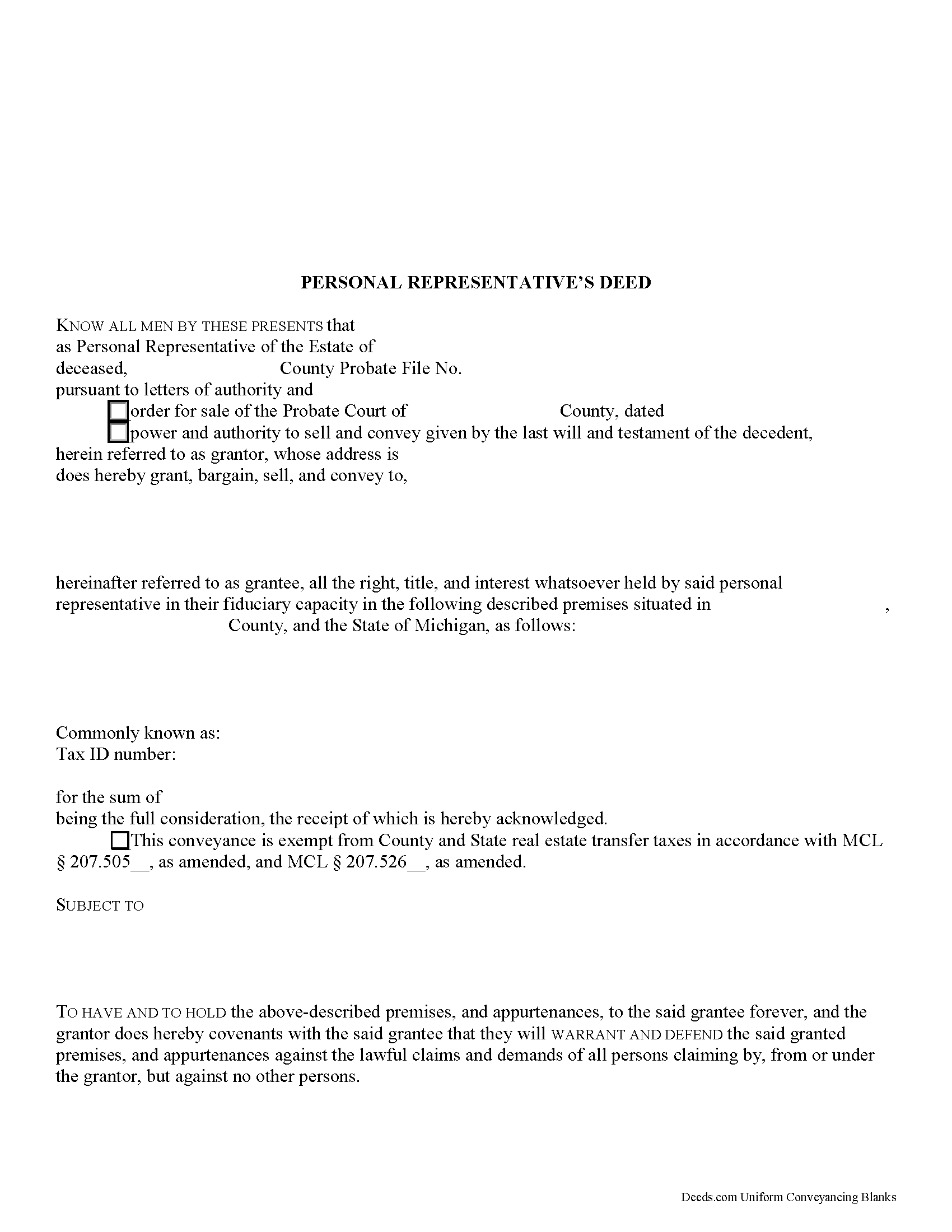
Kalamazoo County Personal Representative Deed Form
Fill in the blank form formatted to comply with all recording and content requirements.
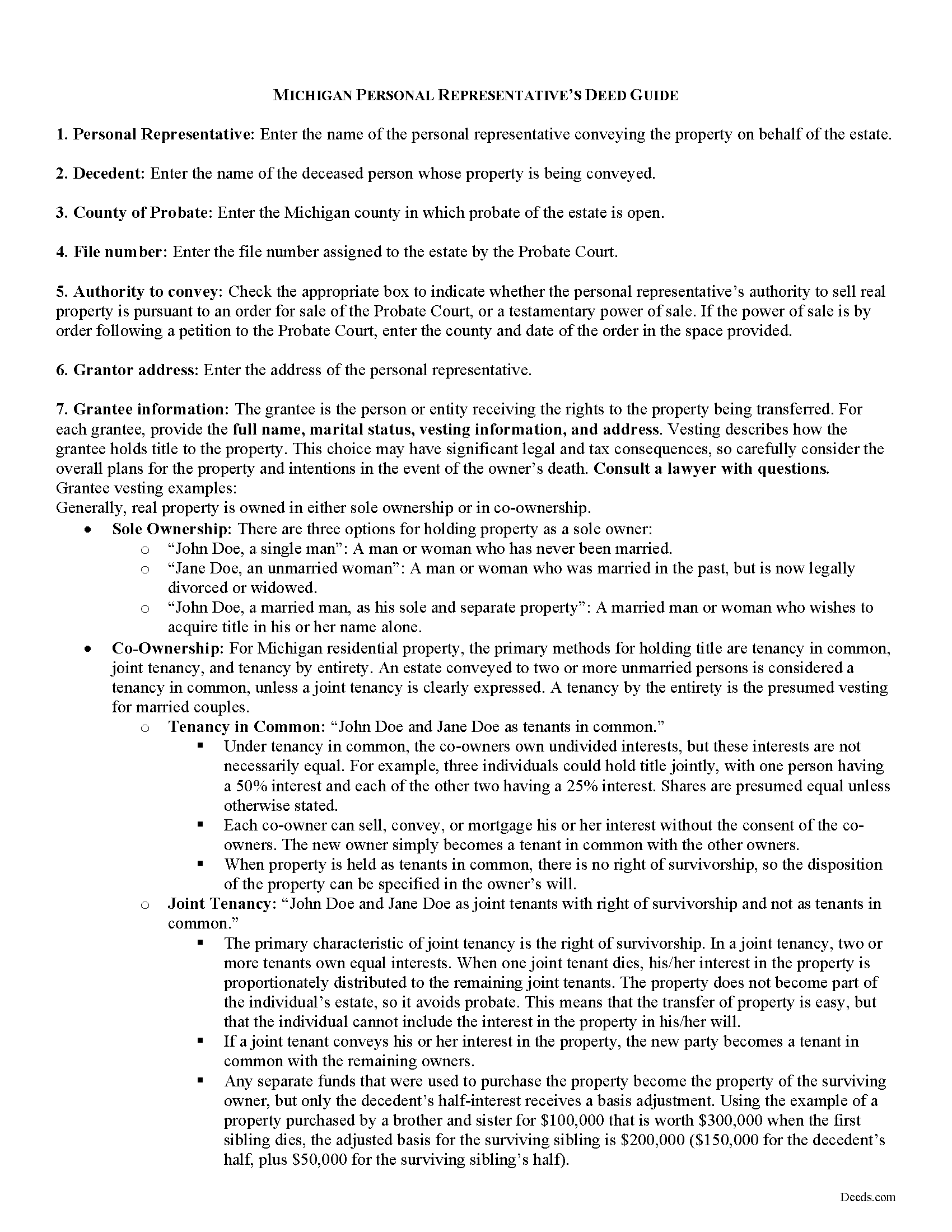
Kalamazoo County Personal Representative Deed Guide
Line by line guide explaining every blank on the form.
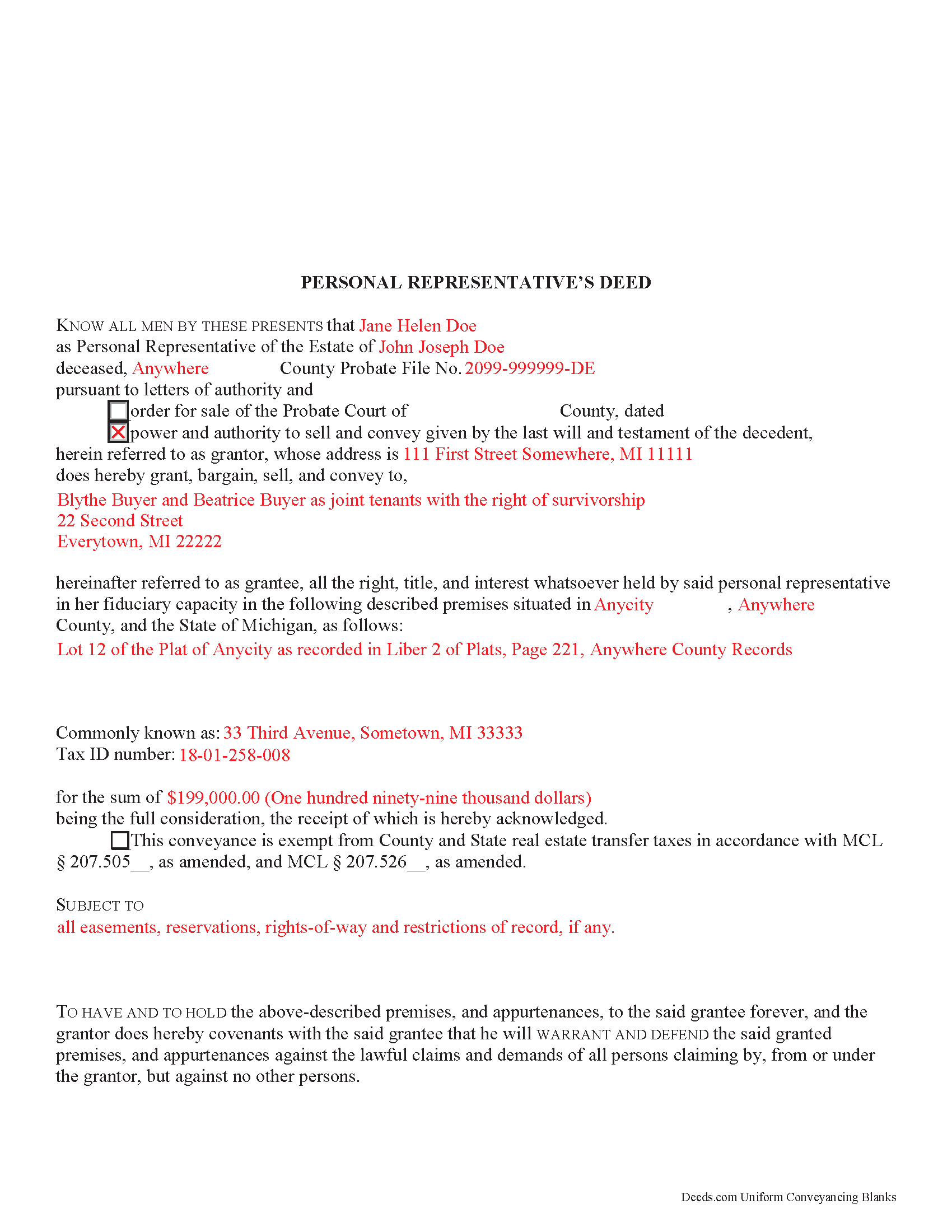
Kalamazoo County Completed Example of the Personal Representative Deed Document
Example of a properly completed form for reference.
All 3 documents above included • One-time purchase • No recurring fees
Immediate Download • Secure Checkout
Additional Michigan and Kalamazoo County documents included at no extra charge:
Where to Record Your Documents
Kalamazoo County Register of Deeds
Kalamazoo, Michigan 49007
Hours: 8:00am to 4:30pm M-F / Recording until 4:00pm
Phone: (269) 383-8970
Recording Tips for Kalamazoo County:
- Bring your driver's license or state-issued photo ID
- Ensure all signatures are in blue or black ink
- Ask for certified copies if you need them for other transactions
- Ask if they accept credit cards - many offices are cash/check only
- Check that your notary's commission hasn't expired
Cities and Jurisdictions in Kalamazoo County
Properties in any of these areas use Kalamazoo County forms:
- Augusta
- Climax
- Comstock
- Fulton
- Galesburg
- Kalamazoo
- Nazareth
- Oshtemo
- Portage
- Richland
- Schoolcraft
- Scotts
- Vicksburg
Hours, fees, requirements, and more for Kalamazoo County
How do I get my forms?
Forms are available for immediate download after payment. The Kalamazoo County forms will be in your account ready to download to your computer. An account is created for you during checkout if you don't have one. Forms are NOT emailed.
Are these forms guaranteed to be recordable in Kalamazoo County?
Yes. Our form blanks are guaranteed to meet or exceed the applicable formatting requirements used for recording in Kalamazoo County, including margin requirements, font requirements, and other layout standards. This guarantee applies to formatting, not to the legal sufficiency of information entered by the user or the suitability of a form for a particular transaction.
Can I reuse these forms?
Yes. You can reuse the forms for your personal use. For example, if you have multiple properties in Kalamazoo County you only need to order once.
What do I need to use these forms?
The forms are PDFs that you fill out on your computer. The free Adobe Acrobat Reader is recommended, and most PDF apps also work. You do NOT enter your property information online - you download the blank forms and complete them privately on your own computer.
Are there any recurring fees?
No. This is a one-time purchase. Nothing to cancel, no memberships, no recurring fees.
How much does it cost to record in Kalamazoo County?
Recording fees in Kalamazoo County vary. Contact the recorder's office at (269) 383-8970 for current fees.
Questions answered? Let's get started!
In the State of Michigan, the administration and distribution of estates is governed by MCL Chapter 700, known as the estates and protected individuals code.
When a Michigander dies, probate -- the process of settling a decedent's estate, including gathering the decedent's assets, paying debts and taxes, and distributing what is left of the estate to those entitled to receive it -- takes place in the county in which the decedent was domiciled at the time of death. Michigan Probate Courts oversee probate proceedings. The extent to which the court supervises administration is dependent upon the type of probate opened. Administration of the estate is generally unsupervised, unless the specific situation necessitates otherwise.
All property owned by the decedent individually is subject to probate. Property held with a survivorship interest, beneficiary designation, or in a trust skips probate.
Administration officially begins when the court appoints a personal representative (PR) who will personally settle the decedent's estate. Michigan uses the general term personal representative, though he or she may be either the executor of the decedent's will, or an administrator of an intestate estate. An estate is said to be intestate when the decedent dies without a will.
The court issues letters of authority to the PR, which confirm the personal representative's powers. In Michigan, the PR's powers are quite broad, unless otherwise limited by a decedent's will. Any restrictions on the PR's powers are noted in the letters of authority.
By process of Michigan law, title to a decedent's real property generally passes at the
time of his or her death to any devisees or heirs at law. Pursuant to MCL 700.3910, an instrument or deed of distribution is proof that the distributee has succeeded to the decedent's interest of the estate in the distributed property. See special provisions relating to distribution under the estates and protected individuals code, and contact a lawyer with questions.
In some cases, the PR may be required to sell real property on behalf of the estate (to pay the decedent's debts, for example). A PR does not, in general, need to seek court approval before selling real property, barring restrictions stated on the letters of administration. However, if complications arise, the PR or an interested person (person having a property right in or claim against the estate) may file a petition and an order may be entered by the Probate Court.
To accomplish a sale of the decedent's property, the PR executes a type of fiduciary deed called a personal representative's deed, which transfers title to the grantee. In Michigan, the PR deed typically carries a limited warranty, covenanting that the grantor warrants and defends the title against lawful claims arising from persons claiming by, through, or under the grantor (but none other).
A PR deed includes information about the probated estate, including the decedent's name, county in which probate is open, probate file number, and source of authorization for the conveyance. All requirements of form and content for instruments pertaining to real property must be met. Each PR must sign the deed for a valid transfer.
Consult a lawyer with questions regarding estate administration and personal representative's deeds in Michigan, as each case is unique.
(Michigan PRD Package includes form, guidelines, and completed example)
Important: Your property must be located in Kalamazoo County to use these forms. Documents should be recorded at the county recording office listed above.
This Personal Representative Deed meets all recording requirements specific to Kalamazoo County.
Our Promise
The documents you receive here are guaranteed to meet or exceed the applicable Kalamazoo County recording format requirements. If there is a rejection caused by our formatting, we will correct the issue or refund your payment. This guarantee applies to document formatting only and does not extend to information entered by the user, the selection of the form, or the legal effect of the completed document.
Save Time and Money
Get your Kalamazoo County Personal Representative Deed form done right the first time with Deeds.com Uniform Conveyancing Blanks. At Deeds.com, we understand that your time and money are valuable resources, and we don't want you to face a penalty fee or rejection imposed by a county recorder for submitting nonstandard documents. We constantly review and update our forms to meet rapidly changing state and county recording requirements for roughly 3,500 counties and local jurisdictions.
4.8 out of 5 - ( 4,828 Reviews )
Suzanne M. 5 out of 5 stars
Easy to download this form. I will use it when the time comes to transfer title of my house.
Thank you for your feedback. We really appreciate it. Have a great day!
Cathy S. 5 out of 5 stars
My experience on the site was very easy to navigate to find just what I needed.
Thank you!
silvia m. 5 out of 5 stars
Used the forms for a quitclaim deed. Worked great! Also, big bonus to have the extra forms available, needed a couple of them. Highly recommend...
We appreciate your business and value your feedback. Thank you. Have a wonderful day!
Kyle E. 5 out of 5 stars
Works great thank you for saving us driving time!!
We appreciate your business and value your feedback. Thank you. Have a wonderful day!
Catherine S. 3 out of 5 stars
Description of document could have been better
Thank you!
Rebecca W. 5 out of 5 stars
Very easy to find and download.
Thank you!
Bonnie A. 5 out of 5 stars
I wish you could send copy in mail
Thank you for your feedback. We really appreciate it. Have a great day!
Thanh P. 5 out of 5 stars
Awesome services. Quick and efficient.
Thank you for your kind words Thanh, we appreciate you.
Sara R. 5 out of 5 stars
The deed is presently at the auditors office and will be recorded after approval from zoning board. As far as I know, everything is going along well. A self addressed envelope was left at recorder's office for return after recording is complete.
Thank you!
Rachel Y. 5 out of 5 stars
I liked the ease of use, however I would love to be able to add multiple APN’s and delete lines that are not applicable
Thank you, Rachel. We’re glad you found the form easy to use, and we appreciate your suggestions about adding multiple APNs and removing inapplicable lines. Feedback like this helps us improve our forms.
Todd J. 5 out of 5 stars
Super Easy!
Thank you!
Jorge F. 3 out of 5 stars
It would be helpful for documents to be in word format as well and for PDF version not to be locked.
Thank you for your feedback. We really appreciate it. Have a great day!
Marilyn C. 5 out of 5 stars
My document got recorded right away. Thank you! Will use again in the future when needed.
We appreciate your business and value your feedback. Thank you. Have a wonderful day!
Patricia R. 3 out of 5 stars
Very quick to respond with the obvious answers. I asked what form to use when adding my daughter to deed. Answer: talk to an attorney duh.
Thank you!
Kari G. 5 out of 5 stars
The service was prompt and attentive to my questions. I would've just appreciated a heads up that I also needed to contact the county directly (and provide contact info) to receive a certified copy of the document (Notice of Commencement) in order to submit the certified copy to the Building Department. This was an extra step that I haven't had to complete before using another eRecording service. Even if this extra step is a result of the county's system. I would still have expected a head's up (since there wasn't any info regarding this on the county's site for eRecording).
Thank you for your feedback. We really appreciate it. Have a great day!