Isanti County Certificate of Trust Form
Last validated November 9, 2026 by our Forms Development TeamFormatted for recording in Isanti County, for property anywhere in the county: rural and unincorporated areas as well as Braham, Cambridge, Dalbo, Grandy, Isanti, Stanchfield.
- 3 documents included
- Immediate PDF download
- Formatting guarantee
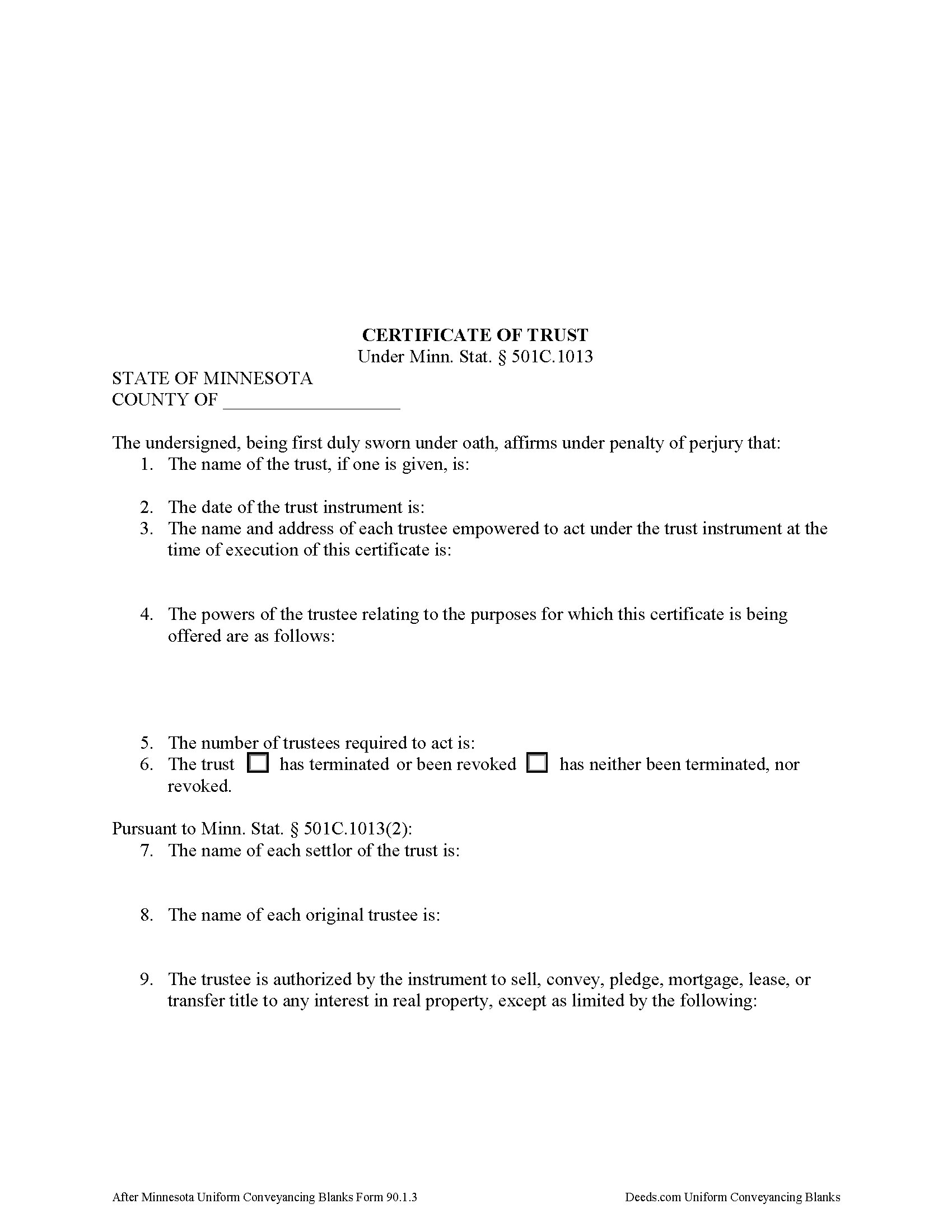
Isanti County Certificate of Trust Form
Fill in the blank form formatted to comply with all recording and content requirements.
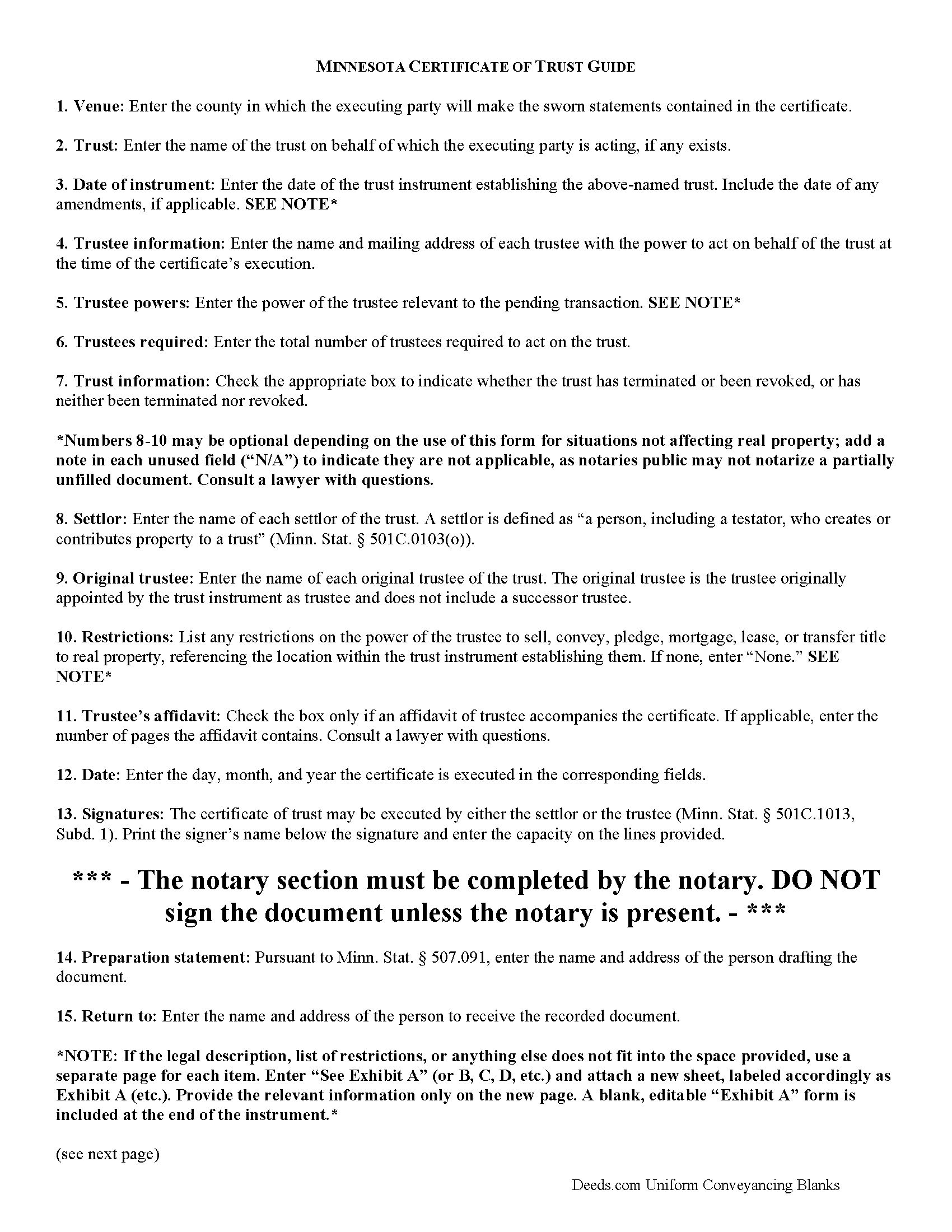
Isanti County Certificate of Trust Guide
Line by line guide explaining every blank on the form.
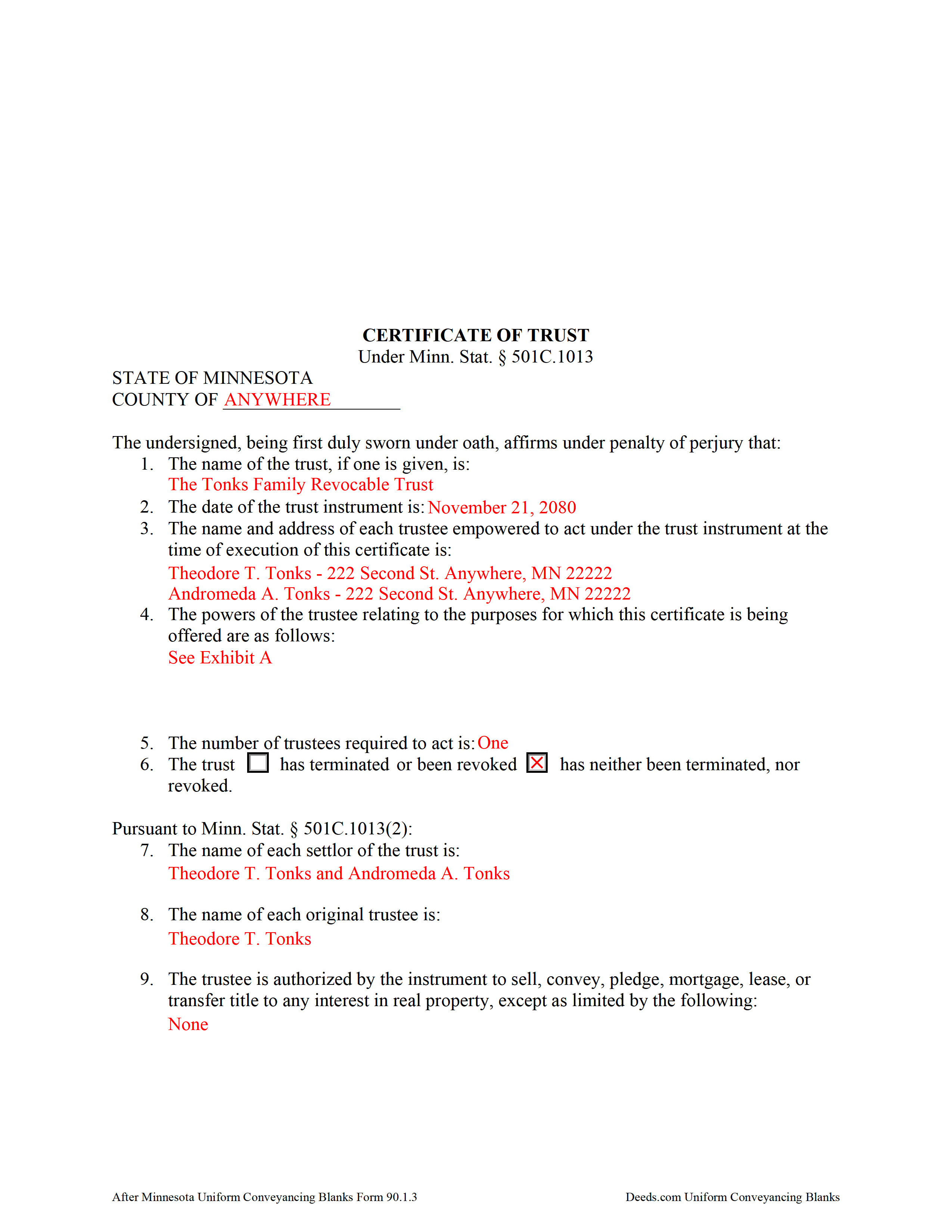
Isanti County Completed Example of the Certificate of Trust Document
Example of a properly completed form for reference.
All 3 documents above included • One-time purchase • No recurring fees
Immediate Download • Secure Checkout
Additional Minnesota and Isanti County documents included at no extra charge:
Where to Record Your Documents
Isanti County Recorder
Cambridge, Minnesota 55008
Hours: 8:00 to 4:30 M-F
Phone: (763) 689-1191
Recording Tips for Isanti County:
- Bring your driver's license or state-issued photo ID
- Ensure all signatures are in blue or black ink
- White-out or correction fluid may cause rejection
- Ask about their eRecording option for future transactions
- Avoid the last business day of the month when possible
Cities and Jurisdictions in Isanti County
Properties in any of these areas use Isanti County forms:
- Braham
- Cambridge
- Dalbo
- Grandy
- Isanti
- Stanchfield
Hours, fees, requirements, and more for Isanti County
How do I get my forms?
Forms are available for immediate download after payment. The Isanti County forms will be in your account ready to download to your computer. An account is created for you during checkout if you don't have one. Forms are NOT emailed.
Are these forms guaranteed to be recordable in Isanti County?
Yes. Our form blanks are guaranteed to meet or exceed the applicable formatting requirements used for recording in Isanti County, including margin requirements, font requirements, and other layout standards. This guarantee applies to formatting, not to the legal sufficiency of information entered by the user or the suitability of a form for a particular transaction.
Can I reuse these forms?
Yes. You can reuse the forms for your personal use. For example, if you have multiple properties in Isanti County you only need to order once.
What do I need to use these forms?
The forms are PDFs that you fill out on your computer. The free Adobe Acrobat Reader is recommended, and most PDF apps also work. You do NOT enter your property information online - you download the blank forms and complete them privately on your own computer.
Are there any recurring fees?
No. This is a one-time purchase. Nothing to cancel, no memberships, no recurring fees.
How much does it cost to record in Isanti County?
Recording fees in Isanti County vary. Contact the recorder's office at (763) 689-1191 for current fees.
Questions answered? Let's get started!
The certificate of trust is codified under the Minnesota Trust Code at Minn. Stat. 501C.1013.
This document is an abstract of the trust instrument setting forth "fewer than all of the provisions . . . and any amendments to the instrument," and contains only essential information relevant to the transaction for which it is being presented (Minn. Stat. 501C.1013, Subd. 1). It "serves to document the existence of the trust, the identity of the trustees, the powers of the trustees and any limitations on those powers, and other matters the certificate of trust sets out, as though the full trust instrument had been recorded or presented" (Subd. 4).
Presented to a recipient in situations regarding personal property, or filed with the county recorder in situations regarding real property, a certificate of trust is "prima facie proof as to matters contained in it" (Subd. 4).
A certificate is valid when executed by settlor or trustee "any time after the execution or creation of a trust" (Subd. 1). The basic content requirements include the name of the trust; the date of the trust instrument; the name and address of each acting trustee; the number of trustees required to act; and the powers of the trustee relevant to the transaction at hand. The certificate also declares whether the trust has terminated or the trust instrument has been revoked (Subd. 1 (1-6)).
For use in real property transactions, the certificate requires the name of each settlor and original trustee, along with a specific statement relating to the authority of the trustee and any restrictions on the trustee's power "to sell, convey, pledge, mortgage, lease, or transfer title to any interest in real property" (Subd. 2). Transactions affecting real property may also require an affidavit of trustee under Minn. Stat. 501C.1014.
The representations contained within the certificate are made by the executing trustee or settlor under oath before a public notary and as such the executing party ensure there are no provisions in the trust instrument or subsequent amendments to limit the power of the trustee in the transaction or "to exercise any other power identified in the certificate" (Subd. 1).
Contact an attorney with any questions regarding trusts or certificates of trust, as each situation is unique.
(Minnesota COT Package includes form, guidelines, and completed example)
Important: Your property must be located in Isanti County to use these forms. Documents should be recorded at the county recording office listed above.
This Certificate of Trust meets all recording requirements specific to Isanti County.
Our Promise
The documents you receive here are guaranteed to meet or exceed the applicable Isanti County recording format requirements. If there is a rejection caused by our formatting, we will correct the issue or refund your payment. This guarantee applies to document formatting only and does not extend to information entered by the user, the selection of the form, or the legal effect of the completed document.
Save Time and Money
Get your Isanti County Certificate of Trust form done right the first time with Deeds.com Uniform Conveyancing Blanks. At Deeds.com, we understand that your time and money are valuable resources, and we don't want you to face a penalty fee or rejection imposed by a county recorder for submitting nonstandard documents. We constantly review and update our forms to meet rapidly changing state and county recording requirements for roughly 3,500 counties and local jurisdictions.
4.8 out of 5 - ( 4,853 Reviews )
Priscilla M. 5 out of 5 stars
Instructions are easy to follow which make filling out the forms easy and simple. I would definitely recommend Deeds.com.
Thank you!
Ann M. 5 out of 5 stars
I was extremely pleased with how easy this process was, and how quickly my document was recorded. I will definitely use this again!
We appreciate your business and value your feedback. Thank you. Have a wonderful day!
James S. 5 out of 5 stars
Forms used, created quitclaim deed that the county accepted without a second look (turns out they see deeds.com forms regularly via erecording and in person). Will be back for any real estate related forms I need and they carry. Will always be my first stop. Also, will use erecording next time, mad I didn't see it this time.
Thanks for the kind words James, glad we could help. Look forward to seeing you again.
Joyce M. 5 out of 5 stars
Great website, but not helpful in locating my deed dated 1747.
Thank you for your feedback. We really appreciate it. Have a great day!
Linda M. 5 out of 5 stars
Happy with the forms and the service, would recommend to others.
We appreciate your business and value your feedback. Thank you. Have a wonderful day!
Tierre J. 1 out of 5 stars
I put in two orders. I did not get any results from either order and I am still waiting for my refunds.
Thank you for your feedback. Sorry we were not able to pull the information you requested. We reviewed your account and the payment voids were processed as your were notified. Sometimes, depending on your financial institution, it can take a few days for the pending charges to fall off of your statement reporting.
Vicki M. 5 out of 5 stars
Deeds.com served my needs perfectly providing a form for a very reasonable price. Every other site was double or more. The form was easy to complete and I like that I can access it if I need to make changes. I had contacted a paralegal to prepare this form for me and she quoted $150. I saved time and money with Deeds.com.
Thank you for your feedback. We really appreciate it. Have a great day!
Raecita H. 5 out of 5 stars
This was the first time I had ever had to fill out a Warranty Deed, so if it was not for your example form on how to fill one out, I would be still be here completely lost. I had originally gone to another site for a Warranty Deed & they wanted double the amount of your price & their website had no examples forms. I am so happy with your site & service. Thank you for giving us the opportunity to be able to download the forms as much as we need to because as many mistakes I made,I had to print quite a few to be able to get it done right.
We appreciate your business and value your feedback. Thank you. Have a wonderful day!
Jo Carol K. 5 out of 5 stars
The information/forms/and ease of filling in the blanks provided me with the confidence to "do it myself". Excellent customer service. Thank you for being there.
We appreciate your business and value your feedback. Thank you. Have a wonderful day!
Lauren D. 5 out of 5 stars
Prompt and helpful
Thank you!
Ken B. 5 out of 5 stars
Instructions were easy to follow
Thank you!
Samantha A. 5 out of 5 stars
Its exactly what it said it was. I received multiple downloads, loaded fast and was pretty easy to navigate.
Thank you for your feedback. We really appreciate it. Have a great day!
Angelique A. 5 out of 5 stars
Very helpful and quick customer service. Highly recommended
Thank you for your feedback Angelique, we appreciate you. Have a great day!
Julie K. 4 out of 5 stars
The process for obtaining document itself was easy, and the included guide and example are great! I do have an issue with the format itself, though. The form has pre-defined text boxes, which cannot be altered without partially rebuilding the entire document. For the 'property description' field on the Mineral Deed form, the text box is not large enough for the rather lengthy legal description entered on my original plat. Fortunately, I have a copy of Adobe Pro, so I have been able to re-build the doc to accommodate this short-coming.
Thank you for taking the time to provide feedback on our legal form. We're pleased to hear that you found the process for obtaining the document and the included guide beneficial.
We understand and appreciate your concern regarding the formatting and size limitations of certain fields, especially the 'property description' field. Our forms are designed to adhere to specific formatting requirements that are often mandated for legal compliance. Making direct alterations to the document can result in them becoming non-conforming, which is why we advise customers to use an exhibit page when their legal description is extensive or does not fit.
Joseph R. 3 out of 5 stars
The form and instructions were easy enough to follow if you had all the information.
The only drawback to the form was the length of text allowed for the name of the document (#4). The form self populates in multiple locations but when printed truncated the name if too many characters were used. I kept having to update the name of the document to allow for proper printing.
Your insights are invaluable to us and help us strive for better service. Thank you for taking the time to share your thoughts.