Gloucester County Certificate of Trust Form
Last validated October 5, 2026 by our Forms Development TeamFormatted for recording in Gloucester County, for property anywhere in the county: rural and unincorporated areas as well as Bridgeport, Clarksboro, Clayton, Deptford, Ewan, Franklinville, Gibbstown, Glassboro and 20 more.
- 3 documents included
- Immediate PDF download
- Formatting guarantee
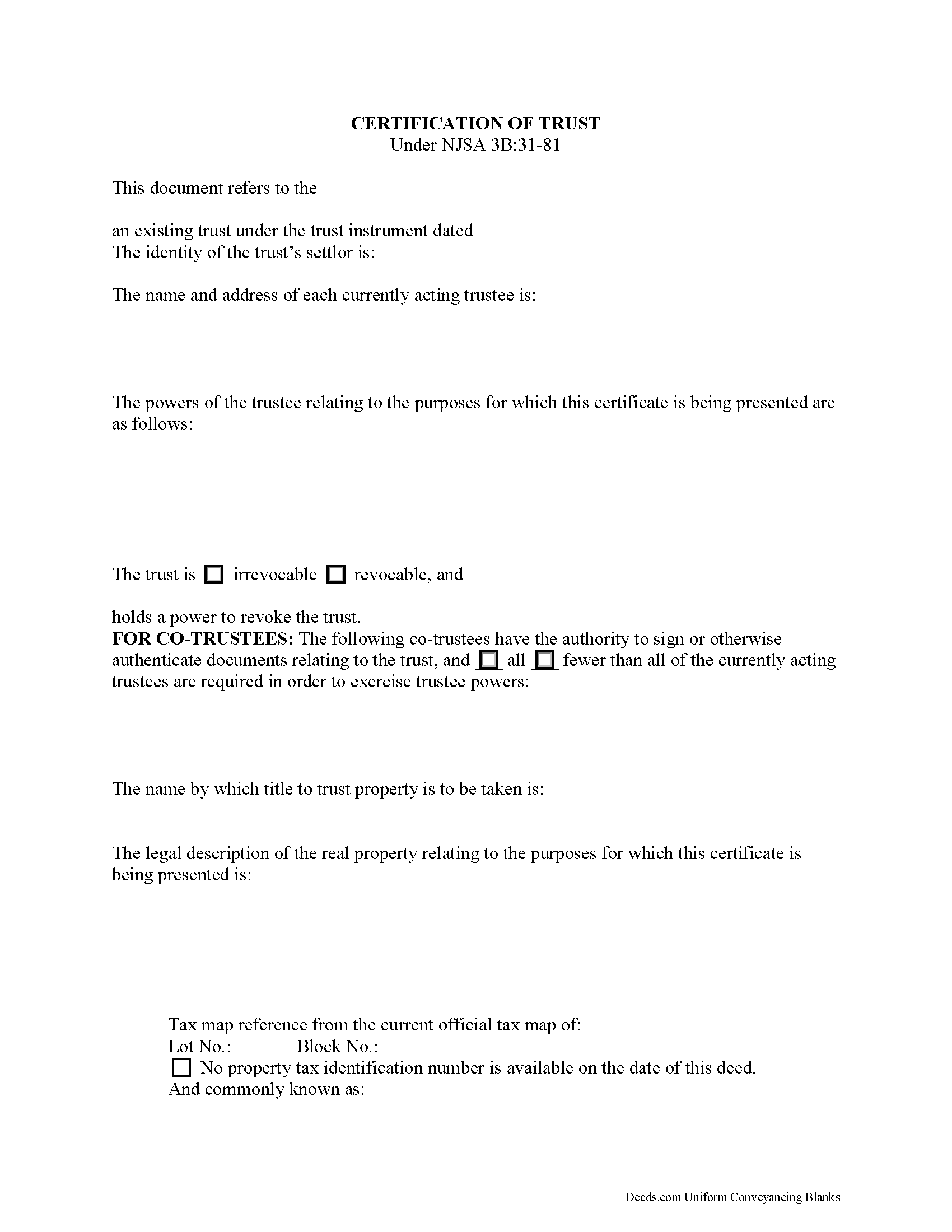
Gloucester County Certificate of Trust Form
Fill in the blank form formatted to comply with all recording and content requirements.
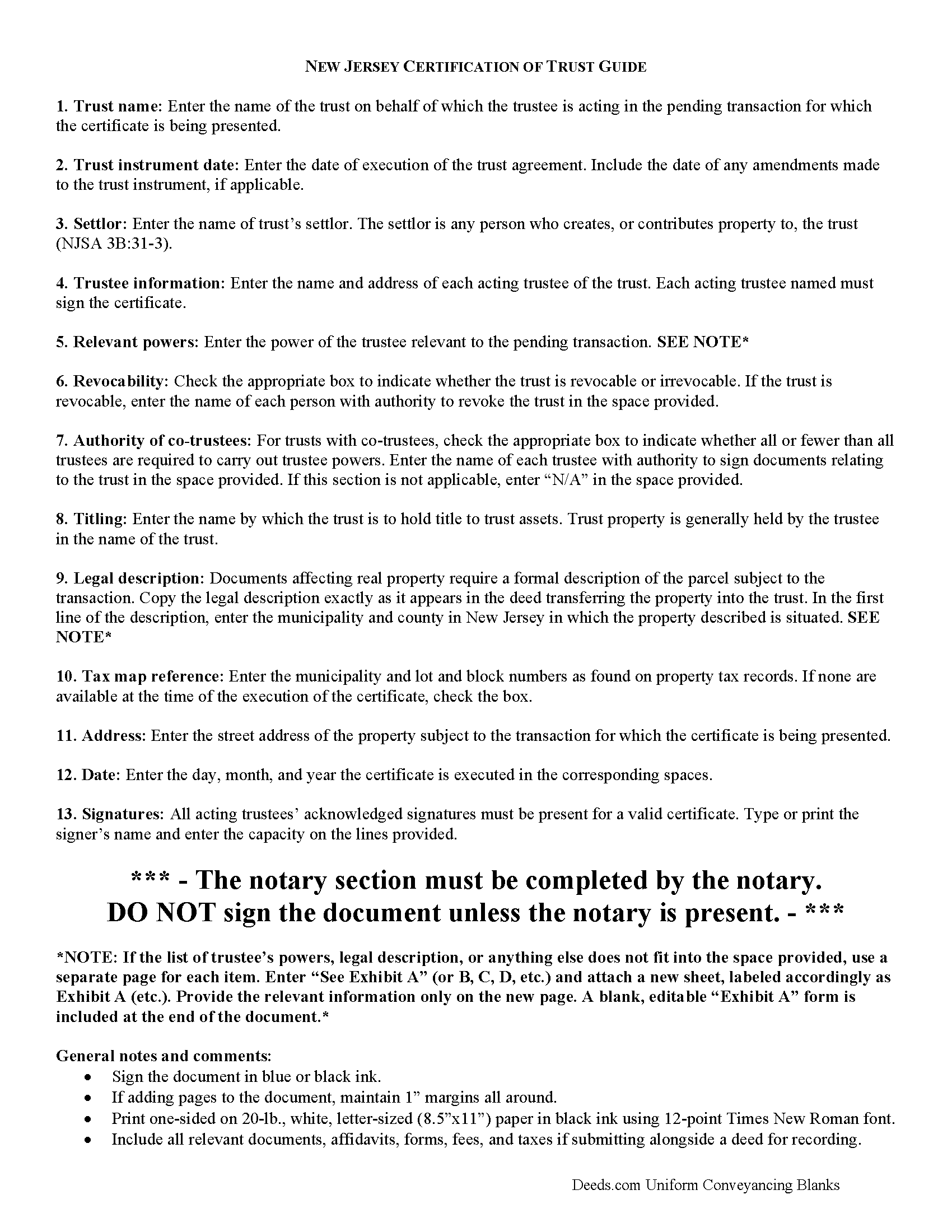
Gloucester County Certificate of Trust Guide
Line by line guide explaining every blank on the form.
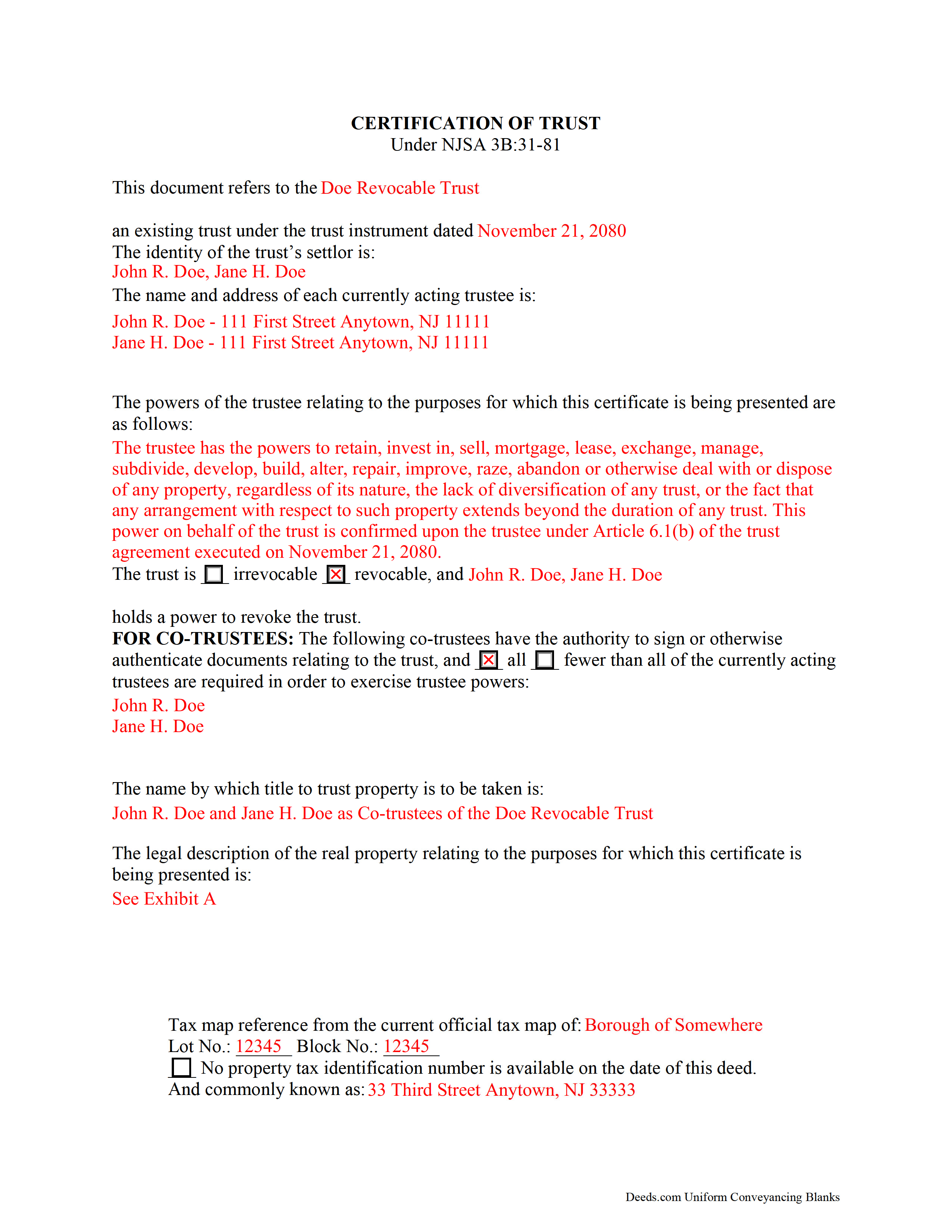
Gloucester County Completed Example of the Certificate of Trust Document
Example of a properly completed form for reference.
All 3 documents above included • One-time purchase • No recurring fees
Immediate Download • Secure Checkout
Additional New Jersey and Gloucester County documents included at no extra charge:
Where to Record Your Documents
Gloucester County Clerk
Woodbury, New Jersey 08096
Hours: 8:30 to 4:30 M-F
Phone: (856) 853-3235
Recording Tips for Gloucester County:
- Bring your driver's license or state-issued photo ID
- Ensure all signatures are in blue or black ink
- Documents must be on 8.5 x 11 inch white paper
- Double-check legal descriptions match your existing deed
- Verify all names are spelled correctly before recording
Cities and Jurisdictions in Gloucester County
Properties in any of these areas use Gloucester County forms:
- Bridgeport
- Clarksboro
- Clayton
- Deptford
- Ewan
- Franklinville
- Gibbstown
- Glassboro
- Grenloch
- Harrisonville
- Malaga
- Mantua
- Mickleton
- Mount Royal
- Mullica Hill
- National Park
- Newfield
- Paulsboro
- Pitman
- Richwood
- Sewell
- Swedesboro
- Thorofare
- Wenonah
- Westville
- Williamstown
- Woodbury
- Woodbury Heights
Hours, fees, requirements, and more for Gloucester County
How do I get my forms?
Forms are available for immediate download after payment. The Gloucester County forms will be in your account ready to download to your computer. An account is created for you during checkout if you don't have one. Forms are NOT emailed.
Are these forms guaranteed to be recordable in Gloucester County?
Yes. Our form blanks are guaranteed to meet or exceed the applicable formatting requirements used for recording in Gloucester County, including margin requirements, font requirements, and other layout standards. This guarantee applies to formatting, not to the legal sufficiency of information entered by the user or the suitability of a form for a particular transaction.
Can I reuse these forms?
Yes. You can reuse the forms for your personal use. For example, if you have multiple properties in Gloucester County you only need to order once.
What do I need to use these forms?
The forms are PDFs that you fill out on your computer. The free Adobe Acrobat Reader is recommended, and most PDF apps also work. You do NOT enter your property information online - you download the blank forms and complete them privately on your own computer.
Are there any recurring fees?
No. This is a one-time purchase. Nothing to cancel, no memberships, no recurring fees.
How much does it cost to record in Gloucester County?
Recording fees in Gloucester County vary. Contact the recorder's office at (856) 853-3235 for current fees.
Questions answered? Let's get started!
Trusts in New Jersey are governed by the New Jersey Uniform Trust Code (NJSA 3B:31). A trust is an estate planning vehicle whereby one person (the settlor) transfers assets to another person (the trustee), who holds them for the benefit of another (the beneficiary). The settlor establishes the terms of the trust in an unrecorded document called a trust instrument.
When a trustee enters into a transaction involving real property held in the trust, additional documentation confirming the trustee's authority to act on behalf of the trust may be requested. To maintain the trust's privacy, the trustee may provide a certificate of trust under 3B:3-81 to parties outside of the trust arrangement instead of furnishing the entire trust instrument.
The certificate, signed by all acting trustees of the trust in the presence of a notary public, provides the recipient with only the information about the trust necessary for the transaction at hand. Recipients of a certificate may rely on the information provided within as factual (requesting the entire trust instrument opens the recipient to certain liabilities under 3B:31-81(g)). The document certifies that the trust is in existence and that the trustee has authority to act in the transaction for which the certificate is being presented.
The form gives the trust's name and date of execution and the settlor's identity. Other requirements include the name and address of each acting trustee, a description of the relevant powers conferred upon the trustee by the trust instrument, and, in the case of co-trustees, identification of the trustees having authority to sign trust documents, and how many of the total trustees are required to exercise trustee powers. Recipients of a certificate of trust can request the excerpts from the trust instrument that designate the trustee and confer the specific powers that enable the trustee to enter into the transaction at hand (3B:31-81(e)).
As the document is used in transactions involving real property, it should also include the legal description, complete with municipality and county and tax map reference, of the subject real estate.
In addition, the certificate identifies the trust as either irrevocable or revocable, and who, if any, has a power to revoke the trust, as well as the name by which the trust will hold title to acquired assets. Finally, it includes a statement that the trust has not been modified in any way that invalidates the certified statements contained within the document.
Consult a lawyer with any questions regarding certifications of trust.
(New Jersey COT Package includes form, guidelines, and completed example)
Important: Your property must be located in Gloucester County to use these forms. Documents should be recorded at the county recording office listed above.
This Certificate of Trust meets all recording requirements specific to Gloucester County.
Our Promise
The documents you receive here are guaranteed to meet or exceed the applicable Gloucester County recording format requirements. If there is a rejection caused by our formatting, we will correct the issue or refund your payment. This guarantee applies to document formatting only and does not extend to information entered by the user, the selection of the form, or the legal effect of the completed document.
Save Time and Money
Get your Gloucester County Certificate of Trust form done right the first time with Deeds.com Uniform Conveyancing Blanks. At Deeds.com, we understand that your time and money are valuable resources, and we don't want you to face a penalty fee or rejection imposed by a county recorder for submitting nonstandard documents. We constantly review and update our forms to meet rapidly changing state and county recording requirements for roughly 3,500 counties and local jurisdictions.
4.8 out of 5 - ( 4,829 Reviews )
harriet l. 5 out of 5 stars
Worked very smoothly and got the job done
Thank you for your feedback. We really appreciate it. Have a great day!
Gretchen R. 5 out of 5 stars
I can't think of any suggestions for improvement. The documents I needed were readily available. Thank you
We appreciate your business and value your feedback. Thank you. Have a wonderful day!
Debra M. 5 out of 5 stars
Since the recorder's office is closed, due to Covid, this worked well to submit my Quit Claim Deed. I was a bit confused with the direction and download. But, I think I got her done! We'll see if I get recorded and confirmation is received. I may be back
Thank you for your feedback. We really appreciate it. Have a great day!
Patricia S. 5 out of 5 stars
The forms was easy to use and the guides was helpful
We appreciate your business and value your feedback. Thank you. Have a wonderful day!
Todd B. 5 out of 5 stars
very quick and easy
Thank you!
Johnny B. 5 out of 5 stars
This site was a breeze using.
We appreciate your business and value your feedback. Thank you. Have a wonderful day!
Joyce M. 5 out of 5 stars
Great website, but not helpful in locating my deed dated 1747.
Thank you for your feedback. We really appreciate it. Have a great day!
Ralph E. 5 out of 5 stars
I wish I had found this site earlier!!! Not only was it helpful and just what I needed but I got my information so fast AND on the weekend. I would recommend this site to everyone. I plan on using it more. Its cheap and I can get my information while sitting at home. Very impressed!
Thank you for the kinds words Ralph. Have a great day!
Anthony P. 5 out of 5 stars
Documents exactly as described, no complaints.
Thank you!
Randy B. 5 out of 5 stars
The form was exactly what we needed and the directions were spot on and perfectly clear. Filling out government forms can be an experience filled with anxiety but deeds.com made it easy and practically worry free.
Thanks Randy, we really appreciate your feedback.
Maurice C. 5 out of 5 stars
This is a great service! Very much needed.
Thank you!
Deborah D. 5 out of 5 stars
Very easy to use, got everything I needed. Reasonable price.
Thank you!
Jean K. 4 out of 5 stars
The website worked fine and I would have been happy to pay the extra money except the deed I needed was "not available". Ended up calling the courthouse anyway.
Thank you for your feedback. We really appreciate it. Have a great day!
Maribel I. 5 out of 5 stars
It would be helpful to be able to edit verbiage on the form. I was preparing a Deed of Distribution; therefore, there was no consideration paid. I had to type the language into a Word document instead.
Thank you for your feedback. We really appreciate it. Have a great day!
Lourdes O. 5 out of 5 stars
Extremely efficient website. Beats going to Court House to record documents. My document was recorded in less then 24 hours! Amazing! I will be using deeds.com from now on.
We appreciate your business and value your feedback. Thank you. Have a wonderful day!