Kewaunee County Transfer on Death to Beneficiary Form
Last validated October 23, 2026 by our Forms Development TeamFormatted for recording in Kewaunee County, for property anywhere in the county: rural and unincorporated areas as well as Algoma, Casco, Kewaunee, Luxemburg.
- 3 documents included
- Immediate PDF download
- Formatting guarantee
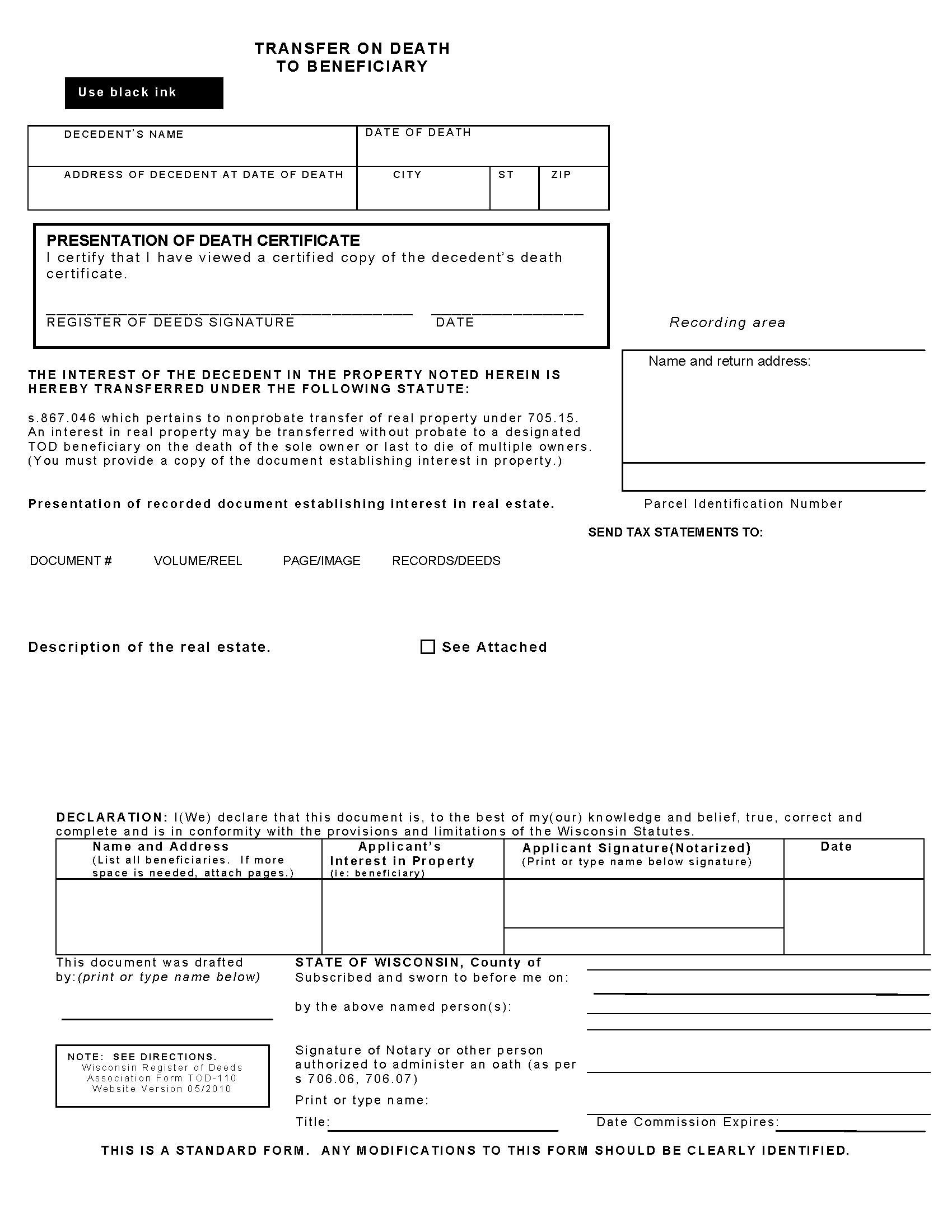
Kewaunee County Transfer on Death to Beneficiary Form
Fill in the blank form formatted to comply with all recording and content requirements.
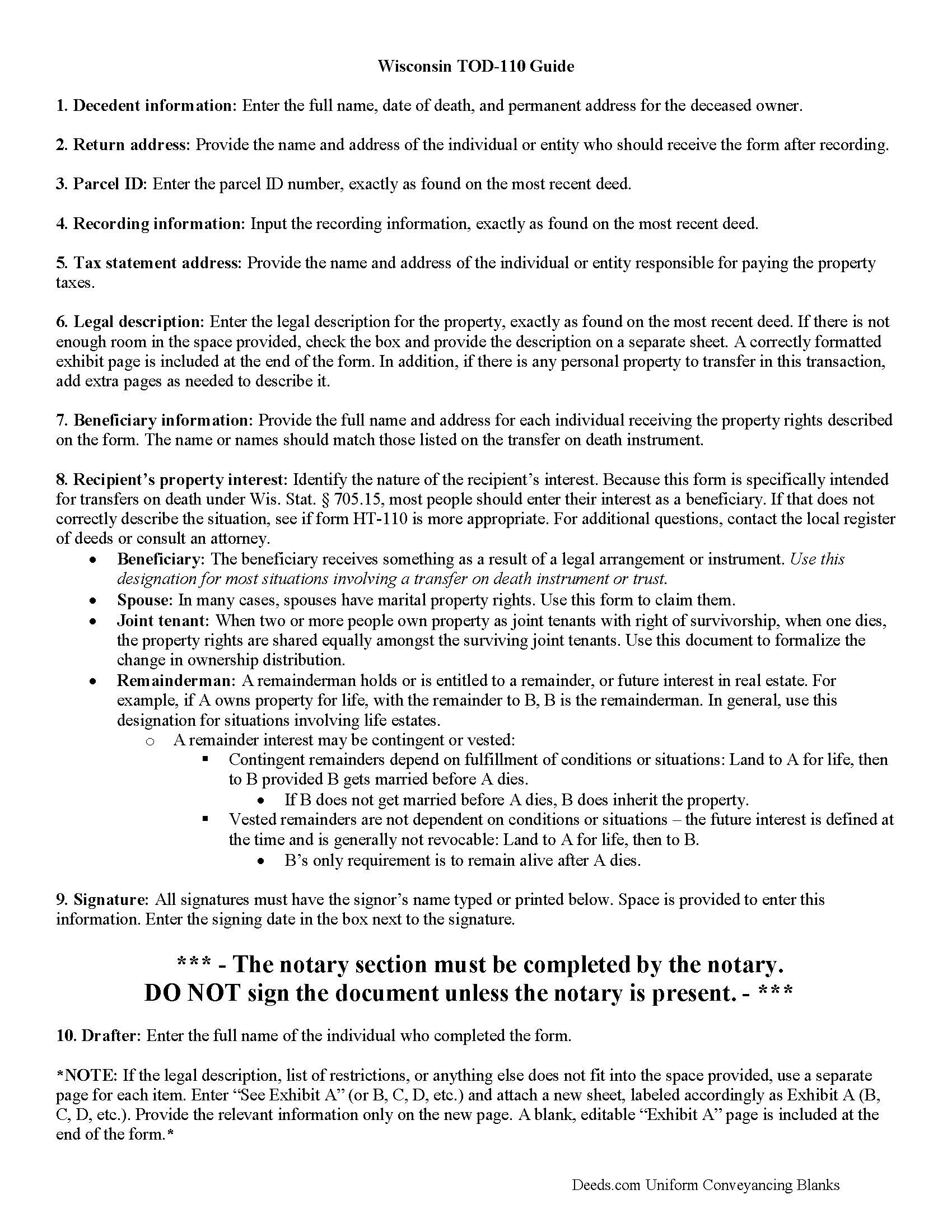
Kewaunee County Transfer on Death to Beneficiary Guide
Line by line guide explaining every blank on the form.
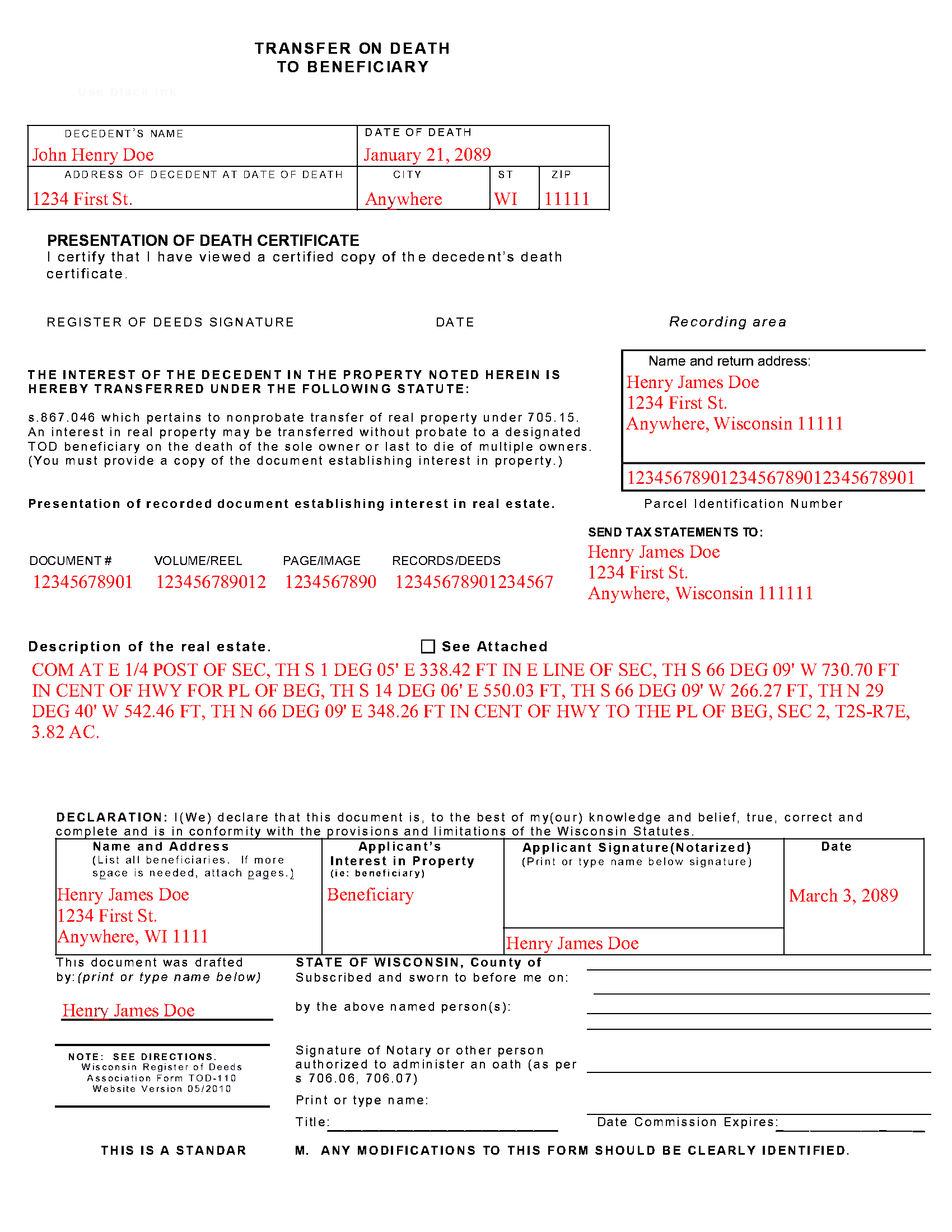
Kewaunee County Completed Example of the Transfer on Death to Beneficiary Document
Example of a properly completed form for reference.
All 3 documents above included • One-time purchase • No recurring fees
Immediate Download • Secure Checkout
Additional Wisconsin and Kewaunee County documents included at no extra charge:
Where to Record Your Documents
Kewaunee County Register of Deeds
Kewaunee, Wisconsin 54216
Hours: Monday - Friday 8:00am to 4:30pm
Phone: (920) 388-7126
Recording Tips for Kewaunee County:
- Bring your driver's license or state-issued photo ID
- Ensure all signatures are in blue or black ink
- Double-check legal descriptions match your existing deed
- Verify all names are spelled correctly before recording
- White-out or correction fluid may cause rejection
Cities and Jurisdictions in Kewaunee County
Properties in any of these areas use Kewaunee County forms:
- Algoma
- Casco
- Kewaunee
- Luxemburg
Hours, fees, requirements, and more for Kewaunee County
How do I get my forms?
Forms are available for immediate download after payment. The Kewaunee County forms will be in your account ready to download to your computer. An account is created for you during checkout if you don't have one. Forms are NOT emailed.
Are these forms guaranteed to be recordable in Kewaunee County?
Yes. Our form blanks are guaranteed to meet or exceed the applicable formatting requirements used for recording in Kewaunee County, including margin requirements, font requirements, and other layout standards. This guarantee applies to formatting, not to the legal sufficiency of information entered by the user or the suitability of a form for a particular transaction.
Can I reuse these forms?
Yes. You can reuse the forms for your personal use. For example, if you have multiple properties in Kewaunee County you only need to order once.
What do I need to use these forms?
The forms are PDFs that you fill out on your computer. The free Adobe Acrobat Reader is recommended, and most PDF apps also work. You do NOT enter your property information online - you download the blank forms and complete them privately on your own computer.
Are there any recurring fees?
No. This is a one-time purchase. Nothing to cancel, no memberships, no recurring fees.
How much does it cost to record in Kewaunee County?
Recording fees in Kewaunee County vary. Contact the recorder's office at (920) 388-7126 for current fees.
Questions answered? Let's get started!
Transfer to Beneficiary -- TOD-110
Completing the Change of Property Rights from a Wisconsin Transfer on Death Deed
When a grantor/owner of real estate under a Wisconsin transfer on death deed dies, the named beneficiary or beneficiaries gain the rights to the property by function of law. Even though this transfer is, in theory, automatic, the best way to ensure accurate and up-to-date ownership records is to file a completed and notarized transfer on death to beneficiary form TOD-110 with the register of deeds for the county where the land is located. By recording this document, the new owner formalizes the transfer and provides public notice of the new status.
(Wisconsin TOD to Beneficiary Package includes form, guidelines, and completed example)
Important: Your property must be located in Kewaunee County to use these forms. Documents should be recorded at the county recording office listed above.
This Transfer on Death to Beneficiary meets all recording requirements specific to Kewaunee County.
Our Promise
The documents you receive here are guaranteed to meet or exceed the applicable Kewaunee County recording format requirements. If there is a rejection caused by our formatting, we will correct the issue or refund your payment. This guarantee applies to document formatting only and does not extend to information entered by the user, the selection of the form, or the legal effect of the completed document.
Save Time and Money
Get your Kewaunee County Transfer on Death to Beneficiary form done right the first time with Deeds.com Uniform Conveyancing Blanks. At Deeds.com, we understand that your time and money are valuable resources, and we don't want you to face a penalty fee or rejection imposed by a county recorder for submitting nonstandard documents. We constantly review and update our forms to meet rapidly changing state and county recording requirements for roughly 3,500 counties and local jurisdictions.
4.8 out of 5 - ( 4,853 Reviews )
JAMES WILLIAM H. 5 out of 5 stars
The DOCUMENT AND INFORMATION WAS JUST WHAT I WANTED AND NEEDED. HOWEVER, NAVIGATING THE ON LINE PROCESS WAS A PROBLEM.. AT ONE POINT IT LOOKED LIKE I HAD PAID FOR THE PRODUCT AND LOST CONTACT WITH THE SYSTEM. I FINALLY GOT TO PRINT WHAT I PURCHASED. FOR SUCH I WOULD ONLY GIVE A FOUR STAR RATING.
Thank you, James. We're glad the documents and information met your needs, and we appreciate you pointing out the navigation issue. Feedback like this helps us improve the ordering experience. Thank you for your review and your business.
Ted C. 5 out of 5 stars
Everything was straight forward. I think I was able to accomplish my objective.
Thank you!
Joyce D. 5 out of 5 stars
Good after I figured out the form process. Hopefully I won't be charged for two as I redid the request thinking I might have made a mistake in the first request.
Thank you for your feedback Joyce. We have reviewed your account and there have been no duplicate orders submitted. Have a great day!
JAMES D. 5 out of 5 stars
Slick as can be and so convenient. Worked like a charm
Thank you for your feedback. We really appreciate it. Have a great day!
Thomas N. 5 out of 5 stars
Great service, truly helpful & saves time!!
Thank you!
Alberta P. 5 out of 5 stars
form was east to use...instructions came in handy.
Thank you for your feedback. We really appreciate it. Have a great day!
NormaJean Q. 5 out of 5 stars
Thank you, thie was very helpful. I did find the forms I needed.Very easy to use.,
We appreciate your business and value your feedback. Thank you. Have a wonderful day!
Richard T. 5 out of 5 stars
Easy forms for DIYers
Thank you!
Karen L. 5 out of 5 stars
Form is easy to complete but has a crowded look upon printing. I would put more returns between paragraphs to make it easier to read.
Thank you for your feedback. We really appreciate it. Have a great day!
Erik G. 5 out of 5 stars
Great...
Thank you!
Anna L W. 5 out of 5 stars
Was insecure about being able to access the information but pleasantly found that the site was easy to use. Seems that I can use it repeatedly to go back and reprint the forms once I paid.
We appreciate your business and value your feedback. Thank you. Have a wonderful day!
John G. 5 out of 5 stars
Applied for my Notice of Commencement to be recorded and it went very smoothly and fast. Will use again if a need irises. Thank You
Thank you for your feedback John, glad we could help.
Lorrie P. 5 out of 5 stars
What a wonderful and easy task using deeds.com. I searched on line for the proper procedure to file a quit claim deed. It looked to confusing to do mysellf until I found deeds.com. With their instructions, I was able to fill out all the proper forms and file with the court in two days. Saved me at least a thousand dollars if I had an attorney do the same. Thank you. I will definitely use them again.
Thank you for your feedback. We really appreciate it. Have a great day!
Patrick M. 5 out of 5 stars
Very useful and easy to use. Great value too. Especially liked the example.
Thank you for your feedback. We really appreciate it. Have a great day!
Laura H. 5 out of 5 stars
I was very impressed with how quickly I was provided the data.
Thank you!