Greene County Correction Quitclaim Deed Form
Last validated October 19, 2026 by our Forms Development TeamFormatted for recording in Greene County, for property anywhere in the county: rural and unincorporated areas as well as Boligee, Clinton, Eutaw, Forkland, Knoxville, West Greene.
- 3 documents included
- Immediate PDF download
- Formatting guarantee
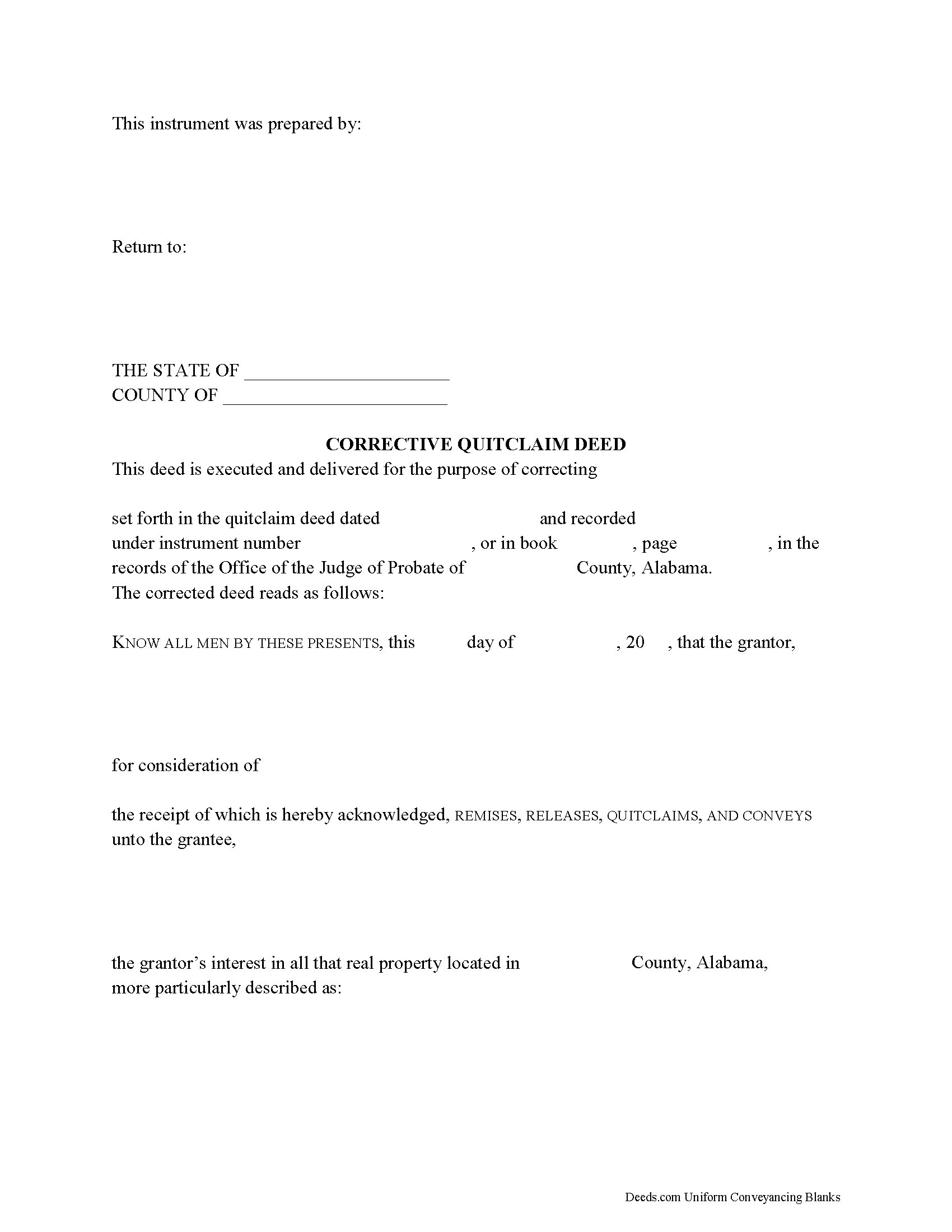
Greene County Correction Quitclaim Deed Form
Fill in the blank Correction Quitclaim Deed form formatted to comply with all Alabama recording and content requirements.
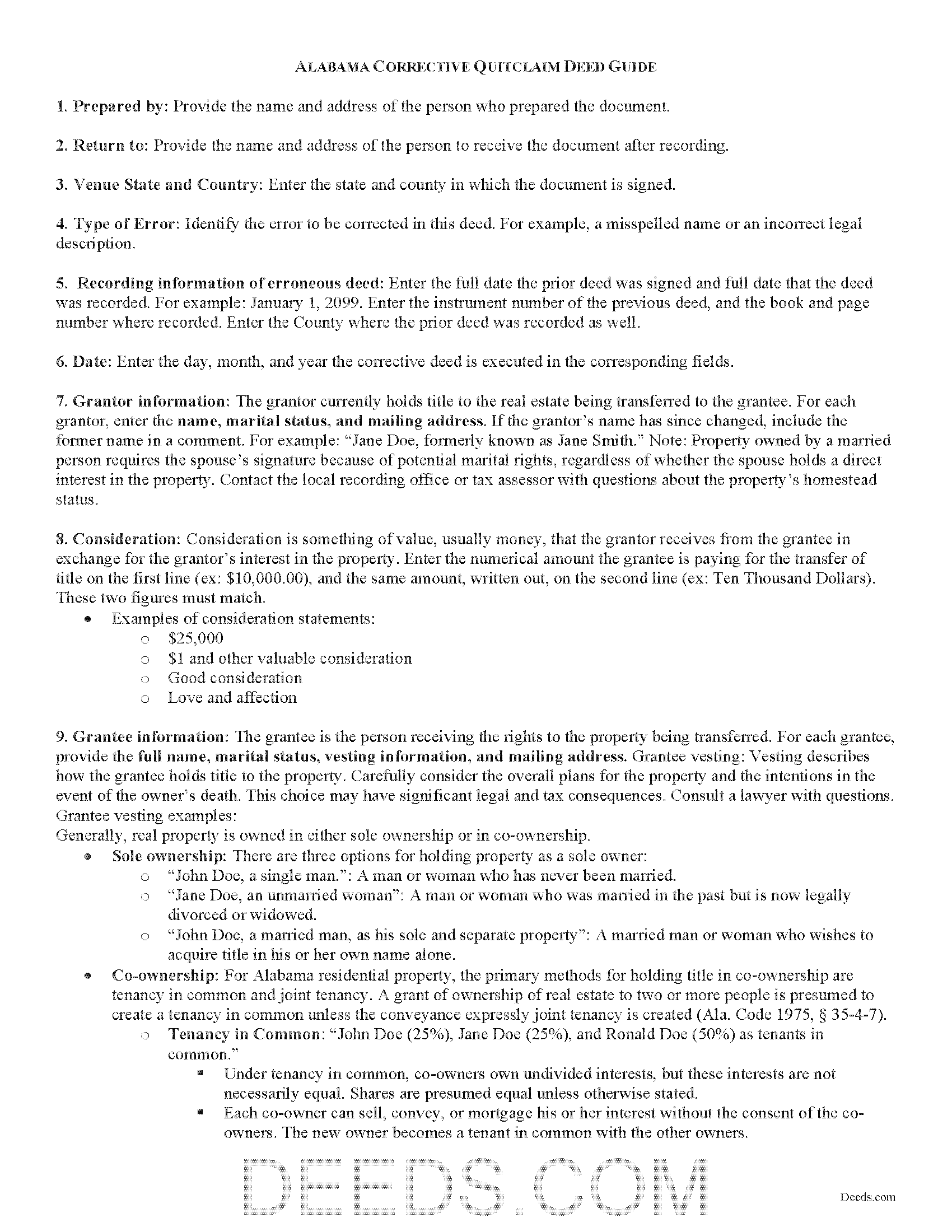
Greene County Correction Quitclaim Deed Guide
Line by line guide explaining every blank on the Correction Quitclaim Deed form.
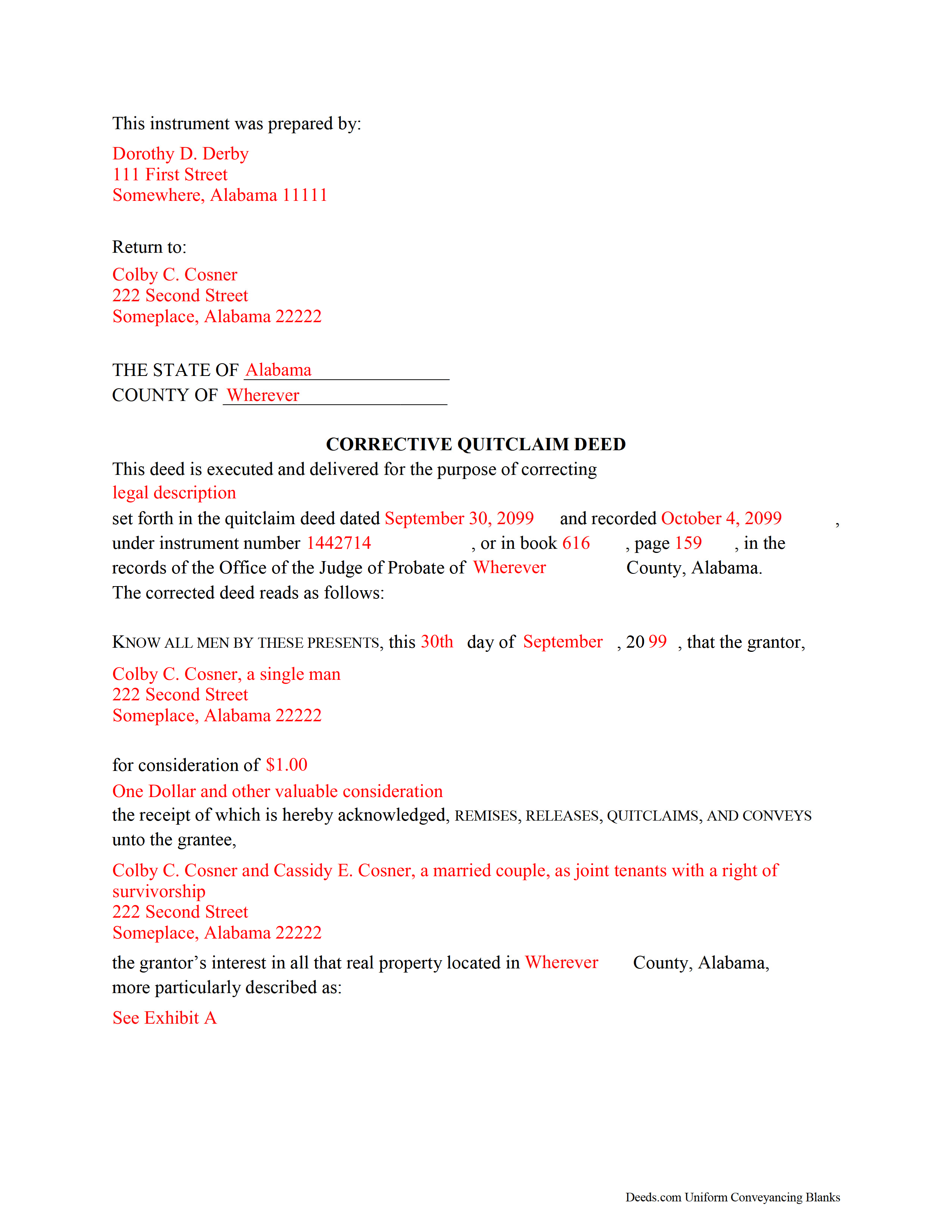
Greene County Completed Example of the Correction Quitclaim Deed Document
Example of a properly completed Alabama Correction Quitclaim Deed document for reference.
All 3 documents above included • One-time purchase • No recurring fees
Immediate Download • Secure Checkout
Additional Alabama and Greene County documents included at no extra charge:
Where to Record Your Documents
Greene Probate Office
Eutaw, Alabama 35462
Hours: 8:00 to 4:00 M-F
Phone: (205) 372-3340
Recording Tips for Greene County:
- Bring your driver's license or state-issued photo ID
- Ensure all signatures are in blue or black ink
- Bring extra funds - fees can vary by document type and page count
- Check margin requirements - usually 1-2 inches at top
- Leave recording info boxes blank - the office fills these
Cities and Jurisdictions in Greene County
Properties in any of these areas use Greene County forms:
- Boligee
- Clinton
- Eutaw
- Forkland
- Knoxville
- West Greene
Hours, fees, requirements, and more for Greene County
How do I get my forms?
Forms are available for immediate download after payment. The Greene County forms will be in your account ready to download to your computer. An account is created for you during checkout if you don't have one. Forms are NOT emailed.
Are these forms guaranteed to be recordable in Greene County?
Yes. Our form blanks are guaranteed to meet or exceed the applicable formatting requirements used for recording in Greene County, including margin requirements, font requirements, and other layout standards. This guarantee applies to formatting, not to the legal sufficiency of information entered by the user or the suitability of a form for a particular transaction.
Can I reuse these forms?
Yes. You can reuse the forms for your personal use. For example, if you have multiple properties in Greene County you only need to order once.
What do I need to use these forms?
The forms are PDFs that you fill out on your computer. The free Adobe Acrobat Reader is recommended, and most PDF apps also work. You do NOT enter your property information online - you download the blank forms and complete them privately on your own computer.
Are there any recurring fees?
No. This is a one-time purchase. Nothing to cancel, no memberships, no recurring fees.
How much does it cost to record in Greene County?
Recording fees in Greene County vary. Contact the recorder's office at (205) 372-3340 for current fees.
Questions answered? Let's get started!
An Alabama Correction Quitclaim Deed is used to fix a recorded Alabama quitclaim deed when the original instrument contains a non-material mistake, such as a misspelled name, omitted marital status, or an error in the legal description that does not change the substance of the transfer. Alabama makes this deed type especially useful because the state has recording rules that can stop a corrective instrument cold over details other states may treat more casually, including marital-status recitals, homestead spousal assent, preparer identification, and county probate recording requirements.
When an Alabama Correction Quitclaim Deed is commonly used
This deed is commonly used after an Alabama quitclaim deed has already been recorded and the parties discover a clerical or scrivener’s error that needs to be corrected in the public record without changing the underlying nature of the conveyance. The corrective instrument refers back to the earlier recorded deed, identifies the mistake, and states the corrected information, while remaining a quitclaim deed rather than converting the transaction into a different deed type.
Alabama execution and content requirements
In Alabama, conveyances of land must be in writing and signed at the foot of the document by the party conveying the property or by an agent with written authority (Ala. Code § 35-4-20). A deed ordinarily must be attested by one witness, but if the signer cannot write, or if another person writes the signer’s name for a signer who can write but does not sign personally, Alabama requires two witnesses who can and do write their names (Ala. Code § 35-4-20). A proper acknowledgment operates as compliance with the witness requirement, and acknowledgments may be taken in Alabama by officers including judges of probate and notaries public (Ala. Code §§ 35-4-23, 35-4-24).
A correction deed should clearly identify the earlier recorded quitclaim deed by date and recording information, state the nature of the error, and set out the corrected information in the body of the instrument. Because Alabama requires the marital status of an individual grantor or vendor to be recited before the deed will be accepted for record, that recital needs to be handled carefully on a corrective instrument as well (Ala. Code § 35-4-73).
Alabama also requires a printed, typed, or stamped statement showing the name and address of the individual who prepared the instrument. For a form deed, the preparer is the person who filled in the blanks or examined the completed entries, so that line is not just cosmetic in Alabama; it is part of recordability (Ala. Code § 35-4-110).
Alabama-specific traps that matter on a correction deed
The biggest Alabama trap is assuming that any error can be fixed with a correction deed. A correction quitclaim deed is suited to clerical and non-substantive mistakes. It is not a clean substitute for changing the actual parties, changing the property conveyed, altering consideration in a way that changes the transaction, or otherwise rewriting the substance of the earlier transfer. When the problem is more than a minor correction, the fix usually moves outside simple re-recording territory, and Alabama law separately recognizes court actions to reform instruments containing erroneous descriptions (Ala. Code § 35-4-151).
Homestead rights are another Alabama-specific danger point. If the property is homestead property and the grantor is married, a deed or other conveyance of the homestead is not valid without the voluntary signature and assent of the spouse, shown by proper acknowledgment (Ala. Code § 6-10-3). That issue does not disappear just because the document is labeled corrective. If the original conveyance implicated homestead rights, the corrective instrument needs to be reviewed with that same rule in mind.
Marital-status recitals also matter in Alabama beyond homestead questions. A probate judge may refuse a deed that does not recite the marital status of an individual grantor, and knowingly making a false recital is a misdemeanor (Ala. Code § 35-4-73). On top of that, county probate offices commonly scrutinize the legal description closely. If the property is described by lot and block, the deed should track the recorded plat reference accurately. If the property is described by government survey, section, township, and range details should match the earlier record. A correction deed meant to fix one problem can create a second one if the replacement description is incomplete or inconsistent.
Recording, deed tax, and why timing still matters in Alabama
Alabama deeds are recorded in the office of the judge of probate, and instruments executed in accordance with law are admitted to record there, with filing serving as notice of their contents (Ala. Code §§ 35-4-50, 35-4-51). Even though a correction deed points back to an earlier instrument, prompt recording still matters because Alabama protects purchasers, mortgagees, and judgment creditors without notice who record first under the state’s recording rules (Ala. Code § 35-4-90).
One useful Alabama feature is that the re-recordation of corrected deeds executed for the purpose of perfecting title is exempt from the privilege or license tax otherwise imposed on deeds (Ala. Code § 40-22-1(b)(3)). That exemption is important because Alabama deed tax rules are strict, and probate offices expect the recording package to line up with the tax treatment claimed. A corrective deed that really is correcting the prior quitclaim deed is treated differently from a new taxable conveyance.
Vesting and survivorship in Alabama
A correction quitclaim deed can also be used to clean up vesting language when the original recorded quitclaim deed contains a non-substantive error in how ownership was stated, but Alabama has its own survivorship rule that makes wording important. In Alabama, survivorship does not arise automatically from joint ownership. Unless the instrument states that the tenancy is with right of survivorship, or uses other words clearly showing that intent, the deceased owner’s interest does not automatically pass to the surviving co-owner (Ala. Code § 35-4-7). Because of that rule, any correction involving vesting language needs to track the intended ownership language exactly and stay within the bounds of a true correction rather than a new conveyance.
What is included in the Alabama Correction Quitclaim Deed package
The Alabama Correction Quitclaim Deed package includes the county-ready deed form, step-by-step guidelines, and a completed example to help you prepare the corrective instrument for recording in the appropriate Alabama probate office. The package is designed to address the practical Alabama details that matter on this deed type, including reference to the prior recorded quitclaim deed, execution formalities, and recording-related requirements that commonly affect acceptance.
Important: Your property must be located in Greene County to use these forms. Documents should be recorded at the county recording office listed above.
This Correction Quitclaim Deed meets all recording requirements specific to Greene County.
Our Promise
The documents you receive here are guaranteed to meet or exceed the applicable Greene County recording format requirements. If there is a rejection caused by our formatting, we will correct the issue or refund your payment. This guarantee applies to document formatting only and does not extend to information entered by the user, the selection of the form, or the legal effect of the completed document.
Save Time and Money
Get your Greene County Correction Quitclaim Deed form done right the first time with Deeds.com Uniform Conveyancing Blanks. At Deeds.com, we understand that your time and money are valuable resources, and we don't want you to face a penalty fee or rejection imposed by a county recorder for submitting nonstandard documents. We constantly review and update our forms to meet rapidly changing state and county recording requirements for roughly 3,500 counties and local jurisdictions.
4.8 out of 5 - ( 4,832 Reviews )
Edward B. 5 out of 5 stars
Thank you for the rapid response. I shall persevere in my search using other public records. I shall keep your website handy for other such searches in the future.
Thank you!
William J. T. 5 out of 5 stars
Satisfied with downloaded documents.
Thank you!
Anne B. 5 out of 5 stars
Great experience! It was so easy and quick. We will definitely use the service again.
We appreciate your business and value your feedback. Thank you. Have a wonderful day!
Dennis M. 5 out of 5 stars
Very quick and easy to use. Deeds.com saved me a lot of money!
Thank you!
Eileen B. 5 out of 5 stars
Great form needs more instructions however but aside from that is perfect solution for my needs.
We appreciate your business and value your feedback. Thank you. Have a wonderful day!
John T. 5 out of 5 stars
Amazing! Very helpful. Very specific.
Thank you for your feedback. We really appreciate it. Have a great day!
Laryn A. 5 out of 5 stars
Very happy with the beneficiary deed forms packet. It was helpful to have an example of a properly filled out form. The only suggestion would be is to show where the exemption code should be placed on the form.
Thank you for your feedback. We really appreciate it. Have a great day!
Joann J. 5 out of 5 stars
Much easier to navigate than some others I've been on. Liked the upfront pricing.
We appreciate your comments and your trust in us. Thank you.
Christine S. 5 out of 5 stars
Very good site! I found everything I needed right here on Deeds.com. Excellent quality forms, easy access, perfect delivery, reasonable price
We appreciate your business and value your feedback. Thank you. Have a wonderful day!
Karina C. 5 out of 5 stars
The process was very convenient, fast, and efficient. I appreciated the messaging feature which provided real-time communication. I would certainly recommended this service to anyone needing it.
We appreciate your business and value your feedback. Thank you. Have a wonderful day!
Fallon G. 5 out of 5 stars
Very easy to use, thank you!
Knowing our customers are happy is our top priority. Thank you for the wonderful feedback!
Adelola O. 5 out of 5 stars
I called the county clerk office yesterday that i wanted to get a deed e-filed and recorded. I was told they are not accepting documents in person because of the COVID 19 pandemic that I have to mail it. I found Deeds.com online and in less than 24hrs i have my document. Thank you!!!!! $15....Totally worth it.
Thanks Adelola, glad we could help.
George A. M. 5 out of 5 stars
User friendly and fast to use. I was pleased with experience.
We appreciate your business and value your feedback. Thank you. Have a wonderful day!
Darrel V. 5 out of 5 stars
Pretty easy to use and timely, too!
We appreciate your business and value your feedback. Thank you. Have a wonderful day!
Rachel Y. 5 out of 5 stars
I liked the ease of use, however I would love to be able to add multiple APN’s and delete lines that are not applicable
Thank you, Rachel. We’re glad you found the form easy to use, and we appreciate your suggestions about adding multiple APNs and removing inapplicable lines. Feedback like this helps us improve our forms.