Bibb County Correction Warranty Deed Form
Last validated October 6, 2026 by our Forms Development TeamFormatted for recording in Bibb County, for property anywhere in the county: rural and unincorporated areas as well as Brent, Brierfield, Centreville, Green Pond, Lawley, Randolph, West Blocton, Woodstock.
- 3 documents included
- Immediate PDF download
- Formatting guarantee
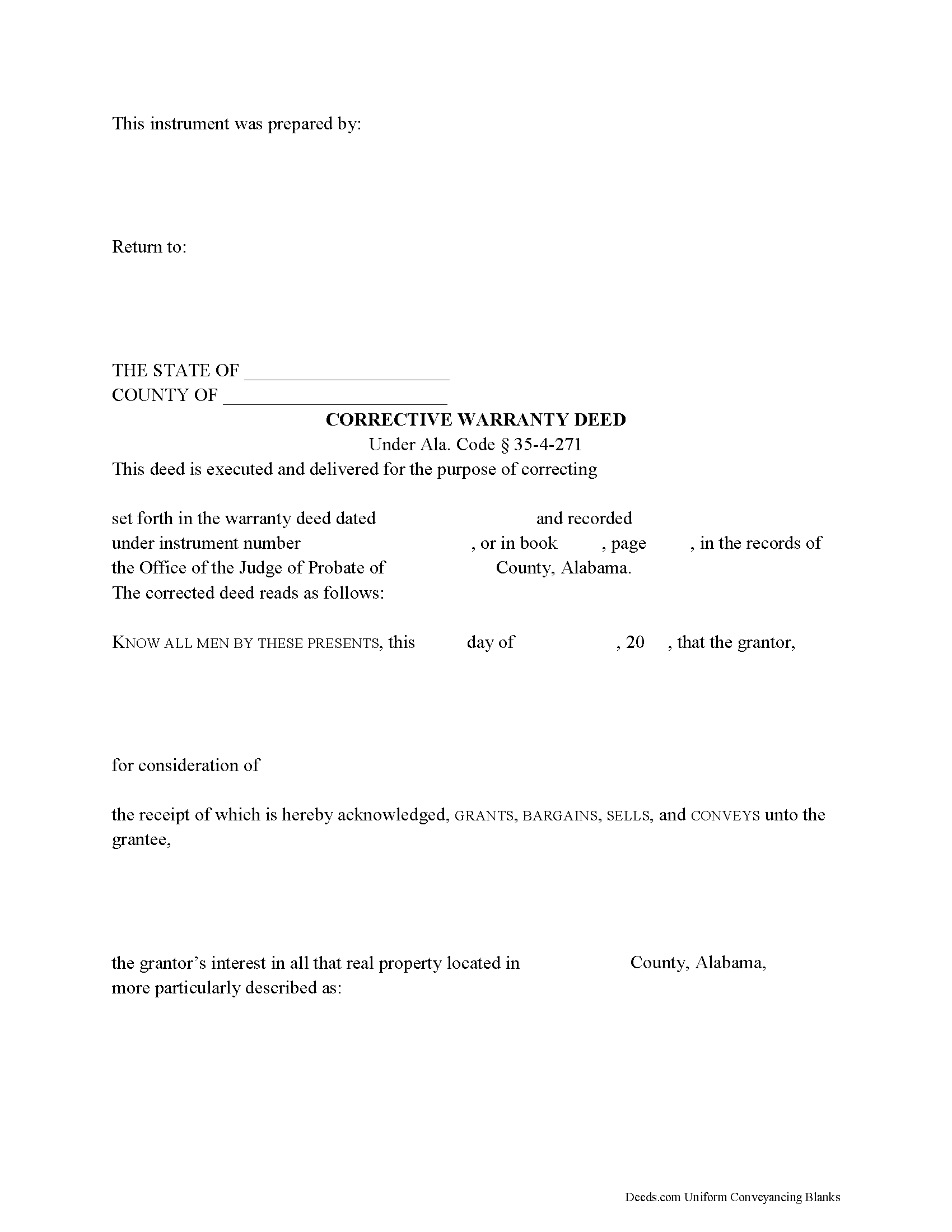
Bibb County Correction Warranty Deed
Fill in the blank form formatted to comply with all recording and content requirements.
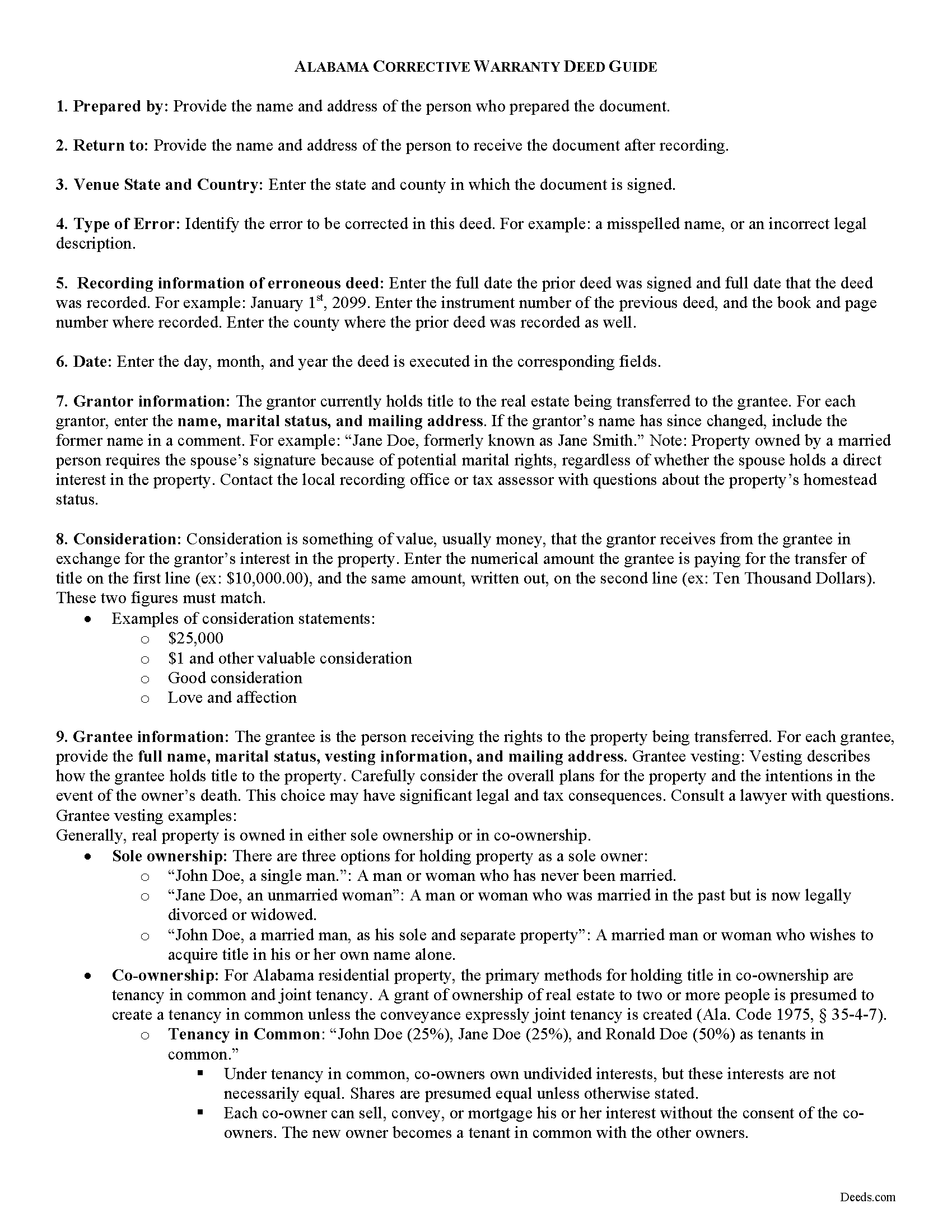
Bibb County Correction Warranty Deed Guide
Line by line guide explaining every blank on the form.
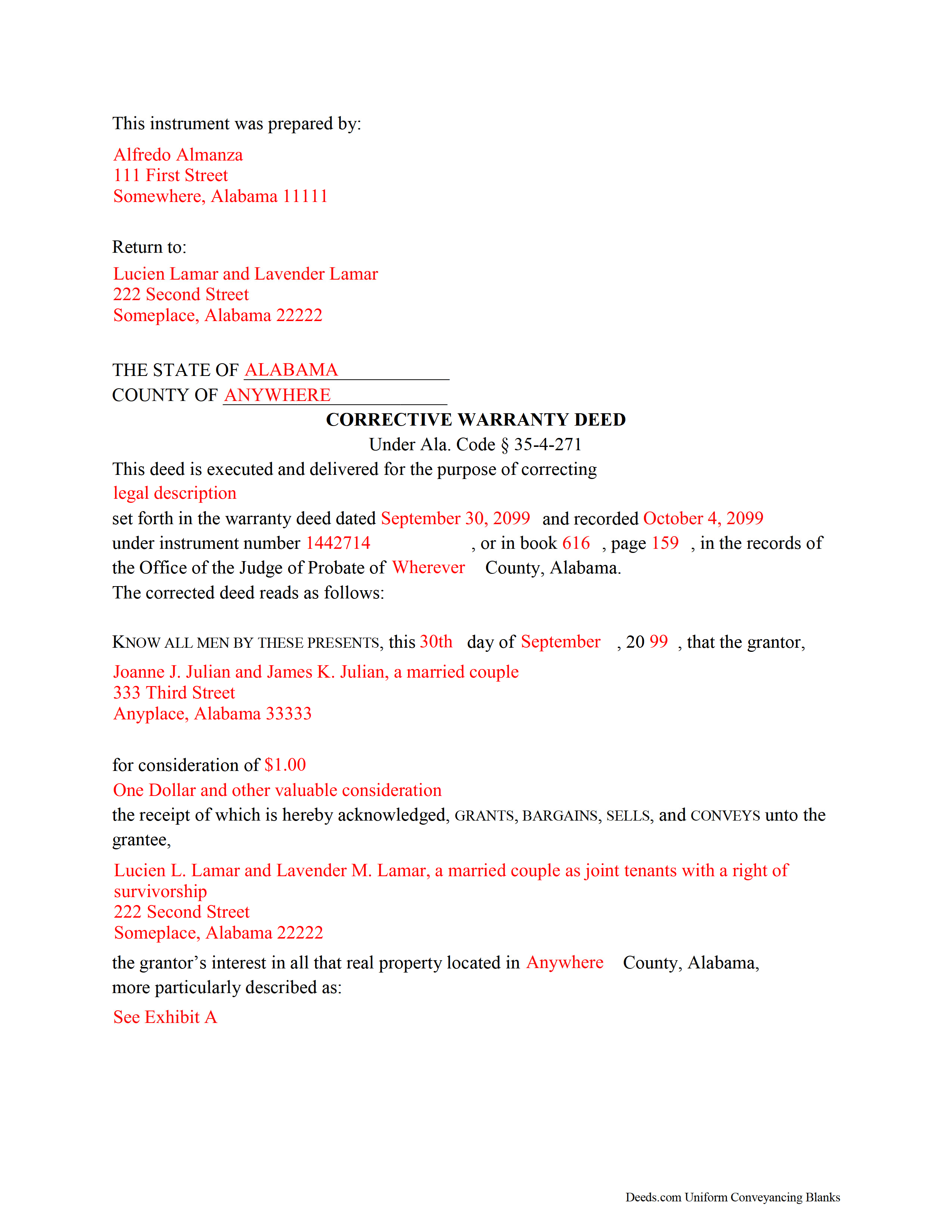
Bibb County Completed Example of the Correction Warranty Deed Document
Example of a properly completed form for reference.
All 3 documents above included • One-time purchase • No recurring fees
Immediate Download • Secure Checkout
Additional Alabama and Bibb County documents included at no extra charge:
Where to Record Your Documents
Bibb County Probate Office
Centreville, Alabama 35042
Hours: 8:30 to 4:30 M-F
Phone: (205) 926-3104
Recording Tips for Bibb County:
- Bring your driver's license or state-issued photo ID
- Ensure all signatures are in blue or black ink
- Make copies of your documents before recording - keep originals safe
- Recorded documents become public record - avoid including SSNs
- Recording fees may differ from what's posted online - verify current rates
Cities and Jurisdictions in Bibb County
Properties in any of these areas use Bibb County forms:
- Brent
- Brierfield
- Centreville
- Green Pond
- Lawley
- Randolph
- West Blocton
- Woodstock
Hours, fees, requirements, and more for Bibb County
How do I get my forms?
Forms are available for immediate download after payment. The Bibb County forms will be in your account ready to download to your computer. An account is created for you during checkout if you don't have one. Forms are NOT emailed.
Are these forms guaranteed to be recordable in Bibb County?
Yes. Our form blanks are guaranteed to meet or exceed the applicable formatting requirements used for recording in Bibb County, including margin requirements, font requirements, and other layout standards. This guarantee applies to formatting, not to the legal sufficiency of information entered by the user or the suitability of a form for a particular transaction.
Can I reuse these forms?
Yes. You can reuse the forms for your personal use. For example, if you have multiple properties in Bibb County you only need to order once.
What do I need to use these forms?
The forms are PDFs that you fill out on your computer. The free Adobe Acrobat Reader is recommended, and most PDF apps also work. You do NOT enter your property information online - you download the blank forms and complete them privately on your own computer.
Are there any recurring fees?
No. This is a one-time purchase. Nothing to cancel, no memberships, no recurring fees.
How much does it cost to record in Bibb County?
Recording fees in Bibb County vary. Contact the recorder's office at (205) 926-3104 for current fees.
Questions answered? Let's get started!
Alabama's recording system operates on a race-notice basis, which means a deed error left unresolved in the public record can cloud title, delay a future sale, or create priority disputes with later creditors and purchasers. A Correction Warranty Deed — sometimes called a corrective deed — is the instrument Alabama practitioners use to fix non-material errors in a previously recorded warranty deed without disturbing the underlying conveyance. Because Alabama has no single statutory form for corrective deeds, the instrument must be drafted to mirror the original deed while clearly identifying the error, reciting the prior deed's recording information, and meeting all current execution requirements. Getting those details right determines whether the probate court accepts the filing and whether the correction actually clears the record.
When a Correction Warranty Deed Is Used in Alabama
A Correction Warranty Deed is used when a recorded warranty deed contains a non-material error — one that does not alter the substance of the conveyance. Common examples include a misspelled grantor or grantee name, an omitted marital status recital, a transposition of courses and distances in the legal description, or missing recording cross-references for a subdivision plat. The corrective deed restates the original conveyance, identifies the specific error, and substitutes the correct information. It does not create a new conveyance; it confirms and clarifies the one already in the record. Errors that change who holds title, what interest was conveyed, or what property was transferred require a new deed rather than a corrective instrument.
Alabama Statutory Framework for Corrective Deeds
Alabama law provides for judicial reformation of a deed when parties cannot agree or when the error is material (Ala. Code 1975, § 35-4-150). For straightforward non-material errors, a corrective deed recorded in the same probate office as the original is the more efficient remedy. The corrective deed must meet the same formal requirements as any deed recorded in Alabama, including proper acknowledgment before an officer authorized under Ala. Code 1975, § 35-4-24 — which includes notaries public and other officers authorized to take acknowledgments within or outside the state.
Execution Requirements — Who Must Sign and How
All parties who executed the original deed must sign the Correction Warranty Deed. Alabama requires at least one witness to the grantor's signature in addition to the notarial acknowledgment (Ala. Code 1975, § 35-4-20). This is a point where Alabama differs from several other states that have eliminated the lay-witness requirement — omitting the witness line will result in rejection at recording.
If the grantor was married at the time of the original conveyance, Alabama's homestead law requires both spouses to appear before an authorized officer and sign any deed affecting homestead property (Ala. Code 1975, § 6-10-3). This obligation carries forward to the corrective deed. A correction deed signed only by the original grantor — without the spouse's signature and acknowledgment — will not cure the homestead defect and may itself be unrecordable depending on the probate office.
Alabama-Specific Traps for Correction Warranty Deeds
Marital Status Recitals
One of the most common reasons a corrective deed is needed in Alabama is a missing or incorrect marital status recital in the original instrument. Alabama probate offices routinely flag deeds that fail to state whether the grantor is single, married, or widowed. The corrective deed must include the accurate marital status at the time of the original conveyance, and the current marital status if different.
Spousal Joinder and Homestead
If the property is or was the grantor's homestead, the corrective deed must include the non-grantor spouse's signature and separate acknowledgment regardless of whether the spouse had any ownership interest. Failure to obtain spousal joinder on homestead property is a material defect that a corrective deed cannot cure after the fact — it requires a new conveyance with proper spousal execution.
Prior Deed Recording Information
Alabama does not have a statute that specifies exactly what recitals a corrective deed must contain, but recording practice across the state's probate offices requires the instrument to identify the prior deed by date of execution, date of recording, and the book and page number (or instrument number) where it appears in the public record. A corrective deed that does not tie back to the original recorded instrument may be rejected or may fail to achieve its purpose of linking the correction to the erroneous filing.
Deed Privilege Tax Exemption
Most Alabama real estate transfers are subject to the state deed privilege tax (Ala. Code 1975, § 40-22-1). Correction deeds are exempt from this tax because no new consideration is being conveyed. The Real Estate Sales Validation Form (Form RT-1), which is typically required at recording, is also not required for a corrective deed. Nonetheless, the instrument should include a clear recital that it is a corrective deed confirming a prior conveyance, so the probate office does not assess the tax in error.
Preparer Identification
Some Alabama counties require that the deed identify the person who drafted it. Including a preparer identification line — stating the name and address of the individual or entity who prepared the instrument — eliminates a common cause of rejection at recording and is considered best practice statewide regardless of whether the specific county mandates it.
Recording the Correction Warranty Deed in Alabama
Deeds in Alabama are recorded in the Probate Court of the county where the property is located. Recording fees vary by county and are based on the number of pages. The corrective deed should be recorded promptly after execution. Alabama is a race-notice state, meaning a subsequent purchaser or creditor who records first without notice of a prior unrecorded interest takes priority — an uncorrected, potentially ambiguous deed in the record increases risk until the correction is filed. Once recorded, the corrective deed becomes part of the chain of title and the public record reflects the accurate information.
What Is Included in the Download Package
The Alabama Correction Warranty Deed package available on Deeds.com includes the deed form specific to the county where the property is located, a completed example showing how the form should be filled out, and a guide covering Alabama's execution and recording requirements. The forms are prepared by Deeds.com's forms development team and are formatted to meet Alabama probate court standards. All files are available for immediate download after purchase.
Important: Your property must be located in Bibb County to use these forms. Documents should be recorded at the county recording office listed above.
This Correction Warranty Deed meets all recording requirements specific to Bibb County.
Our Promise
The documents you receive here are guaranteed to meet or exceed the applicable Bibb County recording format requirements. If there is a rejection caused by our formatting, we will correct the issue or refund your payment. This guarantee applies to document formatting only and does not extend to information entered by the user, the selection of the form, or the legal effect of the completed document.
Save Time and Money
Get your Bibb County Correction Warranty Deed form done right the first time with Deeds.com Uniform Conveyancing Blanks. At Deeds.com, we understand that your time and money are valuable resources, and we don't want you to face a penalty fee or rejection imposed by a county recorder for submitting nonstandard documents. We constantly review and update our forms to meet rapidly changing state and county recording requirements for roughly 3,500 counties and local jurisdictions.
4.8 out of 5 - ( 4,824 Reviews )
silvia m. 5 out of 5 stars
Used the forms for a quitclaim deed. Worked great! Also, big bonus to have the extra forms available, needed a couple of them. Highly recommend...
We appreciate your business and value your feedback. Thank you. Have a wonderful day!
Ardith T. 5 out of 5 stars
Very clear and complete. Good value.
We appreciate your business and value your feedback. Thank you. Have a wonderful day!
Daisy R. 5 out of 5 stars
I did my Lady Bird Deed in a way the instruction indicated to do. The example you provided make it easy to understand. Thank you
Happy we could assist. Thank you for sharing your experience.
DAVID K. 5 out of 5 stars
You are definitely the place to go for forms and other things which I need to solve my problems. Thanks for your help.
Thank you!
carrie m. 5 out of 5 stars
I was excited because I really wanted to see and get a copy of the Deed to my property. The personal/Staff responsible for setting up that plan did an excellent/outstanding job. Thanks so much and keep up the great work. Carrie
Thank you for your feedback. We really appreciate it. Have a great day!
Kathryn C. 5 out of 5 stars
The process to get my needed documents worked easily. I was pleased how quickly I was able to access the documents.
Your positive feedback is a testament to our efforts, and it truly made our day. We are committed to keeping up this level of service and making your future interactions with us equally, if not more, pleasing.
Thank you once again for taking the time to share your positive experience. We look forward to serving you again soon!
Russell N. 5 out of 5 stars
Very simple process to purchase and download. Made it easy to understand the different forms and their uses and how to select the right form.
We appreciate your business and value your feedback. Thank you. Have a wonderful day!
Tonya J. 5 out of 5 stars
User friendly and fast response time!!
Thank you for your feedback. We really appreciate it. Have a great day!
Joy R. 5 out of 5 stars
Easy and efficient way to get a deed copy.
Thank you!
Kevin R. 5 out of 5 stars
I have been using Deeds.com for the last 2 years and find them very easy to use and expedient on all my recordings. Highly recommend.
Thank you for the kind words Kevin. We appreciate you.
Gabriel R. 4 out of 5 stars
So far the service seems good, simple to use. One criticism, the password change feature should require the user to re-enter their old password, new password, and re-enter the new password to make sure there is no typos. Thanks.
Thank you for your feedback. We really appreciate it. Have a great day!
John H. 1 out of 5 stars
Re: Idaho Affidavit of Successor: Decedent's residence may be a state other than Idaho. Death certificate documnet# field is too small.
Thank you for your feedback. We have emailed you an amended document to address your specific needs outlined in your feedback, hope this helps. Have a wonderful day.
Patricia J. 5 out of 5 stars
No word "Download" so had a little trouble figuring out how to download, but finally figured it out.
Thank you for your feedback. We really appreciate it. Have a great day!
Jay G. 5 out of 5 stars
Impressed by their expeditious response to my request which was facilitated by their fabulous software.
Thank you!
David O. 5 out of 5 stars
Service was top-notch....fast, accurate, cost-effective.
Thank you!