Clay County Correction Warranty Deed Form
Last validated October 27, 2026 by our Forms Development TeamFormatted for recording in Clay County, for property anywhere in the county: rural and unincorporated areas as well as Ashland, Cragford, Delta, Hollins, Lineville, Millerville.
- 3 documents included
- Immediate PDF download
- Formatting guarantee
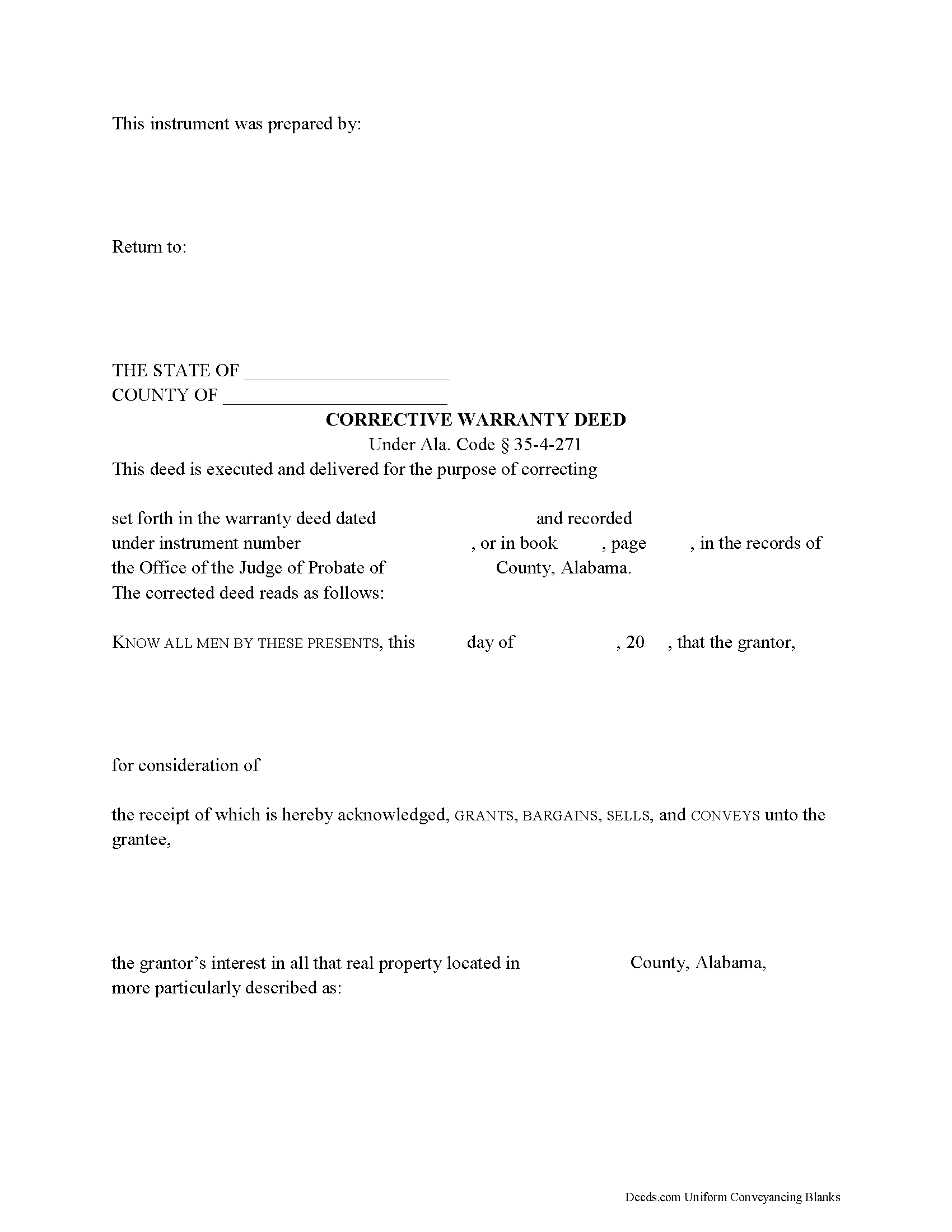
Clay County Correction Warranty Deed
Fill in the blank form formatted to comply with all recording and content requirements.
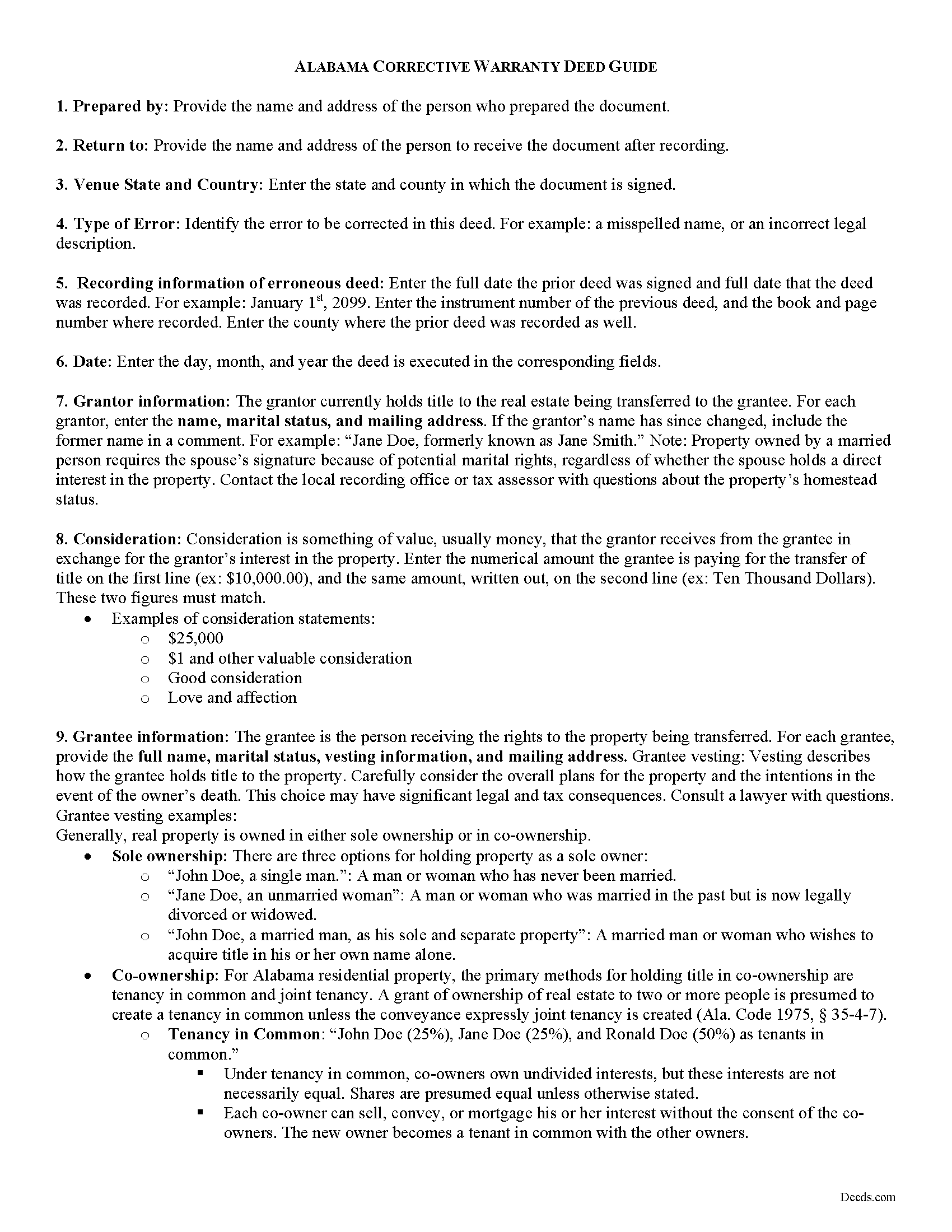
Clay County Correction Warranty Deed Guide
Line by line guide explaining every blank on the form.
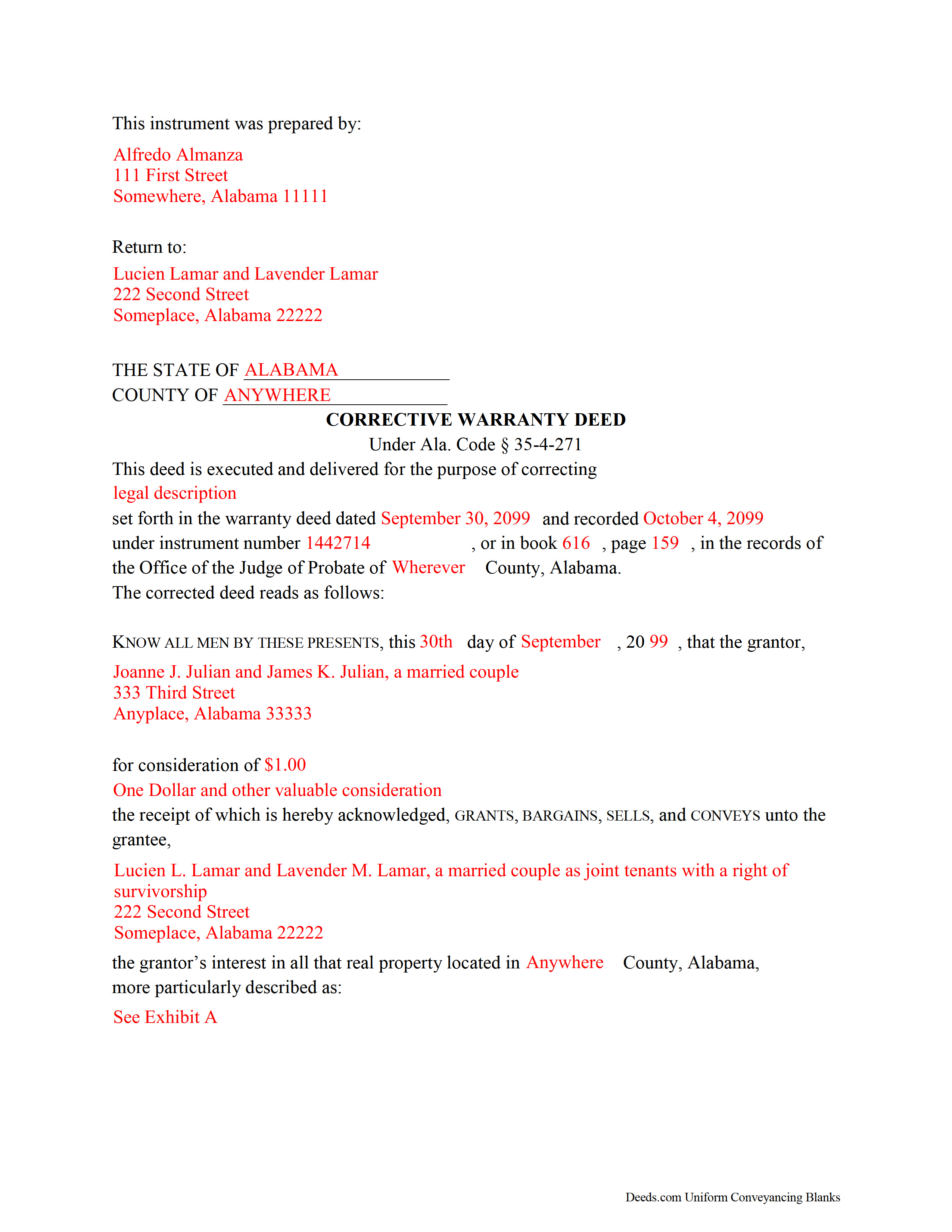
Clay County Completed Example of the Correction Warranty Deed Document
Example of a properly completed form for reference.
All 3 documents above included • One-time purchase • No recurring fees
Immediate Download • Secure Checkout
Additional Alabama and Clay County documents included at no extra charge:
Where to Record Your Documents
Clay County Probate Office
Ashland, Alabama 36251
Hours: 8:30 to 4:00 M-F
Phone: (256) 354-2198
Recording Tips for Clay County:
- Bring your driver's license or state-issued photo ID
- Ensure all signatures are in blue or black ink
- Ask if they accept credit cards - many offices are cash/check only
- Check that your notary's commission hasn't expired
- Documents must be on 8.5 x 11 inch white paper
Cities and Jurisdictions in Clay County
Properties in any of these areas use Clay County forms:
- Ashland
- Cragford
- Delta
- Hollins
- Lineville
- Millerville
Hours, fees, requirements, and more for Clay County
How do I get my forms?
Forms are available for immediate download after payment. The Clay County forms will be in your account ready to download to your computer. An account is created for you during checkout if you don't have one. Forms are NOT emailed.
Are these forms guaranteed to be recordable in Clay County?
Yes. Our form blanks are guaranteed to meet or exceed the applicable formatting requirements used for recording in Clay County, including margin requirements, font requirements, and other layout standards. This guarantee applies to formatting, not to the legal sufficiency of information entered by the user or the suitability of a form for a particular transaction.
Can I reuse these forms?
Yes. You can reuse the forms for your personal use. For example, if you have multiple properties in Clay County you only need to order once.
What do I need to use these forms?
The forms are PDFs that you fill out on your computer. The free Adobe Acrobat Reader is recommended, and most PDF apps also work. You do NOT enter your property information online - you download the blank forms and complete them privately on your own computer.
Are there any recurring fees?
No. This is a one-time purchase. Nothing to cancel, no memberships, no recurring fees.
How much does it cost to record in Clay County?
Recording fees in Clay County vary. Contact the recorder's office at (256) 354-2198 for current fees.
Questions answered? Let's get started!
Alabama's recording system operates on a race-notice basis, which means a deed error left unresolved in the public record can cloud title, delay a future sale, or create priority disputes with later creditors and purchasers. A Correction Warranty Deed — sometimes called a corrective deed — is the instrument Alabama practitioners use to fix non-material errors in a previously recorded warranty deed without disturbing the underlying conveyance. Because Alabama has no single statutory form for corrective deeds, the instrument must be drafted to mirror the original deed while clearly identifying the error, reciting the prior deed's recording information, and meeting all current execution requirements. Getting those details right determines whether the probate court accepts the filing and whether the correction actually clears the record.
When a Correction Warranty Deed Is Used in Alabama
A Correction Warranty Deed is used when a recorded warranty deed contains a non-material error — one that does not alter the substance of the conveyance. Common examples include a misspelled grantor or grantee name, an omitted marital status recital, a transposition of courses and distances in the legal description, or missing recording cross-references for a subdivision plat. The corrective deed restates the original conveyance, identifies the specific error, and substitutes the correct information. It does not create a new conveyance; it confirms and clarifies the one already in the record. Errors that change who holds title, what interest was conveyed, or what property was transferred require a new deed rather than a corrective instrument.
Alabama Statutory Framework for Corrective Deeds
Alabama law provides for judicial reformation of a deed when parties cannot agree or when the error is material (Ala. Code 1975, § 35-4-150). For straightforward non-material errors, a corrective deed recorded in the same probate office as the original is the more efficient remedy. The corrective deed must meet the same formal requirements as any deed recorded in Alabama, including proper acknowledgment before an officer authorized under Ala. Code 1975, § 35-4-24 — which includes notaries public and other officers authorized to take acknowledgments within or outside the state.
Execution Requirements — Who Must Sign and How
All parties who executed the original deed must sign the Correction Warranty Deed. Alabama requires at least one witness to the grantor's signature in addition to the notarial acknowledgment (Ala. Code 1975, § 35-4-20). This is a point where Alabama differs from several other states that have eliminated the lay-witness requirement — omitting the witness line will result in rejection at recording.
If the grantor was married at the time of the original conveyance, Alabama's homestead law requires both spouses to appear before an authorized officer and sign any deed affecting homestead property (Ala. Code 1975, § 6-10-3). This obligation carries forward to the corrective deed. A correction deed signed only by the original grantor — without the spouse's signature and acknowledgment — will not cure the homestead defect and may itself be unrecordable depending on the probate office.
Alabama-Specific Traps for Correction Warranty Deeds
Marital Status Recitals
One of the most common reasons a corrective deed is needed in Alabama is a missing or incorrect marital status recital in the original instrument. Alabama probate offices routinely flag deeds that fail to state whether the grantor is single, married, or widowed. The corrective deed must include the accurate marital status at the time of the original conveyance, and the current marital status if different.
Spousal Joinder and Homestead
If the property is or was the grantor's homestead, the corrective deed must include the non-grantor spouse's signature and separate acknowledgment regardless of whether the spouse had any ownership interest. Failure to obtain spousal joinder on homestead property is a material defect that a corrective deed cannot cure after the fact — it requires a new conveyance with proper spousal execution.
Prior Deed Recording Information
Alabama does not have a statute that specifies exactly what recitals a corrective deed must contain, but recording practice across the state's probate offices requires the instrument to identify the prior deed by date of execution, date of recording, and the book and page number (or instrument number) where it appears in the public record. A corrective deed that does not tie back to the original recorded instrument may be rejected or may fail to achieve its purpose of linking the correction to the erroneous filing.
Deed Privilege Tax Exemption
Most Alabama real estate transfers are subject to the state deed privilege tax (Ala. Code 1975, § 40-22-1). Correction deeds are exempt from this tax because no new consideration is being conveyed. The Real Estate Sales Validation Form (Form RT-1), which is typically required at recording, is also not required for a corrective deed. Nonetheless, the instrument should include a clear recital that it is a corrective deed confirming a prior conveyance, so the probate office does not assess the tax in error.
Preparer Identification
Some Alabama counties require that the deed identify the person who drafted it. Including a preparer identification line — stating the name and address of the individual or entity who prepared the instrument — eliminates a common cause of rejection at recording and is considered best practice statewide regardless of whether the specific county mandates it.
Recording the Correction Warranty Deed in Alabama
Deeds in Alabama are recorded in the Probate Court of the county where the property is located. Recording fees vary by county and are based on the number of pages. The corrective deed should be recorded promptly after execution. Alabama is a race-notice state, meaning a subsequent purchaser or creditor who records first without notice of a prior unrecorded interest takes priority — an uncorrected, potentially ambiguous deed in the record increases risk until the correction is filed. Once recorded, the corrective deed becomes part of the chain of title and the public record reflects the accurate information.
What Is Included in the Download Package
The Alabama Correction Warranty Deed package available on Deeds.com includes the deed form specific to the county where the property is located, a completed example showing how the form should be filled out, and a guide covering Alabama's execution and recording requirements. The forms are prepared by Deeds.com's forms development team and are formatted to meet Alabama probate court standards. All files are available for immediate download after purchase.
Important: Your property must be located in Clay County to use these forms. Documents should be recorded at the county recording office listed above.
This Correction Warranty Deed meets all recording requirements specific to Clay County.
Our Promise
The documents you receive here are guaranteed to meet or exceed the applicable Clay County recording format requirements. If there is a rejection caused by our formatting, we will correct the issue or refund your payment. This guarantee applies to document formatting only and does not extend to information entered by the user, the selection of the form, or the legal effect of the completed document.
Save Time and Money
Get your Clay County Correction Warranty Deed form done right the first time with Deeds.com Uniform Conveyancing Blanks. At Deeds.com, we understand that your time and money are valuable resources, and we don't want you to face a penalty fee or rejection imposed by a county recorder for submitting nonstandard documents. We constantly review and update our forms to meet rapidly changing state and county recording requirements for roughly 3,500 counties and local jurisdictions.
4.8 out of 5 - ( 4,842 Reviews )
ALYSSA J. 1 out of 5 stars
I was unable to end up going through with the deed process on my own as it was out of my realm. I suspect if I knew what I was actually doing when completing a deed, it would of been sufficient. I ended up having to go through an attorney to complete the deed.
Glad to hear you sought the assistance of a legal professional familiar with your specific situation, we always recommend that to anyone who is not completely sure of what they are doing. Have a wonderful day.
DAVID H. 5 out of 5 stars
perfect. follow examples. no problem at court house. good deed layout.
Thank you for your feedback. We really appreciate it. Have a great day!
Gordon J. 5 out of 5 stars
The experience was generally very satisfactory. I was able to fill out the Trust Deed and send it via email no problem. However, I was not able to send the filled out form of the Note. It always erased my fill-ins when it was sent. I found that very frustrating.
Thank you, Gordon. Glad the Trust Deed worked well. Issues like the one you reported with the Note can sometimes be related to how the file is opened or sent. Using Adobe Reader to fill, save, and send the form is recommended. We also pass along all feedback like this to our team to confirm there are no issues.
Thomas D. 2 out of 5 stars
The documents themselves are fine and the information provided with them is helpful. I find the actual processing of the documents, however, to be difficult particularly once the document has been saved. First, I note that the box for the date only allows entry of the last 2 digits of the year. Unfortunately, my download only allows me to enter one of the 2 digits required. When I delete it repeatedly, it eventually allows both digits to be entered but puts them in extremely small text and in superscrypt. I have not found a solution to this problem and am not sure the deed can even be recorded with this problem. Another problem is that if you try to revise the document after you have saved it the curser goes to the end of the line after each key entry. This means that there basically is no way to efficiently save the document for reworking later since you will have to delete everything you have entered in the text box unless you only need to make a single keystroke change or are willing to replace the curser after each entry. Try that with a long property description! Please note that I am using a Mac to prepare my documents and perhaps this is part of an "incompatibility problem". However, I didn't see a disclaimer regarding Mac use and so would expect the documents to perform correctly. Overall, I give the program a "2 star" rating because I am experiencing significant difficulties in entering dates in the documents even before saving them and because saving your work for later revision appears to be basically unworkable.
Thank you for your feedback Thomas, we appreciate you being specific about the issues you encountered. Adobe and Mac have a fairly long history of issues working together.
John v. 4 out of 5 stars
Process is well laid out, clear and concise. Check out is easy. Recommendations: * Assign names to the downloadable files that are meaningful, such as: WARRANTY DEED instead of the useless and cryptic 1420490866F11417.pdf. * Provide a ONE BUTTON DOWNLOAD for all forms ordered. It's aggravating to have to click on each of the 20 documents and download them individually.
Thank you for your feedback. We really appreciate it. Have a great day!
Ken J. 5 out of 5 stars
I liked the software, it's very easy to use. Once it's saved as a .pdf document on your computer, the source document is lost when you log out. I wish it could be saved and then edited on their site later instead of having to create a new document from scratch each time.
Thank you for your feedback. We really appreciate it. Have a great day!
Michael M. 5 out of 5 stars
Deeds.com had what I needed at the time that I needed it. Thank you very much.
We appreciate your business and value your feedback. Thank you. Have a wonderful day!
Julie Z. 5 out of 5 stars
Just getting started with this process, but I was delighted to find this resource to speed up the decision making. Excellent! Very helpful!
Thank you for your positive words! We’re thrilled to hear about your experience.
Penny S. 5 out of 5 stars
Easy to access information needed.
We’re always here to help. Thank you for your feedback.
Jonathon K. 5 out of 5 stars
Recording deeds from the comfort of my office has never been simpler thanks to Deeds.com. The service is affordable, fast, and extremely user friendly. I highly recommend anyone who needs a deed recorded in the state of Florida to look into this website, it has made my job much easier.
We appreciate your business and value your feedback. Thank you. Have a wonderful day!
Elizabeth S. 5 out of 5 stars
Easy to download. I like the fact that it gives me an example of how to fill it out and also the instructions. Thank you so much.
Thank you for your feedback. We really appreciate it. Have a great day!
Marilyn C. 5 out of 5 stars
Fillable documents, after a download, would be helpful. Very good to have all these forms online and accessible for an overall fee.
Thank you!
Dan B. 5 out of 5 stars
Excellent service even faster then I expected. Very pleased and a reasonable priced document. I encourage people too use Deeds.Com
Thank you for your feedback. We really appreciate it. Have a great day!
Dina B. 5 out of 5 stars
The web cite is very easy to navigate through making a document process simple to obtain.
Thank you!
April L. 5 out of 5 stars
It was easy and I will use it again.
We appreciate your business and value your feedback. Thank you. Have a wonderful day!