Tuscaloosa County Limited Power of Attorney for the Purchase of Real Property Form
Last validated September 2, 2026 by our Forms Development TeamFormatted for recording in Tuscaloosa County, for property anywhere in the county: rural and unincorporated areas as well as Abernant, Brookwood, Buhl, Coaling, Coker, Cottondale, Duncanville, Echola and 9 more.
- 3 documents included
- Immediate PDF download
- Formatting guarantee
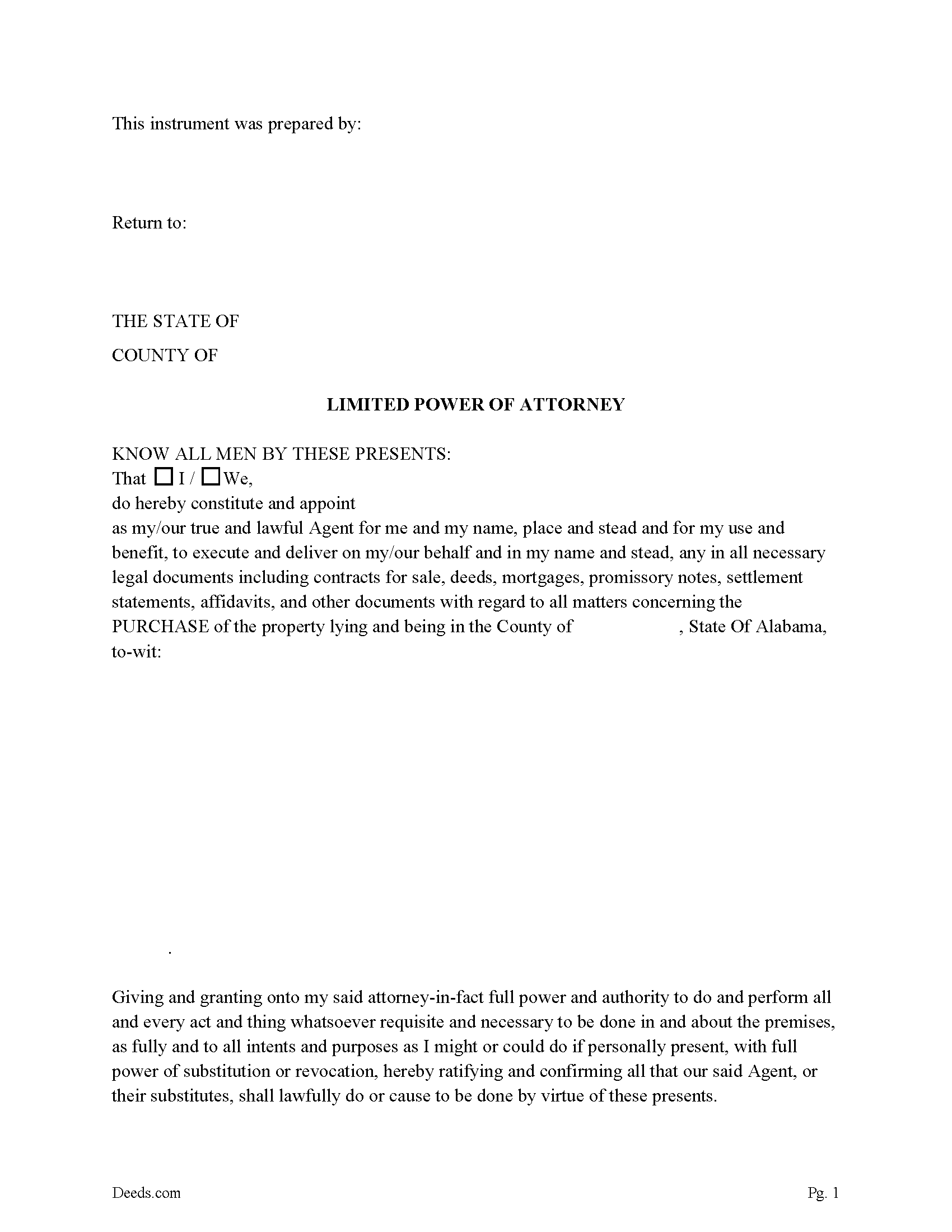
Tuscaloosa County Limited Power of Attorney for the Purchase of Property Form
Fill in the blank form formatted to comply with all recording and content requirements.
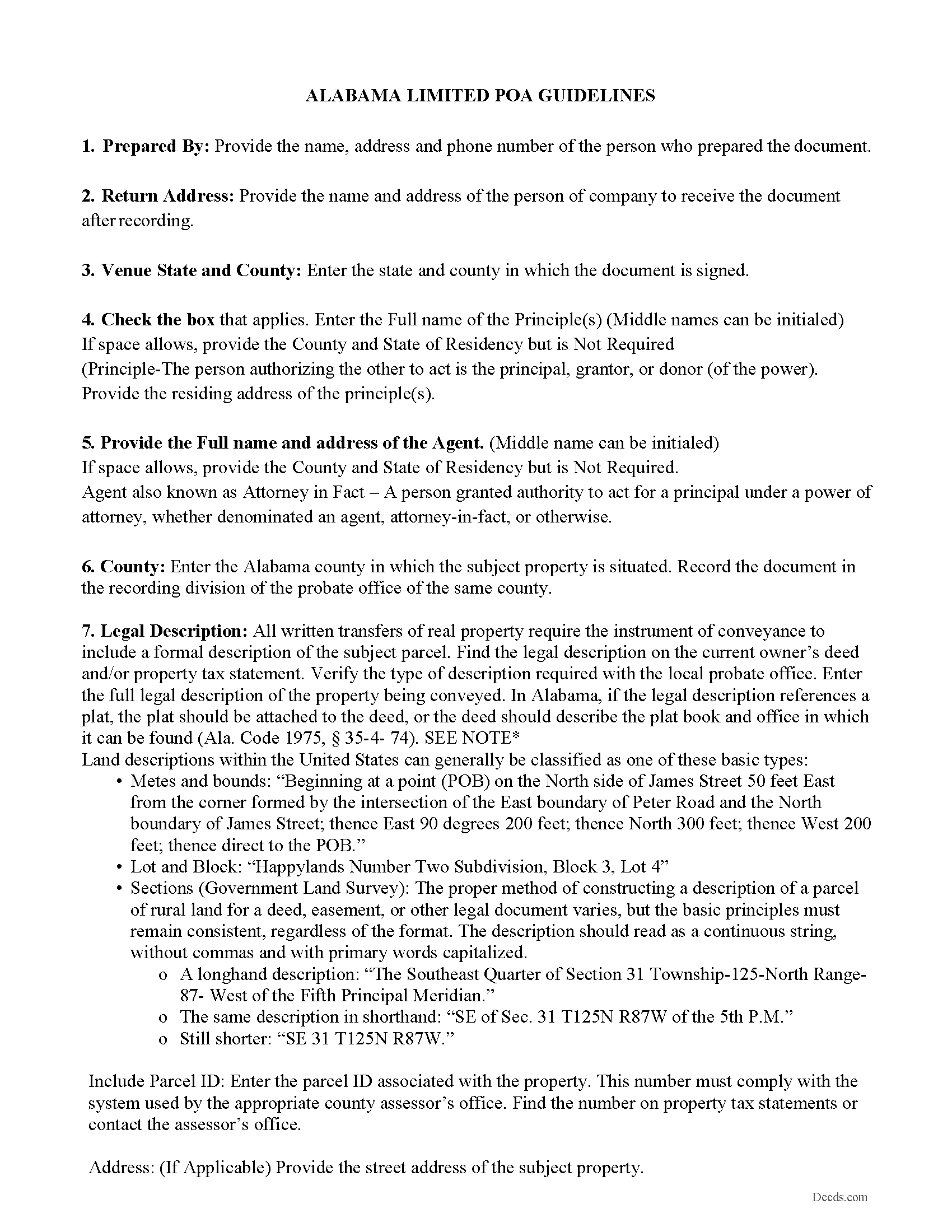
Tuscaloosa County Guidelines for Limited Power of Attorney
Line by line guide explaining every blank on the form.
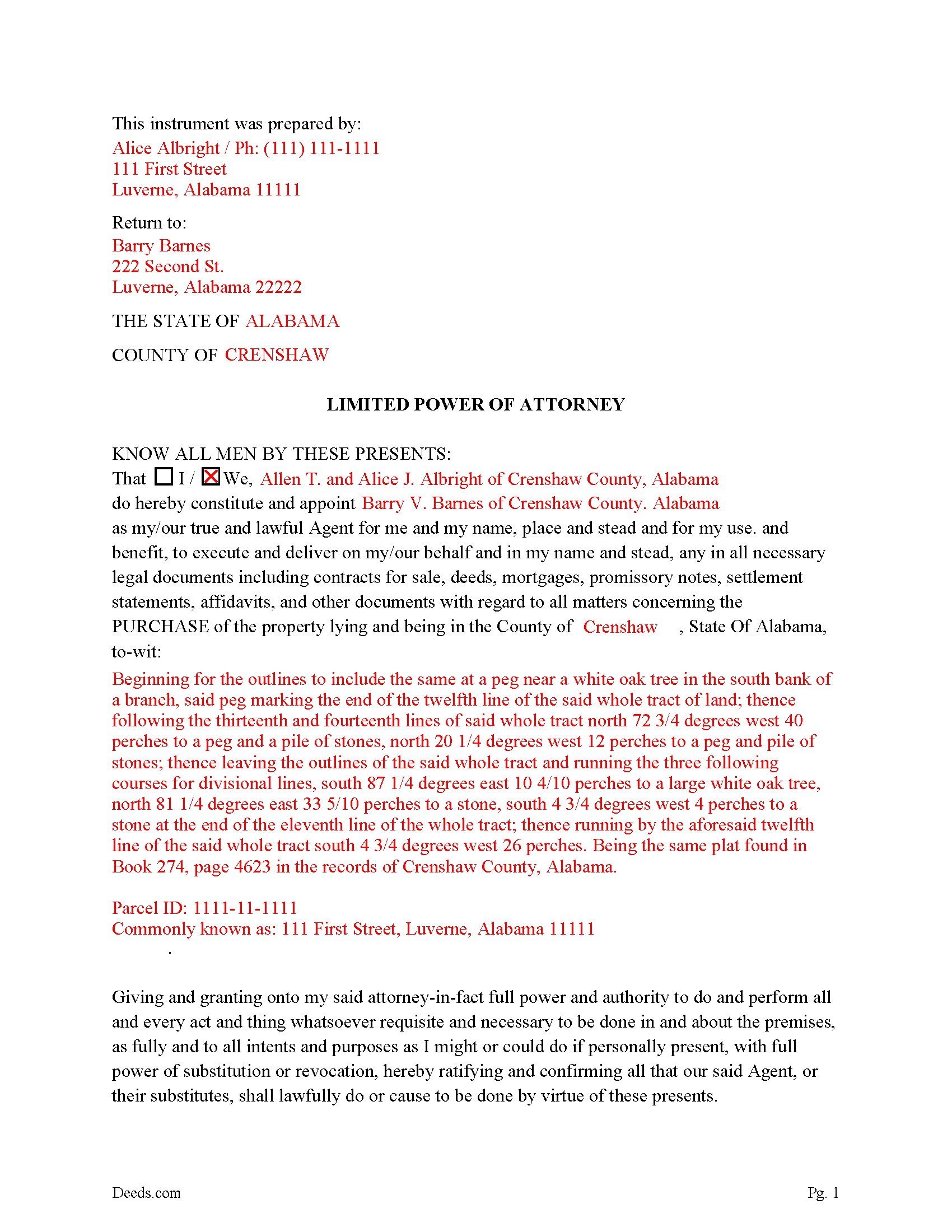
Tuscaloosa County Completed Example of the Limited Power of Attorney
Example of a properly completed form for reference.
All 3 documents above included • One-time purchase • No recurring fees
Immediate Download • Secure Checkout
Additional Alabama and Tuscaloosa County documents included at no extra charge:
Where to Record Your Documents
Tuscaloosa County Probate Judge
Tuscaloosa, Alabama 35401-1891 / 35402
Hours: 8:30 to 5:00 M-F
Phone: (205) 464-8204
Mail to: Tuscaloosa County Commission
Tuscaloosa, Alabama 35402
Hours:
Phone:
Recording Tips for Tuscaloosa County:
- Bring your driver's license or state-issued photo ID
- Ensure all signatures are in blue or black ink
- Bring extra funds - fees can vary by document type and page count
- Check margin requirements - usually 1-2 inches at top
- Leave recording info boxes blank - the office fills these
Cities and Jurisdictions in Tuscaloosa County
Properties in any of these areas use Tuscaloosa County forms:
- Abernant
- Brookwood
- Buhl
- Coaling
- Coker
- Cottondale
- Duncanville
- Echola
- Elrod
- Fosters
- Kellerman
- Northport
- Peterson
- Ralph
- Samantha
- Tuscaloosa
- Vance
Hours, fees, requirements, and more for Tuscaloosa County
How do I get my forms?
Forms are available for immediate download after payment. The Tuscaloosa County forms will be in your account ready to download to your computer. An account is created for you during checkout if you don't have one. Forms are NOT emailed.
Are these forms guaranteed to be recordable in Tuscaloosa County?
Yes. Our form blanks are guaranteed to meet or exceed the applicable formatting requirements used for recording in Tuscaloosa County, including margin requirements, font requirements, and other layout standards. This guarantee applies to formatting, not to the legal sufficiency of information entered by the user or the suitability of a form for a particular transaction.
Can I reuse these forms?
Yes. You can reuse the forms for your personal use. For example, if you have multiple properties in Tuscaloosa County you only need to order once.
What do I need to use these forms?
The forms are PDFs that you fill out on your computer. The free Adobe Acrobat Reader is recommended, and most PDF apps also work. You do NOT enter your property information online - you download the blank forms and complete them privately on your own computer.
Are there any recurring fees?
No. This is a one-time purchase. Nothing to cancel, no memberships, no recurring fees.
How much does it cost to record in Tuscaloosa County?
Recording fees in Tuscaloosa County vary. Contact the recorder's office at (205) 464-8204 for current fees.
Questions answered? Let's get started!
Alabama's Limited Power of Attorney for the Purchase of Real Property allows a principal to authorize an agent to complete a specific real estate acquisition on their behalf without granting broad, open-ended authority. Alabama law governs these instruments under the Alabama Uniform Power of Attorney Act (Alabama Code §26-1A-101 et seq.), which took effect January 1, 2012, and imposes execution requirements that are stricter than those in many other states — including a mandatory two-witness requirement on top of notarization. Because the form is drafted for purchase transactions only, the agent's authority is confined to the closing and the documents necessary to complete it, and the principal sets an explicit expiration date at the time of signing.
What the Alabama Limited Power of Attorney for Purchase Does
This form empowers a named agent to execute, on the principal's behalf, the full range of documents a real estate purchase requires: contracts of sale, deeds, mortgages, promissory notes, settlement statements, affidavits, and related closing instruments. The authority is limited to the identified purchase transaction and terminates on the expiration date the principal specifies. The form is drafted as a durable power of attorney, meaning it remains valid even if the principal becomes disabled, incompetent, or incapacitated before the closing date — a distinction governed by §26-1A-104 and one that matters when closings are delayed for medical or logistical reasons.
Execution Requirements Under Alabama Law
Alabama's execution standard for a power of attorney used in a real estate transaction goes beyond what most other states require. Under §26-1A-105, the principal must sign the document — or direct another adult to sign it in the principal's presence — and the signature must be both notarized and witnessed by two adult witnesses. Both witnesses must observe the principal's signature at the time of signing. This two-witness-plus-notary requirement differs from states that accept notarization alone, and a document executed without both witnesses will not be accepted for recording or honored by a title company at closing.
- Principal signature in the presence of a notary public authorized to act in Alabama
- Two adult witnesses, both present at the time the principal signs
- Notarial acknowledgment confirming the principal signed voluntarily and with apparent capacity
An agent who is also a witness creates a conflict that may render the document ineffective. The two witnesses should be disinterested adults with no beneficial interest in the transaction.
Alabama-Specific Traps That Can Derail a Closing
Homestead and Spousal Consent
Alabama's homestead protections (Alabama Constitution, Article X, §205) extend to real property purchases in situations where the property being acquired will become or is adjacent to a homestead. More directly, if the principal owns a homestead and the transaction involves encumbering or conveying any interest in it, the non-owning spouse must separately consent. Title companies and lenders in Alabama routinely require both spouses to execute mortgage and deed documents at closing — an agent acting under a unilateral POA may not be able to satisfy that requirement without specific spousal authorization or the spouse's direct execution. Principals who are married should account for this before the closing date.
Recording at the Probate Court, Not a Recorder's Office
Alabama does not use a county recorder's office for real estate instruments. Deeds, mortgages, and related documents — including powers of attorney used in real estate transactions — are filed with the Office of the Judge of Probate in the county where the property is located. This distinction matters practically: parties accustomed to recording in other states sometimes submit documents to the wrong office, causing recording delays that can affect lien priority or closing deadlines. For the agent's authority to be recognized and for any deed or mortgage the agent executes to be recordable, the POA itself should be recorded with the Probate Court before or at the time of closing.
Agent Identity Requirements at Closing
When an agent executes closing documents under a POA in Alabama, the agent must sign in a form that identifies both the principal and the agent — for example, "Jane Doe, as Attorney-in-Fact for John Doe." Signing only in the principal's name without disclosing the agency relationship can expose the agent to personal liability and may cause title issues if the agency relationship is later disputed. Title underwriters in Alabama increasingly require the agent to present a certified copy of the recorded POA at closing.
Expiration Date Precision
Because this is a limited POA with a principal-set expiration date, the date must be specific and must be set far enough in advance to cover realistic closing delays. A POA that expires before all closing documents are executed and recorded leaves the agent without authority mid-transaction. Alabama's POA Act does not provide for automatic extensions, so if the closing is rescheduled beyond the expiration date, a new instrument is required.
Durability Language Must Appear in the Document
For the POA to remain effective if the principal becomes incapacitated, the document must contain the specific language required by §26-1A-104. A power of attorney that omits durability language terminates automatically upon the principal's incapacity. This form includes the required durable language — but principals using other forms should verify its presence.
Recording the Power of Attorney
Recording the POA with the Judge of Probate in the county where the property is located is essential for the transaction to proceed without title objections. Alabama's recording statute (§35-4-90) protects subsequent purchasers and encumbrancers without notice, and an unrecorded POA can create gaps in the chain of title for any deed or mortgage the agent executes. Recording fees are set by each county probate office; the principal or agent should confirm the current fee schedule directly with the Probate Court before recording. Alabama imposes a deed tax on recorded conveyances, but the POA itself is not a conveyance and is not subject to deed tax — that obligation falls on the deed executed under it.
Agent's Duties and Limitations
Under Alabama Code §26-1A-301 through §26-1A-308, the agent is a fiduciary. The agent must act solely in the principal's interest, keep the principal's assets and funds separate from the agent's own, maintain accurate records of all actions taken under the POA, and avoid self-dealing or conflicts of interest. The authority under this limited form does not extend beyond the specific purchase transaction — the agent cannot use the POA to sell property, encumber unrelated assets, or take any action outside the identified closing.
What Is Included in the Download Package
The download includes the Alabama Limited Power of Attorney for the Purchase of Real Property, a completed example showing how the form should be filled out, and a guide explaining each field and the requirements for valid execution and recording in Alabama. The forms are prepared by Deeds.com's forms development team and are designed for use in Alabama counties. The package is available immediately after purchase.
Important: Your property must be located in Tuscaloosa County to use these forms. Documents should be recorded at the county recording office listed above.
This Limited Power of Attorney for the Purchase of Real Property meets all recording requirements specific to Tuscaloosa County.
Our Promise
The documents you receive here are guaranteed to meet or exceed the applicable Tuscaloosa County recording format requirements. If there is a rejection caused by our formatting, we will correct the issue or refund your payment. This guarantee applies to document formatting only and does not extend to information entered by the user, the selection of the form, or the legal effect of the completed document.
Save Time and Money
Get your Tuscaloosa County Limited Power of Attorney for the Purchase of Real Property form done right the first time with Deeds.com Uniform Conveyancing Blanks. At Deeds.com, we understand that your time and money are valuable resources, and we don't want you to face a penalty fee or rejection imposed by a county recorder for submitting nonstandard documents. We constantly review and update our forms to meet rapidly changing state and county recording requirements for roughly 3,500 counties and local jurisdictions.
4.8 out of 5 - ( 4,821 Reviews )
Ronald P. 5 out of 5 stars
Very easy to use... awaiting info
Thank you for your feedback. We really appreciate it. Have a great day!
Mark M. 5 out of 5 stars
Deeds was easy to use and worked as specified; they got the recording I needed done finished in one day!
Thank you for your feedback. We really appreciate it. Have a great day!
Shirley L. 5 out of 5 stars
I am very happy with the results of my service received from Deeds.com. I found exactly what I needed in short order. Thanks
Thank you for your feedback. We really appreciate it. Have a great day!
Ben C. 5 out of 5 stars
Easy and Quick,Thanks
Thank you for your feedback. We really appreciate it. Have a great day!
john g. 4 out of 5 stars
no problems got what i needed.
Thanks John.
Donna R. 5 out of 5 stars
This was a seamless process. It probably took one minute to fill out my information and upload the document. It was formatted and sent immediately. It was processed the next day at the county recorders office. I have zero complaints. Before finding this company I spent an entire day calling and leaving messages at other e-filing companies like simplfile and others but they all required subscriptions. I just needed to file a single document now and then so that was not a good fit. (And those companies I found out still require the customer to do all the work!). Deeds.com kept me informed throughout the process every step. I'm happy to write this review. Thank you
Thank you for your feedback. We really appreciate it. Have a great day!
William P. 5 out of 5 stars
Warranty Deed was just what I needed.Easy to complete and accepted by the county.
Thank you!
Reliant Roofers, Inc. N. 5 out of 5 stars
Great communication. Quick response. deeds.com is timely and efficient.
We appreciate your business and value your feedback. Thank you. Have a wonderful day!
Lutalo O. 5 out of 5 stars
Great tool for finding the best real estate forms!
We appreciate your business and value your feedback. Thank you. Have a wonderful day!
Barbara G. 5 out of 5 stars
Easy to use. I especially am thankful for the guide.
Your feedback is greatly appreciated. Thank you for taking the time to share your experience!
Soledad T. 5 out of 5 stars
It's Great!!!
Thank you!
Bruce L. 5 out of 5 stars
Fantastic. The forms were easy to read and complete. Came with a guide and examples of how it looked completed Thanks!
We appreciate your business and value your feedback. Thank you. Have a wonderful day!
Beverly M. 5 out of 5 stars
GREAT FORMS. THANK YOU.
Thank you!
Mary D. B. 5 out of 5 stars
BIG THANK YOU EXCELLENT WEBSITE
Thank you!
Mary B. 5 out of 5 stars
I was very pleased with my experience on Deeds.com. I hand purchased the wrong papers and they credited my account so I could purchase the correct papers. I will use them again
We appreciate your business and value your feedback. Thank you. Have a wonderful day!