Volusia County Affidavit of Death Certificate Form
Last validated September 15, 2026 by our Forms Development TeamFormatted for recording in Volusia County, for property anywhere in the county: rural and unincorporated areas as well as Barberville, Cassadaga, Daytona Beach, De Leon Springs, Debary, Deland, Deltona, Edgewater and 10 more.
- 3 documents included
- Immediate PDF download
- Formatting guarantee
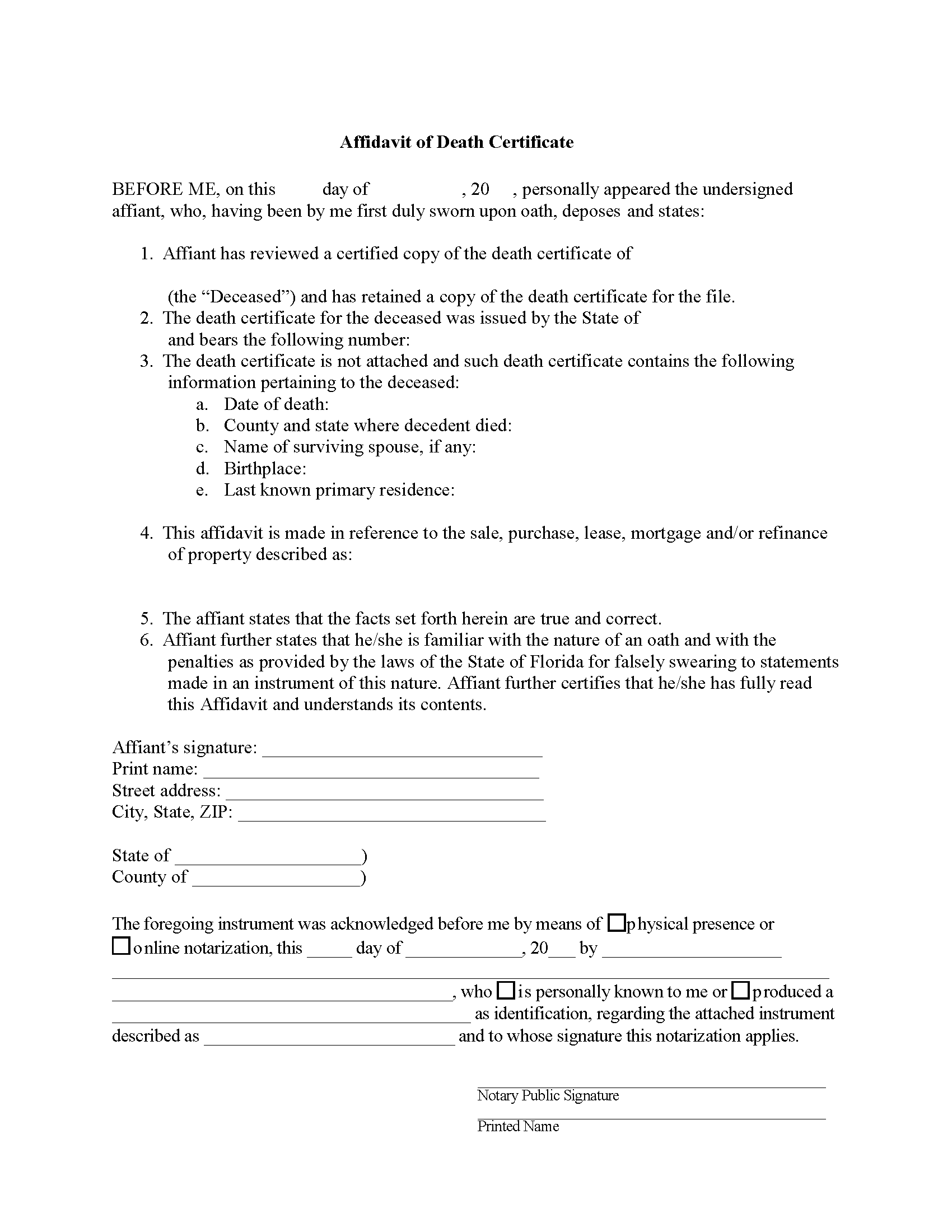
Volusia County Affidavit of Death Certificate Form
Fill in the blank form formatted to comply with all recording and content requirements.
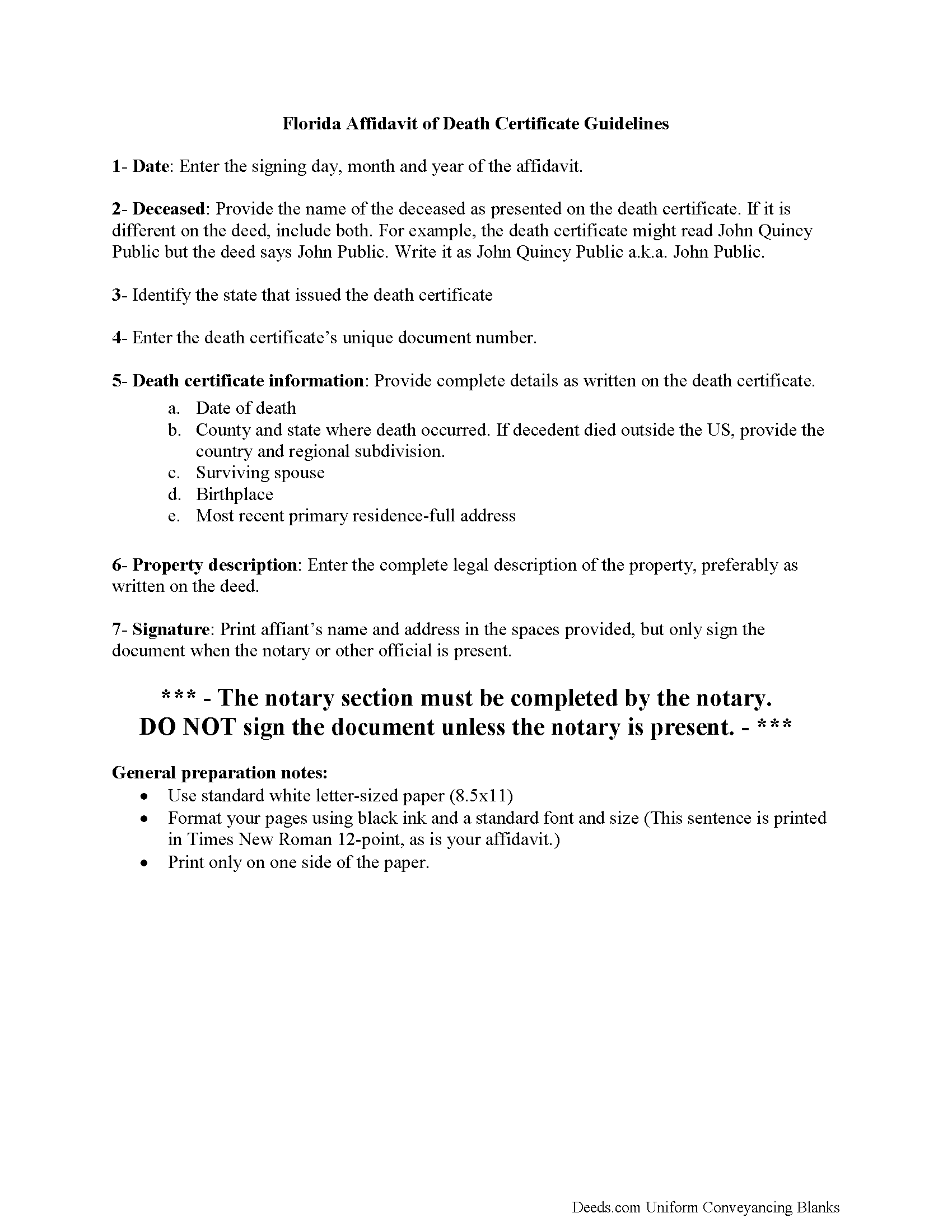
Volusia County Affidavit of Death Certificate Guide
Line by line guide explaining every blank on the form.
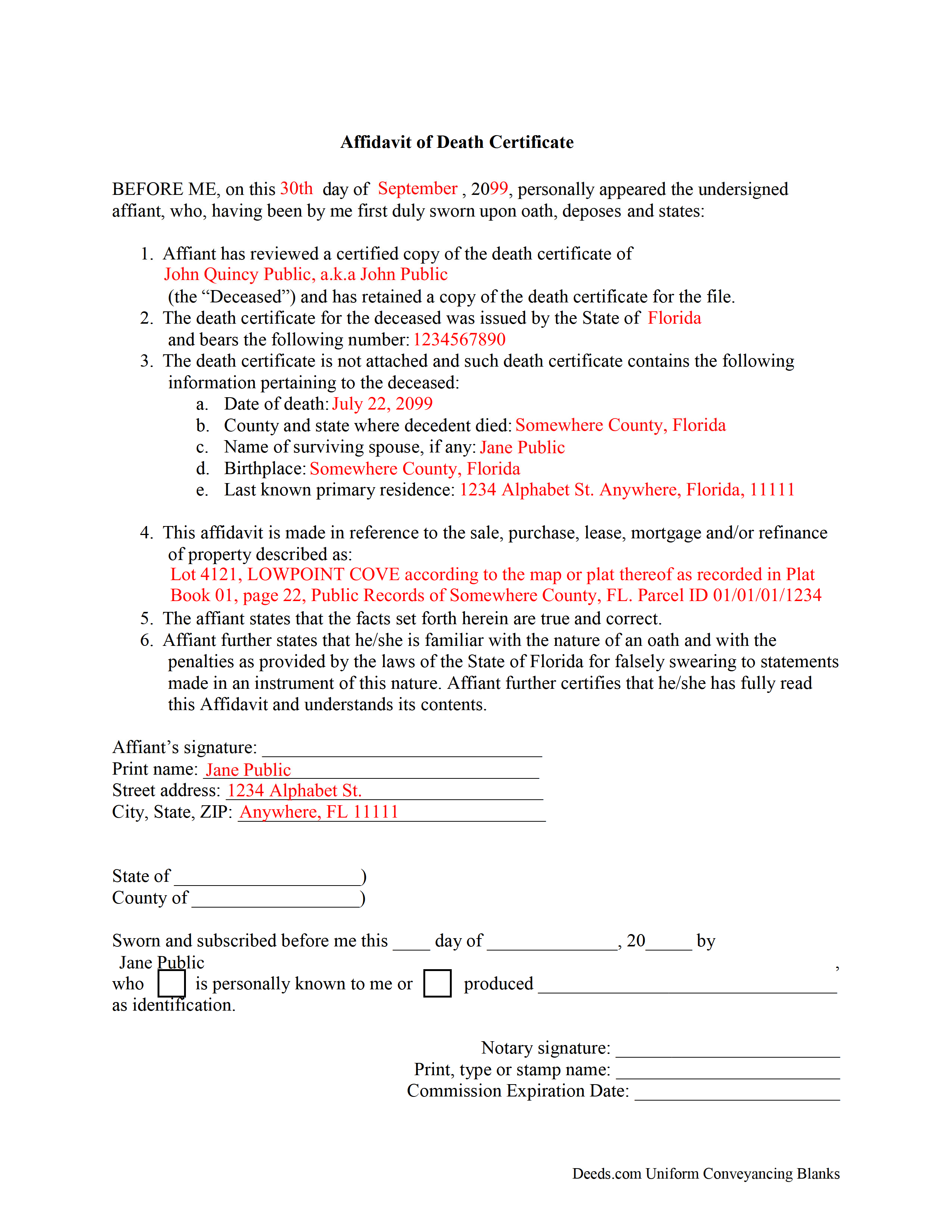
Volusia County Completed Example of the Affidavit of Death Certificate Document
Example of a properly completed form for reference.
All 3 documents above included • One-time purchase • No recurring fees
Immediate Download • Secure Checkout
Additional Florida and Volusia County documents included at no extra charge:
Where to Record Your Documents
Volusia County Clerk of Circuit Court
DeLand, Florida 32724 / 32721-6043
Hours: 8:00am to 4:30pm M-F
Phone: (386) 736-5912
New Smyrna Beach Courthouse Annex
New Smyrna Beach, Florida 32168
Hours: 8:00am to 4:30pm M-F / Document drop-off only
Phone: (386) 423-3300 x15912
Daytona Beach Courthouse Annex
Daytona Beach, Florida 32114
Hours: 8:00am to 4:30pm M-F / Document drop-off only
Phone: (386) 257-6006 x15912
Recording Tips for Volusia County:
- Bring your driver's license or state-issued photo ID
- Ensure all signatures are in blue or black ink
- Verify all names are spelled correctly before recording
- White-out or correction fluid may cause rejection
- Ask about their eRecording option for future transactions
Cities and Jurisdictions in Volusia County
Properties in any of these areas use Volusia County forms:
- Barberville
- Cassadaga
- Daytona Beach
- De Leon Springs
- Debary
- Deland
- Deltona
- Edgewater
- Glenwood
- Lake Helen
- New Smyrna Beach
- Oak Hill
- Orange City
- Ormond Beach
- Osteen
- Pierson
- Port Orange
- Seville
Hours, fees, requirements, and more for Volusia County
How do I get my forms?
Forms are available for immediate download after payment. The Volusia County forms will be in your account ready to download to your computer. An account is created for you during checkout if you don't have one. Forms are NOT emailed.
Are these forms guaranteed to be recordable in Volusia County?
Yes. Our form blanks are guaranteed to meet or exceed the applicable formatting requirements used for recording in Volusia County, including margin requirements, font requirements, and other layout standards. This guarantee applies to formatting, not to the legal sufficiency of information entered by the user or the suitability of a form for a particular transaction.
Can I reuse these forms?
Yes. You can reuse the forms for your personal use. For example, if you have multiple properties in Volusia County you only need to order once.
What do I need to use these forms?
The forms are PDFs that you fill out on your computer. The free Adobe Acrobat Reader is recommended, and most PDF apps also work. You do NOT enter your property information online - you download the blank forms and complete them privately on your own computer.
Are there any recurring fees?
No. This is a one-time purchase. Nothing to cancel, no memberships, no recurring fees.
How much does it cost to record in Volusia County?
Recording fees in Volusia County vary. Contact the recorder's office at (386) 736-5912 for current fees.
Questions answered? Let's get started!
Florida death certificates carry confidentiality restrictions that other states do not impose. Under F.S. 382.025, the cause of death portion of a Florida death certificate is removed from publicly issued copies and is released only to a defined group — the decedent's spouse, parent, child, grandchild, sibling, or a legal representative — for 50 years after the death. When a real estate transaction touches a deceased Florida property owner, the title company or recording party often needs confirmation that a death certificate exists and what it says, but cannot attach the document to a public file without raising privacy issues. The Florida Affidavit of Death Certificate is a sworn statement from someone who has personally reviewed the certified original. It captures the date of death, certificate number, issuing state, and other identifying details so the file is complete without the certificate itself going on the record.
How the Florida Affidavit of Death Certificate is used
This affidavit is used when a Florida title company, lender, recorder, or other party in a real estate transaction needs verification that a death certificate exists for a deceased grantor, joint tenant, or other party of interest, but does not need — or cannot accept — the certificate itself. Common situations include closings on property previously held by joint tenants with right of survivorship, transactions involving an enhanced life estate (Lady Bird) deed where the life tenant has died, and underwriting files where the title insurer needs proof of death without including the full vital record. The affiant — typically a family member, executor, or someone with custody of the original — swears under oath that they have seen the certified document and recites its key contents.
Florida death certificate access rules
Under F.S. 382.025(1), the Florida Department of Health issues two kinds of death certificate copies. The "without cause of death" version is available to any applicant who can identify the decedent. The full version, including cause of death, is restricted for 50 years from the date of death and is released only to specific family members and legal representatives listed in the statute. This split creates the everyday problem this affidavit solves: a recorder or title file may need confirmation of the death without ingesting the cause-of-death information into a public document. The affiant verifies what the certificate says without the document itself becoming part of the record.
What this affidavit is and is not
This is a verification document, not a title instrument. It does not transfer Florida real property, remove a deceased owner from title, vest survivorship in a surviving joint tenant, or open or close a probate estate. It does not function as an affidavit of heirs, an order of summary administration under F.S. 735.201, or a recorded death certificate used to clear a tenancy by the entirety or joint tenancy with right of survivorship under F.S. 689.15. It is narrower than that — a sworn recital of what the affiant saw on a death certificate.
Execution requirements in Florida
Because this is an affidavit rather than a deed, Florida's two-witness requirement for deeds under F.S. 689.01 does not apply. The affiant signs in the presence of a notary public, and the notarial certificate must be a jurat — the form used when the signer takes an oath or affirmation — not the acknowledgment block used on deeds. F.S. 117.05 governs the form of notarial certificates and the information the notary must include. Florida also recognizes online notarization under F.S. 117.201 through 117.305, so the affidavit may be executed remotely before a Florida-commissioned online notary. Under F.S. 92.525, a written declaration signed under penalty of perjury can substitute for a notarized affidavit in some contexts; whether that substitute is acceptable depends on what the recipient — title company, recorder, or court — will accept.
Recording the affidavit in Florida
Whether this affidavit is recorded depends on the requesting party. Some title companies retain it in the underwriting file only; others require it recorded alongside a deed or other instrument. If recorded, it must comply with F.S. 695.26: the name of each signer must be typed or printed beneath the signature, the preparer's name and address must appear on the first page, and the first page must have a 3-inch top margin with 1-inch margins elsewhere to accommodate the recorder's stamp. Florida county recorders charge by the page under F.S. 28.24, so removing extra blank pages before recording reduces cost.
Florida-specific traps
- Wrong notarial certificate. Affidavits require a jurat. A Florida acknowledgment block — common on deeds — does not satisfy the oath requirement and may cause the recipient to reject the document.
- Confusing this with an Affidavit of Heirs. A Florida Affidavit of Heirs identifies who inherits when there is no probate. This affidavit only verifies a death certificate. They are different documents serving different purposes and are not interchangeable.
- Homestead complications. Florida homestead under Article X, Section 4 of the Florida Constitution descends to a surviving spouse and minor children outside of probate, and clearing title to homestead property usually requires more than a death verification. This affidavit alone will not resolve a homestead descent issue.
- Mismatched details. Title companies compare the affidavit's recital of the certificate number, date of death, and place of death against their other file evidence. Transcription errors — a wrong middle initial, a transposed digit in the certificate number — are a common reason the affidavit is sent back.
- Recording margin and preparer block omissions. If the affidavit is being recorded, F.S. 695.26 violations cause Florida recorders to reject the document or charge a non-standard recording fee.
- Cause-of-death disclosure. Reciting the cause of death in the affidavit puts that confidential information into a public record if the affidavit is recorded. Most uses of this form do not require the cause of death; the affiant should include only the details the recipient actually needs.
What is included in the download package
The Florida Affidavit of Death Certificate package contains the fillable form, a guidelines document explaining how to complete and execute it under Florida law, and a completed example for reference. Files are delivered as immediate downloads after purchase and can be reused.
Important: Your property must be located in Volusia County to use these forms. Documents should be recorded at the county recording office listed above.
This Affidavit of Death Certificate meets all recording requirements specific to Volusia County.
Our Promise
The documents you receive here are guaranteed to meet or exceed the applicable Volusia County recording format requirements. If there is a rejection caused by our formatting, we will correct the issue or refund your payment. This guarantee applies to document formatting only and does not extend to information entered by the user, the selection of the form, or the legal effect of the completed document.
Save Time and Money
Get your Volusia County Affidavit of Death Certificate form done right the first time with Deeds.com Uniform Conveyancing Blanks. At Deeds.com, we understand that your time and money are valuable resources, and we don't want you to face a penalty fee or rejection imposed by a county recorder for submitting nonstandard documents. We constantly review and update our forms to meet rapidly changing state and county recording requirements for roughly 3,500 counties and local jurisdictions.
4.8 out of 5 - ( 4,821 Reviews )
Andrea H. 5 out of 5 stars
Easy! Reasonable cost over and above the actual recording cost. Will save me the time I would have spent driving to the county offices.
We appreciate your business and value your feedback. Thank you. Have a wonderful day!
Jeannette C. 5 out of 5 stars
Very useful service! This was easy and quick. It guides you through each step and emails update you during the process. Will use again!
Thank you!
Christy Z. 5 out of 5 stars
Very thorough forms received and very quick service. Thank You!
Thank you for your feedback. We really appreciate it. Have a great day!
Giustino C. 5 out of 5 stars
I am pleased with this electronic service in making a time sensitive deed transfer since very few options exist currently with the Covid 19 Crisis. This was the only rapid and available option to record the deed transfer and the fee was reasonable. I was able to upload my notarized and executed document and had a record number as well as the official document within 24 hours. It was simple and easy to use. Thank you deeds.com!!
Thank you Giustino, glad we could help.
Anne F. 5 out of 5 stars
For someone like me that isn't the swiftest on a computer, deeds.com made getting the documents I needed simple and fast. Loved the pages with the explanation and the sample of a completed document. Thank you for your very organized website. Worth every cent I paid.
Thank you for your feedback. We really appreciate it. Have a great day!
Julie P. 5 out of 5 stars
Quick & easy to use. Spoke a lawyer and saved hundreds by doing it myself.
Thank you for your feedback Julie, we appreciate you.
Renee M. 5 out of 5 stars
My sister in law is in a hospital ICU with Covid, so we were trying to get her affairs in order. Deeds.com made this difficult situation so much better by making this process very easy to understand and do.
Glad we could help Renee, hoping the very best for you and your family.
Christine K. 5 out of 5 stars
While I was initially disappointed I could not go to the local County to file my paperwork due to Covid-19, I was thrilled to work with Deeds.com. Their staff was INCREDIBLY FAST, super knowledgeable and the whole process happened from my computer in minutes. Very positive experience.
We appreciate your business and value your feedback. Thank you. Have a wonderful day!
PAUL D. 5 out of 5 stars
Got what I needed and it all was good according to the County Recorder.
We’re glad to hear things went well. Thank you for the review.
Tyrone L. 5 out of 5 stars
Great time saver fast service
Your satisfaction with our services is of utmost importance to us. Thank you for letting us know how we did!
June G. 5 out of 5 stars
AMAZING! Easy to use, reasonable fee - and get MUCH MORE than just a deed form. I ordered a "deed" and received a whole "package," including a guide and the jurisdiction's costs schedule and cover page that would be needed to record the deed - even included a Certificate of Transfer that is not required for a deed but something I needed for a different transaction. The website was extremely easy to use and the cautions about not disclosing personal information were so clear and personal, they made me feel secure in knowing this site was not trying to rip me off. Very professional. Well done.
Thank you for your feedback. We really appreciate it. Have a great day!
Ronald S. 5 out of 5 stars
got what i wanted
Thank you for your feedback. We really appreciate it. Have a great day!
Chris M. 5 out of 5 stars
The personal attention and the ease of use is beyond any other service I have used. Thank you for making my work so much easier.
Thank you for your positive words! We’re thrilled to hear about your experience.
Lynnette P. 5 out of 5 stars
The site was easy to navigate, which was great. The communication with the agents was quick and helped me get my forms processed correctly.
Thank you, Lynnette. We’re glad everything moved quickly and stayed clear from start to finish. We’ll be sure to pass the kind words along to the team.
Bob B. 5 out of 5 stars
Good so far. Will be great if you get the deed recorded.
Thank you!