Dade County Revocation of Transfer on Death Deed Form
Last validated September 30, 2026 by our Forms Development TeamFormatted for recording in Dade County, for property anywhere in the county: rural and unincorporated areas as well as Rising Fawn, Trenton, Wildwood.
- 3 documents included
- Immediate PDF download
- Formatting guarantee
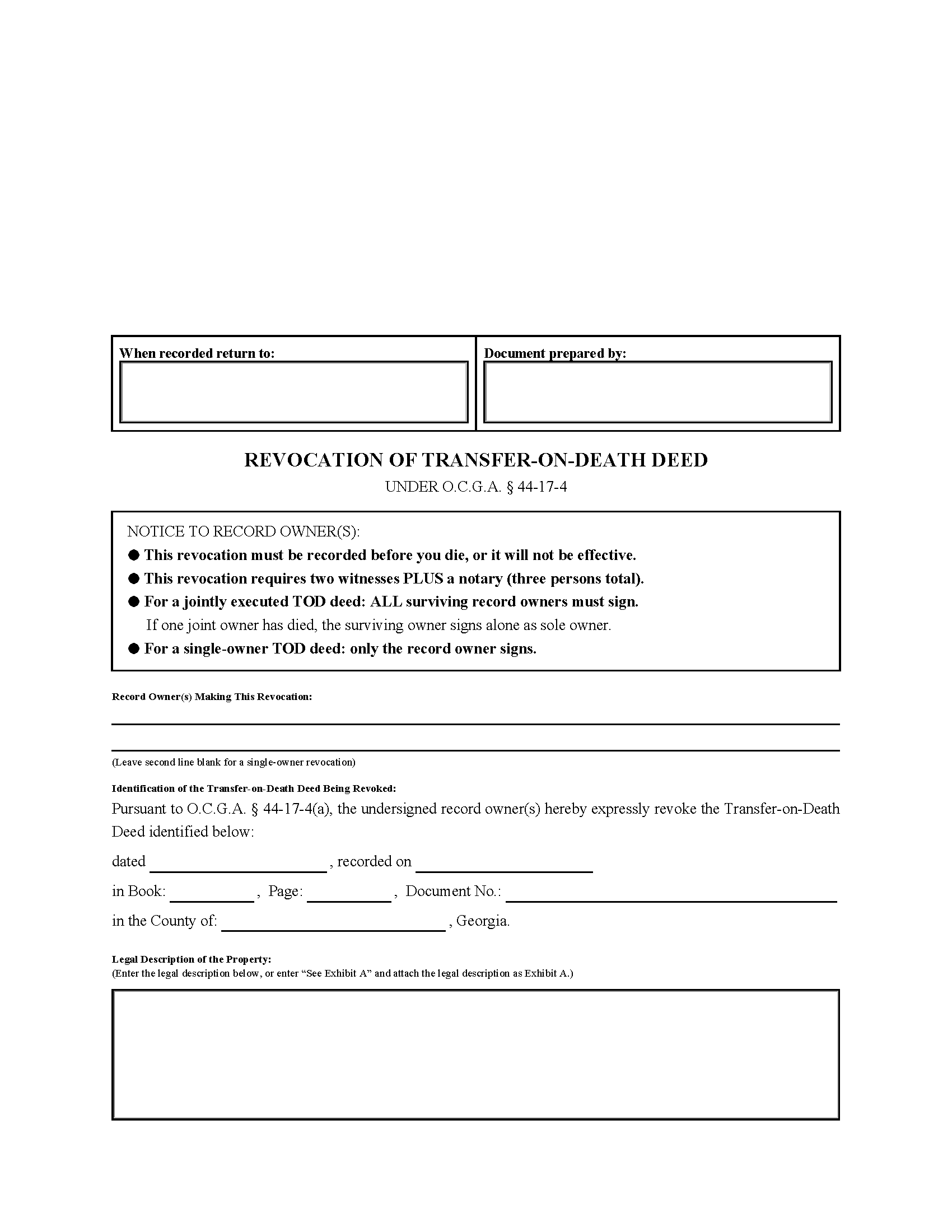
Dade County Revocation of Transfer on Death Deed Form
Fill in the blank Revocation of Transfer on Death Deed form formatted to comply with all Georgia recording and content requirements.
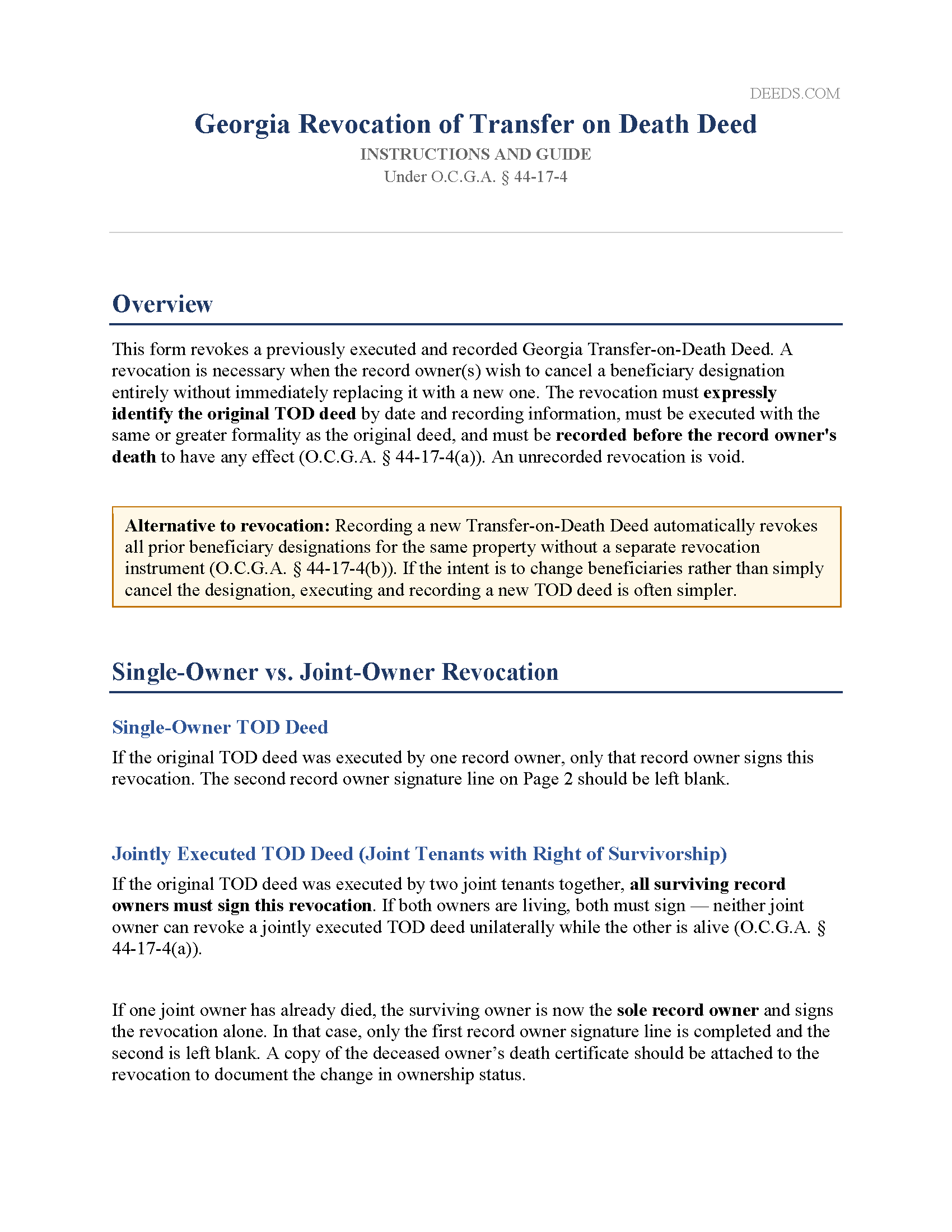
Dade County Revocation of Transfer on Death Deed Guide
Line by line guide explaining every blank on the Revocation of Transfer on Death Deed form.
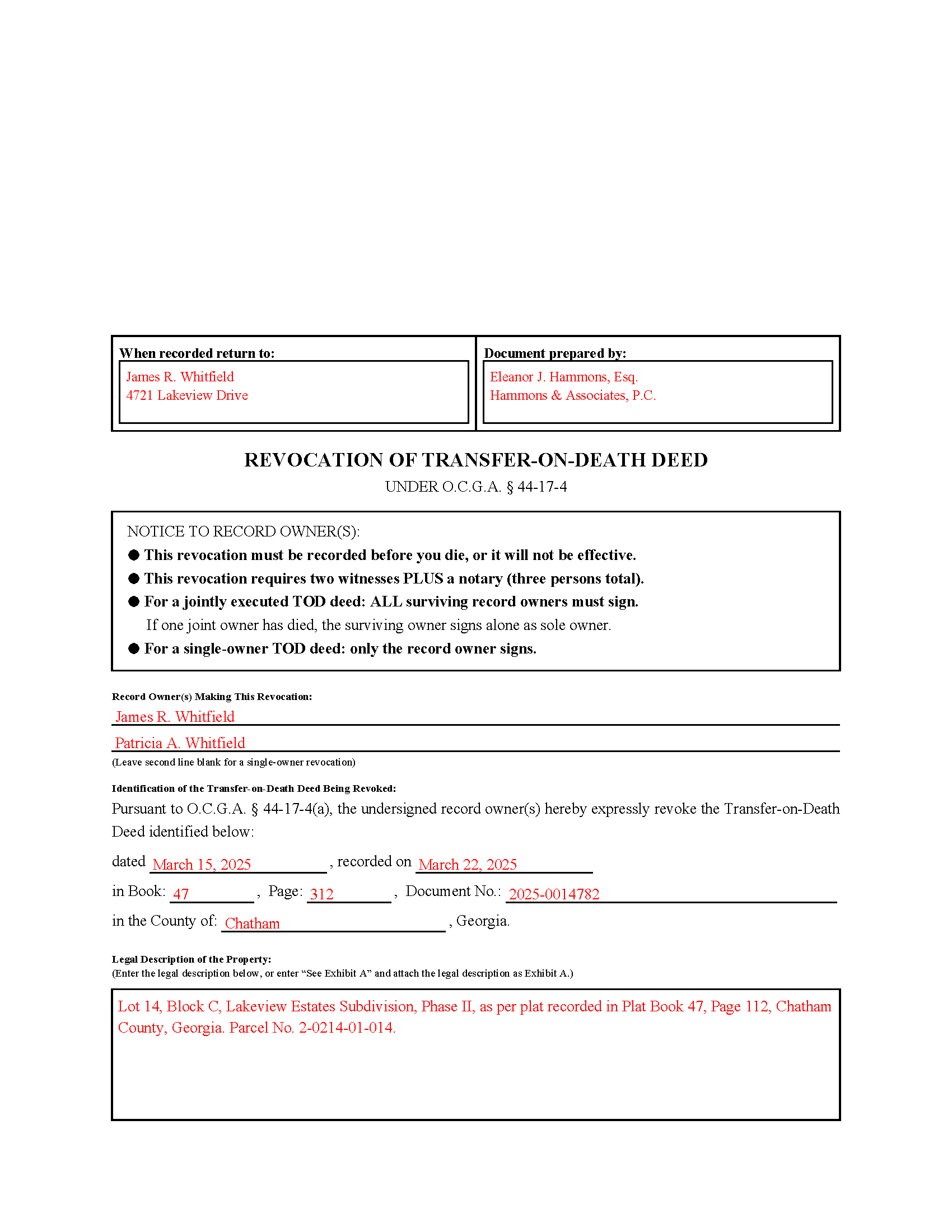
Dade County Completed Example of the Revocation of Transfer on Death Deed Document
Example of a properly completed Georgia Revocation of Transfer on Death Deed document for reference.
All 3 documents above included • One-time purchase • No recurring fees
Immediate Download • Secure Checkout
Additional Georgia and Dade County documents included at no extra charge:
Where to Record Your Documents
Dade Clerk of Superior Court
Trenton, Georgia 30752
Hours: 8:30am - 5:00pm Monday - Friday
Phone: (706) 657-4778 Ext 408
Recording Tips for Dade County:
- Bring your driver's license or state-issued photo ID
- Ensure all signatures are in blue or black ink
- Bring extra funds - fees can vary by document type and page count
- Check margin requirements - usually 1-2 inches at top
- Leave recording info boxes blank - the office fills these
Cities and Jurisdictions in Dade County
Properties in any of these areas use Dade County forms:
- Rising Fawn
- Trenton
- Wildwood
Hours, fees, requirements, and more for Dade County
How do I get my forms?
Forms are available for immediate download after payment. The Dade County forms will be in your account ready to download to your computer. An account is created for you during checkout if you don't have one. Forms are NOT emailed.
Are these forms guaranteed to be recordable in Dade County?
Yes. Our form blanks are guaranteed to meet or exceed the applicable formatting requirements used for recording in Dade County, including margin requirements, font requirements, and other layout standards. This guarantee applies to formatting, not to the legal sufficiency of information entered by the user or the suitability of a form for a particular transaction.
Can I reuse these forms?
Yes. You can reuse the forms for your personal use. For example, if you have multiple properties in Dade County you only need to order once.
What do I need to use these forms?
The forms are PDFs that you fill out on your computer. The free Adobe Acrobat Reader is recommended, and most PDF apps also work. You do NOT enter your property information online - you download the blank forms and complete them privately on your own computer.
Are there any recurring fees?
No. This is a one-time purchase. Nothing to cancel, no memberships, no recurring fees.
How much does it cost to record in Dade County?
Recording fees in Dade County vary. Contact the recorder's office at (706) 657-4778 Ext 408 for current fees.
Questions answered? Let's get started!
Georgia's Revocation of Transfer on Death Deed is the instrument a record owner uses to cancel a previously recorded TOD deed and remove the beneficiary designation from the public record before their death. What makes Georgia's version distinct is the elevated witness requirement: while the original TOD deed requires only two witnesses total (with the notary counting as one), revoking that deed under O.C.G.A. § 44-17-4(a) requires attestation by an officer and two additional witnesses — three persons in all. That distinction catches many property owners off guard and is the most common reason Georgia revocations are rejected at the Clerk of Court's office.
When a Georgia Revocation of Transfer on Death Deed Is Used
This form is used when a record owner who previously recorded a Georgia TOD deed wants to cancel that beneficiary designation entirely without immediately replacing it with a new one. Common situations include a change in family circumstances, a decision to sell or refinance that warrants clearing the public record, or an estate plan revision that replaces the TOD deed with a different arrangement. The revocation has no effect until it is recorded, and it must be recorded before the record owner's death to be valid.
Georgia-Specific Statutory Requirements
The revocation instrument must expressly refer to the original TOD deed being canceled. A general statement of intent to revoke is insufficient — the revocation must identify the original deed with enough specificity that it can be located in the public record (O.C.G.A. § 44-17-4(a)). That means including the date the original deed was executed, the date it was recorded, the book and page number or document number assigned by the clerk, and the county in which it was recorded.
A TOD deed cannot be revoked by will. Any attempt to cancel a beneficiary designation through a will is ineffective under Georgia law, regardless of the language used (O.C.G.A. § 44-17-4(c)). Revocation must occur during the owner's lifetime through a separately executed and recorded instrument.
Execution Requirements — Who Must Sign and Witness
The record owner — or their duly authorized attorney-in-fact — must sign the revocation. For a single-owner TOD deed, only that owner signs. For a jointly executed TOD deed where two joint tenants signed the original deed together, all surviving record owners must sign the revocation. If one joint owner has since died, the surviving owner signs alone as the now-sole record owner and should attach a copy of the deceased owner's death certificate to the revocation instrument.
Georgia's three-person witness requirement for revocations differs from the execution standard for the original deed itself. The revocation must be:
- Signed by the record owner or attorney-in-fact
- Attested by a notary public or other officer as provided in O.C.G.A. § 44-2-15
- Attested by two additional witnesses — separate from and in addition to the notary
The notary does not count toward the two-witness requirement for a revocation. All signatures must be made at the same time, in the presence of both witnesses and the notary. Do not sign the revocation before appearing before the notary.
Georgia-Specific Traps
Preparer Identification and Return Address
Under O.C.G.A. § 44-2-14, the name and mailing address of the person who prepared the revocation instrument and the name and address of the person to whom the recorded document should be returned must both appear on the first page. Missing either item will result in rejection at the Clerk of Court's window.
The Three-Inch Top Margin
The first page of any instrument recorded in Georgia must have a three-inch blank margin at the top, reserved for the Clerk of Court's recording stamp. Content placed in that space causes rejection. This form is pre-formatted to that standard.
Must Reference the Original Deed by Recording Information
A revocation that identifies the original TOD deed only by date — without the book, page, or document number from the recording stamp — is insufficient under O.C.G.A. § 44-17-4(a). The recording reference is what ties the revocation to a specific instrument in the chain of title. If the recording information from the original deed is not available, it can be obtained from the Clerk of Superior Court in the county where the property is located.
Must Be Recorded in the Same County
The revocation must be recorded with the Clerk of Superior Court in the same county where the original TOD deed was recorded. Recording in a different county has no effect on the original designation.
No Beneficiary Consent Required — But No Beneficiary Notice Either
The consent, agreement, or notice of the designated grantee beneficiary is not required for a revocation (O.C.G.A. § 44-17-4(a)). Georgia law does not require the record owner to notify the beneficiary that the designation has been canceled. However, because beneficiaries are often unaware a TOD deed exists in the first place, good practice is to inform them — and to keep a copy of the recorded revocation with other estate planning documents.
Jointly Executed Deeds Cannot Be Revoked Unilaterally
When both joint tenants signed a single TOD deed together, neither owner can revoke it alone while the other is living. The revocation requires both surviving owners to sign. An attempted single-owner revocation of a jointly executed deed is ineffective as to the entire interest (O.C.G.A. § 44-17-4(a)).
Homestead and Spousal Considerations
When the property subject to the TOD deed serves as the primary residence of a married couple, Georgia's homestead and marital property laws may be relevant to the revocation. If the non-owning spouse signed the original TOD deed to address homestead rights, the same considerations apply to the revocation instrument. Confirm the appropriate signatories based on the circumstances of the original deed.
Recording the Revocation
The executed revocation must be filed with the Clerk of Superior Court in the county where the original TOD deed was recorded, and must be recorded before the record owner's death. An unrecorded revocation has no legal effect, regardless of when it was signed. Submit the original document — not a copy — with applicable recording fees. Print on 8.5" × 11" white paper, single-sided. Do not bind, staple, or highlight the instrument. Include a self-addressed stamped envelope for return of the recorded original.
What Is Included
The download includes the Georgia Revocation of Transfer on Death Deed formatted to meet state and county recording requirements, including the three-inch first-page margin, preparer and return-address fields, the statutory revocation language required by O.C.G.A. § 44-17-4, fields for complete identification of the original deed by recording reference, and an exhibit page for the legal description. Also included are a completed example showing a joint-owner revocation and an instruction guide covering Georgia's elevated three-witness requirement, the single-owner and joint-owner scenarios, the survivor signing rule, and recording requirements.
Important: Your property must be located in Dade County to use these forms. Documents should be recorded at the county recording office listed above.
This Revocation of Transfer on Death Deed meets all recording requirements specific to Dade County.
Our Promise
The documents you receive here are guaranteed to meet or exceed the applicable Dade County recording format requirements. If there is a rejection caused by our formatting, we will correct the issue or refund your payment. This guarantee applies to document formatting only and does not extend to information entered by the user, the selection of the form, or the legal effect of the completed document.
Save Time and Money
Get your Dade County Revocation of Transfer on Death Deed form done right the first time with Deeds.com Uniform Conveyancing Blanks. At Deeds.com, we understand that your time and money are valuable resources, and we don't want you to face a penalty fee or rejection imposed by a county recorder for submitting nonstandard documents. We constantly review and update our forms to meet rapidly changing state and county recording requirements for roughly 3,500 counties and local jurisdictions.
4.8 out of 5 - ( 4,810 Reviews )
Cindy A. 5 out of 5 stars
Easy to understand and use. However, need to add line for phone number for preparer - Thanks
Thank you for your feedback. We really appreciate it. Have a great day!
Michael D. 1 out of 5 stars
I sent Deeds.com an email with a question, asking for a little guidance as to which form(s) I need, but I'm waiting for a reply. My wife and I own 3 homes (2 in Indiana & 1 in Florida). We are needing to deed each to ourselves and put them into our living trust. I asked Deeds.com to please help by suggesting which forms I need for this. I do not want to get the wrong ones. I have not received a reply yet. When I receive a helpful reply and am able to purchase the correct forms, I am fairly certain my rating will go from 1 to 5. I withhold judgement until later.
Thank you for your feedback Michael. We make available do it yourself deed documents. We do not prepare documents or provide legal advice. If you have done research and are still unsure of which documents you need we are not the website for you. We highly recommend seeking the advice of a legal professional familiar with your specific situation moving forward. Have a wonderful day.
Nancy A. 5 out of 5 stars
This is an excellent resource. I was surprised because the price is so low I thought the products might be inferior. Not only were were the requested documents high quality, additional unrequested documents were added to my order that I didn't realize I would need until I read them. I especially appreciate that all the documents were specific to my county. I highly recommend using deeds.com.
Your satisfaction with our services is of utmost importance to us. Thank you for letting us know how we did!
Joyce F. 5 out of 5 stars
The forms are simple to follow. I was hoping I would be able to add my personal info. That would make the forms even more simple.
We appreciate your business and value your feedback. Thank you. Have a wonderful day!
Marilyn T. 5 out of 5 stars
This is an extremely user friendly site! I had been searching the internet for days for the proper Gift Deed document. I had no idea that my state, the great state of Mississippi had their own site. I am truly looking forward to using this site for additional available documents. Many more blessings to the creator of this site! Keep them coming! Thank You!
We appreciate your business and value your feedback. Thank you. Have a wonderful day!
Betty Z. 5 out of 5 stars
Thank you so much for giving us a service so important to many. I will pass on this pertinent process to all who need it. again, thank you. bz
Thanks so much Betty. We appreciate you. Have a spectacular day!
Stanley S. 5 out of 5 stars
Extremely convenient and easy to execute the document. Instructions and example are very helpful. I have bookmarked the site and will surely use again. 5 stars!!
Thank you!
LEON S. 5 out of 5 stars
recorded deed space to small for corrective deed requirement
Thank you for your feedback. We really appreciate it. Have a great day!
Dorothy R. 5 out of 5 stars
Actually, it was user friendly once I figured out where to go to get the forms. Thank you.
Thank you for your feedback. We really appreciate it. Have a great day!
Sarah C. 5 out of 5 stars
Great, but I'd like to see the actual filings/documents in my account, PDF, not only the blank forms. Thank you.
Thank you for your feedback. We really appreciate it. Have a great day!
Julius D. 5 out of 5 stars
Worked great....WV accepted this document and made the whole process easy...thanks
We appreciate your business and value your feedback. Thank you. Have a wonderful day!
Rose H. 5 out of 5 stars
I am so glad I found this resource! As the Executor of a family members estate I wanted to save money by bypassing a lawyer as it seemed pretty straight forward to tranfer a Life Estate to the remainderman. (I had original deeds). But talking with 3 different states and 4 different counties - none of which seemed to need the same documents, I was almost ready to dump this in a lawyer's lap. This resource makes it simple!
We appreciate your business and value your feedback. Thank you. Have a wonderful day!
Larry P. 5 out of 5 stars
Easy to follow step by step in completing form. Filing successful on first try. Economical cost. Would highly recommend.
We appreciate your business and value your feedback. Thank you. Have a wonderful day!
Timothy G. 5 out of 5 stars
Easy peezy.
Thank you!
Debra K. 5 out of 5 stars
Very happy with forms downloaded. Well worth the price. Could not find them anywhere else on the web. Also had easy to understand instructions and a demo form as a guide
Thank you Debra, we appreciate your feedback. Have a wonderful day!