Christian County Certificate of Trust Form
Last validated October 22, 2026 by our Forms Development TeamFormatted for recording in Christian County, for property anywhere in the county: rural and unincorporated areas as well as Assumption, Bulpitt, Edinburg, Kincaid, Morrisonville, Mount Auburn, Moweaqua, Owaneco and 6 more.
- 2 documents included
- Immediate PDF download
- Formatting guarantee
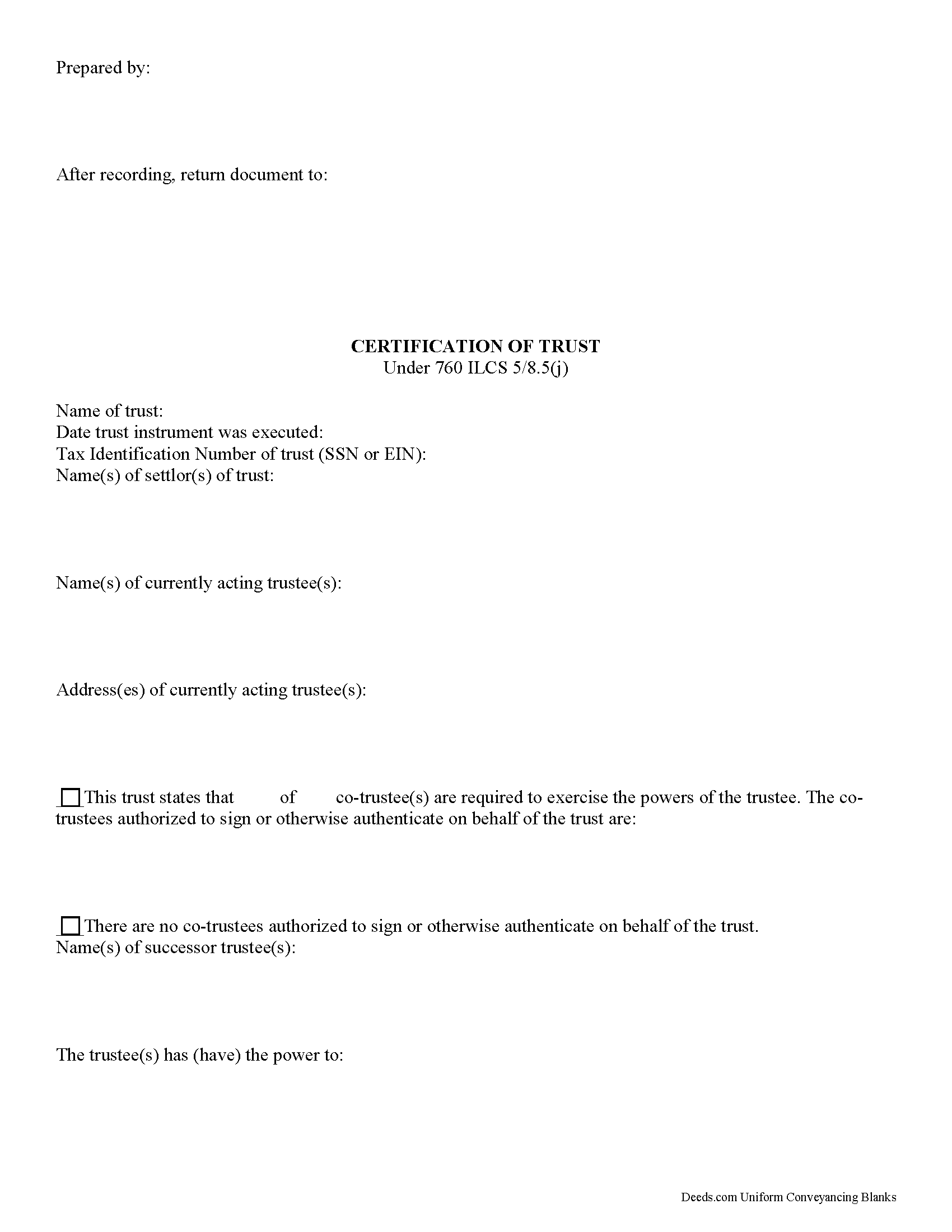
Christian County Certificate of Trust Form
Fill in the blank form formatted to comply with all recording and content requirements.
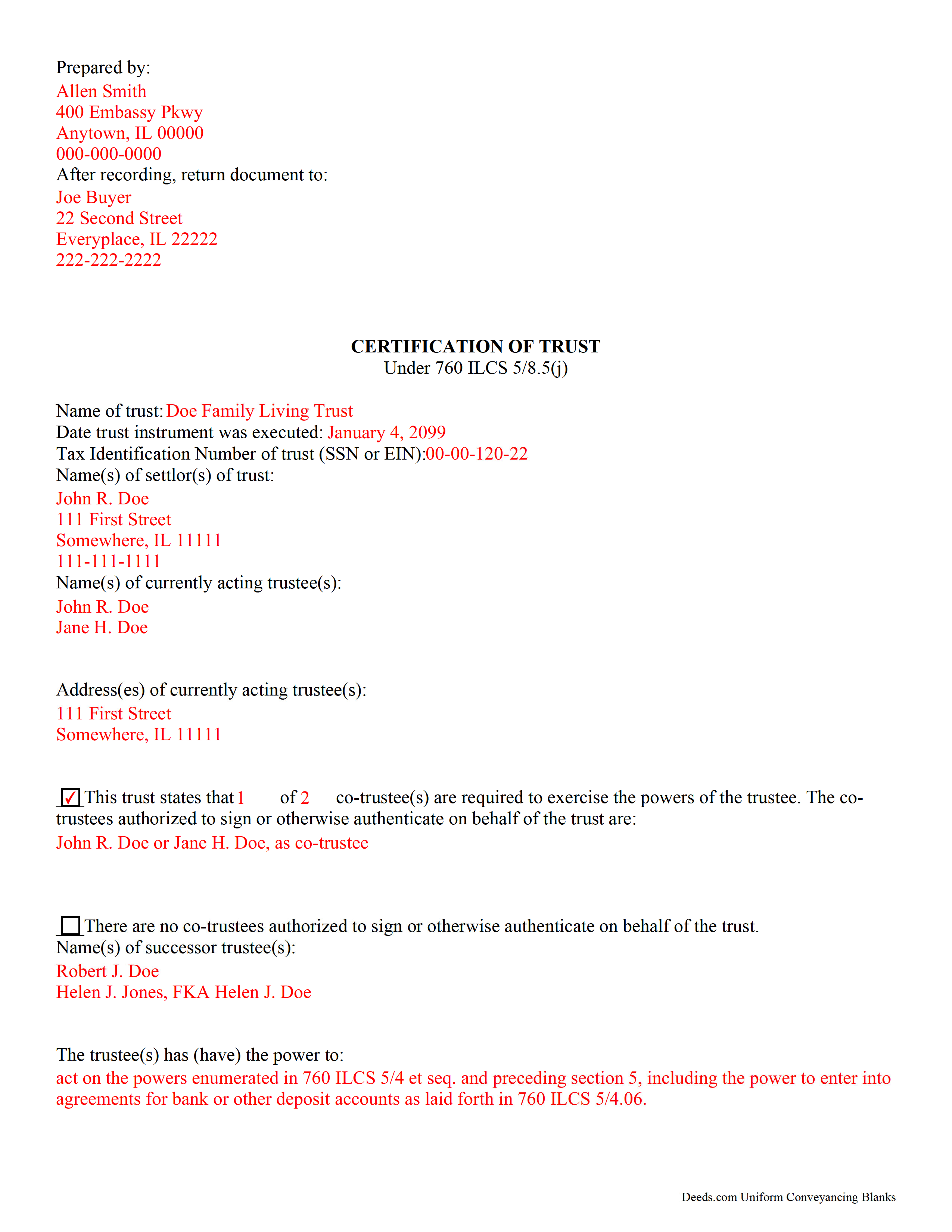
Christian County Completed Example of the Certificate of Trust Document
Example of a properly completed form for reference.
All 2 documents above included • One-time purchase • No recurring fees
Immediate Download • Secure Checkout
Additional Illinois and Christian County documents included at no extra charge:
Where to Record Your Documents
Christian County Recorder's Office
Taylorville, Illinois 62568
Hours: 8:00 to 4:00 Monday through Friday
Phone: (217) 824-4960
Recording Tips for Christian County:
- Bring your driver's license or state-issued photo ID
- Ensure all signatures are in blue or black ink
- Both spouses typically need to sign if property is jointly owned
- Bring extra funds - fees can vary by document type and page count
- Check margin requirements - usually 1-2 inches at top
Cities and Jurisdictions in Christian County
Properties in any of these areas use Christian County forms:
- Assumption
- Bulpitt
- Edinburg
- Kincaid
- Morrisonville
- Mount Auburn
- Moweaqua
- Owaneco
- Palmer
- Pana
- Rosamond
- Stonington
- Taylorville
- Tovey
Hours, fees, requirements, and more for Christian County
How do I get my forms?
Forms are available for immediate download after payment. The Christian County forms will be in your account ready to download to your computer. An account is created for you during checkout if you don't have one. Forms are NOT emailed.
Are these forms guaranteed to be recordable in Christian County?
Yes. Our form blanks are guaranteed to meet or exceed the applicable formatting requirements used for recording in Christian County, including margin requirements, font requirements, and other layout standards. This guarantee applies to formatting, not to the legal sufficiency of information entered by the user or the suitability of a form for a particular transaction.
Can I reuse these forms?
Yes. You can reuse the forms for your personal use. For example, if you have multiple properties in Christian County you only need to order once.
What do I need to use these forms?
The forms are PDFs that you fill out on your computer. The free Adobe Acrobat Reader is recommended, and most PDF apps also work. You do NOT enter your property information online - you download the blank forms and complete them privately on your own computer.
Are there any recurring fees?
No. This is a one-time purchase. Nothing to cancel, no memberships, no recurring fees.
How much does it cost to record in Christian County?
Recording fees in Christian County vary. Contact the recorder's office at (217) 824-4960 for current fees.
Questions answered? Let's get started!
Governed by 760 ILCS 5/8.5, the certificate of trust is the document a trustee provides to a lending institution or other third party that certifies the existence of a trust and his/her authority to act on behalf of the trust.
The document presents only essential information about the trust in lieu of the actual trust document. It names the settlor of the trust and all acting trustees, as well as any successor trustees who may be named under the terms of the trust document. If there are co-trustees, it states the number of trustees required to authorize actions. In addition, the certificate identifies whether or not a trust is revocable and amendable, and who holds authority to revoke and/or make amendments. Certain information, such as the parties having a beneficial interest in the trust, remains confidential.
The recipient of a certificate of trust is not liable for any actions they may take based on false representations within the certificate (760(ILCS 5/8.5(f)). While notarization is not obligatory, a third party may require that the certification of trust be acknowledged.
(Illinois Certificate of Trust Package includes form and completed example)
Important: Your property must be located in Christian County to use these forms. Documents should be recorded at the county recording office listed above.
This Certificate of Trust meets all recording requirements specific to Christian County.
Our Promise
The documents you receive here are guaranteed to meet or exceed the applicable Christian County recording format requirements. If there is a rejection caused by our formatting, we will correct the issue or refund your payment. This guarantee applies to document formatting only and does not extend to information entered by the user, the selection of the form, or the legal effect of the completed document.
Save Time and Money
Get your Christian County Certificate of Trust form done right the first time with Deeds.com Uniform Conveyancing Blanks. At Deeds.com, we understand that your time and money are valuable resources, and we don't want you to face a penalty fee or rejection imposed by a county recorder for submitting nonstandard documents. We constantly review and update our forms to meet rapidly changing state and county recording requirements for roughly 3,500 counties and local jurisdictions.
4.8 out of 5 - ( 4,836 Reviews )
DAVID H. 5 out of 5 stars
perfect. follow examples. no problem at court house. good deed layout.
Thank you for your feedback. We really appreciate it. Have a great day!
Charlotte H. 5 out of 5 stars
Easy to use and download. Everything we needed with a guide for accuracy.
Thank you!
Mike M. 5 out of 5 stars
Get Rid of the places to initial each page on the Trust Deed. The Co. Recorder (Davis) does not require that each page be initialled... If I and the "borrower" had initialed each page, then I would have to use US Mail to get the form from AZ to UT because scans of initials are not acceptable, but only a notarized signature from the borrower is...
Thank you for your feedback. We really appreciate it. Have a great day!
Judy A D. 5 out of 5 stars
It was quick and easy.
Thank you!
Lora N. 5 out of 5 stars
Excellent, easy to use! Awesome system. Loved it.
Thank you!
Florence F. 5 out of 5 stars
excellent experience and very prompt and detail . great service
We appreciate your review and your business. Thank you.
Douglas C. 5 out of 5 stars
Even for a novice like me, this site was easy to use, with very clear & simple options and instructions. I wish every web site was as good!
Thank you for your feedback. We really appreciate it. Have a great day!
Joel N. 5 out of 5 stars
Was helpful
Thank you for your feedback. We really appreciate it. Have a great day!
Edward M. 5 out of 5 stars
Thank you for your excellence form services. I can download all the forms easily. If you have the guide on how to fill out all of those forms, that more helpful for me. I don't know how the use E-Recording? Can you tell me how? If my friends ask me about the legal forms services, I will tell them to use your Website. If I wrote some words wrong, please correct them before display publicly.
Thank you for your feedback. We really appreciate it. Have a great day!
barbara s. 5 out of 5 stars
I was in a rush to record a quit claim deed, however due to covid 19 Miami dade county recorders office are not open to public. According to staff I would have to mail in the quit claim deed and wait approximately two weeks for the deed to get recorded. Thanks to Deeds.com I got my document recorded in less than one day. You guys are awesome, I will use this company anytime I need something like this again. Very reliable.
We appreciate your business and value your feedback. Thank you. Have a wonderful day!
Kathleen T. 5 out of 5 stars
Perfect in every way, the guide was a big help in a few areas that I had questions on. Overall the average person should have no issues with the forms.
We appreciate your business and value your feedback. Thank you. Have a wonderful day!
Melinda P. 5 out of 5 stars
I received my documents immediately! Thats was a huge relief!
We appreciate your business and value your feedback. Thank you. Have a wonderful day!
Jeffrey M. 5 out of 5 stars
Great service. It had all the forms I needed.
Thank you!
Marilyn O. 5 out of 5 stars
Good resource. Got what I needed easily
Thank you for your feedback. We really appreciate it. Have a great day!
Joshua W. 5 out of 5 stars
Very efficient and easy to use, worth the price.
Thank you for your feedback. We really appreciate it. Have a great day!