Franklin County Satisfaction of Lien Form
Last validated October 22, 2026 by our Forms Development TeamFormatted for recording in Franklin County, for property anywhere in the county: rural and unincorporated areas as well as Amberson, Blue Ridge Summit, Chambersburg, Concord, Doylesburg, Dry Run, Fannettsburg, Fayetteville and 23 more.
- 3 documents included
- Immediate PDF download
- Formatting guarantee
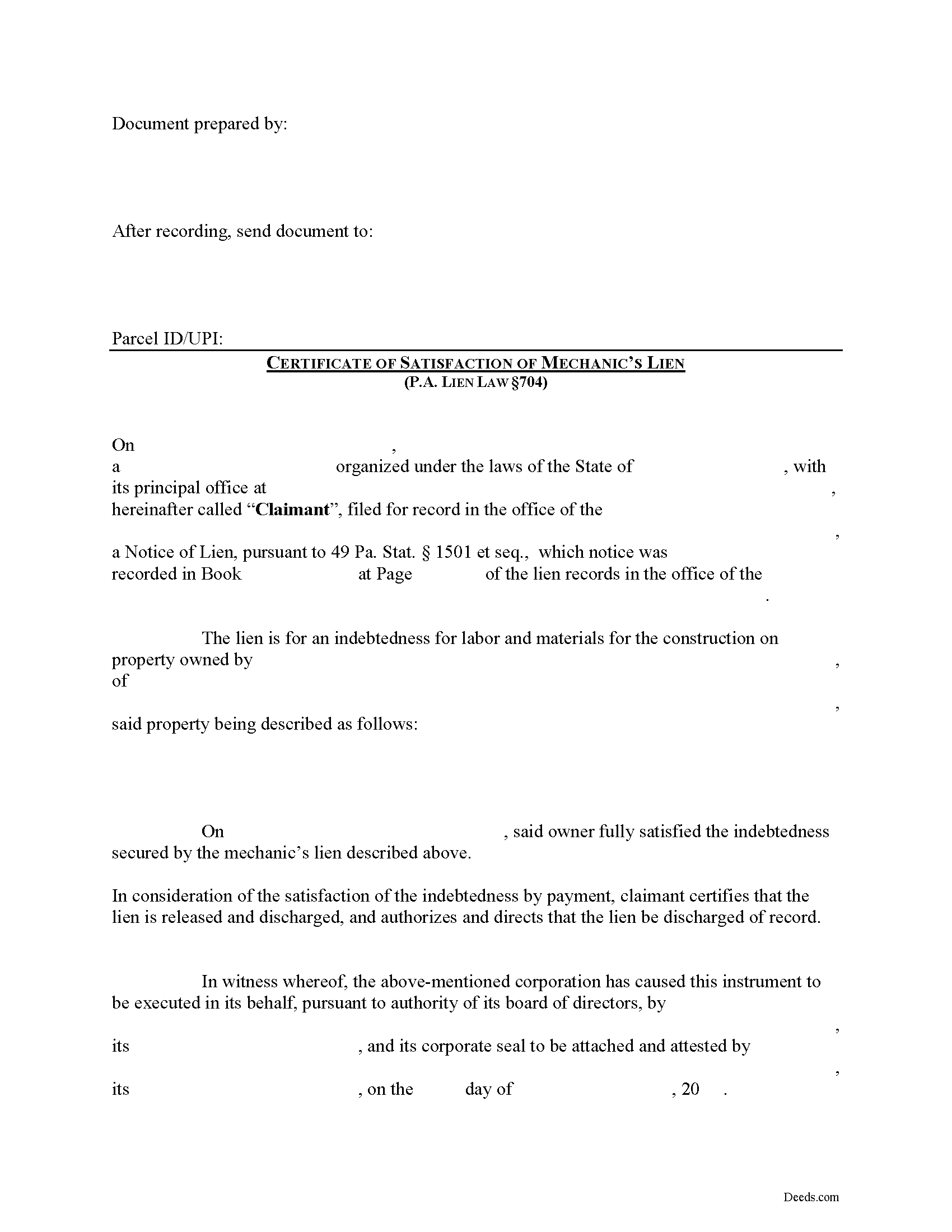
Franklin County Satisfaction of Lien Form
Fill in the blank Satisfaction of Lien form formatted to comply with all Pennsylvania recording and content requirements.
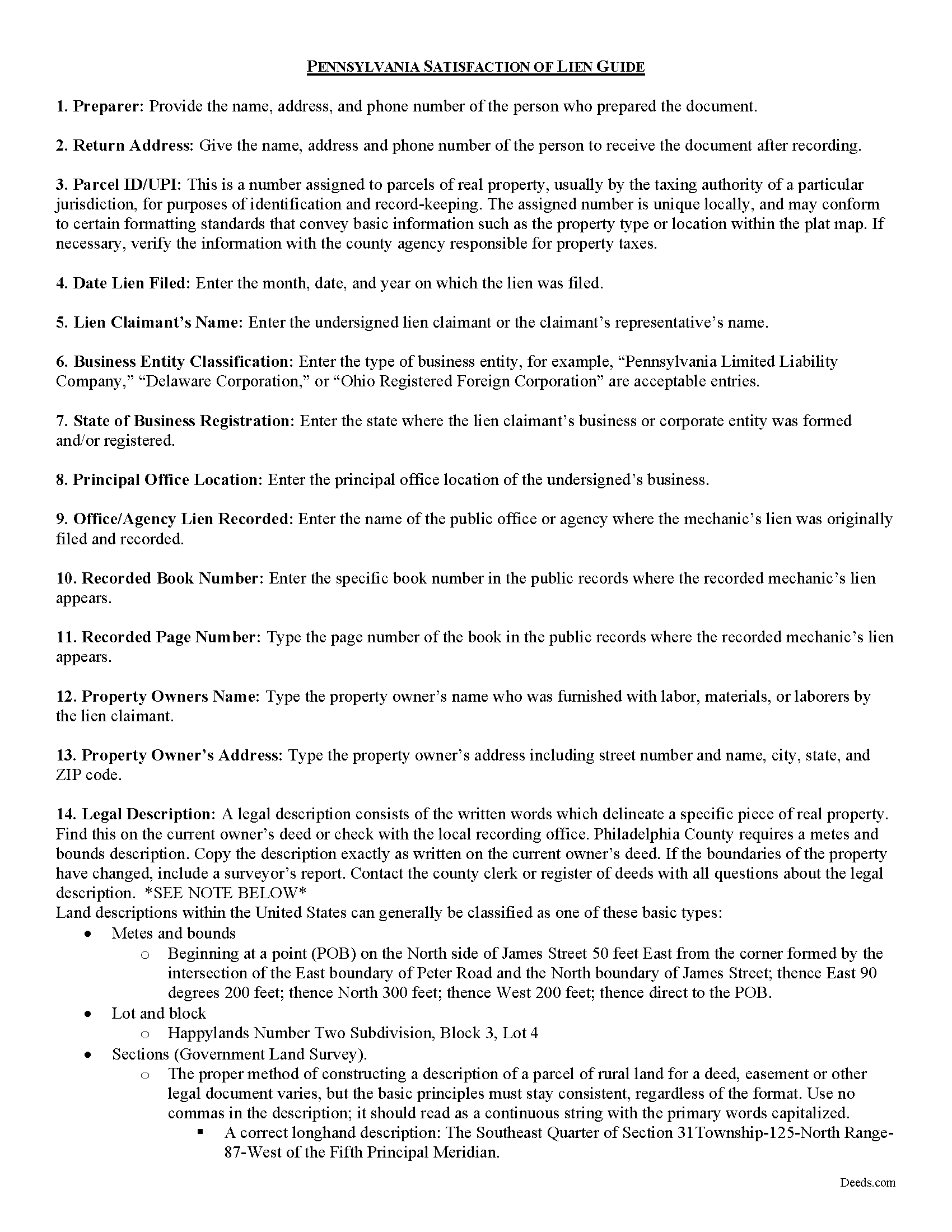
Franklin County Satisfaction of Lien Guide
Line by line guide explaining every blank on the form.
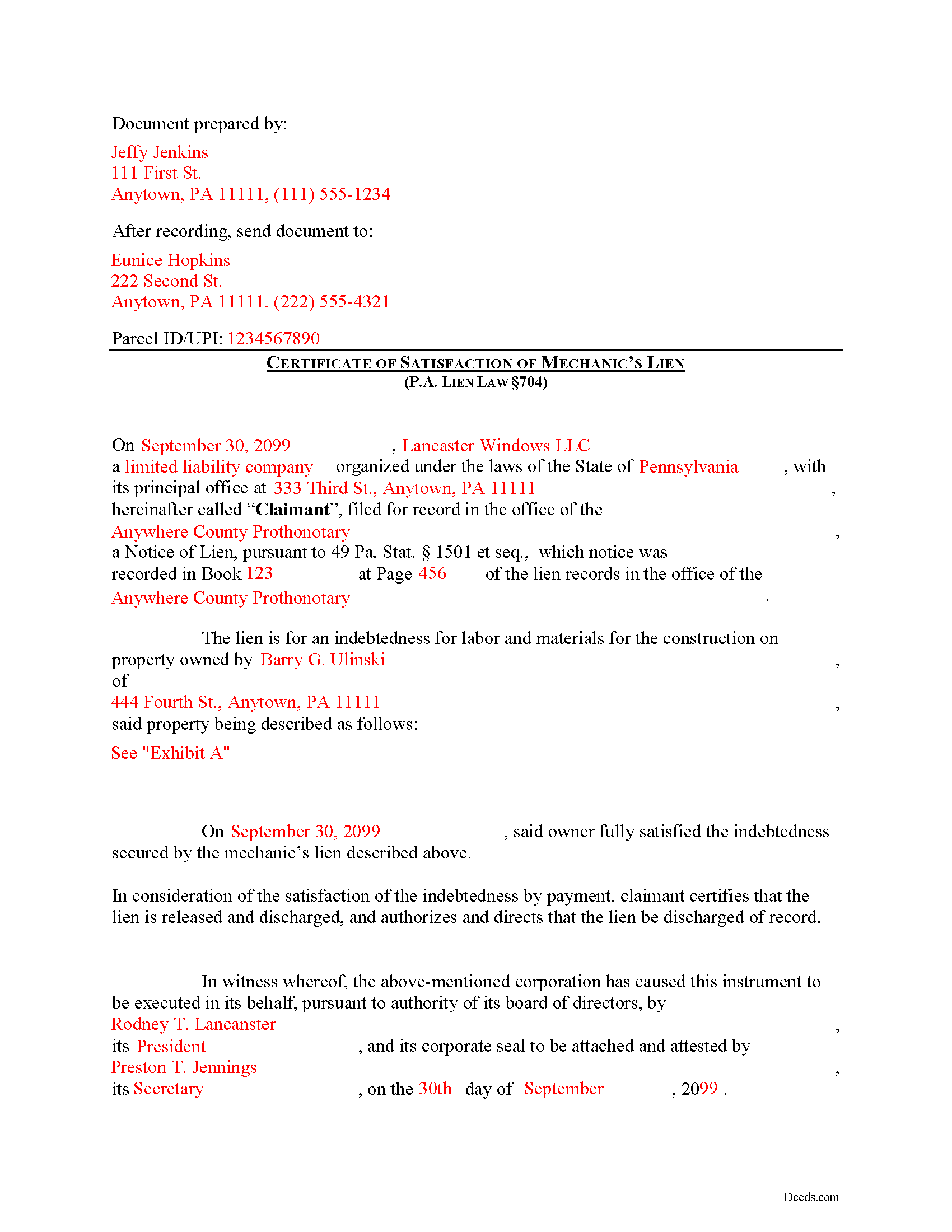
Franklin County Completed Example of the Satisfaction of Lien Document
Example of a properly completed form for reference.
All 3 documents above included • One-time purchase • No recurring fees
Immediate Download • Secure Checkout
Additional Pennsylvania and Franklin County documents included at no extra charge:
Where to Record Your Documents
Recorder of Deeds - Courthouse Annex
Chambersburg, Pennsylvania 17201
Hours: 8:30 to 4:30 M-F
Phone: (717) 261-3872
Recording Tips for Franklin County:
- Bring your driver's license or state-issued photo ID
- Ensure all signatures are in blue or black ink
- Documents must be on 8.5 x 11 inch white paper
- Double-check legal descriptions match your existing deed
- Verify all names are spelled correctly before recording
Cities and Jurisdictions in Franklin County
Properties in any of these areas use Franklin County forms:
- Amberson
- Blue Ridge Summit
- Chambersburg
- Concord
- Doylesburg
- Dry Run
- Fannettsburg
- Fayetteville
- Fort Loudon
- Greencastle
- Lemasters
- Lurgan
- Marion
- Mercersburg
- Mont Alto
- Orrstown
- Pleasant Hall
- Quincy
- Rouzerville
- Roxbury
- Saint Thomas
- Scotland
- Shady Grove
- South Mountain
- Spring Run
- State Line
- Upperstrasburg
- Waynesboro
- Williamson
- Willow Hill
- Zullinger
Hours, fees, requirements, and more for Franklin County
How do I get my forms?
Forms are available for immediate download after payment. The Franklin County forms will be in your account ready to download to your computer. An account is created for you during checkout if you don't have one. Forms are NOT emailed.
Are these forms guaranteed to be recordable in Franklin County?
Yes. Our form blanks are guaranteed to meet or exceed the applicable formatting requirements used for recording in Franklin County, including margin requirements, font requirements, and other layout standards. This guarantee applies to formatting, not to the legal sufficiency of information entered by the user or the suitability of a form for a particular transaction.
Can I reuse these forms?
Yes. You can reuse the forms for your personal use. For example, if you have multiple properties in Franklin County you only need to order once.
What do I need to use these forms?
The forms are PDFs that you fill out on your computer. The free Adobe Acrobat Reader is recommended, and most PDF apps also work. You do NOT enter your property information online - you download the blank forms and complete them privately on your own computer.
Are there any recurring fees?
No. This is a one-time purchase. Nothing to cancel, no memberships, no recurring fees.
How much does it cost to record in Franklin County?
Recording fees in Franklin County vary. Contact the recorder's office at (717) 261-3872 for current fees.
Questions answered? Let's get started!
Filing Satisfaction of a Mechanic's Lien Claim in Pennsylvania
Satisfactions of a Lien Claim are used when a lien claim has been fully paid and satisfied and then underlying lien is no longer necessary. Upon lien satisfaction, the lien claimant is tasked with releasing the lien or face possible civil penalty for failing to do so.
Upon payment, satisfaction or other discharge of the claim, verdict or judgment to the claimant must enter satisfaction thereof upon the record upon payment of the costs of same. 49 P.S. 704.
If the claimant fails to file the satisfaction within thirty (30) days after a written request to satisfy, the court, upon petition of any party in interest, may order the claim, verdict or judgment satisfied and the claimant shall be subject to a penalty in favor of the party aggrieved in such sum as the court in the petition proceedings shall determine to be just, but not exceeding the amount of claim. Id.
A valid satisfaction of lien identifies the parties, the property where the work or improvement took place, recording information for the filed lien, relevant dates, and any other details necessary for the situation. In addition, the form must meet all state and local standards for recorded documents. Submit the completed satisfaction document to the same location where the lien was filed.
Mechanic's Liens are governed by Title 49 of the Pennsylvania Consolidated Statutes.
This article is provided for informational purposes only and does not constitute legal advice. Contact an attorney with questions about the Satisfaction of Lien Claim or any other issues related to mechanic's liens in Pennsylvania.
Important: Your property must be located in Franklin County to use these forms. Documents should be recorded at the county recording office listed above.
This Satisfaction of Lien meets all recording requirements specific to Franklin County.
Our Promise
The documents you receive here are guaranteed to meet or exceed the applicable Franklin County recording format requirements. If there is a rejection caused by our formatting, we will correct the issue or refund your payment. This guarantee applies to document formatting only and does not extend to information entered by the user, the selection of the form, or the legal effect of the completed document.
Save Time and Money
Get your Franklin County Satisfaction of Lien form done right the first time with Deeds.com Uniform Conveyancing Blanks. At Deeds.com, we understand that your time and money are valuable resources, and we don't want you to face a penalty fee or rejection imposed by a county recorder for submitting nonstandard documents. We constantly review and update our forms to meet rapidly changing state and county recording requirements for roughly 3,500 counties and local jurisdictions.
4.8 out of 5 - ( 4,832 Reviews )
Christine L. 5 out of 5 stars
I was very pleased with your service. You got me the information I required within one day. Thank you!
Thank you!
Evaristo R. 2 out of 5 stars
I was very excited to use the website but unfortunately they had a problem retrieving my Deed but thank you for the opportunity.
Thank you for your feedback. We really appreciate it. Have a great day!
Todd B. 5 out of 5 stars
very quick and easy
Thank you!
Felincia L. 5 out of 5 stars
The process was fast and efficient. I did get a bit confused after entering info for my package but soon realized I had completed this part of the process and only needed to leave the page and wait for review of the document and then the invoice. It was pretty simple. After payment of the invoice I was notified that the document had been submitted. A few hours later I received notice that the document was recorded by the city. It was fast!
We are motivated by your feedback to continue delivering excellence. Thank you!
MYRON J. 5 out of 5 stars
Great way to track and save forms.
Thank you!
Ardelle P. 5 out of 5 stars
Extremely happy with this. Easy to use and very professional looking form when completed.
We appreciate your business and value your feedback. Thank you. Have a wonderful day!
Joyce H. 5 out of 5 stars
I found the site very easy to use and upfront about the cost. I had tried two other sites both of which had hidden costs until after I filled out the forms.
Thank you for your feedback. We really appreciate it. Have a great day!
Lourdes O. 5 out of 5 stars
Extremely efficient website. Beats going to Court House to record documents. My document was recorded in less then 24 hours! Amazing! I will be using deeds.com from now on.
We appreciate your business and value your feedback. Thank you. Have a wonderful day!
Zennell W. 5 out of 5 stars
Quick fast and easy transaction.
We are grateful for your feedback and looking forward to serving you again. Thank you!
Alan S. 5 out of 5 stars
Quick, easy, and accurate. And if there's ever a problem, the resolution is also quick, easy, and accurate. The service is hard to beat.
Thank you for your feedback. We really appreciate it. Have a great day!
Felix M. 5 out of 5 stars
Very useful. I'm a Miami attorney and needed an amended deed specific to Texas. Document and instructions were very good.
Your feedback is appreciated. Thank you for letting us know how we did.
Lisa H. 5 out of 5 stars
I needed a copy of a deed for a client and wanted to be sure I had the most recent one. I used Deeds.com and had it along with detailed property information within minutes at a very reasonable price. I am very pleased.
Thank you!
David L. 5 out of 5 stars
Good quick service. The forms helped guide and explain each section and question.
Thank you for your feedback. We really appreciate it. Have a great day!
David K. 5 out of 5 stars
My 1st trip to your site. I give it a full 5-star rating! Thank you. I'll be back.
Thank you for your feedback. We really appreciate it. Have a great day!
Lutz P. 5 out of 5 stars
Your forms are great but I couldn’t use them with my computer and acrobats reader didn’t work. And then my thermal printer would only print 1/3 size pages with no way to fix it. I ordered a new color printer and we’ll see what happens.
Thank you, Lutz. We're glad you like the forms, and we're sorry getting them working turned into such a hassle. That shrunken page is typical of thermal printers: most use narrow receipt or label paper, so a full page gets scaled down to fit, and no setting can change that. Thermal paper also fades over time, which you don't want on a document you're recording, so the new printer is the right call. When it arrives, print on plain white paper with “Actual size” selected in the print settings so the page comes out full size with its margins intact. If Acrobat Reader gives you trouble again, save the form to your computer first and open the saved file in Acrobat Reader rather than in your web browser. Still stuck? Contact our support team and we'll walk you through it.