Nottoway County Unconditional Lien Waiver on Final Payment Form
Last validated October 22, 2026 by our Forms Development TeamFormatted for recording in Nottoway County, for property anywhere in the county or independent city: rural and unincorporated areas as well as Blackstone, Burkeville, Crewe, Nottoway.
- 3 documents included
- Immediate PDF download
- Formatting guarantee
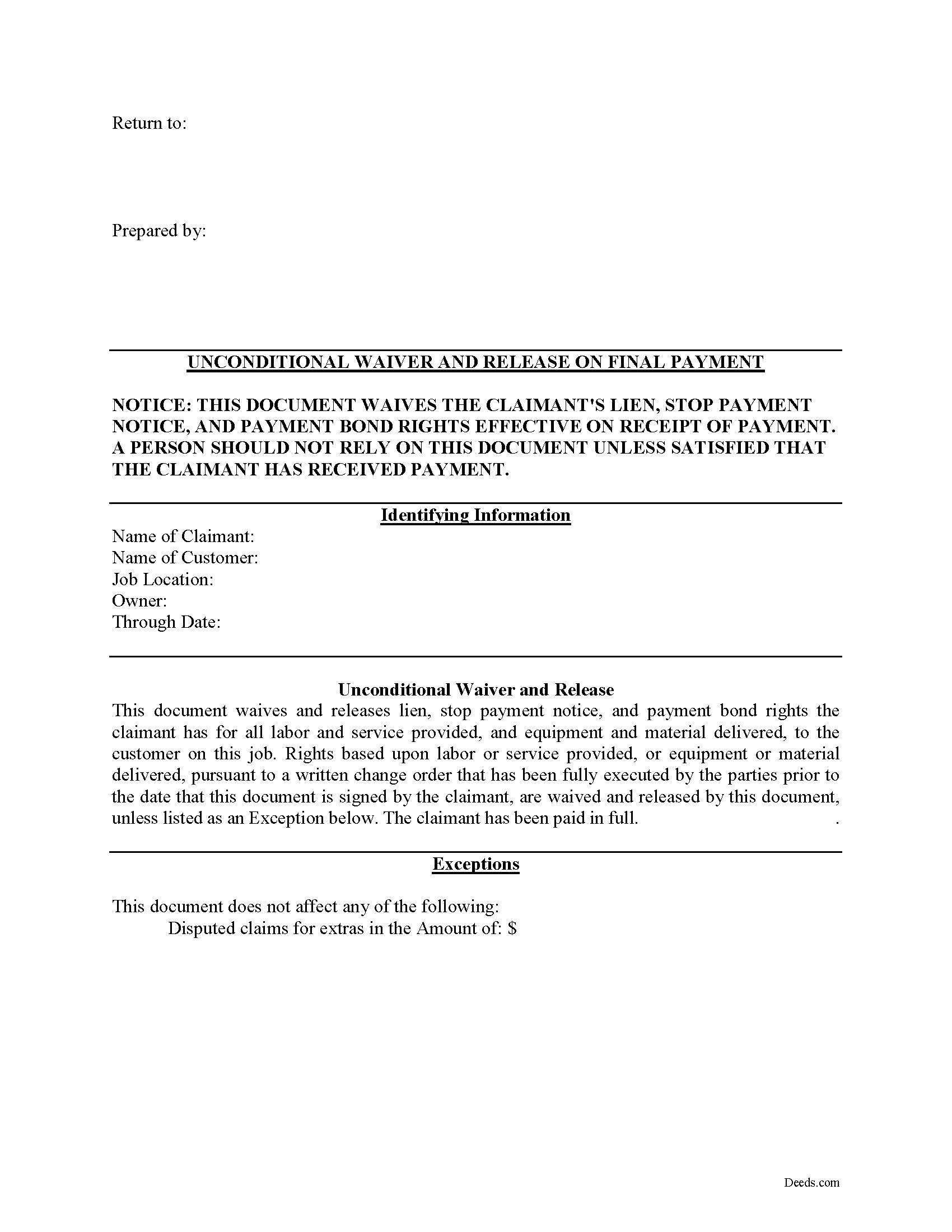
Nottoway County Unconditional Lien Waiver on Final Payment Form
Fill in the blank Unconditional Lien Waiver on Final Payment form formatted to comply with all Virginia recording and content requirements.
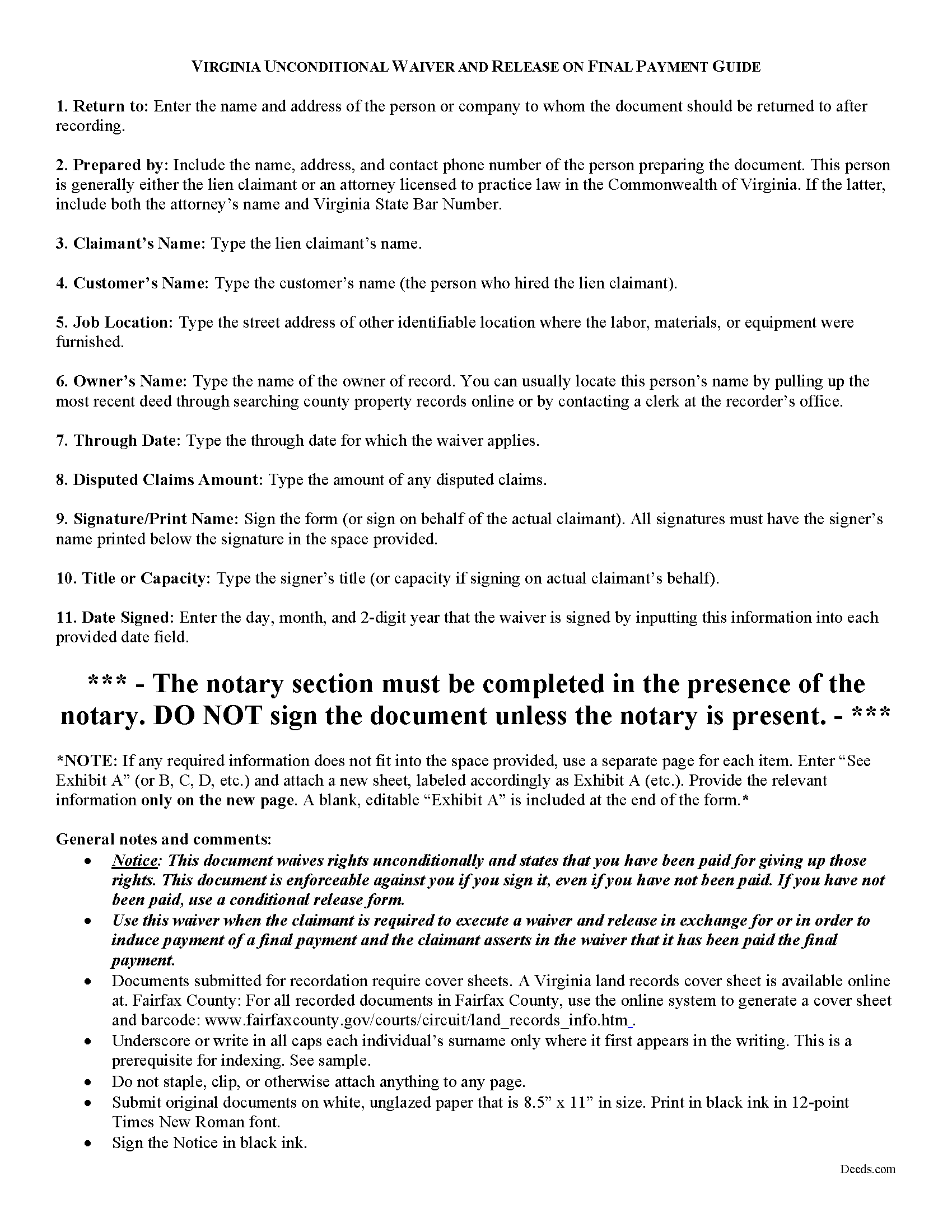
Nottoway County Unconditional Lien Waiver on Final Payment Guide
Line by line guide explaining every blank on the form.
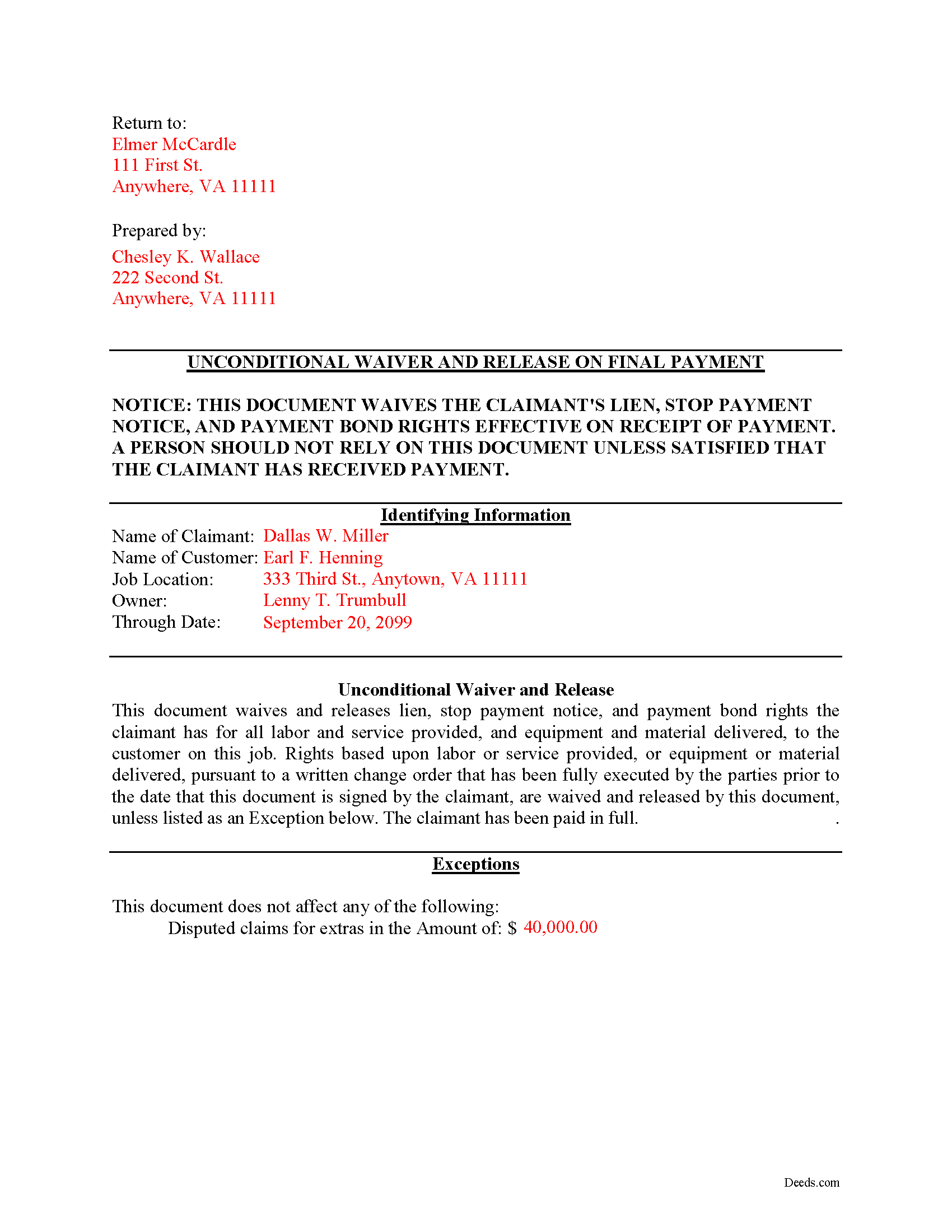
Nottoway County Completed Example of the Unconditional Lien Waiver on Final Payment Document
Example of a properly completed form for reference.
All 3 documents above included • One-time purchase • No recurring fees
Immediate Download • Secure Checkout
Additional Virginia and Nottoway County documents included at no extra charge:
Where to Record Your Documents
Nottoway Clerk of Circuit Court
Nottoway, Virginia 23955
Hours: 8:30 to 4:30 M-F
Phone: (434) 645-9043
Recording Tips for Nottoway County:
- Bring your driver's license or state-issued photo ID
- Ensure all signatures are in blue or black ink
- Documents must be on 8.5 x 11 inch white paper
- Double-check legal descriptions match your existing deed
- Verify all names are spelled correctly before recording
Cities and Jurisdictions in Nottoway County
Properties in any of these areas use Nottoway County forms:
- Blackstone
- Burkeville
- Crewe
- Nottoway
Hours, fees, requirements, and more for Nottoway County
How do I get my forms?
Forms are available for immediate download after payment. The Nottoway County forms will be in your account ready to download to your computer. An account is created for you during checkout if you don't have one. Forms are NOT emailed.
Are these forms guaranteed to be recordable in Nottoway County?
Yes. Our form blanks are guaranteed to meet or exceed the applicable formatting requirements used for recording in Nottoway County, including margin requirements, font requirements, and other layout standards. This guarantee applies to formatting, not to the legal sufficiency of information entered by the user or the suitability of a form for a particular transaction.
Can I reuse these forms?
Yes. You can reuse the forms for your personal use. For example, if you have multiple properties in Nottoway County you only need to order once.
What do I need to use these forms?
The forms are PDFs that you fill out on your computer. The free Adobe Acrobat Reader is recommended, and most PDF apps also work. You do NOT enter your property information online - you download the blank forms and complete them privately on your own computer.
Are there any recurring fees?
No. This is a one-time purchase. Nothing to cancel, no memberships, no recurring fees.
How much does it cost to record in Nottoway County?
Recording fees in Nottoway County vary. Contact the recorder's office at (434) 645-9043 for current fees.
Questions answered? Let's get started!
Lien waivers are used between contractors and property owners as a quid-pro-quo arrangement to induce payment from an owner in return for the contractor waiving some or all available mechanic's lien rights. If the appropriate waivers are used, they offer advantages for both the contractor and the owner.
In Virginia, any right to file or enforce any mechanics' lien may be waived in whole or in part at any time by any person entitled to such lien, except that a subcontractor, lower-tier subcontractor, or material supplier may not waive or diminish his lien rights in a contract in advance of furnishing any labor, services, or materials. Va. Code 43-3(C). A provision that waives or diminishes a subcontractor's, lower-tier subcontractor's, or material supplier's lien rights in a contract executed prior to providing any labor, services, or materials is null and void. Id.
The Virginia legislature does not mandate a required form of a lien waiver, so common law principles of contract allow for the parties to use any form that clearly spells out their intentions. Note that it is a felony for any person to knowingly present a waiver form to an owner, his agent, contractor, lender, or title company for the purpose of obtaining funds or title insurance if the person forges or signs the form without authority. Va. Code. 43-13.1.
Waivers fall under two broad categories of "conditional" and "unconditional," and there are two subcategories of waivers for a "partial" or "final" payment. Each type comes with benefits and risks, so take care to use the correct form for the situation.
An unconditional waiver becomes effective when presented to the owner or other party, regardless of whether or not the payment is valid. If you unconditionally waive a lien, you can still sue on a breach of contract or other legal theory, but that is no substitute for the protections and ease of a mechanic's lien in recovering any money owed. An unconditional waiver gives an owner more protection while taking away some rights from the contractor.
Only use an unconditional final waiver AFTER receiving the final or full payment.
So, when used properly, waivers can facilitate the flow of business and encourage prompt payment.
This article is provided for informational purposes only and should not be relied upon a substitute for the advice of an attorney. For any questions about Virginia lien waivers, please speak with a lawyer.
Important: Your property must be located in Nottoway County to use these forms. Documents should be recorded at the county or independent city recording office listed above.
This Unconditional Lien Waiver on Final Payment meets all recording requirements specific to Nottoway County.
Our Promise
The documents you receive here are guaranteed to meet or exceed the applicable Nottoway County recording format requirements. If there is a rejection caused by our formatting, we will correct the issue or refund your payment. This guarantee applies to document formatting only and does not extend to information entered by the user, the selection of the form, or the legal effect of the completed document.
Save Time and Money
Get your Nottoway County Unconditional Lien Waiver on Final Payment form done right the first time with Deeds.com Uniform Conveyancing Blanks. At Deeds.com, we understand that your time and money are valuable resources, and we don't want you to face a penalty fee or rejection imposed by a county recorder for submitting nonstandard documents. We constantly review and update our forms to meet rapidly changing state and county recording requirements for roughly 3,500 counties and local jurisdictions.
4.8 out of 5 - ( 4,836 Reviews )
James J. 5 out of 5 stars
I couldn't be more pleased or more impressed with the e-recording services I received from deeds.com and from my service representative, KVH. I was able to record documents in approximately half a dozen different counties easily and seamlessly, with a minimum of fuss. The turn around time was incredibly fast. The pricing was incredibly reasonable. I know I have alternatives because, in the past, I have used a competitor service for my recording needs. I won't do that again -- this was an exceptional experience. Thank you for your help!
We appreciate your business and value your feedback. Thank you. Have a wonderful day!
Joseph B. 1 out of 5 stars
Multiple attempts to straight answers to very simple straight forward questions about why my submission is not being accepted have gone unanswered. It's been two days and no answer that solves my problem.
Sorry we were unable to assist you Joseph. We do hope that you find something more suitable to your needs elsewhere. Have a wonderful day.
Natasha M. 5 out of 5 stars
Your forms, guides, sample deeds and submission process were accessible, easy to understand and simple. I also was pleasantly surprised by the efficiency, professionalism and ease of staff communicating with me after I uploaded the document to ensure the county accepted it. I will continue to use this website to record deeds. Thank you!
Thank you for your feedback. We really appreciate it. Have a great day!
Anita A. 5 out of 5 stars
No review provided.
Thank you!
Dan P. 5 out of 5 stars
Great service and well done forms thank you
Thank you!
Steven B. 5 out of 5 stars
County accepted the TODD form. Easy to understand and don’t have to hire an attorney! Excellent
Appreciate this, Steven. That's exactly the outcome we're aiming for. Wishing you well.
Tim M. 5 out of 5 stars
This is my first time using this amazing service. I wish I was told about this before I went all the way downtown, drove thru construction zones, paid for parking only to be told the computer system had crashed. I was referred to Deeds.com and I will not use the downtown system again.
Your feedback is greatly appreciated. Thank you for taking the time to share your experience!
Michael H. 5 out of 5 stars
Site was easy to understand and use. Service was prompt. Good job Montgomery County!
Thank you!
RUTH A. 5 out of 5 stars
I truly appreciate the service that you have for the customers. This very convenient and easy to follow. Thank you very much for this service.
Thank you for your feedback. We really appreciate it. Have a great day!
Christopher W. 5 out of 5 stars
Completed in 1 day and no problems filing a deed in another county. Price was less than the gas I would have used, not to mention my time. Thanks
Thank you!
Samuel C. 5 out of 5 stars
Awesome!!
Thank you!
Kirstie W. 3 out of 5 stars
In California, the recorder charges a $75 fee for EVERY PAGE of any document related to real estate, with a $225 maximum. So the easement deed this company made is 3 pages, when it could easily have fit in 2 pages (including the notary page). So they just cost me an extra $75. Do better!
Thanks for the feedback. One correction, because it matters for anyone reading this: California's $75 fee (SB 2, Government Code 27388.1) is charged per document title, not per page, and the $225 cap applies to transactions with multiple documents or titles. Page count only affects the base recording fee, which is $3 per additional page. A three-page easement deed carries the same $75 as a two-page one would. Recording fees are set and collected by the county, not by Deeds.com, and the county recorder's published fee schedule is the place to confirm what you were charged.
Larry H. 5 out of 5 stars
Wow! So easy and such a cost savings. Thanks
Thanks Larry, we appreciate your feedback.
ELOISA F. 5 out of 5 stars
Once I had everything right;the recording was fast and easy. I was updated at every juncture and apprised of my mistakes in order to fix and record my deed. To improve service: I think that several different examples and scenarios would have helped. If you have different names from your children; birth certificates and marriage certificates are a requirement in Clark County, NV. If you want to add anyone to the deed in a Quit Claim Deed; you have to add yourself as a grantee even if you are the grantor along with the other grantees.
Thank you for your feedback. We really appreciate it. Have a great day!
David S. 5 out of 5 stars
The form was just what I needed for the Circuit Court and Land Records office. The additional information provided was very helpful as well.
We appreciate your business and value your feedback. Thank you. Have a wonderful day!