Calumet County Correction Deed Form
Last validated October 6, 2026 by our Forms Development TeamFormatted for recording in Calumet County, for property anywhere in the county: rural and unincorporated areas as well as Brillion, Chilton, Forest Junction, Hilbert, New Holstein, Potter, Sherwood, Stockbridge.
- 3 documents included
- Immediate PDF download
- Formatting guarantee
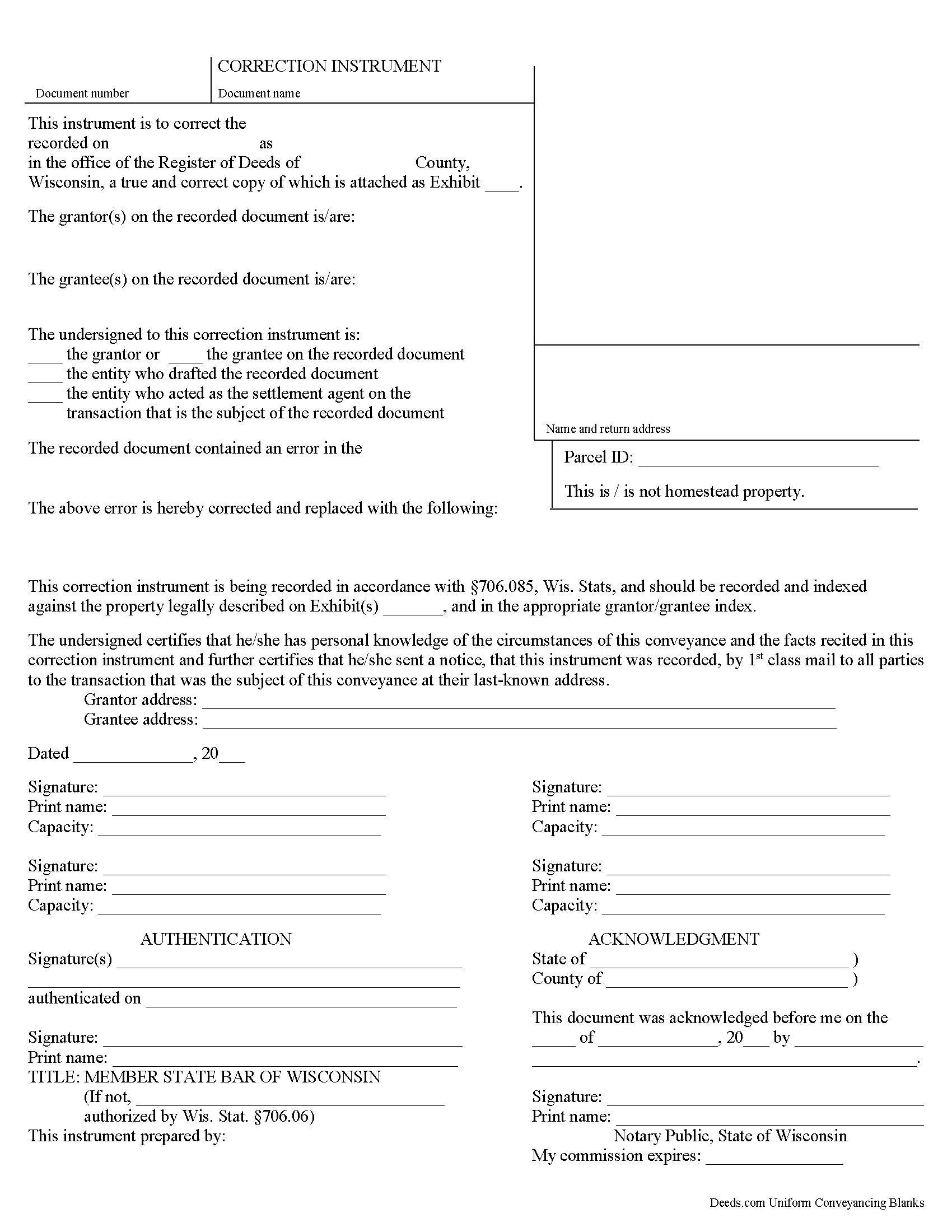
Calumet County Correction Deed Form
Fill in the blank form formatted to comply with all recording and content requirements.
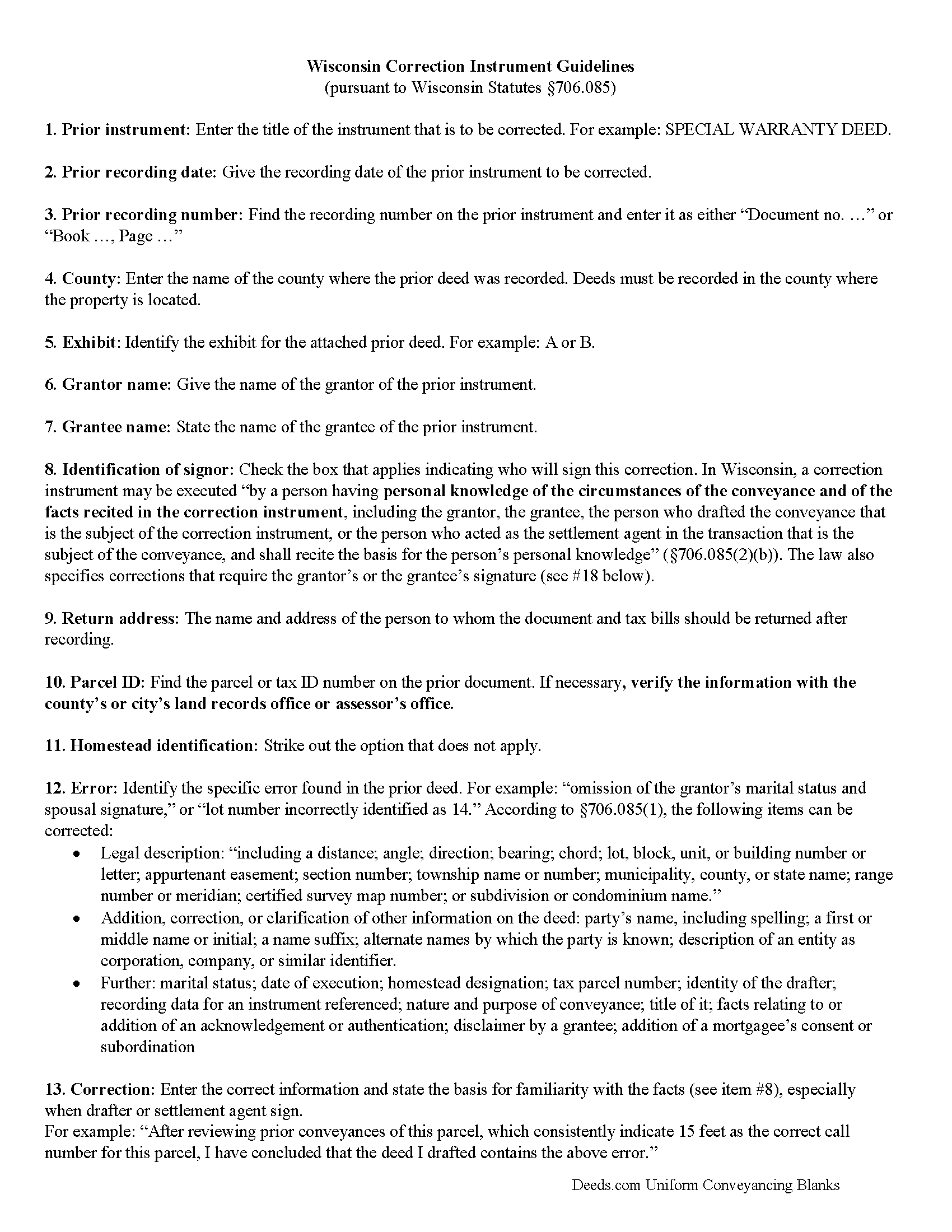
Calumet County Correction Deed Guide
Line by line guide explaining every blank on the form.
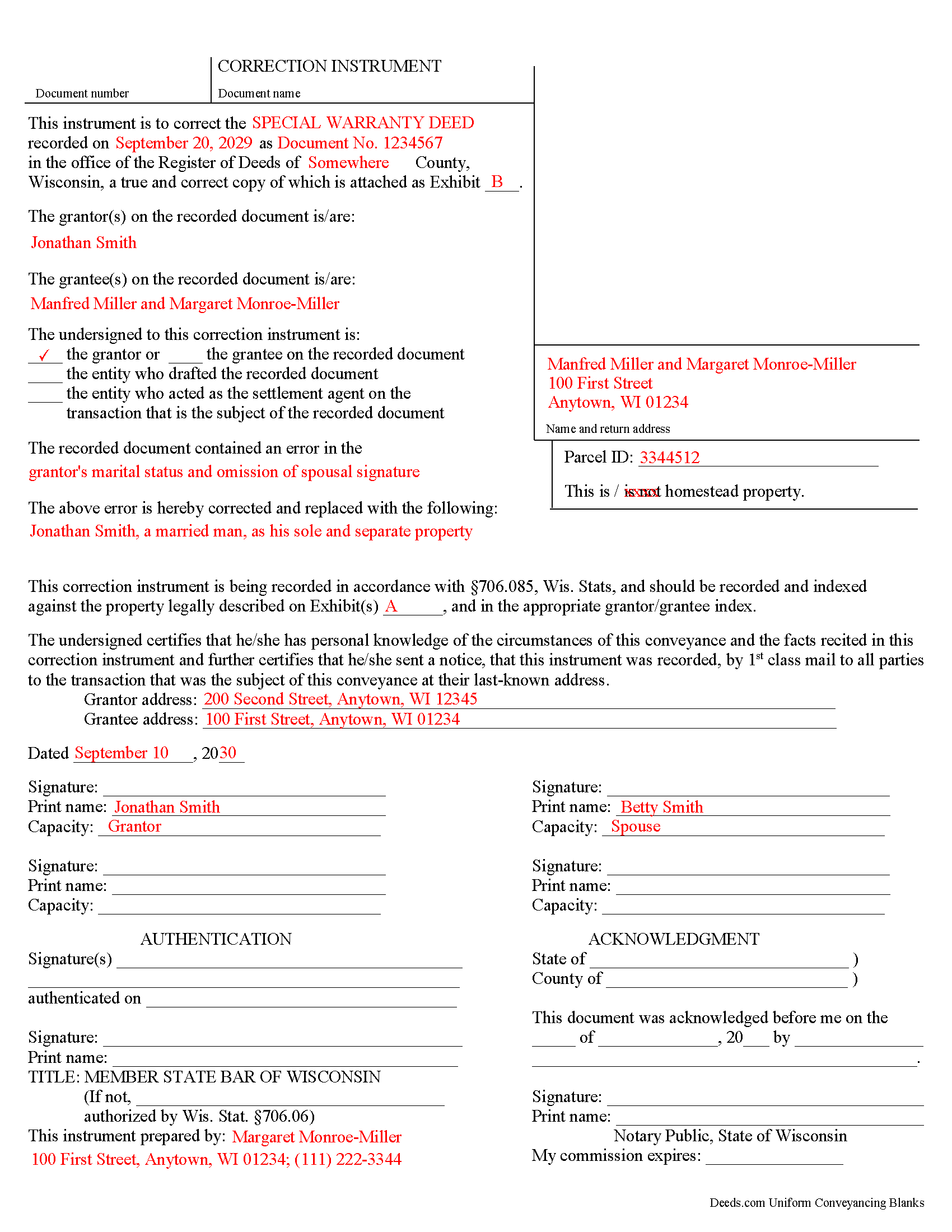
Calumet County Completed Example of the Correction Deed Document
Example of a properly completed form for reference.
All 3 documents above included • One-time purchase • No recurring fees
Immediate Download • Secure Checkout
Additional Wisconsin and Calumet County documents included at no extra charge:
Where to Record Your Documents
Calumet County Register
Chilton, Wisconsin 53014
Hours: Monday - Friday 8:00am - 4:30pm / Recording until 4:00pm
Phone: (920) 849-1441
Recording Tips for Calumet County:
- Bring your driver's license or state-issued photo ID
- Ensure all signatures are in blue or black ink
- Recording fees may differ from what's posted online - verify current rates
- Request a receipt showing your recording numbers
- Ask about accepted payment methods when you call ahead
Cities and Jurisdictions in Calumet County
Properties in any of these areas use Calumet County forms:
- Brillion
- Chilton
- Forest Junction
- Hilbert
- New Holstein
- Potter
- Sherwood
- Stockbridge
Hours, fees, requirements, and more for Calumet County
How do I get my forms?
Forms are available for immediate download after payment. The Calumet County forms will be in your account ready to download to your computer. An account is created for you during checkout if you don't have one. Forms are NOT emailed.
Are these forms guaranteed to be recordable in Calumet County?
Yes. Our form blanks are guaranteed to meet or exceed the applicable formatting requirements used for recording in Calumet County, including margin requirements, font requirements, and other layout standards. This guarantee applies to formatting, not to the legal sufficiency of information entered by the user or the suitability of a form for a particular transaction.
Can I reuse these forms?
Yes. You can reuse the forms for your personal use. For example, if you have multiple properties in Calumet County you only need to order once.
What do I need to use these forms?
The forms are PDFs that you fill out on your computer. The free Adobe Acrobat Reader is recommended, and most PDF apps also work. You do NOT enter your property information online - you download the blank forms and complete them privately on your own computer.
Are there any recurring fees?
No. This is a one-time purchase. Nothing to cancel, no memberships, no recurring fees.
How much does it cost to record in Calumet County?
Recording fees in Calumet County vary. Contact the recorder's office at (920) 849-1441 for current fees.
Questions answered? Let's get started!
Use the correction instrument to correct an error in a deed in Wisconsin.
Since 2010 Wisconsin statutes have allowed for a correction instrument that can be used to correct any of the following (706.085, Wis. Stats.):
* An error in the legal description, "including a distance; angle; direction; bearing; chord; lot, block, unit, or building number or letter; appurtenant easement; section number; township name or number; municipality, county, or state name; range number or meridian; certified survey map number; or subdivision or condominium name."
* The addition, correction, or clarification of other information on the deed: party's name, including spelling; a first or middle name or initial; a name suffix; alternate names by which the party is known; and description of an entity as corporation, company, or similar identifier.
* An error in one of the following items on the deed: marital status; date of execution; homestead designation; tax parcel number; identity of the drafter; recording data for an instrument referenced; nature and purpose of conveyance; title of it; facts relating to or addition of an acknowledgement or authentication; disclaimer by a grantee; and addition of a mortgagee's consent or subordination
If any corrections are made to the legal description, the complete corrected legal description must be attached as exhibit page, in addition to the incorrect version on the attached prior deed.
The correction instrument may be executed "by a person having personal knowledge of the circumstances of the conveyance and of the facts recited in the correction instrument" (706.085, Wis. Stats.). This includes the grantor, the grantee, the person who drafted the prior deed, and the person who acted as the settlement agent in the prior conveyance. In the case of the latter two especially, "the basis for the person's personal knowledge" must be stated. Furthermore, the law specifies corrections that must be signed by the grantor or the grantee.
The grantor only can sign if land is added through the correction. If, on the other hand, a parcel is being removed, the grantee must sign. If a lot or unit number is being corrected and the lot or unit incorrectly recited on the conveyance is also owned by the grantor," the grantee's signature is required as well. If the incorrectly recited parcel is not also owned by the grantor, any party identified above can sign. The same holds true if the correction instrument "supplies a lot, block, unit, or building number or letter that was omitted from the conveyance" (706.085, Wis. Stats.). The correction instrument must be acknowledged or authenticated by a notary or official authorized to do so.
(Wisconsin CD Package includes form, guidelines, and completed example)
Important: Your property must be located in Calumet County to use these forms. Documents should be recorded at the county recording office listed above.
This Correction Deed meets all recording requirements specific to Calumet County.
Our Promise
The documents you receive here are guaranteed to meet or exceed the applicable Calumet County recording format requirements. If there is a rejection caused by our formatting, we will correct the issue or refund your payment. This guarantee applies to document formatting only and does not extend to information entered by the user, the selection of the form, or the legal effect of the completed document.
Save Time and Money
Get your Calumet County Correction Deed form done right the first time with Deeds.com Uniform Conveyancing Blanks. At Deeds.com, we understand that your time and money are valuable resources, and we don't want you to face a penalty fee or rejection imposed by a county recorder for submitting nonstandard documents. We constantly review and update our forms to meet rapidly changing state and county recording requirements for roughly 3,500 counties and local jurisdictions.
4.8 out of 5 - ( 4,829 Reviews )
Michelle M. 5 out of 5 stars
The website was easy to navigate and great communication on every step of the process.
Thank you for your feedback. We really appreciate it. Have a great day!
Paul W. 5 out of 5 stars
Great service; document was exactly what I wanted. I highly recommend your company.
Thank you for your kind words and for choosing us.
Joyce S. 5 out of 5 stars
So happy, great forms made everything a breeze.
Thank you for your feedback. We really appreciate it. Have a great day!
Deborah G. 5 out of 5 stars
Great website and very easy to use
Thank you for your feedback Deborah, we really appreciate it. Have a great day!
Lorrisa L. 4 out of 5 stars
No review provided.
Thank you for your rating. Have a great day!
David C. 5 out of 5 stars
I found it pretty easy to navigate, all worked well. Need a better example of excise tax. Lastly, your link in the email to get to this page doesn't work :)
We appreciate your business and value your feedback. Thank you. Have a wonderful day!
Stephen M. 5 out of 5 stars
Easy to sign up and create an account. Lots of options.
Thank you!
Duane S. 5 out of 5 stars
Really glad to find your site. Made filing so much easier.
Thank you for your feedback. We really appreciate it. Have a great day!
Kelly Y. 5 out of 5 stars
The document was easy to locate, pay for and download. I hope it will be this easy to process by the County!
Thank you!
Carol S. 1 out of 5 stars
Unfortunately for me this website was of no help, due to the amount of paperwork that needed to be submitted. One thing I can say they responded with answer really quickly. If this is a website that only deals with quick and fast deed issues, then it should indicate what they can and cannot do.
Thank you for your feedback. We really appreciate it. Have a great day!
Edwart D. 5 out of 5 stars
I tend to not pay attention to the details and then blame other people. Thankfully Deeds.com has my back when I make silly mistakes.
Thank you!
Philip C. 5 out of 5 stars
The product I purchased looks great and I added Adobe to be able to copy it, but for some reason I can't,so I will delete Adobe and then try again to copy what i paid for. I have all the PDFS' and my computer and printer are fairly new (windows 10),I should have tried to copy it first, I'll get it! Thanks
Thank you for your feedback. We really appreciate it. Have a great day!
Caroline E. 5 out of 5 stars
VERY easy to register, to request relevant deeds that apply to your own county/state, and to download. And bonus - you get instructional materials too! Highly recommend! Thank you!
Thank you for your feedback. We really appreciate it. Have a great day!
Patricia C. 5 out of 5 stars
The website works fine. The process of changing my Mineral Deed is sure more expensive in Texas. But I appreciate the convenience of the website and the pages of directions.
We appreciate your business and value your feedback. Thank you. Have a wonderful day!
Janice U. 5 out of 5 stars
So far everything is going really well. Thank you!
Thank you!