Dale County Quitclaim Deed (Partnership or Limited Partnership Grantor) Form
Last validated October 9, 2026 by our Forms Development TeamFormatted for recording in Dale County, for property anywhere in the county: rural and unincorporated areas as well as Ariton, Daleville, Fort Rucker, Level Plains, Midland City, Newton, Ozark, Pinckard and 1 more.
- 3 documents included
- Immediate PDF download
- Formatting guarantee
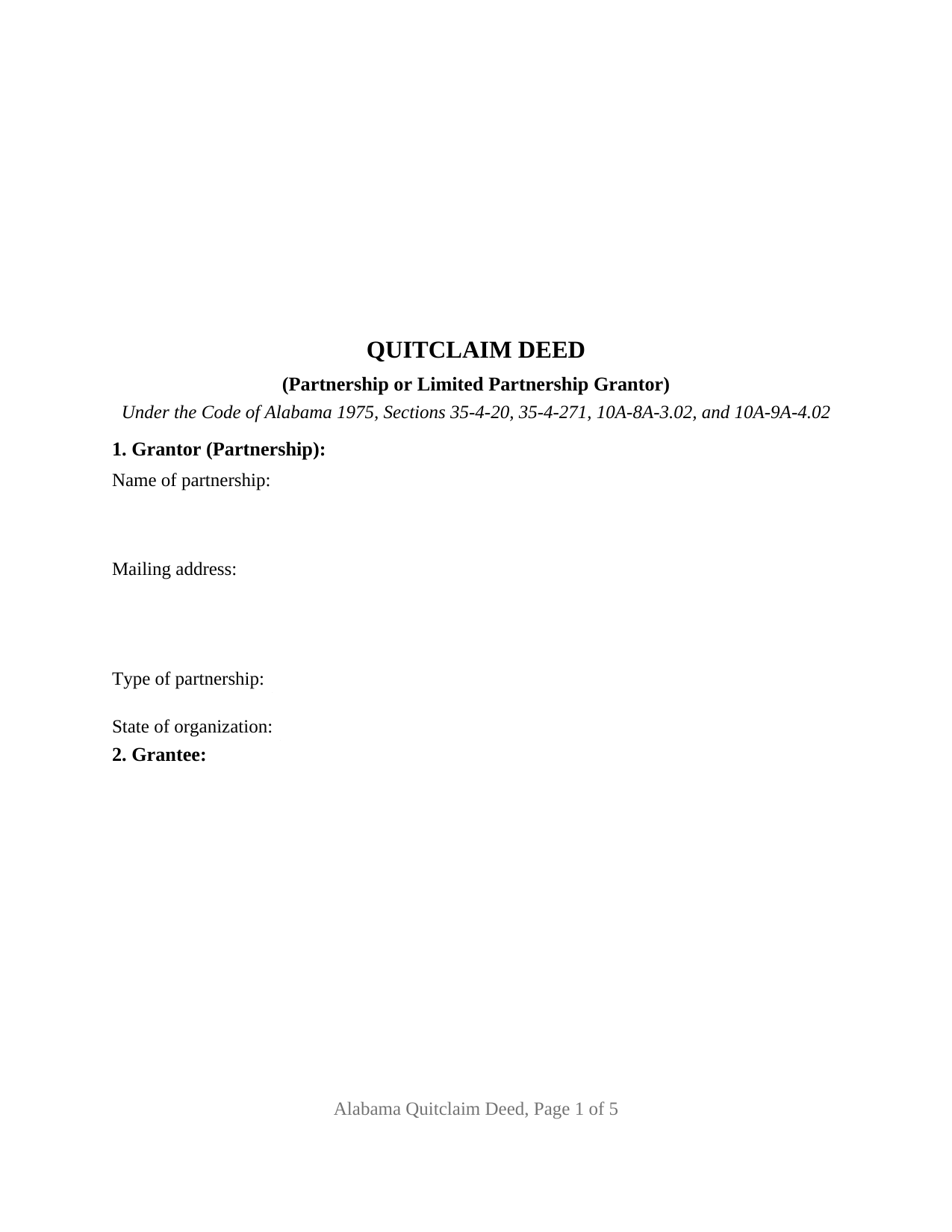
Dale County Quitclaim Deed (Partnership or Limited Partnership Grantor) Form
Fill in the blank Quitclaim Deed (Partnership or Limited Partnership Grantor) form formatted to comply with all Alabama recording and content requirements.
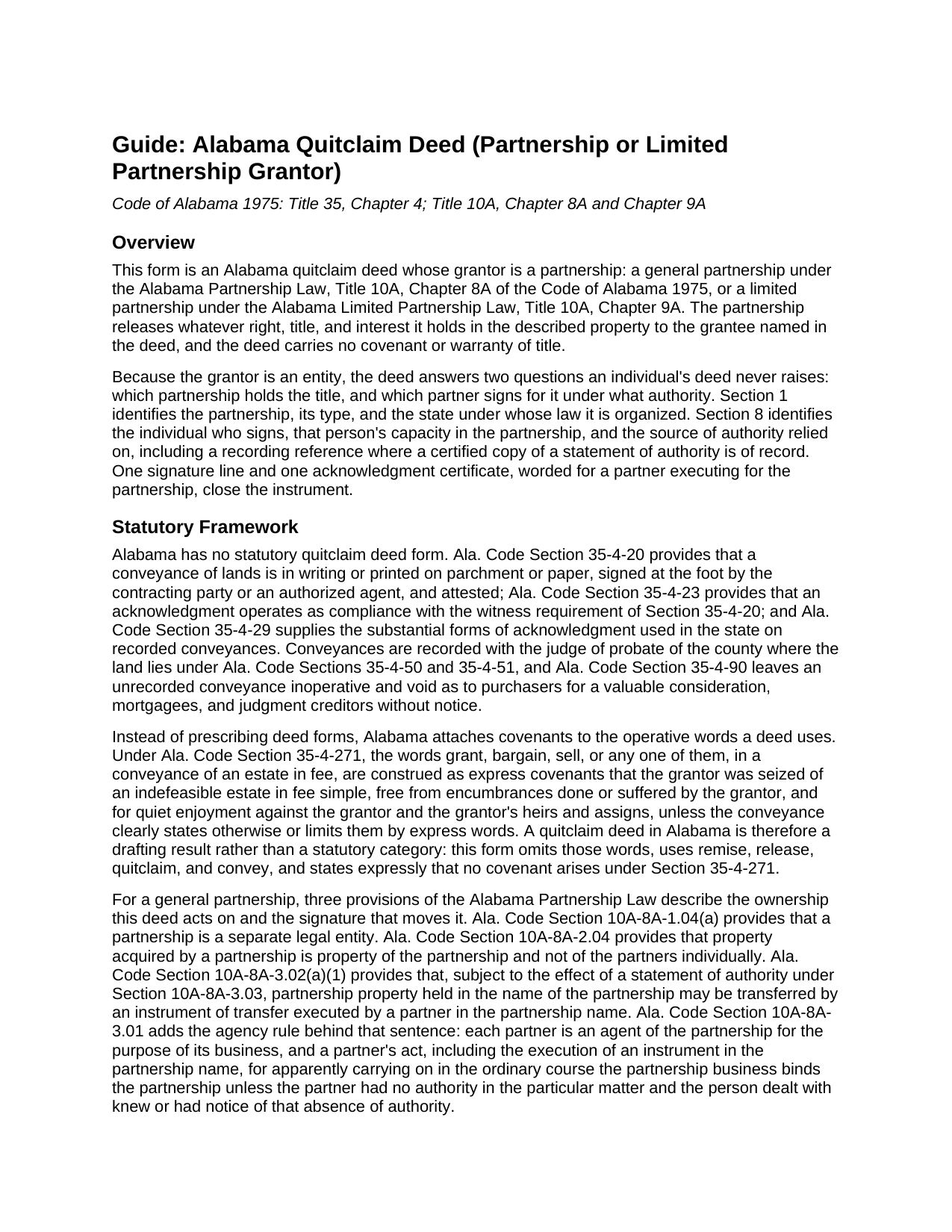
Dale County Quitclaim Deed (Partnership or Limited Partnership Grantor) Guide
Line by line guide explaining every blank on the Quitclaim Deed (Partnership or Limited Partnership Grantor) form.
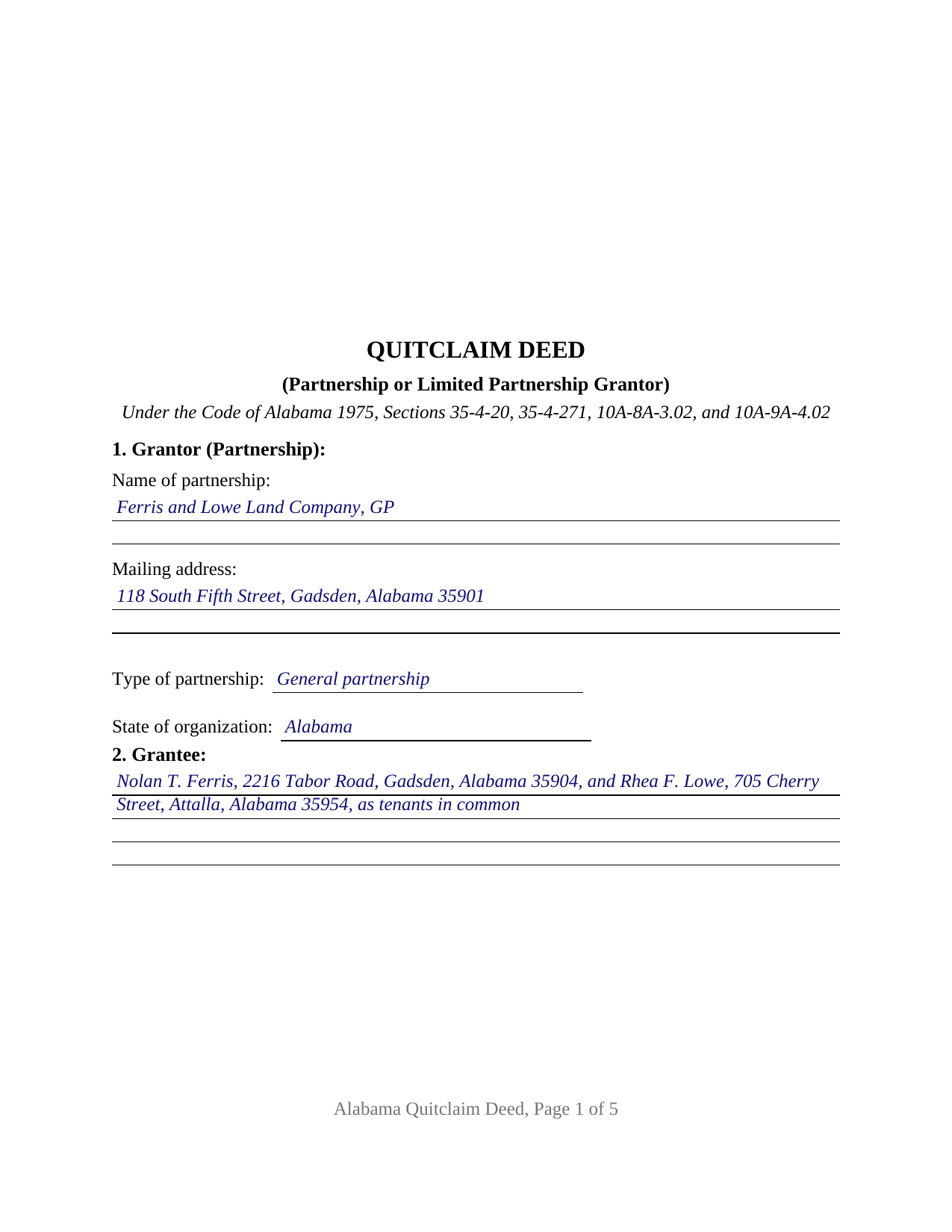
Dale County Completed Example of the Quitclaim Deed (Partnership or Limited Partnership Grantor) Document
Example of a properly completed Alabama Quitclaim Deed (Partnership or Limited Partnership Grantor) document for reference.
All 3 documents above included • One-time purchase • No recurring fees
Immediate Download • Secure Checkout
Additional Alabama and Dale County documents included at no extra charge:
Where to Record Your Documents
Sharon A. Michalic, Judge of Probate
Ozark, Alabama 36360
Hours: Monday-Thursday 7:00AM to 5:00PM. Closed on Friday
Phone: (334) 774-2754
Recording Tips for Dale County:
- Bring your driver's license or state-issued photo ID
- Ensure all signatures are in blue or black ink
- Check margin requirements - usually 1-2 inches at top
- Leave recording info boxes blank - the office fills these
- Make copies of your documents before recording - keep originals safe
Cities and Jurisdictions in Dale County
Properties in any of these areas use Dale County forms:
- Ariton
- Daleville
- Fort Rucker
- Level Plains
- Midland City
- Newton
- Ozark
- Pinckard
- Skipperville
Hours, fees, requirements, and more for Dale County
How do I get my forms?
Forms are available for immediate download after payment. The Dale County forms will be in your account ready to download to your computer. An account is created for you during checkout if you don't have one. Forms are NOT emailed.
Are these forms guaranteed to be recordable in Dale County?
Yes. Our form blanks are guaranteed to meet or exceed the applicable formatting requirements used for recording in Dale County, including margin requirements, font requirements, and other layout standards. This guarantee applies to formatting, not to the legal sufficiency of information entered by the user or the suitability of a form for a particular transaction.
Can I reuse these forms?
Yes. You can reuse the forms for your personal use. For example, if you have multiple properties in Dale County you only need to order once.
What do I need to use these forms?
The forms are PDFs that you fill out on your computer. The free Adobe Acrobat Reader is recommended, and most PDF apps also work. You do NOT enter your property information online - you download the blank forms and complete them privately on your own computer.
Are there any recurring fees?
No. This is a one-time purchase. Nothing to cancel, no memberships, no recurring fees.
How much does it cost to record in Dale County?
Recording fees in Dale County vary. Contact the recorder's office at (334) 774-2754 for current fees.
Questions answered? Let's get started!
Alabama lets a partnership put its signing authority into the same land records that hold its deeds, and this form has a blank for the reference. The Alabama Quitclaim Deed (Partnership or Limited Partnership Grantor) hands one grantee whatever the partnership holds in a described Alabama parcel, warranty free, and Section 8 collects the recording reference of any statement of authority filed under Ala. Code Section 10A-8A-3.03.
Authority that can sit in the land records
Under Section 10A-8A-3.03(a) a partnership may file a statement of authority with the Secretary of State stating the authority, or its limits, of a named person or a stated position to sign an instrument transferring real property held in the partnership name. Section 10A-8A-2.03(a) lets a certified copy go to a judge of probate, and Section 10A-8A-3.03(f) gives the recorded copy its weight: a recorded grant of authority to transfer real property is conclusive in favor of a person who gives value in reliance on it without knowledge to the contrary, subject to the exceptions that subsection lists. Section 8 takes that reference; with no such statement on file, the same blanks take what the partnership does rely on, a numbered provision of the partnership agreement or a dated consent of the partners.
One partner signs, in the partnership name
Alabama treats the partnership itself as the owner. Section 10A-8A-1.04(a) makes a partnership a separate legal entity and Section 10A-8A-2.04 provides that property acquired by a partnership is property of the partnership and not of the partners individually, so no partner holds a share of the parcel to hand over. Section 10A-8A-3.02(a)(1) supplies the mechanics: partnership property held in the partnership name may be transferred by an instrument of transfer executed by a partner in the partnership name.
Two chapters, one signature line
The type entry in Section 1 records which kind of partnership signs, because the authority provision changes with it. General partnerships answer to the Alabama Partnership Law, Chapter 8A; limited partnerships answer to Chapter 9A, which has governed every Alabama limited partnership since January 1, 2017. There, Section 10A-9A-4.02(a) makes each general partner an agent of the entity and Section 10A-9A-3.02 denies a limited partner power as a limited partner to bind it, so a general partner signs.
Configured for one partnership and one signing partner
Section 8 takes the signing partner, that partner's capacity, the authority relied on, and the statement of authority reference; Section 10 carries one signature block captioned for the grantor partnership signing by its authorized partner. One certificate closes it, worded from the entity form of Ala. Code Section 35-4-29 for a partner executing as such partner and with full authority, for and as the act of the partnership. A partnership winding up its business and releasing a tract to the two partners who take it as tenants in common, and a partnership releasing whatever interest it may still hold where an old deed left the partnership name in a chain of title, present the pattern this deed recites. It is not set up for two partners signing together, for an individual or a company grantor, or for a parcel titled in the partners' own names, which Section 10A-8A-3.02(a)(2) routes elsewhere. The deed reports that no individual grantor or vendor is named, which answers Section 35-4-73, and carries no spouse assent block.
Release words, and the counter at the courthouse
The operative sentence remises, releases, quitclaims, and conveys, leaving out grant, bargain, and sell, the words Section 35-4-271 turns into express title covenants; the deed states that no such covenant arises. Until it reaches the record, Section 35-4-90 leaves the deed void against a later buyer, lender, or judgment creditor without notice, so it goes to the judge of probate where the land lies. That office measures the Section 40-22-1 deed tax against the value conveyed and takes Alabama's sales value information on Form RT-1. Page one holds its upper three inches open for the recording stamp, and the deed prints the preparer endorsement Sections 35-4-110 and 35-4-113 require.
Buyers reach this Alabama quitclaim deed as a quit claim deed, a quick claim deed, or a partnership deed. The download carries the blank fillable PDF, a completed example set in Etowah County, and a guide covering every entry, both chapters, and the certificate. These pages describe Alabama law generally and are not legal advice; an Alabama attorney can measure them against a particular partnership and title.
Important: Your property must be located in Dale County to use these forms. Documents should be recorded at the county recording office listed above.
This Quitclaim Deed (Partnership or Limited Partnership Grantor) meets all recording requirements specific to Dale County.
Our Promise
The documents you receive here are guaranteed to meet or exceed the applicable Dale County recording format requirements. If there is a rejection caused by our formatting, we will correct the issue or refund your payment. This guarantee applies to document formatting only and does not extend to information entered by the user, the selection of the form, or the legal effect of the completed document.
Save Time and Money
Get your Dale County Quitclaim Deed (Partnership or Limited Partnership Grantor) form done right the first time with Deeds.com Uniform Conveyancing Blanks. At Deeds.com, we understand that your time and money are valuable resources, and we don't want you to face a penalty fee or rejection imposed by a county recorder for submitting nonstandard documents. We constantly review and update our forms to meet rapidly changing state and county recording requirements for roughly 3,500 counties and local jurisdictions.
4.8 out of 5 - ( 4,836 Reviews )
Paula P. 2 out of 5 stars
Important: Click Download to save each PDF to your device. Open and complete the PDFs using Adobe Acrobat Reader (free). Get Adobe Acrobat Reader Browser PDF viewers (Chrome, Edge, Firefox, Mac Preview) may display fillable fields incorrectly. This information should be shared with the potential buyer BEFORE purchase. Messy formatting and a deeds.com advertisement on each page. I will not purchase from deeds.com again.
Paula, thank you for taking the time to leave feedback. As the product wasn’t a good fit for you, we’ve canceled your order and provided a full refund so there’s no need for you to use the documents.
Esfir K. 5 out of 5 stars
I had to call 3 times, two calls were hanged up on me. Thank you to 3rd representative, who helped me with my question. Unfortunately, I do not know her name. She was very patient, kind, professional. I am very thankful for her help.
Thank you!
Jena S. 5 out of 5 stars
I love how quick the turnaround is, my only request would be for an email notification be sent once an invoice is ready and then once a document is recorded and ready to download (only because I have a large caseload and it's very easy to forget things sometimes).
Thank you!
DEBORAH H. 5 out of 5 stars
I found everything I needed
Your feedback is valuable to us and helps us improve. Thank you for sharing your thoughts!
Marjorie D. 5 out of 5 stars
The process was easy and efficient. I will definitely be using this service!
Thank you for your feedback. We really appreciate it. Have a great day!
kevin d. 5 out of 5 stars
the quitclaim form worked well with the Nevada Recorders office. Tried other vendors, theirs were rejected.
We appreciate your business and value your feedback. Thank you. Have a wonderful day!
Janet P. 5 out of 5 stars
Extremely easy to use. The guide and sample were a great source of reference.
Thank you for your feedback. We really appreciate it. Have a great day!
Kimberly B. 5 out of 5 stars
Absolutely recommend Deeds.com! The process to recording your document is explained step by step. If you have any questions, you just send a message and almost instantly a staff member will reply. Super quick processing. I uploaded my document late Friday afternoon, it was reviewed by Deeds.com staff and sent to the county for recording on Monday. By Tuesday, my document was successfully recorded by the County Recorder's Office and a copy of my recorded document was available for me, as well!
We appreciate your business and value your feedback. Thank you. Have a wonderful day!
Darrell P. 5 out of 5 stars
My legal description exceeds the avaiable space in the one page Exhibit A...any way to add a second page as 'Exhibit A (continued)'?
It is not required to use the included exhibit page. Simply label your printed legal description as the appropriate exhibit.
Norma G. 5 out of 5 stars
Very fast response!
We appreciate your business and value your feedback. Thank you. Have a wonderful day!
Harman F. 5 out of 5 stars
I was able to find the document I very much needed to get my process started. I really appreciate that there was a website to assist me in finding what I needed . I'm very Thankful that this website was available!
We are delighted to have been of service. Thank you for the positive review!
Shihei W. 5 out of 5 stars
Loved every step of the process, from the detail explanation of the services/products provided, to the inclusive packet that comes with my purchase of the trust certification form.
Your feedback is greatly appreciated. Thank you for taking the time to share your experience!
Lara C. 5 out of 5 stars
Love it! It was super easy. Will be back!
Thank you for your feedback. We really appreciate it. Have a great day!
Grace V. 5 out of 5 stars
Easy to use
Thank you!
Doris P. 4 out of 5 stars
Easy to understand and fill out Beneficiary Deed, but when I tried to download finished form, it disappeared! Luckily I had printed it first and had to fill out again.
Thank you!