Yuma County Affidavit of Deceased Joint Tenant Form
Last validated November 3, 2026 by our Forms Development TeamFormatted for recording in Yuma County, for property anywhere in the county: rural and unincorporated areas as well as Eckley, Idalia, Joes, Kirk, Vernon, Wray, Yuma.
- 3 documents included
- Immediate PDF download
- Formatting guarantee
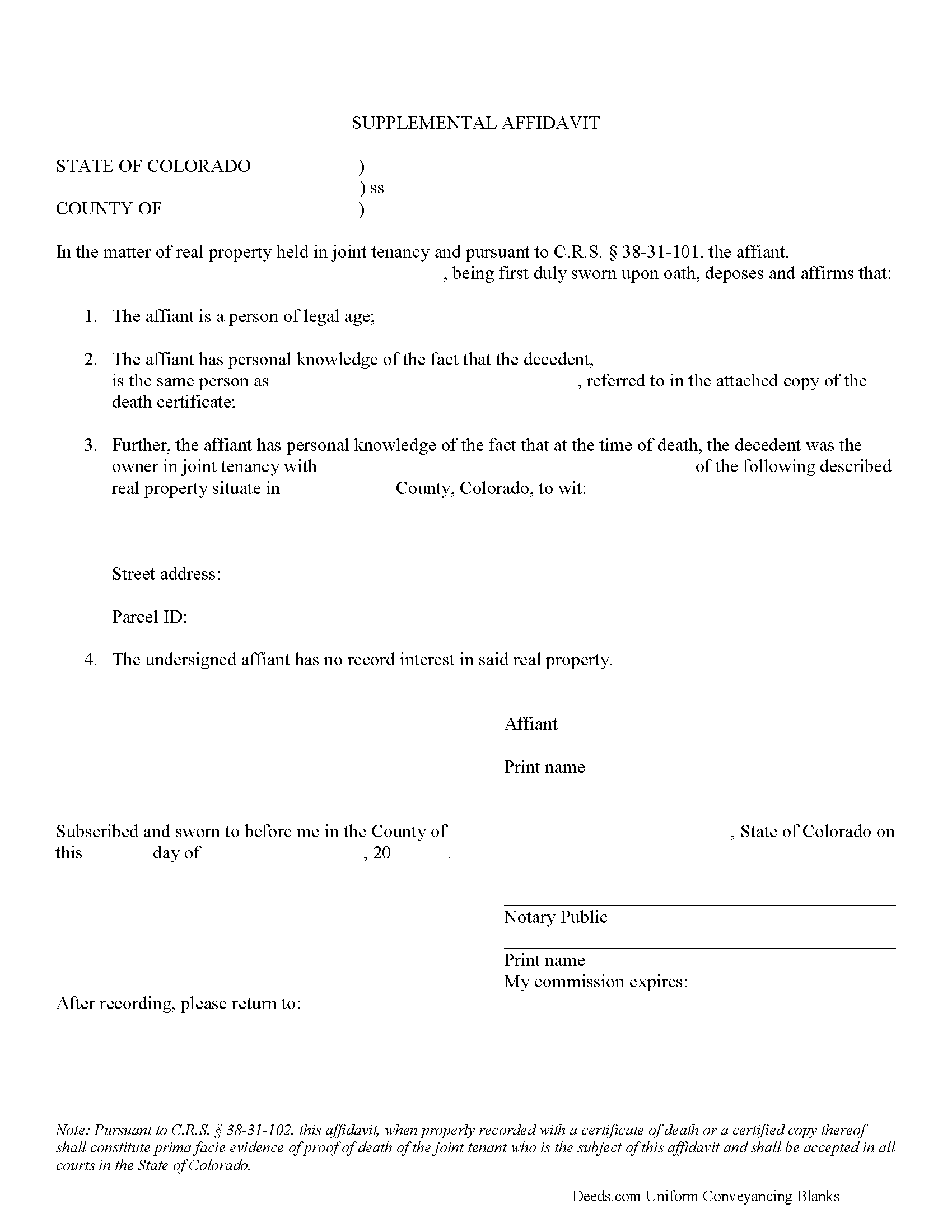
Yuma County Affidavit of Deceased Joint Tenant Form
Fill in the blank form formatted to comply with all recording and content requirements.
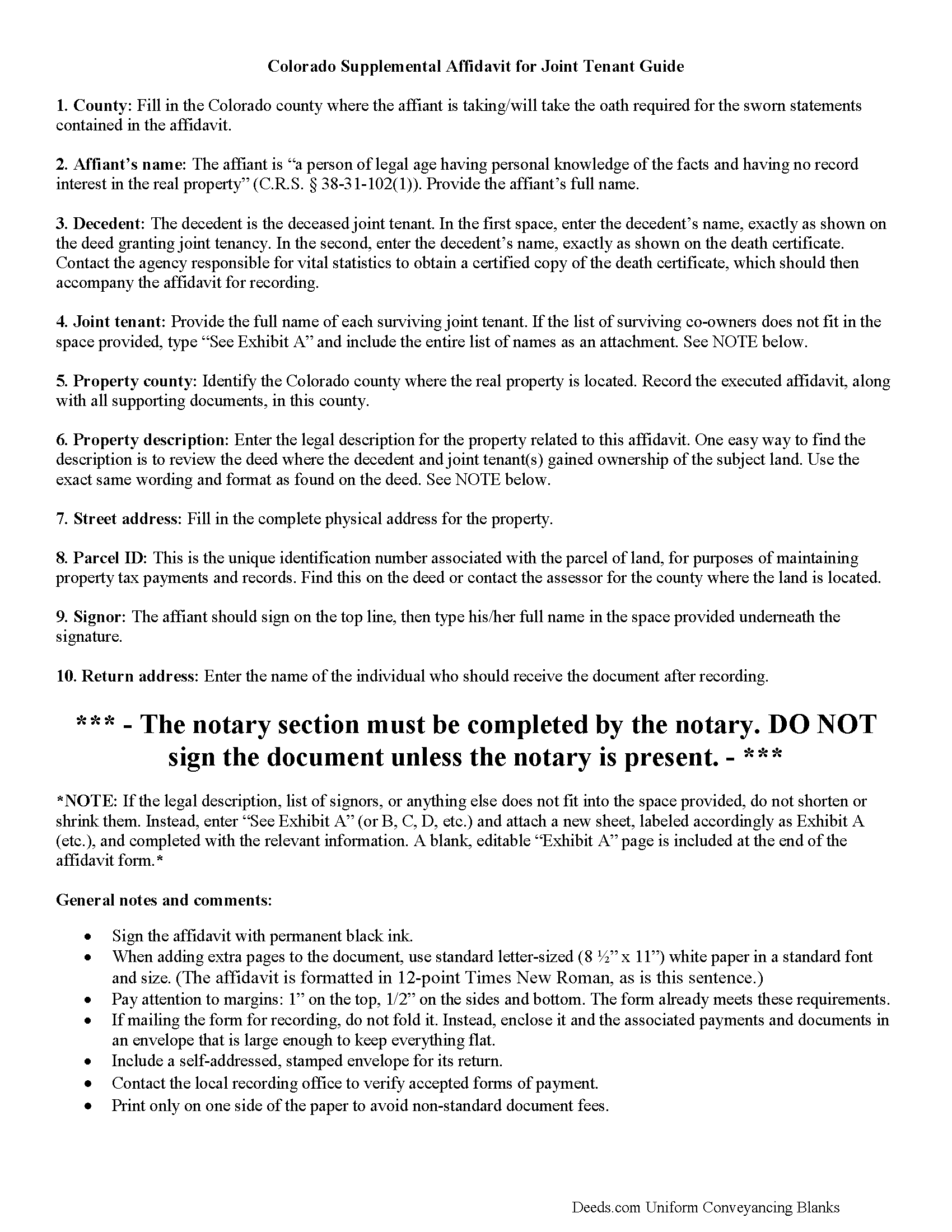
Yuma County Affidavit of Deceased Joint Tenant Guide
Line by line guide explaining every blank on the form.
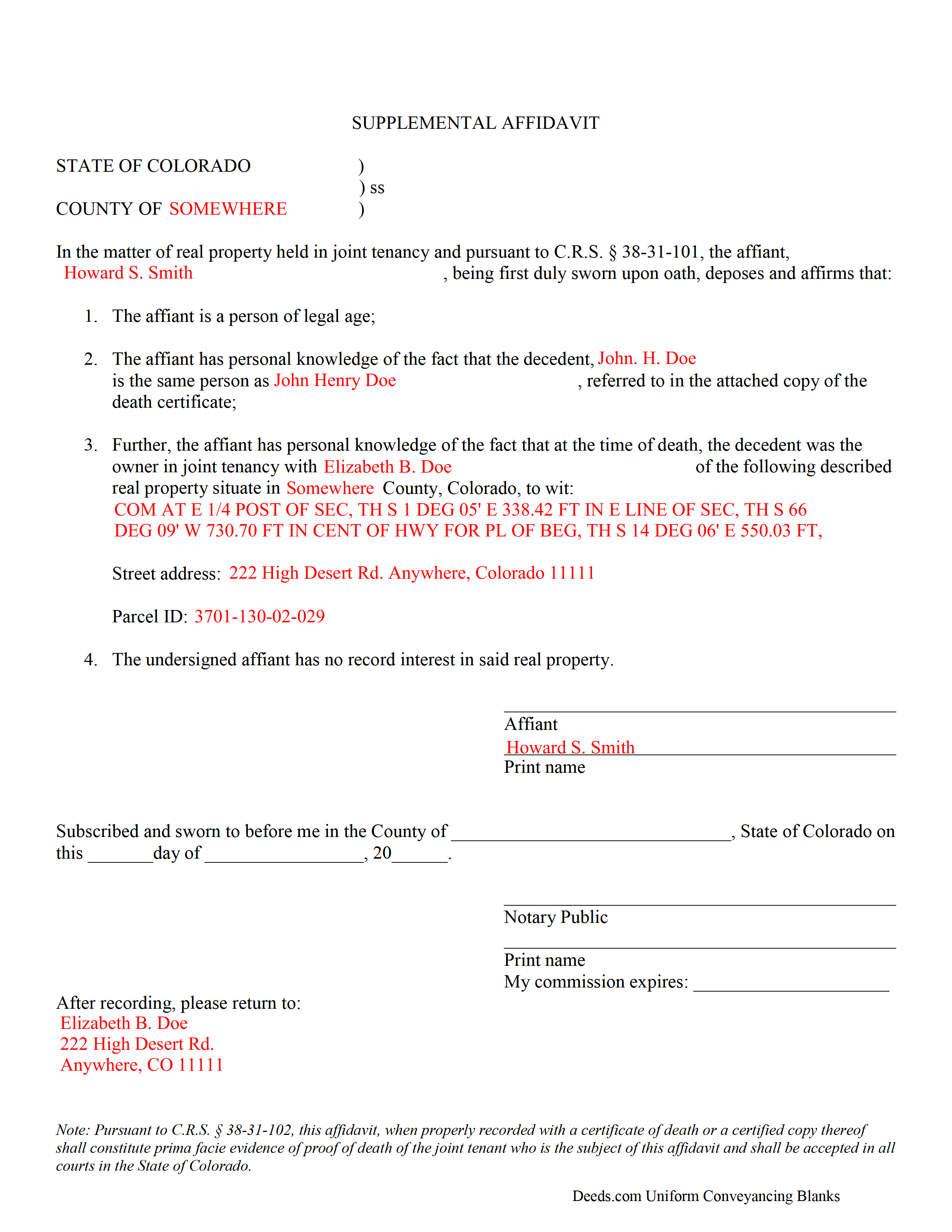
Yuma County Completed Example of the Affidavit of Deceased Joint Tenant Document
Example of a properly completed form for reference.
All 3 documents above included • One-time purchase • No recurring fees
Immediate Download • Secure Checkout
Additional Colorado and Yuma County documents included at no extra charge:
Where to Record Your Documents
Yuma County Clerk and Recorder
Wray, Colorado 80758
Hours: 8:30 to 4:30 Monday through Friday
Phone: (970) 332-5809
Recording Tips for Yuma County:
- Bring your driver's license or state-issued photo ID
- Ensure all signatures are in blue or black ink
- Documents must be on 8.5 x 11 inch white paper
- Double-check legal descriptions match your existing deed
- Verify all names are spelled correctly before recording
Cities and Jurisdictions in Yuma County
Properties in any of these areas use Yuma County forms:
- Eckley
- Idalia
- Joes
- Kirk
- Vernon
- Wray
- Yuma
Hours, fees, requirements, and more for Yuma County
How do I get my forms?
Forms are available for immediate download after payment. The Yuma County forms will be in your account ready to download to your computer. An account is created for you during checkout if you don't have one. Forms are NOT emailed.
Are these forms guaranteed to be recordable in Yuma County?
Yes. Our form blanks are guaranteed to meet or exceed the applicable formatting requirements used for recording in Yuma County, including margin requirements, font requirements, and other layout standards. This guarantee applies to formatting, not to the legal sufficiency of information entered by the user or the suitability of a form for a particular transaction.
Can I reuse these forms?
Yes. You can reuse the forms for your personal use. For example, if you have multiple properties in Yuma County you only need to order once.
What do I need to use these forms?
The forms are PDFs that you fill out on your computer. The free Adobe Acrobat Reader is recommended, and most PDF apps also work. You do NOT enter your property information online - you download the blank forms and complete them privately on your own computer.
Are there any recurring fees?
No. This is a one-time purchase. Nothing to cancel, no memberships, no recurring fees.
How much does it cost to record in Yuma County?
Recording fees in Yuma County vary. Contact the recorder's office at (970) 332-5809 for current fees.
Questions answered? Let's get started!
Use a Colorado supplemental affidavit of deceased joint tenant to provide formal notice that a named joint owner of real property has died.
Removing a Deceased Joint Tenant from a Colorado Real Estate Deed
Colorado law allows two or more people to co-own real property as either tenants in common or joint tenants.
Tenants in common hold individual, but not necessarily equal, shares of the title to real property, which they may sell without consulting the other co-owners. If a tenant in common dies, that portion of the property reverts to his/her estate, with no effect on the shares of the other owners.
Joint tenants, on the other hand, share undivided ownership of the whole property. The primary purpose of joint tenancy relates to the right of survivorship, which states that land titled this way is distributed equally amongst the surviving co-owners when one of them dies. See C.R.S. 38-31-101 for further details about co-ownership of real property.
Even though the shares technically pass to the survivors as a function of law when the deceased co-owner dies, it is necessary to formalize the change. Accomplish this by completing and recording a supplemental affidavit, along with a copy of the deceased co-owner's death certificate. This important step helps to maintain a clear chain of title, which should simplify future sales of the real property. See 38-31-102.
Filing the supplemental affidavit clears the title, but the only way to remove the deceased joint tenant's name from the deed is for the survivors to execute and record a new deed. This instrument should show all joint tenants as grantors, with the decedent appropriately identified, and only the survivors as grantees. A certified copy of the recorded affidavit should accompany the new deed; other required supporting documents may vary from county to county.
Contact an attorney with questions about the affidavit of deceased joint tenant, or for other issues related to real property in Colorado.
(Colorado Affidavit of Deceased Joint Tenant Package includes form, guidelines, and completed example)
Important: Your property must be located in Yuma County to use these forms. Documents should be recorded at the county recording office listed above.
This Affidavit of Deceased Joint Tenant meets all recording requirements specific to Yuma County.
Our Promise
The documents you receive here are guaranteed to meet or exceed the applicable Yuma County recording format requirements. If there is a rejection caused by our formatting, we will correct the issue or refund your payment. This guarantee applies to document formatting only and does not extend to information entered by the user, the selection of the form, or the legal effect of the completed document.
Save Time and Money
Get your Yuma County Affidavit of Deceased Joint Tenant form done right the first time with Deeds.com Uniform Conveyancing Blanks. At Deeds.com, we understand that your time and money are valuable resources, and we don't want you to face a penalty fee or rejection imposed by a county recorder for submitting nonstandard documents. We constantly review and update our forms to meet rapidly changing state and county recording requirements for roughly 3,500 counties and local jurisdictions.
4.8 out of 5 - ( 4,846 Reviews )
Jackie C. 5 out of 5 stars
It was easy to access the documents for a minimal fee.
Thank you for your feedback. We really appreciate it. Have a great day!
Sawnie A. 3 out of 5 stars
the deeds and related materials themselves are excellent but the PDF application is awful plus there is no way to customize the documents for specific purposes, so I had to type them from scratch in each instance.
Thank you for your feedback. We really appreciate it. Have a great day!
Joseph S. 5 out of 5 stars
The website was very easy to use. I rate it a five star
Thank you for your feedback. We really appreciate it. Have a great day!
Quinlyn H. 5 out of 5 stars
They didn't have what I was looking for so they refunded my money immediately. Very easy to work with!
Thank you!
Petre A. 5 out of 5 stars
Easy @ useful
Thank you!
Julie K. 4 out of 5 stars
The process for obtaining document itself was easy, and the included guide and example are great! I do have an issue with the format itself, though. The form has pre-defined text boxes, which cannot be altered without partially rebuilding the entire document. For the 'property description' field on the Mineral Deed form, the text box is not large enough for the rather lengthy legal description entered on my original plat. Fortunately, I have a copy of Adobe Pro, so I have been able to re-build the doc to accommodate this short-coming.
Thank you for taking the time to provide feedback on our legal form. We're pleased to hear that you found the process for obtaining the document and the included guide beneficial.
We understand and appreciate your concern regarding the formatting and size limitations of certain fields, especially the 'property description' field. Our forms are designed to adhere to specific formatting requirements that are often mandated for legal compliance. Making direct alterations to the document can result in them becoming non-conforming, which is why we advise customers to use an exhibit page when their legal description is extensive or does not fit.
Bruce J. 5 out of 5 stars
Fast results
Thank you!
Thomas S. 5 out of 5 stars
Very nice.
Thank you!
Robert L. 5 out of 5 stars
Fairly easy to use process and somewhat reasonably priced. Printed guide and sample filled in can be very helpful, too.
Thank you for your feedback. We really appreciate it. Have a great day!
brian o. 5 out of 5 stars
I was needing some forms from another state. I am a lawyer but don't have ready access to out of state forms. I was impressed with how thorough the intake process was. Very nice that I could download the form in Word so that I could adjust a few things. Very fine service. I recommend.
Thank you!
JEFFREY C. 5 out of 5 stars
This is pretty amazing...! Very simple and immediate. I would definitely recommend deed.com
Thank you!
Toni M. 5 out of 5 stars
I liked having the forms. Some may need to know they can look at the legal Description from online county records, then type up in Word document line by line, the degree sign in Word program is achieved by using alt and 248 on number pad. Then on the form page one write SEE Exibit A and title your Word program description as Exibit A. Goes without saying the legal description should be looked over many times and it is easier to do so if you format your Word the same lineage as the legal description online which is usually not text which is why you have to retype it.
Thank you for your feedback. We really appreciate it. Have a great day!
Ida L. 5 out of 5 stars
The form was easy to complete and print. Best price found online.
Thank you!
Noah B. 4 out of 5 stars
Website is basic, but get's the job done. Communication was prompt and efficient. Would use again. Thank You!
Thank you!
Lisa B. 5 out of 5 stars
Very helpful and fast.
Thank you!