Wilkin County Limited Warranty Deed from Individual to Joint Tenant Excluding Assessment Form
Last validated November 17, 2026 by our Forms Development TeamFormatted for recording in Wilkin County, for property anywhere in the county: rural and unincorporated areas as well as Breckenridge, Campbell, Foxhome, Kent, Nashua, Rothsay, Wolverton.
- 3 documents included
- Immediate PDF download
- Formatting guarantee
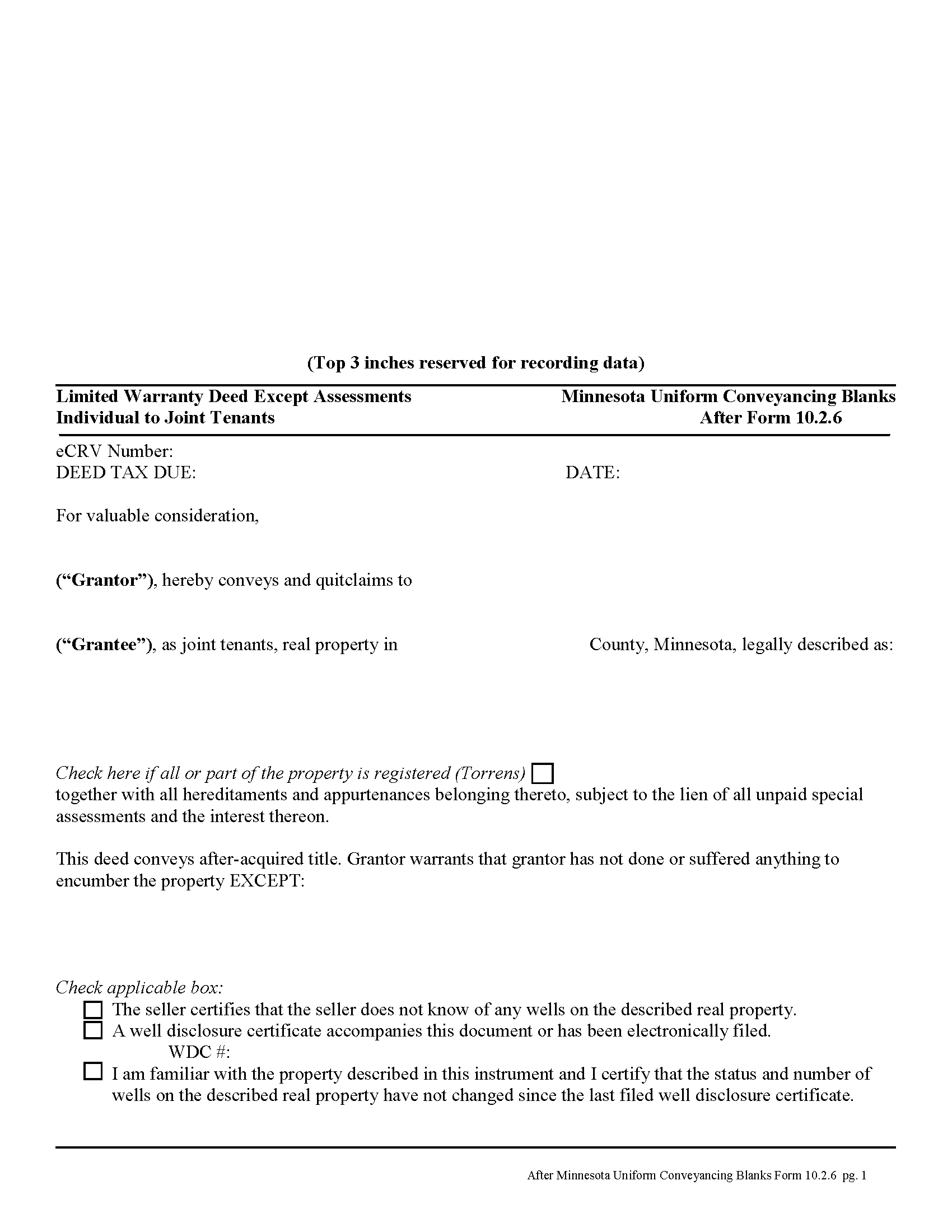
Wilkin County Limited WD from Individual to Joint Tenant Excluding Assessment Form
Fill in the blank form formatted to comply with all recording and content requirements.
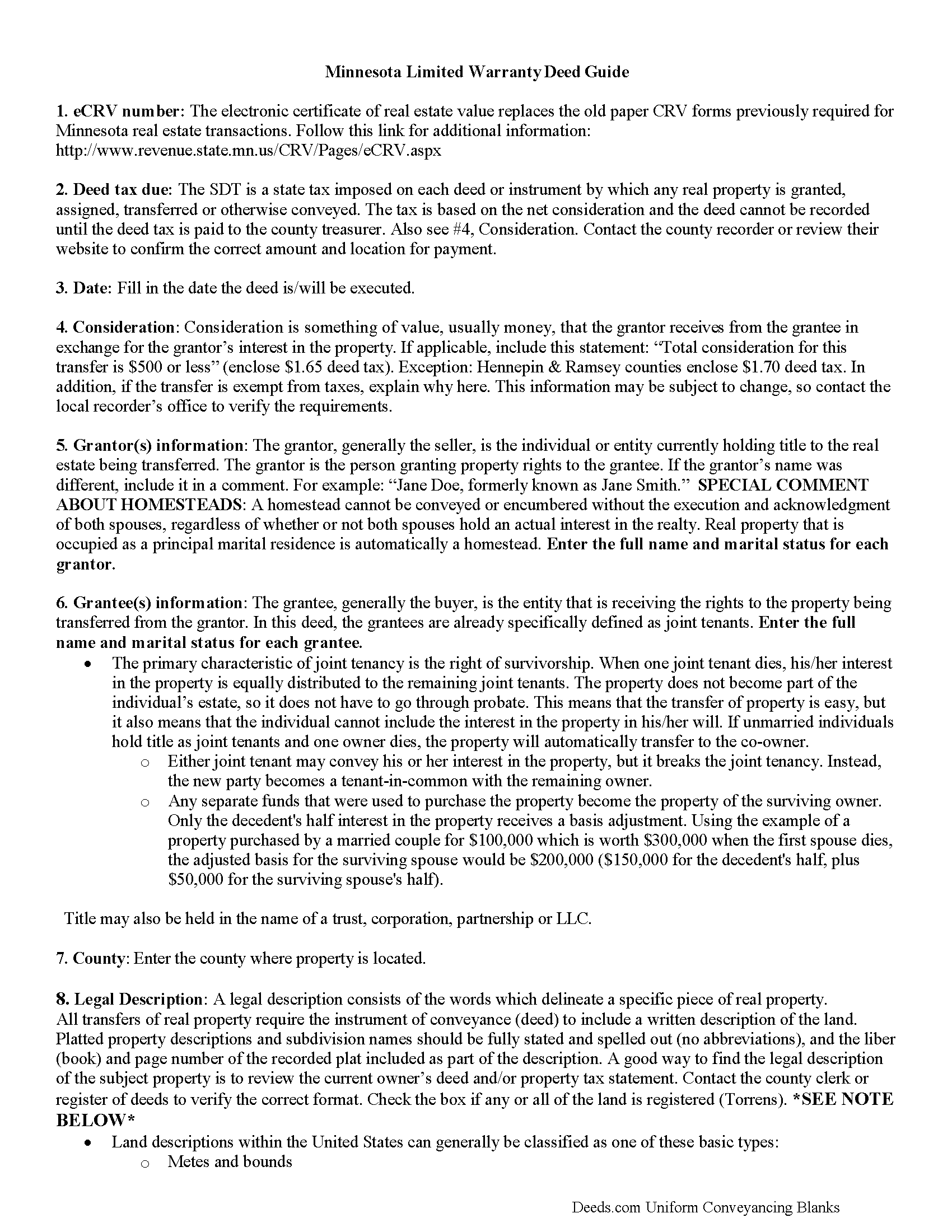
Wilkin County Limited Warranty Deed from Individual to Joint Tenant Excluding Assessment Guide
Line by line guide explaining every blank on the form.
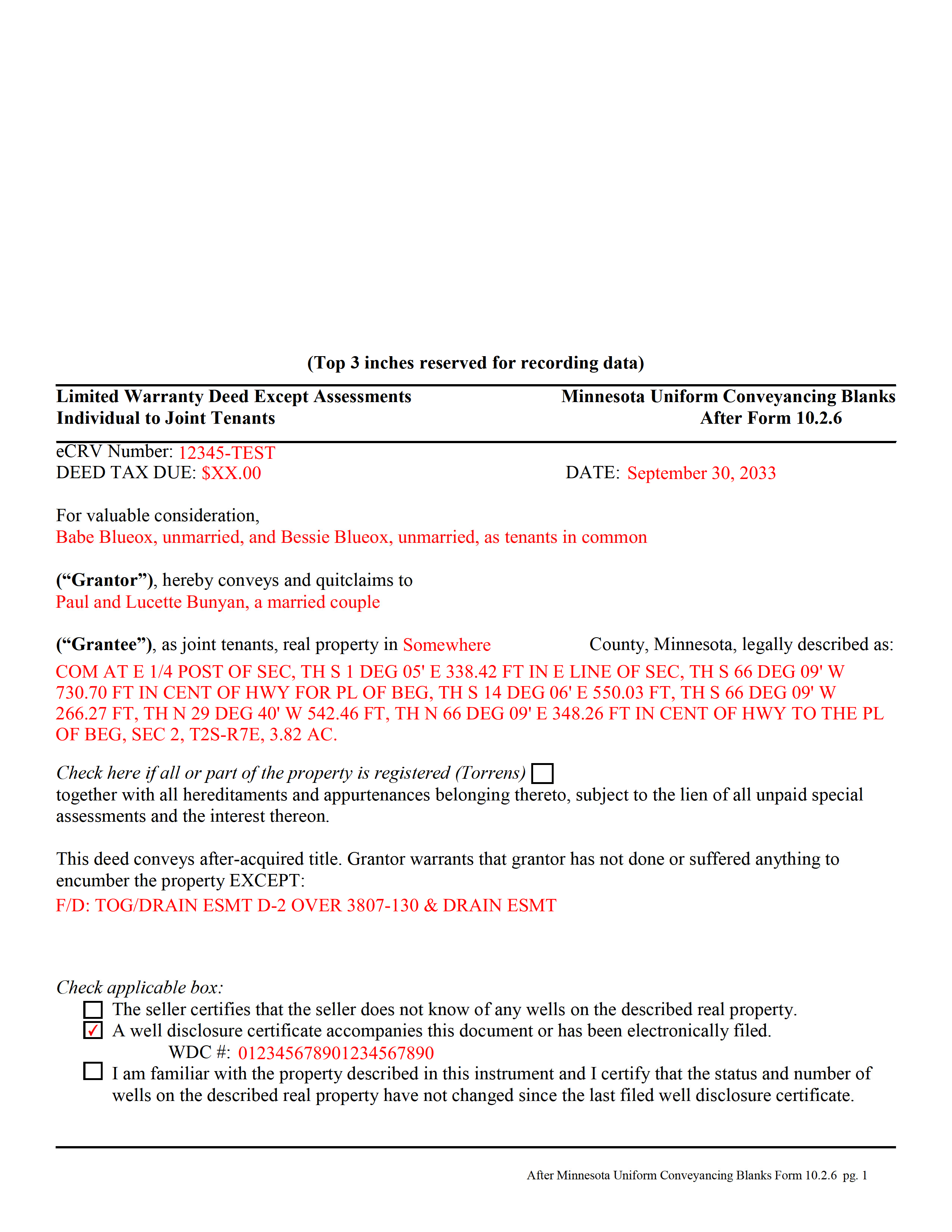
Wilkin County Completed Example of the Limited WD from Individual to Joint Tenant Excluding Assessment Document
Example of a properly completed form for reference.
All 3 documents above included • One-time purchase • No recurring fees
Immediate Download • Secure Checkout
Additional Minnesota and Wilkin County documents included at no extra charge:
Where to Record Your Documents
Wilkin County Recorder
Breckenridge, Minnesota 56520
Hours: 8:00am to 4:30pm Monday through Friday
Phone: (218) 643-7164
Recording Tips for Wilkin County:
- Bring your driver's license or state-issued photo ID
- Ensure all signatures are in blue or black ink
- Check margin requirements - usually 1-2 inches at top
- Leave recording info boxes blank - the office fills these
- Make copies of your documents before recording - keep originals safe
Cities and Jurisdictions in Wilkin County
Properties in any of these areas use Wilkin County forms:
- Breckenridge
- Campbell
- Foxhome
- Kent
- Nashua
- Rothsay
- Wolverton
Hours, fees, requirements, and more for Wilkin County
How do I get my forms?
Forms are available for immediate download after payment. The Wilkin County forms will be in your account ready to download to your computer. An account is created for you during checkout if you don't have one. Forms are NOT emailed.
Are these forms guaranteed to be recordable in Wilkin County?
Yes. Our form blanks are guaranteed to meet or exceed the applicable formatting requirements used for recording in Wilkin County, including margin requirements, font requirements, and other layout standards. This guarantee applies to formatting, not to the legal sufficiency of information entered by the user or the suitability of a form for a particular transaction.
Can I reuse these forms?
Yes. You can reuse the forms for your personal use. For example, if you have multiple properties in Wilkin County you only need to order once.
What do I need to use these forms?
The forms are PDFs that you fill out on your computer. The free Adobe Acrobat Reader is recommended, and most PDF apps also work. You do NOT enter your property information online - you download the blank forms and complete them privately on your own computer.
Are there any recurring fees?
No. This is a one-time purchase. Nothing to cancel, no memberships, no recurring fees.
How much does it cost to record in Wilkin County?
Recording fees in Wilkin County vary. Contact the recorder's office at (218) 643-7164 for current fees.
Questions answered? Let's get started!
A limited warranty deed is used in Minnesota real estate transactions where the grantor guarantees that, during the time of ownership, the grantor did nothing undisclosed to encumber the land. The deed also passes after-acquired title (any future rights the grantor gains to the same land transferred by the deed).
By excluding assessments from the covenants of title, the grantor alerts the grantee to the fact that one or more outstanding assessment liens and any associated interest may still be attached to the title.
The basic forms and requirements for real estate deeds in Minnesota are governed by Minn. Stat. 507. Properly completed statutory deeds are effective in most cases, but leave the possibility for errors based on incorrect or missing information. To reduce confusion about the different real estate transactions, Minnesota suggests requirements for uniform conveyancing forms, each with a specific purpose.
This deed form, specifically intended for real property transfers from individual owner(s) to joint tenants, matches the format, content, and requirements set forth in the most recent update.
(Minnesota LWD Ind to JT Excluding Assessment Package includes form, guidelines, and completed example)
Important: Your property must be located in Wilkin County to use these forms. Documents should be recorded at the county recording office listed above.
This Limited Warranty Deed from Individual to Joint Tenant Excluding Assessment meets all recording requirements specific to Wilkin County.
Our Promise
The documents you receive here are guaranteed to meet or exceed the applicable Wilkin County recording format requirements. If there is a rejection caused by our formatting, we will correct the issue or refund your payment. This guarantee applies to document formatting only and does not extend to information entered by the user, the selection of the form, or the legal effect of the completed document.
Save Time and Money
Get your Wilkin County Limited Warranty Deed from Individual to Joint Tenant Excluding Assessment form done right the first time with Deeds.com Uniform Conveyancing Blanks. At Deeds.com, we understand that your time and money are valuable resources, and we don't want you to face a penalty fee or rejection imposed by a county recorder for submitting nonstandard documents. We constantly review and update our forms to meet rapidly changing state and county recording requirements for roughly 3,500 counties and local jurisdictions.
4.8 out of 5 - ( 4,859 Reviews )
Saul N. 5 out of 5 stars
Great and fast service. Would have been grate to have seen a little more detail or a pre-filled sample in the fields. Had a little confussion in some of the lines to fill out since the guide only explains a few of the lines not all of them. Otherwise, is really great to have this service with low cost. Thank you.
Thank you for taking the time to provide us with your feedback Saul, we appreciate you.
Julia M. 5 out of 5 stars
I live in AZ and have an existing beneficiary deed on my property. I needed to know the process of revoking a beneficiary deed. Your site was very helpful by providing the correct form and instructions for recording it. Thank you!
Your satisfaction with our services is of utmost importance to us. Thank you for letting us know how we did!
Marolyn V. 3 out of 5 stars
The booklet is too wordy. Not concise enough for someone who is inexperienced at filling out your form. It would be nice to have a picture example of what you are talking about. When we got to the Registars office we found out they do not have a notary. Would have been nice to know before we went. The form asks for page and book which is no longer needed. So why have it on there?
Thank you, Marolyn, this is useful feedback. A completed sample is actually included with the form, and your note tells us we should make it easier to find and tie it more directly to the instructions, so we'll do that. We'll also add a "before you begin" checklist and a clearer note that the document needs to be notarized in advance, since recording offices don't provide notary service. On the book and page: that reference is required by the Utah statute this affidavit is filed under (§ 57-1-5.1) and still applies to older deeds recorded before counties moved to entry-number-only indexing around 2000. You enter whichever reference appears on your recorded deed and leave the rest blank. Appreciate you taking the time to write in.
Maria S. 3 out of 5 stars
The paperwork/forms are fine, but there isn't enough explanation for me to figure out how to file the extra forms (which I do need in my case). The main form, Deed Upon Death is fine. I think the price is pretty high for these forms. I wouldn't have purchased it because there are places to get them for much cheaper (about 6 dollars), but this site had the extra forms I wanted (property in a trust and another form). Unfortunately these were included as a "courtesy" and there are no instructions for them. So three stars for being clear about what was in the package, having the right forms that I need, but instructions for putting them to use and price took a couple of stars off. Downloading was easy and once you download you can type the info into the PDF--that makes working with the forms much easier.
Thank you for the feedback Maria. Regarding the supplement documents, it is best to get assistance from the agency that requires them. These are not legal documents, they should provide full support and guidance for them.
Bobby Y. 5 out of 5 stars
I like the content and the availability to conduct valuable business online
Thank you!
ronald s. 5 out of 5 stars
easy to use site, directions well laid out
Thank you for your feedback. We really appreciate it. Have a great day!
Benjamin A. 4 out of 5 stars
This method seems simple for me to complete. Wish me luck.
Thank you for your feedback. We really appreciate it. Have a great day!
GLENN A M. 5 out of 5 stars
I loved the easy to understand and use system, very user friendly.
Thank you!
Heidi J. 3 out of 5 stars
The form was useful, however the formatting is terrible once completed. A lot of white space with no option to remove extra spacing or to improve the overall formatting.
Thank you for your feedback, Heidi. We’re glad to hear the form itself was useful. We also understand your concern about the formatting and extra spacing once completed. Our forms are designed to meet strict county recording requirements, which can sometimes result in additional white space. That said, we’re always working to improve usability and presentation without compromising acceptance. Your input helps us identify where refinements are possible, and we’ll keep it in mind as we continue updating our templates.
Patricia D. 5 out of 5 stars
I looked around for forms and came to this site. I had to do 15 deeds and this form was very useful to completing that. Very impressed. Thanks
Thank you for your feedback. We really appreciate it. Have a great day!
Jim H. 5 out of 5 stars
Well written form, and the guidance document and example supplied were very helpful.
Thank you!
Edward O. 5 out of 5 stars
east too do.. hope it works thanks
Thank you!
Gretchen R. 5 out of 5 stars
I can't think of any suggestions for improvement. The documents I needed were readily available. Thank you
We appreciate your business and value your feedback. Thank you. Have a wonderful day!
JAMES E. 5 out of 5 stars
Easy to use and excellent software.
Thank you!
Jim P. 5 out of 5 stars
Exactly what we were looking for and filled out everything in minutes. Great value!
Thank you!