Queens County Memorandum of Trust Form
Last validated October 14, 2026 by our Forms Development TeamFormatted for recording in Queens County, for property anywhere in the county: rural and unincorporated areas as well as Arverne, Astoria, Bayside, Bellerose, Breezy Point, Cambria Heights, College Point, Corona and 33 more.
- 2 documents included
- Immediate PDF download
- Formatting guarantee
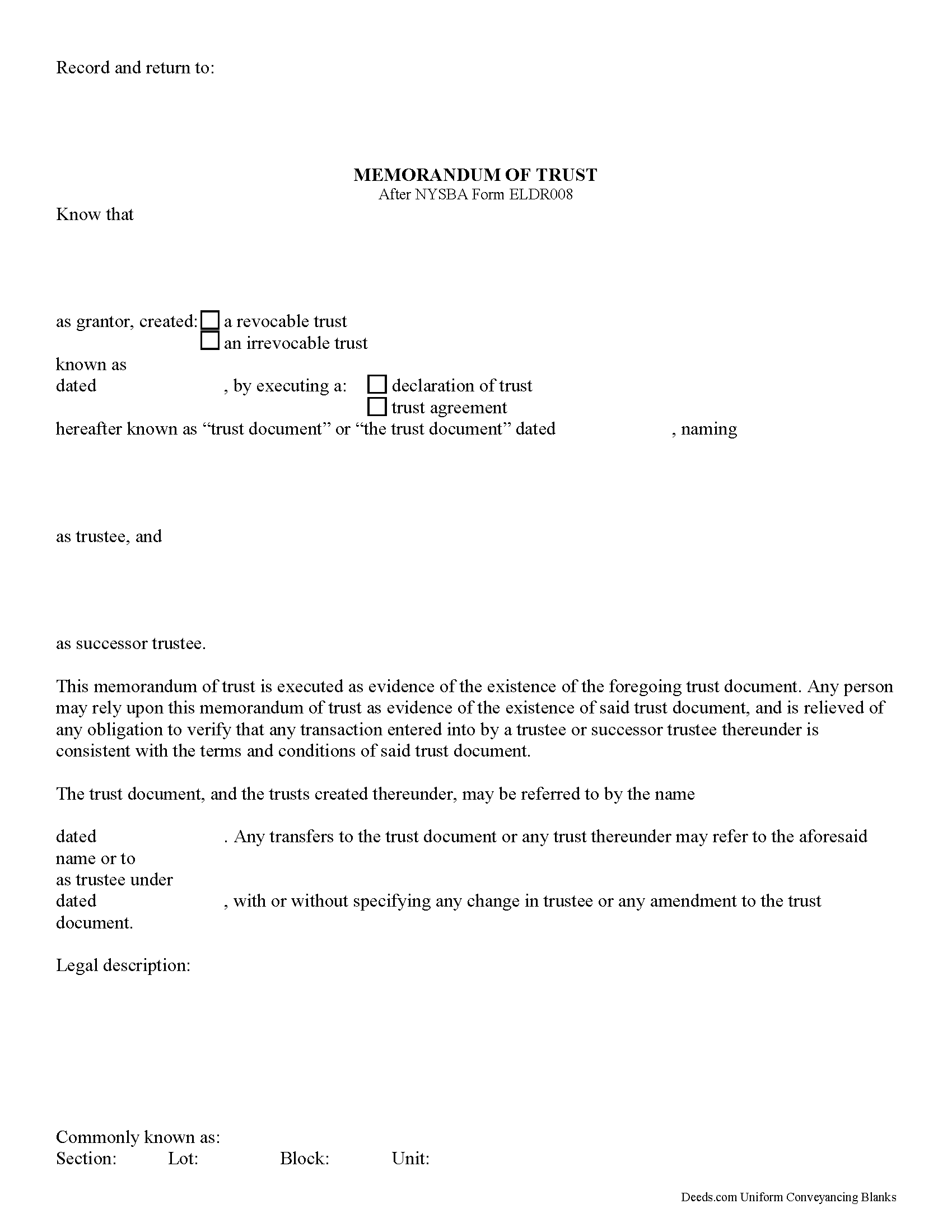
Queens County Memorandum of Trust Form
Fill in the blank form formatted to comply with all recording and content requirements.
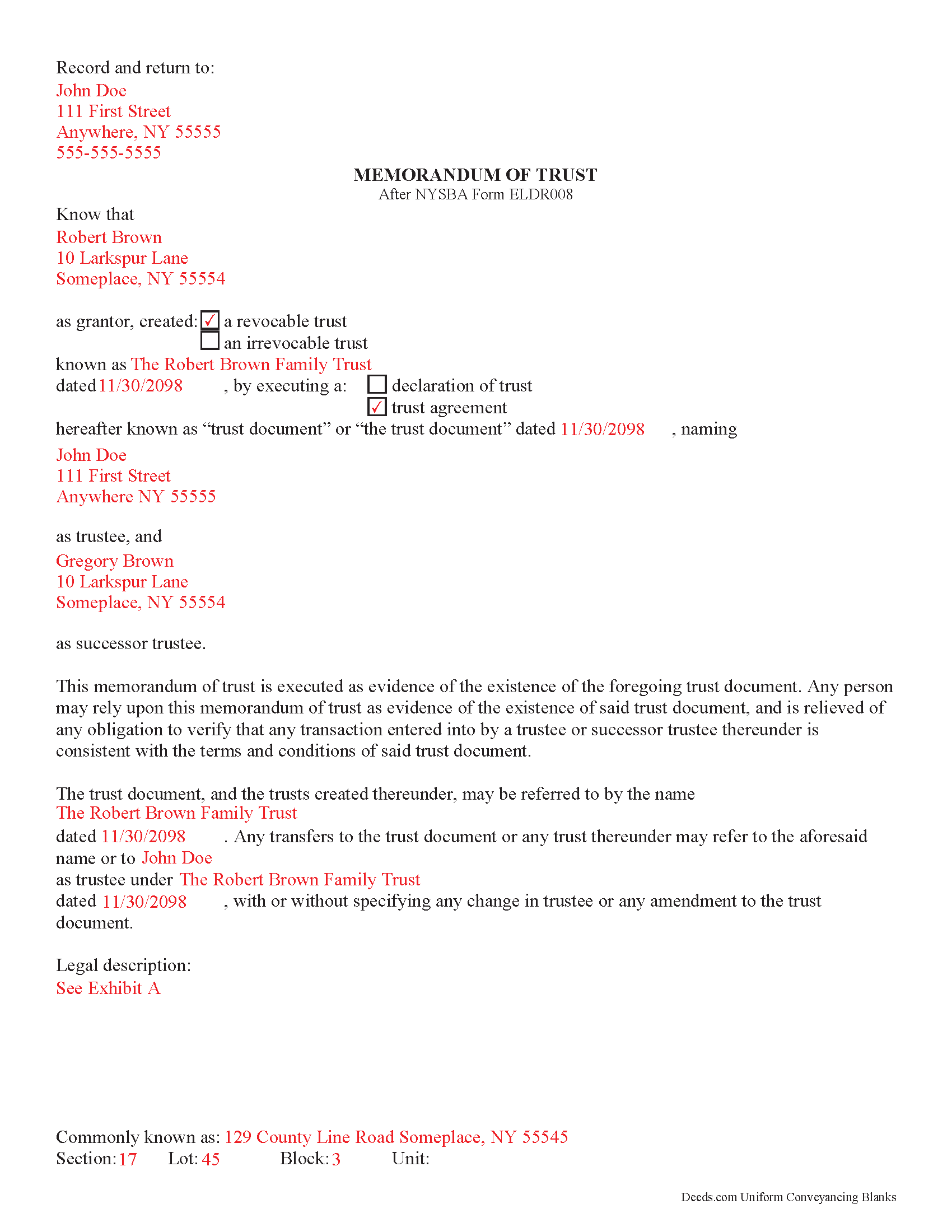
Queens County Completed Example of the Memorandum of Trust
Line by line guide explaining every blank on the form.
All 2 documents above included • One-time purchase • No recurring fees
Immediate Download • Secure Checkout
Additional New York and Queens County documents included at no extra charge:
Where to Record Your Documents
Queens Business Center - City Register
Jamaica, New York 11435
Hours: 9:00 to 4:30 M-F
Phone: (718) 658-4600
Recording Tips for Queens County:
- Bring your driver's license or state-issued photo ID
- Ensure all signatures are in blue or black ink
- Ask for certified copies if you need them for other transactions
- Ask if they accept credit cards - many offices are cash/check only
- Check that your notary's commission hasn't expired
Cities and Jurisdictions in Queens County
Properties in any of these areas use Queens County forms:
- Arverne
- Astoria
- Bayside
- Bellerose
- Breezy Point
- Cambria Heights
- College Point
- Corona
- East Elmhurst
- Elmhurst
- Far Rockaway
- Floral Park
- Flushing
- Forest Hills
- Fresh Meadows
- Glen Oaks
- Hollis
- Howard Beach
- Jackson Heights
- Jamaica
- Kew Gardens
- Little Neck
- Long Island City
- Maspeth
- Middle Village
- Oakland Gardens
- Ozone Park
- Queens Village
- Rego Park
- Richmond Hill
- Ridgewood
- Rockaway Park
- Rosedale
- Saint Albans
- South Ozone Park
- South Richmond Hill
- Springfield Gardens
- Sunnyside
- Whitestone
- Woodhaven
- Woodside
Hours, fees, requirements, and more for Queens County
How do I get my forms?
Forms are available for immediate download after payment. The Queens County forms will be in your account ready to download to your computer. An account is created for you during checkout if you don't have one. Forms are NOT emailed.
Are these forms guaranteed to be recordable in Queens County?
Yes. Our form blanks are guaranteed to meet or exceed the applicable formatting requirements used for recording in Queens County, including margin requirements, font requirements, and other layout standards. This guarantee applies to formatting, not to the legal sufficiency of information entered by the user or the suitability of a form for a particular transaction.
Can I reuse these forms?
Yes. You can reuse the forms for your personal use. For example, if you have multiple properties in Queens County you only need to order once.
What do I need to use these forms?
The forms are PDFs that you fill out on your computer. The free Adobe Acrobat Reader is recommended, and most PDF apps also work. You do NOT enter your property information online - you download the blank forms and complete them privately on your own computer.
Are there any recurring fees?
No. This is a one-time purchase. Nothing to cancel, no memberships, no recurring fees.
How much does it cost to record in Queens County?
Recording fees in Queens County vary. Contact the recorder's office at (718) 658-4600 for current fees.
Questions answered? Let's get started!
Using a New York Memorandum of Trust
In New York, trustees of personal trusts use a memorandum of trust to certify the existence of a trust and their authority to act on behalf of the trust. The memorandum is used in place of the actual trust document and provides only essential information about the trust for lending institutions or other third parties. In this way, information that may be personal in nature, such as the designated beneficiaries under the trust, is kept confidential.
The memorandum is executed and signed by the grantor of the trust under the trust instrument, as well as the trust's formal name and date of origination. It identifies the trustee and any successor trustees with power to act on behalf of the trust.
The difference between a declaration of trust and a trust agreement, as designated in the memorandum of trust document, is the grantor's relationship to the trustee. If the trustee and the grantor are the same person and the grantor controls trust assets, the trust falls under a declaration of trust. If the grantor and the trustee are separate people and the trustee controls the trust assets, trust is under a trust agreement [1].
The distinction between a declaration of trust and a trust agreement also affects the name by which the trust takes title to real property as a grantee. In the following example, "John Doe," under a declaration of trust, serves as both grantor and trustee: "John Doe, trustee under declaration of trust dated mm/dd/yyyy." Under a trust agreement, the grantor name is included as well: "John Doe under agreement with Robert Grantor dated mm/dd/yyyy" [1].
All recorded documents relating to real property in the State of New York are required to include a physical description of the property, as well as the section, lot, block, and unit numbers.
[1] https://www.treasurydirect.gov/indiv/planning/plan_estate_trustsq_a.pdf
(New York MOT Package includes form, guidelines, and completed example)
Important: Your property must be located in Queens County to use these forms. Documents should be recorded at the county recording office listed above.
This Memorandum of Trust meets all recording requirements specific to Queens County.
Our Promise
The documents you receive here are guaranteed to meet or exceed the applicable Queens County recording format requirements. If there is a rejection caused by our formatting, we will correct the issue or refund your payment. This guarantee applies to document formatting only and does not extend to information entered by the user, the selection of the form, or the legal effect of the completed document.
Save Time and Money
Get your Queens County Memorandum of Trust form done right the first time with Deeds.com Uniform Conveyancing Blanks. At Deeds.com, we understand that your time and money are valuable resources, and we don't want you to face a penalty fee or rejection imposed by a county recorder for submitting nonstandard documents. We constantly review and update our forms to meet rapidly changing state and county recording requirements for roughly 3,500 counties and local jurisdictions.
4.8 out of 5 - ( 4,845 Reviews )
Joe B. 5 out of 5 stars
Fantastic service -- very clear
We appreciate your business and value your feedback. Thank you. Have a wonderful day!
Janette K. 5 out of 5 stars
I ordered a Transfer of Deed on Death document. It was easy to fill in, came with a useful guide and was customized to my county/state. It got the job done and was well worth the money!
Thank you for your feedback. We really appreciate it. Have a great day!
Evone A. 5 out of 5 stars
So thankful that I could just find the form and complete the estate I am working on for my parents. The forms and instructions were very helpful.
We truly value your business and appreciate your review.
James D. 5 out of 5 stars
It was very easy to set up the account but then everything is very costly. I didn't see any publications that were free to account holders, so as infrequently I have to do a title search, I may as well just hire an online service to do the legwork too.
We appreciate your business and value your feedback. Thank you. Have a wonderful day!
Dina B. 5 out of 5 stars
The web cite is very easy to navigate through making a document process simple to obtain.
Thank you!
Robert E B. 5 out of 5 stars
Easy to use!
Thank you!
Sheilah C. 5 out of 5 stars
So far very good. I will know more when I complete the forms and submit them.
Thank you!
Melisa H. 5 out of 5 stars
Quick turnaround and superior customer service from my reviewer. Above and beyond my expectations and took the time to look into the lengthy list of other counties I have to confirm you are able to e-record for me. I appreciate all the time and effort taken to help me.
Thank you for your feedback. We really appreciate it. Have a great day!
Dee W. 5 out of 5 stars
Easy process! Submit payment, fill out forms using the document guide provided, and print!
We appreciate your business and value your feedback. Thank you. Have a wonderful day!
Vicky M. 5 out of 5 stars
I would give Deeds.com 10 stars if I could!! The staff were super friendly and easy to work with. They kept me constantly updated during the process of uploading and forwarding my deeds for recording. And, the price was extremely reasonable. I look forward to utilizing Deeds.com every time I need to record a deed no matter what U.S. State. I wholeheartedly recommend them!
Thank you for your feedback. We really appreciate it. Have a great day!
Mary L. 5 out of 5 stars
Super easy, fast recording time. 100% recommend.
We appreciate your business and value your feedback. Thank you. Have a wonderful day!
Kevin V. 5 out of 5 stars
Quick and trouble free experience!
Thank you for your feedback. We really appreciate it. Have a great day!
Linda P. 5 out of 5 stars
Once I found this site the rest was easy. I read through the guide but the example really helped the most. Very easy!!!
We appreciate your business and value your feedback. Thank you. Have a wonderful day!
Keith L. 5 out of 5 stars
Great to have a downloadable form, rather than a cloud solution that gives no guarantee of privacy. Appreciated the sample.......but all of that still left me with open issues about how to tweak the form to serve my particular needs......for example: how to ensure that survivor rights were properly characterized; how far back I should go with the "Source" section + how I should layer my own additions to the chain of ownership, etc. Nonetheless, an overall happy experience. Thank you for your help
Thank you for your feedback. We really appreciate it. Have a great day!
Richard O. 4 out of 5 stars
It has an easy-to-use interface and well-formatted, detailed forms. Consider adding AI agents to assist in completing these forms from data provided or available from public sources. Overall, I am very satisfied!
Your feedback is greatly appreciated. Thank you for taking the time to share your experience!