Catawba County Certificate of Trust Form
Last validated October 28, 2026 by our Forms Development TeamFormatted for recording in Catawba County, for property anywhere in the county: rural and unincorporated areas as well as Catawba, Claremont, Conover, Hickory, Maiden, Newton, Sherrills Ford, Terrell.
- 3 documents included
- Immediate PDF download
- Formatting guarantee
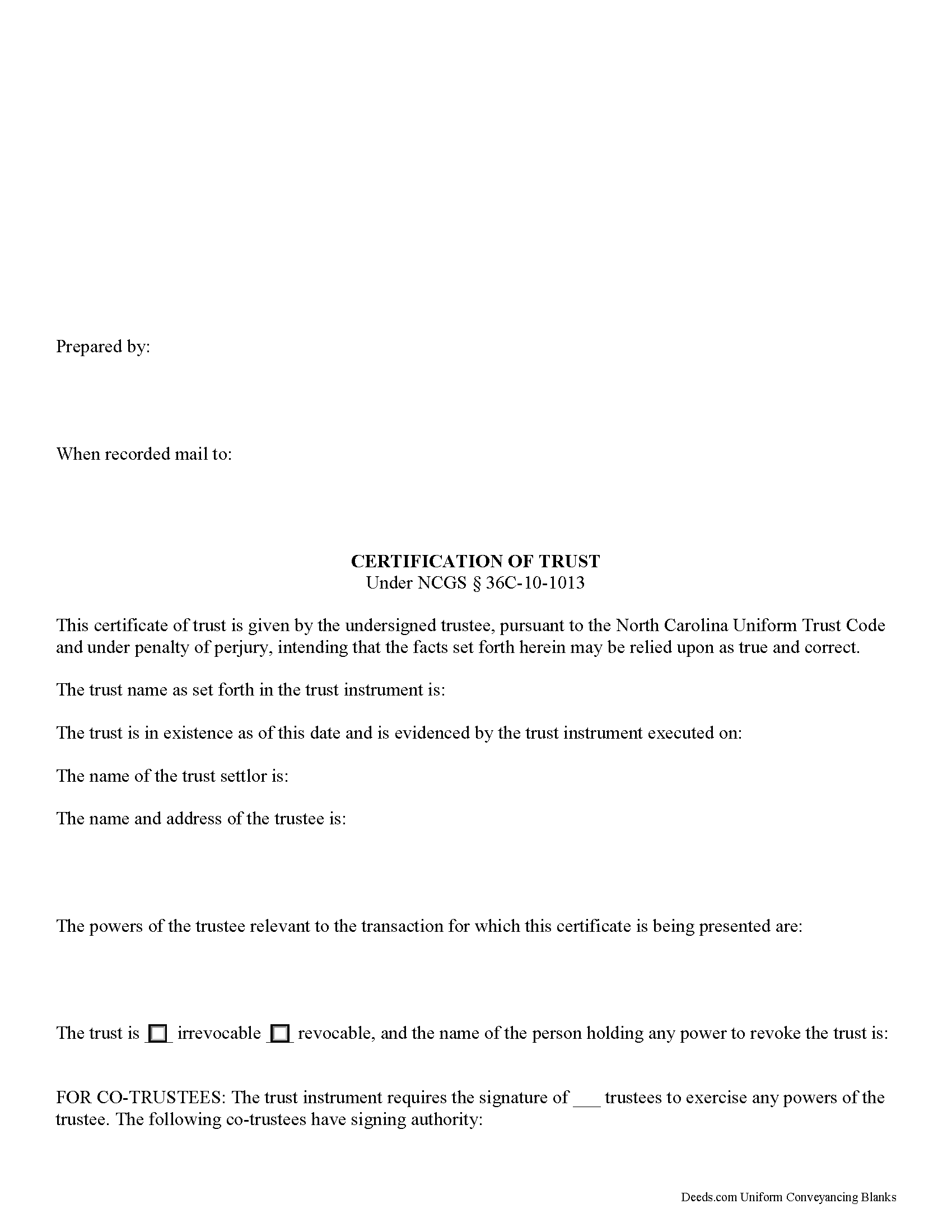
Catawba County Certificate of Trust Form
Fill in the blank form formatted to comply with all recording and content requirements.
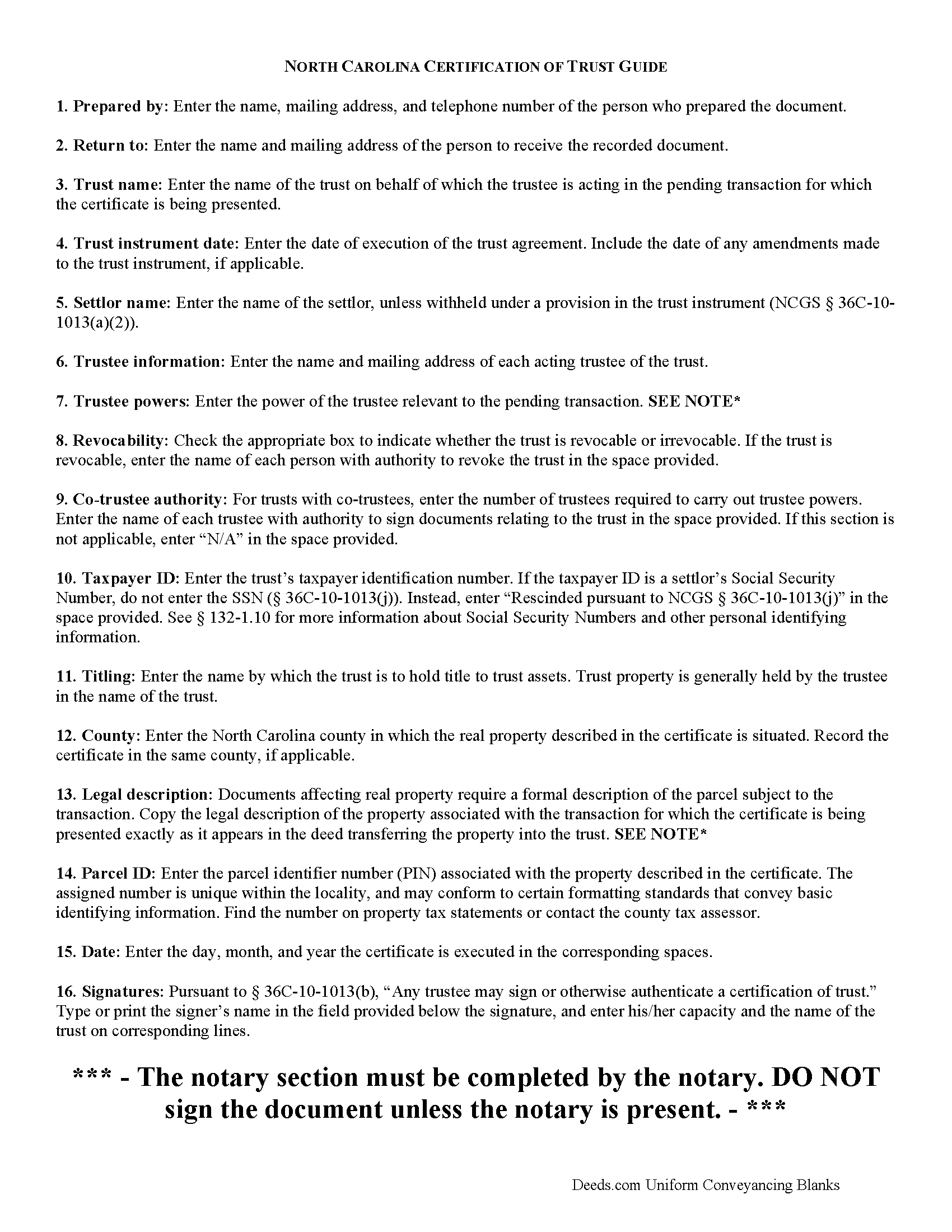
Catawba County Certificate of Trust Guide
Line by line guide explaining every blank on the form.
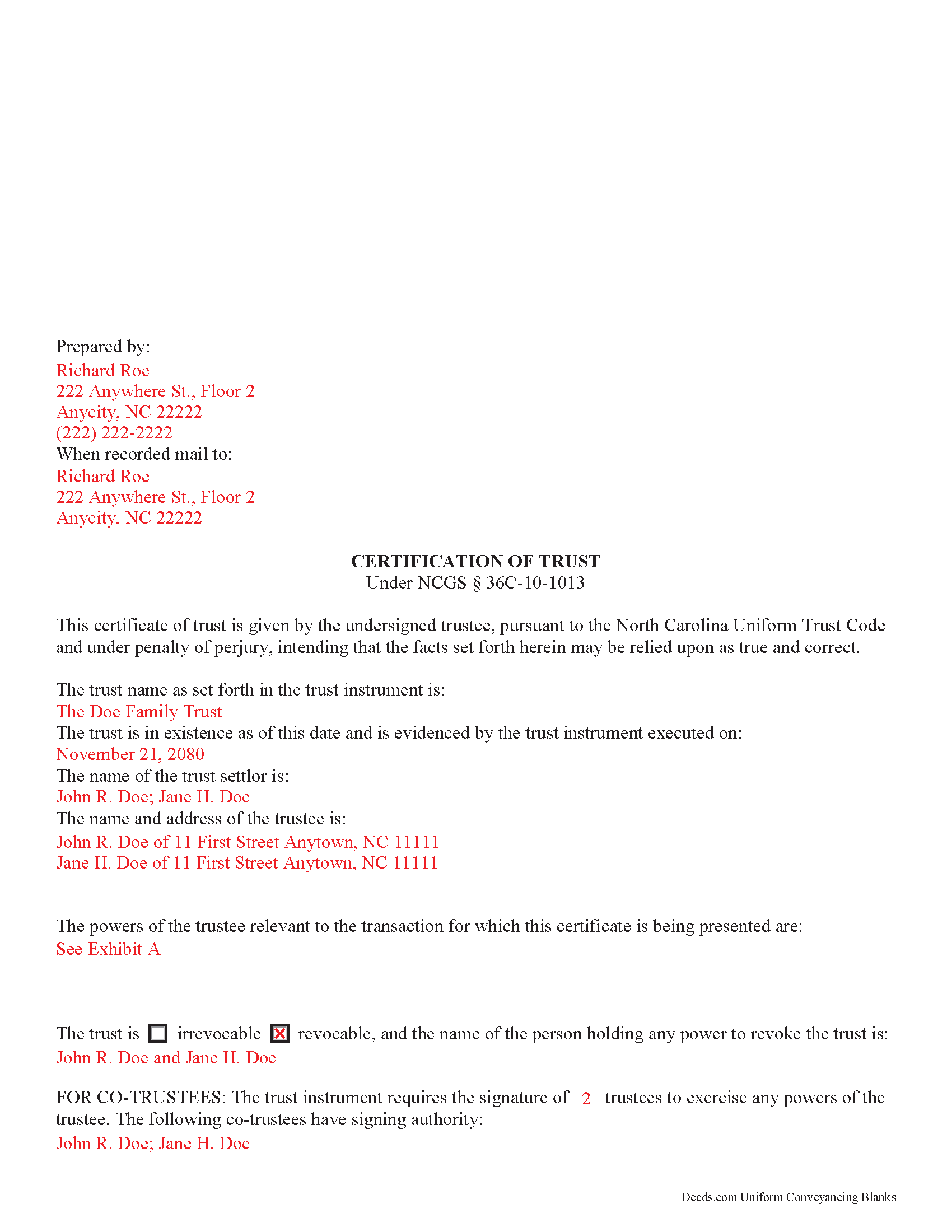
Catawba County Completed Example of the Certificate of Trust Document
Example of a properly completed form for reference.
All 3 documents above included • One-time purchase • No recurring fees
Immediate Download • Secure Checkout
Additional North Carolina and Catawba County documents included at no extra charge:
Where to Record Your Documents
Catawba County Register of Deeds
Newton, North Carolina 28658
Hours: 7:30am to 5:30pm M-F (first/last half hour by appt only)
Phone: (828) 465-1573
Recording Tips for Catawba County:
- Bring your driver's license or state-issued photo ID
- Ensure all signatures are in blue or black ink
- Request a receipt showing your recording numbers
- Ask about accepted payment methods when you call ahead
- Ask for certified copies if you need them for other transactions
Cities and Jurisdictions in Catawba County
Properties in any of these areas use Catawba County forms:
- Catawba
- Claremont
- Conover
- Hickory
- Maiden
- Newton
- Sherrills Ford
- Terrell
Hours, fees, requirements, and more for Catawba County
How do I get my forms?
Forms are available for immediate download after payment. The Catawba County forms will be in your account ready to download to your computer. An account is created for you during checkout if you don't have one. Forms are NOT emailed.
Are these forms guaranteed to be recordable in Catawba County?
Yes. Our form blanks are guaranteed to meet or exceed the applicable formatting requirements used for recording in Catawba County, including margin requirements, font requirements, and other layout standards. This guarantee applies to formatting, not to the legal sufficiency of information entered by the user or the suitability of a form for a particular transaction.
Can I reuse these forms?
Yes. You can reuse the forms for your personal use. For example, if you have multiple properties in Catawba County you only need to order once.
What do I need to use these forms?
The forms are PDFs that you fill out on your computer. The free Adobe Acrobat Reader is recommended, and most PDF apps also work. You do NOT enter your property information online - you download the blank forms and complete them privately on your own computer.
Are there any recurring fees?
No. This is a one-time purchase. Nothing to cancel, no memberships, no recurring fees.
How much does it cost to record in Catawba County?
Recording fees in Catawba County vary. Contact the recorder's office at (828) 465-1573 for current fees.
Questions answered? Let's get started!
North Carolina Certification of Trust
Codified under the North Carolina Uniform Trust Code, which governs testamentary and non-testamentary trusts, the certification of trust at NCGS 36C-10-1013 is a document verifying a trust's existence and a trustee's authority to act in the transaction for which the certificate is being presented.
A trust is an arrangement whereby a settlor transfers property to another person (the trustee), who holds it for the benefit of a third (the beneficiary). A testamentary trust takes effect upon the settlor's death as specified by his/her will, and a non-testamentary (inter vivos) trust takes effect during the settlor's lifetime, and functions pursuant to the terms established by the settlor in an unrecorded document called the trust instrument.
As the trust's administrator, the trustee handles the trust's assets and sees to the trust's affairs. Upon entering into a transaction involving the trust, a trustee can present a certification of trust to establish his authority to do so. The certificate contains the essential information about the trust that is necessary for the business at hand, allowing the trust instrument (containing the full scope of the trust's assets, the trustee's obligations, and identity of the beneficiary) to remain private.
Any trustee may execute a trust certificate ( 36C-10-1013(b)). In it, the trustee confirms that "the trust has not been revoked, modified, or amended in any manner that would cause the representations contained in the certification of trust to be incorrect" ( 36C-10-1013(c)). Recipients of a trustee's certificate may rely upon the statements contained within the document as correct without further inquiry ( 36C-10-1013(f)).
A certification of trust in North Carolina must state that the trust exists, and provide the date of the trust instrument. Unless withheld under a provision of the trust instrument, the document names each settlor, or person who contributes property to the trust ( 36C-1-103(17)). The certificate identifies the trust as either revocable or irrevocable, and gives the name of anyone holding a power to revoke the trust.
It also includes the name and address of the trust's currently acting trustee, along with a description of the trustee's powers relevant to the transaction for which the certificate is presented. If the trust has multiple trustees, the certificate shows how many trustees are required to exercise trustee powers, and which trustees have the authority to sign documents relating to the trust. It also specifies how trust assets will be titled (usually in the name of the trustee as representative of the trust).
Recipients of a certificate can request excerpts from the trust document designating the trustee and conferring the relevant powers necessary for the pending transaction unto the trustee ( 36C-10-1013(e)). Requesting that the trustee provide the entire trust instrument opens the recipient of a certification of trust up to certain liabilities under 36-10-1013(h). Note that this excludes the right to obtain a copy of the trust instrument in a legal proceeding involving the trust ( 36-10-1013(i)).
The certificate should also include the trust's taxpayer identification number, unless this number is the social security number of a settlor. If the taxpayer ID is rescinded from the document, however, it "shall be certified by the trustee to the person acting in reliance upon the certification of trust in a manner reasonably satisfactory to that person" ( 36C-10-1013(j)).
For transactions involving real property held in trust in North Carolina, the certification should meet all form and content requirements for real estate documents, including a legal description of the property subject to the transaction. The document may be recorded with the register of deeds in the county where the real property is located (36-10-1013(j)).
Talk to a lawyer with any questions regarding trusts and certifications of trust in North Carolina.
(North Carolina COT Package includes form, guidelines, and completed example)
Important: Your property must be located in Catawba County to use these forms. Documents should be recorded at the county recording office listed above.
This Certificate of Trust meets all recording requirements specific to Catawba County.
Our Promise
The documents you receive here are guaranteed to meet or exceed the applicable Catawba County recording format requirements. If there is a rejection caused by our formatting, we will correct the issue or refund your payment. This guarantee applies to document formatting only and does not extend to information entered by the user, the selection of the form, or the legal effect of the completed document.
Save Time and Money
Get your Catawba County Certificate of Trust form done right the first time with Deeds.com Uniform Conveyancing Blanks. At Deeds.com, we understand that your time and money are valuable resources, and we don't want you to face a penalty fee or rejection imposed by a county recorder for submitting nonstandard documents. We constantly review and update our forms to meet rapidly changing state and county recording requirements for roughly 3,500 counties and local jurisdictions.
4.8 out of 5 - ( 4,845 Reviews )
ronnie y. 5 out of 5 stars
nice to get everything I need for the county that the property is located.
Thank you for your feedback. We really appreciate it. Have a great day!
Philip S. 5 out of 5 stars
This was our first time using Deeds.Com. We were tremendously impressed. The website works well, but the customer service really makes this organization special. The prompt, professional and knowledgeable responses to inquiries and recording issues was refreshing.
We appreciate your business and value your feedback. Thank you. Have a wonderful day!
Steven N. 5 out of 5 stars
I was introduced to Deeds.com from my title company. I wanted the title company to do a courtesy recording for me and they suggested Deeds.com. Best suggestion in a while. The interface to use the website was seemlessly easy. The communication with the service staff was thorough and prompt. After the initial verification process (which the photo app was a little tricky), everything was easy. Will use them again.
Your feedback is greatly appreciated. Thank you for taking the time to share your experience!
Traci R. 1 out of 5 stars
I was disappointed in the form received. The language was not clear and for the price, one would think we would receive a Word version rather than a PDF.
Sorry to hear of your struggle Traci. We have canceled your order and payment. We do hope that you find something more suitable to your needs elsewhere. Have a wonderful day.
Derrell S. 5 out of 5 stars
I like the simplicity of your site and the reasonable charge for your services but for some reason you were unable to fulfill my order. Would appreciate knowing why. Derrell Sweem
Thank you for your feedback. We really appreciate it. Have a great day!
Charlotte K. 5 out of 5 stars
Really a simple, quick, professional experience!
Thank you!
Owen w. 5 out of 5 stars
Was very pleased with execution of the forms. Easy to understand and was hassle free.
Thank you!
Rhonda L. 5 out of 5 stars
This was one of the most simple but efficient process. Walked me thru every step. Total process was less than 2 weeks.
Thank you!
John D. 5 out of 5 stars
Forms were easy to complete, with the instructions that were provided. Very satisfied!
Thank you!
Georgana T. 3 out of 5 stars
Not clear information on ownership, which is what I wanted.
Sorry to hear that we were unable to find the information you need Georgana. Your account has been credited. Have a wonderful day.
Michael R. 5 out of 5 stars
This was just TOO easy to do and use!! Thank you so much for your service!
Thank you!
Sofia H. 5 out of 5 stars
Where has this site been my entire career? Very helpful. This site made what would normally take three days with a runner, a snap. Five Stars.
Thank you for your feedback. We really appreciate it. Have a great day!
Rachel F. 5 out of 5 stars
Easy and can add our own additional language in spaces provided. Thank you!
Thank you Rachel!
Barbara B. 5 out of 5 stars
A great help! Thank you.
Thank you!
MARC G. 5 out of 5 stars
Very easy. Very helpful.
Thank you!