Maricopa County Quitclaim Deed (Reserving Life Estate) Form
Last validated October 15, 2026 by our Forms Development TeamFormatted for recording in Maricopa County, for property anywhere in the county: rural and unincorporated areas as well as Aguila, Arlington, Avondale, Buckeye, Carefree, Cashion, Cave Creek, Chandler and 33 more.
- 3 documents included
- Immediate PDF download
- Formatting guarantee
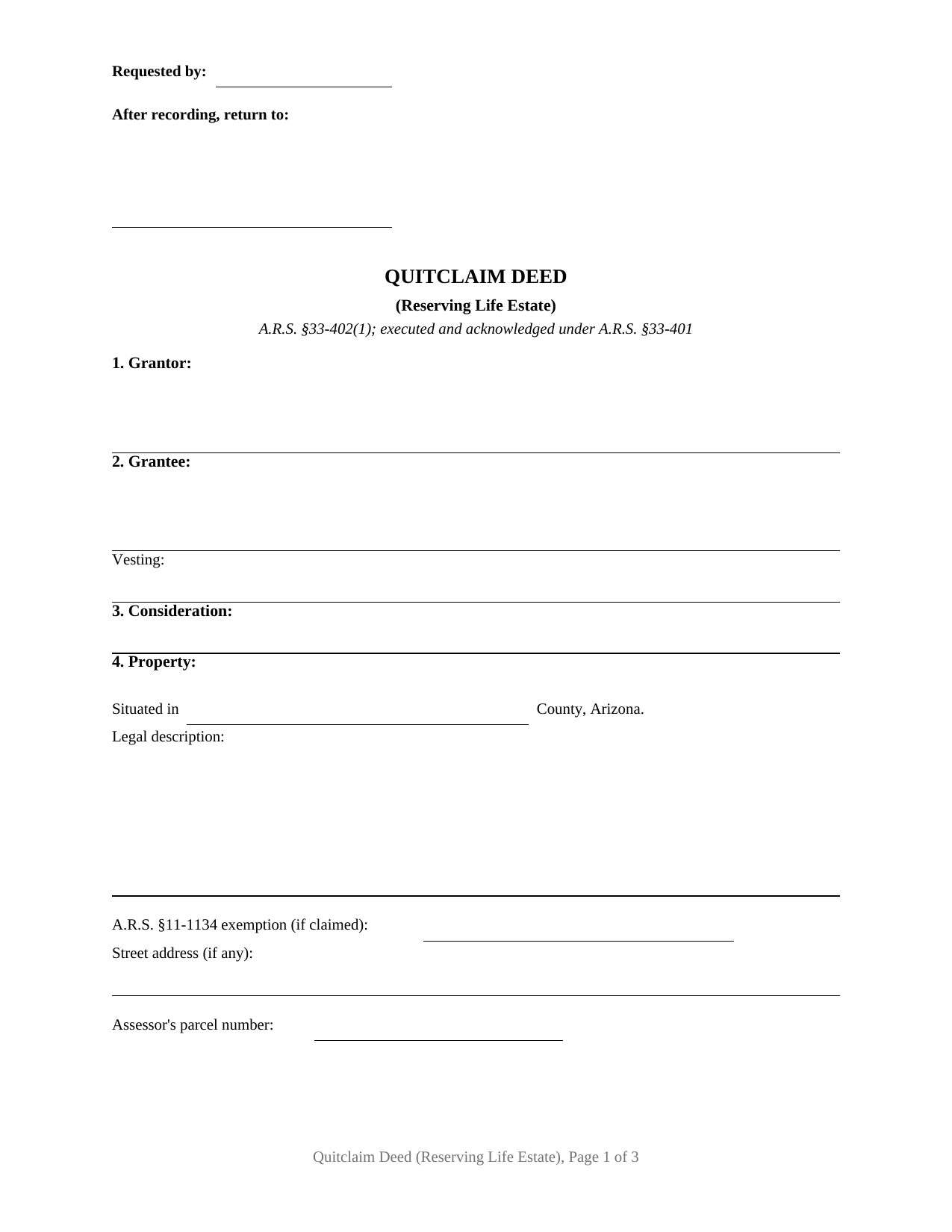
Maricopa County Quitclaim Deed (Reserving Life Estate) Form
Fill in the blank Quitclaim Deed (Reserving Life Estate) form formatted to comply with all Arizona recording and content requirements.
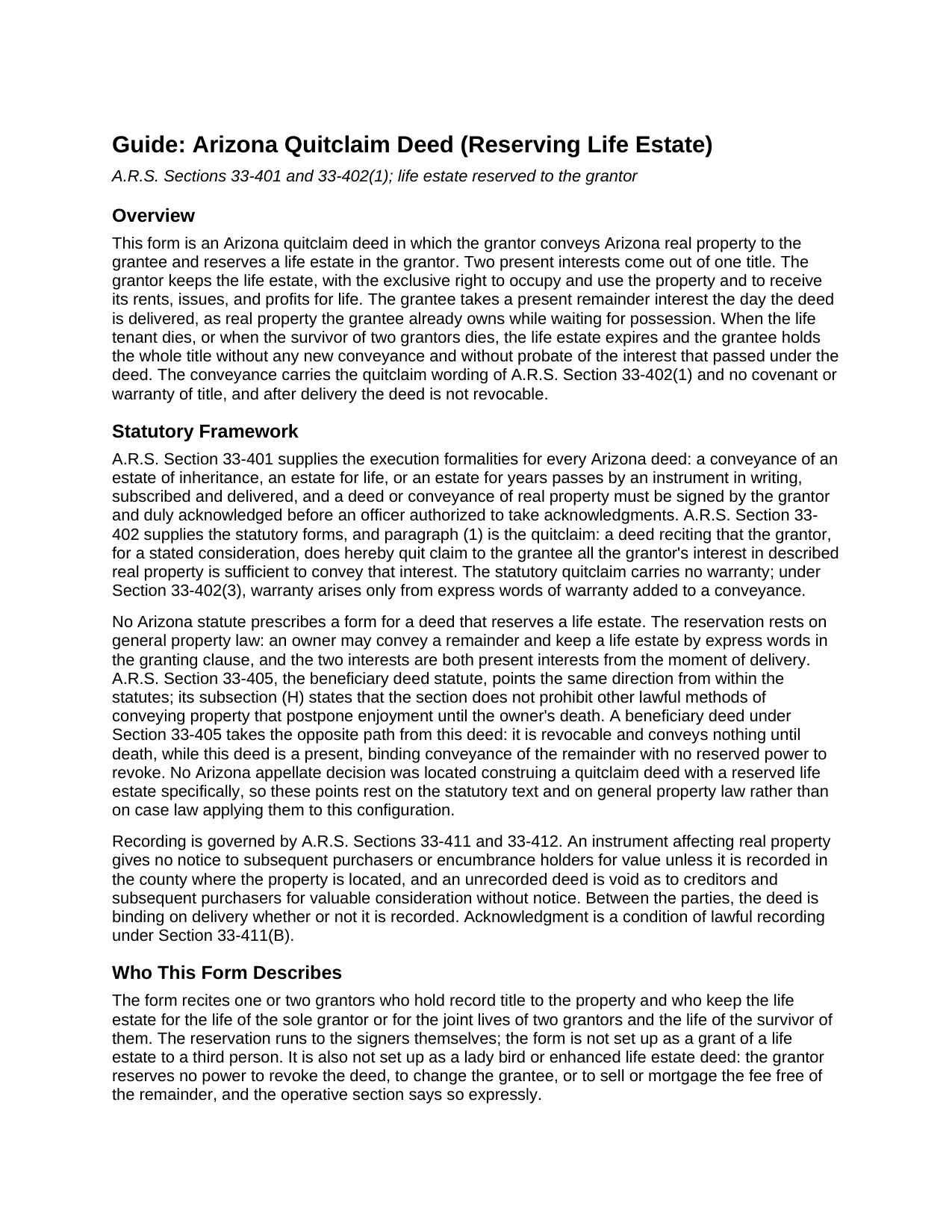
Maricopa County Quitclaim Deed (Reserving Life Estate) Guide
Line by line guide explaining every blank on the Quitclaim Deed (Reserving Life Estate) form.
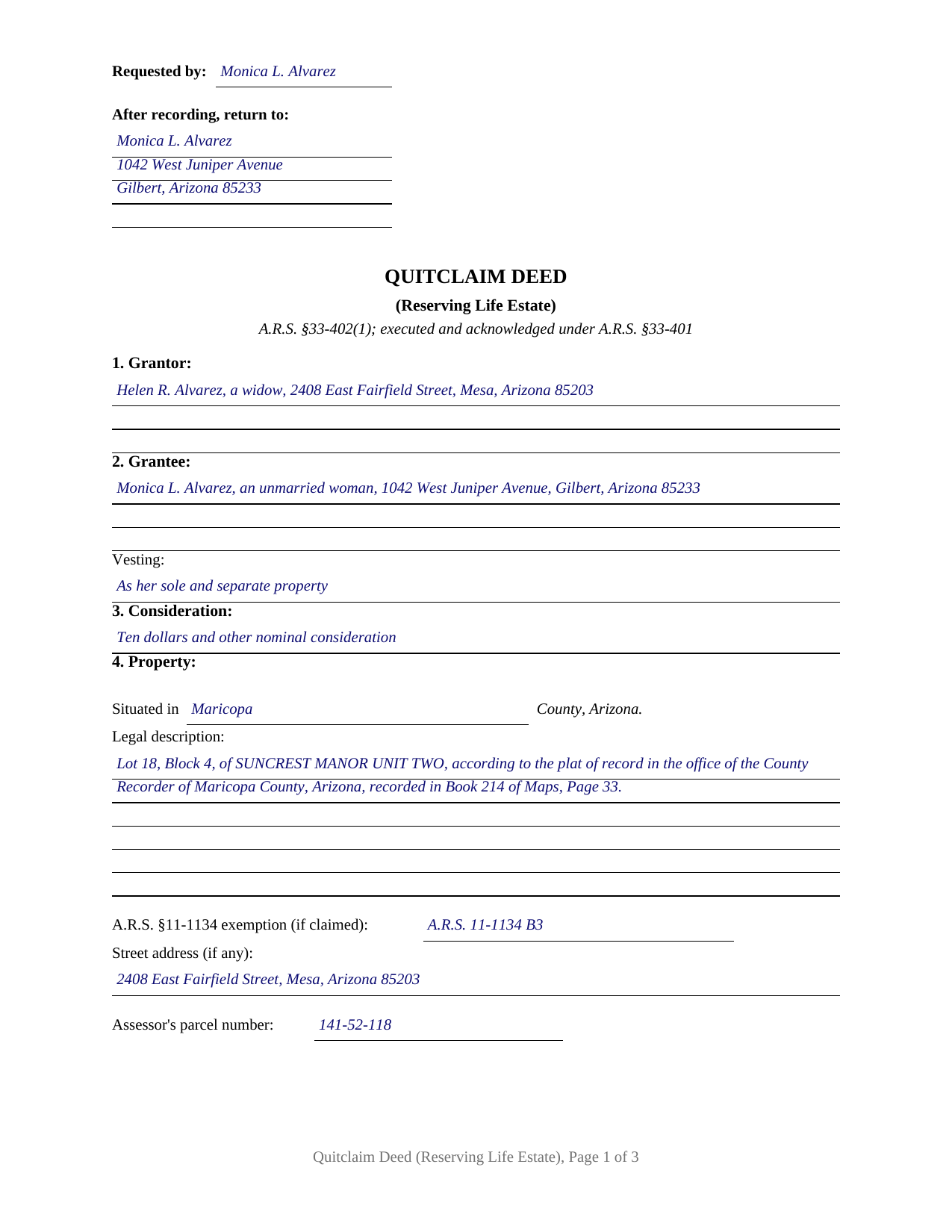
Maricopa County Completed Example of the Quitclaim Deed (Reserving Life Estate) Document
Example of a properly completed Arizona Quitclaim Deed (Reserving Life Estate) document for reference.
All 3 documents above included • One-time purchase • No recurring fees
Immediate Download • Secure Checkout
Additional Arizona and Maricopa County documents included at no extra charge:
Where to Record Your Documents
Recorder: Main Office
Phoenix, Arizona 85003
Hours: 8:00 A.M. - 5:00 P.M. Monday - Friday
Phone: 602-506-3535
Recording Tips for Maricopa County:
- Bring your driver's license or state-issued photo ID
- Ensure all signatures are in blue or black ink
- Bring extra funds - fees can vary by document type and page count
- Check margin requirements - usually 1-2 inches at top
- Leave recording info boxes blank - the office fills these
Cities and Jurisdictions in Maricopa County
Properties in any of these areas use Maricopa County forms:
- Aguila
- Arlington
- Avondale
- Buckeye
- Carefree
- Cashion
- Cave Creek
- Chandler
- Chandler Heights
- El Mirage
- Fort Mcdowell
- Fountain Hills
- Gila Bend
- Gilbert
- Glendale
- Glendale Luke Afb
- Goodyear
- Higley
- Laveen
- Litchfield Park
- Mesa
- Morristown
- New River
- Palo Verde
- Paradise Valley
- Peoria
- Phoenix
- Queen Creek
- Rio Verde
- Scottsdale
- Sun City
- Sun City West
- Surprise
- Tempe
- Tolleson
- Tonopah
- Tortilla Flat
- Waddell
- Wickenburg
- Wittmann
- Youngtown
Hours, fees, requirements, and more for Maricopa County
How do I get my forms?
Forms are available for immediate download after payment. The Maricopa County forms will be in your account ready to download to your computer. An account is created for you during checkout if you don't have one. Forms are NOT emailed.
Are these forms guaranteed to be recordable in Maricopa County?
Yes. Our form blanks are guaranteed to meet or exceed the applicable formatting requirements used for recording in Maricopa County, including margin requirements, font requirements, and other layout standards. This guarantee applies to formatting, not to the legal sufficiency of information entered by the user or the suitability of a form for a particular transaction.
Can I reuse these forms?
Yes. You can reuse the forms for your personal use. For example, if you have multiple properties in Maricopa County you only need to order once.
What do I need to use these forms?
The forms are PDFs that you fill out on your computer. The free Adobe Acrobat Reader is recommended, and most PDF apps also work. You do NOT enter your property information online - you download the blank forms and complete them privately on your own computer.
Are there any recurring fees?
No. This is a one-time purchase. Nothing to cancel, no memberships, no recurring fees.
How much does it cost to record in Maricopa County?
Recording fees in Maricopa County vary. Contact the recorder's office at 602-506-3535 for current fees.
Questions answered? Let's get started!
The grantor who signs this Arizona quitclaim deed gives the property away and keeps living in it. The form conveys the parcel to the grantee with Arizona's statutory quitclaim words under Section 33-402(1) and reserves a life estate in the same operative clause: the grantee takes a vested remainder the day the deed is delivered, and the grantor keeps the exclusive right to occupy the property, use it, and collect its rents and income for life.
Keeping a life estate, giving the remainder
A reserved life estate splits one title into two present interests. The life estate stays with the grantor, who remains the person in possession. The remainder passes to the grantee now, as real property the grantee already owns while waiting for possession. When the life tenant dies, the life estate simply expires, and the grantee holds the whole title without probate of the interest that passed under the deed and without any new conveyance. Arizona statute separately recognizes a revocable instrument under Section 33-405 that conveys nothing until death; a life estate deed takes the opposite path. The transfer is present and binding, so after delivery the grantor alone cannot revoke the deed, name a different taker, or sell or mortgage the fee free of the remainder. That permanence is the trade written on the face of the deed: the power to change course is given up for the certainty that the property's destination is fixed while lifetime possession stays put.
What the reservation clause carries
The conveyance and the reservation travel in one operative section. The form quit claims all of the grantor's right, title, and interest to the grantee, reserves the life estate for the life of the grantor, or for the joint lives of two grantors and the survivor of them, and states expressly that no covenant or warranty of title and no power of revocation attach. Around that clause the form recites one or two grantors, who are also the life tenants; a grantee section with its own vesting line for the remainder; and two signature blocks, each with a separate acknowledgment certificate, so spouses conveying community real property can both join as A.R.S. Section 25-214(C) requires, before different notaries or on different dates where distance calls for it. The form is not set up as a grant of a life estate to a third person, and it reserves no power to sell or revoke without the grantee; the reservation runs to the signers themselves. An owner passing the remainder in a family residence to an adult child while keeping lifetime occupancy, and a widowed owner fixing where a home goes while continuing to live in it, present the pattern this deed recites.
Through the recorder's door with code B3
A life estate reservation changes none of Arizona's recording arithmetic. The flat thirty dollar fee of Section 11-475 covers the deed, the two dollar transfer fee of Section 11-1132 rides inside it, and the Affidavit of Property Value checkpoint of Section 11-1133 still stands at the counter. The family transfers this configuration usually documents tend to be exempt from the affidavit: Section 11-1134(B)(3) reaches a transfer of residential property between family members for only nominal actual consideration, and the notation goes on the face of the deed beneath the legal description. The completed example carries that entry, A.R.S. 11-1134 B3, for a Mesa home whose widowed owner deeds the remainder to her daughter and keeps possession for life. Acknowledgments taken on or after September 12, 2026 also gain a new journal entry, the signer's thumbprint, required by Arizona's 2026 anti-fraud act.
The download includes the blank deed as a fillable PDF, the completed Maricopa County example, and a section by section guide covering the reservation clause, the remainder vesting options, signing, and recording. The materials are informational and are not legal advice.
Important: Your property must be located in Maricopa County to use these forms. Documents should be recorded at the county recording office listed above.
This Quitclaim Deed (Reserving Life Estate) meets all recording requirements specific to Maricopa County.
Our Promise
The documents you receive here are guaranteed to meet or exceed the applicable Maricopa County recording format requirements. If there is a rejection caused by our formatting, we will correct the issue or refund your payment. This guarantee applies to document formatting only and does not extend to information entered by the user, the selection of the form, or the legal effect of the completed document.
Save Time and Money
Get your Maricopa County Quitclaim Deed (Reserving Life Estate) form done right the first time with Deeds.com Uniform Conveyancing Blanks. At Deeds.com, we understand that your time and money are valuable resources, and we don't want you to face a penalty fee or rejection imposed by a county recorder for submitting nonstandard documents. We constantly review and update our forms to meet rapidly changing state and county recording requirements for roughly 3,500 counties and local jurisdictions.
4.8 out of 5 - ( 4,832 Reviews )
Monica D. N. 5 out of 5 stars
The Web site is very intuitive, organized well and forms are easily found. The instructions provided are very helpful. Value in terms of price is very good.
We appreciate your business and value your feedback. Thank you. Have a wonderful day!
Deborah M. 5 out of 5 stars
Absolutely great. The staff is responsive and knowledgeable. The online interface is excellent. The total cost for finalizing the sale on our property (minus state filing fees) was $39. A wonderful experience.
Thank you for your feedback. We really appreciate it. Have a great day!
Rebecca C. 5 out of 5 stars
Great service ! Hawaii is not a "forms state" so unfortunately the public has no way to get templates on our local gov site but deeds.com to the rescue. The template was affordable and easy to use and successfully recorded. Great to use when you don't need to involve title or attorneys for simple deed changes, thank you
Thank you for your feedback. We really appreciate it. Have a great day!
leila m. 5 out of 5 stars
Very good service, friendly customer service I absolutely will use the service again
Thank you!
TEDDY Y. 5 out of 5 stars
this experience was made possible with the ease of using your service thank you
Thank you!
James B. 5 out of 5 stars
Does everything I expected it to do. Very helpful. It is in compliance with applicable Nevada State regulations
Thank you for your feedback. We really appreciate it. Have a great day!
shelley m. 5 out of 5 stars
I thought the service was good
Thank you Shelley. Have a fantastic day!
Elizabeth K. 5 out of 5 stars
Really great experience. Thanks!
Thank you for your feedback. We really appreciate it. Have a great day!
Earline S. 5 out of 5 stars
Total package. Very prompt with complete instructions & example to complete forms. If you don't want to hire a lawyer, this is pretty simple & will bypass probate.
Thank you, we really appreciate your feedback.
Frazer W. 5 out of 5 stars
Deeds.com does a great job getting our legal documents filed with the D.C. Recorder of Deeds. Frazer Walton, Jr. Law Office of Frazer Walton, Jr.
Your appreciative words mean the world to us. Thank you.
William A. 5 out of 5 stars
great service and very accommodating generally, and especially during these times.
We appreciate your business and value your feedback. Thank you. Have a wonderful day!
deborah k. 5 out of 5 stars
was very easy to fill out the directions were very helpful
Thank you!
Robert S. 5 out of 5 stars
Very timely service and retrieved information I was looking for
We appreciate your business and value your feedback. Thank you. Have a wonderful day!
LINDA S. 5 out of 5 stars
This was SO much easier than having to go down to the county recorder's office. I would definitely use this company again!
Thank you for your feedback. We really appreciate it. Have a great day!
Michael S. 5 out of 5 stars
Great product and service. So convenient.
Your satisfaction with our services is of utmost importance to us. Thank you for letting us know how we did!