Santa Clara County Revocable Transfer on Death Deed (One Individual Beneficiary) Form
Last validated October 14, 2026 by our Forms Development TeamFormatted for recording in Santa Clara County, for property anywhere in the county: rural and unincorporated areas as well as Alviso, Campbell, Coyote, Cupertino, Gilroy, Holy City, Los Altos, Los Gatos and 13 more.
- 3 documents included
- Immediate PDF download
- Formatting guarantee
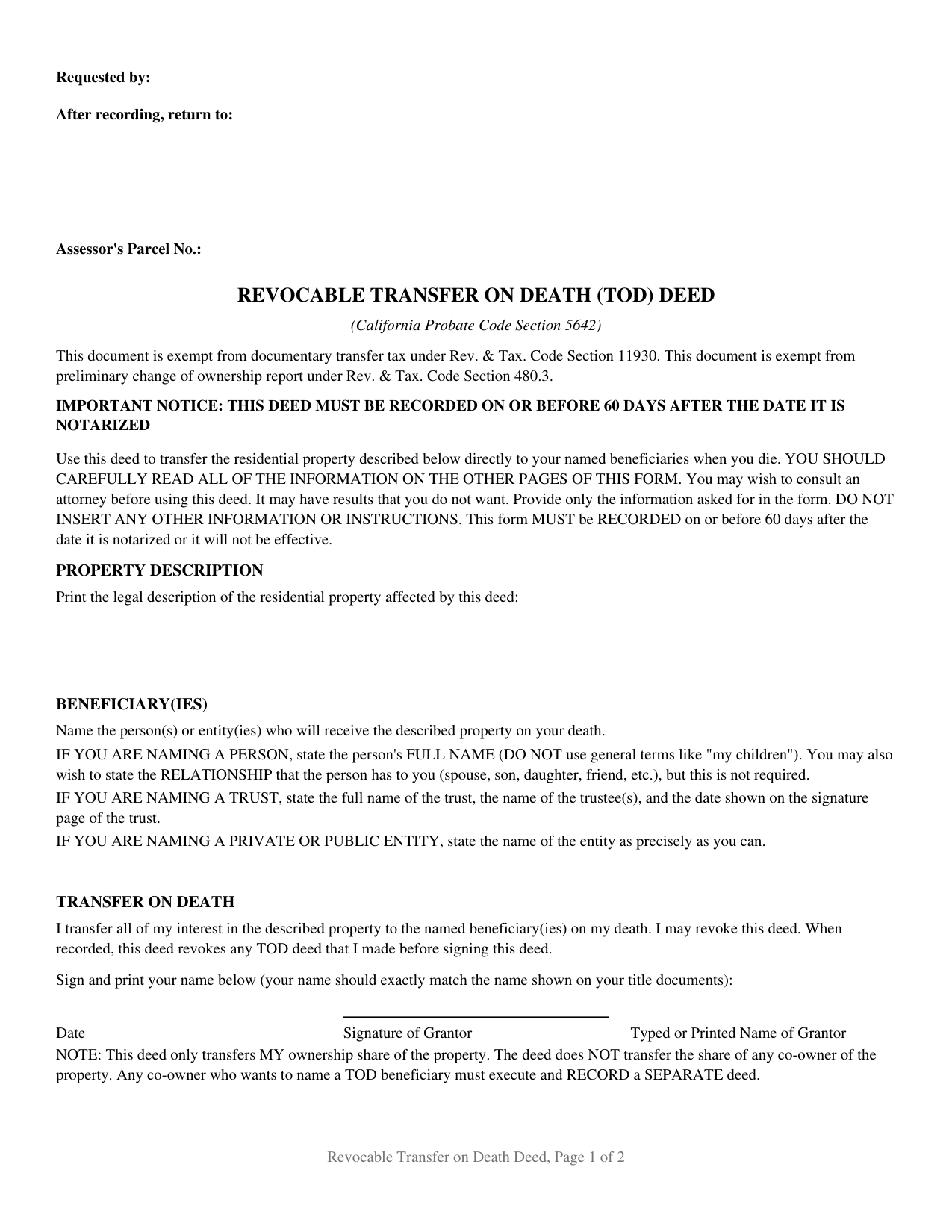
Santa Clara County Revocable Transfer on Death Deed (One Individual Beneficiary) Form
Fill in the blank Revocable Transfer on Death Deed (One Individual Beneficiary) form formatted to comply with all California recording and content requirements.
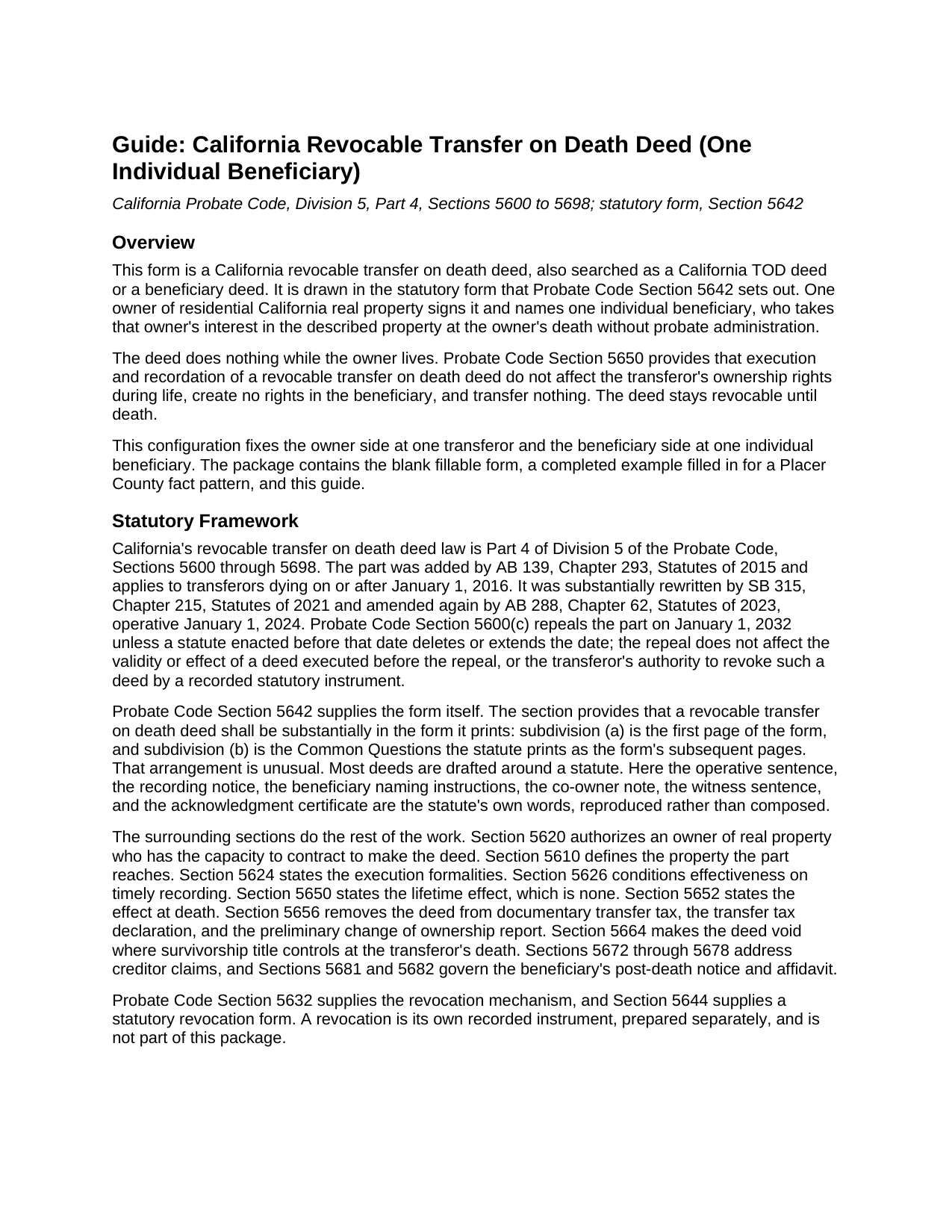
Santa Clara County Revocable Transfer on Death Deed (One Individual Beneficiary) Guide
Line by line guide explaining every blank on the Revocable Transfer on Death Deed (One Individual Beneficiary) form.
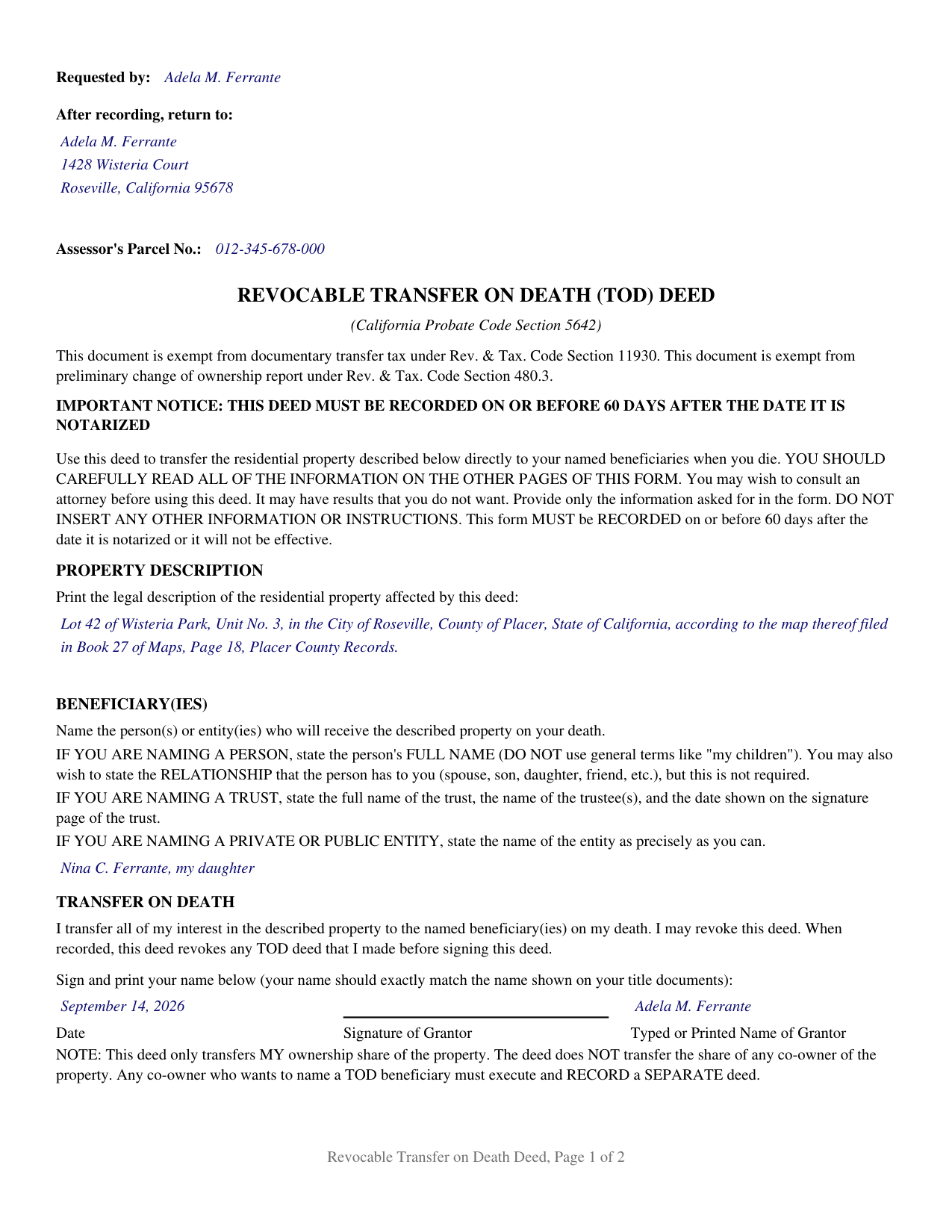
Santa Clara County Completed Example of the Revocable Transfer on Death Deed (One Individual Beneficiary) Document
Example of a properly completed California Revocable Transfer on Death Deed (One Individual Beneficiary) document for reference.
All 3 documents above included • One-time purchase • No recurring fees
Immediate Download • Secure Checkout
Additional California and Santa Clara County documents included at no extra charge:
Where to Record Your Documents
County Clerk-Recorder
San Jose, California 95134
Hours: 8:00 a.m. to 4:30 p.m
Phone: (408) 299-5688
Recording Tips for Santa Clara County:
- Bring your driver's license or state-issued photo ID
- Ensure all signatures are in blue or black ink
- Ask about accepted payment methods when you call ahead
- Ask for certified copies if you need them for other transactions
- Ask if they accept credit cards - many offices are cash/check only
Cities and Jurisdictions in Santa Clara County
Properties in any of these areas use Santa Clara County forms:
- Alviso
- Campbell
- Coyote
- Cupertino
- Gilroy
- Holy City
- Los Altos
- Los Gatos
- Milpitas
- Morgan Hill
- Mount Hamilton
- Mountain View
- New Almaden
- Palo Alto
- Redwood Estates
- San Jose
- San Martin
- Santa Clara
- Saratoga
- Stanford
- Sunnyvale
Hours, fees, requirements, and more for Santa Clara County
How do I get my forms?
Forms are available for immediate download after payment. The Santa Clara County forms will be in your account ready to download to your computer. An account is created for you during checkout if you don't have one. Forms are NOT emailed.
Are these forms guaranteed to be recordable in Santa Clara County?
Yes. Our form blanks are guaranteed to meet or exceed the applicable formatting requirements used for recording in Santa Clara County, including margin requirements, font requirements, and other layout standards. This guarantee applies to formatting, not to the legal sufficiency of information entered by the user or the suitability of a form for a particular transaction.
Can I reuse these forms?
Yes. You can reuse the forms for your personal use. For example, if you have multiple properties in Santa Clara County you only need to order once.
What do I need to use these forms?
The forms are PDFs that you fill out on your computer. The free Adobe Acrobat Reader is recommended, and most PDF apps also work. You do NOT enter your property information online - you download the blank forms and complete them privately on your own computer.
Are there any recurring fees?
No. This is a one-time purchase. Nothing to cancel, no memberships, no recurring fees.
How much does it cost to record in Santa Clara County?
Recording fees in Santa Clara County vary. Contact the recorder's office at (408) 299-5688 for current fees.
Questions answered? Let's get started!
Putting one person on the beneficiary line is the quietest configuration this instrument has, and the one where most of the Probate Code's beneficiary machinery never starts. The form is the statutory deed at Probate Code Section 5642, set up for one owner and one individual beneficiary: one name on the beneficiary entry, one captioned signature row, one certificate. Californians searching for a TOD deed or a beneficiary deed land here: the instrument moves residential property to the person named, at death, outside probate.
One name, and the sharing rules stay asleep
Probate Code Section 5652 carries the rules for several takers: equal shares as tenants in common, with a failed share redistributed among the survivors. None of that engages on a deed with a single named taker. There is no fraction to state, no cotenancy to explain, nothing to divide. Section 5652(a)(1) transfers the whole of the transferor's interest in accordance with the deed.
Survival becomes the only question
Section 5652(a)(2) conditions a beneficiary's interest on outliving the transferor: the interest of a beneficiary who does not lapses, notwithstanding the anti-lapse rule of Probate Code Section 21110. Where several people are named, that lapse is absorbed by the rest. Where one is named, the statute's own Common Questions answer it in a line: the deed has no effect, and the property passes under the transferor's will or by intestate succession. The statutory form prints no alternate or successor line, and its opening instruction forbids adding one, so this is a designation with one point of failure.
An entry that takes a name and nothing else
The beneficiary entry on this form is a single line, and the statute's convention for a person is what fills it: the full name, with a general term such as a reference to children ruled out, and the relationship to the transferor stated briefly or left off. Nothing else belongs there. Because the form directs that only the information it asks for be provided and nothing else inserted, there is no address entry, no capacity entry, and no condition to write in. The rest of the instrument keeps the same single-party shape: the statute's captioned row of date, signature, and printed name; two witness columns for the two witnesses Probate Code Section 5624 requires; and one acknowledgment certificate whose venue already reads State of California, because it certifies under California law. No second transferor block and no second beneficiary entry exists anywhere on the deed, and the statute's note under the signature row confines the transfer to the signer's own share. A parent naming one adult child, and a sole owner naming one relative, present the single-name pattern this deed recites; a trust taker, an entity taker, or several takers present a different configuration.
What comes attached to the one interest
Section 5652(e) transfers without covenant or warranty of title, and Section 5652(b) takes the property as encumbered: subject to every limitation of record at the transferor's death, a deed of trust included, and to limitations recorded up to 120 days after the beneficiary records the Section 5682(c) affidavit. Section 5664 sets the other boundary. If title stands in joint tenancy or as community property with right of survivorship when the transferor dies, the deed is void and survivorship carries the interest instead, an effect the statute attaches at death, not something drafting can reach.
Sixty days, and a page count that ignores the annex
Section 5626 makes recordation an effectiveness condition and runs the sixty day window from the date of the notarial acknowledgment. The Common Questions behind the certificate are the statute's own subsequent pages under Section 5642(b), and Section 5626(d)(1) does not require them to be recorded; leaving them at home changes nothing about the deed. They are paginated on a separate count for that reason, so the deed's footer reads the same two pages whether or not the annex goes to the counter. Recording happens at the county recorder where the property sits; fee schedules differ county to county.
Inside the package are the blank fillable deed, a completed example built on a Placer County fact pattern, and a guide that walks the form heading by heading. Both this page and that guide speak about the form and about California law in general terms only, and neither is legal advice.
Important: Your property must be located in Santa Clara County to use these forms. Documents should be recorded at the county recording office listed above.
This Revocable Transfer on Death Deed (One Individual Beneficiary) meets all recording requirements specific to Santa Clara County.
Our Promise
The documents you receive here are guaranteed to meet or exceed the applicable Santa Clara County recording format requirements. If there is a rejection caused by our formatting, we will correct the issue or refund your payment. This guarantee applies to document formatting only and does not extend to information entered by the user, the selection of the form, or the legal effect of the completed document.
Save Time and Money
Get your Santa Clara County Revocable Transfer on Death Deed (One Individual Beneficiary) form done right the first time with Deeds.com Uniform Conveyancing Blanks. At Deeds.com, we understand that your time and money are valuable resources, and we don't want you to face a penalty fee or rejection imposed by a county recorder for submitting nonstandard documents. We constantly review and update our forms to meet rapidly changing state and county recording requirements for roughly 3,500 counties and local jurisdictions.
4.8 out of 5 - ( 4,845 Reviews )
Diane W. 5 out of 5 stars
Easy to download and print. Came with good instructions. Would use deeds.com again.
We appreciate your business and value your feedback. Thank you. Have a wonderful day!
Cindy N. 5 out of 5 stars
Our home was in only my husband’s name and as we are getting older, it was time to add my name to the Deed to avoid potential issues in the future. Our experience with Deeds.com was wonderful. The website is user friendly, instructions written in layman’s terms, straightforward and easy to follow. Very reasonably priced. I highly recommend using Deeds.com.
Thank you for the kind words Cindy. We appreciate you. Have an amazing day!
THOMAS C. 5 out of 5 stars
Very fast service
We appreciate your business and value your feedback. Thank you. Have a wonderful day!
Lori W. 5 out of 5 stars
Disclaimer letter was just what I needed. Download worked without a hitch.
Thank you for your feedback Lori, we really appreciate it. Have a fantastic day!
TAMARA B. 5 out of 5 stars
Great service
We appreciate your business and value your feedback. Thank you. Have a wonderful day!
Charlene H. 5 out of 5 stars
Deeds.com is a wonderful website. I highly recommend them and would use them again in the future.
Thank you, Charlene! We're so glad to hear you had a great experience. We truly appreciate your recommendation and look forward to helping you again in the future.
Angeline P. 5 out of 5 stars
Great service! I downloaded the Quit Claim Deed package and I'm so grateful I did. It contained detailed directions on how to fill out all the forms, an example of a finalized copy, and excellent customer service. Also, if you choose to use their digital service, they will digitally submit the documents into the County Recorder's Office for you. Going through DEEDS.COM for the service I chose saved me over $300. Recording my new deed was a breeze. Thank you again DEEDS.com!
We appreciate your business and value your feedback. Thank you. Have a wonderful day!
Andrew T. 5 out of 5 stars
I was pleasantly surprised with the experience. Cost was better than other sites I checked. Questions about my submittal were asked within an hour. Document was recorded by next day.
Thanks for the review, Andrew. Glad we could get your document recorded quickly — that's the standard we hold ourselves to. We appreciate your business.
Rebecca G. 5 out of 5 stars
Very user friendly. Forms professional and acceptable to state applicable to. Appreciate the sample & instructions.
Thank you for your feedback. We really appreciate it. Have a great day!
JENNIE W. 5 out of 5 stars
This is so much easier than going downtown to file paperwork! Thanks deeds.com!
Thank you!
Gloria C. 5 out of 5 stars
AMazing service. Fast and affordable.
We appreciate your business and value your feedback. Thank you. Have a wonderful day!
katherine a. 5 out of 5 stars
loved the ease of use for the forms. went on line to find out about Adobe Reader, too. Had a test to see if I had it. Took few seconds. Then on to ordering and downloading which took only 5 minutes for the three forms I wanted. Thanks, Katie Anderson
Thank you for your feedback. We really appreciate it. Have a great day!
Norma V. 5 out of 5 stars
So far it's been great. My 2 deeds were accepted and prepared for recording very quickly. Now I am waiting for the County to record them and Deeds.com to e-send them back to me. Very impressive!
We appreciate your business and value your feedback. Thank you. Have a wonderful day!
Sandra R. 5 out of 5 stars
This site was easy to use for access to State forms for filing in Montmorency County clerks office. Not only did I find claim form but a sample claim was available for assisting on how to complete your form correctly. Found this so very useful for us (public resident) to fill in the form as a .PDF file that prints out typed form - rather than handwritten entries. There is a fee but your access is always available on internet to this site in the future. Saved me time using this site and My filed form looks professional. You have access to several other forms if needed.
Thank you for the kind words Sandra, we appreciate you. Glad we could help!
Arthur S. 5 out of 5 stars
It is great and fast you get 5 stars from me
We appreciate your business and value your feedback. Thank you. Have a wonderful day!