Solano County Revocable Transfer on Death Deed Form
Last validated October 27, 2026 by our Forms Development TeamFormatted for recording in Solano County, for property anywhere in the county: rural and unincorporated areas as well as Benicia, Birds Landing, Dixon, Elmira, Fairfield, Rio Vista, Suisun City, Travis Afb and 2 more.
- 3 documents included
- Immediate PDF download
- Formatting guarantee
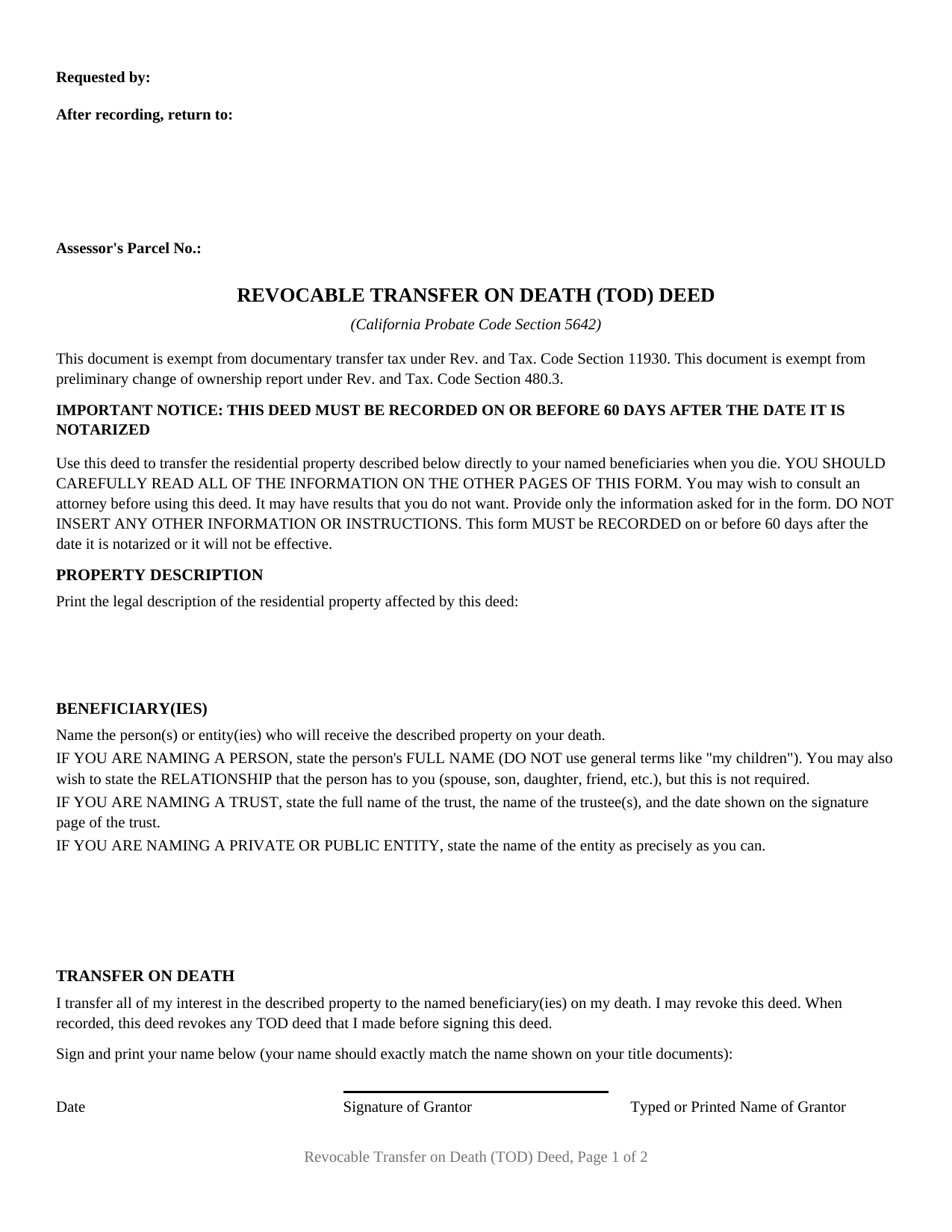
Solano County Revocable Transfer on Death Deed Form
Fill in the blank Revocable Transfer on Death Deed form formatted to comply with all California recording and content requirements.
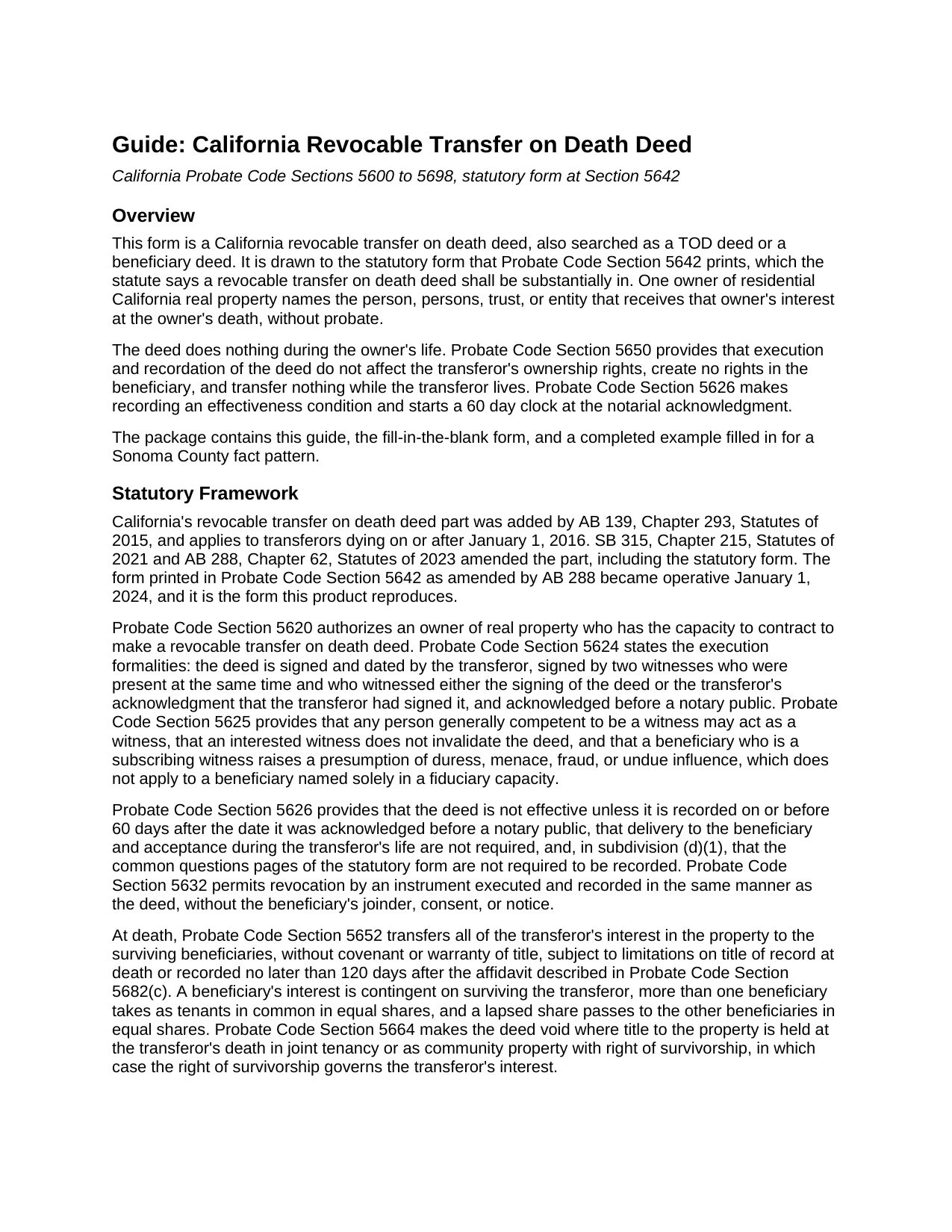
Solano County Revocable Transfer on Death Deed Guide
Line by line guide explaining every blank on the Revocable Transfer on Death Deed form.
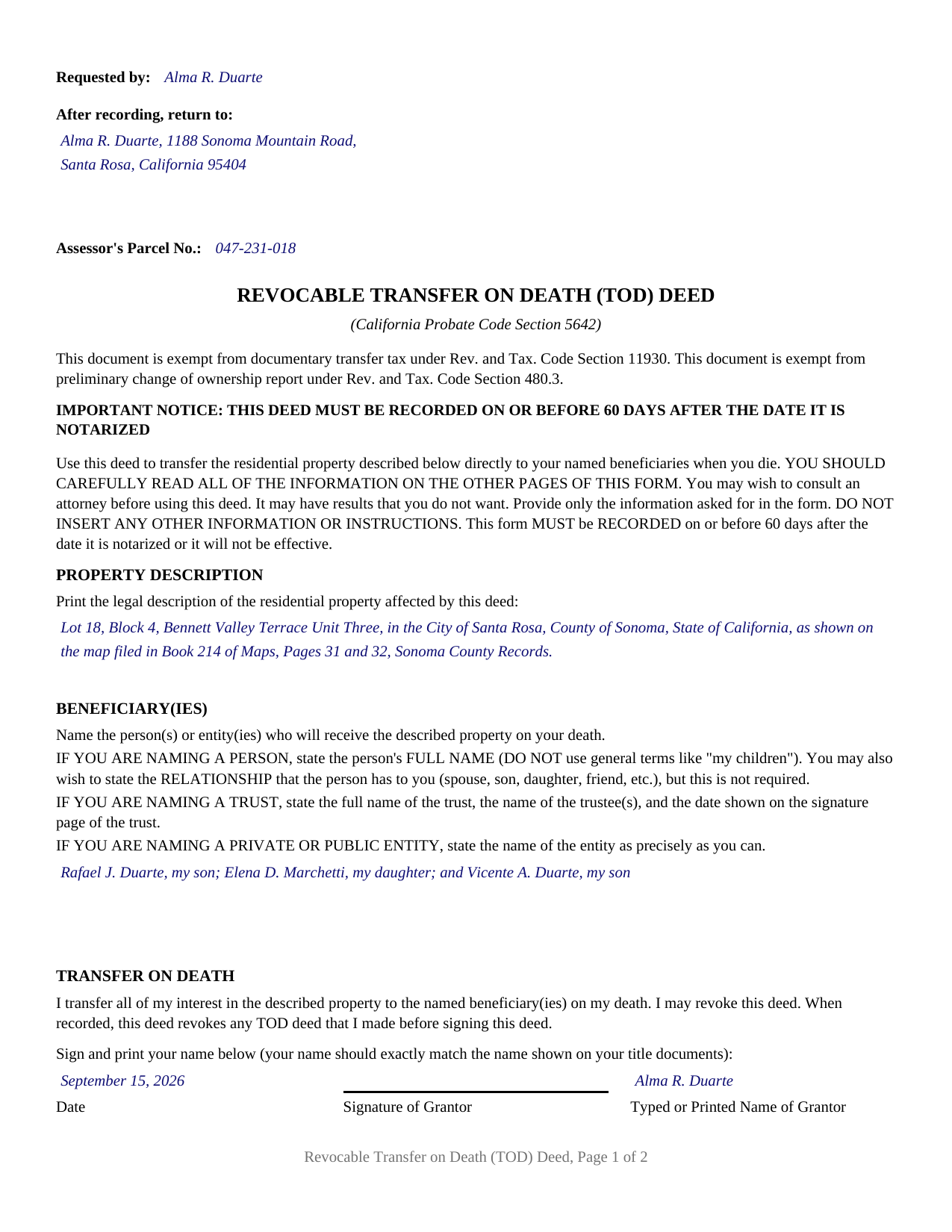
Solano County Completed Example of the Revocable Transfer on Death Deed Document
Example of a properly completed California Revocable Transfer on Death Deed document for reference.
All 3 documents above included • One-time purchase • No recurring fees
Immediate Download • Secure Checkout
Additional California and Solano County documents included at no extra charge:
Where to Record Your Documents
Solano County Assessor-Recorder
Fairfield, California 94533-6338
Hours: 8:00am - 4:00pm / Recording: 8:00 - 3:30pm
Phone: (707) 784-6290
Recording Tips for Solano County:
- Bring your driver's license or state-issued photo ID
- Ensure all signatures are in blue or black ink
- Ask about their eRecording option for future transactions
- Avoid the last business day of the month when possible
- Both spouses typically need to sign if property is jointly owned
Cities and Jurisdictions in Solano County
Properties in any of these areas use Solano County forms:
- Benicia
- Birds Landing
- Dixon
- Elmira
- Fairfield
- Rio Vista
- Suisun City
- Travis Afb
- Vacaville
- Vallejo
Hours, fees, requirements, and more for Solano County
How do I get my forms?
Forms are available for immediate download after payment. The Solano County forms will be in your account ready to download to your computer. An account is created for you during checkout if you don't have one. Forms are NOT emailed.
Are these forms guaranteed to be recordable in Solano County?
Yes. Our form blanks are guaranteed to meet or exceed the applicable formatting requirements used for recording in Solano County, including margin requirements, font requirements, and other layout standards. This guarantee applies to formatting, not to the legal sufficiency of information entered by the user or the suitability of a form for a particular transaction.
Can I reuse these forms?
Yes. You can reuse the forms for your personal use. For example, if you have multiple properties in Solano County you only need to order once.
What do I need to use these forms?
The forms are PDFs that you fill out on your computer. The free Adobe Acrobat Reader is recommended, and most PDF apps also work. You do NOT enter your property information online - you download the blank forms and complete them privately on your own computer.
Are there any recurring fees?
No. This is a one-time purchase. Nothing to cancel, no memberships, no recurring fees.
How much does it cost to record in Solano County?
Recording fees in Solano County vary. Contact the recorder's office at (707) 784-6290 for current fees.
Questions answered? Let's get started!
California is one of the few states that writes its transfer on death deed out in the statute itself: Probate Code Section 5642 sets the form word for word and says a revocable transfer on death deed shall be substantially in that form. This package prepares it. A California revocable transfer on death deed, also searched as a California TOD deed or a beneficiary deed, lets one owner of residential California real property name who receives it at death, without probate administration.
A statute that supplies the words
Most deed forms are drafted around a statute. This one is the statute. Section 5642 prints the title and citation line, the tax exemption recitals, the capitalized 60 day recording warning, the introductory paragraph, the beneficiary naming instructions, the operative transfer sentence, the co-owner note, and the witness sentence. The operative language is fixed rather than drafted: the deed reads that the owner transfers all of that owner's interest in the described property to the named beneficiaries on death, may revoke the deed, and, on recording, revokes any earlier TOD deed. The form's own introduction directs that only the information it asks for be provided, which is why this deed carries no provisions box and no condition to write in.
One owner, one signature, one certificate
Section 5642 is executed by a single transferor. It prints one signature line, and the note under it states that the deed transfers only that owner's ownership share, not the share of any co-owner, and that a co-owner who wants a TOD beneficiary executes and records a separate deed. The form matches that architecture: one owner block, one signature block, one acknowledgment certificate, and no second owner block anywhere. Two record owners of one parcel present the pattern of two separate deeds, each on its own recording clock.
Three classes of beneficiary, named the statute's way
The beneficiary block takes more than one beneficiary, and the form recognizes three classes with a naming convention for each: a person by full name, with a general term such as a reference to children ruled out; a trust by its full name, its trustee or trustees, and the date on its signature page; and an entity by its own name. The completed example fills the block with one of each. What happens among them belongs to the chapter, not the deed: Probate Code Section 5652 makes each interest contingent on survival, gives multiple beneficiaries equal shares as tenants in common, and passes a lapsed share to the others. The deed states no share and names no alternate.
The sixty day clock and the two witnesses
California put two formalities on this instrument that its ordinary deeds do not carry. Probate Code Section 5624 requires two witnesses, both present at the same time, who witness either the signing or the owner's acknowledgment of the signature, and those witness signatures need no notarization. Probate Code Section 5626 then makes recording an effectiveness condition and starts the clock at the notarial acknowledgment rather than at signing: a deed recorded after the sixtieth day does not take effect. Hence the capitalized warning on the first page.
Where the deed stops
Probate Code Section 5610 limits this part to a parcel improved with one to four residential dwelling units, or a residential separate interest in a common interest development, and excludes agricultural land over 40 acres. Section 5652 transfers the property without covenant or warranty of title, subject to the liens of record. Section 5664 makes the deed void where title stands in joint tenancy or as community property with right of survivorship at the owner's death, so survivorship governs instead. Section 5672 leaves a beneficiary personally liable for the owner's unsecured debts, capped by Section 5674 at the property's value at death less the liens then on it. After the death, Sections 5681 and 5682 add a notice to heirs and a recorded affidavit, each prepared separately and not included here.
The deed records with the recorder for the county where the property sits, on a page built to the Government Code Section 27361.6 format, with the title below the reserved recording space where Government Code Section 27324 puts it for indexing. Fees vary by county.
The package contains the fillable form, a completed example filled in for a Sonoma County fact pattern, and the guide that walks through every section. This description and the guide describe the form and the governing California statutes in general terms; they are not legal advice.
Important: Your property must be located in Solano County to use these forms. Documents should be recorded at the county recording office listed above.
This Revocable Transfer on Death Deed meets all recording requirements specific to Solano County.
Our Promise
The documents you receive here are guaranteed to meet or exceed the applicable Solano County recording format requirements. If there is a rejection caused by our formatting, we will correct the issue or refund your payment. This guarantee applies to document formatting only and does not extend to information entered by the user, the selection of the form, or the legal effect of the completed document.
Save Time and Money
Get your Solano County Revocable Transfer on Death Deed form done right the first time with Deeds.com Uniform Conveyancing Blanks. At Deeds.com, we understand that your time and money are valuable resources, and we don't want you to face a penalty fee or rejection imposed by a county recorder for submitting nonstandard documents. We constantly review and update our forms to meet rapidly changing state and county recording requirements for roughly 3,500 counties and local jurisdictions.
4.8 out of 5 - ( 4,837 Reviews )
Jacqueline B. 5 out of 5 stars
The service was very clear and direct. I was able to get everything I need right now. Your website is set up well. Thank you
Thank you for your feedback. We really appreciate it. Have a great day!
Jay W. 5 out of 5 stars
your service is more than I expected easy to navigate, great info, easy to understand. other other sites every time you go to next page there is something to buy to get the info you want. Jay
Thank you!
Carol K. 5 out of 5 stars
Amazing! That's all I can say. From the time I started the process to the time the deed was recorded was less than two hours! What a great, streamlined, seamless process
Thank you!
Michelle M. 5 out of 5 stars
This was an excellent source. The fee was much lower than the first site I checked. The sample form was very helpful.
Thank you!
Bobette B. 5 out of 5 stars
Worked well with clear guide!
Thank you!
Anthony P. 5 out of 5 stars
I was able to easily navigate the interface and purchase the forms that I needed. I was then able to prepare the forms with assistance from the reference documents provided with the deed. This was simple, easy, and user friendly. Great job!
Thanks, Anthony! We're glad to hear the process was simple and user-friendly for you. Appreciate the great feedback!
JESSICA B. 5 out of 5 stars
easy to move through the site and create an account.
Thank you!
Everette W. 5 out of 5 stars
This form was very helpful ... I wish I had run across your before it would have saved me a lot of money.
Thank you!
Tracy B. 5 out of 5 stars
I was happy with the way this worked and the quick responses. Unfortunately, my documents could not be pulled. I will use this service again in the future.
Thank you for your feedback. We really appreciate it. Have a great day!
Brian O. 5 out of 5 stars
It's an instant download. I was very pleased that it included instructions and any necessary additional forms. Much easier than spending 3 hours on a county assessor's website searching for every single form. A good deal and I don't know how Deeds.com keeps up with thousands of counties. The fillable .pdf capability is a great enhancement.
Thank you for your feedback. We really appreciate it. Have a great day!
Nancy C. 5 out of 5 stars
Simple and easy to download. After reading the instructions/sample pages I did still have some questions regarding the beneficiary deed for the state of MO.
We appreciate your business and value your feedback. Thank you. Have a wonderful day!
Cathy W. 5 out of 5 stars
Easy to use and fee is reasonable.
Thank you!
Robert T. 5 out of 5 stars
Perfect. Downloaded the forms with no issues, filled them out, had them notarized and recorded all in just a few hours (most of that time was spent at the recorder's office). Highly recommend.
Thank you for your feedback. We really appreciate it. Have a great day!
Blaine G. 3 out of 5 stars
Pretty good promissory note...but unable to delete some of the not needed stuff. Fill in blanks are fine but not all the template language is appropriate in my situation
Thank you for your feedback. We really appreciate it. Have a great day!
Robert F. 5 out of 5 stars
Great, quick and easy to use
Thank you for your feedback. We really appreciate it. Have a great day!