Ross County Assignment of Leases and Rents (Entity) Form
Last validated October 29, 2026 by our Forms Development TeamFormatted for recording in Ross County, for property anywhere in the county: rural and unincorporated areas as well as Adelphi, Bainbridge, Bourneville, Chillicothe, Clarksburg, Frankfort, Hallsville, Kingston and 3 more.
- 3 documents included
- Immediate PDF download
- Formatting guarantee
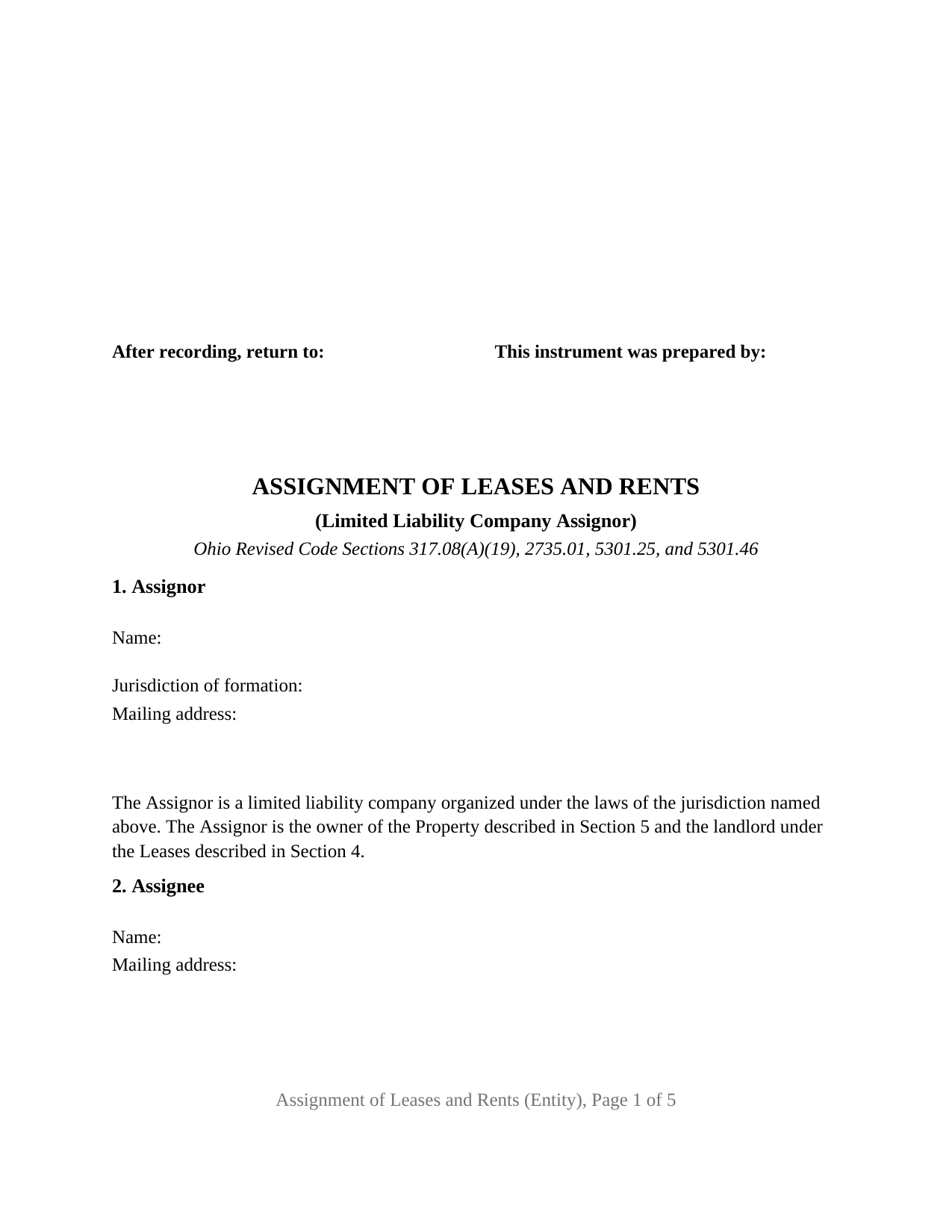
Ross County Assignment of Leases and Rents (Entity) Form
Fill in the blank Assignment of Leases and Rents (Entity) form formatted to comply with all Ohio recording and content requirements.
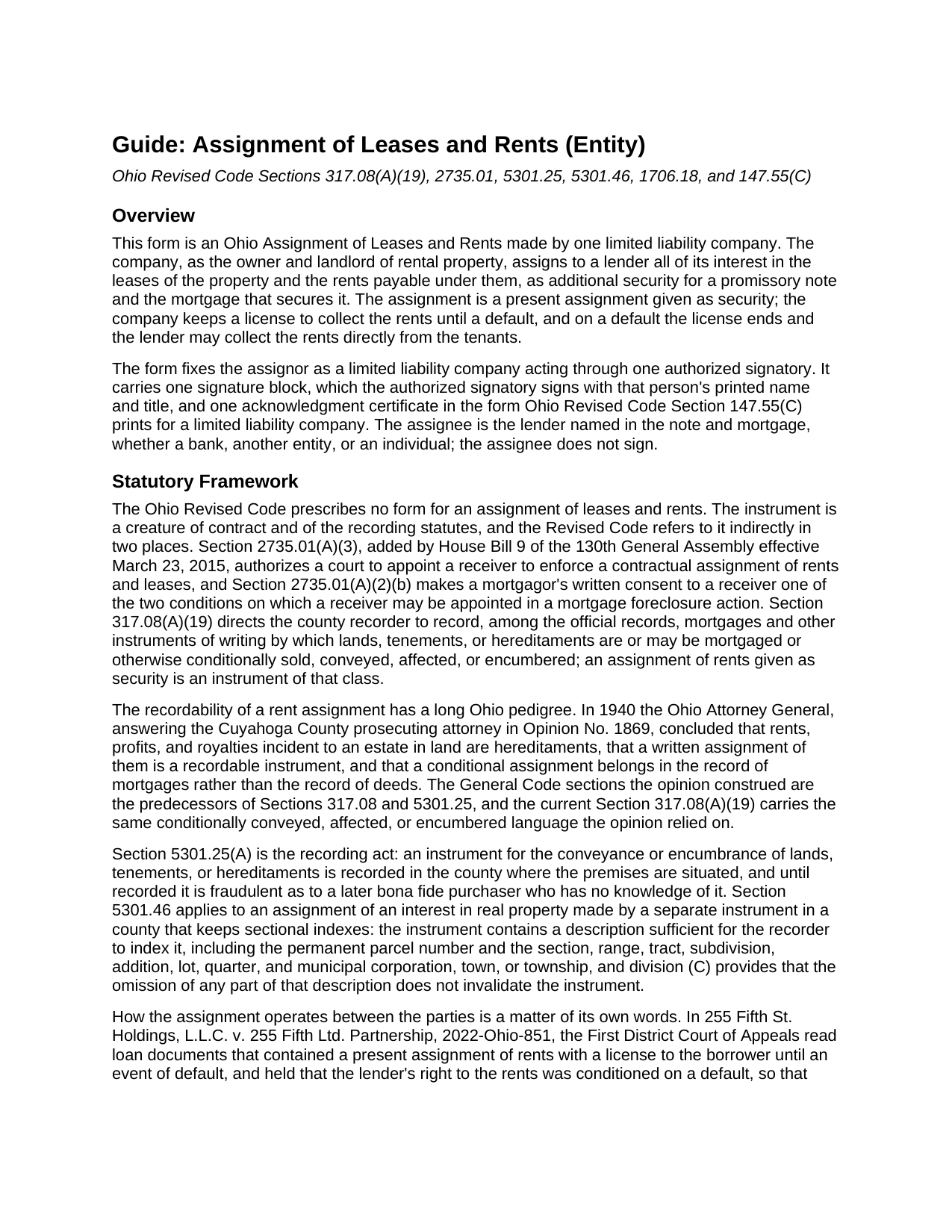
Ross County Assignment of Leases and Rents (Entity) Guide
Line by line guide explaining every blank on the Assignment of Leases and Rents (Entity) form.
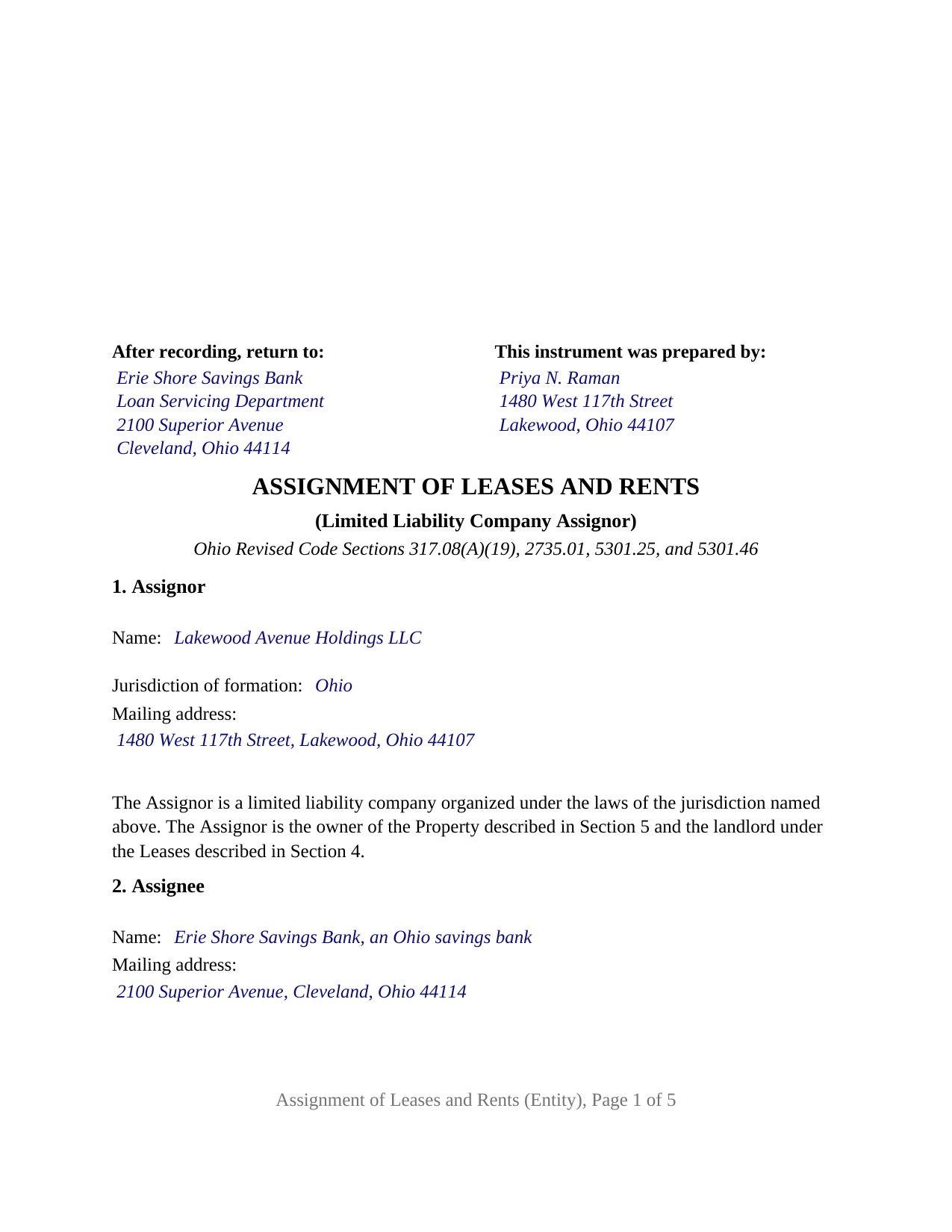
Ross County Completed Example of the Assignment of Leases and Rents (Entity) Document
Example of a properly completed Ohio Assignment of Leases and Rents (Entity) document for reference.
All 3 documents above included • One-time purchase • No recurring fees
Immediate Download • Secure Checkout
Additional Ohio and Ross County documents included at no extra charge:
Where to Record Your Documents
Ross County Recorder
Chillicothe, Ohio 45601
Hours: 8:30am to 4:30pm Monday through Friday
Phone: 740-702-3000
Recording Tips for Ross County:
- Bring your driver's license or state-issued photo ID
- Ensure all signatures are in blue or black ink
- Bring extra funds - fees can vary by document type and page count
- Check margin requirements - usually 1-2 inches at top
- Leave recording info boxes blank - the office fills these
Cities and Jurisdictions in Ross County
Properties in any of these areas use Ross County forms:
- Adelphi
- Bainbridge
- Bourneville
- Chillicothe
- Clarksburg
- Frankfort
- Hallsville
- Kingston
- Londonderry
- Richmond Dale
- South Salem
Hours, fees, requirements, and more for Ross County
How do I get my forms?
Forms are available for immediate download after payment. The Ross County forms will be in your account ready to download to your computer. An account is created for you during checkout if you don't have one. Forms are NOT emailed.
Are these forms guaranteed to be recordable in Ross County?
Yes. Our form blanks are guaranteed to meet or exceed the applicable formatting requirements used for recording in Ross County, including margin requirements, font requirements, and other layout standards. This guarantee applies to formatting, not to the legal sufficiency of information entered by the user or the suitability of a form for a particular transaction.
Can I reuse these forms?
Yes. You can reuse the forms for your personal use. For example, if you have multiple properties in Ross County you only need to order once.
What do I need to use these forms?
The forms are PDFs that you fill out on your computer. The free Adobe Acrobat Reader is recommended, and most PDF apps also work. You do NOT enter your property information online - you download the blank forms and complete them privately on your own computer.
Are there any recurring fees?
No. This is a one-time purchase. Nothing to cancel, no memberships, no recurring fees.
How much does it cost to record in Ross County?
Recording fees in Ross County vary. Contact the recorder's office at 740-702-3000 for current fees.
Questions answered? Let's get started!
When the landlord is a limited liability company, the Ohio Assignment of Leases and Rents is signed by a person who is not the borrower. This form is set up for that configuration: one Ohio or foreign limited liability company, as owner and landlord of rental property, pledges its leases and rents to its lender as additional security for a note and mortgage, signing through one authorized signatory. The assignee, the lender named in the note and mortgage, does not sign.
A company signs through a person Chapter 1706 names
Ohio Revised Code Section 1706.18 provides that no person has the power to bind a limited liability company except as the operating agreement, Section 1706.30(A), a statement of authority under Section 1706.19, or other law authorizes. A member's title alone settles nothing; the operating agreement does, or a filed statement of authority, which Section 1706.19(C) makes conclusive in favor of a person who gives value in reliance on it. The form carries that structure on its face: Section 1 names the company and its jurisdiction of formation and prints the fixed sentence that the assignor is a limited liability company, the owner and landlord; Section 8 carries the signatory's representation of authority; and Section 9 places the company's name above a signature line headed ASSIGNOR, by its authorized signatory, with the signatory's printed name, date, and title.
The certificate that names the company and its jurisdiction
The acknowledgment certificate is the short form Section 147.55(C) prints for a limited liability company, not the individual form. Its blanks are the date, the name and title of the member or managing member who acknowledged, the company's name, and its jurisdiction of formation, and its printed close reads on behalf of the limited liability company. A certificate taken in another state is recognized under Section 147.51(B) when the officer is authorized where the act is performed.
Rents pledged now, collected by the company until a default
Section 6 assigns, transfers, and sets over to the lender all of the company's interest in the leases and the rents, as a present assignment given as security and not merely the grant of a lien. Section 7 grants the company a revocable license to collect the rents until an Event of Default under the note, the mortgage, or the assignment; on a default the license ends, and each tenant is directed to pay the lender on written notice. Section 8 records the company's consent to a receiver under Section 2735.01(A)(3), the division added in 2015 for this instrument, and makes it the mortgagor's written consent Section 2735.01(A)(2)(b) names for a foreclosure receivership.
What the recorder sees and what the auditor does not
Section 5 describes the property by county, legal description, permanent parcel number, municipal corporation or township, street address, and the recording reference of the company's deed, the parcel and municipality being the Section 5301.46(B) items for a sectional-index county. The instrument conveys no title, so it never passes through the county auditor's transfer office. It goes straight to the county recorder, who records it under Section 317.08(A)(19) with mortgages and the other instruments by which land is conditionally conveyed, affected, or encumbered, the classification the Ohio Attorney General gave conditional rent assignments in 1940.
One company assignor, one signature block, one certificate
The form fixes the assignor as a limited liability company acting through one authorized signatory. It prints no dower release and no spouse signature line, because dower under Section 2103.02 is a spouse's interest in the other spouse's real property, and the assignor here is a company. A single-asset company that holds an apartment building financed by a bank, and a family company that holds a rental house financed by a private lender, present the pattern this form recites. The form is not set up as an instrument for a corporation, a partnership, a trustee, or an attorney-in-fact, each of which takes a different recital and Section 147.55 certificate, or for an individual owner, or for two or more assignors on one instrument.
The package contains the fillable Ohio Assignment of Leases and Rents form for a limited liability company assignor, a completed example showing a Cuyahoga County company assigning the leases and rents of a four-unit building to its bank, and a guide covering each section, the Chapter 1706 signing rules, the acknowledgment, and recording. The guide and this description explain the form and the statutes in general terms and are not legal advice.
Important: Your property must be located in Ross County to use these forms. Documents should be recorded at the county recording office listed above.
This Assignment of Leases and Rents (Entity) meets all recording requirements specific to Ross County.
Our Promise
The documents you receive here are guaranteed to meet or exceed the applicable Ross County recording format requirements. If there is a rejection caused by our formatting, we will correct the issue or refund your payment. This guarantee applies to document formatting only and does not extend to information entered by the user, the selection of the form, or the legal effect of the completed document.
Save Time and Money
Get your Ross County Assignment of Leases and Rents (Entity) form done right the first time with Deeds.com Uniform Conveyancing Blanks. At Deeds.com, we understand that your time and money are valuable resources, and we don't want you to face a penalty fee or rejection imposed by a county recorder for submitting nonstandard documents. We constantly review and update our forms to meet rapidly changing state and county recording requirements for roughly 3,500 counties and local jurisdictions.
4.8 out of 5 - ( 4,838 Reviews )
Jose R. 5 out of 5 stars
User friendly. Smooth transaction. I saved a lot of time
Thank you for taking the time to leave your feedback Jose, we really appreciate it. Have a fantastic day!
James R. 5 out of 5 stars
Super website. Easy to use and stuff is well organized.
We appreciate your business and value your feedback. Thank you. Have a wonderful day!
John B. 4 out of 5 stars
I purchased the Notice of Completion form because the City of Chula Vista did not have a "fillable" version of this form on their website. The Deeds.com version of this form is somewhat different than the City's version (8 numbered paragraphs vs. 11 numbered paragraphs.) However, it contains the same information in a different format. This form provided more blank space to fill in important items- like a long ownership name- than the version on the City's website. The recorder's office was satisfied with this form as I hand-delivered it to the Recorder's Office and they approved it for recording. Overall, I found this form easy to use and found the extra blank space for writing on the form helpful. My one comment for possible improvement is: it would be even more helpful (particularly for attorney users) to have strike-out capability. I would have liked having the ability to strike-out inapplicable portions of long awkward sentences. Still, I would use this form again.
Your feedback means a lot to us. Thank you.
Barbara S. 5 out of 5 stars
I had an issue due to the fact that I had many beneficiaries. I was and still am not sure how to handle this. We do have Adobe Pro and can modify the form, if needed. But I would like to talk to your organization for more information.
While we are unable to assist you specifically with completing the document we can note that this is addressed in the guide. Information that does not fit in the available space should be included in an exhibit page.
Rita M. 5 out of 5 stars
Forget what I just wrote! I found it. Thank You! This is a very convenient service.
That's great to hear Rita, thanks for following up.
Mary C. 5 out of 5 stars
The Deeds.com site made is relatively simple to download a Beneficiary Deed form specific to St Louis, which is great, because neither the city or state provide this. Thanks!
Thank you for your feedback. We really appreciate it. Have a great day!
Gina I. 5 out of 5 stars
Found the forms I needed with no problem and easy to fill out thanks to the guide that is with it. Big help!
Thank you for your feedback. We really appreciate it. Have a great day!
M. TIMOTHY P. 5 out of 5 stars
EXCELLENT service! Deed came back within minutes!
Thank you for your feedback. We really appreciate it. Have a great day!
Stephenie A. 5 out of 5 stars
No review provided.
Thank you!
Helen M. 1 out of 5 stars
The forms are very confusing when there is so much to download! Trying to keep track and make sure you have everything needed is terrible! I think I have everything but I was under the impression I would be filling it out online and with instructions... I am very disappointed to say the least!
Sorry to hear of your disappointment Helen. We have gone ahead and canceled your order and payment. We do hope that you are able to find something more suitable to your needs elsewhere. Have a wonderful day.
Karla L. 5 out of 5 stars
Perfect! Recorded my completed deed today with no problems.
Thank you!
Maricarol F. 5 out of 5 stars
Found the site very easy to use. My fault I did not answer back right away. What was found is almost what I needed... Thanks.
Thank you for the feedback Maricarol, we really appreciate it.
Kenneth H. 5 out of 5 stars
Easy download, informative examples. Very good experience.
We appreciate your business and value your feedback. Thank you. Have a wonderful day!
Kristine S. 5 out of 5 stars
Thank you! You made the process of filing something unusual very easy and efficiently. I will definitely recommend you and be back for my future recording needs.
We appreciate your business and value your feedback. Thank you. Have a wonderful day!
Miguel R. 5 out of 5 stars
Easy to create an account! Awesome!
Thank you!