Lawrence County Full Release of Memorandum and Notice of Agreement Form
Last validated October 9, 2026 by our Forms Development TeamFormatted for recording in Lawrence County, for property anywhere in the county: rural and unincorporated areas as well as Chesapeake, Ironton, Kitts Hill, Pedro, Proctorville, Rock Camp, Scottown, South Point and 2 more.
- 3 documents included
- Immediate PDF download
- Formatting guarantee
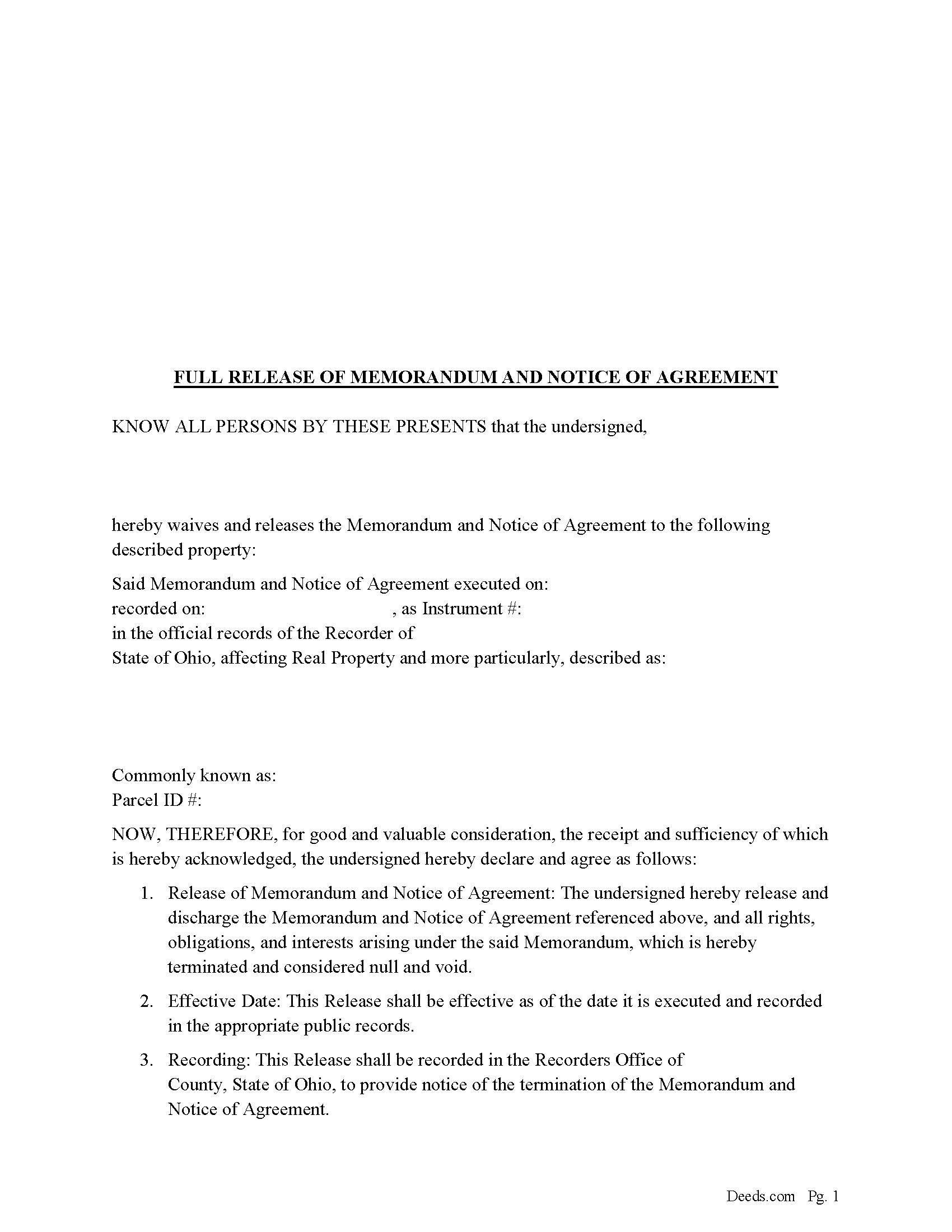
Lawrence County Full Release of Memorandum and Notice of Agreement Form
Fill in the blank Full Release of Memorandum and Notice of Agreement form formatted to comply with all Ohio recording and content requirements.
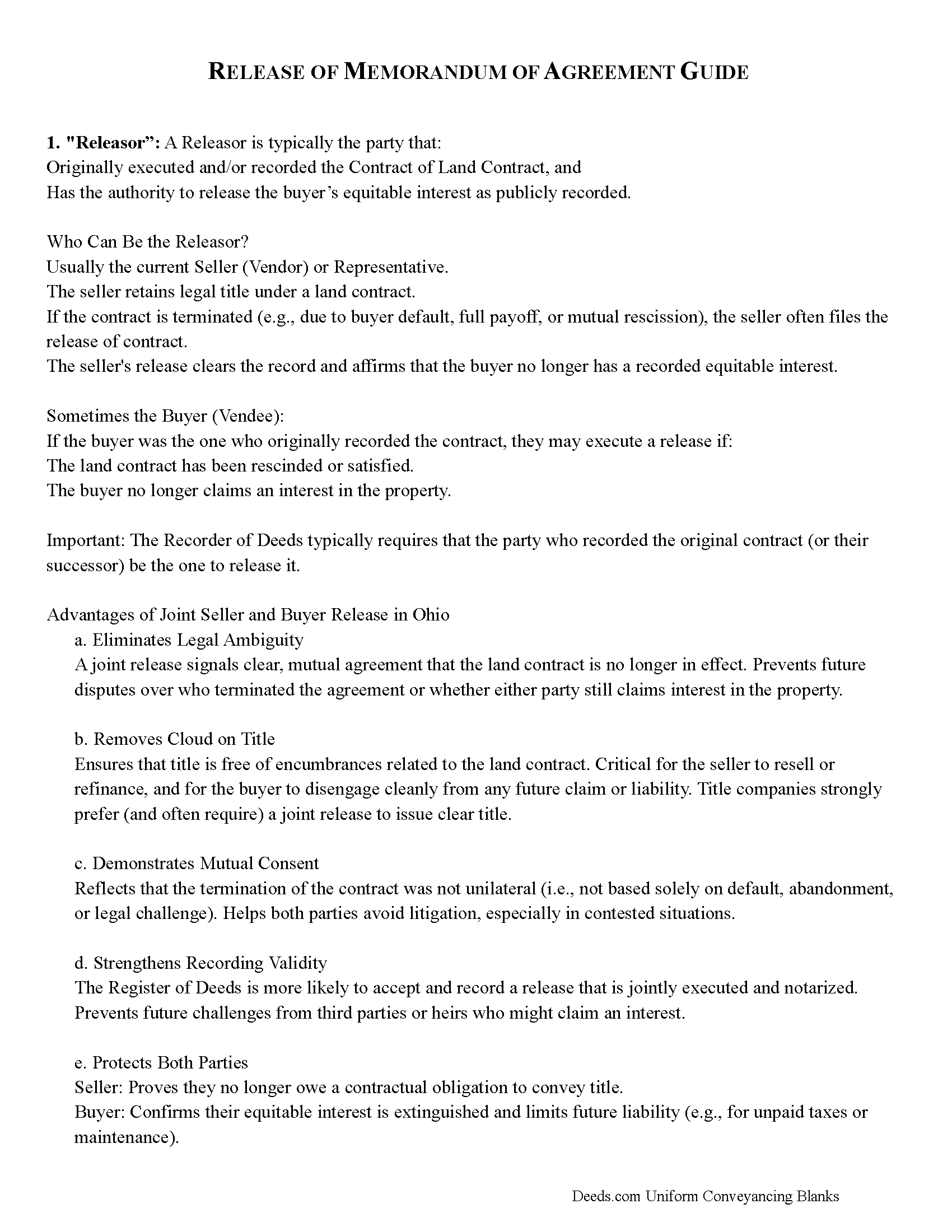
Lawrence County Full Release of Memorandum and Notice of Agreement Guide
Line by line guide explaining every blank on the Full Release of Memorandum and Notice of Agreement form.
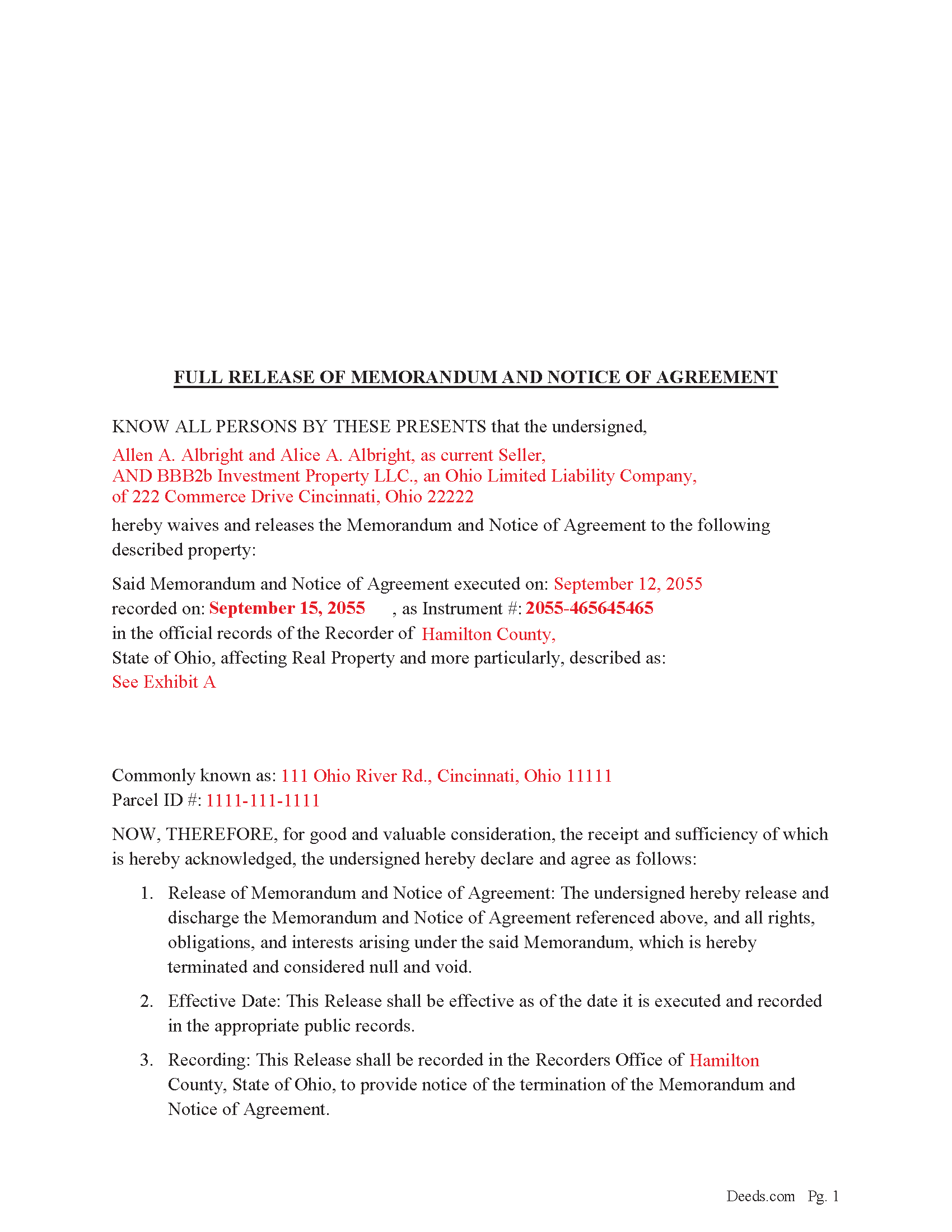
Lawrence County Completed Example of the Full Release of Memorandum and Notice of Agreement Document
Example of a properly completed Ohio Full Release of Memorandum and Notice of Agreement document for reference.
All 3 documents above included • One-time purchase • No recurring fees
Immediate Download • Secure Checkout
Additional Ohio and Lawrence County documents included at no extra charge:
Where to Record Your Documents
Lawrence County Recorder
Ironton, Ohio 45638
Hours: 8:00 a.m. - 4:00 p.m. Monday - Friday
Phone: (740) 533-4314
Recording Tips for Lawrence County:
- Bring your driver's license or state-issued photo ID
- Ensure all signatures are in blue or black ink
- Ask if they accept credit cards - many offices are cash/check only
- Check that your notary's commission hasn't expired
- Documents must be on 8.5 x 11 inch white paper
Cities and Jurisdictions in Lawrence County
Properties in any of these areas use Lawrence County forms:
- Chesapeake
- Ironton
- Kitts Hill
- Pedro
- Proctorville
- Rock Camp
- Scottown
- South Point
- Waterloo
- Willow Wood
Hours, fees, requirements, and more for Lawrence County
How do I get my forms?
Forms are available for immediate download after payment. The Lawrence County forms will be in your account ready to download to your computer. An account is created for you during checkout if you don't have one. Forms are NOT emailed.
Are these forms guaranteed to be recordable in Lawrence County?
Yes. Our form blanks are guaranteed to meet or exceed the applicable formatting requirements used for recording in Lawrence County, including margin requirements, font requirements, and other layout standards. This guarantee applies to formatting, not to the legal sufficiency of information entered by the user or the suitability of a form for a particular transaction.
Can I reuse these forms?
Yes. You can reuse the forms for your personal use. For example, if you have multiple properties in Lawrence County you only need to order once.
What do I need to use these forms?
The forms are PDFs that you fill out on your computer. The free Adobe Acrobat Reader is recommended, and most PDF apps also work. You do NOT enter your property information online - you download the blank forms and complete them privately on your own computer.
Are there any recurring fees?
No. This is a one-time purchase. Nothing to cancel, no memberships, no recurring fees.
How much does it cost to record in Lawrence County?
Recording fees in Lawrence County vary. Contact the recorder's office at (740) 533-4314 for current fees.
Questions answered? Let's get started!
In Ohio, a Full Release of Memorandum and Notice of Agreement (typically referring to a land contract or real estate contract) should be recorded when the underlying agreement is terminated, satisfied, or no longer enforceable. This ensures clear title and protects future buyers, lenders, and owners.
________________________________________
When to Record a Full Release of Memorandum
You should record the release when:
1. The Land Contract or Agreement Has Been Fully Performed
• The buyer has completed all installment payments under a land contract.
• Title has been (or will be) transferred by deed.
• The contract is no longer needed as evidence of equitable interest.
2. The Contract Has Been Terminated or Canceled
• If either party lawfully terminates the agreement (e.g., buyer default, mutual rescission).
• This includes forfeiture proceedings or cancellation by mutual release.
3. To Clear Cloud on Title
• A recorded Memorandum and Notice of Agreement creates a public notice of a party’s interest.
• If that interest no longer exists, failing to release it can cloud title and prevent sale or refinancing.
________________________________________
Why Recording Is Important
Reason Explanation
Clear chain of title Prevents confusion over current ownership and interest.
Protects future buyers/lenders Shows the agreement is no longer in effect, reducing risk.
Complies with title company requirements Needed for issuing clear title insurance.
Avoids potential litigation Prevents claims of continuing interest or disputes.
________________________________________
Legal Background
In Ohio, there's no statute that specifically requires a release of a memorandum — but once a memorandum is recorded (under R.C. § 5301.25), it becomes constructive notice of the agreement. If the agreement ends, releasing that memorandum is strongly recommended to:
• Avoid misleading third parties
• Ensure a clean public record
Important: Your property must be located in Lawrence County to use these forms. Documents should be recorded at the county recording office listed above.
This Full Release of Memorandum and Notice of Agreement meets all recording requirements specific to Lawrence County.
Our Promise
The documents you receive here are guaranteed to meet or exceed the applicable Lawrence County recording format requirements. If there is a rejection caused by our formatting, we will correct the issue or refund your payment. This guarantee applies to document formatting only and does not extend to information entered by the user, the selection of the form, or the legal effect of the completed document.
Save Time and Money
Get your Lawrence County Full Release of Memorandum and Notice of Agreement form done right the first time with Deeds.com Uniform Conveyancing Blanks. At Deeds.com, we understand that your time and money are valuable resources, and we don't want you to face a penalty fee or rejection imposed by a county recorder for submitting nonstandard documents. We constantly review and update our forms to meet rapidly changing state and county recording requirements for roughly 3,500 counties and local jurisdictions.
4.8 out of 5 - ( 4,833 Reviews )
GERALD P. 5 out of 5 stars
Product is as advertised. Most beneficial is including detailed instructions and examples. Most other options did not include instructions.
Thank you for your feedback. We really appreciate it. Have a great day!
Nathan M. 5 out of 5 stars
It had the info, but when I would type into the document the items I needed in adobe all that would print out was the info I typed and none of the document information.
Thank you!
Georgiana I. 5 out of 5 stars
The deed itself was easy. I did notice that although the website says that the deed would exempt the house from probate, the deed clearly states that it might not. I hope that "might " is the operative word here.
Thank you for your feedback. We really appreciate it. Have a great day!
samantha b. 5 out of 5 stars
excellent instructions and the examples made completing the forms so very simple. thanks so much.
Thank you Samantha.
Daniel S. 5 out of 5 stars
Easy to access documents.
Thank you for your feedback. We really appreciate it. Have a great day!
Karen J. 5 out of 5 stars
Excellent and easy to download and use. Love the example page and was so easy to fill out and use immediately. Thank you
Thank you for your feedback Karen. We really appreciate it. Enjoy your day!
Priscilla M. 5 out of 5 stars
Instructions are easy to follow which make filling out the forms easy and simple. I would definitely recommend Deeds.com.
Thank you!
Dennis D. 5 out of 5 stars
Heard about this service from a lawyer who said their offic used it quite a bit.
Thank you for your feedback. We really appreciate it. Have a great day!
Timothy B. 5 out of 5 stars
Information was very helpful and straight forward, Thankyou!
Thank you!
Dorothy N. 5 out of 5 stars
The mortgage and note were thorough and very satisfactory for my purposes. The accompanying forms were excellent. I am very pleased with my purchase.
We welcome your positive feedback and are thrilled to have met your expectations. Thank you for choosing our services.
Jo Anne C. 5 out of 5 stars
Excellent documentation. Thank you.
Thank you for your feedback. We really appreciate it. Have a great day!
HELEN F. 5 out of 5 stars
Process was easy... paperwork was on point... process took less then one day...
We appreciate your business and value your feedback. Thank you. Have a wonderful day!
Debra M. 5 out of 5 stars
Since the recorder's office is closed, due to Covid, this worked well to submit my Quit Claim Deed. I was a bit confused with the direction and download. But, I think I got her done! We'll see if I get recorded and confirmation is received. I may be back
Thank you for your feedback. We really appreciate it. Have a great day!
Jeffrey M. 5 out of 5 stars
Great service. It had all the forms I needed.
Thank you!
Lori G. 5 out of 5 stars
I needed to add my husband to my deed. an attorney would charge me $275.00. I decided to file myself. This makes it easy. Not done w/the process yet. But so far so good! :)
Thank you for your feedback. We really appreciate it. Have a great day!