Carroll County Corrective Affidavit Form
Last validated September 24, 2026 by our Forms Development TeamFormatted for recording in Carroll County, for property anywhere in the county or independent city: rural and unincorporated areas as well as Cana, Dugspur, Fancy Gap, Hillsville, Lambsburg, Laurel Fork, Woodlawn.
- 3 documents included
- Immediate PDF download
- Formatting guarantee
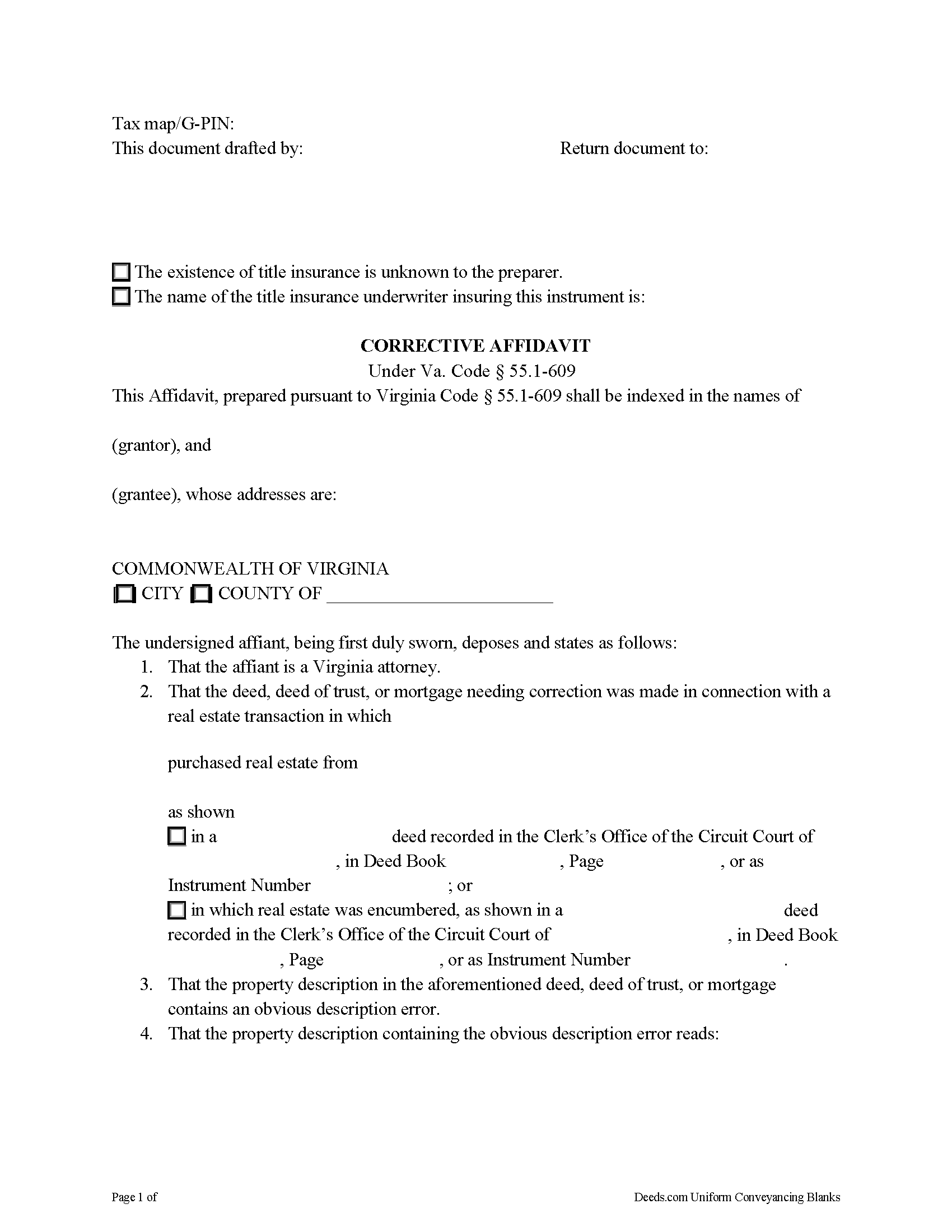
Carroll County Corrective Affidavit Form
Fill in the blank form formatted to comply with all recording and content requirements.
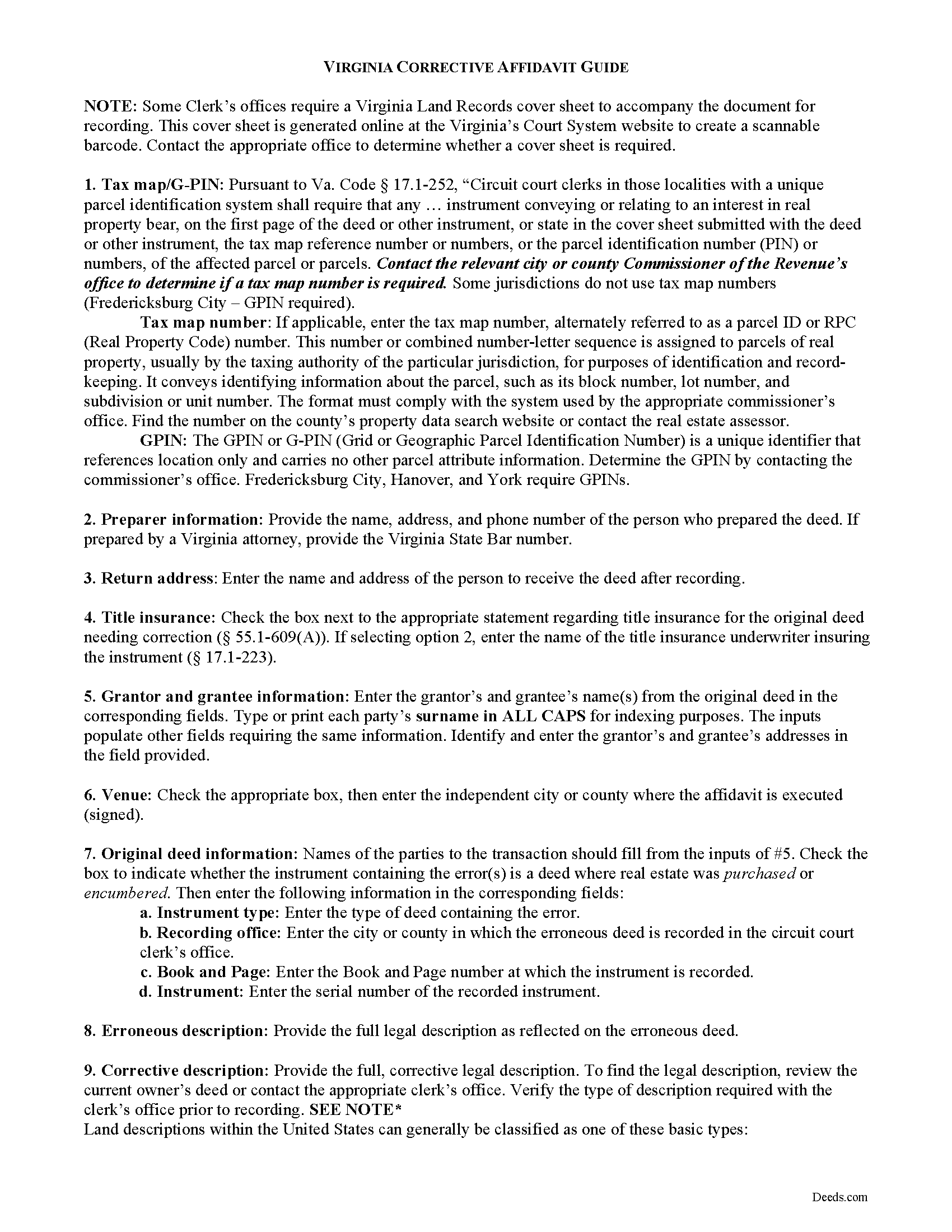
Carroll County Corrective Affidavit Guide
Line by line guide explaining every blank on the form.
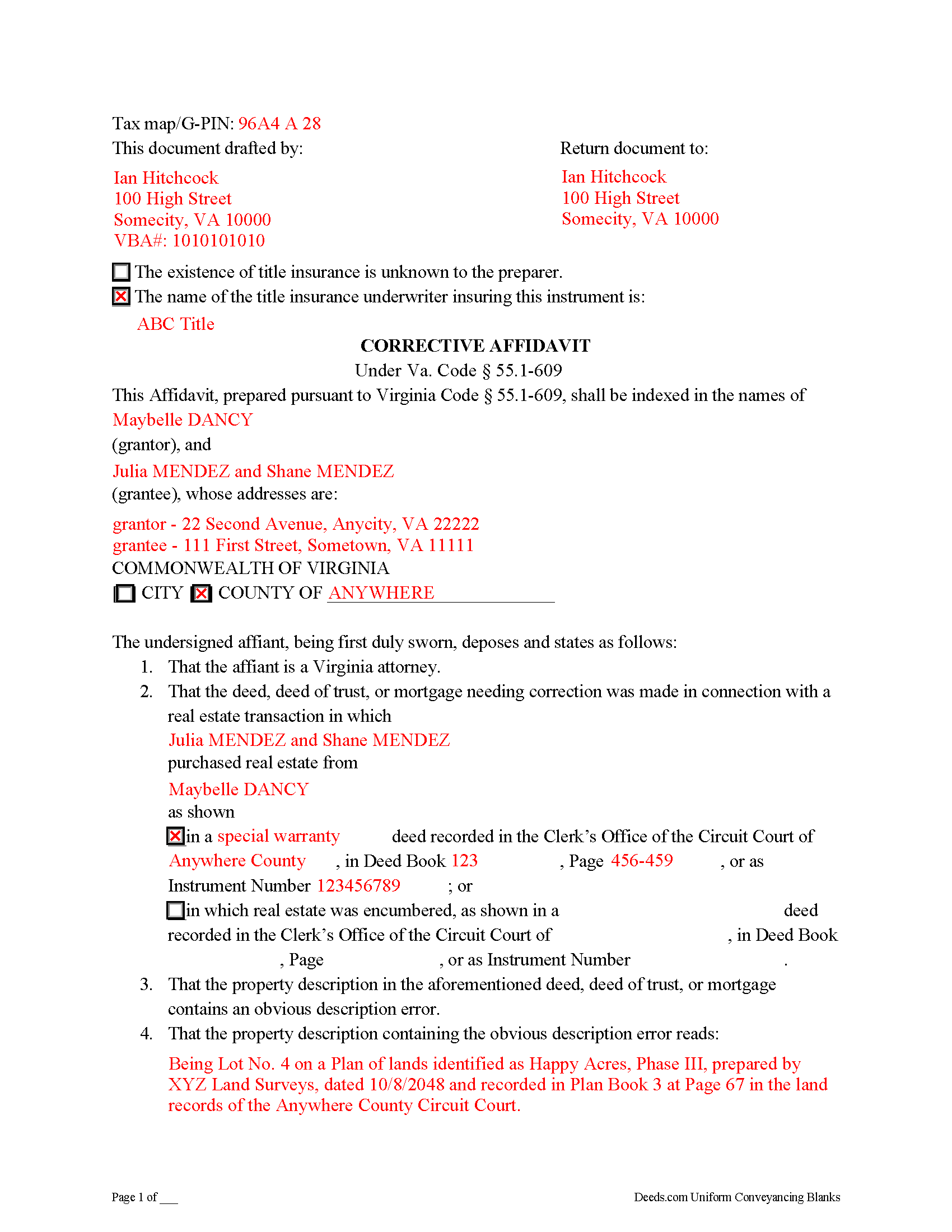
Carroll County Completed Example of the Corrective Affidavit Document
Example of a properly completed form for reference.
All 3 documents above included • One-time purchase • No recurring fees
Immediate Download • Secure Checkout
Additional Virginia and Carroll County documents included at no extra charge:
Where to Record Your Documents
Circuit Court Clerk
Hillsville, Virginia 24343-0218
Hours: Monday - Friday 8:00 am - 5:00 pm
Phone: (276) 730-3070
Recording Tips for Carroll County:
- Bring your driver's license or state-issued photo ID
- Ensure all signatures are in blue or black ink
- Check margin requirements - usually 1-2 inches at top
- Leave recording info boxes blank - the office fills these
- Make copies of your documents before recording - keep originals safe
Cities and Jurisdictions in Carroll County
Properties in any of these areas use Carroll County forms:
- Cana
- Dugspur
- Fancy Gap
- Hillsville
- Lambsburg
- Laurel Fork
- Woodlawn
Hours, fees, requirements, and more for Carroll County
How do I get my forms?
Forms are available for immediate download after payment. The Carroll County forms will be in your account ready to download to your computer. An account is created for you during checkout if you don't have one. Forms are NOT emailed.
Are these forms guaranteed to be recordable in Carroll County?
Yes. Our form blanks are guaranteed to meet or exceed the applicable formatting requirements used for recording in Carroll County, including margin requirements, font requirements, and other layout standards. This guarantee applies to formatting, not to the legal sufficiency of information entered by the user or the suitability of a form for a particular transaction.
Can I reuse these forms?
Yes. You can reuse the forms for your personal use. For example, if you have multiple properties in Carroll County you only need to order once.
What do I need to use these forms?
The forms are PDFs that you fill out on your computer. The free Adobe Acrobat Reader is recommended, and most PDF apps also work. You do NOT enter your property information online - you download the blank forms and complete them privately on your own computer.
Are there any recurring fees?
No. This is a one-time purchase. Nothing to cancel, no memberships, no recurring fees.
How much does it cost to record in Carroll County?
Recording fees in Carroll County vary. Contact the recorder's office at (276) 730-3070 for current fees.
Questions answered? Let's get started!
A corrective affidavit under Va. Code Section 55.1-609 is a statutory form for correcting an obvious description error in a recorded deed, deed of trust, or mortgage. Note that the affidavit must be executed by an attorney licensed by the Virginia State Bar.
The statutes classify an "obvious description error" as an error transcribing courses and distances; an error incorporating a recorded plat or deed reference; an error in lot number or designation; or an omitted exhibit supplying the legal description of the subject parcel.
The contents of a statutory corrective affidavit include the original grantor's and grantee's names and the place where the original deed was recorded. It includes both the property description containing the error and the corrected property description. The affidavit is signed by a Virginia attorney and notarized.
Prior to recording the affidavit, the attorney delivers a copy to all parties to the deed, deed of trust, or mortgage containing the error and to the title insurance company, if applicable, and gives notice of intent to record the affidavit. If no objection is received within 30 days of receipt of notice, the attorney may record the affidavit. The affidavit should include a copy of the notice sent to the parties and a statement that no objection was received.
In addition to meeting the requirements set forth at 55.1-609, the affidavit must comply with recording standards for documents in the Commonwealth of Virginia. Record the affidavit in the Circuit Court Clerk's office of the county or independent city where the parcel described within the affidavit is situated.
This is a form for an attorney's use only. Contact a Virginia attorney if you think you need this form, or to address your specific situation.
(Virginia CA Package includes form, guidelines, and completed example)
Important: Your property must be located in Carroll County to use these forms. Documents should be recorded at the county or independent city recording office listed above.
This Corrective Affidavit meets all recording requirements specific to Carroll County.
Our Promise
The documents you receive here are guaranteed to meet or exceed the applicable Carroll County recording format requirements. If there is a rejection caused by our formatting, we will correct the issue or refund your payment. This guarantee applies to document formatting only and does not extend to information entered by the user, the selection of the form, or the legal effect of the completed document.
Save Time and Money
Get your Carroll County Corrective Affidavit form done right the first time with Deeds.com Uniform Conveyancing Blanks. At Deeds.com, we understand that your time and money are valuable resources, and we don't want you to face a penalty fee or rejection imposed by a county recorder for submitting nonstandard documents. We constantly review and update our forms to meet rapidly changing state and county recording requirements for roughly 3,500 counties and local jurisdictions.
4.8 out of 5 - ( 4,845 Reviews )
David T. 5 out of 5 stars
This is a great service and terrific value. The form package provided (blank form, example form & set of instructions) was clear and easy to follow. Being able to complete the forms using the computer to insert the needed information saved countless hours. My completed form was accepted by the Clerk & Recorder office without any issue. Well worth the investment
We appreciate your business and value your feedback. Thank you. Have a wonderful day!
Herman B. 5 out of 5 stars
Special Warranty Deed I can't seem to type all my info in the blank spaces. It won't allow me to type any more. Maybe you should consider either allowing typists to type more (leaving more space) or allowing more room to type more.
Thank you!
Debra W. 5 out of 5 stars
I found this site a must. It provided all the forms I needed to file a Quit Claim Deed. I filed what use to be called a Quick Claim Deed 30 years ago. You only had to file the one form. Today it is called a Quit Claim Deed. The pack provided forms that I had no idea had to be filed with the Quit Claim Deed. I would not have known this otherwise if the option hadn't presented itself. Thank you!
Thanks for taking the time to leave your feedback Debra, we really appreciate it.
WILLIAM P. 5 out of 5 stars
The forms were clear, concise and easy to understand. thank you
Happy we could assist. Thank you for sharing your experience.
Ryan B. 5 out of 5 stars
This was a very quick and convenient way to complete one of the tasks for my divorce that I imagined would be extremely difficult. Thank you deeds.com for making a difficult situation bearable.
We appreciate your business and value your feedback. Thank you. Have a wonderful day!
Brenda M. 5 out of 5 stars
I was glad that I paid to get a copy of the gift deed it help me out a lot and the copy of the example how to fill everything out was great
Thank you for your feedback. We really appreciate it. Have a great day!
Frazer W. 5 out of 5 stars
The great part about Deeds.com is that the staff works with filers to get the job done.
Thank you, Frazer! We appreciate your kind words and are glad our team could help get the job done.
Thomas W. 5 out of 5 stars
easy to use, no problems except in beneficiary box. Need to make the box bigger because I have 4 beneficiaries to list. how do I enlarge the box.
Thanks for reaching out. All available space on the document is being used. As is noted in the guide, if you have information that does not fit in the available space the included exhibit page should be used.
Nancy A. 5 out of 5 stars
This is an excellent resource. I was surprised because the price is so low I thought the products might be inferior. Not only were were the requested documents high quality, additional unrequested documents were added to my order that I didn't realize I would need until I read them. I especially appreciate that all the documents were specific to my county. I highly recommend using deeds.com.
Your satisfaction with our services is of utmost importance to us. Thank you for letting us know how we did!
Timothy P. 5 out of 5 stars
Straightforward, easy to navigate, saves time and gas = a real value for the price!
Thank you for your feedback. We really appreciate it. Have a great day!
Lloyd T. 5 out of 5 stars
Example deed given did not apply to married couples as joint owners with both being grantors. The example and directions also did not show how to write more than one grantee as equal grantees. Both would have been helpful when husband and wife are granting their property to their children equally. Also when attaching the exhibit A with the property description the example did not say "see exhibit A"in the property description area, so I didn't write that. Luckily the recorder of deeds allowed me to write it in. I think directions and examples for multiple scenarios would be helpful.
Thank you for your feedback. We really appreciate it. Have a great day!
Dorothy N. 5 out of 5 stars
The mortgage and note were thorough and very satisfactory for my purposes. The accompanying forms were excellent. I am very pleased with my purchase.
We welcome your positive feedback and are thrilled to have met your expectations. Thank you for choosing our services.
Delba O. 5 out of 5 stars
This was the easiest process ever. Thank you for making this so easy. No hassle, just upload your docs, pay the invoice and done. It didn't even take 2 business days to get my deed recorded. If I ever need to record anything I will definitely use your services again.
We appreciate your business and value your feedback. Thank you. Have a wonderful day!
Lisa C. 5 out of 5 stars
Great. Thank you. Received information quickly. Helped out a lot.
Thank you!
Ralph O. 5 out of 5 stars
The experience has been excellent. The site gave me exactly what I was looking for. The documentation we easy to understand.
We are grateful for your feedback and looking forward to serving you again. Thank you!