Graham County Revocation of Beneficiary Deed (Last Surviving Original Owner) Form
Last validated November 2, 2026 by our Forms Development TeamFormatted for recording in Graham County, for property anywhere in the county: rural and unincorporated areas as well as Bylas, Central, Eden, Fort Thomas, Pima, Safford, Solomon, Thatcher.
- 3 documents included
- Immediate PDF download
- Formatting guarantee
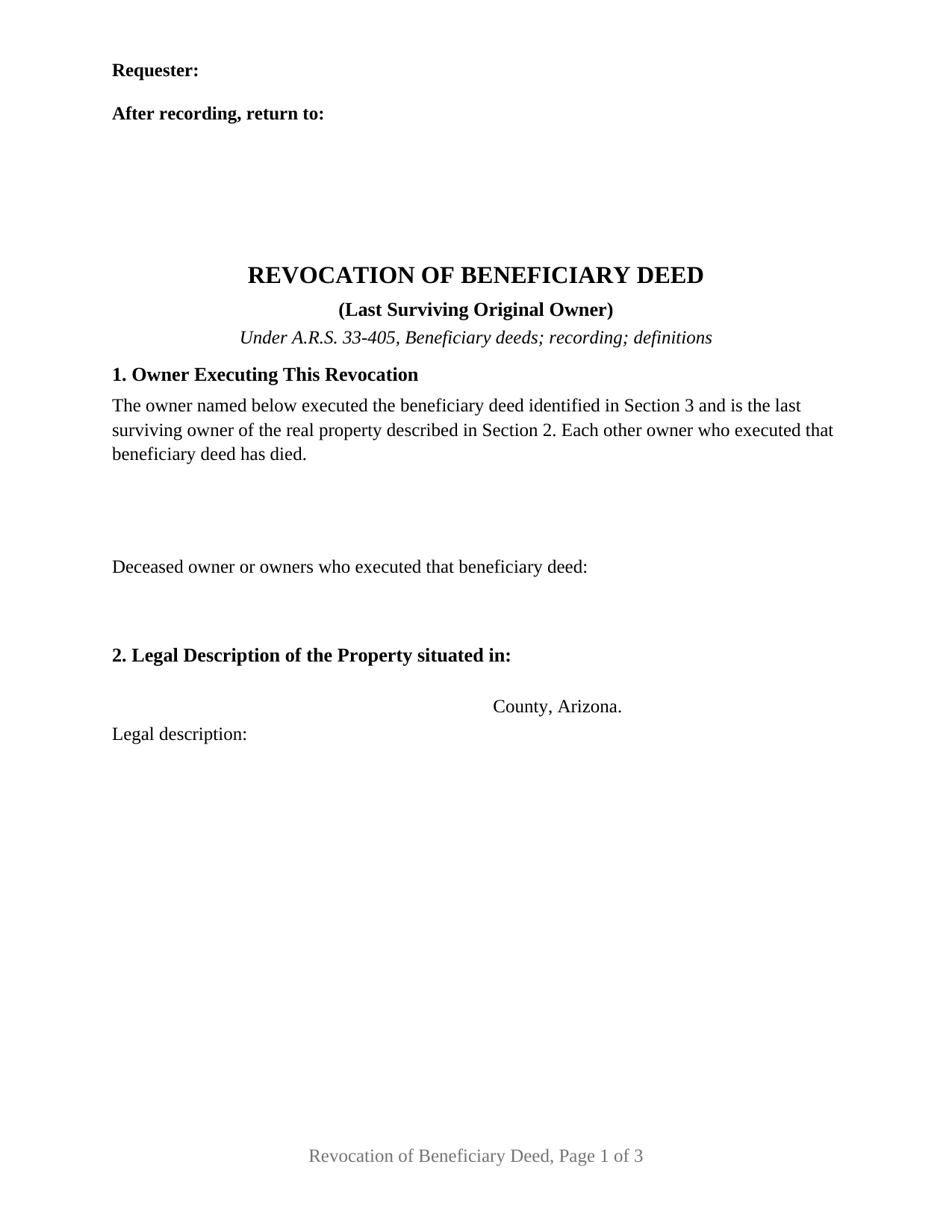
Graham County Revocation of Beneficiary Deed (Last Surviving Original Owner) Form
Fill in the blank Revocation of Beneficiary Deed (Last Surviving Original Owner) form formatted to comply with all Arizona recording and content requirements.

Graham County Revocation of Beneficiary Deed (Last Surviving Original Owner) Guide
Line by line guide explaining every blank on the Revocation of Beneficiary Deed (Last Surviving Original Owner) form.

Graham County Completed Example of the Revocation of Beneficiary Deed (Last Surviving Original Owner) Document
Example of a properly completed Arizona Revocation of Beneficiary Deed (Last Surviving Original Owner) document for reference.
All 3 documents above included • One-time purchase • No recurring fees
Immediate Download • Secure Checkout
Additional Arizona and Graham County documents included at no extra charge:
Where to Record Your Documents
County Recorder
Safford, Arizona 85546 / 85548
Hours: 7:00 a.m. to 6:00 p.m. Monday through Thursday / e-Recording until 5 on Friday
Phone: 928-428-3560
Recording Tips for Graham County:
- Bring your driver's license or state-issued photo ID
- Ensure all signatures are in blue or black ink
- Check margin requirements - usually 1-2 inches at top
- Leave recording info boxes blank - the office fills these
- Make copies of your documents before recording - keep originals safe
Cities and Jurisdictions in Graham County
Properties in any of these areas use Graham County forms:
- Bylas
- Central
- Eden
- Fort Thomas
- Pima
- Safford
- Solomon
- Thatcher
Hours, fees, requirements, and more for Graham County
How do I get my forms?
Forms are available for immediate download after payment. The Graham County forms will be in your account ready to download to your computer. An account is created for you during checkout if you don't have one. Forms are NOT emailed.
Are these forms guaranteed to be recordable in Graham County?
Yes. Our form blanks are guaranteed to meet or exceed the applicable formatting requirements used for recording in Graham County, including margin requirements, font requirements, and other layout standards. This guarantee applies to formatting, not to the legal sufficiency of information entered by the user or the suitability of a form for a particular transaction.
Can I reuse these forms?
Yes. You can reuse the forms for your personal use. For example, if you have multiple properties in Graham County you only need to order once.
What do I need to use these forms?
The forms are PDFs that you fill out on your computer. The free Adobe Acrobat Reader is recommended, and most PDF apps also work. You do NOT enter your property information online - you download the blank forms and complete them privately on your own computer.
Are there any recurring fees?
No. This is a one-time purchase. Nothing to cancel, no memberships, no recurring fees.
How much does it cost to record in Graham County?
Recording fees in Graham County vary. Contact the recorder's office at 928-428-3560 for current fees.
Questions answered? Let's get started!
Two owners once put their names to a single Arizona beneficiary deed. One of them has since died, and the survivor is now the only person who can reach that designation. This form prepares the revocation for that position: one signer, who joined in executing the recorded deed and who is now the last surviving owner of the land, cancelling the designation with no other signature on the page.
One signer, one certificate, the deceased owner named
The configuration is printed as deed text, not left to a checkbox. Section 1 states that the owner named in it executed the beneficiary deed identified in Section 3 and is the last surviving owner of the property described in Section 2, and that each other owner who executed that deed has died. A second entry takes the name of the deceased owner or owners, so the record shows how ownership came to rest in one living person. Under the recital sit one party block, one signature block headed OWNER, and one acknowledgment certificate. No entry asks the signer to classify co-ownership or marital status: A.R.S. 25-214(C)(1) speaks to acquiring, disposing of, or encumbering community real property, and this instrument does none of the three.
Why the lone survivor's signature carries
Arizona permits a beneficiary deed to be undone at any time, and where several people executed it, any one of them may cancel. The chapter then adds a rule for survivorship title. Where the land is held as joint tenants with right of survivorship, or as community property with right of survivorship, and every owner has not signed the cancelling instrument, A.R.S. 33-405(F) withholds effect unless the last surviving owner is the person who signed. This form is built to that clause: its signer is at once an original signer of the deed and the last owner left. The named beneficiary stays out of it, since A.R.S. 33-405(I) makes a grantee beneficiary's signature, consent, agreement, or notice unnecessary for any purpose while the owner lives.
A recorded paper that points at another one
Two Arizona statutes want the earlier deed pinned down. The statutory revocation form at A.R.S. 33-405(L) reaches it through the recording date, the docket or book and page or the instrument number, and the county whose records hold it. A.R.S. 11-480(D) then provides that an instrument presented for recording which modifies a previously recorded document states the date of recordation and the docket and page of the document being modified. Section 3 gathers those entries, and Section 4 draws them into the revocation sentence, which opens in the language of the statute.
Recorded in a lifetime, or not at all
Effect turns on timing, not on telling anyone. A.R.S. 33-405(F) gives the instrument force only once it has been executed and recorded with the recorder of the county where the property lies, before the death of the owner who signs it, and the form sets that condition in capital letters over the signature line. A will is no substitute: A.R.S. 33-405(J) provides that a beneficiary deed executed, acknowledged and recorded in accordance with the section is not revoked by the provisions of a will. Neither does the record tidy itself, because A.R.S. 33-405(G) treats the last beneficiary deed recorded before the owner's death as the effective one where an owner recorded more than one.
What the last page carries
The certificate is Arizona's own, its operative sentence drawn from A.R.S. 41-265(1), and the state and county lines above it stay open for the place where the notarial act happens, which need not be Arizona: A.R.S. 41-259 gives a qualifying act performed in another state the same effect here. Beneath the caption, the certificate describes the record it is attached to, the four identifying items A.R.S. 41-264(F) sets out. One date deserves a note: on September 12, 2026, an amendment to A.R.S. 41-254 begins requiring a notary journal thumbprint for real property documents, a change reaching the notary's book rather than the face of this instrument.
Searches for this document run under other names, among them revocation of a transfer on death deed and TOD deed cancellation, and the instrument behind each is the one A.R.S. 33-405 authorizes. The package holds the fillable form, a completed example worked through a Maricopa County fact pattern, and a guide walking the sections, the certificate, and Arizona recording mechanics. It describes the form and the cited statutes in general terms and is not legal advice.
Important: Your property must be located in Graham County to use these forms. Documents should be recorded at the county recording office listed above.
This Revocation of Beneficiary Deed (Last Surviving Original Owner) meets all recording requirements specific to Graham County.
Our Promise
The documents you receive here are guaranteed to meet or exceed the applicable Graham County recording format requirements. If there is a rejection caused by our formatting, we will correct the issue or refund your payment. This guarantee applies to document formatting only and does not extend to information entered by the user, the selection of the form, or the legal effect of the completed document.
Save Time and Money
Get your Graham County Revocation of Beneficiary Deed (Last Surviving Original Owner) form done right the first time with Deeds.com Uniform Conveyancing Blanks. At Deeds.com, we understand that your time and money are valuable resources, and we don't want you to face a penalty fee or rejection imposed by a county recorder for submitting nonstandard documents. We constantly review and update our forms to meet rapidly changing state and county recording requirements for roughly 3,500 counties and local jurisdictions.
4.8 out of 5 - ( 4,857 Reviews )
Marsella F. 5 out of 5 stars
Thank you so much!! This is a fantastic tool!! Marsella F.
Thank you for your feedback. We really appreciate it. Have a great day!
Title H. 1 out of 5 stars
THIS SERVICE IS DIFFICULT TO USE AND TROUBLESOME, IN MY PROFESSIOBAL OPINION; a true NUGHTMARE! As a Title / Petroleum Land Professional (Landman), I use a wide variert of online title research tools and services. Mist are EXTREMELY COMPREHENSIVE, and relatively easy to perform one’s research. I am beginning to beliece that there is no search intrrfaxe here; just a long list of instructions full of circular references that simply tuns the researcher around and around to the same pages repeatedly. This service takes users NOWHERE. Good luck to those seeking to waste their time reading a vast set of redundant words and NO INTERFACE FOR CREATING OR EXECUTING AN AXTUAL SEARCH.
Thank you for sharing your feedback with us. We're genuinely sorry to hear about the difficulties you faced while using our service. As a Title / Petroleum Land Professional, your experience is invaluable to us, and we regret that our website did not meet your expectations.
We are committed to making the necessary changes to enhance our platform and provide a better experience for all users, including professionals like yourself.
Pamela C. 4 out of 5 stars
It was easy to download. And your guide was informative as was the completed form for an example. But I wish that I had been able to edit the forms online and then print. My handwritten info is just not as crisp.
Thank you for your feedback. We really appreciate it. Have a great day!
Melody P. 5 out of 5 stars
Great service as always, thanks!
Thank you for your feedback. We really appreciate it. Have a great day!
Aubrey M. 5 out of 5 stars
I am an attorney who was trying to draft some deeds in arizona. The deed templates coupled with the document instructions saved me hours work. At 1st I was skeptical, so spent hours figuring out how to draft the documents, but could have saved so much time If I had just spend the $20 sooner. Would use again is needed a deed format as a basis for my drafting.
Thank you for your feedback. We really appreciate it. Have a great day!
Ginger L. 5 out of 5 stars
Excellent full set of documents with example and guidelines on how to do it ourselves without paying a lawyer. Or, we save legal fees by completing it ourselves and having a lawyer review it. Love that I can save the pdf and fill it out whenever I want. Thank you for having this available!
We appreciate your business and value your feedback. Thank you. Have a wonderful day!
Andrew F. 5 out of 5 stars
The process was terrific. Much better than hiring someone local to process deeds, as deeds.com got back to me right away with corrections before submitting.
Thank you for your feedback. We really appreciate it. Have a great day!
John W. 2 out of 5 stars
You charge too much for a form. Your business model is shortsighted. I would not try to use your service again. You got $20 from me this once, but I would try very hard to not use your service again. Your model does not encourage serial or professional usage.
Thank you for your feedback John. We do wish that you had decided our product was too expensive prior to purchasing and using so that there was no remorse. Have a wonderful day.
Terry K. 1 out of 5 stars
Thought from the reviews and claims, it would be able to do our quit claim deed. Maybe for simple situations it works but ours required more room for the description and parcel numbers. Ended up being a total waste of $40.00. Wouldn't buy again. It is no better than the free forms you can find online.
Hi Terry, thanks for the feedback. Your order was canceled and fully refunded. To clarify for other customers: our quitclaim deed package includes an exhibit/attachment page for legal descriptions and parcel numbers that run long, with instructions on when and how to use it, this is a standard approach for multi-page legal descriptions and is accepted by recorders.
Anne J. 5 out of 5 stars
I could not be happier with the service. Shortly after I uploaded my documents, my package was prepared and invoiced. It was only minutes before the document was recorded with the County I selected and returned to me with their seal for download.
We appreciate your business and value your feedback. Thank you. Have a wonderful day!
Terrill M. 5 out of 5 stars
Great forms and information
We appreciate your business and value your feedback. Thank you. Have a wonderful day!
Daniel C. 2 out of 5 stars
The fill-in pdf produced a messy document and several of the fields too small to accommodate the text. A tailorable MS Word document would have been far better. I would not recommend using this product.
Thank you for taking the time to share your feedback. We’re sorry to hear that the fill-in PDF did not meet your expectations, particularly with regard to formatting and field sizing.
Based on your comments, we will be reviewing the document to see where improvements can be made. Feedback like yours is genuinely helpful in identifying areas where our forms can be clearer and easier to use.
We’ve gone ahead and canceled your order and refunded your payment in full, so there’s no expectation that you use a product you wouldn’t feel comfortable recommending.
Wendy S. 4 out of 5 stars
Good template that met my needs. Much better than another draft template that I found on another site. Would have been helpful if the template had been provided in a Word format instead of PDF so that I could remove the sections that are not applicable.
We appreciate your business and value your feedback. Thank you. Have a wonderful day!
Joseph D. 5 out of 5 stars
Exellent and easy! Thqanks!
Thank you for your feedback. We really appreciate it. Have a great day!
Donna C. 5 out of 5 stars
I was very impressed with the system. Easy to navigate. Took less than 15 minutes to get what I needed.
We appreciate your business and value your feedback. Thank you. Have a wonderful day!