Sonoma County Revocable Transfer on Death Deed (Trust Beneficiary) Form
Last validated October 21, 2026 by our Forms Development TeamFormatted for recording in Sonoma County, for property anywhere in the county: rural and unincorporated areas as well as Annapolis, Bodega, Bodega Bay, Boyes Hot Springs, Camp Meeker, Cazadero, Cloverdale, Cotati and 27 more.
- 3 documents included
- Immediate PDF download
- Formatting guarantee
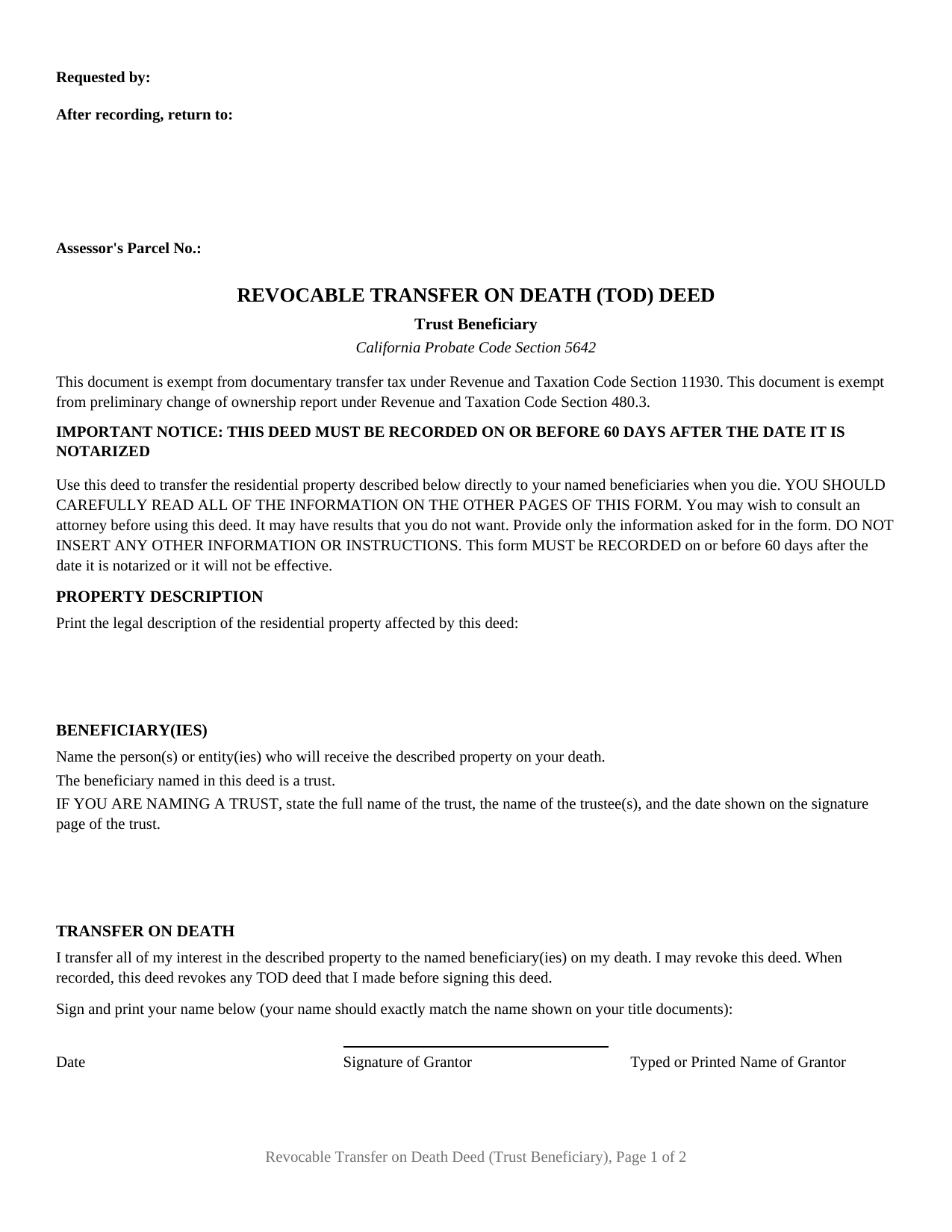
Sonoma County Revocable Transfer on Death Deed (Trust Beneficiary) Form
Fill in the blank Revocable Transfer on Death Deed (Trust Beneficiary) form formatted to comply with all California recording and content requirements.
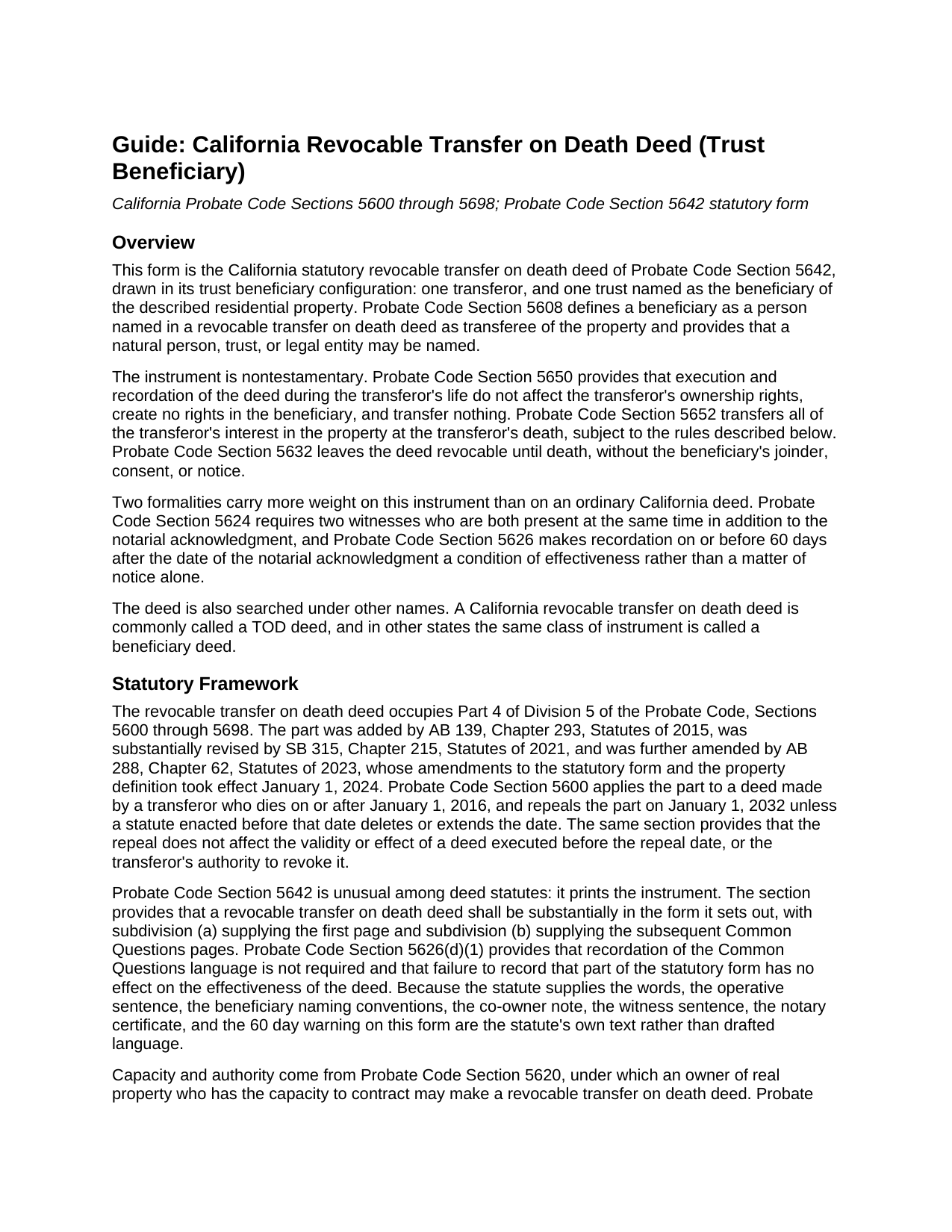
Sonoma County Revocable Transfer on Death Deed (Trust Beneficiary) Guide
Line by line guide explaining every blank on the Revocable Transfer on Death Deed (Trust Beneficiary) form.
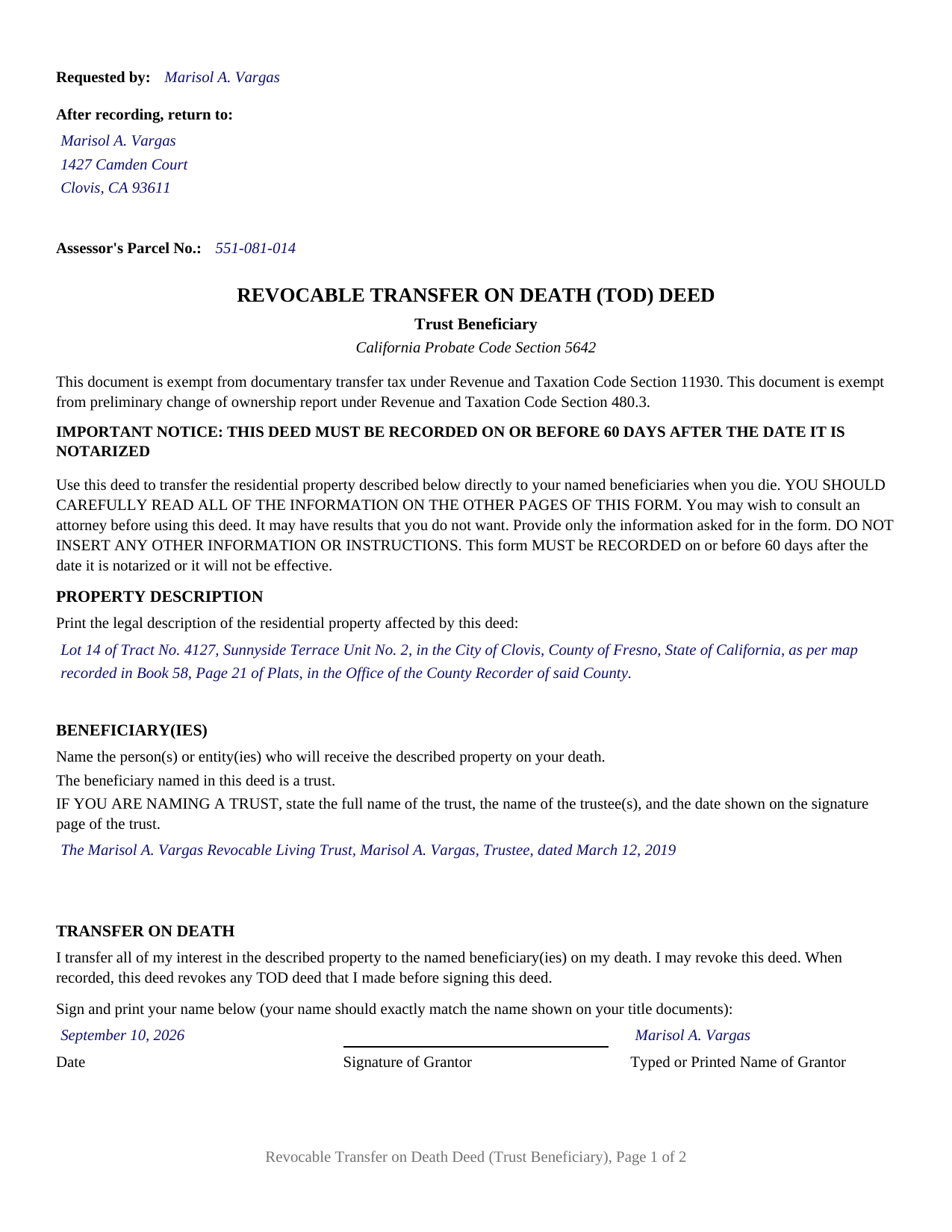
Sonoma County Completed Example of the Revocable Transfer on Death Deed (Trust Beneficiary) Document
Example of a properly completed California Revocable Transfer on Death Deed (Trust Beneficiary) document for reference.
All 3 documents above included • One-time purchase • No recurring fees
Immediate Download • Secure Checkout
Additional California and Sonoma County documents included at no extra charge:
Where to Record Your Documents
Clerk-Recorder-Assessor-Registrar
Santa Rosa, California 95403 / 95402
Hours: 8:00 to 5:00, Wed until 4:00 / Same-day Recording until 4:00
Phone: (707) 565-2651
Recording Tips for Sonoma County:
- Bring your driver's license or state-issued photo ID
- Ensure all signatures are in blue or black ink
- Both spouses typically need to sign if property is jointly owned
- Bring extra funds - fees can vary by document type and page count
- Check margin requirements - usually 1-2 inches at top
Cities and Jurisdictions in Sonoma County
Properties in any of these areas use Sonoma County forms:
- Annapolis
- Bodega
- Bodega Bay
- Boyes Hot Springs
- Camp Meeker
- Cazadero
- Cloverdale
- Cotati
- Duncans Mills
- El Verano
- Eldridge
- Forestville
- Fulton
- Geyserville
- Glen Ellen
- Graton
- Guerneville
- Healdsburg
- Jenner
- Kenwood
- Monte Rio
- Occidental
- Penngrove
- Petaluma
- Rio Nido
- Rohnert Park
- Santa Rosa
- Sebastopol
- Sonoma
- Stewarts Point
- The Sea Ranch
- Valley Ford
- Villa Grande
- Vineburg
- Windsor
Hours, fees, requirements, and more for Sonoma County
How do I get my forms?
Forms are available for immediate download after payment. The Sonoma County forms will be in your account ready to download to your computer. An account is created for you during checkout if you don't have one. Forms are NOT emailed.
Are these forms guaranteed to be recordable in Sonoma County?
Yes. Our form blanks are guaranteed to meet or exceed the applicable formatting requirements used for recording in Sonoma County, including margin requirements, font requirements, and other layout standards. This guarantee applies to formatting, not to the legal sufficiency of information entered by the user or the suitability of a form for a particular transaction.
Can I reuse these forms?
Yes. You can reuse the forms for your personal use. For example, if you have multiple properties in Sonoma County you only need to order once.
What do I need to use these forms?
The forms are PDFs that you fill out on your computer. The free Adobe Acrobat Reader is recommended, and most PDF apps also work. You do NOT enter your property information online - you download the blank forms and complete them privately on your own computer.
Are there any recurring fees?
No. This is a one-time purchase. Nothing to cancel, no memberships, no recurring fees.
How much does it cost to record in Sonoma County?
Recording fees in Sonoma County vary. Contact the recorder's office at (707) 565-2651 for current fees.
Questions answered? Let's get started!
A trust can be the transferee of California real property at death, and this deed names one. The form is the statutory instrument of Probate Code Section 5642 in its trust beneficiary configuration: one transferor signs, and the beneficiary entry holds a trust, identified as the statute identifies one. Probate Code Section 5608 makes that possible: a natural person, trust, or legal entity may be named as transferee. Californians searching for a TOD deed or a beneficiary deed land here.
A trust is identified by three things
The statutory convention for a trust is short and exact: the trust's full name, the trustee or trustees, and the date printed on the trust instrument's signature page. Those three items are what the beneficiary entry takes, and the form's instruction against inserting other information keeps the rest out, a trust address included. The date works as identification, not as a deadline, because a family may have restated a trust more than once. Section 5659 covers a designation that still goes wrong, leaving an ambiguity in designating a beneficiary open to judicial construction where the transferor's intention can be determined.
The deed names the trust; the trust does the dividing
A designation running to a trust moves the sharing question off the deed. Probate Code Section 5652 transfers the interest in accordance with the deed, subject to the right to disclaim, and with one beneficiary there are no equal shares to allocate and no cotenancy to describe. What follows is the trust instrument's work, under its own terms and trustee, none of it on the deed. Two provisions still reach the designation: Section 5652 conditions the interest on surviving the transferor, and Section 5658 lets a court reform a charitable designation.
One signature row, one certificate, one trust
The instrument carries one transferor. Section 5642 prints the signing area as a captioned row of date, signature, and printed name, one acknowledgment certificate follows, and the note under the row confines the deed to the signer's ownership share, a co-owner who wants a beneficiary executing and recording a separate deed. The beneficiary entry is set up for the trust convention alone; a designation naming an individual, or a public or private entity, follows the statute's other conventions. A transferor naming a long standing revocable living trust so the residence joins the rest of the trust estate, and one naming a trust created for a relative, present the designation this deed recites.
Two witnesses, then sixty days
California puts formalities on this instrument that its grant and quitclaim deeds never carry. Section 5624 calls for two witnesses, together at one time, watching the transferor sign or acknowledge that signature, and no notary touches what they sign. Section 5626 makes recordation an effectiveness condition and starts the sixty day window at the notarial acknowledgment, not at signing, hence the capitalized warning on page one. Under Section 5650, while the transferor lives the recorded deed transfers nothing and gives the trust no interest.
What the trust would take
Title arrives as it stands under Section 5652, without covenant or warranty and subject to each limitation of record at the transferor's death, a deed of trust among them. Section 5664 is the harder boundary: where title is held at death in joint tenancy or as community property with right of survivorship, the deed is void and survivorship governs. Section 5610 confines the chapter to one to four unit residential property or a residential unit in a common interest development, excluding agricultural parcels over 40 acres. Unsecured debts follow as well: Section 5672 makes a beneficiary personally liable for them, Section 5674 caps the exposure at the death value of the property net of liens, and Section 5674(a) drops the liability once administration of the transferor's estate begins and the beneficiary meets Section 5677 or Section 5678.
The deed goes to the recorder for the county holding the property, page one left clear at the top for the recording stamp under Government Code Section 27361.6, with Section 27324 placing the title just under that space for indexing. Probate Code Section 5656 spares the filing a documentary transfer tax, a tax declaration, and a preliminary change of ownership report. County fee schedules differ. Included are the blank fillable deed, a completed example built on a Fresno County fact pattern naming one living trust, and the guide that walks each part of the form. Both speak about the form and California law in general terms, and neither is legal advice.
Important: Your property must be located in Sonoma County to use these forms. Documents should be recorded at the county recording office listed above.
This Revocable Transfer on Death Deed (Trust Beneficiary) meets all recording requirements specific to Sonoma County.
Our Promise
The documents you receive here are guaranteed to meet or exceed the applicable Sonoma County recording format requirements. If there is a rejection caused by our formatting, we will correct the issue or refund your payment. This guarantee applies to document formatting only and does not extend to information entered by the user, the selection of the form, or the legal effect of the completed document.
Save Time and Money
Get your Sonoma County Revocable Transfer on Death Deed (Trust Beneficiary) form done right the first time with Deeds.com Uniform Conveyancing Blanks. At Deeds.com, we understand that your time and money are valuable resources, and we don't want you to face a penalty fee or rejection imposed by a county recorder for submitting nonstandard documents. We constantly review and update our forms to meet rapidly changing state and county recording requirements for roughly 3,500 counties and local jurisdictions.
4.8 out of 5 - ( 4,837 Reviews )
Jeffrey B. 5 out of 5 stars
Love Deeds.com! I was a little confused as to how to go about Quitclaiming, but you made it very easy! Thank you SO much!
We appreciate your business and value your feedback. Thank you. Have a wonderful day!
Kenneh C. 1 out of 5 stars
I was looking for something this website does not offer. Very dissapointed.
Sorry to hear that. We do hope you found what you were looking for elsewhere.
LIsa B. 5 out of 5 stars
Deeds.com made this process of electronic document recording so easy! The communication was quick, friendly, helpful and efficient. I am out of state and have administrative items to handle for my father who has Alzheimer's. Deeds.com is a great service. I highly recommend them, and will use them again when the time comes.
Thank you!
Ron M. 5 out of 5 stars
The download of forms, etc. was easy and the guides that were provided were good, but more information would have been nice as to where to find tax map #, parcel #, and district mentioned in Exemptions from Property Transfer Fees (and Declaration of Consideration or Value. In general, I was quite pleased with your product.
We appreciate your business and value your feedback. Thank you. Have a wonderful day!
Viviana Hansen M. 5 out of 5 stars
I was thrilled that I could execute the paperwork for a lady bird deed here in Florida ! Thank you
We are grateful for your feedback and looking forward to serving you again. Thank you!
Joseph S. 5 out of 5 stars
THIS IS MY FIRST EXPERIENCE WITH DEEDS.COM. I DLED THE ESTATE DEED FORM THAT I HOPE WILL GO THROUGH OK WITH THE COUNTY. IT WILL BE SOMETIME UNTIL I HAVE IT FILLED IN AND ALL THE NAMES IN, NORARIZED AND FILED. CAN I RECONTACT YOU FOLKS IF THERE IS A PROBLEM? THANK YOU, JOE SEUBERT
We are motivated by your feedback to continue delivering excellence. Thank you!
Sunny S. 5 out of 5 stars
Easy to use and quick turnaround. I would use again.
Thank you!
Doreen P. 5 out of 5 stars
I have uploaded 2 documents for E recording, I have searched thinking it would prompt me to a business customer service contact info tel no. ? I am concerned as to the fees related to the recording of both instruments? please advise? thank you
Thank you for your feedback. We really appreciate it. Have a great day!
Deborah Anne C. 5 out of 5 stars
Easy, Comprehensive and most importantly Easy!
We appreciate your business and value your feedback. Thank you. Have a wonderful day!
Cleatous S. 3 out of 5 stars
The deed form is hard to fill in. There is no way to fill in the county in the "reviewed by" section. Also, there is no place for the Grantee's address on the form. I had to include it in the fill-in space for the legal description.
Thank you!
Linda D C. 5 out of 5 stars
This was so easy to use. I appreciated the finished sample to guide me and the proper attachments necessary to process my Quit Claim Deed. I am gifting it to my nephew as I am too old to run farm and I live in a different state now. I tried other websites but their info was not up to date or accurate. Thank you so much. 71 Y/O Nana.
Thank you for your feedback. We really appreciate it. Have a great day!
Michael L. 5 out of 5 stars
Perfect timely service! Will use again!
Thank you!
Christine S. 5 out of 5 stars
One stop shopping for your Deed needs. Downloaded the forms and filled them out with ease following the step by step instructions. Saved me hundreds of dollars for not having to hire an attorney to do the exact same thing.
Thank you for your feedback. We really appreciate it. Have a great day!
Cecelia S. 5 out of 5 stars
I was looking for a copy of my deed and was able to complete the request and get copy fast.
Thank you!
john m. 5 out of 5 stars
its a bit confusing for a novice computer user. I would prefer to print out the forms, fill them out on paper, then attach them to an email to discuss the accuracy of the forms with a friend, and then take the completed forms to the County office to be recorded
Thank you for your feedback. We really appreciate it. Have a great day!