Windham County Easement Deed Form
Last validated October 29, 2026 by our Forms Development TeamFormatted for recording in Windham County, for property anywhere in the county: rural and unincorporated areas as well as Abington, Ashford, Ballouville, Brooklyn, Canterbury, Central Village, Chaplin, Danielson and 27 more.
- 4 documents included
- Immediate PDF download
- Formatting guarantee
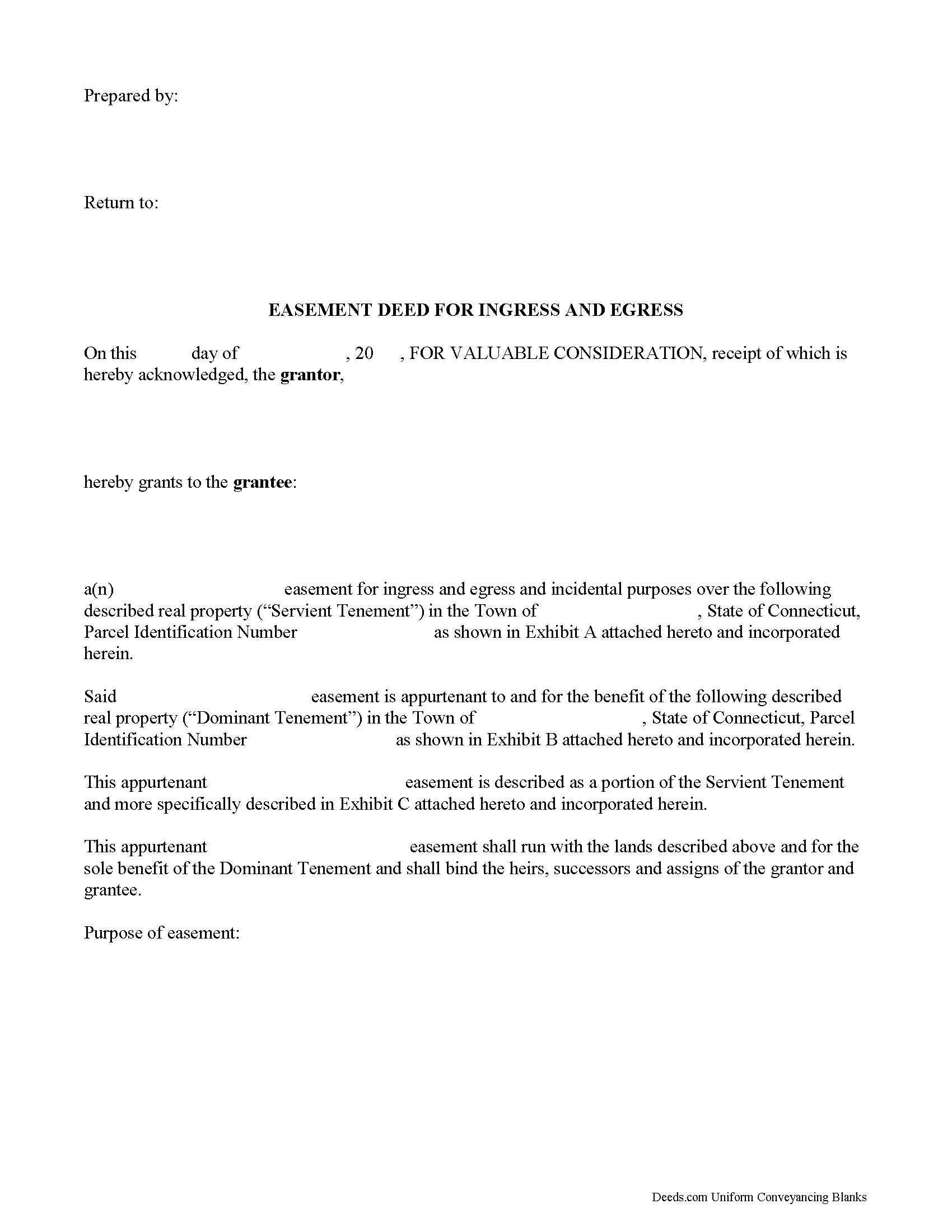
Windham County Easement Deed Form
Fill in the blank form formatted to comply with all recording and content requirements.
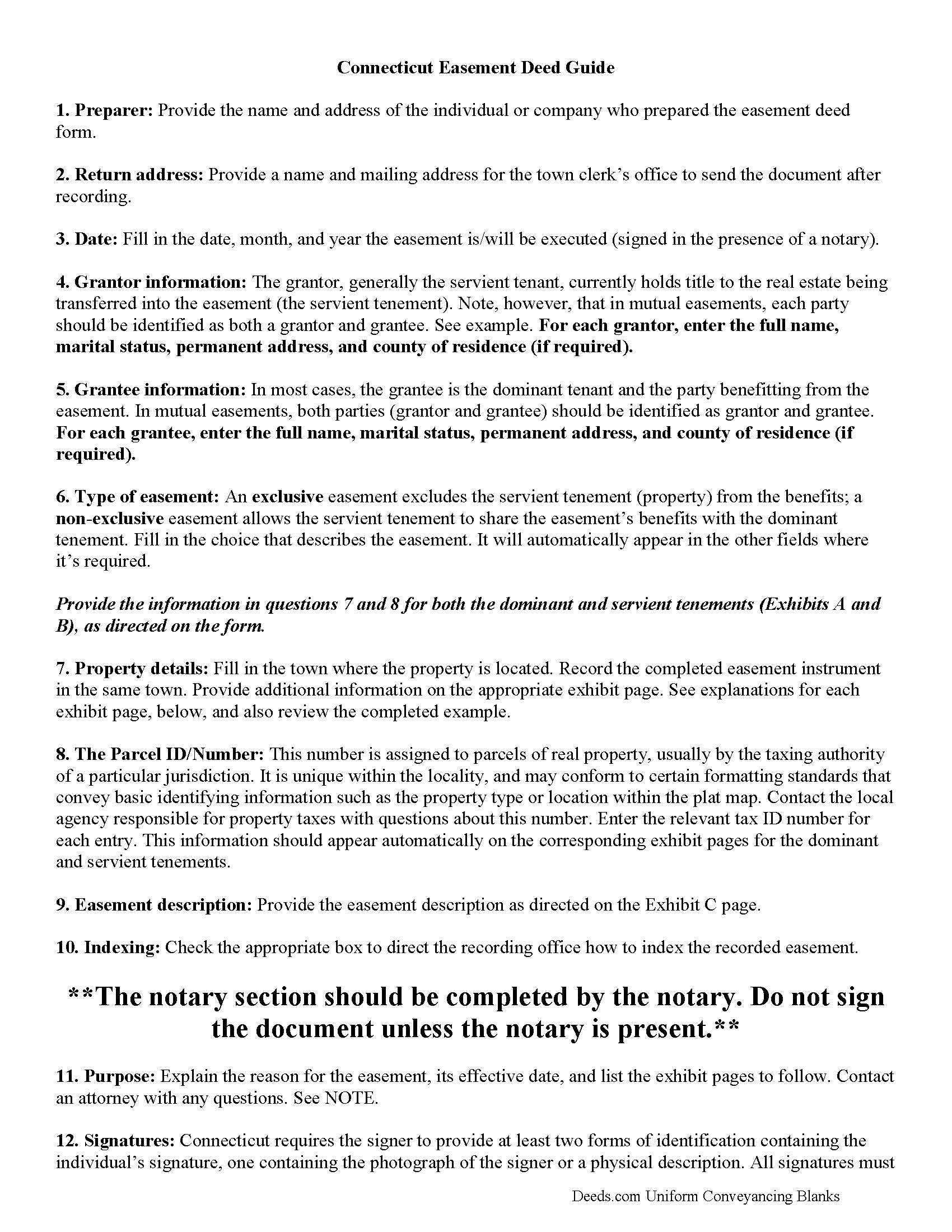
Windham County Easement Deed Guide
Line by line guide explaining every blank on the form.
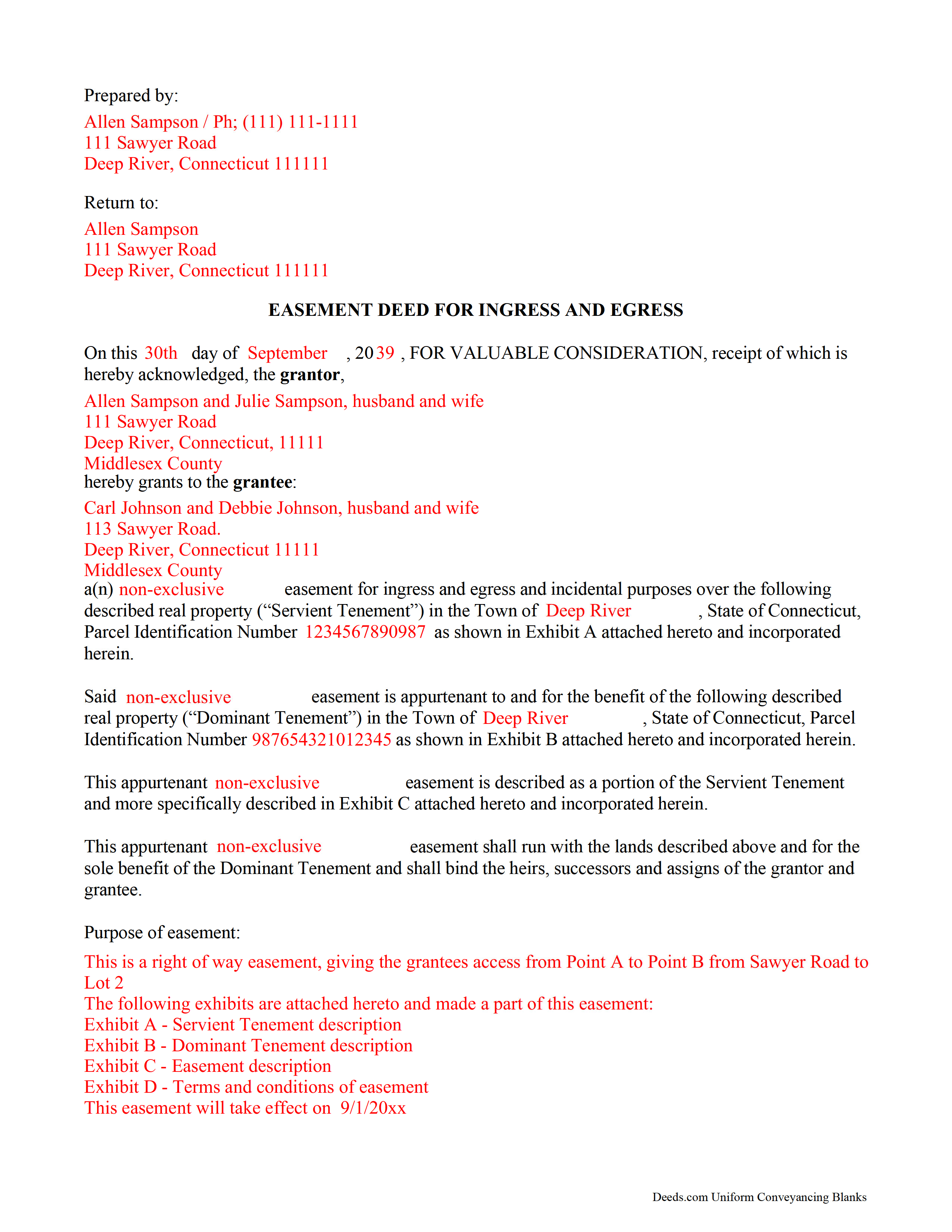
Windham County Completed Example of the Easement Deed Document
Example of a properly completed form for reference.

Windham County Guide to Writing an Easement Description
A Description of the Easement will be required, apply this guide to write an acceptable description of an easement/right of way, which gives access, to and from - point A to point B.
All 4 documents above included • One-time purchase • No recurring fees
Immediate Download • Secure Checkout
Additional Connecticut and Windham County documents included at no extra charge:
Where to Record Your Documents
Ashford Town Clerk
Ashford, Connecticut 06278
Hours: M, T, W, F 8:30 to 3:00; W 7:00 to 9:00; closed Th
Phone: 860-487-4401
Brooklyn Town Clerk
Brooklyn, Connecticut 06234
Hours: Mon-Wed 8:00 to 5:00; Thu 8:00 to 6:00; Fri closed
Phone: (860) 779-3411 Press "4"
Canterbury Town Clerk
Canterbury, Connecticut 06331
Hours: Mon-Wed 9:00 to 4:00; Thu 9:00 to 6:30; Fri 9:00 to 1:30
Phone: (860) 546-9377
Chaplin Town Clerk
Chaplin, Connecticut 06235
Hours: Mon, Wed, Thu 9:00 to 3:00; Tue 1:00 to 7:00; Fri closed
Phone: (860) 455-0073 Ext 312
Eastford Town Clerk
Eastford, Connecticut 06242
Hours: Tue, Wed 10:00 to 12:00 & 1:00 to 4:00; 2nd & 4th Tue until 6:30
Phone: (860) 974-1885
Hampton Town Clerk
Hampton, Connecticut 06247
Hours: Tue 9:00 to 4:00; Thu 10:00 to 7:00
Phone: (860) 455-9132
Killingly Town Clerk
Killingly, Connecticut 06239
Hours: Mon, Wed, Thu 8:00 to 5:00; Tue 8:00 to 6:00; Friday 8:00 to 12:00
Phone: (860) 779-5306, 5307, 5308
Plainfield Town Clerk
Plainfield, Connecticut 06374
Hours: Mon-Fri 8:30 to 4:30
Phone: (860) 230-3009, 3010, 3040
Pomfret Town Clerk
Pomfret Center, Connecticut 06259
Hours: Mon, Tue & Thu 8:30 to 5:00; Wed 8:30 to 6:00
Phone: (860) 315-5730
Putnam Town Clerk
Putnam, Connecticut 06260
Hours: Mon-Wed 8:30 to 12:00 & 1:00 to 4:30; Thu 8:00 to 12:00 & 1:00 to 6:00; Fri 8:00 to 1:00
Phone: (860) 963-6807
Scotland Town Clerk
Scotland, Connecticut 06264
Hours: Mon, Tue, Thu 9:00 to 3:00, 1:00 to 4:00; Wed 11:00 to 7:00; Fri closed
Phone: (860) 423-9634
Sterling Town Clerk
Plainfield, Connecticut 06373-0157
Hours: Mon, Tue 8:00 to 4:30; Wed until 6:00; Thu until 4:00; Fri closed
Phone: (860) 564-2657
Thompson Town Clerk
North Grosvenordale, Connecticut 06255-0899
Hours: Mon-Wed 9:00 to 4:00; Thu 9:00 to 6:00; Fri 9:00 to 2:00; first Sat 9:00 to 12:00
Phone: (860) 923-9900
Windham Town Clerk
Willimantic, Connecticut 06226
Hours: Mon-Wed 8:00 to 5:00; Thu 8:00 to 7:30; Fri 8:00 to 12:00
Phone: (860) 465-3013
Woodstock Town Clerk
Woodstock, Connecticut 06281-3039
Hours: Mon, Tue, Thu 8:30am to 4:30pm; Wed 8:30am to 6:00pm; Fri 8:30am to 3:00pm
Phone: (860) 928-6595 x322 or 320
Recording Tips for Windham County:
- Bring your driver's license or state-issued photo ID
- Ensure all signatures are in blue or black ink
- Ask about accepted payment methods when you call ahead
- Ask for certified copies if you need them for other transactions
- Ask if they accept credit cards - many offices are cash/check only
Cities and Jurisdictions in Windham County
Properties in any of these areas use Windham County forms:
- Abington
- Ashford
- Ballouville
- Brooklyn
- Canterbury
- Central Village
- Chaplin
- Danielson
- Dayville
- East Killingly
- East Woodstock
- Eastford
- Fabyan
- Grosvenor Dale
- Hampton
- Moosup
- North Grosvenordale
- North Windham
- Oneco
- Plainfield
- Pomfret
- Pomfret Center
- Putnam
- Quinebaug
- Rogers
- Scotland
- South Windham
- South Woodstock
- Sterling
- Thompson
- Wauregan
- Willimantic
- Windham
- Woodstock
- Woodstock Valley
Hours, fees, requirements, and more for Windham County
How do I get my forms?
Forms are available for immediate download after payment. The Windham County forms will be in your account ready to download to your computer. An account is created for you during checkout if you don't have one. Forms are NOT emailed.
Are these forms guaranteed to be recordable in Windham County?
Yes. Our form blanks are guaranteed to meet or exceed the applicable formatting requirements used for recording in Windham County, including margin requirements, font requirements, and other layout standards. This guarantee applies to formatting, not to the legal sufficiency of information entered by the user or the suitability of a form for a particular transaction.
Can I reuse these forms?
Yes. You can reuse the forms for your personal use. For example, if you have multiple properties in Windham County you only need to order once.
What do I need to use these forms?
The forms are PDFs that you fill out on your computer. The free Adobe Acrobat Reader is recommended, and most PDF apps also work. You do NOT enter your property information online - you download the blank forms and complete them privately on your own computer.
Are there any recurring fees?
No. This is a one-time purchase. Nothing to cancel, no memberships, no recurring fees.
How much does it cost to record in Windham County?
Recording fees in Windham County vary. Contact the recorder's office at 860-487-4401 for current fees.
Questions answered? Let's get started!
An easement is the right to use another person's property for a specific purpose. It is a non-possessory interest in another person's land. There are many forms of easements, such as utility easements and right of ways.
An easement or right-of-way in Connecticut may not be acquired from, in, upon, or over the land of another by the adverse use or enjoyment thereof unless the use has continued uninterrupted for fifteen years (47-37). The owner of land over which an easement or other right of way is claimed or used may give notice in writing to the person claiming or using the privilege, of his intention to dispute the right of way or other easement and to prevent the other party from acquiring the right. The notice, once served and recorded, is deemed an interruption of the use and will prevent the acquisition of a right thereto by the continuance of the use for any length of time thereafter (47-38).
As an instrument that affects real property, an easement should be executed and acknowledged according to the rules of all other conveyances of real property in Connecticut. The grantor, or the person granting the easement, should sign the form and should have his or her signature acknowledged. If acknowledged in Connecticut, the acknowledgement must be made before a judge of a court of record, a clerk or commissioner of the Superior Court, a justice of the peace, a notary public, or a town clerk (47-5a). Out of state acknowledgements may be made by any of the officers listed in section 47-5a of the Connecticut Statutes.
Land records are recorded in the offices of a city or town clerk in Connecticut. This state does not authorize county recording. No easement deed will be effective to hold any land against any other person but the grantor and his heirs unless it is recorded with the town or city clerk in the town or city where the land is located. The first recorded instrument will have priority over later recordings for the same real estate. Upon delivery to the grantee, an easement is effective as against the world, provided that it is recorded within a reasonable time period following the delivery (47-10).
Important: Your property must be located in Windham County to use these forms. Documents should be recorded at the county recording office listed above.
This Easement Deed meets all recording requirements specific to Windham County.
Our Promise
The documents you receive here are guaranteed to meet or exceed the applicable Windham County recording format requirements. If there is a rejection caused by our formatting, we will correct the issue or refund your payment. This guarantee applies to document formatting only and does not extend to information entered by the user, the selection of the form, or the legal effect of the completed document.
Save Time and Money
Get your Windham County Easement Deed form done right the first time with Deeds.com Uniform Conveyancing Blanks. At Deeds.com, we understand that your time and money are valuable resources, and we don't want you to face a penalty fee or rejection imposed by a county recorder for submitting nonstandard documents. We constantly review and update our forms to meet rapidly changing state and county recording requirements for roughly 3,500 counties and local jurisdictions.
4.8 out of 5 - ( 4,850 Reviews )
Jennifer B. 3 out of 5 stars
I didn't care for it because I was having to do other things in between filling it out and all of a sudden it would not allow me back in it to make changes. Luckily I had saved it and then had to do FILL/SIGN option which looks ugly but that was the only way I could add what I needed.
We appreciate your business and value your feedback. Thank you. Have a wonderful day!
Jim J. 5 out of 5 stars
The forms were easy to use and the fields are tabbed so that you can enter your information and then move quickly to the next entry. The Guide for the documents was very helpful.
Thanks Jim, we appreciate your feedback.
Kim L. 5 out of 5 stars
Got the quit claim forms, amazing really. Easy to understand, looked great when completed, accepted without question for recording. Nice job!
Thank you!
Thomas E. 4 out of 5 stars
For the most part the process went smoothly. However, I have some suggestions to make the photo verification process better. 1) State up front that you must configure your appearance to conform with the photo on your state issued ID. In other words, take off you glasses if you are not wearing them in the photo. I know you issued that suggestion AFTER a couple of failed attempts. 2) I do not need glasses for driving, but I do need them for reading and close up work. I had difficulty reading the instructions about turning my head right and left on the screen without my glasses.
Thank you, Thomas. Both suggestions are fair and we have passed them along for the ID verification step. Glad the rest of the process went smoothly.
CEDRIC D. 3 out of 5 stars
need more instructions for each form
Thank you for your feedback. We really appreciate it. Have a great day!
Felicia T. 5 out of 5 stars
Great service with all the added resources on the form I requested. Question: How long do the forms stay available on my account?
Thanks for the feedback Felicia. Our goal is to keep the documents available in your account indefinitely. It's a good idea to download the documents and store them yourself just in case.
Isaac T. 5 out of 5 stars
Had no problem getting my forms. It was quick,easy, and reasonable priced. Will use again if needed
We appreciate your business and value your feedback. Thank you. Have a wonderful day!
Alisen J. 5 out of 5 stars
Easiest experience ever when filling out these forms, given the examples provided, and explanation of content on forms.
We’re glad you had a positive experience. Thank you.
Gwenevere J. 5 out of 5 stars
Website is very informative and user friendly!
Thank you!
Christopher S. 5 out of 5 stars
very easy to use, and comprehensive...I like the e-recording package
We are grateful for your feedback and looking forward to serving you again. Thank you!
Michelle G. 5 out of 5 stars
This was a great service! I was having trouble recording something and found this was the best, and quickest, way to get it completed. Excellent service! Will definitely use them again!
Thank you for your feedback. We really appreciate it. Have a great day!
Becky B. 1 out of 5 stars
Terrible form format
Thank you for taking the time to leave your feedback Becky. We do hope that you found something more suitable to your needs elsewhere. Have a wonderful day.
Terri S. 5 out of 5 stars
Form was easy to complete, price was reasonable and everything worked out just fine. Would absolutely use this service again if needed, Thank you :)
Thank you for your feedback. We really appreciate it. Have a great day!
Dorothy B. 5 out of 5 stars
Love your deed service. Simple and easy.
Thank you!
Pamela P. 5 out of 5 stars
I liked the speed and efficiency of your website.
Thank you for your feedback. We really appreciate it. Have a great day!