Hardin County Affidavit of Confirmation Form
Last validated November 19, 2026 by our Forms Development TeamFormatted for recording in Hardin County, for property anywhere in the county: rural and unincorporated areas as well as Ada, Alger, Dola, Dunkirk, Forest, Kenton, Mc Guffey, Mount Victory and 2 more.
- 3 documents included
- Immediate PDF download
- Formatting guarantee
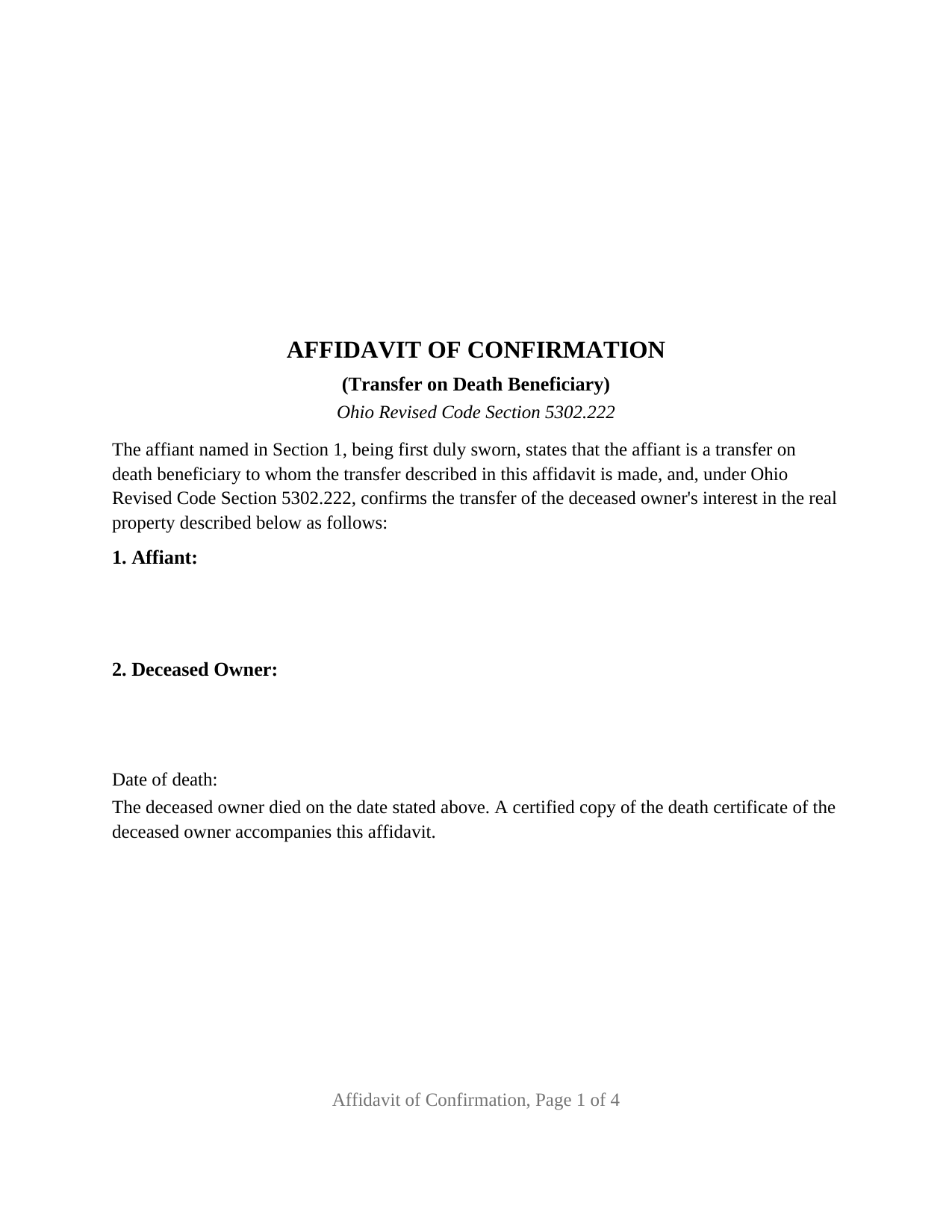
Hardin County Affidavit of Confirmation Form
Fill in the blank Affidavit of Confirmation form formatted to comply with all Ohio recording and content requirements.
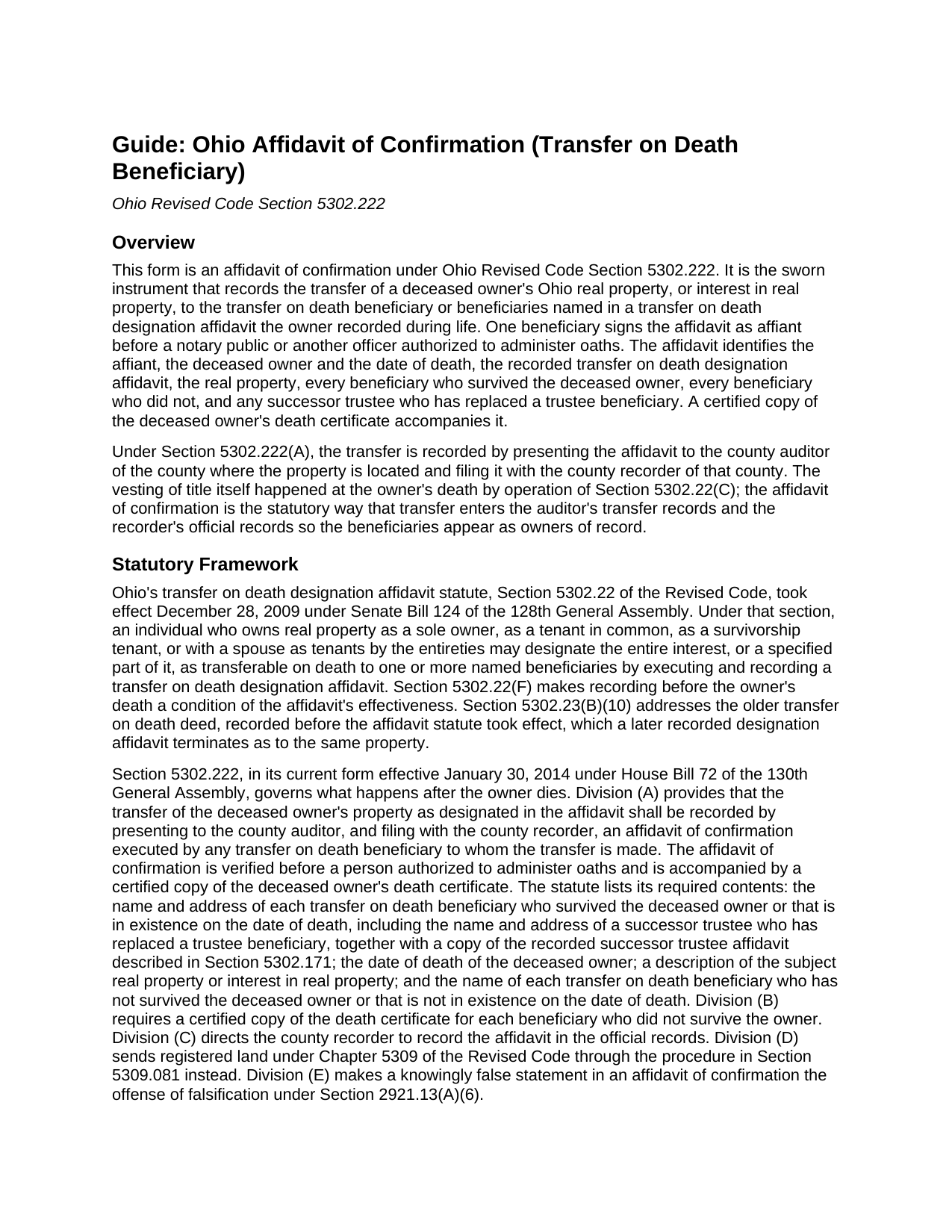
Hardin County Affidavit of Confirmation Guide
Line by line guide explaining every blank on the Affidavit of Confirmation form.
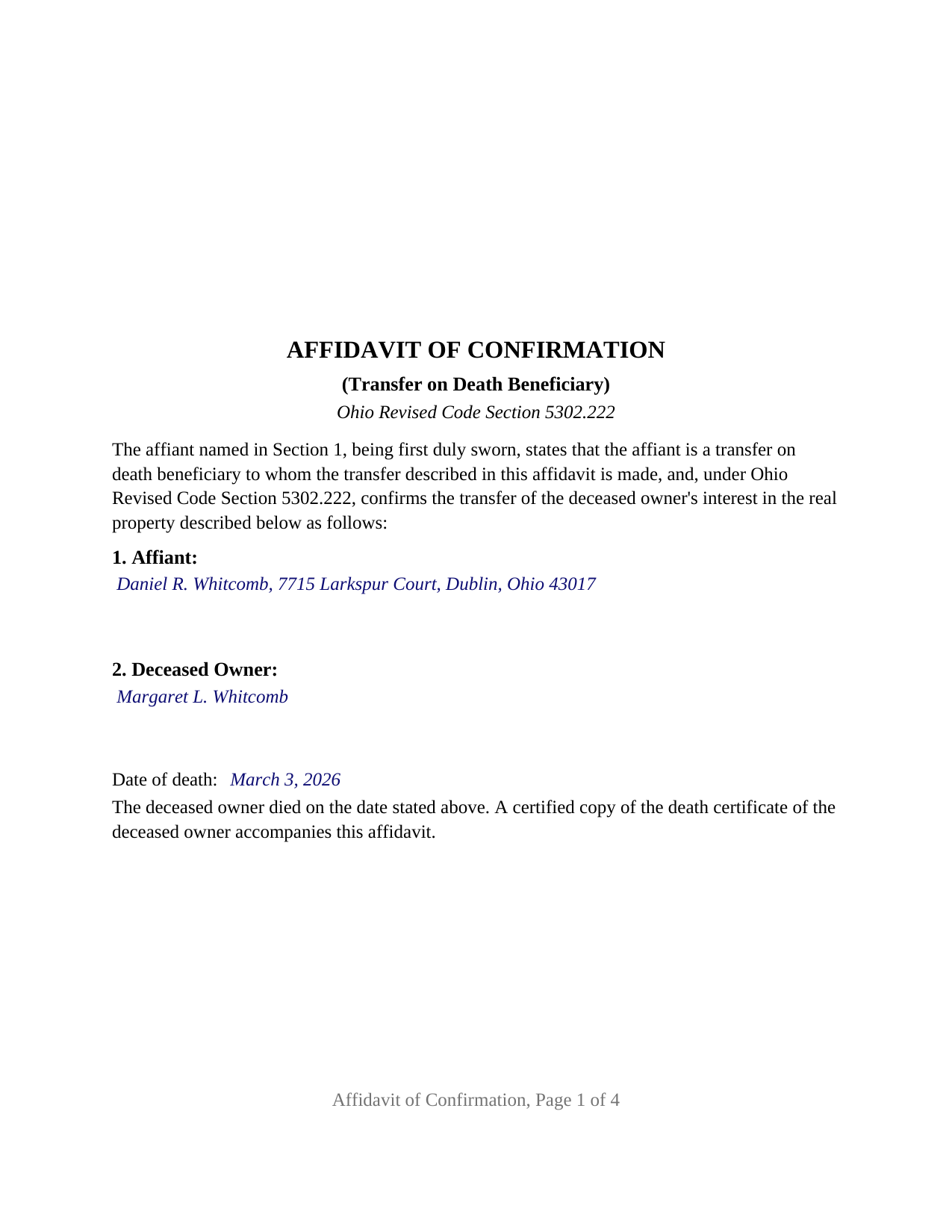
Hardin County Completed Example of the Affidavit of Confirmation Document
Example of a properly completed Ohio Affidavit of Confirmation document for reference.
All 3 documents above included • One-time purchase • No recurring fees
Immediate Download • Secure Checkout
Additional Ohio and Hardin County documents included at no extra charge:
Where to Record Your Documents
Hardin County Recorder
Kenton, Ohio 43326-1575
Hours: 8:30 a.m. - 4:00 p.m. Monday - Friday
Phone: (419) 674-2250 or 2252
Recording Tips for Hardin County:
- Bring your driver's license or state-issued photo ID
- Ensure all signatures are in blue or black ink
- Request a receipt showing your recording numbers
- Ask about accepted payment methods when you call ahead
- Ask for certified copies if you need them for other transactions
Cities and Jurisdictions in Hardin County
Properties in any of these areas use Hardin County forms:
- Ada
- Alger
- Dola
- Dunkirk
- Forest
- Kenton
- Mc Guffey
- Mount Victory
- Ridgeway
- Roundhead
Hours, fees, requirements, and more for Hardin County
How do I get my forms?
Forms are available for immediate download after payment. The Hardin County forms will be in your account ready to download to your computer. An account is created for you during checkout if you don't have one. Forms are NOT emailed.
Are these forms guaranteed to be recordable in Hardin County?
Yes. Our form blanks are guaranteed to meet or exceed the applicable formatting requirements used for recording in Hardin County, including margin requirements, font requirements, and other layout standards. This guarantee applies to formatting, not to the legal sufficiency of information entered by the user or the suitability of a form for a particular transaction.
Can I reuse these forms?
Yes. You can reuse the forms for your personal use. For example, if you have multiple properties in Hardin County you only need to order once.
What do I need to use these forms?
The forms are PDFs that you fill out on your computer. The free Adobe Acrobat Reader is recommended, and most PDF apps also work. You do NOT enter your property information online - you download the blank forms and complete them privately on your own computer.
Are there any recurring fees?
No. This is a one-time purchase. Nothing to cancel, no memberships, no recurring fees.
How much does it cost to record in Hardin County?
Recording fees in Hardin County vary. Contact the recorder's office at (419) 674-2250 or 2252 for current fees.
Questions answered? Let's get started!
When an Ohio property owner who recorded a transfer on death designation affidavit dies, title passes to the named beneficiaries at that moment by operation of law. The paperwork does not follow on its own: the county auditor and county recorder still show the deceased owner until a beneficiary records an affidavit of confirmation under Ohio Revised Code Section 5302.222. This fillable form prepares that affidavit for Ohio real property.
The transfer happened at death; the affidavit puts it on record
Ohio's transfer on death designation affidavit, the instrument Section 5302.22 substituted for the older transfer on death deed in 2009, vests title in the designated beneficiaries when the owner dies, without probate. Section 5302.222 supplies the recording step: the transfer is recorded by presenting to the county auditor, and filing with the county recorder of the county where the property is located, an affidavit of confirmation executed by any transfer on death beneficiary to whom the transfer is made, verified before a person authorized to administer oaths and accompanied by a certified copy of the deceased owner's death certificate.
The affidavit of confirmation is therefore a sworn statement, not a deed. It confirms, for the public record, who died, when, under which recorded designation affidavit, what property is involved, and who takes it.
One beneficiary swears for every beneficiary
Section 5302.222 lets any beneficiary to whom the transfer is made execute the affidavit, so the form carries one affiant, one signature line, and one jurat. The affidavit still names everyone: the statute requires the name and address of each transfer on death beneficiary who survived the deceased owner or that is in existence on the date of death, and the name of each beneficiary who did not survive. The form gives each list its own section, and a third section for a successor trustee who has replaced a beneficiary named solely as trustee of a trust, whom Section 5302.22(G) treats as the beneficiary in existence at death.
Shares are not written into the affidavit. Under Section 5302.23(B)(1), two or more beneficiaries take in equal shares as tenants in common unless the designation affidavit stated other shares or a survivorship tenancy, and a contingent beneficiary takes the share of a named beneficiary who did not survive.
What the sworn statements cover
Beyond the four items the statute lists, the form's fixed statements recite the facts that make the transfer complete: that the designation affidavit was recorded before the owner's death, the condition Section 5302.22(F) places on its effectiveness; that the affiant knows of no later recorded designation affidavit revoking or changing the beneficiaries, the revocation method Section 5302.23(B)(5) provides; and that, where the owner held as a survivorship tenant or as a tenant by the entireties, the deceased owner was the last surviving tenant, since Section 5302.22(C) vests title in the beneficiaries only at that death. Section 5302.222(E) makes a knowingly false statement in the affidavit the offense of falsification.
Through the auditor, then the recorder
The sequence is fixed by the statute: auditor first, recorder second. At the auditor's counter the affidavit travels with a DTE 100EX statement of reason for exemption from the conveyance fee, or a DTE 100 where no exemption is claimed, and the certified death certificate; the auditor's conveyance standards under Section 319.203 govern the legal description and parcel number. The form carries the parcel number, the prior instrument reference Section 319.20 requires, and a mailing address for each beneficiary. The recorder then records the affidavit in the official records under Section 5302.222(C). The document is laid out to Ohio's standard format statute, Section 317.114, with the three inch blank first-page margin reserved for county endorsements, 12 point type over the 10 point minimum, and the preparer statement Section 317.111 requires.
A jurat, not an acknowledgment
Because the affidavit is sworn, the certificate below the signature is a jurat in the form Section 147.542 accepts, with the state and county venue, the date, the affiant's name, and the officer's signature, printed name, seal, and commission expiration. The guide covers an affidavit sworn outside Ohio under Section 147.51 and what an online notarization adds to the certificate.
The package includes the fillable affidavit of confirmation, a completed example filled in for a Franklin County fact pattern with two surviving beneficiaries, and the guide that walks through every numbered section and the auditor and recorder steps. The description and the guide describe the form and the governing Ohio statutes in general terms; they are not legal advice.
Important: Your property must be located in Hardin County to use these forms. Documents should be recorded at the county recording office listed above.
This Affidavit of Confirmation meets all recording requirements specific to Hardin County.
Our Promise
The documents you receive here are guaranteed to meet or exceed the applicable Hardin County recording format requirements. If there is a rejection caused by our formatting, we will correct the issue or refund your payment. This guarantee applies to document formatting only and does not extend to information entered by the user, the selection of the form, or the legal effect of the completed document.
Save Time and Money
Get your Hardin County Affidavit of Confirmation form done right the first time with Deeds.com Uniform Conveyancing Blanks. At Deeds.com, we understand that your time and money are valuable resources, and we don't want you to face a penalty fee or rejection imposed by a county recorder for submitting nonstandard documents. We constantly review and update our forms to meet rapidly changing state and county recording requirements for roughly 3,500 counties and local jurisdictions.
4.8 out of 5 - ( 4,864 Reviews )
Mark M. 5 out of 5 stars
So nice to find the forms I was looking for. Great site!! Thanks
Thank you for your feedback. We really appreciate it. Have a great day!
Andrew M. 5 out of 5 stars
Very easy to find the Quitclaim Deed form I needed. It was correct format and was accepted by my bank.
We appreciate your business and value your feedback. Thank you. Have a wonderful day!
EILEEN K. 5 out of 5 stars
I received my product in great condition and it works ok. Thankyou!!!
Thank you!
Tierre J. 1 out of 5 stars
I put in two orders. I did not get any results from either order and I am still waiting for my refunds.
Thank you for your feedback. Sorry we were not able to pull the information you requested. We reviewed your account and the payment voids were processed as your were notified. Sometimes, depending on your financial institution, it can take a few days for the pending charges to fall off of your statement reporting.
Jeffrey G. 5 out of 5 stars
Nice an easy. Just wondered if I can come back and still have my order (forms) available to get again, if I have an issue with saving them.
Thank you for your feedback. We really appreciate it. Have a great day!
Patsy H. 5 out of 5 stars
I had trouble at first printing out the forms but once I figured out what to do, all went well. Thanks
We appreciate your business and value your feedback. Thank you. Have a wonderful day!
Albo A. 5 out of 5 stars
Deeds.com was fast and easy to file documents
Thank you!
Lawrence C. 5 out of 5 stars
Excellent and expeditious service. Will definitely use in the future when the need arises.
Thank you for your positive words! We’re thrilled to hear about your experience.
John B. 4 out of 5 stars
I purchased the Notice of Completion form because the City of Chula Vista did not have a "fillable" version of this form on their website. The Deeds.com version of this form is somewhat different than the City's version (8 numbered paragraphs vs. 11 numbered paragraphs.) However, it contains the same information in a different format. This form provided more blank space to fill in important items- like a long ownership name- than the version on the City's website. The recorder's office was satisfied with this form as I hand-delivered it to the Recorder's Office and they approved it for recording. Overall, I found this form easy to use and found the extra blank space for writing on the form helpful. My one comment for possible improvement is: it would be even more helpful (particularly for attorney users) to have strike-out capability. I would have liked having the ability to strike-out inapplicable portions of long awkward sentences. Still, I would use this form again.
Your feedback means a lot to us. Thank you.
William H. 5 out of 5 stars
The form cost was reasonable - it helped me organize my thoughts and write things down to help minimize the attorney fees.
We are grateful for your engagement and feedback, which help us to serve you better. Thank you for being an integral part of our community.
Lawrence N. 5 out of 5 stars
Very easy and convenient to use. Low cost and saves a trip to the courthouse and/or having to do mailing(s)
We appreciate your business and value your feedback. Thank you. Have a wonderful day!
Deanna K. 5 out of 5 stars
Great service. Prompt and great communication tools. Affordably priced.
We appreciate your business and value your feedback. Thank you. Have a wonderful day!
Renata L. 3 out of 5 stars
Was a bit difficult to navigate. I feel a fee to access the site and a fee to print is a bit much. I am in the real estate business and find the deeds very useful
Thank you for your feedback. We really appreciate it. Have a great day!
Lorie S. 5 out of 5 stars
It was available to download immediately
Thank you!
HAMIDREZA M. 5 out of 5 stars
excellent service
Thank you!