Wayne County Affidavit of Confirmation Form
Last validated October 22, 2026 by our Forms Development TeamFormatted for recording in Wayne County, for property anywhere in the county: rural and unincorporated areas as well as Apple Creek, Burbank, Creston, Dalton, Doylestown, Fredericksburg, Kidron, Marshallville and 8 more.
- 3 documents included
- Immediate PDF download
- Formatting guarantee
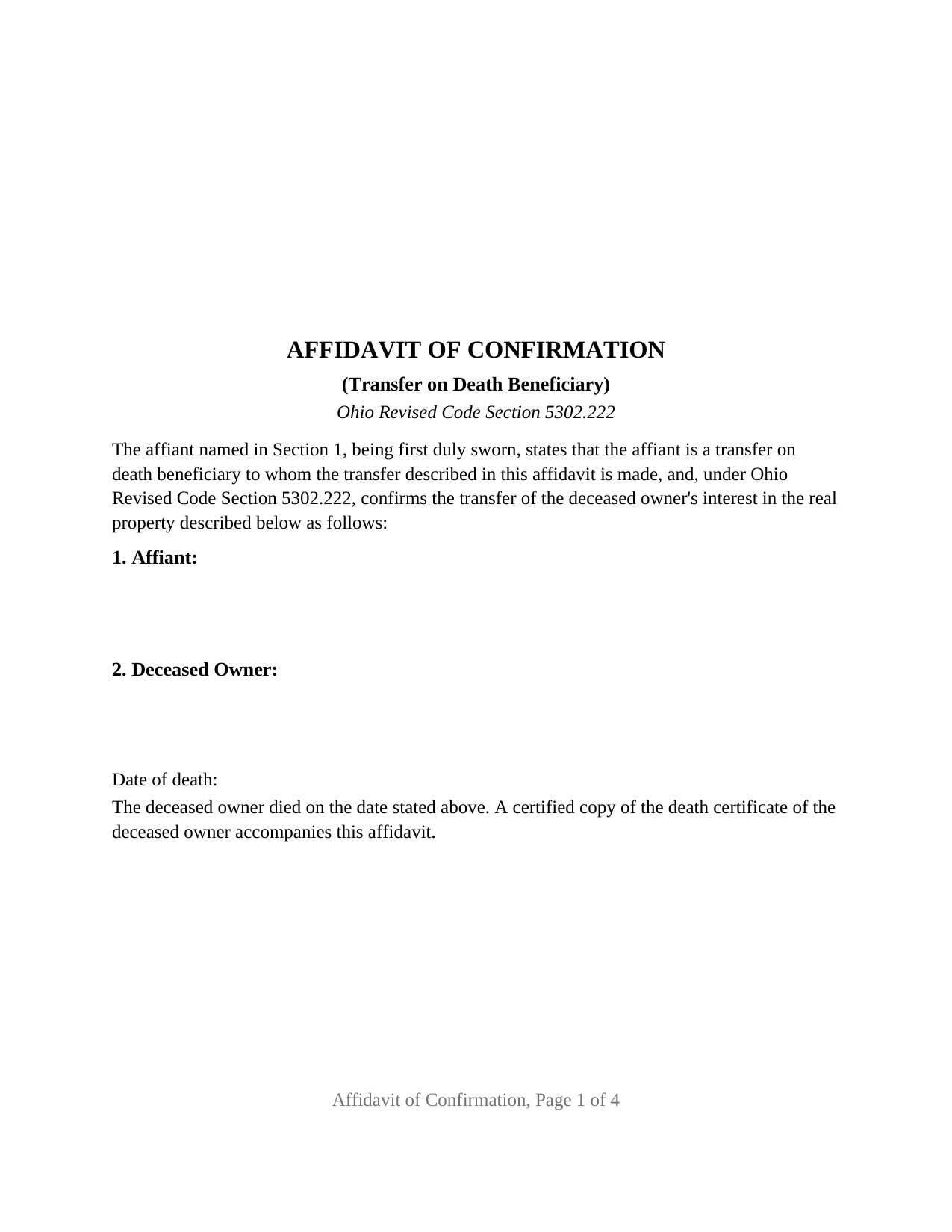
Wayne County Affidavit of Confirmation Form
Fill in the blank Affidavit of Confirmation form formatted to comply with all Ohio recording and content requirements.
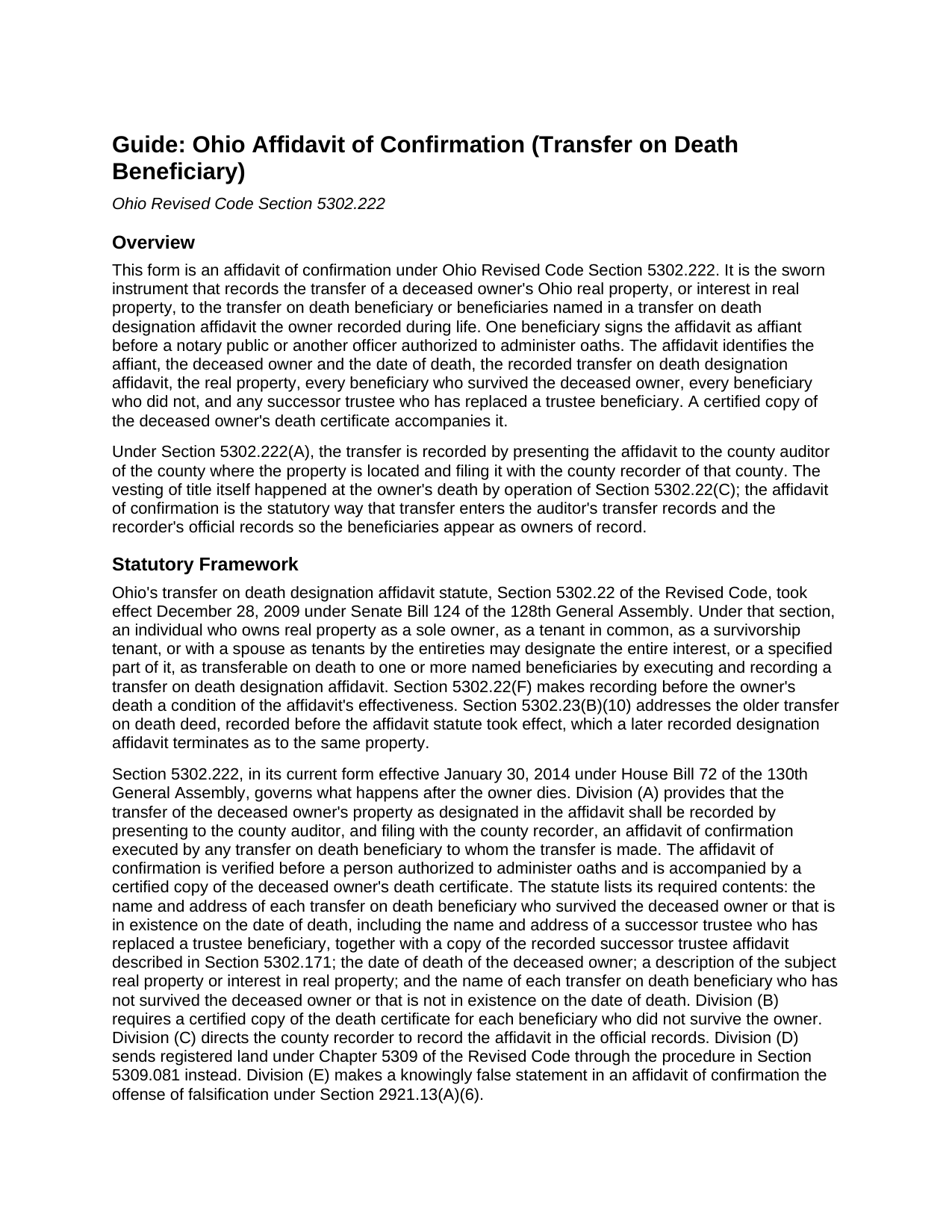
Wayne County Affidavit of Confirmation Guide
Line by line guide explaining every blank on the Affidavit of Confirmation form.
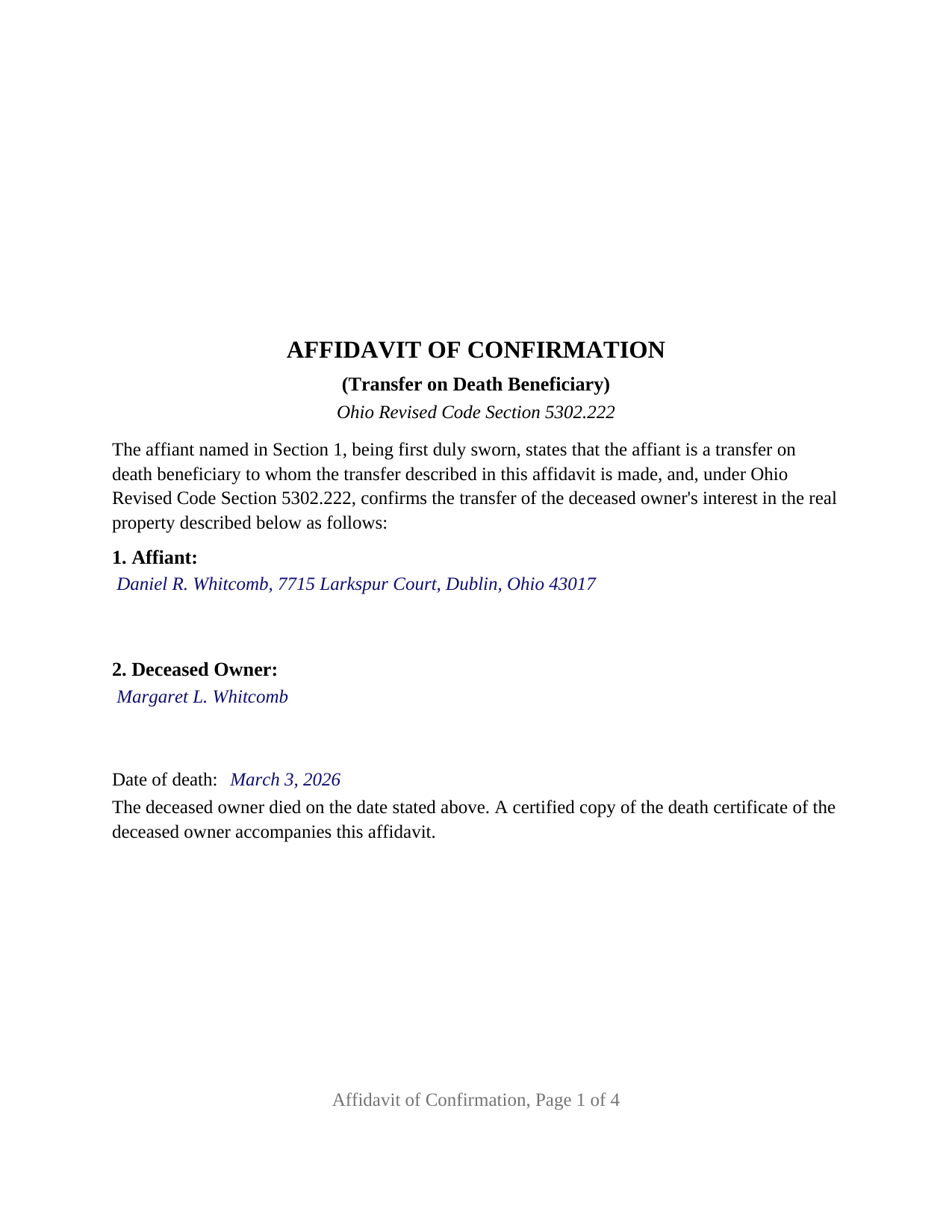
Wayne County Completed Example of the Affidavit of Confirmation Document
Example of a properly completed Ohio Affidavit of Confirmation document for reference.
All 3 documents above included • One-time purchase • No recurring fees
Immediate Download • Secure Checkout
Additional Ohio and Wayne County documents included at no extra charge:
Where to Record Your Documents
Wayne County Recorder
Wooster, Ohio 44691
Hours: 8:00 to 4:30 M-F
Phone: 330-287-5460
Recording Tips for Wayne County:
- Bring your driver's license or state-issued photo ID
- Ensure all signatures are in blue or black ink
- Check margin requirements - usually 1-2 inches at top
- Leave recording info boxes blank - the office fills these
- Make copies of your documents before recording - keep originals safe
Cities and Jurisdictions in Wayne County
Properties in any of these areas use Wayne County forms:
- Apple Creek
- Burbank
- Creston
- Dalton
- Doylestown
- Fredericksburg
- Kidron
- Marshallville
- Mount Eaton
- Orrville
- Rittman
- Shreve
- Smithville
- Sterling
- West Salem
- Wooster
Hours, fees, requirements, and more for Wayne County
How do I get my forms?
Forms are available for immediate download after payment. The Wayne County forms will be in your account ready to download to your computer. An account is created for you during checkout if you don't have one. Forms are NOT emailed.
Are these forms guaranteed to be recordable in Wayne County?
Yes. Our form blanks are guaranteed to meet or exceed the applicable formatting requirements used for recording in Wayne County, including margin requirements, font requirements, and other layout standards. This guarantee applies to formatting, not to the legal sufficiency of information entered by the user or the suitability of a form for a particular transaction.
Can I reuse these forms?
Yes. You can reuse the forms for your personal use. For example, if you have multiple properties in Wayne County you only need to order once.
What do I need to use these forms?
The forms are PDFs that you fill out on your computer. The free Adobe Acrobat Reader is recommended, and most PDF apps also work. You do NOT enter your property information online - you download the blank forms and complete them privately on your own computer.
Are there any recurring fees?
No. This is a one-time purchase. Nothing to cancel, no memberships, no recurring fees.
How much does it cost to record in Wayne County?
Recording fees in Wayne County vary. Contact the recorder's office at 330-287-5460 for current fees.
Questions answered? Let's get started!
When an Ohio property owner who recorded a transfer on death designation affidavit dies, title passes to the named beneficiaries at that moment by operation of law. The paperwork does not follow on its own: the county auditor and county recorder still show the deceased owner until a beneficiary records an affidavit of confirmation under Ohio Revised Code Section 5302.222. This fillable form prepares that affidavit for Ohio real property.
The transfer happened at death; the affidavit puts it on record
Ohio's transfer on death designation affidavit, the instrument Section 5302.22 substituted for the older transfer on death deed in 2009, vests title in the designated beneficiaries when the owner dies, without probate. Section 5302.222 supplies the recording step: the transfer is recorded by presenting to the county auditor, and filing with the county recorder of the county where the property is located, an affidavit of confirmation executed by any transfer on death beneficiary to whom the transfer is made, verified before a person authorized to administer oaths and accompanied by a certified copy of the deceased owner's death certificate.
The affidavit of confirmation is therefore a sworn statement, not a deed. It confirms, for the public record, who died, when, under which recorded designation affidavit, what property is involved, and who takes it.
One beneficiary swears for every beneficiary
Section 5302.222 lets any beneficiary to whom the transfer is made execute the affidavit, so the form carries one affiant, one signature line, and one jurat. The affidavit still names everyone: the statute requires the name and address of each transfer on death beneficiary who survived the deceased owner or that is in existence on the date of death, and the name of each beneficiary who did not survive. The form gives each list its own section, and a third section for a successor trustee who has replaced a beneficiary named solely as trustee of a trust, whom Section 5302.22(G) treats as the beneficiary in existence at death.
Shares are not written into the affidavit. Under Section 5302.23(B)(1), two or more beneficiaries take in equal shares as tenants in common unless the designation affidavit stated other shares or a survivorship tenancy, and a contingent beneficiary takes the share of a named beneficiary who did not survive.
What the sworn statements cover
Beyond the four items the statute lists, the form's fixed statements recite the facts that make the transfer complete: that the designation affidavit was recorded before the owner's death, the condition Section 5302.22(F) places on its effectiveness; that the affiant knows of no later recorded designation affidavit revoking or changing the beneficiaries, the revocation method Section 5302.23(B)(5) provides; and that, where the owner held as a survivorship tenant or as a tenant by the entireties, the deceased owner was the last surviving tenant, since Section 5302.22(C) vests title in the beneficiaries only at that death. Section 5302.222(E) makes a knowingly false statement in the affidavit the offense of falsification.
Through the auditor, then the recorder
The sequence is fixed by the statute: auditor first, recorder second. At the auditor's counter the affidavit travels with a DTE 100EX statement of reason for exemption from the conveyance fee, or a DTE 100 where no exemption is claimed, and the certified death certificate; the auditor's conveyance standards under Section 319.203 govern the legal description and parcel number. The form carries the parcel number, the prior instrument reference Section 319.20 requires, and a mailing address for each beneficiary. The recorder then records the affidavit in the official records under Section 5302.222(C). The document is laid out to Ohio's standard format statute, Section 317.114, with the three inch blank first-page margin reserved for county endorsements, 12 point type over the 10 point minimum, and the preparer statement Section 317.111 requires.
A jurat, not an acknowledgment
Because the affidavit is sworn, the certificate below the signature is a jurat in the form Section 147.542 accepts, with the state and county venue, the date, the affiant's name, and the officer's signature, printed name, seal, and commission expiration. The guide covers an affidavit sworn outside Ohio under Section 147.51 and what an online notarization adds to the certificate.
The package includes the fillable affidavit of confirmation, a completed example filled in for a Franklin County fact pattern with two surviving beneficiaries, and the guide that walks through every numbered section and the auditor and recorder steps. The description and the guide describe the form and the governing Ohio statutes in general terms; they are not legal advice.
Important: Your property must be located in Wayne County to use these forms. Documents should be recorded at the county recording office listed above.
This Affidavit of Confirmation meets all recording requirements specific to Wayne County.
Our Promise
The documents you receive here are guaranteed to meet or exceed the applicable Wayne County recording format requirements. If there is a rejection caused by our formatting, we will correct the issue or refund your payment. This guarantee applies to document formatting only and does not extend to information entered by the user, the selection of the form, or the legal effect of the completed document.
Save Time and Money
Get your Wayne County Affidavit of Confirmation form done right the first time with Deeds.com Uniform Conveyancing Blanks. At Deeds.com, we understand that your time and money are valuable resources, and we don't want you to face a penalty fee or rejection imposed by a county recorder for submitting nonstandard documents. We constantly review and update our forms to meet rapidly changing state and county recording requirements for roughly 3,500 counties and local jurisdictions.
4.8 out of 5 - ( 4,836 Reviews )
STEPHEN C. 5 out of 5 stars
Excellent service. Easy to use. Thank you.
We appreciate your business and value your feedback. Thank you. Have a wonderful day!
Gary G. 5 out of 5 stars
Ordered the forms I needed for my state and county and everything worked out perfectly. All the forms came with examples (filled in) and very detailed instructions for each block that required an entry. I was able to fill everything out on my computer and save the files for future use, if required. Deeds provides an excellent product. I highly recommend their products and will use their services again.
Thank you for your feedback. We really appreciate it. Have a great day!
Laurie J. 5 out of 5 stars
Very satisfied with what I purchased.
Thank you for your positive words! We’re thrilled to hear about your experience.
Rose H. 5 out of 5 stars
I am so glad I found this resource! As the Executor of a family members estate I wanted to save money by bypassing a lawyer as it seemed pretty straight forward to tranfer a Life Estate to the remainderman. (I had original deeds). But talking with 3 different states and 4 different counties - none of which seemed to need the same documents, I was almost ready to dump this in a lawyer's lap. This resource makes it simple!
We appreciate your business and value your feedback. Thank you. Have a wonderful day!
Johnny H. 5 out of 5 stars
The format presented is exactly what is needed to produce a perfect listing in the registry of The Maricopa County Office of the Recorder. Thanks for an effective solution to a very important document.
Thank you!
Christine S. 5 out of 5 stars
Very good site! I found everything I needed right here on Deeds.com. Excellent quality forms, easy access, perfect delivery, reasonable price
We appreciate your business and value your feedback. Thank you. Have a wonderful day!
Donald P. 4 out of 5 stars
Very fast and efficient. Easy to fill out but was upset the latest tax exemptions ruled in 2014 did not seem to be included. Exclusion of sale to blood relatives, etc. _ the one I needed.
Thank you for your feedback. We really appreciate it. Have a great day!
Marie B. 5 out of 5 stars
Easily found what I needed. Very helpful. Downloaded the documents, saved to my computer and printed what I needed.
We appreciate your business and value your feedback. Thank you. Have a wonderful day!
Bruce C. 5 out of 5 stars
Easy to navigate. The guide and sample helped a lot, including the availability of "Exhibit A". Knowing your documents are guaranteed to be in the required format and the ease of using your forms has been a great service, Thank you!
Your feedback is greatly appreciated. Thank you for taking the time to share your experience!
Lisa P. 5 out of 5 stars
Wonderful forms. It's nice that they were formatted perfectly for my county, it's real easy to miss a requirement (margines, font size, and so on) and end up with a rejection or higher recording fee. Good job folks!
Thank you!
John T. 5 out of 5 stars
Amazing! Very helpful. Very specific.
Thank you for your feedback. We really appreciate it. Have a great day!
Catherine C. 5 out of 5 stars
This was great. Happy I found you!
Thank you!
George A. M. 5 out of 5 stars
User friendly and fast to use. I was pleased with experience.
We appreciate your business and value your feedback. Thank you. Have a wonderful day!
Kathleen M. 5 out of 5 stars
Wow, this was a breeze!! Best experience and fast. Great way to record documents in a matter of minutes. I recommend Deeds.com for anyone who needs to record documents quickly and conveniently.
Thank you for your feedback. We really appreciate it. Have a great day!
Heidi G. 5 out of 5 stars
Very happy with the service that you offer. My office will use you again.
Great to hear Heidi, glad we could help. Have an amazing day!