Wayne County Transfer on Death Designation Affidavit Form
Last validated September 29, 2026 by our Forms Development TeamFormatted for recording in Wayne County, for property anywhere in the county: rural and unincorporated areas as well as Apple Creek, Burbank, Creston, Dalton, Doylestown, Fredericksburg, Kidron, Marshallville and 8 more.
- 3 documents included
- Immediate PDF download
- Formatting guarantee
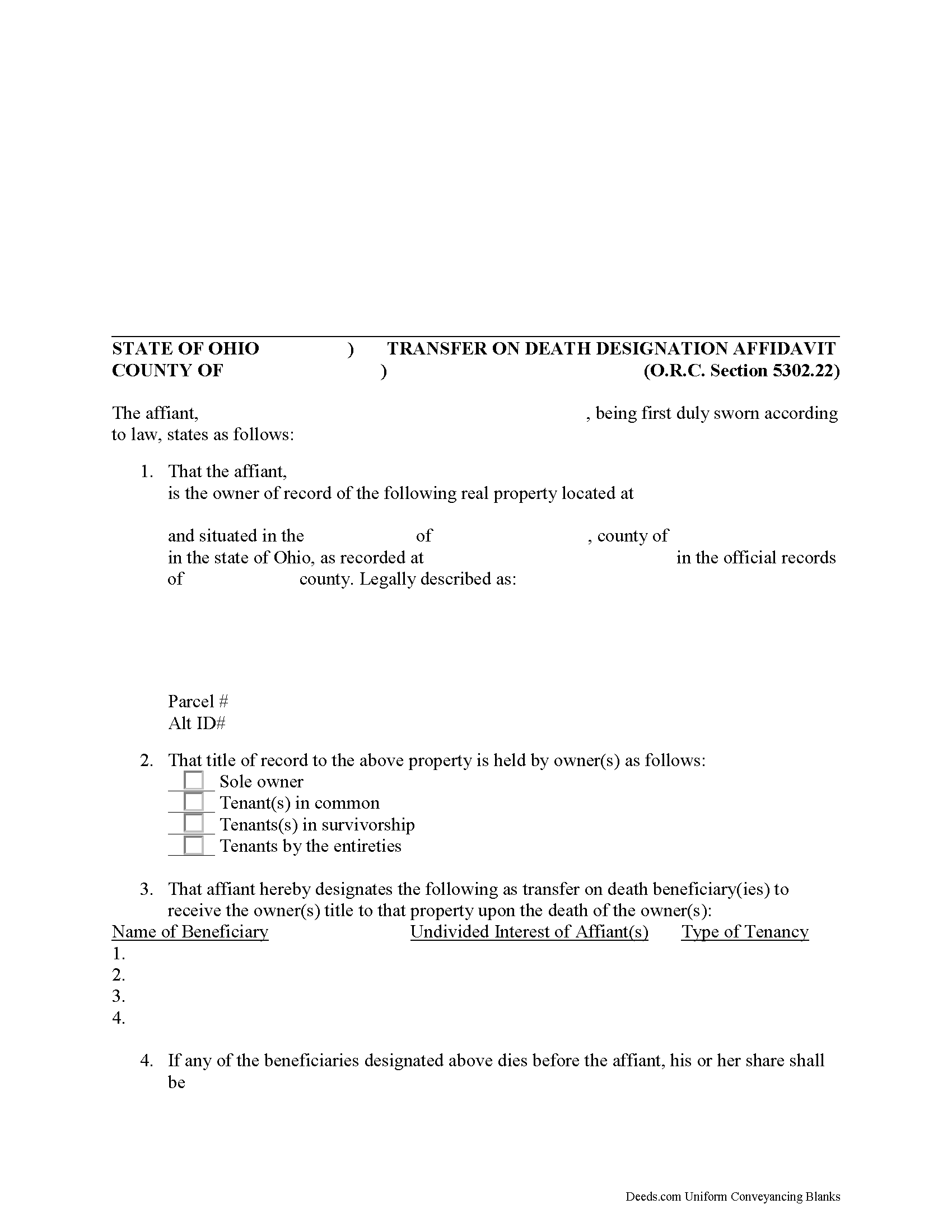
Wayne County Transfer on Death Designation Affidavit
Fill in the blank form formatted to comply with all recording and content requirements.
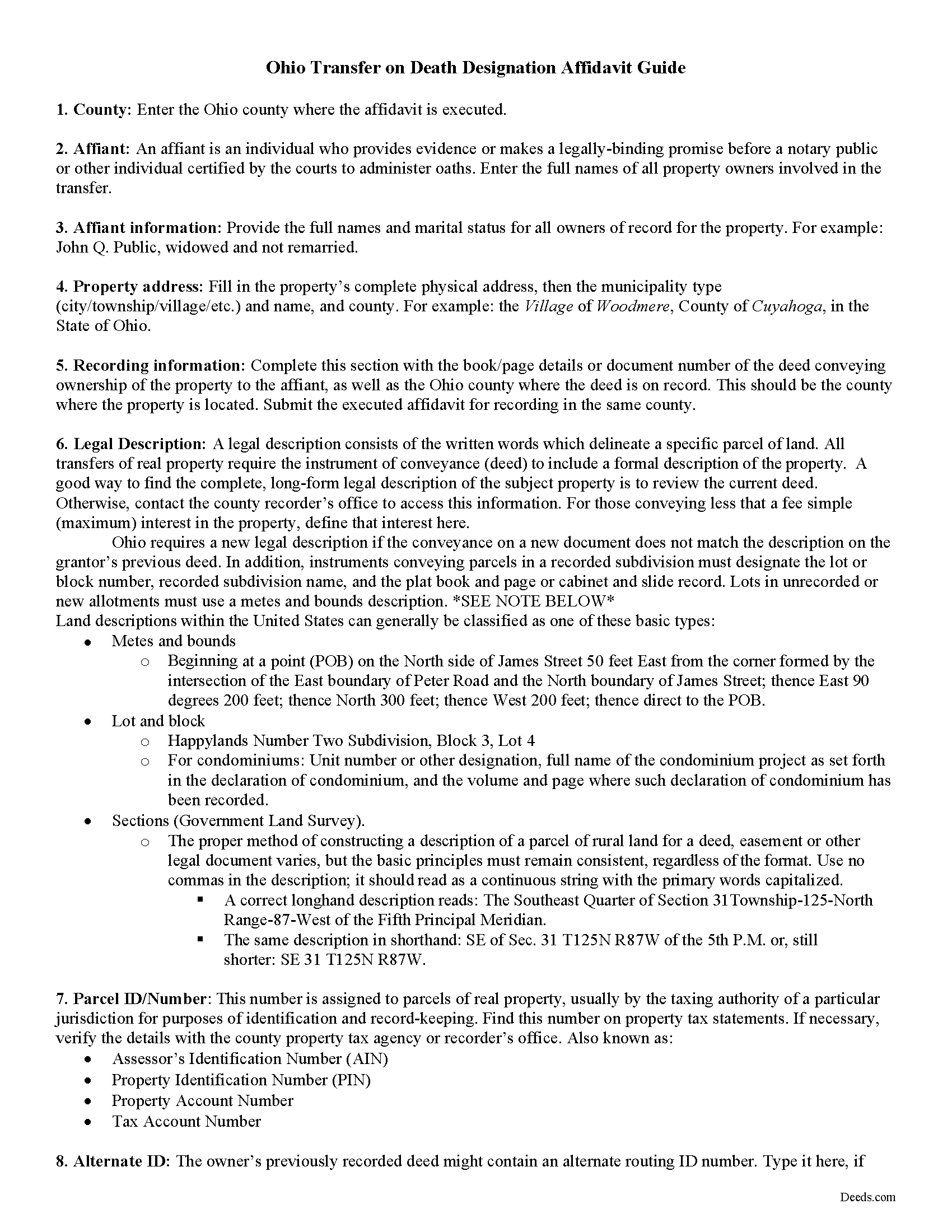
Wayne County Transfer on Death Designation Affidavit Guide
Line by line guide explaining every blank on the form.
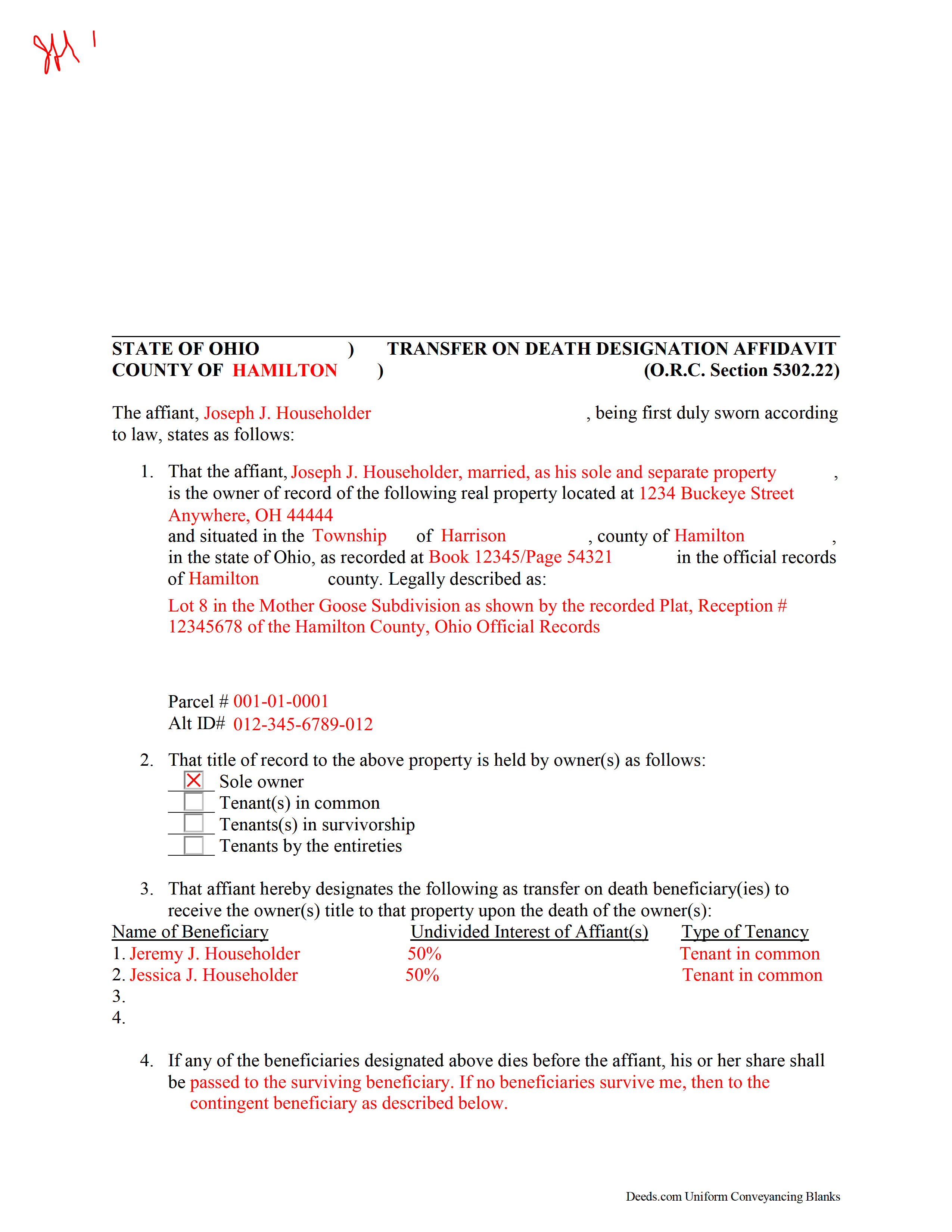
Wayne County Completed Example of the Transfer on Death Designation Affidavit Document
Example of a properly completed form for reference.
All 3 documents above included • One-time purchase • No recurring fees
Immediate Download • Secure Checkout
Additional Ohio and Wayne County documents included at no extra charge:
Where to Record Your Documents
Wayne County Recorder
Wooster, Ohio 44691
Hours: 8:00 to 4:30 M-F
Phone: 330-287-5460
Recording Tips for Wayne County:
- Bring your driver's license or state-issued photo ID
- Ensure all signatures are in blue or black ink
- Recording fees may differ from what's posted online - verify current rates
- Request a receipt showing your recording numbers
- Ask about accepted payment methods when you call ahead
Cities and Jurisdictions in Wayne County
Properties in any of these areas use Wayne County forms:
- Apple Creek
- Burbank
- Creston
- Dalton
- Doylestown
- Fredericksburg
- Kidron
- Marshallville
- Mount Eaton
- Orrville
- Rittman
- Shreve
- Smithville
- Sterling
- West Salem
- Wooster
Hours, fees, requirements, and more for Wayne County
How do I get my forms?
Forms are available for immediate download after payment. The Wayne County forms will be in your account ready to download to your computer. An account is created for you during checkout if you don't have one. Forms are NOT emailed.
Are these forms guaranteed to be recordable in Wayne County?
Yes. Our form blanks are guaranteed to meet or exceed the applicable formatting requirements used for recording in Wayne County, including margin requirements, font requirements, and other layout standards. This guarantee applies to formatting, not to the legal sufficiency of information entered by the user or the suitability of a form for a particular transaction.
Can I reuse these forms?
Yes. You can reuse the forms for your personal use. For example, if you have multiple properties in Wayne County you only need to order once.
What do I need to use these forms?
The forms are PDFs that you fill out on your computer. The free Adobe Acrobat Reader is recommended, and most PDF apps also work. You do NOT enter your property information online - you download the blank forms and complete them privately on your own computer.
Are there any recurring fees?
No. This is a one-time purchase. Nothing to cancel, no memberships, no recurring fees.
How much does it cost to record in Wayne County?
Recording fees in Wayne County vary. Contact the recorder's office at 330-287-5460 for current fees.
Questions answered? Let's get started!
Authorized under section 5302.22 of the Ohio Revised Code, the Transfer on Death Designation Affidavit (TDDA) allows owners of real estate situated in Ohio to plan the conveyance of their property to designated beneficiaries after their death. The conveyance occurs separately from a will and without the need for probate. These instruments are known in other states as transfer on death deeds, beneficiary deeds, or Lady Bird deeds, and all fall under the heading of Non-probate Transfers on Death.
TDDAs are useful estate planning tools, because unlike "regular" deeds (warranty, grant, quitclaim, etc.), which permanently transfer the owner's interest in the property, the grantor retains full ownership and control of the property while alive, and may change the beneficiaries, modify the terms, or even sell the property with no restriction or penalty. This flexibility is possible because the grantor accepts no consideration from any of the beneficiaries.
In addition to meeting all state and local standards for recorded documents, TDDAs must include a statement by "the individual executing the affidavit that the individual is the person appearing on the record of the real property as the owner of the real property or interest in the real property at the time of the recording of the affidavit and the marital status of that owner." Married owners must include a statement by "the owner's spouse stating that the spouse's dower rights are subordinate to the vesting of title to the real property or interest in the real property in the transfer on death beneficiary or beneficiaries designated in the affidavit" (RC 5302.22(D)(3)). It must also designate "one or more persons, identified by name, as transfer on death beneficiary or beneficiaries" ( 5302.22(D)(4)).
File the completed and notarized affidavit for recording in the county where the property is located. NOTE THAT THE AFFIDAVIT IS ONLY VALID WHEN SUBMITTED FOR RECORDING WHILE THE GRANTOR IS STILL ALIVE.
The transfer of property rights is completed when the owner dies and the beneficiary completes and records an affidavit of confirmation under R.C. 5302.222.
Using this instrument might affect tax obligations or eligibility for certain income or asset-dependent programs. Please contact an attorney with questions about this or any other issues related to estate planning or transferring real property in Ohio.
(Ohio Transfer on Death Designation Package includes form, guidelines, and completed example)
Important: Your property must be located in Wayne County to use these forms. Documents should be recorded at the county recording office listed above.
This Transfer on Death Designation Affidavit meets all recording requirements specific to Wayne County.
Our Promise
The documents you receive here are guaranteed to meet or exceed the applicable Wayne County recording format requirements. If there is a rejection caused by our formatting, we will correct the issue or refund your payment. This guarantee applies to document formatting only and does not extend to information entered by the user, the selection of the form, or the legal effect of the completed document.
Save Time and Money
Get your Wayne County Transfer on Death Designation Affidavit form done right the first time with Deeds.com Uniform Conveyancing Blanks. At Deeds.com, we understand that your time and money are valuable resources, and we don't want you to face a penalty fee or rejection imposed by a county recorder for submitting nonstandard documents. We constantly review and update our forms to meet rapidly changing state and county recording requirements for roughly 3,500 counties and local jurisdictions.
4.8 out of 5 - ( 4,831 Reviews )
Larry L. 5 out of 5 stars
Easy, quick and responsive for recording purposes.
We appreciate your business and value your feedback. Thank you. Have a wonderful day!
STANLEY F. 5 out of 5 stars
Forms were spot on and able to save over $100 by not going to an attorney to complete the same documents. There were templates on how forms are supposed to be completed. You just need a notary to sign.
Thank you Stanley, we really appreciate your feedback.
Sara W. 5 out of 5 stars
Got the legal forms, they worked. Nothing exciting but that probably a good thing.
Thank you Sara, we appreciate you.
Mary Ann G. 2 out of 5 stars
Couldn't find the deed form that I needed. Needs to have a short summary to determine the correct form.
Sorry to hear that Mary Ann, we appreciate your feedback.
Pedro M. 5 out of 5 stars
Fast and professional service.
Thank you for your positive words! We’re thrilled to hear about your experience.
Brenda W. 5 out of 5 stars
Good.
Thank you for your feedback. We really appreciate it. Have a great day!
Owen w. 5 out of 5 stars
Was very pleased with execution of the forms. Easy to understand and was hassle free.
Thank you!
Melody P. 5 out of 5 stars
Great service, as always!!
We appreciate your business and value your feedback. Thank you. Have a wonderful day!
Tamica D. 5 out of 5 stars
Exceptional service. Thank you for your assistance.
Thank you!
Kathryn L. 5 out of 5 stars
I went to the recorders office. Had no problem was finished in about 10 minutes .The forms was excellent . With the instructions it was easy for me to fill out. Thank you, Kathryn L
Thank you for your feedback. We really appreciate it. Have a great day!
Jack S. 5 out of 5 stars
This is a great service and fairly priced.
Thank you Jack. hope you're having a great day!
David A. 5 out of 5 stars
Excellent service. I have been looking for a beneficiary deed for quite a wile with no success. My friend found your site and I was overjoyed. Fast, easy to use, and understand.I recommend this site to anyone.
We appreciate your business and value your feedback. Thank you. Have a wonderful day!
Louise D. 5 out of 5 stars
It was easy to complete the form and I appreciated the sample form.
We appreciate your business and value your feedback. Thank you. Have a wonderful day!
Denise B. 5 out of 5 stars
Quick and easy!
Thank you Denise. We appreciate you.
Mary H. 5 out of 5 stars
Great source for forms acceptable to the county.
We appreciate your business and value your feedback. Thank you. Have a wonderful day!