Apache County Notice of Intent to Suspend Work Form
Last validated October 20, 2026 by our Forms Development TeamFormatted for recording in Apache County, for property anywhere in the county: rural and unincorporated areas as well as Alpine, Chambers, Chinle, Concho, Dennehotso, Eagar, Fort Defiance, Ganado and 20 more.
- 3 documents included
- Immediate PDF download
- Formatting guarantee
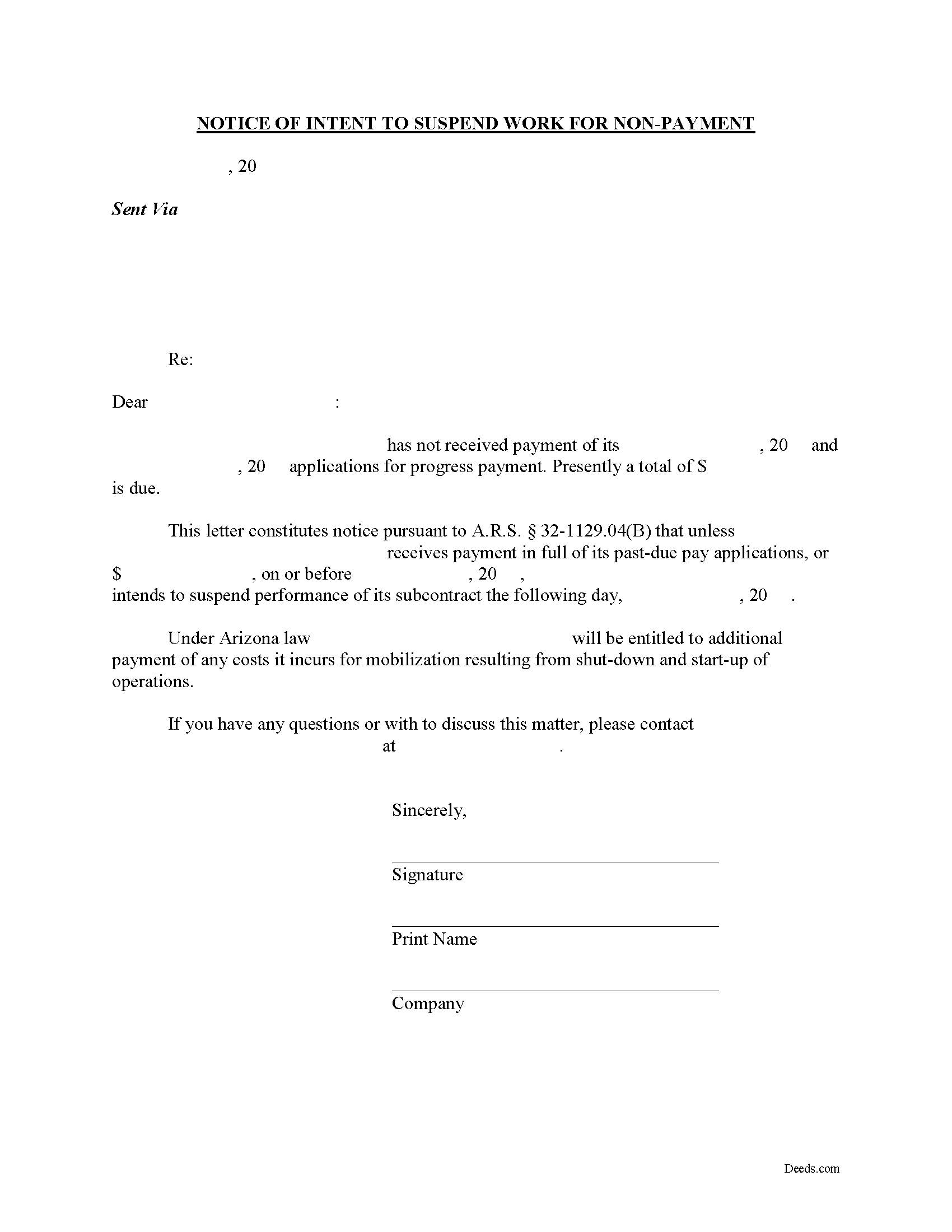
Apache County Notice of Intent to Suspend Work Form
Fill in the blank form formatted to comply with all recording and content requirements.

Apache County Notice of Intent to Suspend Work Guide
Line by line guide explaining every blank on the form.
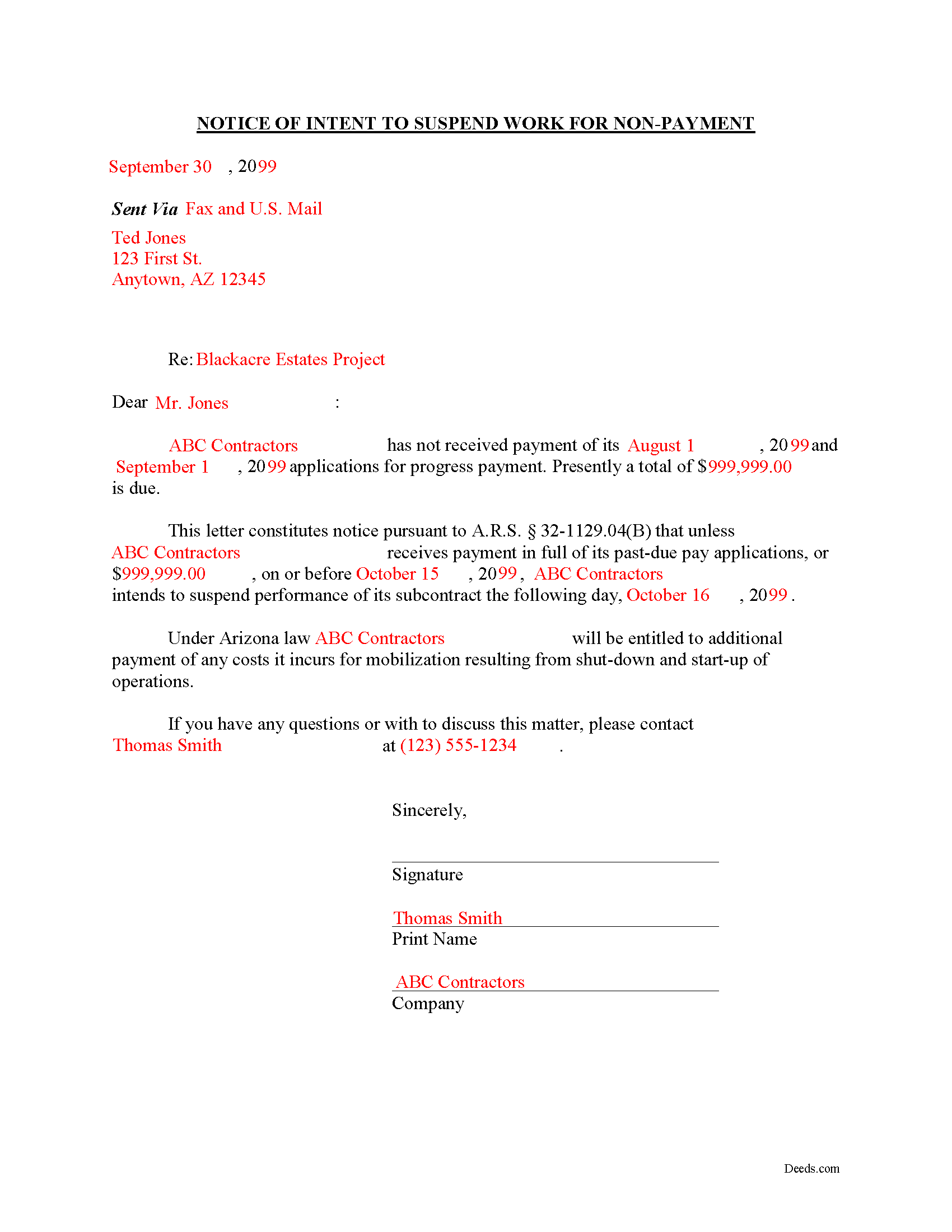
Apache County Completed Example of the Notice to Suspend Work Document
Example of a properly completed form for reference.
All 3 documents above included • One-time purchase • No recurring fees
Immediate Download • Secure Checkout
Additional Arizona and Apache County documents included at no extra charge:
Where to Record Your Documents
County Recorder Office - County Annex Bldg
St. Johns, Arizona 85936
Hours: Monday through Thursday 6:30am - 5:30pm. Closed Fridays
Phone: 928-337-7515
Recorder's Sub Office
Springerville, Arizona
Hours: Mon, Tue 8:00 - 5:00, Wed 9:00 - 12:00
Phone:
Recording Tips for Apache County:
- Bring your driver's license or state-issued photo ID
- Ensure all signatures are in blue or black ink
- Avoid the last business day of the month when possible
- Both spouses typically need to sign if property is jointly owned
- Bring extra funds - fees can vary by document type and page count
Cities and Jurisdictions in Apache County
Properties in any of these areas use Apache County forms:
- Alpine
- Chambers
- Chinle
- Concho
- Dennehotso
- Eagar
- Fort Defiance
- Ganado
- Greer
- Houck
- Lukachukai
- Lupton
- Many Farms
- Mcnary
- Nazlini
- Nutrioso
- Petrified Forest Natl Pk
- Red Valley
- Rock Point
- Round Rock
- Saint Johns
- Saint Michaels
- Sanders
- Springerville
- Teec Nos Pos
- Tsaile
- Vernon
- Window Rock
Hours, fees, requirements, and more for Apache County
How do I get my forms?
Forms are available for immediate download after payment. The Apache County forms will be in your account ready to download to your computer. An account is created for you during checkout if you don't have one. Forms are NOT emailed.
Are these forms guaranteed to be recordable in Apache County?
Yes. Our form blanks are guaranteed to meet or exceed the applicable formatting requirements used for recording in Apache County, including margin requirements, font requirements, and other layout standards. This guarantee applies to formatting, not to the legal sufficiency of information entered by the user or the suitability of a form for a particular transaction.
Can I reuse these forms?
Yes. You can reuse the forms for your personal use. For example, if you have multiple properties in Apache County you only need to order once.
What do I need to use these forms?
The forms are PDFs that you fill out on your computer. The free Adobe Acrobat Reader is recommended, and most PDF apps also work. You do NOT enter your property information online - you download the blank forms and complete them privately on your own computer.
Are there any recurring fees?
No. This is a one-time purchase. Nothing to cancel, no memberships, no recurring fees.
How much does it cost to record in Apache County?
Recording fees in Apache County vary. Contact the recorder's office at 928-337-7515 for current fees.
Questions answered? Let's get started!
Sending a Notice of Intent to Suspend Work for Non-Payment in Arizona
When a prime contractor or property owner fails to make timely payments on accounts on past-due accounts, one option to encourage payment is sending a notice that all further work will be suspended because of non-payment. In Arizona, contractors can use a Notice of Intent to Suspend Work for Non-Payment for that purpose. The Notice is not a statutory form and thus does not have to be recorded, notarized, or verified like other lien documents. There is also no required format and it can take the appearance of an ordinary business correspondence, but there is a preferred layout in an attempt to streamline the process.
The Notice contains the name and address of the property owner or contractor, first and second missed payment due dates, total amount due, and a date on which work will be suspended if the account remains unpaid. Contact information can also be included if the recipient has any questions or wishes to make further arrangements.
This article is provided for informational purposes only and should not be relied upon as a substitute for the advice of an attorney. If you have any questions about sending a Notice of Intent to Suspend Work for Non-Payment, or any other issues related to mechanic's liens, please contact an attorney.
Important: Your property must be located in Apache County to use these forms. Documents should be recorded at the county recording office listed above.
This Notice of Intent to Suspend Work meets all recording requirements specific to Apache County.
Our Promise
The documents you receive here are guaranteed to meet or exceed the applicable Apache County recording format requirements. If there is a rejection caused by our formatting, we will correct the issue or refund your payment. This guarantee applies to document formatting only and does not extend to information entered by the user, the selection of the form, or the legal effect of the completed document.
Save Time and Money
Get your Apache County Notice of Intent to Suspend Work form done right the first time with Deeds.com Uniform Conveyancing Blanks. At Deeds.com, we understand that your time and money are valuable resources, and we don't want you to face a penalty fee or rejection imposed by a county recorder for submitting nonstandard documents. We constantly review and update our forms to meet rapidly changing state and county recording requirements for roughly 3,500 counties and local jurisdictions.
4.8 out of 5 - ( 4,829 Reviews )
JAMES E. 5 out of 5 stars
Easy to use and excellent software.
Thank you!
Connie L. 5 out of 5 stars
Ordered a Quitclaim deed and worked perfectly at Register of Deed office. Liked the instructions and copy of one example filled out made it so much easier to understand. One price is great as most of other companies wanted a membership to join. Will use Deeds.com again if I ever need different forms. Thanks!!!
We are grateful for your feedback and looking forward to serving you again. Thank you!
Patricia U. 5 out of 5 stars
Quick and easy document recording from home! Wish I knew about this before!
Thank you for your feedback. We really appreciate it. Have a great day!
James W. 5 out of 5 stars
We were able to find deceased parents' deed.
Thank you!
Patricia J. 5 out of 5 stars
No word "Download" so had a little trouble figuring out how to download, but finally figured it out.
Thank you for your feedback. We really appreciate it. Have a great day!
CARRIE T. 5 out of 5 stars
Thought it was pretty simple to use.
Thank you!
Bonnie A. 5 out of 5 stars
I wish you could send copy in mail
Thank you for your feedback. We really appreciate it. Have a great day!
James E. 5 out of 5 stars
Forms were available for immediate download. Examples were helpful in completing form.
We appreciate your business and value your feedback. Thank you. Have a wonderful day!
Steven W. 5 out of 5 stars
Good form with an example and instructions
Thanks, Steven! We’re glad the example and instructions were helpful. We appreciate you taking the time to leave a review.
William C. 5 out of 5 stars
Excellent service. Reasonably priced. Highly recommend.
Thank you for your feedback. We really appreciate it. Have a great day!
Anthony C. 4 out of 5 stars
Good information for solving my issue...
Thank you!
Sylvia B. 5 out of 5 stars
What a wonderful resource! Forms are so easy to use, made the process a breeze. Deeds even helped with the recording. Thank you.
We appreciate your business and value your feedback. Thank you. Have a wonderful day!
Elizabeth H. 5 out of 5 stars
You had just what I was looking for. It was explained well and easy to find. Will recommend you.
We appreciate your business and value your feedback. Thank you. Have a wonderful day!
Thomas W. 5 out of 5 stars
easy to use, no problems except in beneficiary box. Need to make the box bigger because I have 4 beneficiaries to list. how do I enlarge the box.
Thanks for reaching out. All available space on the document is being used. As is noted in the guide, if you have information that does not fit in the available space the included exhibit page should be used.
Melody P. 5 out of 5 stars
Thanks for such great service!
Thank you for your feedback. We really appreciate it. Have a great day!