Contra Costa County Substitution of Trustee and Full Reconveyance Form
Last validated October 1, 2026 by our Forms Development TeamFormatted for recording in Contra Costa County, for property anywhere in the county: rural and unincorporated areas as well as Alamo, Antioch, Bethel Island, Brentwood, Byron, Canyon, Clayton, Concord and 22 more.
- 3 documents included
- Immediate PDF download
- Formatting guarantee
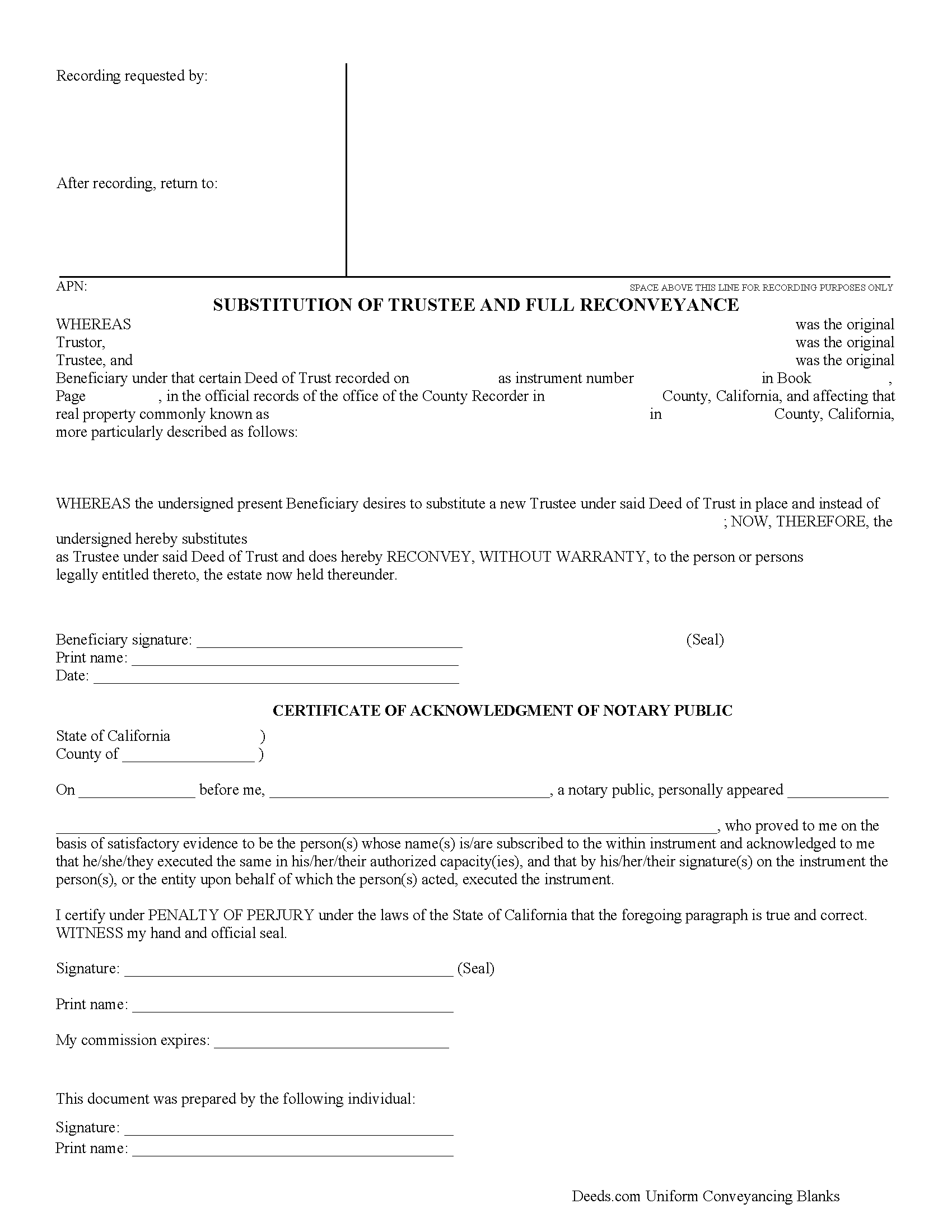
Contra Costa County Substitution of Trustee and Full Reconveyance Form
Fill in the blank form formatted to comply with all recording and content requirements.
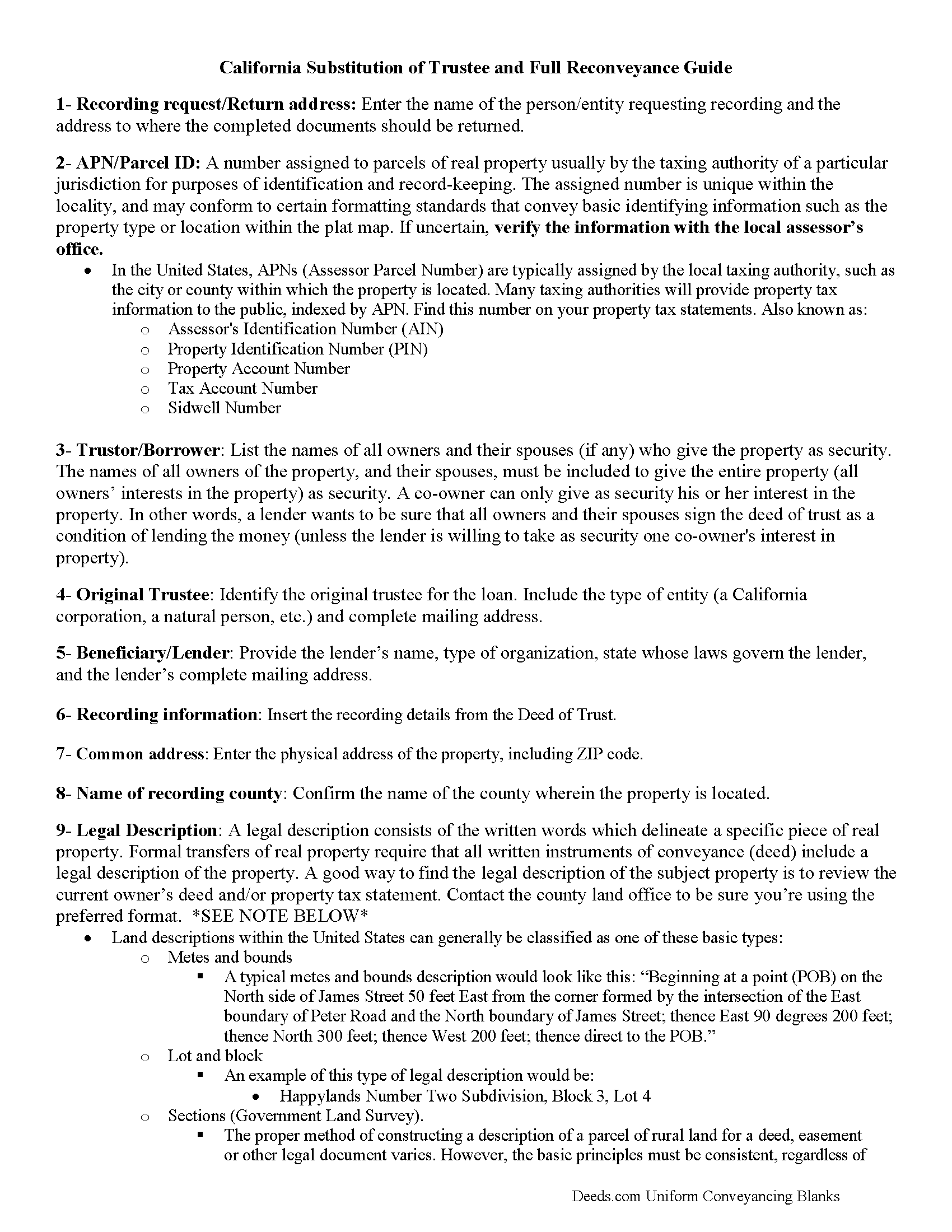
Contra Costa County Substitution of Trustee and Full Reconveyance Guide
Line by line guide explaining every blank on the form.
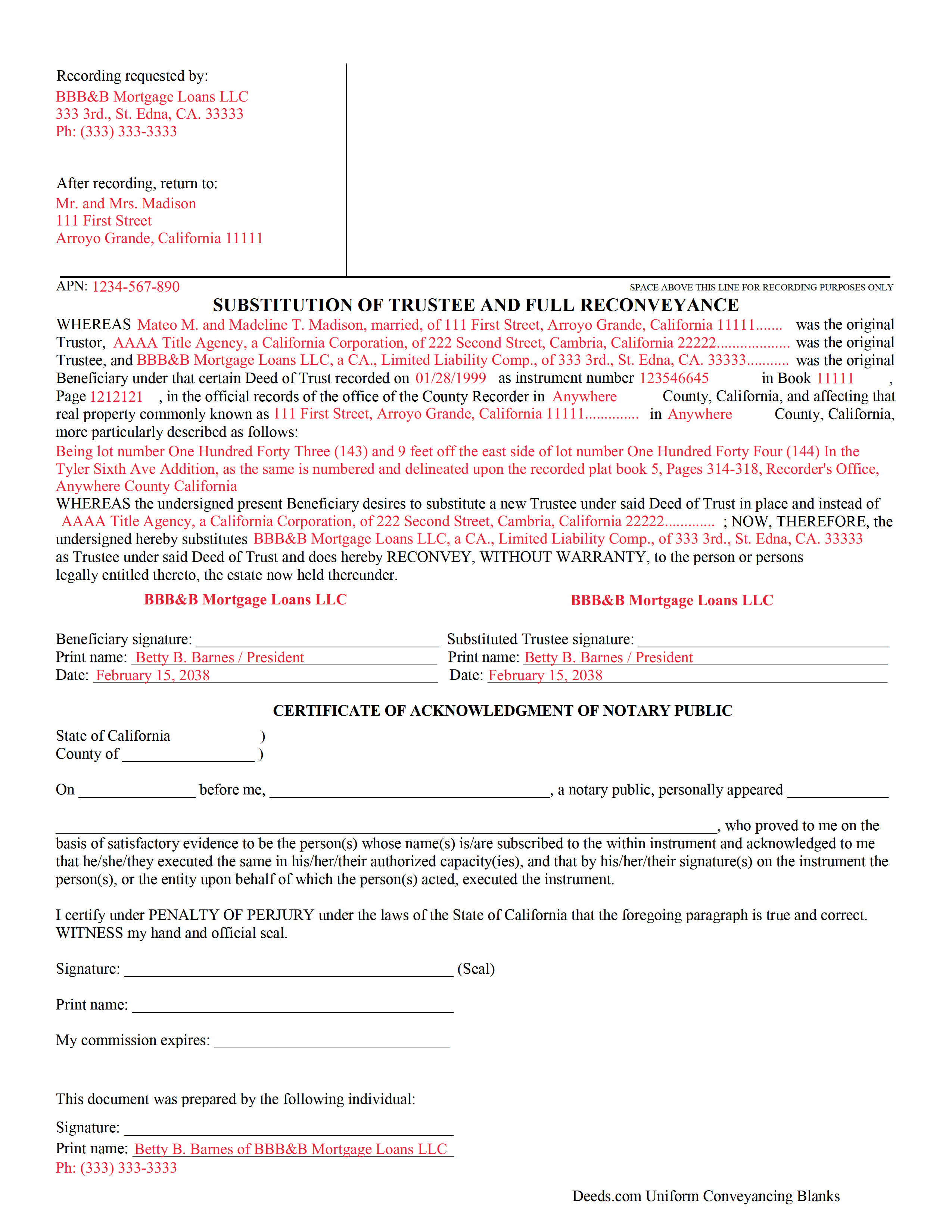
Contra Costa County Completed Example of the Substitution of Trustee and Full Reconveyance Document
Example of a properly completed form for reference.
All 3 documents above included • One-time purchase • No recurring fees
Immediate Download • Secure Checkout
Additional California and Contra Costa County documents included at no extra charge:
Where to Record Your Documents
Contra Costa Clerk-Recorder
Martinez, California 94553
Hours: 8:00 AM to 4:00 PM Monday through Friday
Phone: (925) 335-7910
Recording Tips for Contra Costa County:
- Bring your driver's license or state-issued photo ID
- Ensure all signatures are in blue or black ink
- Verify all names are spelled correctly before recording
- White-out or correction fluid may cause rejection
- Ask about their eRecording option for future transactions
Cities and Jurisdictions in Contra Costa County
Properties in any of these areas use Contra Costa County forms:
- Alamo
- Antioch
- Bethel Island
- Brentwood
- Byron
- Canyon
- Clayton
- Concord
- Crockett
- Danville
- Diablo
- Discovery Bay
- El Cerrito
- El Sobrante
- Hercules
- Knightsen
- Lafayette
- Martinez
- Moraga
- Oakley
- Orinda
- Pinole
- Pittsburg
- Pleasant Hill
- Port Costa
- Richmond
- Rodeo
- San Pablo
- San Ramon
- Walnut Creek
Hours, fees, requirements, and more for Contra Costa County
How do I get my forms?
Forms are available for immediate download after payment. The Contra Costa County forms will be in your account ready to download to your computer. An account is created for you during checkout if you don't have one. Forms are NOT emailed.
Are these forms guaranteed to be recordable in Contra Costa County?
Yes. Our form blanks are guaranteed to meet or exceed the applicable formatting requirements used for recording in Contra Costa County, including margin requirements, font requirements, and other layout standards. This guarantee applies to formatting, not to the legal sufficiency of information entered by the user or the suitability of a form for a particular transaction.
Can I reuse these forms?
Yes. You can reuse the forms for your personal use. For example, if you have multiple properties in Contra Costa County you only need to order once.
What do I need to use these forms?
The forms are PDFs that you fill out on your computer. The free Adobe Acrobat Reader is recommended, and most PDF apps also work. You do NOT enter your property information online - you download the blank forms and complete them privately on your own computer.
Are there any recurring fees?
No. This is a one-time purchase. Nothing to cancel, no memberships, no recurring fees.
How much does it cost to record in Contra Costa County?
Recording fees in Contra Costa County vary. Contact the recorder's office at (925) 335-7910 for current fees.
Questions answered? Let's get started!
California Substitution of Trustee and Full Reconveyance
Sometimes the original trustee on a deed of trust is unable or unwilling to perform his/her responsibilities. In that case, the beneficiary/lender uses this form to authorize a substitute trustee, who, by recording it, will release the lien and convey the land with a clear title.
California Code, Civil Code - CIV 2941
(2) If the trustee has failed to execute and record, or cause to be recorded, the full reconveyance within 60 calendar days of satisfaction of the obligation, the beneficiary, upon receipt of a written request by the trustor or trustor's heirs, successor in interest, agent, or assignee, shall execute and acknowledge a document pursuant to Section 2934a substituting itself or another as trustee and issue a full reconveyance.
(California Reconveyance Package includes form, guidelines, and completed example)
Important: Your property must be located in Contra Costa County to use these forms. Documents should be recorded at the county recording office listed above.
This Substitution of Trustee and Full Reconveyance meets all recording requirements specific to Contra Costa County.
Our Promise
The documents you receive here are guaranteed to meet or exceed the applicable Contra Costa County recording format requirements. If there is a rejection caused by our formatting, we will correct the issue or refund your payment. This guarantee applies to document formatting only and does not extend to information entered by the user, the selection of the form, or the legal effect of the completed document.
Save Time and Money
Get your Contra Costa County Substitution of Trustee and Full Reconveyance form done right the first time with Deeds.com Uniform Conveyancing Blanks. At Deeds.com, we understand that your time and money are valuable resources, and we don't want you to face a penalty fee or rejection imposed by a county recorder for submitting nonstandard documents. We constantly review and update our forms to meet rapidly changing state and county recording requirements for roughly 3,500 counties and local jurisdictions.
4.8 out of 5 - ( 4,828 Reviews )
Michelle G. 5 out of 5 stars
This was a great service! I was having trouble recording something and found this was the best, and quickest, way to get it completed. Excellent service! Will definitely use them again!
Thank you for your feedback. We really appreciate it. Have a great day!
Lloyd F. 5 out of 5 stars
We were very pleased at how quickly the forms showed up and the guide and copy of a sample filled in form was very helpful. We will defiantly use you again if the occasion arises, and will highly recommend your company to friends and family. Thank you
We appreciate your business and value your feedback. Thank you. Have a wonderful day!
Wendy S. 4 out of 5 stars
Good template that met my needs. Much better than another draft template that I found on another site. Would have been helpful if the template had been provided in a Word format instead of PDF so that I could remove the sections that are not applicable.
We appreciate your business and value your feedback. Thank you. Have a wonderful day!
Darryl S. 5 out of 5 stars
These guys saved the day! Very good at what they do and deliver AS ADVERTISED!! My county's recorder's office was closed to the public due to the COVID-19 pandemic, and the recorder's office did not offer the service I needed online. Attempting to close on a home the following day, I was in immediate need of a deed for property that I previously owned to provide to the underwriters for my pending loan. I thought I was dead in the water and would miss my next day closing date. Strolling the internet for options, I came upon DEEDS.COM. After reading the posted reviews, I thought I would give them a try. Within 10 minutes of placing my order, I received ALL the information I requested about the property I previously owned. Thank you DEEDS.COM for the prompt, courteous, and professional service. You guys are ROCK STARS!!! I closed on my new home.
Thank you so much for your kinds words Darryl, glad we were able to help.
DARLA L. 5 out of 5 stars
I was happy with the quick response to obtain the requested forms. Effective and easy website to use.
We appreciate your business and value your feedback. Thank you. Have a wonderful day!
Kelly Y. 5 out of 5 stars
The document was easy to locate, pay for and download. I hope it will be this easy to process by the County!
Thank you!
Jamie F. 4 out of 5 stars
I purchased he Alabama Correction Warranty Deed Form to correct a mistake in the legal description. However, this form says it must be signed by all who previously signed the deed. One of these people is now deceased. Can I use this form? How would it be different? I would give you 5 stars but wish this issue had been addressed. Thanks.
Thank you for your feedback. From the product description: All parties who signed the prior deed must sign the correction deed in the presence of a notary.
Charles D. 5 out of 5 stars
Good product!! I highly recommend.
Thank you!
Laura H. 5 out of 5 stars
I was very impressed with how quickly I was provided the data.
Thank you!
Timothy B. 3 out of 5 stars
Excellent sample deed, very helpful. Unfortunately, the fill-able template only allowed for one BENEFICIARY.
Thank you for your feedback. We really appreciate it. Have a great day!
Katie G. 5 out of 5 stars
I haven't used the forms yet but it appears, with your tutelage, that they should not be too difficult to fill out and file. Your site was easy to navigate. Thank You
Thank you for the kinds words Katie. have a fantastic day!
Jason P. 5 out of 5 stars
Price is fair and system is so user friendly. Highly recommend
We appreciate your business and value your feedback. Thank you. Have a wonderful day!
Clarence O. 5 out of 5 stars
Very easy process to record a Quit Claim Deed. Would definitely recommend!
Thank you!
Robin G. 5 out of 5 stars
Very user friendly. I was totally amazed. Thank you so much.
We are delighted to have been of service. Thank you for the positive review!
Javoura G. 5 out of 5 stars
Great was not hard at all to do and process only wished it told how much it cost to actually submit the forms
Thank you for your feedback. We really appreciate it. Have a great day!