Pinellas County Notice of Contest of Claim Against Payment Bond Form
Last validated October 1, 2026 by our Forms Development TeamFormatted for recording in Pinellas County, for property anywhere in the county: rural and unincorporated areas as well as Bay Pines, Belleair Beach, Clearwater, Clearwater Beach, Crystal Beach, Dunedin, Indian Rocks Beach, Largo and 8 more.
- 3 documents included
- Immediate PDF download
- Formatting guarantee
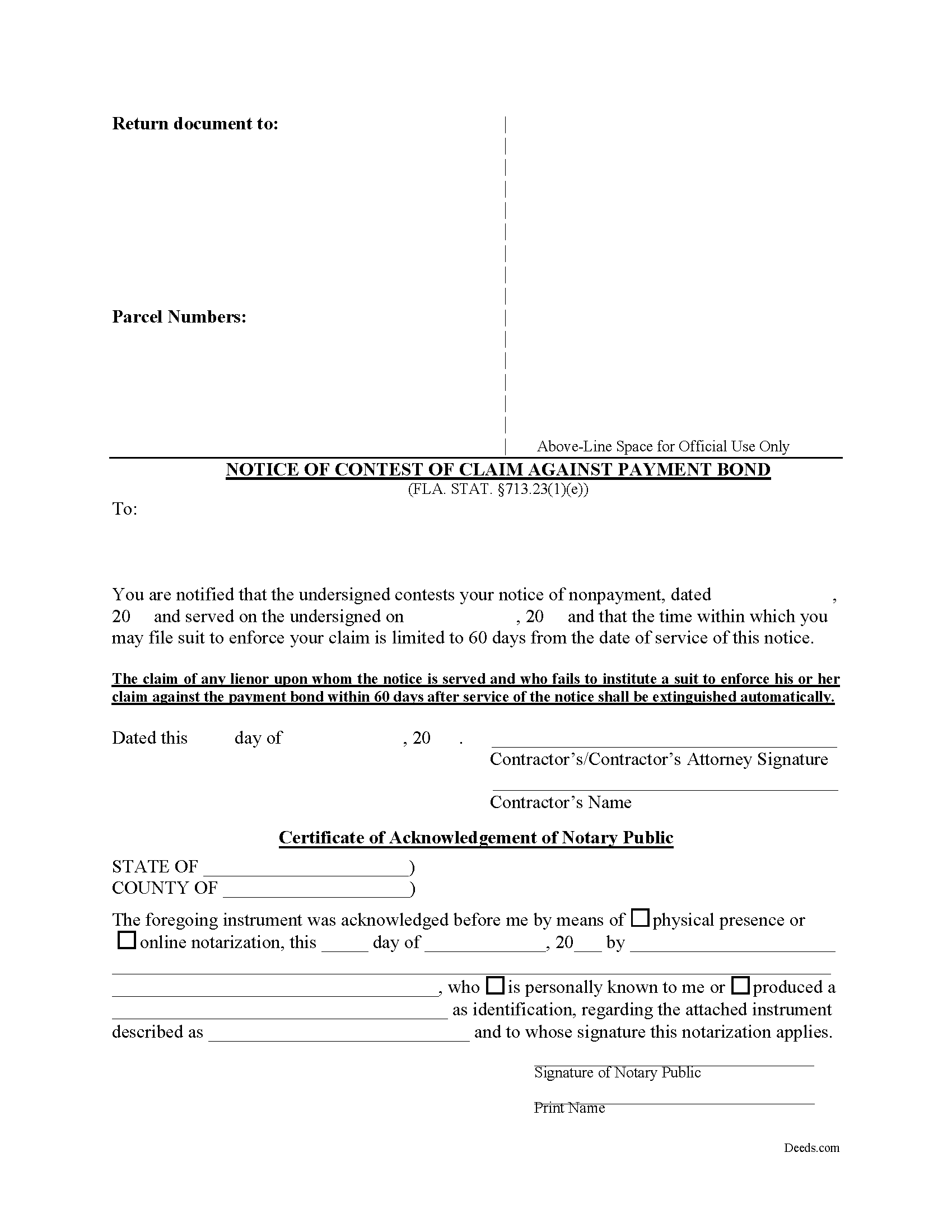
Pinellas County Notice of Contest of Claim Against Payment Bond Form
Fill in the blank form formatted to comply with all recording and content requirements.
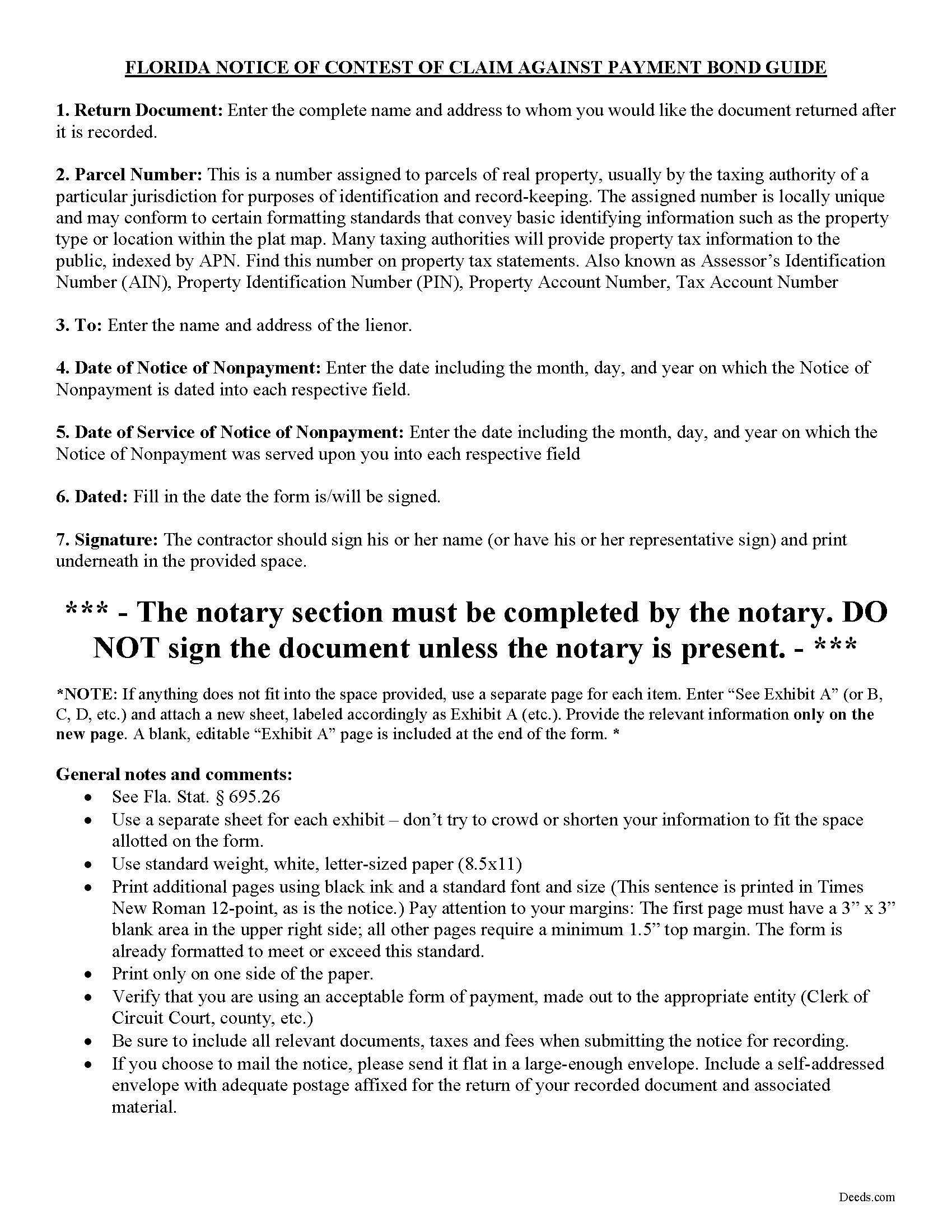
Pinellas County Notice of Contest of Claim Against Payment Bond Guide
Line by line guide explaining every blank on the form.
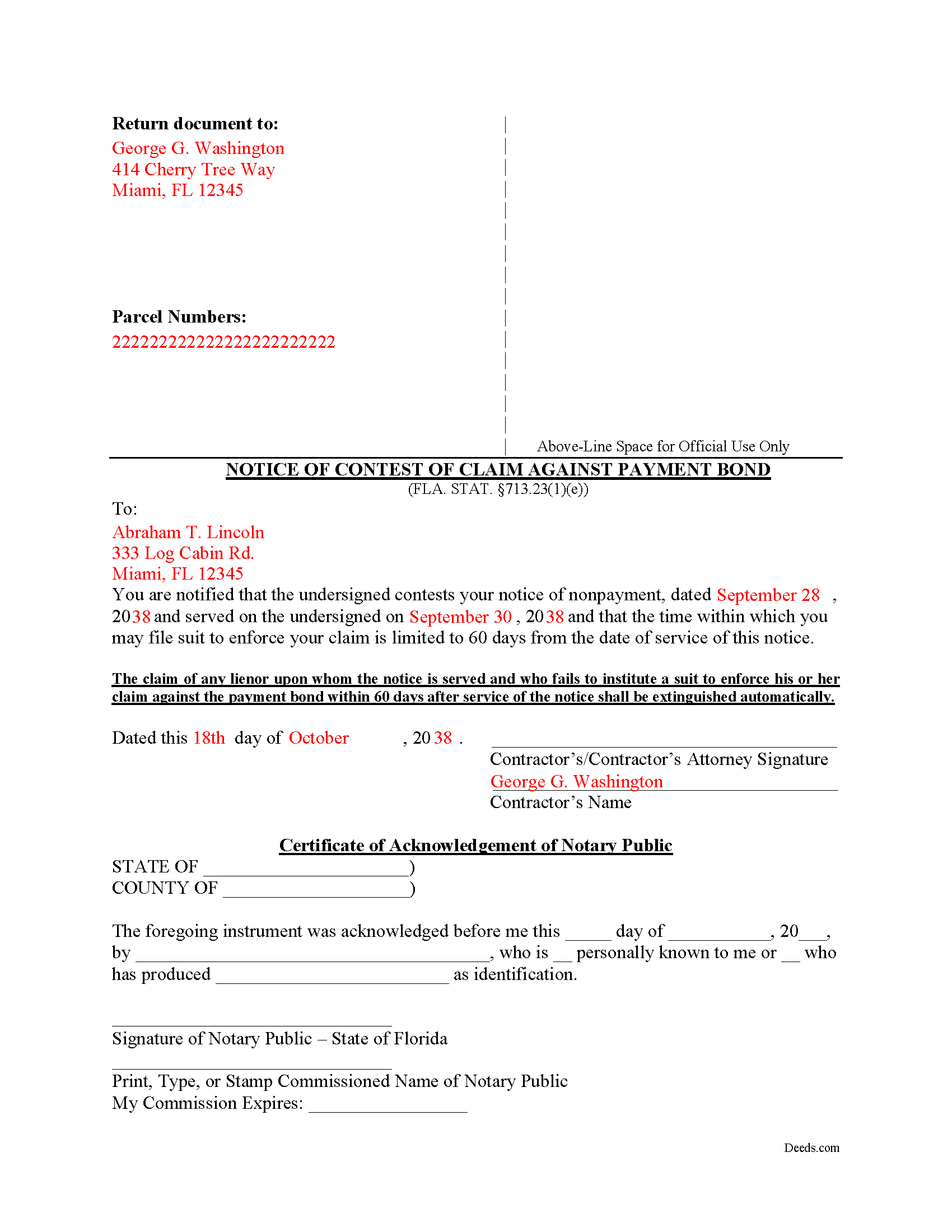
Pinellas County Completed Example of the Notice of Contest of Claim Against Payment Bond Document
Example of a properly completed form for reference.
All 3 documents above included • One-time purchase • No recurring fees
Immediate Download • Secure Checkout
Additional Florida and Pinellas County documents included at no extra charge:
Where to Record Your Documents
Recording Services Dept - Clearwater Courthouse
Clearwater, Florida 33756
Hours: 8:30 to 4:30 M-F
Phone: (727) 464-7000
St. Petersburg Branch Office
St. Petersburg, Florida 33701
Hours: 8:30 to 4:30 M-F
Phone: (727) 464-7000
North County Branch Office
Clearwater, Florida 33761
Hours: 8:30 to 4:30 M-F / Document drop-off only
Phone: (727) 464-7000
Clerk's Tyrone Branch Office
St. Petersburg, Florida 33710
Hours: 8:30 - 4:30 M-F / Document drop-off only
Phone: (727) 464-7000
Recording Tips for Pinellas County:
- Bring your driver's license or state-issued photo ID
- Ensure all signatures are in blue or black ink
- Recorded documents become public record - avoid including SSNs
- Recording fees may differ from what's posted online - verify current rates
- Request a receipt showing your recording numbers
Cities and Jurisdictions in Pinellas County
Properties in any of these areas use Pinellas County forms:
- Bay Pines
- Belleair Beach
- Clearwater
- Clearwater Beach
- Crystal Beach
- Dunedin
- Indian Rocks Beach
- Largo
- Oldsmar
- Ozona
- Palm Harbor
- Pinellas Park
- Safety Harbor
- Saint Petersburg
- Seminole
- Tarpon Springs
Hours, fees, requirements, and more for Pinellas County
How do I get my forms?
Forms are available for immediate download after payment. The Pinellas County forms will be in your account ready to download to your computer. An account is created for you during checkout if you don't have one. Forms are NOT emailed.
Are these forms guaranteed to be recordable in Pinellas County?
Yes. Our form blanks are guaranteed to meet or exceed the applicable formatting requirements used for recording in Pinellas County, including margin requirements, font requirements, and other layout standards. This guarantee applies to formatting, not to the legal sufficiency of information entered by the user or the suitability of a form for a particular transaction.
Can I reuse these forms?
Yes. You can reuse the forms for your personal use. For example, if you have multiple properties in Pinellas County you only need to order once.
What do I need to use these forms?
The forms are PDFs that you fill out on your computer. The free Adobe Acrobat Reader is recommended, and most PDF apps also work. You do NOT enter your property information online - you download the blank forms and complete them privately on your own computer.
Are there any recurring fees?
No. This is a one-time purchase. Nothing to cancel, no memberships, no recurring fees.
How much does it cost to record in Pinellas County?
Recording fees in Pinellas County vary. Contact the recorder's office at (727) 464-7000 for current fees.
Questions answered? Let's get started!
The Florida Notice of Contest of Claim Against Payment Bond is a defensive tool created by section 713.23(1)(e), Florida Statutes, that lets a contractor or surety compress the lienor's window to file suit on a bonded payment claim from one year down to sixty days. The contest belongs to Florida's chapter 713 construction lien framework — it operates only on private projects covered by a section 713.23 payment bond or the conditional payment bond authorized by section 713.245, and the form must follow the statutory wording closely to do its work.
What the Florida Notice of Contest of Claim Against Payment Bond Does
A contractor (or the contractor's attorney) on a project secured by a section 713.23 payment bond — or the conditional payment bond authorized by section 713.245 — uses this notice after a lienor has served a sworn Notice of Nonpayment and is sitting on what would otherwise be a one-year statutory window to sue. Recording and serving the contest forces the lienor to file suit within sixty days of service or watch the bond claim extinguish automatically. Contractors typically reach for it to clear stale claims off a closeout, force a fish-or-cut-bait decision before records and witnesses go cold, or remove a cloud from a bond before a follow-on project closes financing.
Statutory Framework
Section 713.23(1)(e), Florida Statutes, supplies both the authority and the substantial form. The statute fixes the underlying one-year period that the contest is overriding: action against the contractor or surety must be brought within one year of the lienor's last day of furnishing labor, services, or materials. Florida law specifies that the one-year clock cannot be measured by certificates of occupancy or substantial completion, and the contractor's contest is the only mechanism that contracts that window.
Prerequisites Before the Contest Has Anything to Attach To
The contest only works against a lienor who has actually triggered the bond claim sequence. Before this notice is appropriate:
- The lienor, if not in privity with the contractor, must have served a Notice to Contractor under 713.23(1)(c) within forty-five days of first furnishing.
- The lienor must have served a sworn Notice of Nonpayment under 713.23(1)(d) within ninety days of last furnishing.
- The contractor must have a copy of the Notice of Nonpayment with the lienor's address of record, because the contest must be served at the address shown in that notice or its most recent amendment.
If those prior notices are missing or defective, there is generally no payment-bond claim to contest in the first place.
Execution, Service, and Recording
Section 713.23(1)(e) is unusual among Florida construction-lien filings because it requires both service and recording. The contractor or the contractor's attorney must:
- Serve a copy of the notice on the lienor at the address shown in the Notice of Nonpayment;
- Certify that service on the face of the notice itself; and
- Record the notice in the official records of the county where the property is located.
Service is governed by section 713.18 — the construction-lien service statute that controls how all chapter 713 documents are delivered. The sixty-day clock that defeats the lienor's claim runs from the date of service, not from the date of recording, so dating and proof of service drive the calendar.
Florida-Specific Traps
Several recurring missteps cost contractors the benefit of the contest:
- Form deviation. The notice must be in substantially the form set out in 713.23(1)(e). A homemade objection letter — even one that fairly communicates the dispute — does not start the sixty-day clock.
- Missing the dual delivery. Service without recording, or recording without service, undermines the defensive effect. Both are statutory commands.
- Wrong address. Service must go to the address shown in the Notice of Nonpayment or its most recent amendment. Sending the contest to a different address — even one the contractor knows is current — invites argument that service was insufficient.
- Failure to certify service on the face. The certification must appear on the notice itself, not in a separate proof of service. Recording a contest that lacks the certification leaves a defective record.
- Confusing the bond contest with the lien contest. Section 713.22 governs contest of a recorded claim of lien — a parallel but distinct mechanism. Section 713.23(1)(e) is its bond-side cousin, and using the wrong form for the wrong instrument is a common error.
- Stretching to projects without a 713.23 bond. The contest only operates where a section 713.23 payment bond or section 713.245 conditional payment bond is in place. On non-bonded private projects, there is no payment-bond claim to contest.
Recording in the County of Record
The notice is recorded in the official records of the county where the project property sits — typically the same county where the Notice of Commencement and the payment bond appear. Prompt recording matters because the recorded contest puts third parties — including title examiners and prospective purchasers — on notice that the contractor is contesting the claim, which can be useful when the bond claim is being treated as a cloud on closeout records. Recording fees follow the standard county document-recording schedule.
What Happens After Service
The sixty-day extinguishment is self-executing. If the lienor does not file an action against the contractor or surety within that window, the bond claim is extinguished by operation of statute — no court order is required. A lienor who does file in time still proceeds under the direct right of action against the surety that 713.23(1)(f) recognizes, just on the contractor's compressed calendar.
Download Package
The Deeds.com Florida Notice of Contest of Claim Against Payment Bond download package includes the statutory form, a completed example showing how the dates of nonpayment notice and contest service are filled in, and a plain-language guide describing the prerequisites, the service-and-recording sequence, and the sixty-day extinguishment mechanic. Files are delivered as instant download in a fillable format, prepared by the Deeds.com forms development team for use across all Florida counties.
Important: Your property must be located in Pinellas County to use these forms. Documents should be recorded at the county recording office listed above.
This Notice of Contest of Claim Against Payment Bond meets all recording requirements specific to Pinellas County.
Our Promise
The documents you receive here are guaranteed to meet or exceed the applicable Pinellas County recording format requirements. If there is a rejection caused by our formatting, we will correct the issue or refund your payment. This guarantee applies to document formatting only and does not extend to information entered by the user, the selection of the form, or the legal effect of the completed document.
Save Time and Money
Get your Pinellas County Notice of Contest of Claim Against Payment Bond form done right the first time with Deeds.com Uniform Conveyancing Blanks. At Deeds.com, we understand that your time and money are valuable resources, and we don't want you to face a penalty fee or rejection imposed by a county recorder for submitting nonstandard documents. We constantly review and update our forms to meet rapidly changing state and county recording requirements for roughly 3,500 counties and local jurisdictions.
4.8 out of 5 - ( 4,828 Reviews )
Jennifer M P. 5 out of 5 stars
Locating the deed I needed was not too hard. I love that you can download and complete it on your time frame.
Thank you!
steven l. 3 out of 5 stars
As a first time user and not having knowledge of how your site worked it was awkward to upload a file and not know what to do next. I found out there is nothing to do next but that after some time looking for a submit button or some kind of confirmation that I was doing the right thing. Ended up being very easy, just wasted time trying to figure out what to do when there was nothing left to do.
Thank you!
Robert L. 5 out of 5 stars
Very easy to use and I had no issues submitting my deed.
Thank you!
Nellouise S. 5 out of 5 stars
Documents are ok but I needed to reword some of the verbiage and it cannot be edited without paying a monthly or annual membership. otherwise it is a very nice site.
Thank you for your feedback. We really appreciate it. Have a great day!
Jules S. 5 out of 5 stars
I can't believe I haven't been using this service since inception. The only thing I would recommend is to allow us to delete an erroneous upload. I accidentally uploaded the same document twice but I saw no way for me to correct my mistake other than to send an email.
Thank you for your feedback. We really appreciate it. Have a great day!
Monica M. 5 out of 5 stars
I was very impressed with the quick responses I received from my questions. Usually when forced to communicate via email, responses aren't received right away. Thank you for being on top of things.
Thank you!
Claude F. 5 out of 5 stars
quick and easy to use, thank you
Thank you!
Nick J. 4 out of 5 stars
We aimed to handle a survivorship affidavit (deed change) without a lawyer following my dad's death. After some searching, deeds.com seemed to have the most comprehensive and "correct looking" form we could find for our locale, so we went with it, and it was accepted by our recorder's office. I'm not sure why our local government office doesn't offer a standard form, but they don't, and deeds.com came through for us in a pinch.
We appreciate your business and value your feedback. Thank you. Have a wonderful day!
Barbara A. 5 out of 5 stars
Always helpful!
We are thankful for your continued support and feedback, which inspire us to continuously improve. Thank you..
Mark B. 3 out of 5 stars
I had to download forms one by one: would be more convenient to have a single download for all.
Thank you for your feedback. We really appreciate it. Have a great day!
Donald T. 5 out of 5 stars
very user friendly. includes an example you can reference, and explanation of terms, which helps greatly in understanding.
Thank you!
Joseph R. 3 out of 5 stars
The form and instructions were easy enough to follow if you had all the information.
The only drawback to the form was the length of text allowed for the name of the document (#4). The form self populates in multiple locations but when printed truncated the name if too many characters were used. I kept having to update the name of the document to allow for proper printing.
Your insights are invaluable to us and help us strive for better service. Thank you for taking the time to share your thoughts.
Lisa C. 5 out of 5 stars
Great. Thank you. Received information quickly. Helped out a lot.
Thank you!
Ken W. 5 out of 5 stars
Deeds.com provides outstanding service! Quick e-recording, at a reasonable price, and if there are any issues, they work with you to resolve them. I'm recommending them to everyone I know who buys and sells land.
Knowing our customers are happy is our top priority. Thank you for the wonderful feedback!
Kenneth J. 5 out of 5 stars
Great product; Got the Job done.
Thank you!