Jefferson County Transfer on Death Revocation Form
Last validated October 23, 2026 by our Forms Development TeamFormatted for recording in Jefferson County, for property anywhere in the county: rural and unincorporated areas as well as Belle Rive, Bluford, Bonnie, Dix, Ina, Mount Vernon, Nason, Opdyke and 4 more.
- 3 documents included
- Immediate PDF download
- Formatting guarantee
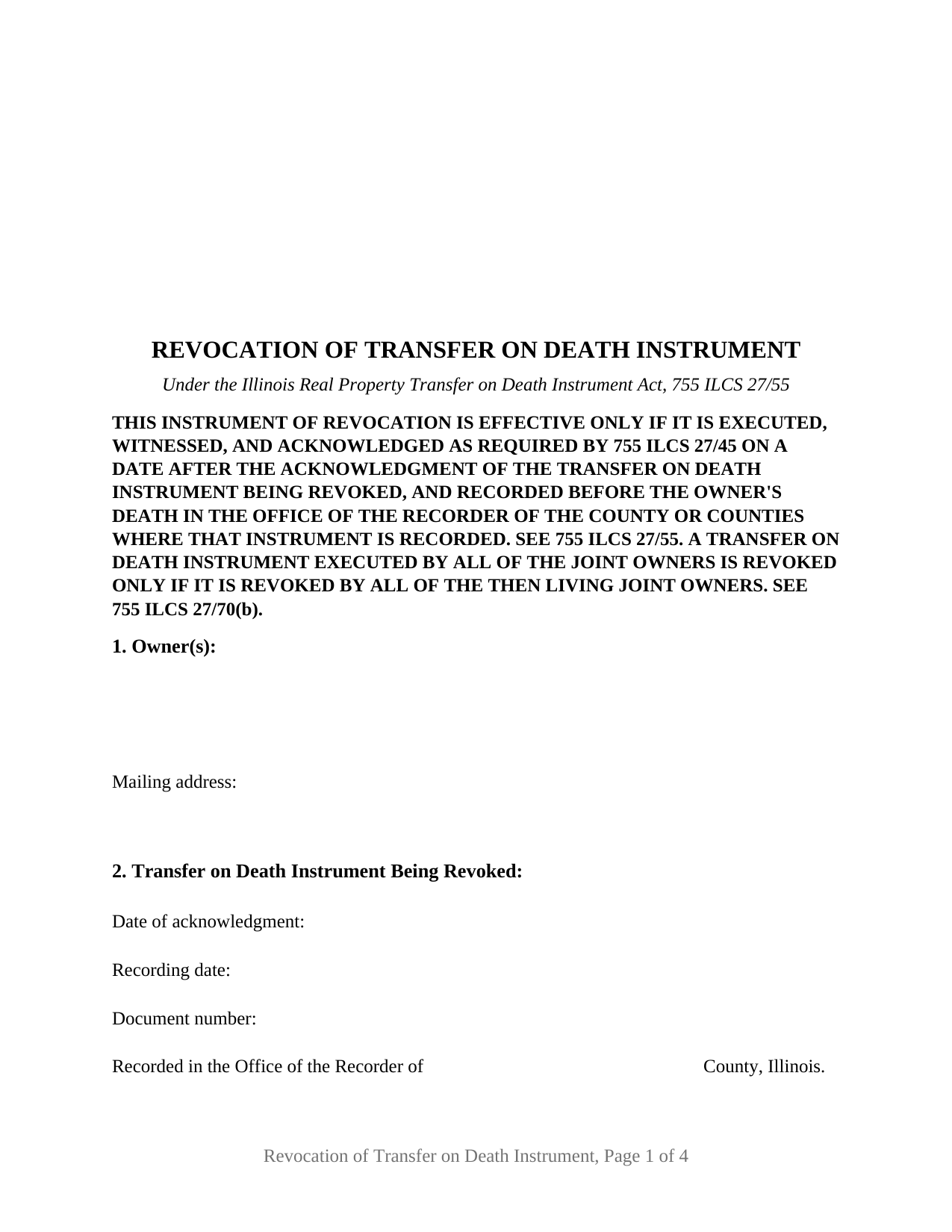
Jefferson County Transfer on Death Revocation Form
Fill in the blank Transfer on Death Revocation form formatted to comply with all Illinois recording and content requirements.
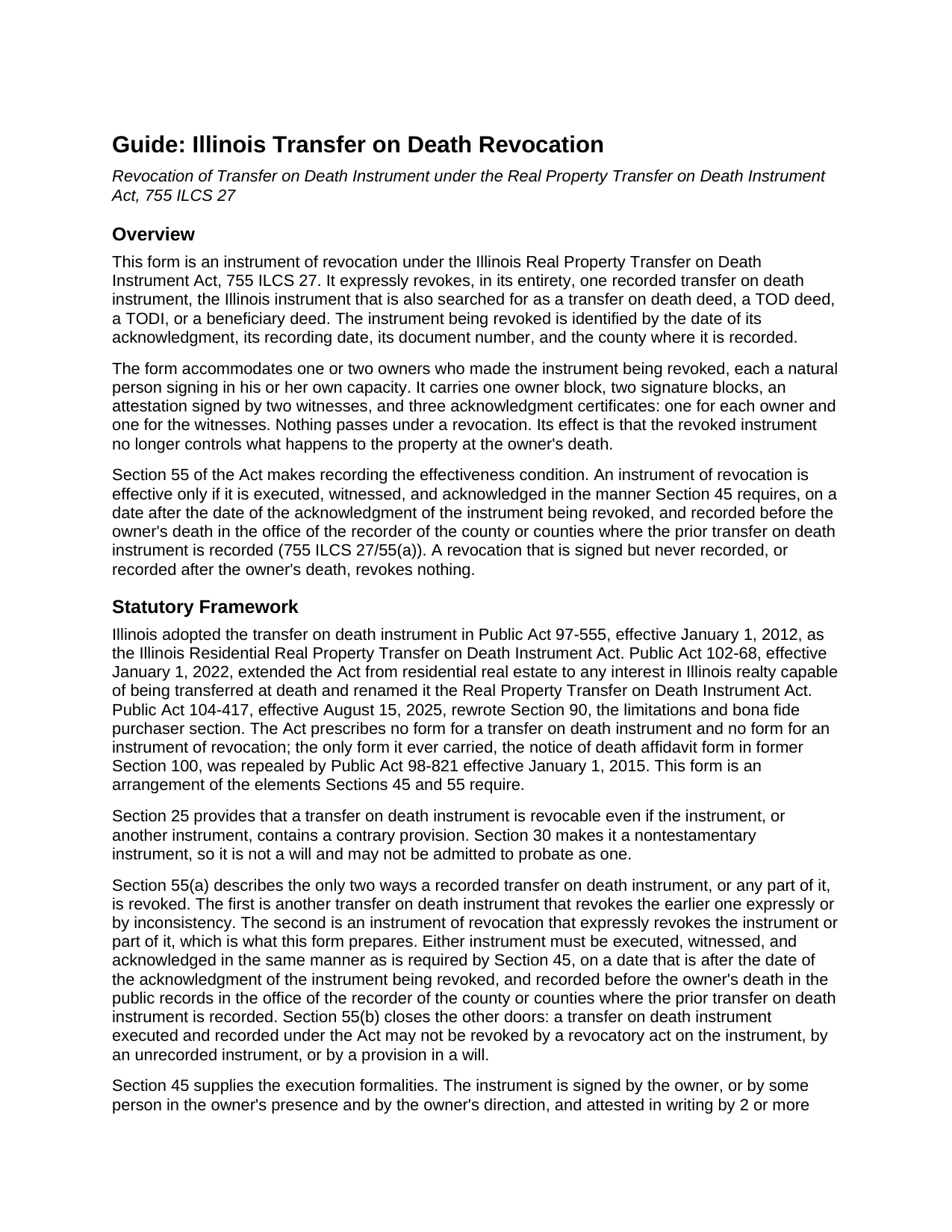
Jefferson County Transfer on Death Revocation Guide
Line by line guide explaining every blank on the Transfer on Death Revocation form.
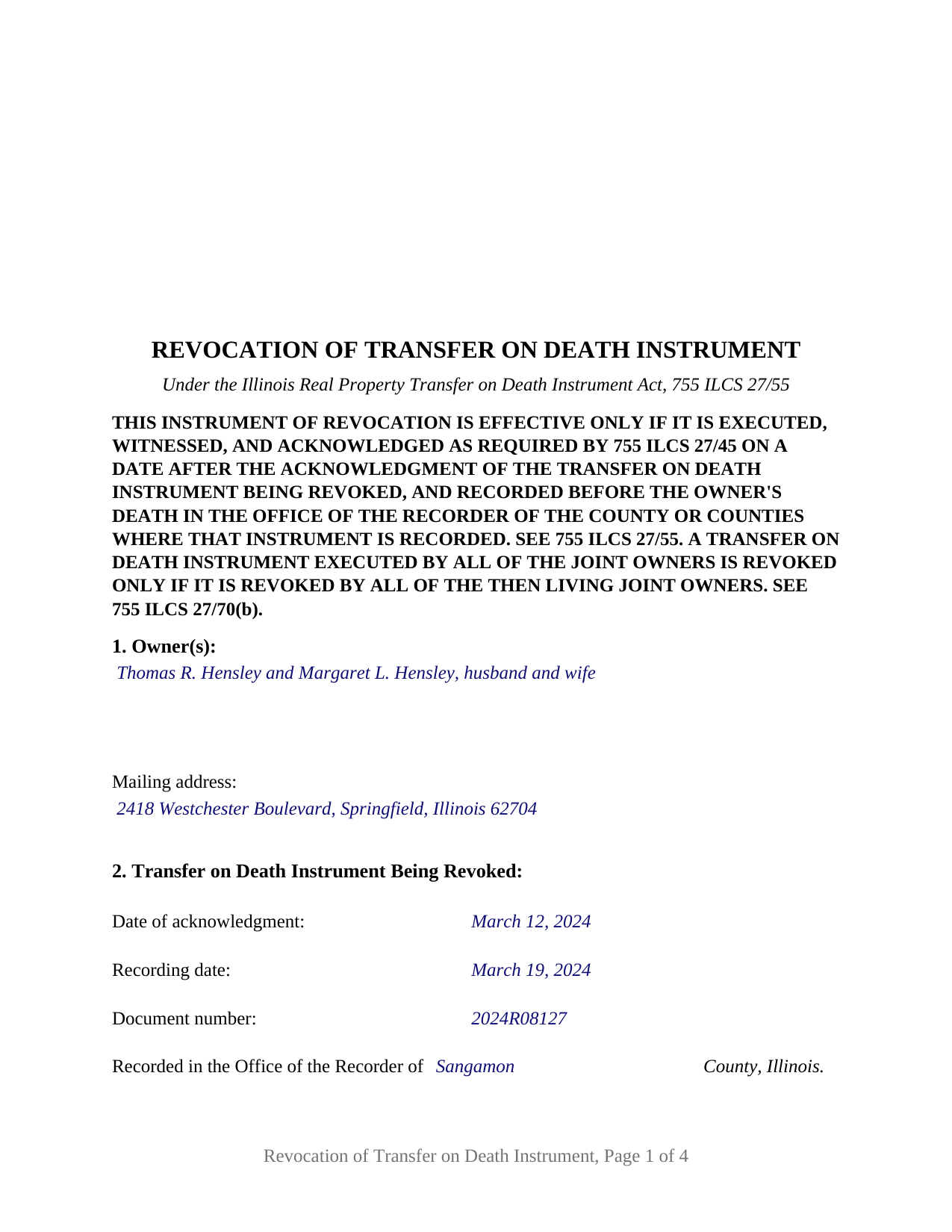
Jefferson County Completed Example of the Transfer on Death Revocation Document
Example of a properly completed Illinois Transfer on Death Revocation document for reference.
All 3 documents above included • One-time purchase • No recurring fees
Immediate Download • Secure Checkout
Additional Illinois and Jefferson County documents included at no extra charge:
Where to Record Your Documents
Jefferson County Clerk
Mount Vernon, Illinois 62864
Hours: 8:00 to 4:30 M-F
Phone: (618) 244-8020 Ext.3, Opt.1
Recording Tips for Jefferson County:
- Bring your driver's license or state-issued photo ID
- Ensure all signatures are in blue or black ink
- White-out or correction fluid may cause rejection
- Ask about their eRecording option for future transactions
- Avoid the last business day of the month when possible
Cities and Jurisdictions in Jefferson County
Properties in any of these areas use Jefferson County forms:
- Belle Rive
- Bluford
- Bonnie
- Dix
- Ina
- Mount Vernon
- Nason
- Opdyke
- Scheller
- Texico
- Waltonville
- Woodlawn
Hours, fees, requirements, and more for Jefferson County
How do I get my forms?
Forms are available for immediate download after payment. The Jefferson County forms will be in your account ready to download to your computer. An account is created for you during checkout if you don't have one. Forms are NOT emailed.
Are these forms guaranteed to be recordable in Jefferson County?
Yes. Our form blanks are guaranteed to meet or exceed the applicable formatting requirements used for recording in Jefferson County, including margin requirements, font requirements, and other layout standards. This guarantee applies to formatting, not to the legal sufficiency of information entered by the user or the suitability of a form for a particular transaction.
Can I reuse these forms?
Yes. You can reuse the forms for your personal use. For example, if you have multiple properties in Jefferson County you only need to order once.
What do I need to use these forms?
The forms are PDFs that you fill out on your computer. The free Adobe Acrobat Reader is recommended, and most PDF apps also work. You do NOT enter your property information online - you download the blank forms and complete them privately on your own computer.
Are there any recurring fees?
No. This is a one-time purchase. Nothing to cancel, no memberships, no recurring fees.
How much does it cost to record in Jefferson County?
Recording fees in Jefferson County vary. Contact the recorder's office at (618) 244-8020 Ext.3, Opt.1 for current fees.
Questions answered? Let's get started!
An Illinois transfer on death instrument stays in force until a recorded instrument takes it out of force. Section 55 of the Real Property Transfer on Death Instrument Act, 755 ILCS 27, allows only two things to revoke one: a new transfer on death instrument that contradicts it, or an instrument of revocation that expressly revokes it. This form is the second of those: an instrument of revocation carrying one or two owners who made a recorded Illinois transfer on death instrument, also searched for as a TODI, a transfer on death deed, a TOD deed, or a beneficiary deed, and who now revoke it in its entirety.
Why the revocation has to be recorded before death
Section 55(a) makes recording the effectiveness condition. An instrument of revocation is effective only if it is executed, witnessed, and acknowledged in the same manner Section 45 requires, on a date after the date of the acknowledgment of the instrument being revoked, and recorded before the owner's death in the office of the recorder of the county or counties where the prior instrument is recorded. A revocation that sits in a drawer at the owner's death revokes nothing. Section 55(b) states the other side of the rule: a transfer on death instrument may not be revoked by a revocatory act on the instrument, by an unrecorded instrument, or by a provision in a will. The form's first page carries that condition in capital letters, and its Section 2 identifies the instrument being revoked by acknowledgment date, recording date, document number, and county.
Signed like a will, not like a deed
Under Section 45, the owner signs, two or more credible witnesses attest in writing that the owner executed the instrument in their presence as a free and voluntary act while, in their belief, of sound mind and memory, and the signatures of the witnesses along with the owner's signature are acknowledged in front of a notary public. Section 55 applies the same formalities to the revocation, so the form carries an attestation paragraph with two witness blocks and a third acknowledgment certificate captioned for the witnesses. The capacity required to revoke is the capacity required to make a will, and Section 35 provides that an agent under a power of attorney, even one that purports to grant the authority, cannot revoke a transfer on death instrument for the owner.
One or two owners on a single instrument
The form recites no status, vesting, or capacity language of its own. One free-form owner block receives one or two natural persons with whatever status recital the record uses, and two signature blocks, headed OWNER and SECOND OWNER (if applicable), follow with an acknowledgment certificate for each, so a sole owner's revocation and a two-owner revocation are the same instrument with the second block left blank. A sole owner revoking the instrument he or she recorded, two joint tenants or tenants by the entirety who both executed one instrument and now revoke it together, and two tenants in common who executed one instrument covering their separate interests present the patterns the form carries. An owner acting through an attorney-in-fact, a fiduciary, an entity, three or more owners, and a revocation of only part of an instrument are configurations the form is not set up as. Under Section 70(b), an instrument executed by all of the joint owners is revoked only if it is revoked by all of the then living joint owners, and the last surviving joint owner may revoke it alone; the form's notice states that rule beside the recording condition.
Prepared by the owner
Section 95 of the Act provides that a transfer on death instrument or its revocation shall be prepared only by a licensed attorney, and in the same breath provides that nothing in the section prohibits an owner from preparing his or her own instrument or revocation, or renders it void for failing to be prepared by an attorney. The completed example shows that pattern: the owner's own name and address in the preparer statement that 55 ILCS 5/3-5022 requires on the face of every instrument affecting title to Illinois real estate.
The package includes the fillable instrument of revocation, a completed example filled in for a two-owner Sangamon County fact pattern, and the guide that walks through each section, the witness and notary formalities, and recording. This description and the guide describe the form and the governing Illinois statutes in general terms; they are not legal advice.
Important: Your property must be located in Jefferson County to use these forms. Documents should be recorded at the county recording office listed above.
This Transfer on Death Revocation meets all recording requirements specific to Jefferson County.
Our Promise
The documents you receive here are guaranteed to meet or exceed the applicable Jefferson County recording format requirements. If there is a rejection caused by our formatting, we will correct the issue or refund your payment. This guarantee applies to document formatting only and does not extend to information entered by the user, the selection of the form, or the legal effect of the completed document.
Save Time and Money
Get your Jefferson County Transfer on Death Revocation form done right the first time with Deeds.com Uniform Conveyancing Blanks. At Deeds.com, we understand that your time and money are valuable resources, and we don't want you to face a penalty fee or rejection imposed by a county recorder for submitting nonstandard documents. We constantly review and update our forms to meet rapidly changing state and county recording requirements for roughly 3,500 counties and local jurisdictions.
4.8 out of 5 - ( 4,840 Reviews )
Laurence G. 5 out of 5 stars
Easy to use, inexpensive, very helpful
Thank you!
Richard H. 5 out of 5 stars
Excellent service--couldn't be more complete and useful !
We appreciate your business and value your feedback. Thank you. Have a wonderful day!
CHARLES V. 5 out of 5 stars
Legit. Reasonable prices.
Thank you for your feedback. We really appreciate it. Have a great day!
Robert G. 5 out of 5 stars
Very nice. Especially liked that I could re-use the form since I have a couple of properties.
Thank you!
Gene N. 5 out of 5 stars
My mind is blown! For some reason, our veteran title companies wouldn't record our deed but luckily, the assessor's page recommended Deeds and other sites to e-record. It was so simple and so convenient!
We appreciate your business and value your feedback. Thank you. Have a wonderful day!
Jason B. 5 out of 5 stars
KVH provided excellent customer service (great communication was provided). I would differently use this service if needed in the further.
We appreciate your business and value your feedback. Thank you. Have a wonderful day!
Evelyn N. 5 out of 5 stars
Great website, efficient and informational. Very helpful!
We appreciate your business and value your feedback. Thank you. Have a wonderful day!
Juanita B. 5 out of 5 stars
Very easy and fast transaction. Thank you for complete set of forms needed for property transfer.
Thank you for your feedback. We really appreciate it. Have a great day!
Joseph R. 5 out of 5 stars
Wonderful service! Things changed for me on my side and the company saw this and closed my account with ease.
Thank you!
Gregory K. 5 out of 5 stars
Easy to work with. Fair price. Nice, efficient service. Would definitely use Deeds.com again for any legal documents.
We appreciate your business and value your feedback. Thank you. Have a wonderful day!
Pamela L. 5 out of 5 stars
The packet was very comprehensive and easy to use (I had just one question that wasn't clearly explained). II appreciate that the forms are kept up to date.
We appreciate your business and value your feedback. Thank you. Have a wonderful day!
Quanah N. 5 out of 5 stars
Instruction easy to follow
Thank you!
Catherine B. 5 out of 5 stars
Trying to get a hold of someone in the office is very difficult. This made it so much easier, thank you!
Thank you for your feedback. We really appreciate it. Have a great day!
Raad A. 3 out of 5 stars
Not easy to navigate
Thank you for your feedback.
Charles F. 5 out of 5 stars
I found the information easy to understand, and the forms to be correct for my needs.
Your insights are invaluable to us and help us strive for better service. Thank you for taking the time to share your thoughts.