Grand Isle County Correction Deed (Entity Grantor) Form
Last validated September 25, 2026 by our Forms Development TeamFormatted for recording in Grand Isle County, for property anywhere in the county: rural and unincorporated areas as well as Alburgh, Grand Isle, Isle La Motte, North Hero, South Hero.
- 3 documents included
- Immediate PDF download
- Formatting guarantee

Grand Isle County Correction Deed (Entity Grantor) Form
Fill in the blank Correction Deed (Entity Grantor) form formatted to comply with all Vermont recording and content requirements.

Grand Isle County Correction Deed (Entity Grantor) Guide
Line by line guide explaining every blank on the Correction Deed (Entity Grantor) form.
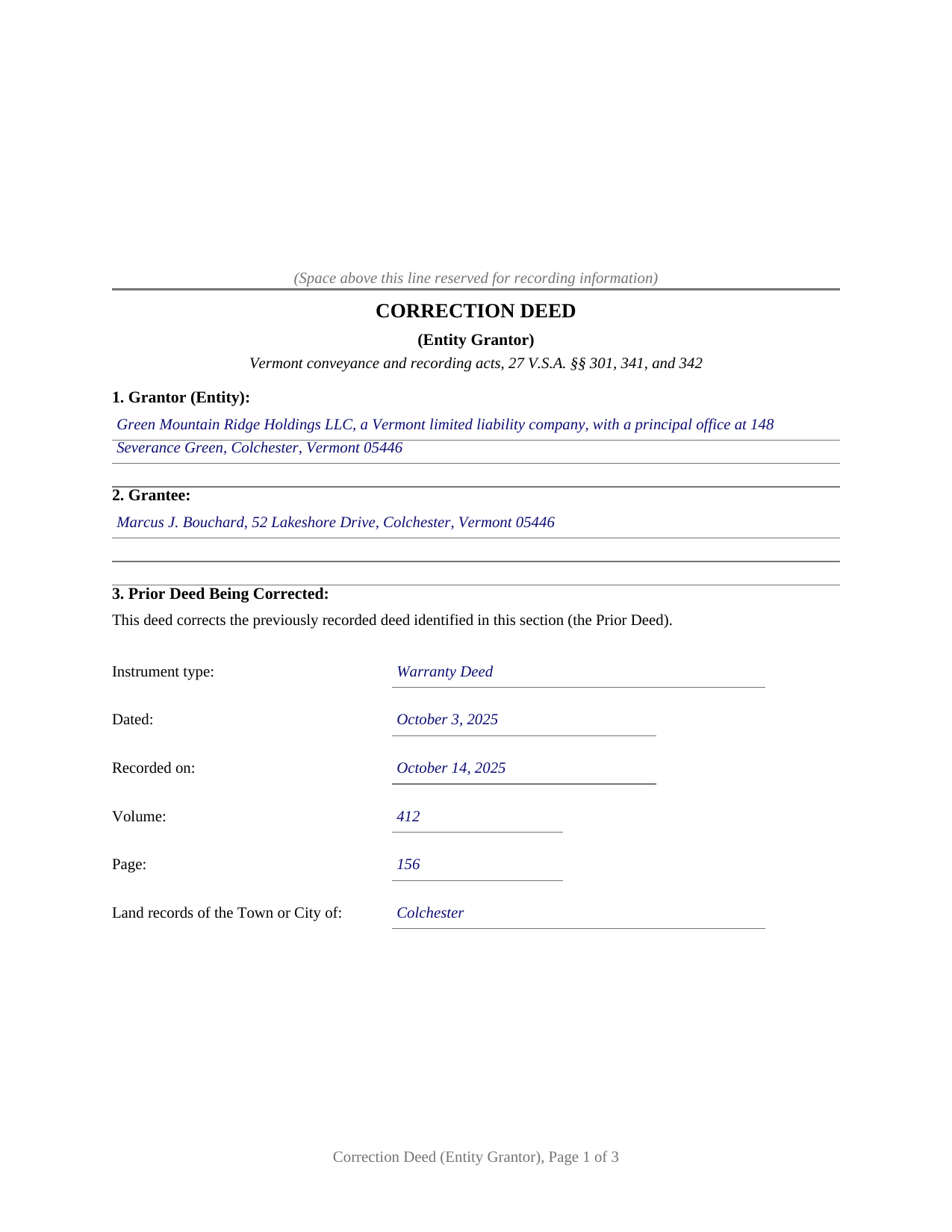
Grand Isle County Completed Example of the Correction Deed (Entity Grantor) Document
Example of a properly completed Vermont Correction Deed (Entity Grantor) document for reference.
All 3 documents above included • One-time purchase • No recurring fees
Immediate Download • Secure Checkout
Additional Vermont and Grand Isle County documents included at no extra charge:
Where to Record Your Documents
Town Clerk of Alburgh
Alburgh, Vermont 05440
Hours: M-F 9:00 to 5:00
Phone: (802) 796-3468
Town Clerk of Grand Isle
Grand Isle, Vermont 05458-0049
Hours: M-F 8:30 to 3:30; Tu 5:00 to 7:00; Sat 10:00 to 12:00
Phone: (802) 372-8830
Town Clerk of Isle La Motte
Isle La Motte, Vermont 05463
Hours: Tu & Th 7:30 to 3:30; W & F 1:00 to 5:00; Sa 8:00 to 12:00
Phone: (802) 928-3434
Town Clerk of North Hero
North Hero, Vermont 05474
Hours: M, Tu, Th 8:00 to 4:30; W, F, Sat 8:00 to noon
Phone: (802) 372-6926
Town Clerk of South Hero
South Hero, Vermont 05486
Hours: M-W 8:30 to 12 & 1:00 to 4:30; Th 8:30 to 12 & 1:00 to 5:00
Phone: (802) 372-5552
Grand Isle County Clerk
North Hero, Vermont 05474
Hours: Tue only 9:00 to 12:00
Phone: (802) 372-8350 or 928-3275 (home)
Recording Tips for Grand Isle County:
- Bring your driver's license or state-issued photo ID
- Ensure all signatures are in blue or black ink
- Ask about accepted payment methods when you call ahead
- Ask for certified copies if you need them for other transactions
- Ask if they accept credit cards - many offices are cash/check only
Cities and Jurisdictions in Grand Isle County
Properties in any of these areas use Grand Isle County forms:
- Alburgh
- Grand Isle
- Isle La Motte
- North Hero
- South Hero
Hours, fees, requirements, and more for Grand Isle County
How do I get my forms?
Forms are available for immediate download after payment. The Grand Isle County forms will be in your account ready to download to your computer. An account is created for you during checkout if you don't have one. Forms are NOT emailed.
Are these forms guaranteed to be recordable in Grand Isle County?
Yes. Our form blanks are guaranteed to meet or exceed the applicable formatting requirements used for recording in Grand Isle County, including margin requirements, font requirements, and other layout standards. This guarantee applies to formatting, not to the legal sufficiency of information entered by the user or the suitability of a form for a particular transaction.
Can I reuse these forms?
Yes. You can reuse the forms for your personal use. For example, if you have multiple properties in Grand Isle County you only need to order once.
What do I need to use these forms?
The forms are PDFs that you fill out on your computer. The free Adobe Acrobat Reader is recommended, and most PDF apps also work. You do NOT enter your property information online - you download the blank forms and complete them privately on your own computer.
Are there any recurring fees?
No. This is a one-time purchase. Nothing to cancel, no memberships, no recurring fees.
How much does it cost to record in Grand Isle County?
Recording fees in Grand Isle County vary. Contact the recorder's office at (802) 796-3468 for current fees.
Questions answered? Let's get started!
A recorded deed with a wrong lot number or a misspelled name does not fix itself, and when the grantor is a company, the fix carries its own signing pattern. This Vermont correction deed is set up for an entity grantor: a corporation, limited liability company, partnership, or other organization corrects an error in a deed it previously delivered and recorded, signing through one authorized person whose printed name, title, and representative acknowledgment the form carries.
A recorded fix that leaves the original deed in place
The deed identifies the previously recorded instrument by type, date, and volume and page in the town or city land records, describes the error in plain terms, and states the corrected information. It then confirms the conveyance the earlier deed made, restating that deed only to the extent of the correction. The original deed stays of record, and the two instruments are read together in the chain of title. Typical errors this pattern reaches are drafting mistakes: a legal description that names the wrong lot, a grantee name spelled two different ways, a recording reference that points at the wrong volume or page. The deed also states on its face that it adds no covenant of title, so whatever covenants the original deed carries continue only as stated there.
Signing for the company under Vermont acknowledgment law
Vermont deeds are signed by the party granting and acknowledged before a notary public under 27 V.S.A. 341(a), and a deed holds the estate against persons other than the grantor and the grantor's heirs only when it is acknowledged and recorded, under 27 V.S.A. 342. On this form, one authorized person signs for the organization, a printed name and title line sits under the signature (32 V.S.A. 1405 permits the recording official to require printed names under signatures), and the acknowledgment certificate is completed for a representative signer in the style of Vermont's statutory short form certificates in 26 V.S.A. 5368. The blank following the certificate's operative sentence holds the signer's name and capacity, in the pattern the completed example shows for a manager signing on behalf of a limited liability company.
No new transfer tax for a true correction
Vermont taxes transfers of title by deed and bars the town clerk from recording a deed transferring title unless a complete Property Transfer Tax Return accompanies it, under 32 V.S.A. 9608. A correction sits in its own category: 32 V.S.A. 9603(4) exempts transfers that, without additional consideration, confirm or correct a transfer previously recorded. The return still accompanies the deed at recording, with the exemption entered on it, and the deed's consideration section states the fact supporting the claim, that no additional consideration is paid and the deed is given to confirm and correct a transfer previously recorded. The form is set up for exactly that category. A transaction that moves title to a different grantee, adds or removes land, or exchanges new value describes a new conveyance rather than a correction, with its own tax treatment.
Recorded town by town
Vermont land records are municipal, so a corrective deed is recorded with the clerk of the town or city where the land lies, at the statewide fee of 15 dollars per page, alongside the transfer tax return and its own filing fee. Where a deed refers to a survey prepared or revised after July 1, 1988, Vermont law has the deed accompanied by the survey or citing the volume and page where the survey is recorded, under 27 V.S.A. 341(b), a detail that matters when the correction touches the legal description. The form reserves the top of the first page for the clerk's recording information and keeps every entry inside Vermont's page and legibility standards.
The download includes the correction deed as a fillable PDF, a completed example showing the deed filled in for a realistic Vermont fact pattern, and a plain language guide that walks through each numbered section, the representative acknowledgment, and the recording and transfer tax return steps. The materials describe Vermont law in general terms and are not legal advice.
Important: Your property must be located in Grand Isle County to use these forms. Documents should be recorded at the county recording office listed above.
This Correction Deed (Entity Grantor) meets all recording requirements specific to Grand Isle County.
Our Promise
The documents you receive here are guaranteed to meet or exceed the applicable Grand Isle County recording format requirements. If there is a rejection caused by our formatting, we will correct the issue or refund your payment. This guarantee applies to document formatting only and does not extend to information entered by the user, the selection of the form, or the legal effect of the completed document.
Save Time and Money
Get your Grand Isle County Correction Deed (Entity Grantor) form done right the first time with Deeds.com Uniform Conveyancing Blanks. At Deeds.com, we understand that your time and money are valuable resources, and we don't want you to face a penalty fee or rejection imposed by a county recorder for submitting nonstandard documents. We constantly review and update our forms to meet rapidly changing state and county recording requirements for roughly 3,500 counties and local jurisdictions.
4.8 out of 5 - ( 4,836 Reviews )
O. Peter P. 2 out of 5 stars
I find your forms hard to use, inasmuch as the forms cannot be converted to a Word Document. Editing and deleting of extra lines is not possible, making for a deed with large blank spaces. Document that results is not usable for me.
Sorry to hear that we did not meet your expectations. We have canceled your order and payment. We do hope you find something more suitable to your needs elsewhere. Have a wonderful day.
SHEDDRICK H. 5 out of 5 stars
I got exactly what I paid for. No fraudulent transaction on my card. I like that. This is an excellent service. Straight and to the point help. That e-recording process looks like a winner. When I get my forms filled out I might use that.
We appreciate your business and value your feedback. Thank you. Have a wonderful day!
Victoria L. 5 out of 5 stars
This is a fantastic website and financial savings to many. Being able to download and complete the document I needed vs having my attorney complete saved me $800. I would highly recommend this website.
Thank you for the kind words Victoria. Have a great day!
Scott P. 5 out of 5 stars
So far so good
Thank you!
Jay B. 5 out of 5 stars
I've never had a problem locating the records I need. I can't imagine what can be done to improve the service.
Thank you!
Claire W. 5 out of 5 stars
The price is right, and very simple to follow
Thank you!
Vickie M. 5 out of 5 stars
The website was easy to use even for me with little computer knowledge.
We appreciate your business and value your feedback. Thank you. Have a wonderful day!
Betty S. 5 out of 5 stars
Thank you for the excellent and complete layout of all forms needed to complete the Affidavit of Death and Heirship, including the notarial officer and an example of how these forms should be completed. This method definitely saves time and money and an answer to my family's Prayers.
Thank you for your feedback. We really appreciate it. Have a great day!
Randy R. 5 out of 5 stars
Thank you So far everything worked great. Got my downloads so I'm off and running. I hope the rest of the paperwork goes this easy.
Thank you Randy, we appreciate your feedback.
Tim P. 5 out of 5 stars
Super easy and they filed my paperwork the same day
Thank you for your feedback. We really appreciate it. Have a great day!
Dennis D. 5 out of 5 stars
Heard about this service from a lawyer who said their offic used it quite a bit.
Thank you for your feedback. We really appreciate it. Have a great day!
Jerri S. 5 out of 5 stars
Very helpful. Print out go to court house spent less then 15 minutes there and done! Thanks will use again.
Thank you Jerri, we appreciate your feedback.
Tammy S. 5 out of 5 stars
Easy to download, great guidelines, and samples of each form needed.
Thank you!
Valerie I. 5 out of 5 stars
Quick and easy! Had my document submitted to the county and back in one day. Good rates as well!
Thank you!
Charles S. 5 out of 5 stars
Easy to set up and fast service.
We appreciate your business and value your feedback. Thank you. Have a wonderful day!