Placer County Certificate of Trust Form
Last validated September 10, 2026 by our Forms Development TeamFormatted for recording in Placer County, for property anywhere in the county: rural and unincorporated areas as well as Alta, Applegate, Auburn, Carnelian Bay, Colfax, Dutch Flat, Emigrant Gap, Foresthill and 16 more.
- 3 documents included
- Immediate PDF download
- Formatting guarantee
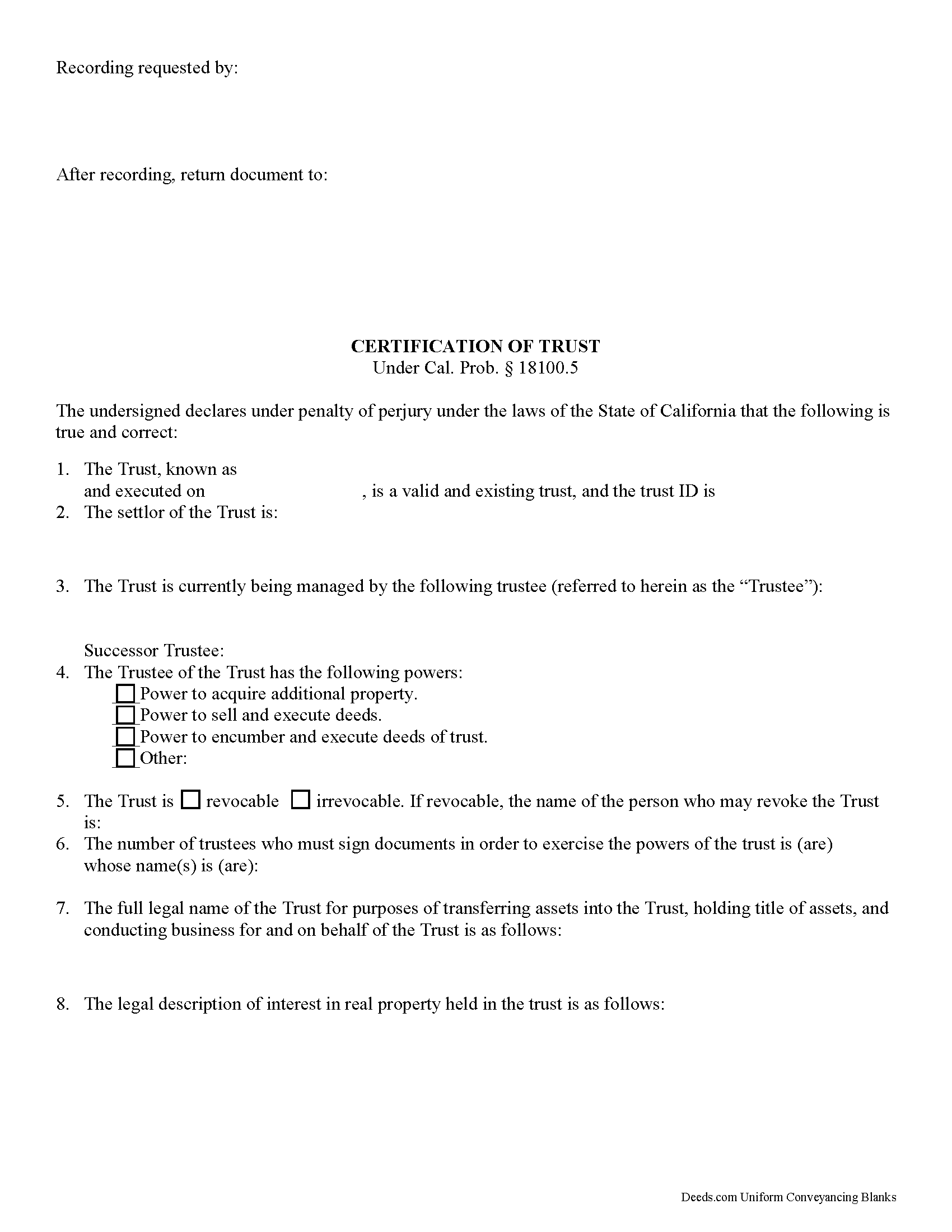
Placer County Certificate of Trust Form
Fill in the blank form formatted to comply with all recording and content requirements.
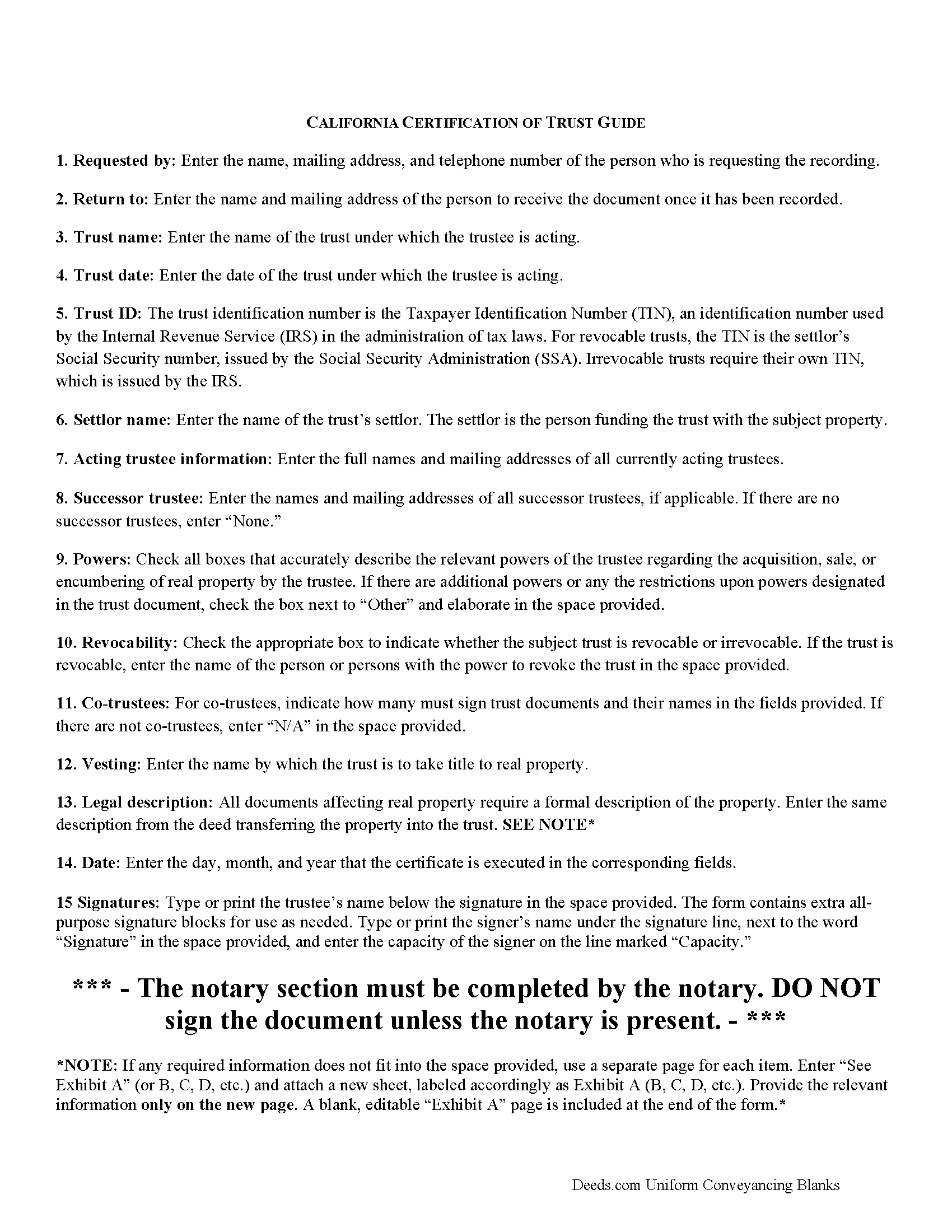
Placer County Certificate of Trust Guide
Line by line guide explaining every blank on the form.
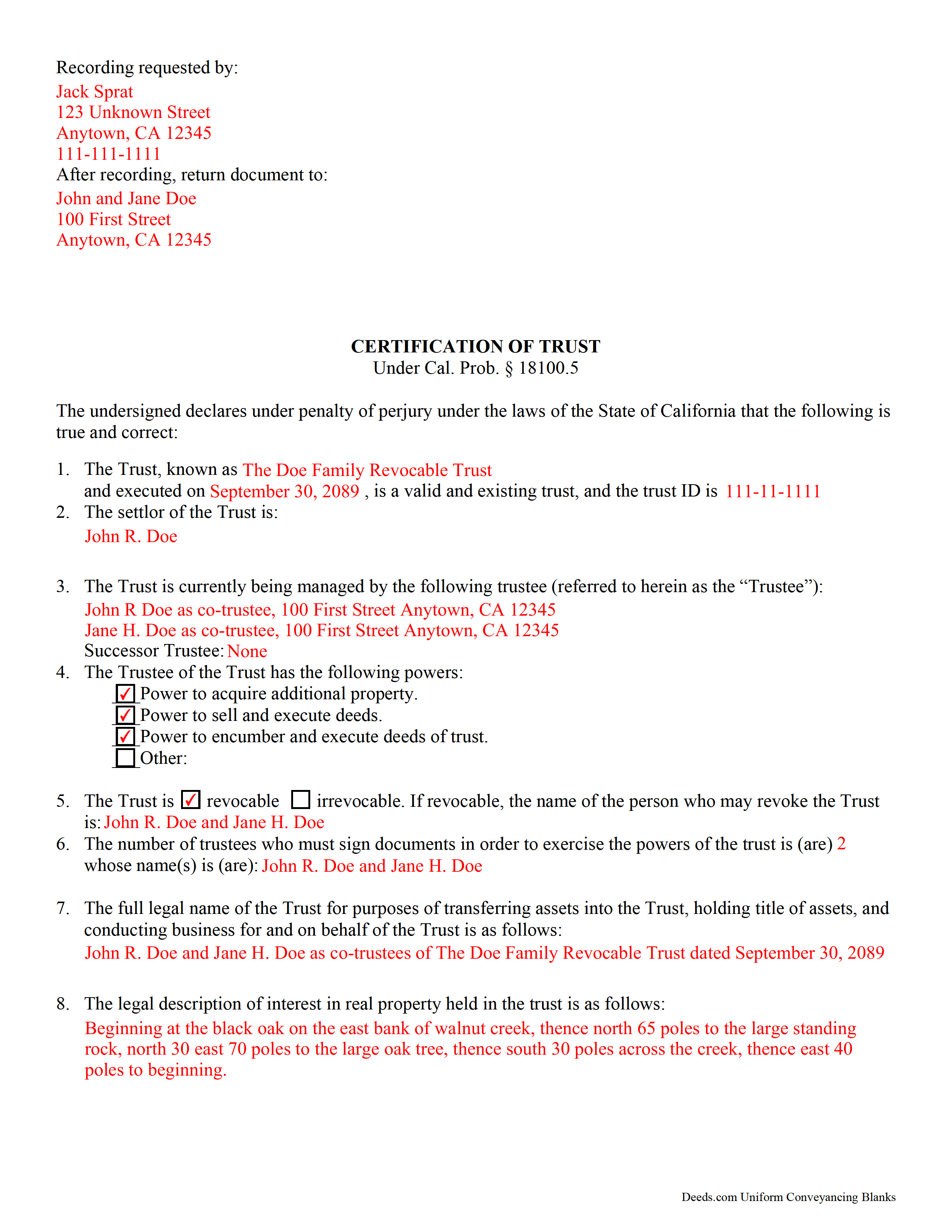
Placer County Completed Example of the Certificate of Trust Document
Example of a properly completed form for reference.
All 3 documents above included • One-time purchase • No recurring fees
Immediate Download • Secure Checkout
Additional California and Placer County documents included at no extra charge:
Where to Record Your Documents
Placer County Clerk-Recorder
Auburn, California 95603
Hours: Mon to Fri 8:00 to 5:00 / Recording until 4:00
Phone: (530) 886-5600
Satellite Office
Auburn, California 95603
Hours: Monday through Friday 8 a.m. to 4 p.m.
Phone: (530) 886-5600
Recording Tips for Placer County:
- Bring your driver's license or state-issued photo ID
- Ensure all signatures are in blue or black ink
- Ask if they accept credit cards - many offices are cash/check only
- Check that your notary's commission hasn't expired
- Documents must be on 8.5 x 11 inch white paper
Cities and Jurisdictions in Placer County
Properties in any of these areas use Placer County forms:
- Alta
- Applegate
- Auburn
- Carnelian Bay
- Colfax
- Dutch Flat
- Emigrant Gap
- Foresthill
- Gold Run
- Granite Bay
- Homewood
- Kings Beach
- Lincoln
- Loomis
- Meadow Vista
- Newcastle
- Olympic Valley
- Penryn
- Rocklin
- Roseville
- Sheridan
- Tahoe City
- Tahoe Vista
- Weimar
Hours, fees, requirements, and more for Placer County
How do I get my forms?
Forms are available for immediate download after payment. The Placer County forms will be in your account ready to download to your computer. An account is created for you during checkout if you don't have one. Forms are NOT emailed.
Are these forms guaranteed to be recordable in Placer County?
Yes. Our form blanks are guaranteed to meet or exceed the applicable formatting requirements used for recording in Placer County, including margin requirements, font requirements, and other layout standards. This guarantee applies to formatting, not to the legal sufficiency of information entered by the user or the suitability of a form for a particular transaction.
Can I reuse these forms?
Yes. You can reuse the forms for your personal use. For example, if you have multiple properties in Placer County you only need to order once.
What do I need to use these forms?
The forms are PDFs that you fill out on your computer. The free Adobe Acrobat Reader is recommended, and most PDF apps also work. You do NOT enter your property information online - you download the blank forms and complete them privately on your own computer.
Are there any recurring fees?
No. This is a one-time purchase. Nothing to cancel, no memberships, no recurring fees.
How much does it cost to record in Placer County?
Recording fees in Placer County vary. Contact the recorder's office at (530) 886-5600 for current fees.
Questions answered? Let's get started!
California Certification of Trust
In California, the certification of trust is governed by Probate Code Section 18100.5.
A certificate of trust is used by an acting trustee or trustees of a trust to prove to financial institutions or other third parties that he/she/they has/have the authority to act on behalf of the trust. The certificate is used in lieu of the full trust document to keep nonessential information about the trust, such as the identities of trust beneficiaries, confidential.
The certificate verifies the existence of the trust and presents the pertinent details of the trust, such as the settlor, the trustee, the powers granted to the trustee, and, in the case that there are co-trustees, the number and identity of persons required to sign legal documents dealing with the trust. The certificate also specifies how the trust will vest title to real property.
Like all documents affecting real estate, the certification requires a legal description of the real property subject to the trust. In California, the certification also must include the trust's taxpayer ID, a number that is either the SSN of the settlor (in the case of revocable trusts) or an EIN assigned by the IRS (in the case of irrevocable trusts).
Trust law can quickly become complicated, and each case is unique, so contact a lawyer with any questions that arise.
(California Certificate of Trust Package includes form, guidelines, and completed example)
Important: Your property must be located in Placer County to use these forms. Documents should be recorded at the county recording office listed above.
This Certificate of Trust meets all recording requirements specific to Placer County.
Our Promise
The documents you receive here are guaranteed to meet or exceed the applicable Placer County recording format requirements. If there is a rejection caused by our formatting, we will correct the issue or refund your payment. This guarantee applies to document formatting only and does not extend to information entered by the user, the selection of the form, or the legal effect of the completed document.
Save Time and Money
Get your Placer County Certificate of Trust form done right the first time with Deeds.com Uniform Conveyancing Blanks. At Deeds.com, we understand that your time and money are valuable resources, and we don't want you to face a penalty fee or rejection imposed by a county recorder for submitting nonstandard documents. We constantly review and update our forms to meet rapidly changing state and county recording requirements for roughly 3,500 counties and local jurisdictions.
4.8 out of 5 - ( 4,819 Reviews )
Jana H. 5 out of 5 stars
This company has made my life so much easier. I'm not driving 25 miles twice a week to record a document. I'm almost giddy! Thank you for making my job so much faster! Jana Hamilton
We appreciate your business and value your feedback. Thank you. Have a wonderful day!
Marc Z. 5 out of 5 stars
Thank you for having an easy to navigate website with updated documents! Had everything I needed, took care of business and on to the next transaction.- Aloha
Thank you Marc. Have a fantastic day!
Melody P. 5 out of 5 stars
Great service continues! Thanks again!
Thank you!
Joyce D. 5 out of 5 stars
Good after I figured out the form process. Hopefully I won't be charged for two as I redid the request thinking I might have made a mistake in the first request.
Thank you for your feedback Joyce. We have reviewed your account and there have been no duplicate orders submitted. Have a great day!
Donovan M. 5 out of 5 stars
Straight forward, very fair price with excellent instructions and example. I am very pleased with your product!
Thank you!
John M. 5 out of 5 stars
Easy to use site with a good selection of documents
Thank you!
James D. 4 out of 5 stars
good product, but would prefer an editable document, such as word
Thanks for your feedback James.
christopher c. 5 out of 5 stars
Everything was professionally, handled and the process was simple and easy. I appreciated the responsiveness and recommendations from the reviewer of my package and look forward to getting my other submissions done. Wish I knew about this process sooner, thanks
Thanks, Christopher! We're glad the process was smooth and our team could help. Looking forward to assisting with your future submissions!
Bruno W. 5 out of 5 stars
Great website. average person needs to care of stuff like this, and presented in a simple direct way. was easy to do. Like best: the sample sheet really made me secure i was doing everything in the right way. My only issue was finding the website. Keep up the good We work. Need more common legal information like this.
Thank you for the kind words, Bruno. We’re glad the sample sheet helped make the process clear and gave you confidence while preparing your documents. Our goal is to present complex legal forms in a straightforward way so people can handle routine filings themselves. We appreciate the feedback and are continuing to expand helpful information and resources on the site.
Jennifer J. 5 out of 5 stars
I have to admit this process was a scary one but you have made it very clear and simple to follow along with. I felt their virtual hand holding, that is how user friendly it is. Thank you for being top notch.
Thank you!
Thomas M. 5 out of 5 stars
EXCELLENT resource for ALL state documents! The forms come with explanations and examples. A real Deal!!!
Thank you!
Javoura G. 5 out of 5 stars
Great was not hard at all to do and process only wished it told how much it cost to actually submit the forms
Thank you for your feedback. We really appreciate it. Have a great day!
Resa J. 5 out of 5 stars
Seamless. Excellent.
Thank you for your feedback Resa. Have a wonderful day!
Kristen N. 5 out of 5 stars
Very easy to use, helpful instructions and examples. I also like the chat feature and the erecording. So much better than other DIY law websites out there.
We appreciate your business and value your feedback. Thank you. Have a wonderful day!
Tod F. 5 out of 5 stars
In 15 minutes I had my out of state documents. I am very pleased with the ease of acquiring them. I will definitely be using Deeds.com again if the need arises.
We appreciate your business and value your feedback. Thank you. Have a wonderful day!