Placer County Notice of Revocable Transfer on Death Deed Form
Last validated October 28, 2026 by our Forms Development TeamFormatted for recording in Placer County, for property anywhere in the county: rural and unincorporated areas as well as Alta, Applegate, Auburn, Carnelian Bay, Colfax, Dutch Flat, Emigrant Gap, Foresthill and 16 more.
- 3 documents included
- Immediate PDF download
- Formatting guarantee
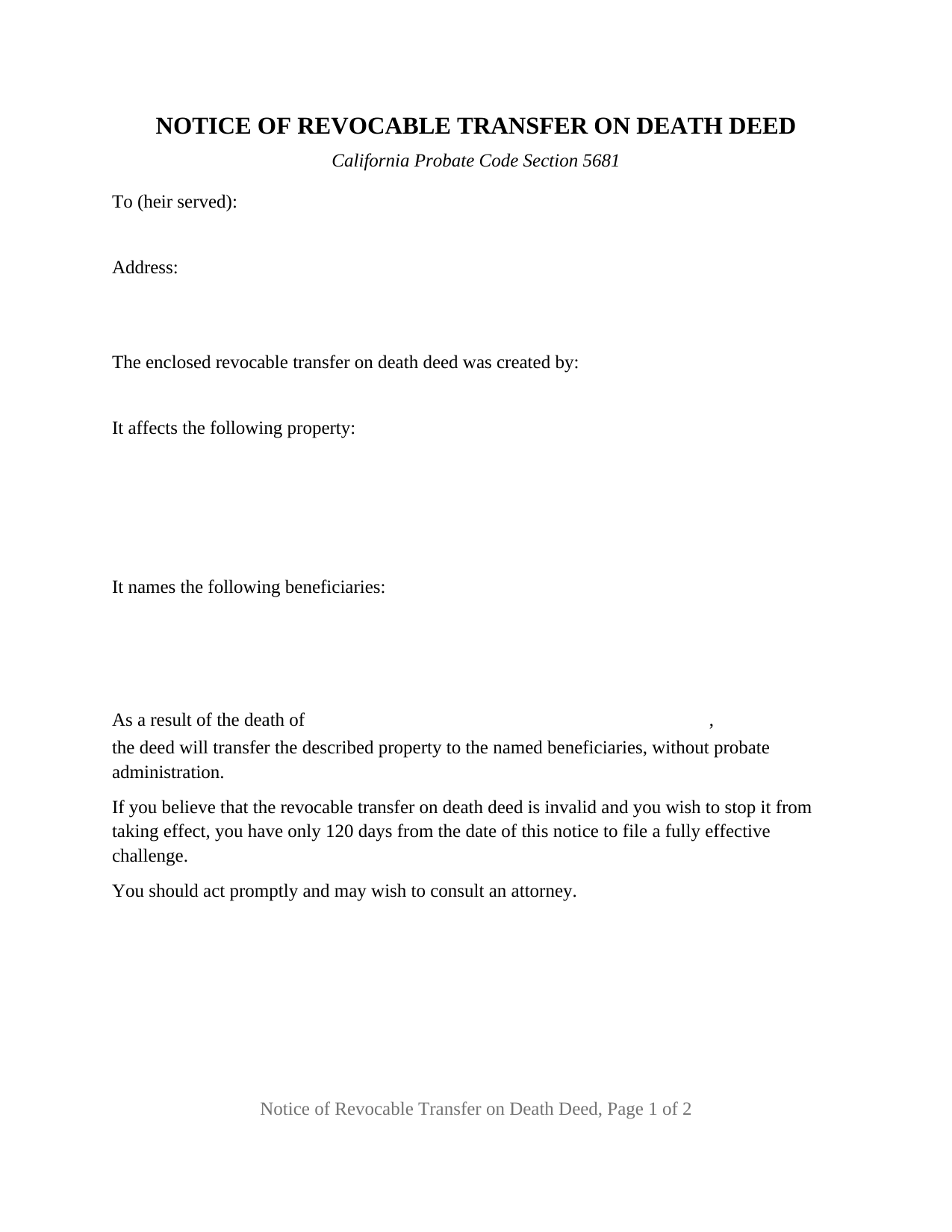
Placer County Notice of Revocable Transfer on Death Deed Form
Fill in the blank Notice of Revocable Transfer on Death Deed form formatted to comply with all California recording and content requirements.

Placer County Notice of Revocable Transfer on Death Deed Guide
Line by line guide explaining every blank on the Notice of Revocable Transfer on Death Deed form.

Placer County Completed Example of the Notice of Revocable Transfer on Death Deed Document
Example of a properly completed California Notice of Revocable Transfer on Death Deed document for reference.
All 3 documents above included • One-time purchase • No recurring fees
Immediate Download • Secure Checkout
Additional California and Placer County documents included at no extra charge:
Where to Record Your Documents
Placer County Clerk-Recorder
Auburn, California 95603
Hours: Mon to Fri 8:00 to 5:00 / Recording until 4:00
Phone: (530) 886-5600
Satellite Office
Auburn, California 95603
Hours: Monday through Friday 8 a.m. to 4 p.m.
Phone: (530) 886-5600
Recording Tips for Placer County:
- Bring your driver's license or state-issued photo ID
- Ensure all signatures are in blue or black ink
- Recorded documents become public record - avoid including SSNs
- Recording fees may differ from what's posted online - verify current rates
- Request a receipt showing your recording numbers
Cities and Jurisdictions in Placer County
Properties in any of these areas use Placer County forms:
- Alta
- Applegate
- Auburn
- Carnelian Bay
- Colfax
- Dutch Flat
- Emigrant Gap
- Foresthill
- Gold Run
- Granite Bay
- Homewood
- Kings Beach
- Lincoln
- Loomis
- Meadow Vista
- Newcastle
- Olympic Valley
- Penryn
- Rocklin
- Roseville
- Sheridan
- Tahoe City
- Tahoe Vista
- Weimar
Hours, fees, requirements, and more for Placer County
How do I get my forms?
Forms are available for immediate download after payment. The Placer County forms will be in your account ready to download to your computer. An account is created for you during checkout if you don't have one. Forms are NOT emailed.
Are these forms guaranteed to be recordable in Placer County?
Yes. Our form blanks are guaranteed to meet or exceed the applicable formatting requirements used for recording in Placer County, including margin requirements, font requirements, and other layout standards. This guarantee applies to formatting, not to the legal sufficiency of information entered by the user or the suitability of a form for a particular transaction.
Can I reuse these forms?
Yes. You can reuse the forms for your personal use. For example, if you have multiple properties in Placer County you only need to order once.
What do I need to use these forms?
The forms are PDFs that you fill out on your computer. The free Adobe Acrobat Reader is recommended, and most PDF apps also work. You do NOT enter your property information online - you download the blank forms and complete them privately on your own computer.
Are there any recurring fees?
No. This is a one-time purchase. Nothing to cancel, no memberships, no recurring fees.
How much does it cost to record in Placer County?
Recording fees in Placer County vary. Contact the recorder's office at (530) 886-5600 for current fees.
Questions answered? Let's get started!
A California revocable transfer on death deed sits in the county records during the owner's lifetime and moves the property at death without probate. What it does not do is tell the family. Probate Code Section 5681, added by Senate Bill 315 in 2021, closed that gap: after the transferor dies, the beneficiary serves notice on the transferor's heirs, along with a copy of the recorded transfer on death deed and a copy of the death certificate. This form is that notice, in the wording Section 5681(b) prescribes.
A notice that is delivered, not recorded
Almost every document in a California TOD deed file goes to the county recorder. This one does not. Section 5681(e) provides for delivery to the heir at the last known address by one of the methods described in Probate Code Section 1215, which covers mail, personal delivery, and, with the recipient's express consent on a Judicial Council form, electronic delivery. Because the notice is delivered rather than recorded, it carries no recording request block, no return address block, and no reserved stamp space at the top of the page. The form is what the statute describes: a letter to one heir, with the heir's name and address at the top and the statutory statements below.
The clock the notice starts
The prescribed wording ends with a warning about time: a challenge to the deed has only 120 days from the date of the notice to be fully effective. That is why the form carries a dated signature block for the beneficiary sending it, since the date entered there is the date the statutory sentence measures from. A separate 120 day period appears in Probate Code Sections 5652(b) and 5694, and runs from recordation of the affidavit described in Section 5682(c). The two periods have different starting points, and the guide sets them side by side with their citations.
Why a beneficiary keeps the record
Section 5682 is the reason the notification step matters to title. A buyer or lender dealing with the beneficiary in good faith and for value takes the rights and protections of a distributee under a final order for distribution, but only where an affidavit of death has been recorded for the property and an affidavit has been recorded containing a statement in substantially the form "I, [name of beneficiary], served the notice required by Probate Code Section 5681." Those two affidavits are separate recorded instruments, prepared and recorded separately, and neither is part of this package. The notice is the act the second affidavit swears to.
What the form carries
The form pairs one sender with one recipient: a beneficiary named in the recorded deed, and one heir of the transferor. Section 5681(f) provides that where a deed names more than one beneficiary, only one of them carries out the section, and Section 5681(c) leaves the identification of the heirs to that beneficiary, who relies on a final judicial determination of heirship where one is known and otherwise makes a good faith determination by any reasonable means. The entries follow the statute: the deceased transferor's name, the property description used on the deed, the beneficiaries named on the deed, and the transferor's name again in the operative sentence. Added at the end are the recording date, instrument number, and county of the enclosed deed, and the signature, printed name, and date of the beneficiary. Where a transferor left several heirs, a separate copy carries each heir's name and address.
The exposure the statute attaches
Section 5681(g) gives the step teeth. A beneficiary who fails to serve a known heir who is not a beneficiary is responsible for all damages caused by the failure, unless the beneficiary shows a reasonably diligent effort, which the statute defines as delivery under Section 1215 to the heir's last actually known address. The same subdivision protects a beneficiary who reasonably relied in good faith on another beneficiary's undertaking, and states that a beneficiary is not held to the same standard as a fiduciary. Subdivision (d) excuses a copy to an heir who is unknown, and to one who is known but cannot be located after reasonable diligence.
This package contains the fillable notice form, a completed example filled with a Riverside County fact pattern, and a guide that walks the form entry by entry and sets out the Section 5681 framework with citations. It is a self-help product and not legal advice; a California attorney can address how these rules apply to a particular estate.
Important: Your property must be located in Placer County to use these forms. Documents should be recorded at the county recording office listed above.
This Notice of Revocable Transfer on Death Deed meets all recording requirements specific to Placer County.
Our Promise
The documents you receive here are guaranteed to meet or exceed the applicable Placer County recording format requirements. If there is a rejection caused by our formatting, we will correct the issue or refund your payment. This guarantee applies to document formatting only and does not extend to information entered by the user, the selection of the form, or the legal effect of the completed document.
Save Time and Money
Get your Placer County Notice of Revocable Transfer on Death Deed form done right the first time with Deeds.com Uniform Conveyancing Blanks. At Deeds.com, we understand that your time and money are valuable resources, and we don't want you to face a penalty fee or rejection imposed by a county recorder for submitting nonstandard documents. We constantly review and update our forms to meet rapidly changing state and county recording requirements for roughly 3,500 counties and local jurisdictions.
4.8 out of 5 - ( 4,847 Reviews )
Gloria B. 5 out of 5 stars
Super easy and efficient. One time charge for the form with no commitment to a recurring charge for monthly membership. *****
Thank you for your feedback. We really appreciate it. Have a great day!
WAYNE C. 5 out of 5 stars
Wonderful forms, been coming here for years (since 2012) for my deed forms and they have never failed.
We appreciate your business and value your feedback. Thank you. Have a wonderful day!
Barbara P. 5 out of 5 stars
So easy and fast!
We appreciate your business and value your feedback. Thank you. Have a wonderful day!
John K. 5 out of 5 stars
I was unable to finish what I started due to computer crash. I'll get back soon. I paid off my mortgage last year in November. I need to see what to do to get the deed to my property.
Thank you!
Ellen D. 5 out of 5 stars
Fantastic service! The forms were available to download instantly and they were perfect for my situation. Easy to use on my older computer. Thanks!
Thank you for your feedback. We really appreciate it. Have a great day!
Eduardo A. 5 out of 5 stars
Perfect, blank forms, just what I ordered. Easy to download, understand, and complete.
Thank you!
Shawn S. 5 out of 5 stars
Listen, I love your services. It's been such a convenience utilizing it.
We appreciate your business and value your feedback. Thank you. Have a wonderful day!
linda l. 4 out of 5 stars
I was very impressed with the Mineral Deed form, especially with the instructions to fill it out AND a copy of a completed for to compare against. This definitely saved me money for an attorney. The one thing I don't understand, though, is why I could not save the completed Deed to my hard drive. I did have to change a few things after the fact and I had to re-type the entire page to make the corrections. If not for this, I would definitely rate the forms and instructions as a 5 star.
Thank you for your feedback. We really appreciate it. Have a great day!
Richard D. 5 out of 5 stars
We are pleased with your service. It is user friendly and efficient,
Thank you!
Scott M. 4 out of 5 stars
Very straightforward. Only issue was it took a few times for the mineral deed form to show up. The first few times it instead showed a mineral rights transfer between operators.
Your feedback is valuable to us and helps us improve. Thank you for sharing your thoughts!
Lynnellen S. 2 out of 5 stars
My rating is not a 5. Although it had good instructions, it would NOT print the whole document no matter how many times I inputted the names. I ended up writing it in to complete. I also recommend putting it on one page. I had to pay an additional fees per page and if I had to notarize it, why did I have to find 2 witnesses as well. I deserve a discount for the time I spent repeatedly putting the same data. I was trying to save money since Im on social security only. It didnt. Get it to work correctly
Thank you for your feedback Lynnellen. Sorry to hear of your struggle with our document. We've gone ahead and refunded your payment. Hope you have a wonderful day.
Robert W. 5 out of 5 stars
The forms were as I expected them to be. The guide was very helpful. Overall very good.
Thanks Robert. We appreciate your feedback.
ROBERT W. 5 out of 5 stars
Very good service .I recommend it if you need your documentation on a weekend or when offices are closed.Very fast service
We appreciate your business and value your feedback. Thank you. Have a wonderful day!
Michael H. 5 out of 5 stars
Site was easy to understand and use. Service was prompt. Good job Montgomery County!
Thank you!
Joseph T. 5 out of 5 stars
I downloaded the wrong form, how do I change this, or can I?
Sorry to hear that. As a one time courtesy we have canceled your order and payment for the documents you ordered in error. Have a great day.