Greenlee County Revocation of Beneficiary Deed (Individual Sole Owner) Form
Last validated October 20, 2026 by our Forms Development TeamFormatted for recording in Greenlee County, for property anywhere in the county: rural and unincorporated areas as well as Blue, Clifton, Duncan, Morenci.
- 3 documents included
- Immediate PDF download
- Formatting guarantee

Greenlee County Revocation of Beneficiary Deed (Individual Sole Owner) Form
Fill in the blank Revocation of Beneficiary Deed (Individual Sole Owner) form formatted to comply with all Arizona recording and content requirements.

Greenlee County Revocation of Beneficiary Deed (Individual Sole Owner) Guide
Line by line guide explaining every blank on the Revocation of Beneficiary Deed (Individual Sole Owner) form.
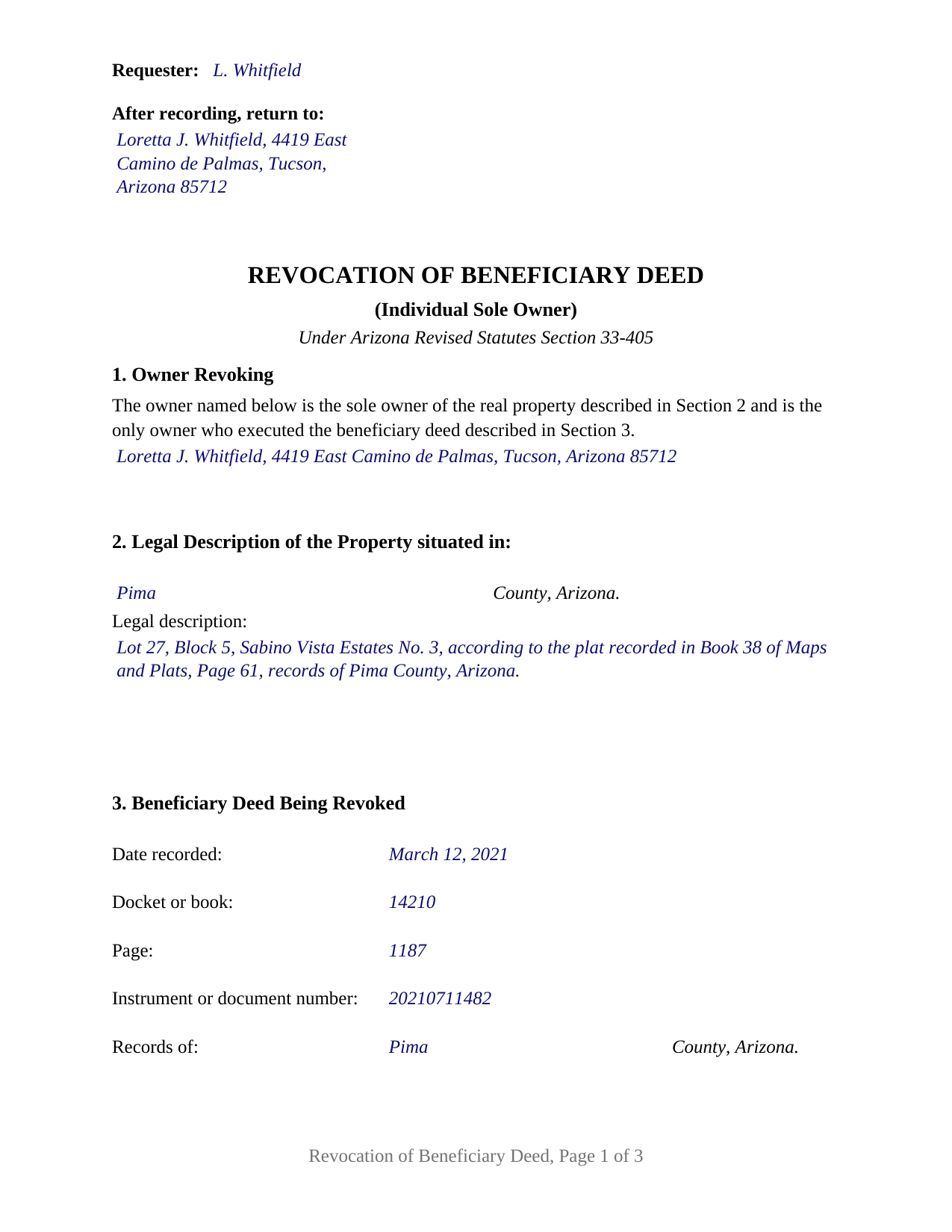
Greenlee County Completed Example of the Revocation of Beneficiary Deed (Individual Sole Owner) Document
Example of a properly completed Arizona Revocation of Beneficiary Deed (Individual Sole Owner) document for reference.
All 3 documents above included • One-time purchase • No recurring fees
Immediate Download • Secure Checkout
Additional Arizona and Greenlee County documents included at no extra charge:
Where to Record Your Documents
County Recorder
Clifton, Arizona 85533
Hours: Monday thru Friday 8:00 am until 5:00 pm
Phone: 928-865-2632 or 928-865-1717
Recording Tips for Greenlee County:
- Bring your driver's license or state-issued photo ID
- Ensure all signatures are in blue or black ink
- Ask if they accept credit cards - many offices are cash/check only
- Check that your notary's commission hasn't expired
- Documents must be on 8.5 x 11 inch white paper
Cities and Jurisdictions in Greenlee County
Properties in any of these areas use Greenlee County forms:
- Blue
- Clifton
- Duncan
- Morenci
Hours, fees, requirements, and more for Greenlee County
How do I get my forms?
Forms are available for immediate download after payment. The Greenlee County forms will be in your account ready to download to your computer. An account is created for you during checkout if you don't have one. Forms are NOT emailed.
Are these forms guaranteed to be recordable in Greenlee County?
Yes. Our form blanks are guaranteed to meet or exceed the applicable formatting requirements used for recording in Greenlee County, including margin requirements, font requirements, and other layout standards. This guarantee applies to formatting, not to the legal sufficiency of information entered by the user or the suitability of a form for a particular transaction.
Can I reuse these forms?
Yes. You can reuse the forms for your personal use. For example, if you have multiple properties in Greenlee County you only need to order once.
What do I need to use these forms?
The forms are PDFs that you fill out on your computer. The free Adobe Acrobat Reader is recommended, and most PDF apps also work. You do NOT enter your property information online - you download the blank forms and complete them privately on your own computer.
Are there any recurring fees?
No. This is a one-time purchase. Nothing to cancel, no memberships, no recurring fees.
How much does it cost to record in Greenlee County?
Recording fees in Greenlee County vary. Contact the recorder's office at 928-865-2632 or 928-865-1717 for current fees.
Questions answered? Let's get started!
One owner signed the beneficiary deed, and one owner ends it. This form prepares an Arizona revocation of beneficiary deed for that configuration: a sole owner of the property, who was also the only person to execute the recorded deed now being cancelled, signing alone under A.R.S. 33-405(F).
One owner, one signature, one certificate
The configuration is printed into the instrument rather than left to the person completing it. Section 1 recites that the owner named in it is the sole owner of the described property and the only owner who executed the beneficiary deed identified later in the document. Below that recital the form carries a single signature block headed OWNER, followed by a single acknowledgment certificate. There is no second signature line, no co-owner block, and no box asking the signer to classify an ownership arrangement.
Marital status is absent by design as well. A.R.S. 25-214(C)(1) calls for both spouses to join a transaction for the acquisition, disposition, or encumbrance of an interest in community real property, and a revocation does none of those things: it cancels a designation that would have operated at a future death. The signing requirement the instrument answers is the one the beneficiary deed statute states.
Why Arizona counts signatures on a revocation
A.R.S. 33-405(F) allows a beneficiary deed to be revoked at any time by the owner, or, where more than one owner exists, by any of the owners who executed it. The same subsection then adds a rule for survivorship title: where property is held in joint tenancy with right of survivorship or as community property with right of survivorship and the revocation is not executed by all of the owners, it is ineffective unless the last surviving owner executes it. That rule is the reason a single-owner revocation and a multi-owner revocation are different documents on paper. This one recites the pattern in which the question never arises, because the signer is the whole of the ownership and the whole of the earlier deed's execution.
The deed is identified by its place in the record
A revocation works only if the record can tell which instrument it cancels. The statutory form at A.R.S. 33-405(L) identifies the earlier deed by its recording date, by docket or book and page or by instrument number, and by the county whose records hold it, and Section 3 collects exactly those items. A.R.S. 11-461(F) treats a docket and page, a book and page, and similar indications as a recorded instrument's location in the record, and Arizona counties differ in which of them an entry carries, so the section provides for both.
Recording is the step that gives the instrument force. Under A.R.S. 33-405(F) the revocation takes effect only on being executed and recorded with the county recorder where the land lies, before the death of the owner executing it, and the form prints that condition in capitals above the signature line. Page one reserves the top two inches for the recorder under A.R.S. 11-480(C), with the requester and return blocks in the left three and one half inches, where the statute allows them.
A certificate that describes the record it closes
Arizona notarial law shapes the last page. The certificate's operative sentence is the short form at A.R.S. 41-265(1), which states that the record was acknowledged before the officer on a given date by a named individual, and the venue lines stay blank because the place of the notarial act and the place of the land are separate facts. Directly under the caption the certificate carries a description of the record it belongs to: title or type, date, number of pages, and additional signers other than the individual named in the certificate, the items A.R.S. 41-264(F) calls for when a certificate reaches a tangible record on a separate sheet. On a document one person signs, that last line prints as None.
This document is also searched as a revocation of a transfer on death deed or a TOD deed cancellation; the instrument is the one A.R.S. 33-405 describes. The download contains the fillable form, a completed example filled in for a Pima County fact pattern, and a guide covering each numbered section, the notarial requirements, and Arizona recording practice. Those materials describe the form and the statutes in general terms and are not legal advice.
Important: Your property must be located in Greenlee County to use these forms. Documents should be recorded at the county recording office listed above.
This Revocation of Beneficiary Deed (Individual Sole Owner) meets all recording requirements specific to Greenlee County.
Our Promise
The documents you receive here are guaranteed to meet or exceed the applicable Greenlee County recording format requirements. If there is a rejection caused by our formatting, we will correct the issue or refund your payment. This guarantee applies to document formatting only and does not extend to information entered by the user, the selection of the form, or the legal effect of the completed document.
Save Time and Money
Get your Greenlee County Revocation of Beneficiary Deed (Individual Sole Owner) form done right the first time with Deeds.com Uniform Conveyancing Blanks. At Deeds.com, we understand that your time and money are valuable resources, and we don't want you to face a penalty fee or rejection imposed by a county recorder for submitting nonstandard documents. We constantly review and update our forms to meet rapidly changing state and county recording requirements for roughly 3,500 counties and local jurisdictions.
4.8 out of 5 - ( 4,829 Reviews )
Richard H. 5 out of 5 stars
Excellent service--couldn't be more complete and useful !
We appreciate your business and value your feedback. Thank you. Have a wonderful day!
Sheri L. 5 out of 5 stars
Very helpful even though what I'm looking for hasnt updated yet. I'll use you again.
Thank you!
Karen J. 5 out of 5 stars
Excellent and easy to download and use. Love the example page and was so easy to fill out and use immediately. Thank you
Thank you for your feedback Karen. We really appreciate it. Enjoy your day!
HAROLD V. 5 out of 5 stars
Great website to have your buyer's deeds done correctly! I highly recommend this website to anyone in the real estate business.
Thank you!
darryl c. 5 out of 5 stars
very easy to use website
Thank you!
Kwaku A. 5 out of 5 stars
Excellent service ! Came through in the clutch! Easy to use and understand ! Exceptional service ! 10/10
Thank you!
Russell R. 5 out of 5 stars
This a seamless way to get a beneficiary deed recorded. Everything was easier than I imagined including the visit to the county. The website and downloads work well and I have no complaints.
Thank you for your kind words and for choosing us.
Alan S. 5 out of 5 stars
Great job! Fast and easy. Terrific communications.
Thank you!
Mary Ann H V. 5 out of 5 stars
I'm very happy with your service! It saved me, at least, hundreds of dollars vs. going through a lawyer in a different state.
We appreciate your business and value your feedback. Thank you. Have a wonderful day!
Angel T. 5 out of 5 stars
First the convenience to get forms without going or calling Recorder's office is outstanding. Suggest that Recorder's staff be able to guide or assist users in filling up the forms.
We appreciate your business and value your feedback. Thank you. Have a wonderful day!
Albert j. 5 out of 5 stars
Very easy site to use for a simple minded happy howmowner. Very reasonable fee Quick turn around Good communication
Thank you!
Mary P. 5 out of 5 stars
Excellent easy to follow instructions.
Great to hear Mary, Have a wonderful day!
Jamal . 5 out of 5 stars
So far so good!
Thank you!
Heidi J. 3 out of 5 stars
The form was useful, however the formatting is terrible once completed. A lot of white space with no option to remove extra spacing or to improve the overall formatting.
Thank you for your feedback, Heidi. We’re glad to hear the form itself was useful. We also understand your concern about the formatting and extra spacing once completed. Our forms are designed to meet strict county recording requirements, which can sometimes result in additional white space. That said, we’re always working to improve usability and presentation without compromising acceptance. Your input helps us identify where refinements are possible, and we’ll keep it in mind as we continue updating our templates.
Jo A B. 5 out of 5 stars
Clean crisp website with helpful information; however. If the site states the following files are included, a single .zip, .rar, , ,download should be available instead of individual.
Thank you for your feedback. We really appreciate it. Have a great day!