Greenlee County Revocation of Beneficiary Deed (Last Surviving Original Owner) Form
Last validated November 2, 2026 by our Forms Development TeamFormatted for recording in Greenlee County, for property anywhere in the county: rural and unincorporated areas as well as Blue, Clifton, Duncan, Morenci.
- 3 documents included
- Immediate PDF download
- Formatting guarantee
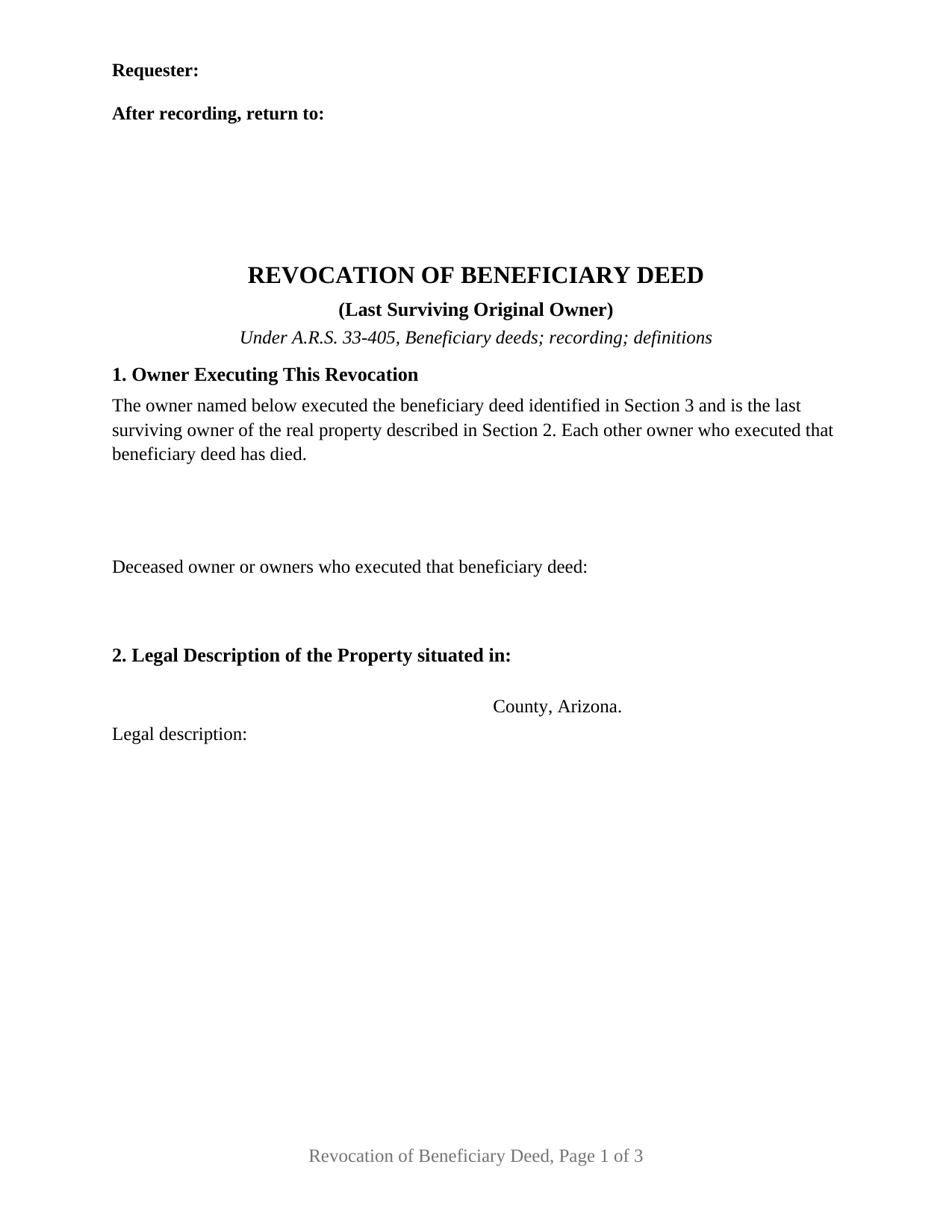
Greenlee County Revocation of Beneficiary Deed (Last Surviving Original Owner) Form
Fill in the blank Revocation of Beneficiary Deed (Last Surviving Original Owner) form formatted to comply with all Arizona recording and content requirements.

Greenlee County Revocation of Beneficiary Deed (Last Surviving Original Owner) Guide
Line by line guide explaining every blank on the Revocation of Beneficiary Deed (Last Surviving Original Owner) form.

Greenlee County Completed Example of the Revocation of Beneficiary Deed (Last Surviving Original Owner) Document
Example of a properly completed Arizona Revocation of Beneficiary Deed (Last Surviving Original Owner) document for reference.
All 3 documents above included • One-time purchase • No recurring fees
Immediate Download • Secure Checkout
Additional Arizona and Greenlee County documents included at no extra charge:
Where to Record Your Documents
County Recorder
Clifton, Arizona 85533
Hours: Monday thru Friday 8:00 am until 5:00 pm
Phone: 928-865-2632 or 928-865-1717
Recording Tips for Greenlee County:
- Bring your driver's license or state-issued photo ID
- Ensure all signatures are in blue or black ink
- Ask about their eRecording option for future transactions
- Avoid the last business day of the month when possible
- Both spouses typically need to sign if property is jointly owned
Cities and Jurisdictions in Greenlee County
Properties in any of these areas use Greenlee County forms:
- Blue
- Clifton
- Duncan
- Morenci
Hours, fees, requirements, and more for Greenlee County
How do I get my forms?
Forms are available for immediate download after payment. The Greenlee County forms will be in your account ready to download to your computer. An account is created for you during checkout if you don't have one. Forms are NOT emailed.
Are these forms guaranteed to be recordable in Greenlee County?
Yes. Our form blanks are guaranteed to meet or exceed the applicable formatting requirements used for recording in Greenlee County, including margin requirements, font requirements, and other layout standards. This guarantee applies to formatting, not to the legal sufficiency of information entered by the user or the suitability of a form for a particular transaction.
Can I reuse these forms?
Yes. You can reuse the forms for your personal use. For example, if you have multiple properties in Greenlee County you only need to order once.
What do I need to use these forms?
The forms are PDFs that you fill out on your computer. The free Adobe Acrobat Reader is recommended, and most PDF apps also work. You do NOT enter your property information online - you download the blank forms and complete them privately on your own computer.
Are there any recurring fees?
No. This is a one-time purchase. Nothing to cancel, no memberships, no recurring fees.
How much does it cost to record in Greenlee County?
Recording fees in Greenlee County vary. Contact the recorder's office at 928-865-2632 or 928-865-1717 for current fees.
Questions answered? Let's get started!
Two owners once put their names to a single Arizona beneficiary deed. One of them has since died, and the survivor is now the only person who can reach that designation. This form prepares the revocation for that position: one signer, who joined in executing the recorded deed and who is now the last surviving owner of the land, cancelling the designation with no other signature on the page.
One signer, one certificate, the deceased owner named
The configuration is printed as deed text, not left to a checkbox. Section 1 states that the owner named in it executed the beneficiary deed identified in Section 3 and is the last surviving owner of the property described in Section 2, and that each other owner who executed that deed has died. A second entry takes the name of the deceased owner or owners, so the record shows how ownership came to rest in one living person. Under the recital sit one party block, one signature block headed OWNER, and one acknowledgment certificate. No entry asks the signer to classify co-ownership or marital status: A.R.S. 25-214(C)(1) speaks to acquiring, disposing of, or encumbering community real property, and this instrument does none of the three.
Why the lone survivor's signature carries
Arizona permits a beneficiary deed to be undone at any time, and where several people executed it, any one of them may cancel. The chapter then adds a rule for survivorship title. Where the land is held as joint tenants with right of survivorship, or as community property with right of survivorship, and every owner has not signed the cancelling instrument, A.R.S. 33-405(F) withholds effect unless the last surviving owner is the person who signed. This form is built to that clause: its signer is at once an original signer of the deed and the last owner left. The named beneficiary stays out of it, since A.R.S. 33-405(I) makes a grantee beneficiary's signature, consent, agreement, or notice unnecessary for any purpose while the owner lives.
A recorded paper that points at another one
Two Arizona statutes want the earlier deed pinned down. The statutory revocation form at A.R.S. 33-405(L) reaches it through the recording date, the docket or book and page or the instrument number, and the county whose records hold it. A.R.S. 11-480(D) then provides that an instrument presented for recording which modifies a previously recorded document states the date of recordation and the docket and page of the document being modified. Section 3 gathers those entries, and Section 4 draws them into the revocation sentence, which opens in the language of the statute.
Recorded in a lifetime, or not at all
Effect turns on timing, not on telling anyone. A.R.S. 33-405(F) gives the instrument force only once it has been executed and recorded with the recorder of the county where the property lies, before the death of the owner who signs it, and the form sets that condition in capital letters over the signature line. A will is no substitute: A.R.S. 33-405(J) provides that a beneficiary deed executed, acknowledged and recorded in accordance with the section is not revoked by the provisions of a will. Neither does the record tidy itself, because A.R.S. 33-405(G) treats the last beneficiary deed recorded before the owner's death as the effective one where an owner recorded more than one.
What the last page carries
The certificate is Arizona's own, its operative sentence drawn from A.R.S. 41-265(1), and the state and county lines above it stay open for the place where the notarial act happens, which need not be Arizona: A.R.S. 41-259 gives a qualifying act performed in another state the same effect here. Beneath the caption, the certificate describes the record it is attached to, the four identifying items A.R.S. 41-264(F) sets out. One date deserves a note: on September 12, 2026, an amendment to A.R.S. 41-254 begins requiring a notary journal thumbprint for real property documents, a change reaching the notary's book rather than the face of this instrument.
Searches for this document run under other names, among them revocation of a transfer on death deed and TOD deed cancellation, and the instrument behind each is the one A.R.S. 33-405 authorizes. The package holds the fillable form, a completed example worked through a Maricopa County fact pattern, and a guide walking the sections, the certificate, and Arizona recording mechanics. It describes the form and the cited statutes in general terms and is not legal advice.
Important: Your property must be located in Greenlee County to use these forms. Documents should be recorded at the county recording office listed above.
This Revocation of Beneficiary Deed (Last Surviving Original Owner) meets all recording requirements specific to Greenlee County.
Our Promise
The documents you receive here are guaranteed to meet or exceed the applicable Greenlee County recording format requirements. If there is a rejection caused by our formatting, we will correct the issue or refund your payment. This guarantee applies to document formatting only and does not extend to information entered by the user, the selection of the form, or the legal effect of the completed document.
Save Time and Money
Get your Greenlee County Revocation of Beneficiary Deed (Last Surviving Original Owner) form done right the first time with Deeds.com Uniform Conveyancing Blanks. At Deeds.com, we understand that your time and money are valuable resources, and we don't want you to face a penalty fee or rejection imposed by a county recorder for submitting nonstandard documents. We constantly review and update our forms to meet rapidly changing state and county recording requirements for roughly 3,500 counties and local jurisdictions.
4.8 out of 5 - ( 4,864 Reviews )
Paula P. 2 out of 5 stars
Important: Click Download to save each PDF to your device. Open and complete the PDFs using Adobe Acrobat Reader (free). Get Adobe Acrobat Reader Browser PDF viewers (Chrome, Edge, Firefox, Mac Preview) may display fillable fields incorrectly. This information should be shared with the potential buyer BEFORE purchase. Messy formatting and a deeds.com advertisement on each page. I will not purchase from deeds.com again.
Paula, thank you for taking the time to leave feedback. As the product wasn’t a good fit for you, we’ve canceled your order and provided a full refund so there’s no need for you to use the documents.
Beatrice V. 5 out of 5 stars
I was in despair as I needed to file two (2) very important documents with the County. Due to Covid the office was closed and my only recourse was to E-Fie with a service provider. I was fortunate enough to hear about Deeds.com. They were specific, courteous, patient and most of all productive. My documents will take awhile for the final filing but that is because the County happens to have a slow turn around time. Otherwise, I am now relieved that this part is over. Thank you Deeds.com. You are awesome.
Thank you for the kinds words Beatrice.
Kimberly W. 5 out of 5 stars
Thank you for making this process so convenient.
Thank you for your feedback. We really appreciate it. Have a great day!
Roy B. 5 out of 5 stars
Great way to get forms needed and fill them out then we only need to record them!
Thank you!
brian p. 4 out of 5 stars
Good, easy to use, quit claim form worked as expected.
We appreciate your business and value your feedback. Thank you. Have a wonderful day!
Kurt P. 5 out of 5 stars
I like the basics. The one thing I would recommend changing would be, something that tells me I have actually have submitted my package, or that I can leave at any time without needing to click on a "Submit" button.
Thank you for your feedback. We really appreciate it. Have a great day!
Joshua A. 5 out of 5 stars
It was fast, secure, and reliable, and for the cost it saved me time, and driving four hours to the courthouse and back. It really saved me. Thank You.
Thank you Joshua, glad we could help.
Mary H. 5 out of 5 stars
Easy, convenient, and very reasonably priced. I really appreciate the comprehensive step-by-step instructions to complete the forms. I would recommend their services and will use them again if needed.
We’re glad you had a positive experience. Thank you.
Sherri S. 5 out of 5 stars
Easy to access forms, and reasonably priced. I'll definitely use again in the future.
We appreciate your business and value your feedback. Thank you. Have a wonderful day!
Camesha Y. 5 out of 5 stars
Was working with a notary client that need to do a deed. We got on this site, ordered the blank forms, he filled them out and we printed them so he could sign. Really clean forms, easy to understand and complete in a hurry. I will be letting all my clients know about this site.
That's terrific Camesha, glad to hear. Have a great day!
Karen O. 5 out of 5 stars
I often think I am smarter than I am. Thankfully there are people that know what they are doing so I can focus on my business and the big picture without worrying about the little things.
Thank you!
LuAnn F. 5 out of 5 stars
Simple and quick access to the form I needed
Thank you!
Joel B. 5 out of 5 stars
I would have liked more room in the text fields for describing the potential claim. had to use Exhibit A. Could not delete Exhibit B. Alo would like to have a custom footer - not deeds.com. Unprofessional.
Thank you for your feedback. We really appreciate it. Have a great day!
Wayne R. 5 out of 5 stars
Couldn't believe how simple it was to do such a very important family support task and the price was right! Thank you
We appreciate your business and value your feedback. Thank you. Have a wonderful day!
Esther R. 5 out of 5 stars
Very easy to follow and complete.
Thank you for your feedback. We really appreciate it. Have a great day!