Jefferson County Quitclaim Deed (Trustee Grantor) Form
Last validated October 19, 2026 by our Forms Development TeamFormatted for recording in Jefferson County, for property anywhere in the county: rural and unincorporated areas as well as Adena, Amsterdam, Bergholz, Bloomingdale, Brilliant, Dillonvale, East Springfield, Empire and 14 more.
- 3 documents included
- Immediate PDF download
- Formatting guarantee
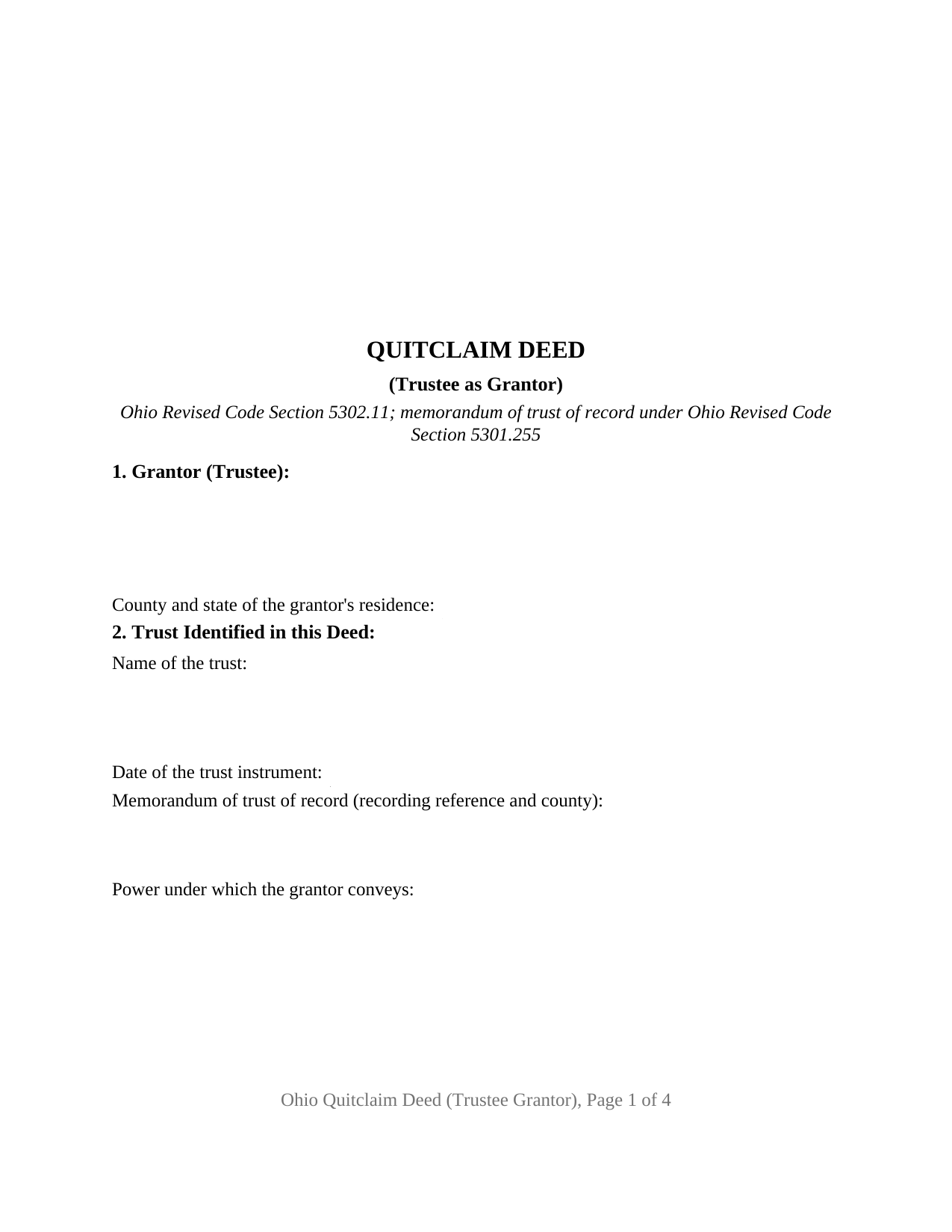
Jefferson County Quitclaim Deed (Trustee Grantor) Form
Fill in the blank Quitclaim Deed (Trustee Grantor) form formatted to comply with all Ohio recording and content requirements.
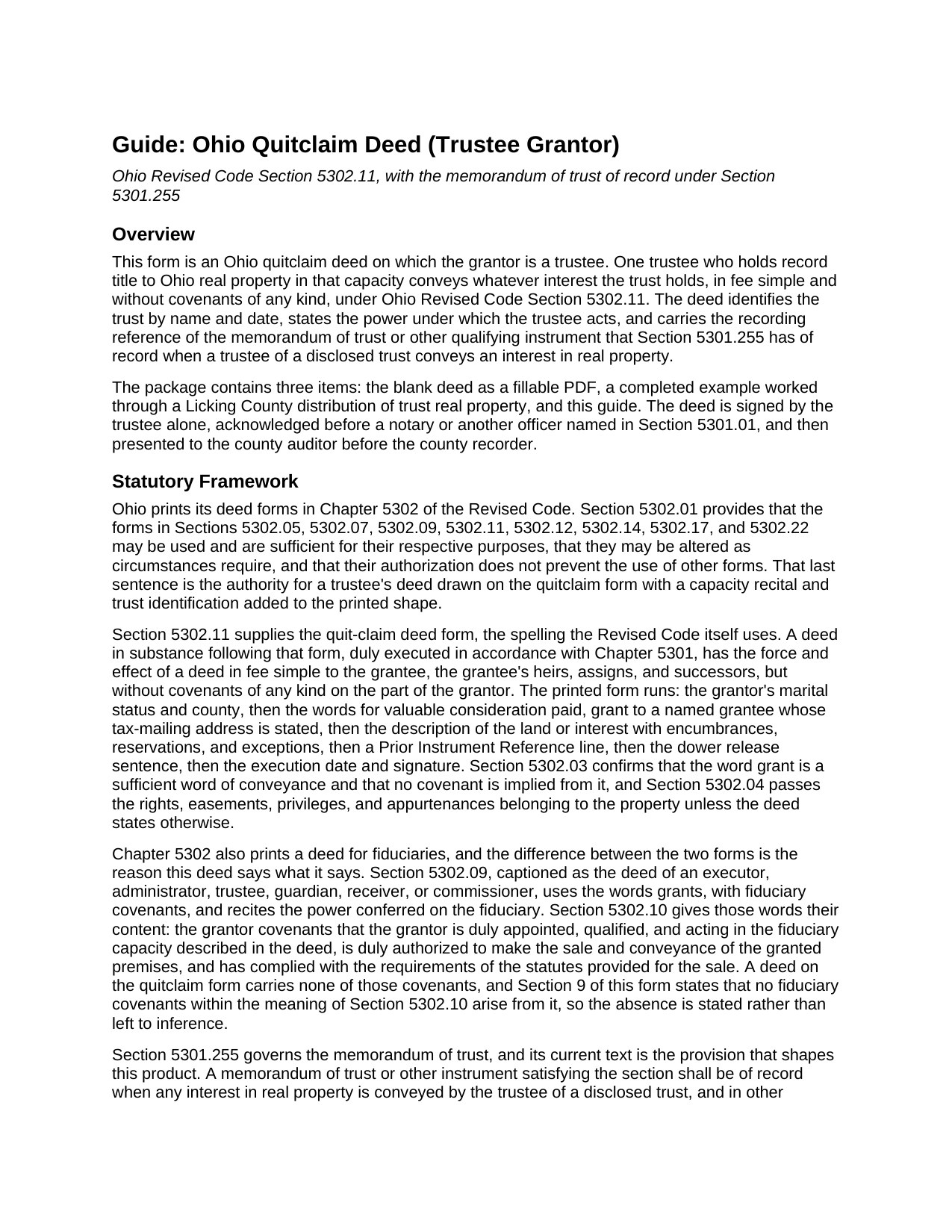
Jefferson County Quitclaim Deed (Trustee Grantor) Guide
Line by line guide explaining every blank on the Quitclaim Deed (Trustee Grantor) form.
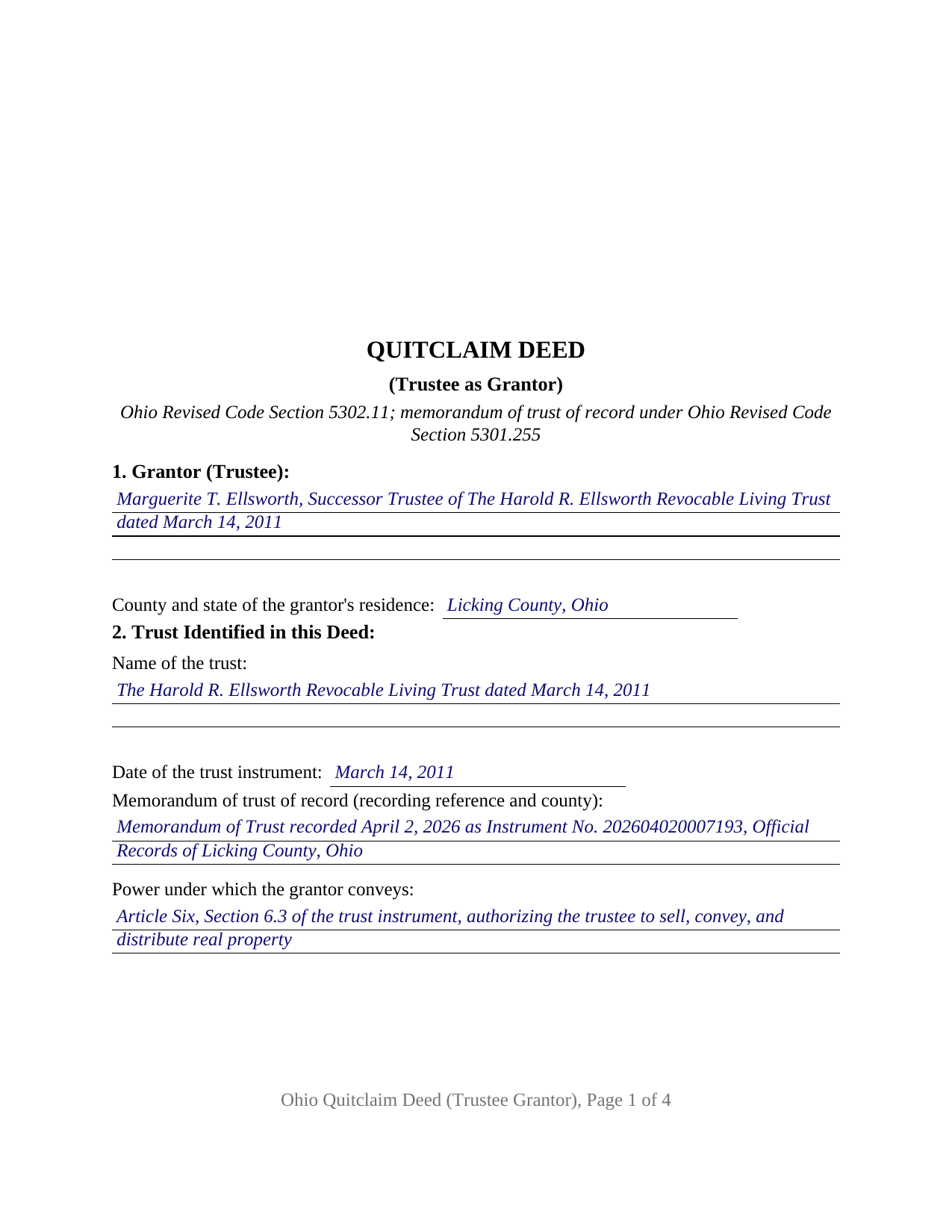
Jefferson County Completed Example of the Quitclaim Deed (Trustee Grantor) Document
Example of a properly completed Ohio Quitclaim Deed (Trustee Grantor) document for reference.
All 3 documents above included • One-time purchase • No recurring fees
Immediate Download • Secure Checkout
Additional Ohio and Jefferson County documents included at no extra charge:
Where to Record Your Documents
Jefferson County Recorder
Steubenville, Ohio 43952
Hours: 8:30am to 4:30pm Monday through Friday
Phone: 740-283-8566
Recording Tips for Jefferson County:
- Bring your driver's license or state-issued photo ID
- Ensure all signatures are in blue or black ink
- Recorded documents become public record - avoid including SSNs
- Recording fees may differ from what's posted online - verify current rates
- Request a receipt showing your recording numbers
Cities and Jurisdictions in Jefferson County
Properties in any of these areas use Jefferson County forms:
- Adena
- Amsterdam
- Bergholz
- Bloomingdale
- Brilliant
- Dillonvale
- East Springfield
- Empire
- Hammondsville
- Irondale
- Mingo Junction
- Mount Pleasant
- Piney Fork
- Rayland
- Richmond
- Smithfield
- Steubenville
- Stratton
- Tiltonsville
- Toronto
- Wolf Run
- Yorkville
Hours, fees, requirements, and more for Jefferson County
How do I get my forms?
Forms are available for immediate download after payment. The Jefferson County forms will be in your account ready to download to your computer. An account is created for you during checkout if you don't have one. Forms are NOT emailed.
Are these forms guaranteed to be recordable in Jefferson County?
Yes. Our form blanks are guaranteed to meet or exceed the applicable formatting requirements used for recording in Jefferson County, including margin requirements, font requirements, and other layout standards. This guarantee applies to formatting, not to the legal sufficiency of information entered by the user or the suitability of a form for a particular transaction.
Can I reuse these forms?
Yes. You can reuse the forms for your personal use. For example, if you have multiple properties in Jefferson County you only need to order once.
What do I need to use these forms?
The forms are PDFs that you fill out on your computer. The free Adobe Acrobat Reader is recommended, and most PDF apps also work. You do NOT enter your property information online - you download the blank forms and complete them privately on your own computer.
Are there any recurring fees?
No. This is a one-time purchase. Nothing to cancel, no memberships, no recurring fees.
How much does it cost to record in Jefferson County?
Recording fees in Jefferson County vary. Contact the recorder's office at 740-283-8566 for current fees.
Questions answered? Let's get started!
When an Ohio trustee conveys trust real property, the public record has to carry the trust's own paperwork alongside the deed. Ohio Revised Code Section 5301.255, as amended effective June 16, 2026, has a memorandum of trust or other qualifying instrument of record when any interest in real property is conveyed by the trustee of a disclosed trust. This quitclaim deed form is built around that sequence: one trustee grants Ohio real property under Section 5302.11, and the grantor side names the trust, its date, the power relied on, and where the memorandum is recorded.
The entry that answers Section 5301.255
A trust holds no title of its own in Ohio; a trustee does. So Section 2 asks for four entries: the name of the trust, the date of the trust instrument, the source of the trustee's power to convey, and the recording reference of the memorandum. That memorandum is signed and acknowledged by the trustee, states the trust's execution date and the trustee's powers over the sale, encumbering, and conveyance of real property, and gives notice only of what it contains; it is recorded on its own, apart from this package. Ohio Title Standard 3.18 treats a disclosed trust with nothing of record as a title objection, so the reference printed here is what a later examiner reads first.
A trustee's deed that promises nothing
Ohio prints two deeds a trustee may sign, and they differ on covenants. The fiduciary form in Section 5302.09 uses the words grants, with fiduciary covenants, which Section 5302.10 turns into promises that the grantor is duly appointed, is authorized to make the conveyance, and has complied with the governing statutes. A deed following Section 5302.11 takes effect in fee simple without covenants of any kind, and Section 5302.03 confirms that the word grant implies none. This form recites that no fiduciary covenants within the meaning of Section 5302.10 arise from it. A buyer searching for a quit claim deed, for the hyphenated quit-claim spelling Ohio's code prints, or for a trustee deed moving property out of a living trust arrives at this one.
One trustee, signing in a capacity
The form recites exactly one grantor, and every entry beneath the conveyance belongs to that trustee and the notarial officer: one signature block, one printed name line per Section 317.11, and one acknowledgment certificate. Section 1 takes the trustee's name with the signing capacity, and Section 9 grants solely as trustee of the trust identified in Section 2 and not individually. No marital status entry and no dower release block appear, following the shape of the statutory fiduciary deed, which prints neither. A successor trustee distributing a parcel to the beneficiaries after the settlor's death, a trustee conveying property back to a settlor exercising a reserved power to revoke, and a trustee selling a surveyed tract out of a larger trust holding present the record this deed recites. Two co-trustees signing together take two signature blocks, and an owner conveying property titled in an individual name signs the ordinary form with its marital status line.
Two exemption items that point outward
A trustee's deed meets the county auditor first, and the fee schedule treats a conveyance out of a trust on its own terms. Section 319.54(G)(3) charges ten cents per hundred dollars of value, never under a dollar, and form DTE 100EX lists the exemptions: item (u) reaches a transfer back to the grantor of a trust made under the power to revoke it, and item (v) reaches a transfer to the beneficiaries where the fee was paid going in or the trust provisions became irrevocable at the grantor's death. A sale to a third party sits outside both, and the auditor may ask for trust documents before allowing one. Section 317.22 holds the deed out of the record until the auditor's stamp and transfer endorsement appear.
The page geometry answers Section 317.114, from the three inch recording reserve atop page one to the print size floor, and Sections 319.20 and 317.111 account for the grantee tax-mailing address, the prior instrument reference, and the preparer name. The download holds three files: the deed as a fillable PDF, a completed example worked through a Licking County distribution of trust real property, and a plain language guide covering the numbered sections, the trust and execution statutes, the ways an Ohio grantee may hold title, and the route from the auditor's window to the recorder's file number. The materials are informational and are not legal advice.
Important: Your property must be located in Jefferson County to use these forms. Documents should be recorded at the county recording office listed above.
This Quitclaim Deed (Trustee Grantor) meets all recording requirements specific to Jefferson County.
Our Promise
The documents you receive here are guaranteed to meet or exceed the applicable Jefferson County recording format requirements. If there is a rejection caused by our formatting, we will correct the issue or refund your payment. This guarantee applies to document formatting only and does not extend to information entered by the user, the selection of the form, or the legal effect of the completed document.
Save Time and Money
Get your Jefferson County Quitclaim Deed (Trustee Grantor) form done right the first time with Deeds.com Uniform Conveyancing Blanks. At Deeds.com, we understand that your time and money are valuable resources, and we don't want you to face a penalty fee or rejection imposed by a county recorder for submitting nonstandard documents. We constantly review and update our forms to meet rapidly changing state and county recording requirements for roughly 3,500 counties and local jurisdictions.
4.8 out of 5 - ( 4,828 Reviews )
Robert W. 5 out of 5 stars
Easier than I thought. No problem Nice service
Thank you!
Jim D. 5 out of 5 stars
A bit pricey for someone on a fixed income.
Thank you!
Margaret A. 5 out of 5 stars
Thank for the help. Needed that disclaimer to avoid filing a full ITR tax return to get an L-9
We appreciate your business and value your feedback. Thank you. Have a wonderful day!
Cindy A. 5 out of 5 stars
Easy to understand and use. However, need to add line for phone number for preparer - Thanks
Thank you for your feedback. We really appreciate it. Have a great day!
Susan M. 5 out of 5 stars
Outstanding service. Docs delivered to recorder as expected without issue. Happy our recorder recommended Deeds.com.
We appreciate your business and value your feedback. Thank you. Have a wonderful day!
Mark S. 5 out of 5 stars
Excellent service, quick and very efficient! Thanks for your great service!
We appreciate your business and value your feedback. Thank you. Have a wonderful day!
Laurie D. 5 out of 5 stars
Comforting that you include an example of a completed TOD Deed form. Just downloaded all forms for my state & county and I'm SURE this will save a paying for a massive attorney fee!
We are grateful for your feedback and looking forward to serving you again. Thank you!
Stephanie B. 5 out of 5 stars
Really great, relevant and straight forward forms. Deeds.com is excellent and helps you avoid costly errors on documents.
Thank you for your feedback. We really appreciate it. Have a great day!
Altaray S. 5 out of 5 stars
Really fast turn around time, and was provided exactly what I was looking for this time. This is my first experience with this site. It would have been cool to also get a document depicting/describing a property line, but like I said before, exactly what I was looking for this time.
Thank you so much for your feedback Altaray, we really appreciate it.
Hayley C. 5 out of 5 stars
Love this site, so easy to work with and customer service is amazing.
We appreciate your business and value your feedback. Thank you. Have a wonderful day!
Margaret L. 1 out of 5 stars
I was not able to use the form after paying for it. The words in red would not let me type over them and I could not get a blank document. Useless.
Each forms package includes a blank form, a guide, and a completed example. The red text appears in the completed example to show how a finished document may look; the blank form is the editable document intended for customer use. Because our products are do-it-yourself legal forms, we canceled the order and payment when it was clear the customer was not able to identify and use the blank form included in the package.
GLENN B. 5 out of 5 stars
Great affordable quick service
We appreciate your business and value your feedback. Thank you. Have a wonderful day!
lorali V. 3 out of 5 stars
Not easy to fill in and the finished product looked awful when printed.
Thank you for your feedback. We really appreciate it. Have a great day!
Lenore B. 4 out of 5 stars
Thank you for making this deed available. The guide was such a big help.
Thanks Lenore, have a great day!
Evan W. 5 out of 5 stars
Quick service. Thank you
Thank you!