Charleston County Certificate of Trust Form
Last validated October 2, 2026 by our Forms Development TeamFormatted for recording in Charleston County, for property anywhere in the county: rural and unincorporated areas as well as Adams Run, Awendaw, Charleston, Charleston Afb, Folly Beach, Hollywood, Isle Of Palms, Johns Island and 6 more.
- 3 documents included
- Immediate PDF download
- Formatting guarantee
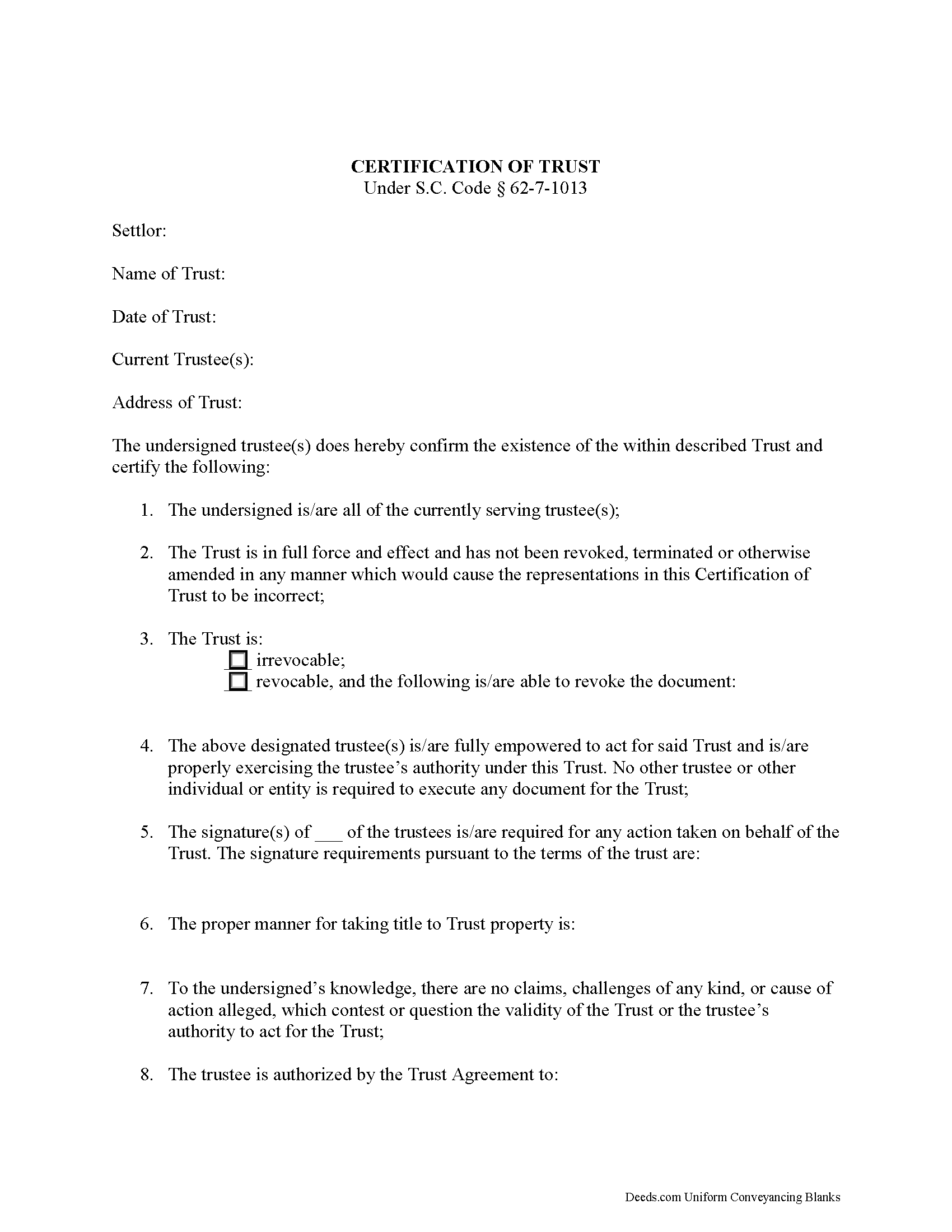
Charleston County Certificate of Trust Form
Fill in the blank form formatted to comply with all recording and content requirements.
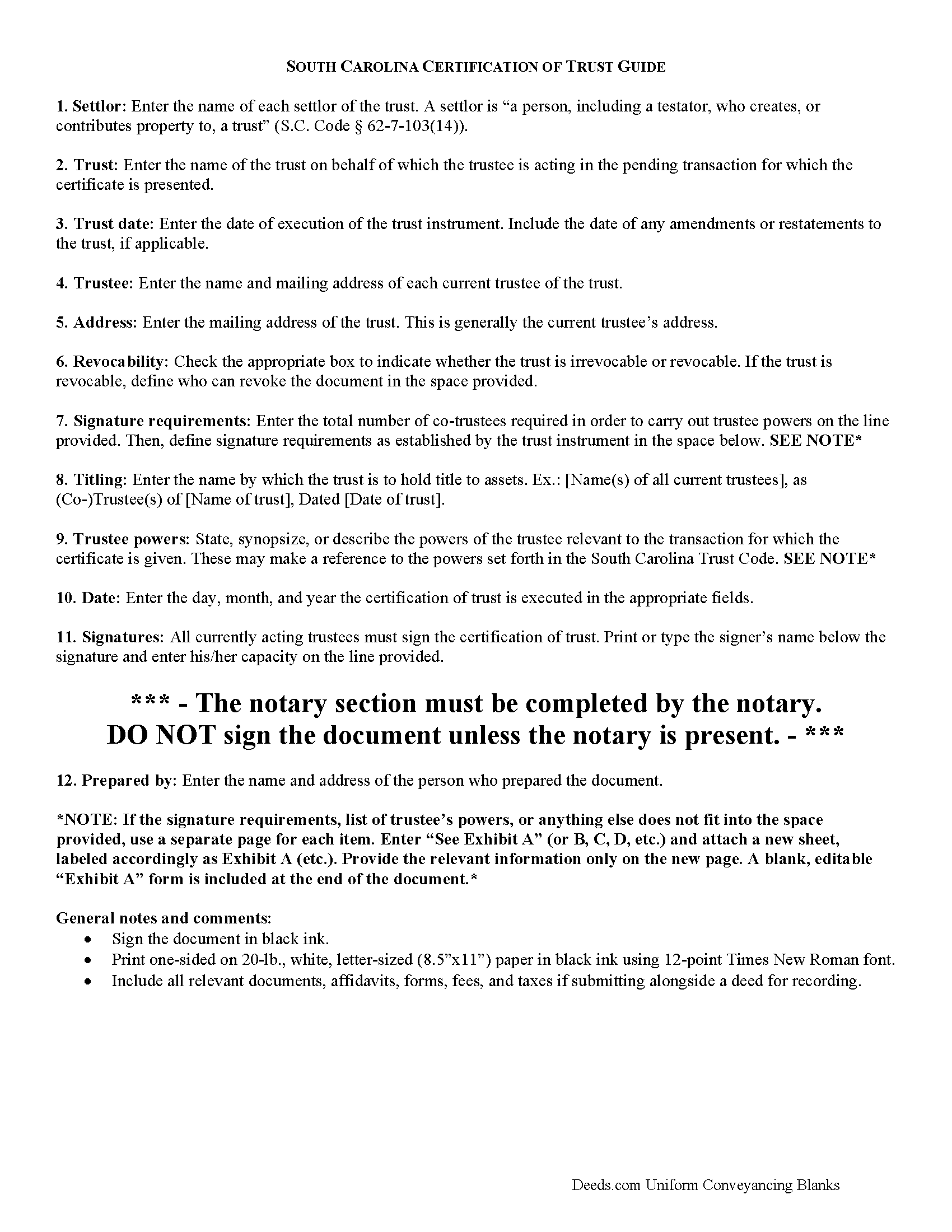
Charleston County Certificate of Trust Guide
Line by line guide explaining every blank on the form
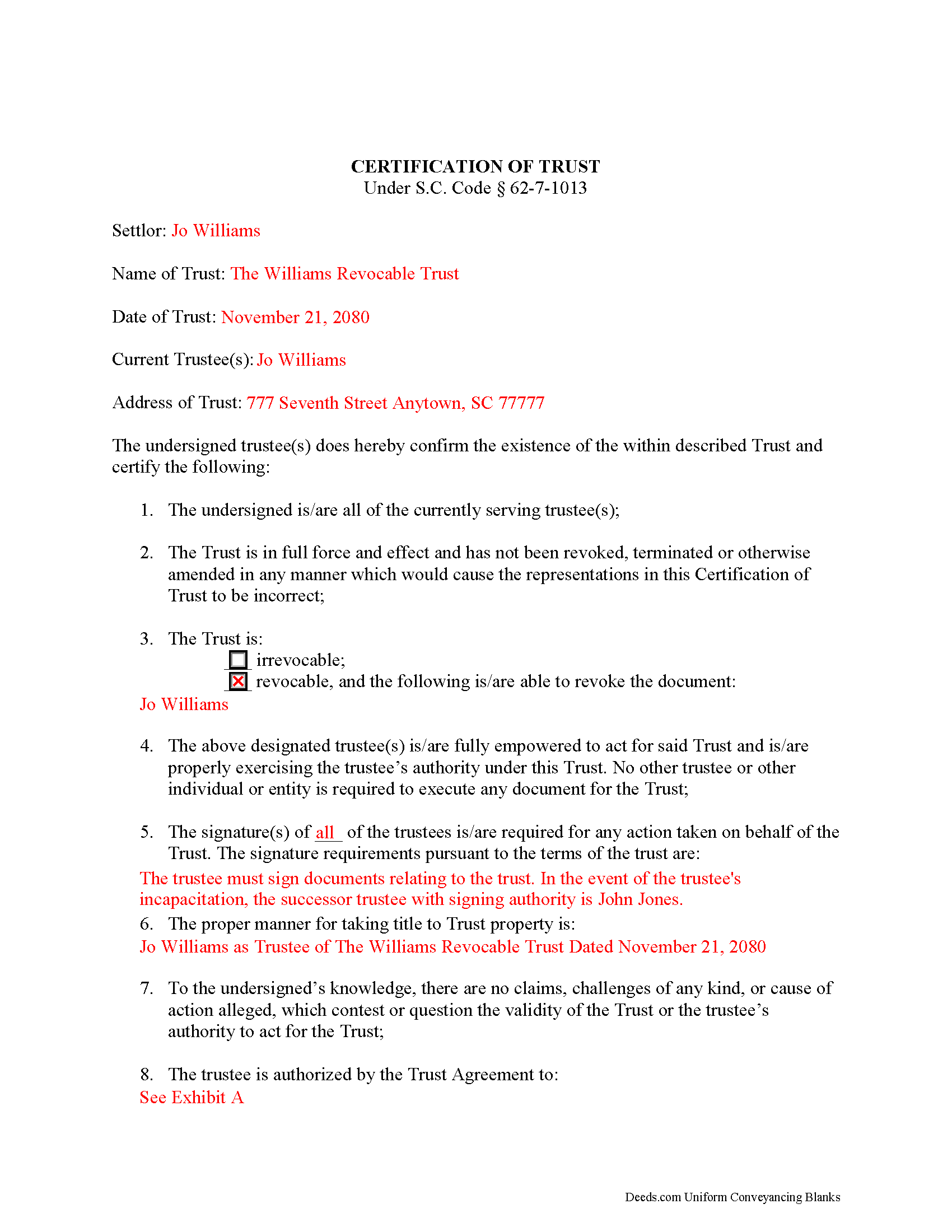
Charleston County Completed Example of the Certificate of Trust Document
Example of a properly completed form for reference.
All 3 documents above included • One-time purchase • No recurring fees
Immediate Download • Secure Checkout
Additional South Carolina and Charleston County documents included at no extra charge:
Where to Record Your Documents
Charleston County Register
Charleston, South Carolina 29401 / 29402
Hours: 8:30am to 5:00pm Monday through Friday / Recording until 4:30pm
Phone: (843) 958-4800
Recording Tips for Charleston County:
- Bring your driver's license or state-issued photo ID
- Ensure all signatures are in blue or black ink
- Check margin requirements - usually 1-2 inches at top
- Leave recording info boxes blank - the office fills these
- Make copies of your documents before recording - keep originals safe
Cities and Jurisdictions in Charleston County
Properties in any of these areas use Charleston County forms:
- Adams Run
- Awendaw
- Charleston
- Charleston Afb
- Folly Beach
- Hollywood
- Isle Of Palms
- Johns Island
- Mc Clellanville
- Mount Pleasant
- North Charleston
- Ravenel
- Sullivans Island
- Wadmalaw Island
Hours, fees, requirements, and more for Charleston County
How do I get my forms?
Forms are available for immediate download after payment. The Charleston County forms will be in your account ready to download to your computer. An account is created for you during checkout if you don't have one. Forms are NOT emailed.
Are these forms guaranteed to be recordable in Charleston County?
Yes. Our form blanks are guaranteed to meet or exceed the applicable formatting requirements used for recording in Charleston County, including margin requirements, font requirements, and other layout standards. This guarantee applies to formatting, not to the legal sufficiency of information entered by the user or the suitability of a form for a particular transaction.
Can I reuse these forms?
Yes. You can reuse the forms for your personal use. For example, if you have multiple properties in Charleston County you only need to order once.
What do I need to use these forms?
The forms are PDFs that you fill out on your computer. The free Adobe Acrobat Reader is recommended, and most PDF apps also work. You do NOT enter your property information online - you download the blank forms and complete them privately on your own computer.
Are there any recurring fees?
No. This is a one-time purchase. Nothing to cancel, no memberships, no recurring fees.
How much does it cost to record in Charleston County?
Recording fees in Charleston County vary. Contact the recorder's office at (843) 958-4800 for current fees.
Questions answered? Let's get started!
South Carolina Certification of Trust
The certification of trust is codified at S.C. Code 62-7-1013 as part of the South Carolina Trust Code. A certificate of trust presents a summary of the trust to which it pertains, and verifies a trust's existence and the trustee's authority to act on behalf of the trust. A trustee may present the document in lieu of the trust instrument any person who is not a trust beneficiary. This allows the trustee to maintain the privacy of the settlor's estate plans by presenting only necessary information about the trust to parties outside the trust arrangement.
The format of the South Carolina certificate presents the most basic information about the trust first, including the name of the trust and date of execution of the trust instrument, and the name of each settlor and the acting trustee's name and address.
The certificate then presents certified statements, made by the trustees, that all currently serving trustees have executed and acknowledged the instrument, and that the trust "has not been revoked, modified, or amended in any manner that would cause the representations contained in the certification of trust to be incorrect" ( 62-4-1013(7)(c)).
Information about the trust's ability to be revoked, and the identity of any person who may revoke the trust pursuant to the terms of the trust instrument comes next, and information regarding the execution of trust documents follows. For trusts with co-trustees, the certificate shows how many trustees are required to execute trustee powers and enumerates the signature requirements established in the trust.
The certificate also requires the name by which the trust is to hold title to assets, typically by way of the trustee (e.g. "John Doe as Trustee of the Doe Revocable Trust Dated..."). In addition, the certificate presents the exact powers of the trustee to enter the transaction for which the certificate is presented, and may make a reference to the powers set forth in the South Carolina Trust Code.
Persons doing business with trustees have certain protections under the statutes. Recipients of a certification of trust, for example, "may assume without inquiry the existence of the facts contained in the certification" and "may enforce the transaction against the trust property as if the representations contained in the certification were correct" ( 62-4-1013(7)(f),(g)). Recipients may request that a trustee provide copies of excerpts from the trust instrument which designate the trustee and present the trustee's relevant powers, in addition to the certificate. Requesting the entire trust instrument opens them up to liabilities, however ( 62-4-1013(7)(h)).
Where a certification of trust is presented for transactions involving real property, the document should meet standards for recording documents in the State of South Carolina. The certificate must be acknowledged by the acting trustees and witnesses in the presence of a Notary Public before it is recorded in the county where the subject real property is situated.
Consult a lawyer with questions regarding certifications of trust in South Carolina.
(South Carolina COT Package includes form, guidelines, and completed example)
Important: Your property must be located in Charleston County to use these forms. Documents should be recorded at the county recording office listed above.
This Certificate of Trust meets all recording requirements specific to Charleston County.
Our Promise
The documents you receive here are guaranteed to meet or exceed the applicable Charleston County recording format requirements. If there is a rejection caused by our formatting, we will correct the issue or refund your payment. This guarantee applies to document formatting only and does not extend to information entered by the user, the selection of the form, or the legal effect of the completed document.
Save Time and Money
Get your Charleston County Certificate of Trust form done right the first time with Deeds.com Uniform Conveyancing Blanks. At Deeds.com, we understand that your time and money are valuable resources, and we don't want you to face a penalty fee or rejection imposed by a county recorder for submitting nonstandard documents. We constantly review and update our forms to meet rapidly changing state and county recording requirements for roughly 3,500 counties and local jurisdictions.
4.8 out of 5 - ( 4,819 Reviews )
GLENN A M. 5 out of 5 stars
I loved the easy to understand and use system, very user friendly.
Thank you!
Beverly L J. 3 out of 5 stars
The process for receiving the quitclaim document worked well. I couldn't use the document. If I had been able to view the document before I had to pay for it, I would have known, but that isn't how your process works. However, that's the only snag I found. Otherwise the process for paying and downloading the document worked well. Thank you.
Thank you for your feedback Beverly. We certainly do not want you to pay for something you are unable to use. To that end we have canceled your order and refunded your payment. We do hope that you find something more suitable to your needs. Have a wonderful day.
Laura J. 5 out of 5 stars
Very satisfied. Highly recommend!
Thank you!
Erik H. 5 out of 5 stars
tl;dr - Bookmarked and anticipating using this site for years to come. My justification for rating 5/5 1. Provide intuitive method for requesting property records. 2. Cost for records *seems reasonable. 3. They clearly state that interested parties could gather these records at more affordable costs through the county (which was more confusing for an inexperienced person such as myself). I mean, I appreciate and respect this level of honesty. *I didn't shop around too much because it was difficult for me to find other services that could deliver CA property records.
We appreciate your business and value your feedback. Thank you. Have a wonderful day!
Leslie S. 5 out of 5 stars
After over a month of turmoil and feeling like "you can't get there from here",you solved my problem in a little over an hour. Thank you!!
Thank you for your feedback. We really appreciate it. Have a great day!
Arthur M. 5 out of 5 stars
Efficient and easy to use. Thanks.
Thank you!
Vallie D. 5 out of 5 stars
Very easy to navigate website. Quick filing, great communication. Saved me hundreds of dollars vs. filing through the escrow service
Thank you for your kind words Vallie, glad we could help. Have an amazing day!
Marilyn S. 5 out of 5 stars
I was pleased with the service and product.
Thank you!
Daniel R. 5 out of 5 stars
It all looked pretty easy to navigate. Forms are just now downloaded so I'll see how opening, filling-out goes. I'm encouraged. Thanks
Thank you for your feedback. We really appreciate it. Have a great day!
Mary S. 5 out of 5 stars
Very helpful and an easy site to use so far.
Thank you for your feedback. We really appreciate it. Have a great day!
John C. 5 out of 5 stars
Excellent find (Deeds.com) from a google search, first hit. This was exactly what we were looking for. It also got me to upgrade Adobe to be able to fill in the forms. Will be back for follow up as needed, but I think I got everything we needed in the first downloads. Appreciate a well done site like yours. Thanks John
Thank you for your feedback. We really appreciate it. Have a great day!
Jina N. 5 out of 5 stars
Awesome site!! You guys really make it simple to understand and access any Deeds that I need. I know you keep very up to date forms, as my county is hard core when it comes to the smallest of details, even compared to every other county across the state. Yet you made it simple and quick, and I never had to redo anything. Even the clerk was impressed that I had it filled out correctly the first time, as that usually never happened. Even the size of type/font and the margins were perfect. That saved a lot of time, money and most of all, frustration. I've recommended you to relatives, friends and co-workers. Thanks to the staff at deeds dot com !! I truly appreciate you. j
Thank you!
Catherine B. 5 out of 5 stars
Wow absolutely amazing service. So quick and easy and makes what would be such a hassel a piece of cake. Outstanding value for money way cheaper than I expected. Will use again and highly recommend.
Your appreciative words mean the world to us. Thank you.
James S. 4 out of 5 stars
The forms download was quick and easy. The example deed was excellent. However, the payment method should include PayPal, not just credit cards.
Thank you for your feedback James, we appreciate it.
Elaine S. 4 out of 5 stars
Being new at this, the system was somewhat difficult to understand at first. It took a couple of tries before I got it. It seems to be somewhat slow as well. However, it's a wonderful idea to have documents recorded from the comfort of your home, especially in the times that we are in with COVID19. I definitely don't mind paying the fee which I thought was reasonable.
Thank you!