Rutland County Discharge of Mortgage (MERS) Form
Last validated September 4, 2026 by our Forms Development TeamFormatted for recording in Rutland County, for property anywhere in the county: rural and unincorporated areas as well as Belmont, Benson, Bomoseen, Brandon, Castleton, Center Rutland, Chittenden, Cuttingsville and 21 more.
- 3 documents included
- Immediate PDF download
- Formatting guarantee
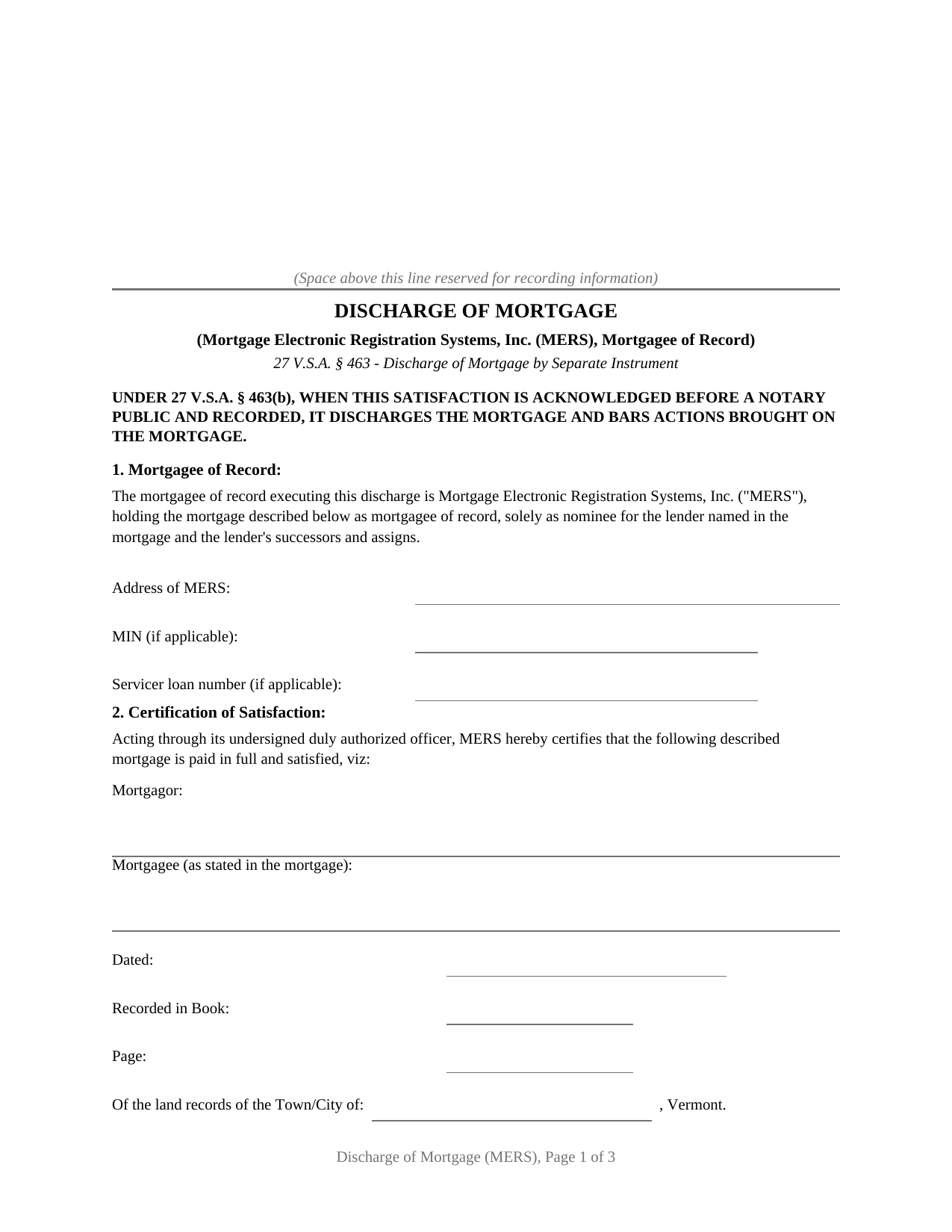
Rutland County Discharge of Mortgage (MERS) Form
Fill in the blank Discharge of Mortgage (MERS) form formatted to comply with all Vermont recording and content requirements.
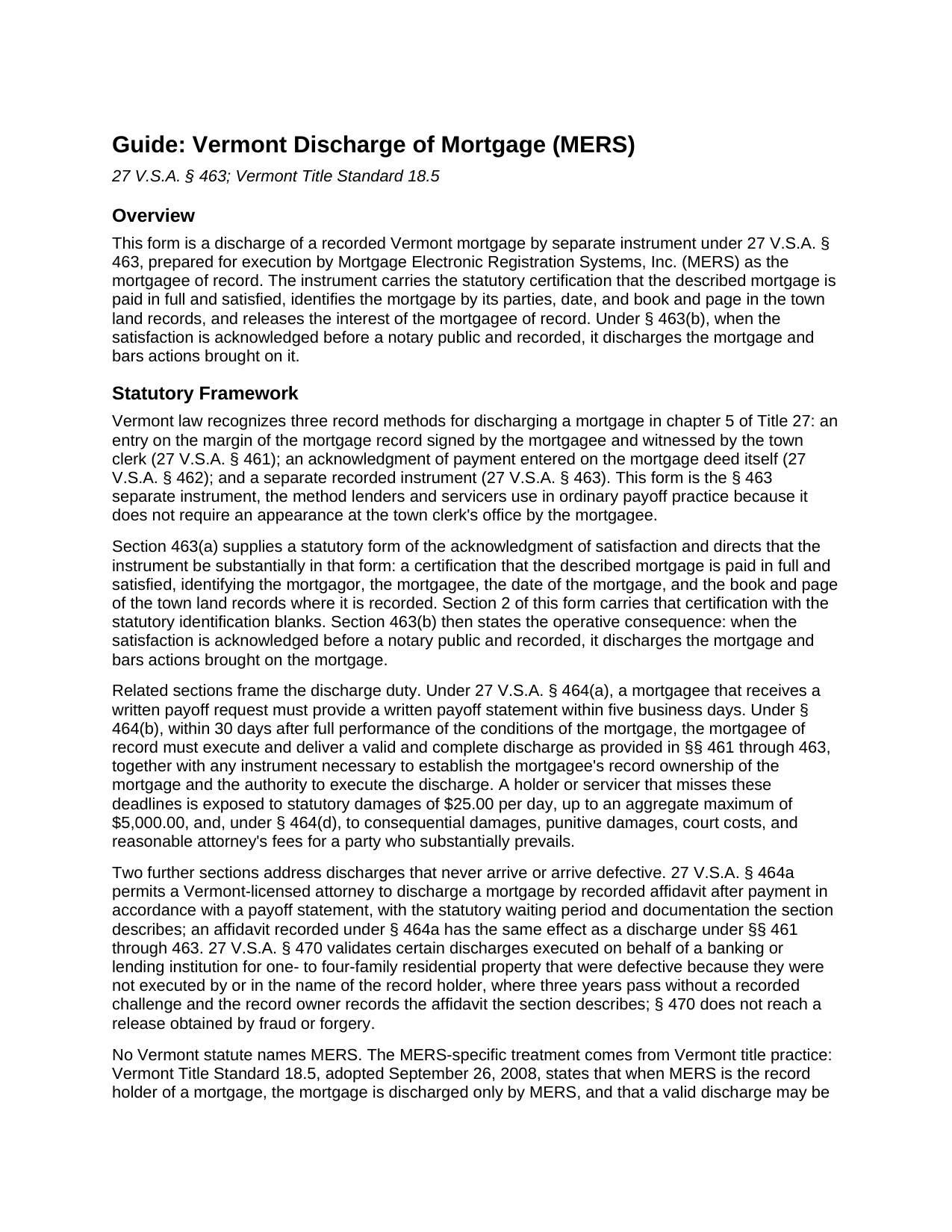
Rutland County Discharge of Mortgage (MERS) Guide
Line by line guide explaining every blank on the Discharge of Mortgage (MERS) form.
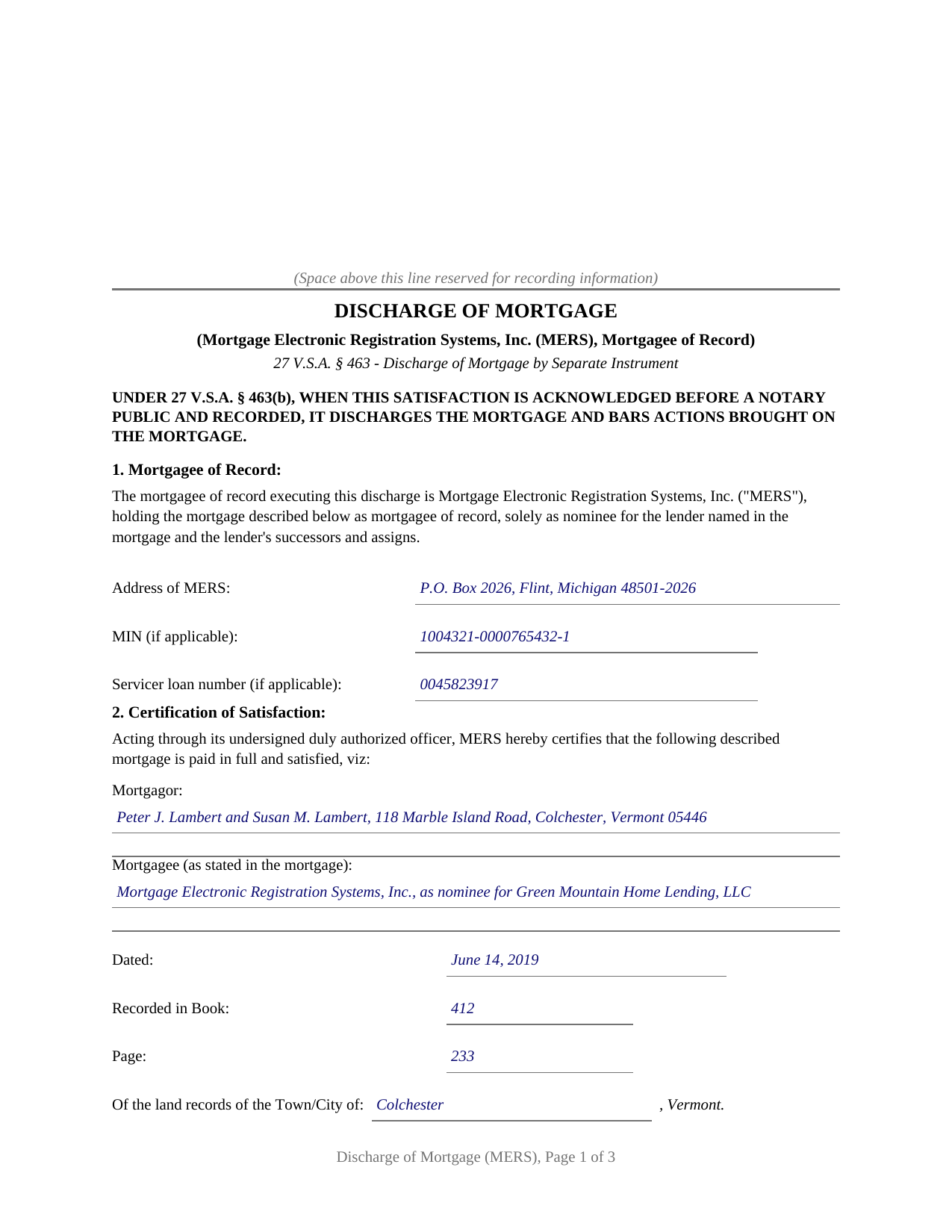
Rutland County Completed Example of the Discharge of Mortgage (MERS) Document
Example of a properly completed Vermont Discharge of Mortgage (MERS) document for reference.
All 3 documents above included • One-time purchase • No recurring fees
Immediate Download • Secure Checkout
Additional Vermont and Rutland County documents included at no extra charge:
Where to Record Your Documents
Town Clerk of Benson
Benson, Vermont 05731
Hours: Mo, Tu, Th, Fr 9:00 to 3:00 & We 3:00 to 7:00
Phone: (802) 537-2611
Town Clerk of Brandon
Brandon, Vermont 05733
Hours: Mo-Fr 8:00 to 4:00
Phone: (802) 247-3635
Town Clerk of Castleton
Castleton, Vermont 05735
Hours: Mo-We 9:00 to 4:30; Th 10:00 to 5:30 (closed 12:30-1:00); Fr 9:00 to 1:00
Phone: (802) 468-2212
Town Clerk of Chittenden
Rutland, Vermont 05737
Hours: Mo-Th 9:00 to 4:00
Phone: (802) 483-6647 x1
Town Clerk of Clarendon
Clarendon, Vermont 05759
Hours: Mo-Th 10am to 4pm
Phone: (802) 775-4274
Town Clerk of Danby
Danby, Vermont 05739
Hours: Mo-Th 9am to 12pm & 1pm to 4pm
Phone: (802) 293-5136
Town Clerk of Fair Haven
Fair Haven, Vermont 05743
Hours: Mo-Th 8:00 to 4:00; We until 7:00; Fr 8:00 to 12:00
Phone: (802) 265-3610 x4
Town Clerk of Hubbardton
Castleton, Vermont 05735
Hours: Mo, We, Fr 9am to 2pm; call on other days
Phone: (802) 273-2951
Town Clerk of Ira
Ira, Vermont 05777
Hours: Tu 3:00 to 7:00 & Fr 8:30 to 2:30; or by appt
Phone: (802) 235-2745
Town Clerk of Killington
Killington, Vermont 05751
Hours: Mo-Fr 9:00 to 3:00
Phone: (802) 422-3243
Town Clerk of Mendon
Mendon, Vermont 05701
Hours: Mo, Tu, Th 8:00 to 5:00
Phone: (802) 775-1662 x1
Town Clerk of Middletown Springs
Middletown Springs, Vermont 05757-1232
Hours: Mo, Tu 9:00 to 12:00 & 1:00 to 4:00, Fr 1:00 to 4:00, Sa 9:00 to 12:00
Phone: (802) 235-2220
Town Clerk of Mount Holly
Mount Holly, Vermont 05758
Hours: Mo-Th 8:30 to 4:00
Phone: (802) 259-2391
Town Clerk of Mount Tabor
Mt. Tabor, Vermont 05739
Hours: Tu & We 9am to noon or by appt
Phone: (802) 293-5282 or 293-5020 (home)
Town Clerk of Pawlet
Pawlet, Vermont 05761-0128
Hours: Mo, We 8:30 to 3:30; Tu 11:00 to 6:00; Th 9:00 to noon
Phone: (802) 325-3309 x1
Town Clerk of Pittsfield
Pittsfield, Vermont 05762
Hours: Tu 12pm to 6pm; We, Th 9am to 3pm
Phone: (802) 746-8170
Town Clerk of Pittsford
Pittsford, Vermont 05763-0010
Hours: Mo-We 8:00 to 4:30; Th 8:00 to 6:00; Fr 8:00 to 3:00
Phone: (802) 483-6500 x11, 12 & 13
Town Clerk of Poultney
Poultney, Vermont 05764
Hours: Mo-Fr 8:30 to 12:30 & 1:30 to 4:00
Phone: (802) 287-5761
Town Clerk of Proctor
Proctor, Vermont 05765
Hours: Mo-Fr 8:00 to 4:00
Phone: (802) 459-3333
City of Rutland: Clerk
Rutland, Vermont 05702
Hours: Mo-Fr 8:30 to 5:00 (phone); 9:00 to 4:45 (vault)
Phone: (802) 773-1800 x5
Town of Rutland: Clerk
Ctr Rutland, Vermont 05736
Hours: Mo-Fr 8:00 to 4:30
Phone: (802) 773-2528
Town Clerk of Shrewsbury
Shrewsbury, Vermont 05738
Hours: Mo-Th 9:00 to 3:00
Phone: (802) 492-3511
Town Clerk of Sudbury
Sudbury, Vermont 05733
Hours: Mo 9:00 to 4:00; We 7:00 to 9:00; Fr 9:00 to 3:00
Phone: (802) 623-7296
Town Clerk of Tinmouth
Tinmouth, Vermont 05773
Hours: Mo & Th 8:00 to 12:00 & 1:00 to 5:00; most Sats 9:00 to noon; and by appt
Phone: (802) 446-2498
Town Clerk of Wallingford
Wallingford, Vermont 05773
Hours: Mo-Th 8:00 to 4:30; Fr 8:00 to 12:00
Phone: (802) 446-2336
Town Clerk of Wells
Wells, Vermont 05774
Hours: Mo-Th 7:30 to 3:30
Phone: (802) 645-0486 x10
Town Clerk of West Haven
West Haven, Vermont 05743
Hours: Mo & We 1:00 to 3:30
Phone: (802) 265-4880
Town Clerk of West Rutland
West Rutland, Vermont 05777
Hours: Mo-Th 9:00 to 3:00; Friday by appointment
Phone: (802) 438-2204
Recording Tips for Rutland County:
- Bring your driver's license or state-issued photo ID
- Ensure all signatures are in blue or black ink
- Recording fees may differ from what's posted online - verify current rates
- Request a receipt showing your recording numbers
- Ask about accepted payment methods when you call ahead
Cities and Jurisdictions in Rutland County
Properties in any of these areas use Rutland County forms:
- Belmont
- Benson
- Bomoseen
- Brandon
- Castleton
- Center Rutland
- Chittenden
- Cuttingsville
- Danby
- East Poultney
- East Wallingford
- Fair Haven
- Florence
- Forest Dale
- Hydeville
- Killington
- Middletown Springs
- Mount Holly
- North Clarendon
- Pawlet
- Pittsfield
- Pittsford
- Poultney
- Proctor
- Rutland
- Wallingford
- Wells
- West Pawlet
- West Rutland
Hours, fees, requirements, and more for Rutland County
How do I get my forms?
Forms are available for immediate download after payment. The Rutland County forms will be in your account ready to download to your computer. An account is created for you during checkout if you don't have one. Forms are NOT emailed.
Are these forms guaranteed to be recordable in Rutland County?
Yes. Our form blanks are guaranteed to meet or exceed the applicable formatting requirements used for recording in Rutland County, including margin requirements, font requirements, and other layout standards. This guarantee applies to formatting, not to the legal sufficiency of information entered by the user or the suitability of a form for a particular transaction.
Can I reuse these forms?
Yes. You can reuse the forms for your personal use. For example, if you have multiple properties in Rutland County you only need to order once.
What do I need to use these forms?
The forms are PDFs that you fill out on your computer. The free Adobe Acrobat Reader is recommended, and most PDF apps also work. You do NOT enter your property information online - you download the blank forms and complete them privately on your own computer.
Are there any recurring fees?
No. This is a one-time purchase. Nothing to cancel, no memberships, no recurring fees.
How much does it cost to record in Rutland County?
Recording fees in Rutland County vary. Contact the recorder's office at (802) 537-2611 for current fees.
Questions answered? Let's get started!
When a Vermont home loan is paid off, the instrument that clears the land records is often signed not by the lender but by Mortgage Electronic Registration Systems, Inc. This form prepares that instrument: a Vermont discharge of mortgage by separate instrument under 27 V.S.A. Section 463, set up for MERS as the mortgagee of record, signing through a certifying officer.
The certification Vermont law prescribes
Vermont's separate-instrument discharge statute supplies its own language. Under Section 463(a), the instrument is substantially in the statutory form: a certification that the described mortgage is paid in full and satisfied, identifying the mortgagor, the mortgagee, the date of the mortgage, and the book and page of the town land records where it was recorded. This form carries that certification with the identification blanks in the statutory order, then adds express release language covering the interest of the mortgagee of record. Section 463(b) states the consequence: once the satisfaction is acknowledged before a notary public and recorded, it discharges the mortgage and bars actions brought on it. A satisfaction of mortgage, a mortgage release, and a discharge of mortgage are the same instrument under different names; Vermont's statute calls it a discharge.
Why MERS signs, and how the form shows it
A large share of residential mortgages name Mortgage Electronic Registration Systems, Inc. as the mortgagee of record, acting solely as nominee for the lender and the lender's successors and assigns. Once MERS holds the mortgage of record, sales of the loan and transfers of servicing move across the MERS registry without recorded assignments, so at payoff the discharge comes from MERS even when the original lender is long out of the picture. Vermont Title Standard 18.5 addresses this pattern directly: when MERS is the record holder, the mortgage is discharged only by MERS, acting itself or through a member's certifying officer. The form is built around the details a Vermont title examiner reads in such a discharge. It identifies MERS as mortgagee of record and nominee, carries entries for the MERS address, the 18-digit MIN (Mortgage Identification Number), and the servicer loan number, collects the certifying officer's office title under the signature line, and includes an assignment reference section for a mortgage that reached MERS by recorded assignment rather than in the original security instrument.
Recorded with the town clerk, town by town
Vermont records land instruments by town and city rather than by county, so the discharge goes to the clerk of the municipality whose land records hold the mortgage, at the statewide fee of $15.00 per page under 32 V.S.A. Section 1671. A discharge is not a deed transferring title, so no Vermont property transfer tax return accompanies it. A mortgage recorded in more than one town, as happens where a parcel spans a town line, is discharged in every town where it appears; the form's release language speaks to each municipality where the mortgage is of record. Vermont law also puts time pressure behind the paperwork: under 27 V.S.A. Section 464, the mortgagee of record has 30 days after full performance to execute and deliver a complete discharge, with statutory damages of $25.00 per day, up to $5,000.00, for a holder or servicer that lets the deadline pass.
One mortgage, satisfied in full
The form describes the complete satisfaction of one recorded mortgage. It is not set up as a partial release of a portion of the mortgaged land, and it is not set up for a lender or servicer that holds the mortgage of record in its own name without MERS; those situations follow different record chains. The acknowledgment certificate is completed for one signer, the certifying officer, and its name line carries the officer's representative capacity, in the style of an assistant secretary of MERS. The venue lines reflect where the officer actually appears before the notary, which for servicer offices is commonly outside Vermont; an out-of-state certificate records in a Vermont town without difficulty.
The package delivers three items: the blank discharge as a fillable PDF, a completed example showing the entire instrument filled in for a realistic Vermont payoff recorded in the Colchester land records, and a plain-language guide that walks through every section, the signing formalities, and town-by-town recording. The materials are informational and are not legal advice.
Important: Your property must be located in Rutland County to use these forms. Documents should be recorded at the county recording office listed above.
This Discharge of Mortgage (MERS) meets all recording requirements specific to Rutland County.
Our Promise
The documents you receive here are guaranteed to meet or exceed the applicable Rutland County recording format requirements. If there is a rejection caused by our formatting, we will correct the issue or refund your payment. This guarantee applies to document formatting only and does not extend to information entered by the user, the selection of the form, or the legal effect of the completed document.
Save Time and Money
Get your Rutland County Discharge of Mortgage (MERS) form done right the first time with Deeds.com Uniform Conveyancing Blanks. At Deeds.com, we understand that your time and money are valuable resources, and we don't want you to face a penalty fee or rejection imposed by a county recorder for submitting nonstandard documents. We constantly review and update our forms to meet rapidly changing state and county recording requirements for roughly 3,500 counties and local jurisdictions.
4.8 out of 5 - ( 4,824 Reviews )
Katherine M. 5 out of 5 stars
Easy smooth process to get a legal Maine template - thanks for providing
Thank you for your feedback. We really appreciate it. Have a great day!
Patricia W. 3 out of 5 stars
The technology and service was excellent. The content was too limited. I was seeking to find out about 61b deeds on the property and that was not provided.
We appreciate your feedback Patricia.
Jacqueline B. 5 out of 5 stars
The service was very clear and direct. I was able to get everything I need right now. Your website is set up well. Thank you
Thank you for your feedback. We really appreciate it. Have a great day!
Linda E. 5 out of 5 stars
Forms were perfect, guide was very helpful. Passed recording official's scrutiny with flying colors. Will be back should the need arise.
Thank you!
Michael F. 5 out of 5 stars
I'm not too bright and I made a mess of things when I tried to create my own deed. It was lucky that I found the forms here after so many of my personal failures. It's good that the pros know what they are doing.
Such kind words Michael, thank you.
Sandra B. 5 out of 5 stars
Easy to navigate through. Documents were in orderly fashion. Highly recommend. Step by step instructions
We appreciate your business and value your feedback. Thank you. Have a wonderful day!
Jo Ann P. 3 out of 5 stars
Was hoping I would be sent copies on paper so I can fill them out without a desk computer
We appreciate your feedback. Our forms are delivered instantly as digital files, so customers can download and print as many copies as they need. This way, you have the flexibility to complete them by hand if you prefer.
Andre H. 5 out of 5 stars
World class forms, great for someone like me that has no clue what I'm doing! Always better to let the pros do it than think one knows it all and gets themselves in trouble!
Thank you for your feedback. We really appreciate it. Have a great day!
Louise D. 5 out of 5 stars
It was easy to complete the form and I appreciated the sample form.
We appreciate your business and value your feedback. Thank you. Have a wonderful day!
Leah P. 5 out of 5 stars
Thank you for your complete listing of deeds and forms. The Deed form I needed worked perfectly!
Thank you!
Anna C. 4 out of 5 stars
While I don't know if my filing will be accepted which is the penultimate test, I was happy with the product.
Thank you!
Paula S. 5 out of 5 stars
I highly recommend this website. It was quick and easy with very helpful guides and examples! I am so very thankful that I stumbled across the Deed website! Definitely worth every penny spent!
We appreciate your business and value your feedback. Thank you. Have a wonderful day!
Terry K. 1 out of 5 stars
Thought from the reviews and claims, it would be able to do our quit claim deed. Maybe for simple situations it works but ours required more room for the description and parcel numbers. Ended up being a total waste of $40.00. Wouldn't buy again. It is no better than the free forms you can find online.
Hi Terry, thanks for the feedback. Your order was canceled and fully refunded. To clarify for other customers: our quitclaim deed package includes an exhibit/attachment page for legal descriptions and parcel numbers that run long, with instructions on when and how to use it, this is a standard approach for multi-page legal descriptions and is accepted by recorders.
Barbara B. 5 out of 5 stars
Great forms and instructions!
Thank you Barbara.
Barbara P. 5 out of 5 stars
Love this service! So easy and quick
It was a pleasure serving you. Thank you for the positive feedback!