Cochise County Revocation of Beneficiary Deed (Individual Sole Owner) Form
Last validated October 20, 2026 by our Forms Development TeamFormatted for recording in Cochise County, for property anywhere in the county: rural and unincorporated areas as well as Benson, Bisbee, Bowie, Cochise, Douglas, Dragoon, Elfrida, Fort Huachuca and 12 more.
- 3 documents included
- Immediate PDF download
- Formatting guarantee

Cochise County Revocation of Beneficiary Deed (Individual Sole Owner) Form
Fill in the blank Revocation of Beneficiary Deed (Individual Sole Owner) form formatted to comply with all Arizona recording and content requirements.

Cochise County Revocation of Beneficiary Deed (Individual Sole Owner) Guide
Line by line guide explaining every blank on the Revocation of Beneficiary Deed (Individual Sole Owner) form.
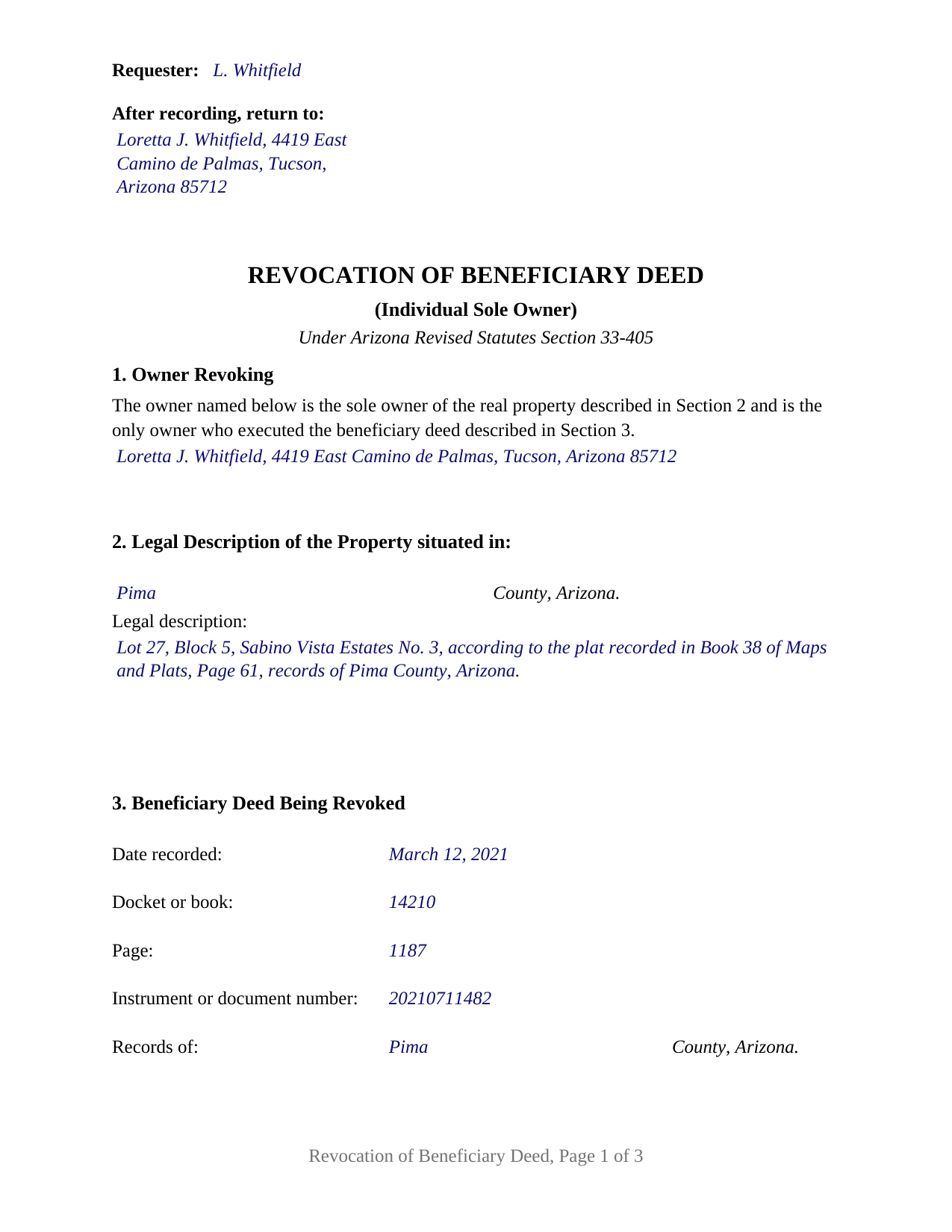
Cochise County Completed Example of the Revocation of Beneficiary Deed (Individual Sole Owner) Document
Example of a properly completed Arizona Revocation of Beneficiary Deed (Individual Sole Owner) document for reference.
All 3 documents above included • One-time purchase • No recurring fees
Immediate Download • Secure Checkout
Additional Arizona and Cochise County documents included at no extra charge:
Where to Record Your Documents
Recorder's Office
Bisbee, Arizona 85603
Hours: 8:00am - 5:00pm Monday - Friday
Phone: 520-432-8350
Recording Tips for Cochise County:
- Bring your driver's license or state-issued photo ID
- Ensure all signatures are in blue or black ink
- Bring extra funds - fees can vary by document type and page count
- Check margin requirements - usually 1-2 inches at top
- Leave recording info boxes blank - the office fills these
Cities and Jurisdictions in Cochise County
Properties in any of these areas use Cochise County forms:
- Benson
- Bisbee
- Bowie
- Cochise
- Douglas
- Dragoon
- Elfrida
- Fort Huachuca
- Hereford
- Huachuca City
- Mc Neal
- Naco
- Pearce
- Pirtleville
- Pomerene
- Saint David
- San Simon
- Sierra Vista
- Tombstone
- Willcox
Hours, fees, requirements, and more for Cochise County
How do I get my forms?
Forms are available for immediate download after payment. The Cochise County forms will be in your account ready to download to your computer. An account is created for you during checkout if you don't have one. Forms are NOT emailed.
Are these forms guaranteed to be recordable in Cochise County?
Yes. Our form blanks are guaranteed to meet or exceed the applicable formatting requirements used for recording in Cochise County, including margin requirements, font requirements, and other layout standards. This guarantee applies to formatting, not to the legal sufficiency of information entered by the user or the suitability of a form for a particular transaction.
Can I reuse these forms?
Yes. You can reuse the forms for your personal use. For example, if you have multiple properties in Cochise County you only need to order once.
What do I need to use these forms?
The forms are PDFs that you fill out on your computer. The free Adobe Acrobat Reader is recommended, and most PDF apps also work. You do NOT enter your property information online - you download the blank forms and complete them privately on your own computer.
Are there any recurring fees?
No. This is a one-time purchase. Nothing to cancel, no memberships, no recurring fees.
How much does it cost to record in Cochise County?
Recording fees in Cochise County vary. Contact the recorder's office at 520-432-8350 for current fees.
Questions answered? Let's get started!
One owner signed the beneficiary deed, and one owner ends it. This form prepares an Arizona revocation of beneficiary deed for that configuration: a sole owner of the property, who was also the only person to execute the recorded deed now being cancelled, signing alone under A.R.S. 33-405(F).
One owner, one signature, one certificate
The configuration is printed into the instrument rather than left to the person completing it. Section 1 recites that the owner named in it is the sole owner of the described property and the only owner who executed the beneficiary deed identified later in the document. Below that recital the form carries a single signature block headed OWNER, followed by a single acknowledgment certificate. There is no second signature line, no co-owner block, and no box asking the signer to classify an ownership arrangement.
Marital status is absent by design as well. A.R.S. 25-214(C)(1) calls for both spouses to join a transaction for the acquisition, disposition, or encumbrance of an interest in community real property, and a revocation does none of those things: it cancels a designation that would have operated at a future death. The signing requirement the instrument answers is the one the beneficiary deed statute states.
Why Arizona counts signatures on a revocation
A.R.S. 33-405(F) allows a beneficiary deed to be revoked at any time by the owner, or, where more than one owner exists, by any of the owners who executed it. The same subsection then adds a rule for survivorship title: where property is held in joint tenancy with right of survivorship or as community property with right of survivorship and the revocation is not executed by all of the owners, it is ineffective unless the last surviving owner executes it. That rule is the reason a single-owner revocation and a multi-owner revocation are different documents on paper. This one recites the pattern in which the question never arises, because the signer is the whole of the ownership and the whole of the earlier deed's execution.
The deed is identified by its place in the record
A revocation works only if the record can tell which instrument it cancels. The statutory form at A.R.S. 33-405(L) identifies the earlier deed by its recording date, by docket or book and page or by instrument number, and by the county whose records hold it, and Section 3 collects exactly those items. A.R.S. 11-461(F) treats a docket and page, a book and page, and similar indications as a recorded instrument's location in the record, and Arizona counties differ in which of them an entry carries, so the section provides for both.
Recording is the step that gives the instrument force. Under A.R.S. 33-405(F) the revocation takes effect only on being executed and recorded with the county recorder where the land lies, before the death of the owner executing it, and the form prints that condition in capitals above the signature line. Page one reserves the top two inches for the recorder under A.R.S. 11-480(C), with the requester and return blocks in the left three and one half inches, where the statute allows them.
A certificate that describes the record it closes
Arizona notarial law shapes the last page. The certificate's operative sentence is the short form at A.R.S. 41-265(1), which states that the record was acknowledged before the officer on a given date by a named individual, and the venue lines stay blank because the place of the notarial act and the place of the land are separate facts. Directly under the caption the certificate carries a description of the record it belongs to: title or type, date, number of pages, and additional signers other than the individual named in the certificate, the items A.R.S. 41-264(F) calls for when a certificate reaches a tangible record on a separate sheet. On a document one person signs, that last line prints as None.
This document is also searched as a revocation of a transfer on death deed or a TOD deed cancellation; the instrument is the one A.R.S. 33-405 describes. The download contains the fillable form, a completed example filled in for a Pima County fact pattern, and a guide covering each numbered section, the notarial requirements, and Arizona recording practice. Those materials describe the form and the statutes in general terms and are not legal advice.
Important: Your property must be located in Cochise County to use these forms. Documents should be recorded at the county recording office listed above.
This Revocation of Beneficiary Deed (Individual Sole Owner) meets all recording requirements specific to Cochise County.
Our Promise
The documents you receive here are guaranteed to meet or exceed the applicable Cochise County recording format requirements. If there is a rejection caused by our formatting, we will correct the issue or refund your payment. This guarantee applies to document formatting only and does not extend to information entered by the user, the selection of the form, or the legal effect of the completed document.
Save Time and Money
Get your Cochise County Revocation of Beneficiary Deed (Individual Sole Owner) form done right the first time with Deeds.com Uniform Conveyancing Blanks. At Deeds.com, we understand that your time and money are valuable resources, and we don't want you to face a penalty fee or rejection imposed by a county recorder for submitting nonstandard documents. We constantly review and update our forms to meet rapidly changing state and county recording requirements for roughly 3,500 counties and local jurisdictions.
4.8 out of 5 - ( 4,829 Reviews )
Greg M. 5 out of 5 stars
This is a great site! Very easy to use and has all the documents I required. Thank you!
Thank you!
Roger J. 5 out of 5 stars
I found the service easy to use and very helpful.
Thank you!
STEVEN T. 5 out of 5 stars
New customer....submitted 2 packages for erecording....very easy to do and good price....still waiting on documents to be recorded but I expect that to go smooth too. Nice to work with for sure
Thank you, Steven. We appreciate your business and the kind words. We will keep things moving and look forward to a smooth recording process for both packages.
James S. 5 out of 5 stars
unbelievable Deeds Rocks Start to finish 2=Day Recommended by Coconino County Recorders office in Arizona there were incomplete sections. I would correct and resubmit . All done Yeah!!!!!!
Thank you for your feedback. We really appreciate it. Have a great day!
diana l. 5 out of 5 stars
Easy to use & got my one question answered in less than 5 minutes! Excellence.
Your satisfaction with our services is of utmost importance to us. Thank you for letting us know how we did!
Gina B. 5 out of 5 stars
This website is reliable and informative. So glad I can across this website. They provide a wide range of documents that are always provided on the recording county website. Thanks!
Thank you!
Rachel C. 5 out of 5 stars
Excellent information, and form source.
Thank you!
Barry B. 5 out of 5 stars
Convenient and easy.
Thank you!
Thomas M. 5 out of 5 stars
The process of finding exactly what was needed was pretty painless.
We appreciate your business and value your feedback. Thank you. Have a wonderful day!
Rosie R. 5 out of 5 stars
LOVE THIS!! I am a REALTORand from time to time I have had to take documents for filing. I'm so glad I invested some time online researching eFiling services. The first few search results that populated required an expensive annual or monthly subscription. Luckily I continued to scroll and found Deeds.com. No annual or monthly subscription required. Just pay per use. I uploaded a ROL late one night and Deed.com had it eFiled the very next morning!!! They keep you updated throughout the process via email notifications which you click on the link provided in the email that directs you to your online portal to view the status and once your documents have been filed you can immediately download the filed of record documents including the receipt from the county in which the documents were filed. SO SIMPLE, CONVENIENT, & QUICK-THANK YOU DEEDS.com!!!
We appreciate your business and value your feedback. Thank you. Have a wonderful day!
Lesley B. 5 out of 5 stars
It was so quick and easy to access.. Thank you!!
Thank you for your feedback. We really appreciate it. Have a great day!
Rebecca C. 5 out of 5 stars
Great service ! Hawaii is not a "forms state" so unfortunately the public has no way to get templates on our local gov site but deeds.com to the rescue. The template was affordable and easy to use and successfully recorded. Great to use when you don't need to involve title or attorneys for simple deed changes, thank you
Thank you for your feedback. We really appreciate it. Have a great day!
Susan A. 5 out of 5 stars
Very convenient. Instructions and samples are a plus because I often see documents incorrectly completed. Take the time to do it right.
We appreciate your business and value your feedback. Thank you. Have a wonderful day!
Christine S. 5 out of 5 stars
Very good site! I found everything I needed right here on Deeds.com. Excellent quality forms, easy access, perfect delivery, reasonable price
We appreciate your business and value your feedback. Thank you. Have a wonderful day!
Harry C. 3 out of 5 stars
Sign up was rocky. Tried to access documents and msg. said did not recognize my email (even though it had sent me an email). Contacted support and it was resolved. House transfer affidavit straight forward and easy to fill out.
Thank you for your feedback. We really appreciate it. Have a great day!